2016 TOYOTA HIGHLANDER HYBRID remote control
[x] Cancel search: remote controlPage 181 of 608

1813-5. Opening and closing the windows
3
Operation of each component
HIGHLANDER_HV_U (OM48F12U)■
When the power window does not close normally (windows with one-
touch closing function only)
If the jam protection function is operating abnormally and a window cannot be
closed, perform the following operations using the power window switch on
the relevant door.
●After stopping the vehicle, the window can be closed by holding the power
window switch in the one-touch closing position while the power switch is
turned to ON mode.
● If the window still cannot be closed even by carrying out the operation
explained above, initialize the function by performing the following proce-
dure.
Hold the power window switch in the one-touch closing position. Continue
holding the switch for a further 6 seconds after the window has closed.
Hold the power window switch in the one-touch opening position. Con-
tinue holding the switch for a further 2 seconds after the window has
opened completely.
Hold the power window switch in the one-touch closing position once
again. Continue holding the switch for a further 2 seconds after the win-
dow has closed.
If you release the switch while the window is moving, start again from the
beginning.
If the window continues to close but then re-open slightly even after perform-
ing the above procedure correctly, have the vehicle inspected by your Toyota
dealer.
■ Door lock linked window operation (windows with one-touch closing
function only)
●The power windows can be opened and closed using the mechanical key.
*
( P. 517)
● The power windows can be opened using the wireless remote control.
*
(P. 129)
*: These settings must be customized at your Toyota dealer.
■ Customization
Settings (e.g. linked door lock operation) can be changed.
(Customizable features: P. 560)
1
2
3
Page 182 of 608
1823-5. Opening and closing the windows
HIGHLANDER_HV_U (OM48F12U)
WARNING
Observe the following precautions.
Failure to do so may result in death or serious injury.
■Closing the windows
●The driver is responsible for all the power window operations, including the
operation for the passengers. In order to prevent accidental operation,
especially by a child, do not let a child operate the power windows. It is
possible for children and other passengers to have body parts caught in
the power window. Also, when riding with a child, it is recommended to use
the window lock switch. ( P. 180)
● Check to make sure that all passengers do not have any part of their body
in a position where it could be caught when a window is being operated.
● When using the wireless remote control or mechanical key and operating
the power windows, operate the power window after checking to make
sure that there is no possibility of any passenger having any of their body
parts caught in the window. Also do not let a child operate window by the
wireless remote control or mechanical key. It is possible for children and
other passengers to get caught in the power window.
● When exiting the vehicle, turn the power switch off, carry the key and exit
the vehicle along with the child. There may be accidental operation, due to
mischief, etc., that may possibly lead to an accident.
■ Jam protection function (windows with one-touch closing function
only)
●Never use any part of your body to intentionally activate the jam protection
function.
● The jam protection function may not work if something gets caught just
before the window fully closes.
Page 184 of 608

1843-5. Opening and closing the windows
HIGHLANDER_HV_U (OM48F12U)
■The moon roof can be operated when
The power switch is in ON mode.
■ Operating the moon roof after turning the hybrid system off
The moon roof can be operated for approximately 45 seconds after the power
switch is turned to ACCESSORY mode or turned off. It cannot, however, be
operated once either front door is opened.
■ Jam protection function
If an object is detected between the moon roof and the frame while the moon
roof is closing or tilting down, travel is stopped and the moon roof opens
slightly.
■ Sunshade
The sunshade can be opened and closed manually. However, the sunshade
will open automatically when the moon roof is opened.
■ Door lock linked mo on roof operation
● The moon roof can be opened and closed using the mechanical key.
*
( P. 517)
● The moon roof can be opened using the wireless remote control.
*
( P. 129)
*: These settings must be customized at your Toyota dealer.
Page 186 of 608
1863-5. Opening and closing the windows
HIGHLANDER_HV_U (OM48F12U)
WARNING
Observe the following precautions.
Failure to do so may cause death or serious injury.
■Opening the moon roof
●Do not allow any passengers to put their hands or heads outside the vehi-
cle while it is moving.
● Do not sit on top of the moon roof.
■ Closing the moon roof
●The driver is responsible for moon roof opening and closing operations.
In order to prevent accidental operation, especially by a child, do not let a
child operate the moon roof. It is possible for children and other passen-
gers to have body parts caught in the moon roof.
● Check to make sure that all passengers do not have any part of their bod-
ies in a position where they could be caught when the moon roof is being
operated.
● When using the wireless remote control or mechanical key and operating
the moon roof, operate the moon roof after checking to make sure that
there is no possibility of any passenger having any of their body parts
caught in the moon roof. Also, do not let a child operate moon roof by the
wireless remote control or mechanical key. It is possible for children and
other passengers to get caught in the moon roof.
● When exiting the vehicle, turn the power switch off, carry the key and exit
the vehicle along with the child. There may be accidental operation, due to
mischief, etc., that may possibly lead to an accident.
■ Jam protection function
●Never use any part of your body to intentionally activate the jam protection
function.
● The jam protection function may not work if something gets caught just
before the moon roof fully closes.
Page 363 of 608
3635-4. Using the other interior features
5
Interior features
HIGHLANDER_HV_U (OM48F12U)
The garage door opener (HomeLink Universal Transceiver) is manu-
factured under license from HomeLink.
The HomeLink
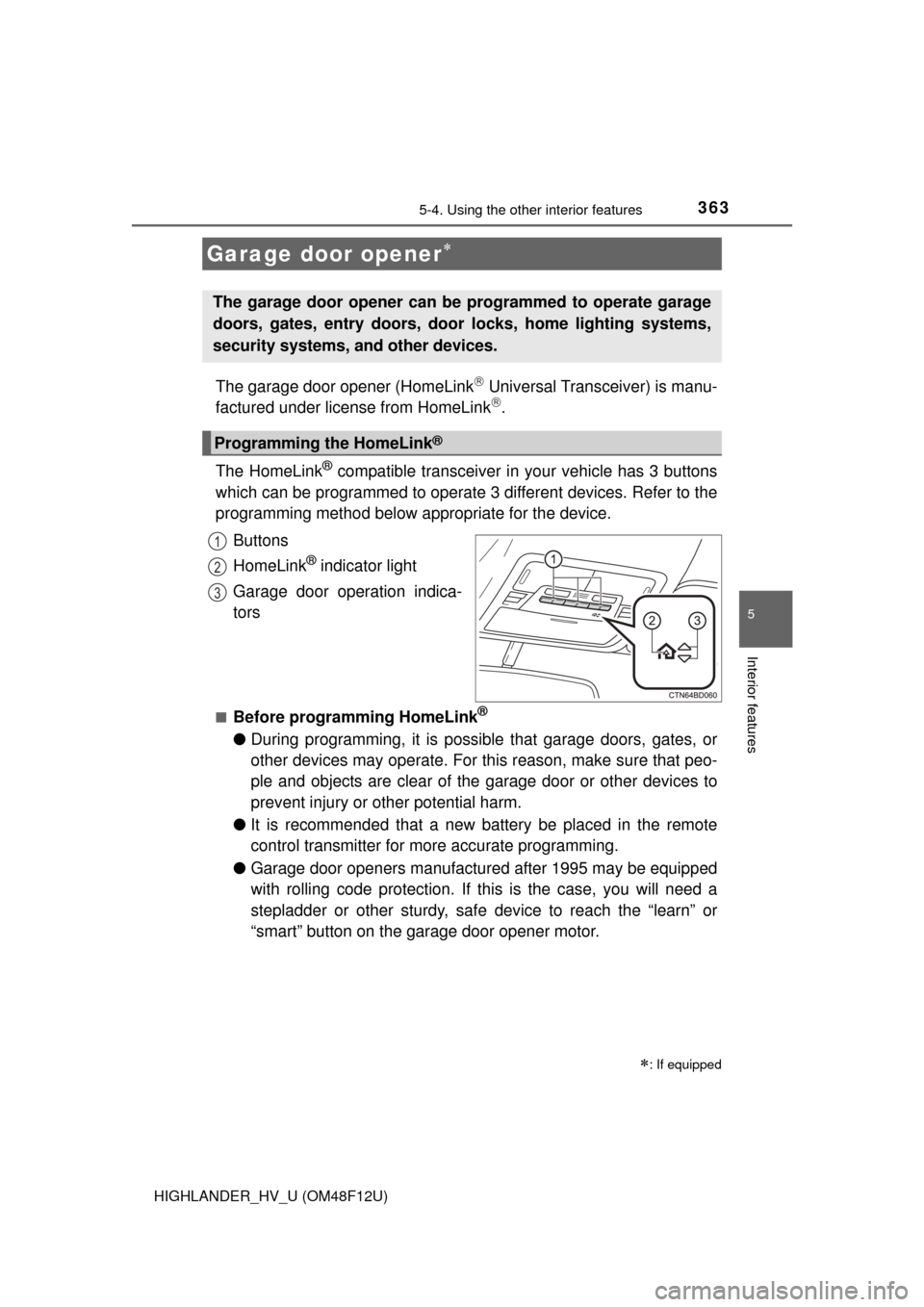
® compatible transceiver in your vehicle has 3 buttons
which can be programmed to operate 3 different devices. Refer to the
programming method below appropriate for the device.
Buttons
HomeLink
® indicator light
Garage door operation indica-
tors
■Before programming HomeLink®
● During programming, it is possible that garage doors, gates, or
other devices may operate. For this reason, make sure that peo-
ple and objects are clear of the garage door or other devices to
prevent injury or other potential harm.
● It is recommended that a new battery be placed in the remote
control transmitter for more accurate programming.
● Garage door openers manufactured after 1995 may be equipped
with rolling code protection. If this is the case, you will need a
stepladder or other sturdy, safe device to reach the “learn” or
“smart” button on the garage door opener motor.
Garage door opener
: If equipped
The garage door opener can be programmed to operate garage
doors, gates, entry doors, door locks, home lighting systems,
security systems, and other devices.
Programming the HomeLink®
1
2
3
Page 364 of 608

3645-4. Using the other interior features
HIGHLANDER_HV_U (OM48F12U)■
Programming HomeLink®
Point the remote control
transmitter for the device 1 to
3 in. (25 to 75 mm) from the
HomeLink
® buttons.
Keep the HomeLink® indicator
light in view while programming.
For U.S.A. owner’s
Press and hold the
HomeLink
® button you want
to program and the hand-
held transmitter button simul-
taneously. When the
HomeLink
® indicator light
changes from slowly flashing
orange to rapidly flashing
green (rolling code) or contin-
uously lit green (fixed code),
release both buttons.
Programming an entry gate (for U.S.A. owners)/Programming a
device in the Canadian market
With one hand, press and hold the HomeLink
® button you want
to program. With your other h and, press and release the remote
control transmitter every 2 seconds and repeat this cycle until the
HomeLink
® indicator light starts to flash rapidly. Then, release
the buttons.
1
2
2
Page 369 of 608

3695-4. Using the other interior features
5
Interior features
HIGHLANDER_HV_U (OM48F12U)Cet appareil est conforme aux normes FCC partie 15 et Industry Canada
RSS-210.
Son fonctionnement est soumis aux deux conditions suivantes: (1) Cet appa-
reil ne doit pas causer d’interférences nuisibles et (2) Cet appareil doit accep-
ter toute interférence qui peuvent être reçues y compris les interférences
pouvant provoquer un fonctionnement indésirable.
AVERTISSEMENT:
L’émetteur a été testé et est conforme aux régles de la FCC et IC. Les chan-
gements ou modifications non expressément approuvés par la partie respon-
sable de la conformité pourrait annuler l’autorité de l’utilisateur de faire
fonctionner le dispositif.
Le terme “IC:” devant le numéro de certification / enregistrement signifie seu-
lement que les spécifications techniques d’Industry Canada ont été respec-
tées.
■ For additional programming assi stance with your HomeLink
® Universal
Transceiver
Visit on the web at www.homelink.com
or call 1-800-355-3515.
WARNING
■ When programming a garage door or other remote control device
The garage door may operate, so ensure people and objects are out of dan-
ger to prevent potential harm.
■ Conforming to federal safety standards
Do not use the HomeLink
Compatible Transceiver with any garage door
opener or device that lacks safety stop and reverse features as required by
federal safety standards.
This includes any garage door that cannot detect an obstruction object. A
door or device without these features increases the risk of death or ser\
ious
injury.
■ When operating or programming HomeLink
®
Never allow a child to operate or play with the HomeLink® buttons.
Page 413 of 608

4136-3. Do-it-yourself maintenance
HIGHLANDER_HV_U (OM48F12U)
6
Maintenance and care
■After recharging/reconnecting the 12-volt battery
●The hybrid system may not start. Follow the procedure below to initialize the
system.
Shift the shift lever to P.
Open and close any of the doors.
Restart the hybrid system.
● Unlocking the doors using the smart key system may not be possible imme-
diately after reconnecting the 12-volt battery. If this happens, use the wire-
less remote control or the mechanical key to lock/unlock the doors.
● Start the hybrid system with the power switch in ACCESSORY mode. The
hybrid system may not start with the power switch turned off. However, the
hybrid system will operate normally from the second attempt.
● The power switch mode is recorded by the vehicle. If the 12-volt battery is
disconnected and reconnected, the vehicle will return the power switch
mode to the status it was in before the 12-volt battery was disconnected.
Make sure to turn off the power switch before disconnecting the 12-volt bat-
tery. Take extra care when connecting the 12-volt battery if the power switch
mode prior to the battery being disconnected is unknown.
If the system will not start even after multiple attempts, contact your Toyota
dealer.
WARNING
■ Chemicals in the 12-volt battery
The 12-volt battery contains poisonous and corrosive sulfuric acid and may
produce hydrogen gas which is flammable and explosive. To reduce the risk
of death or serious injury, take the following precautions while working on or
near the 12-volt battery:
●Do not cause sparks by touching the 12-volt battery terminals with tools.
● Do not smoke or light a match near the 12-volt battery.
● Avoid contact with eyes, skin and clothes.
● Never inhale or swallow electrolyte.
● Wear protective safety glasses when working near the 12-volt battery.
● Keep children away from the 12-volt battery.
■ Where to safely charge the 12-volt battery
Always charge the 12-volt battery in an open area. Do not charge the 12-
volt battery in a garage or closed room where there is not sufficient ventila-
tion.
■ How to recharge th e 12-volt battery
Only perform a slow charge (5 A or less). The 12-volt battery may explode if
charged at a quicker rate.
1
2
3