2016 TOYOTA CAMRY HYBRID brake
[x] Cancel search: brakePage 220 of 572

2204-5. Using the driving support systems
CAMRY_HV_U (OM33C35U)
nTurning off both TRAC and VSC systems
To turn the TRAC and VSC systems off, press and hold for more than 3
seconds while the vehicle is stopped.
The VSC OFF indicator light will come on and the “TRAC OFF” and a mes-
sage will be shown on the multi-information display
*.
Press again to turn the systems back on.
*: On vehicles with pre-collision system, pre-collision brake assist and pre- collision braking will also be disabled. The pre-collision system warning
light will come on and the message will be shown on the multi-information
display. ( P. 227)
n When the message is displayed on th e multi-information display show-
ing that TRAC has been disable d even if has not been pressed
TRAC and hill-start assist control cannot be operated. Contact your Toyota
dealer.
n Sounds and vibrations caused by th e ABS, brake assist, TRAC and VSC
systems
Any of the following conditions may occur when the above systems are oper-
ating. None of these indicates that a malfunction has occurred.
l Vibrations may be felt through the vehicle body and steering.
l A motor sound may be heard after the vehicle comes to a stop.
l The brake pedal may pulsate slightly after the ABS is activated.
l The brake pedal may move down slightly after the ABS is activated.
n ECB operating sound
ECB operating sound may be heard in the following cases, but it does not
indicate that a malfunction has occurred.
lOperating sound heard from engine compartment when the brake pedal is
operated.
l Motor sound of the brake system heard from the front part of the vehicle
when the driver’s door is opened.
l Operating sound heard from the engine compartment when one or two min-
utes passed after the stop of the hybrid system.
n EPS operation sound
When the steering wheel is operated, a motor sound (whirring sound) may be
heard. This does not indicate a malfunction.
Page 221 of 572

2214-5. Using the driving support systems
4
Driving
CAMRY_HV_U (OM33C35U)n
Automatic reactivation of TRAC and VSC systems
After turning the TRAC and VSC systems off, the systems will be automati-
cally re-enabled in the following situations:
l When the power switch is turned off
l If only the TRAC system is turned off, the TRAC will turn on when vehicle
speed increases
If both the TRAC and VSC systems are turned off, automatic re-enabling will
not occur when vehicle speed increases
n Reduced effectiveness of the EPS system
The effectiveness of the EPS system is reduced to prevent the system from
overheating when there is frequent steering input over an extended period of
time. The steering wheel may feel heavy as a result. Should this occur, refrain
from excessive steering input or stop the vehicle and turn the hybrid system
off. The EPS system should return to normal within 10 minutes.
n Operating conditions of hill-start assist control
When the following four conditions are met, the hill-start assist control will
operate:
lThe shift lever is in a position other than P or N (when starting off forward/
backward on an upward incline).
l The vehicle is stopped.
l The accelerator pedal is not depressed.
l The parking brake is not engaged.
n Automatic system cancelation of hill-start assist control
The hill-start assist control will turn off in any of the following situations:
l The shift lever is moved to P or N.
l The accelerator pedal is depressed.
l The parking brake is engaged.
l Approximately 2 seconds elapse after the brake pedal is released.
Page 222 of 572

2224-5. Using the driving support systems
CAMRY_HV_U (OM33C35U)
WARNING
nThe ABS does not operate effectively when
lThe limits of tire gripping performance have been exceeded (such as
excessively worn tires on a snow covered road).
l The vehicle hydroplanes while driving at high speed on wet or slick roads.
n Stopping distance when the ABS is operating may exceed that of nor-
mal conditions
The ABS is not designed to shorten the vehicle’s stopping distance. Always
maintain a safe distance from the vehicle in front of you, especially in the
following situations:
l When driving on dirt, gravel or snow-covered roads
l When driving with tire chains
l When driving over bumps in the road
l When driving over roads with potholes or uneven surfaces
n TRAC may not operat e effectively when
Directional control and power may not be achievable while driving on slip-
pery road surfaces, even if the TRAC system is operating.
Drive the vehicle carefully in conditions where stability and power may be
lost.
n Hill- start assist control does not operate effectively when
lDo not overly rely on hill-start assist control. Hill-start assist control may
not operate effectively on steep inclines and roads covered with ice.
l Unlike the parking brake, hill-start assist control is not intended to hold the
vehicle stationary for an extended period of time. Do not attempt to use
hill-start assist control to hold the vehicle on an incline, as doing so may
lead to an accident.
n When the VSC is activated
The slip indicator light flashes. Always drive carefully. Reckless driving may
cause an accident. Exercise particular care when the indicator light flashes.
n When the TRAC/VSC syst ems are turned off
Be especially careful and drive at a speed appropriate to the road condi-
tions. As these are the systems to help ensure vehicle stability and driving
force, do not turn the TRAC/VSC systems off unless necessary.
Page 224 of 572
2244-5. Using the driving support systems
CAMRY_HV_U (OM33C35U)
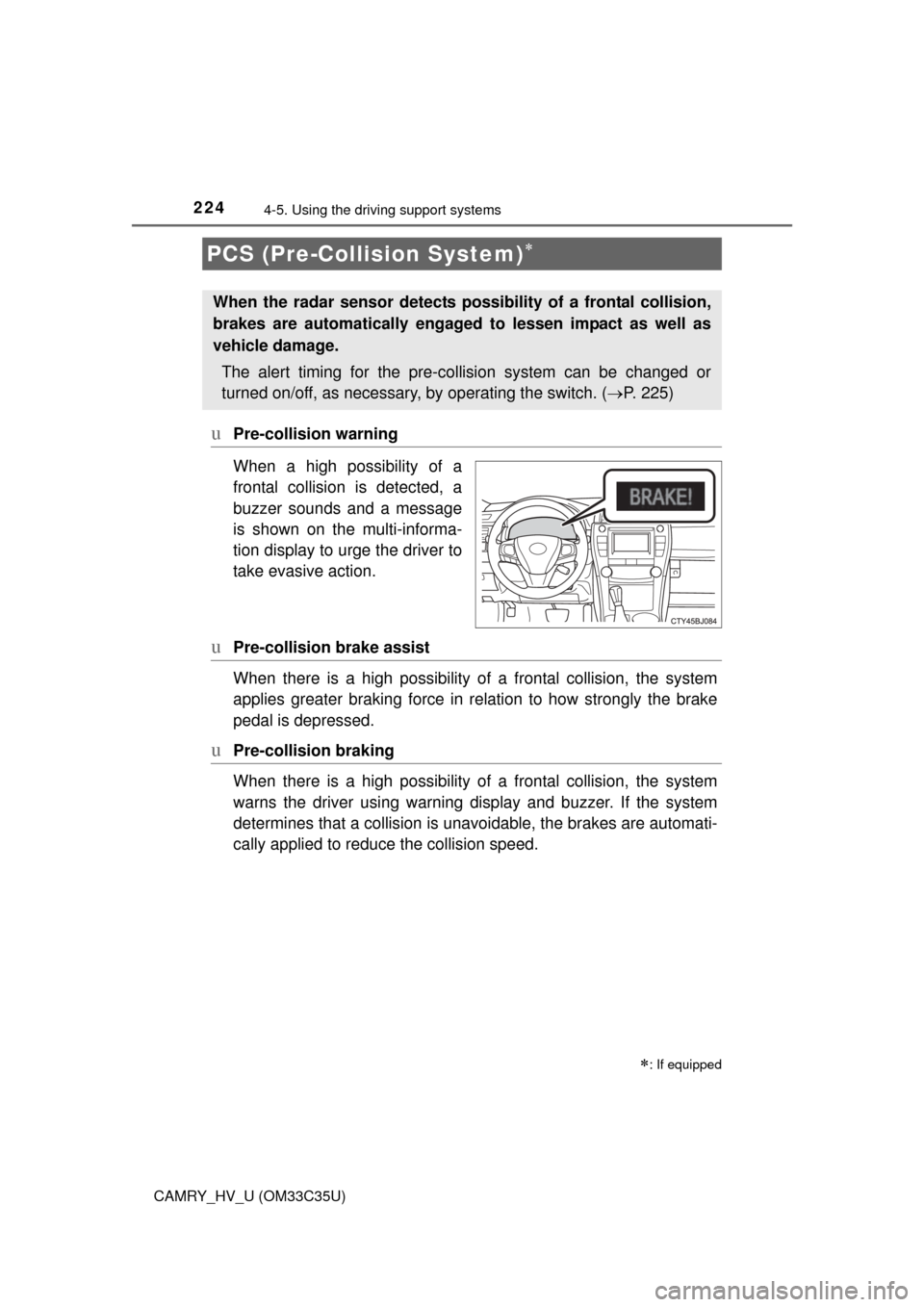
uPre-collision warning
When a high possibility of a
frontal collision is detected, a
buzzer sounds and a message
is shown on the multi-informa-
tion display to urge the driver to
take evasive action.
uPre-collision brake assist
When there is a high po ssibility of a frontal collision, the system
applies greater braking force in relation to how strongly the brake
pedal is depressed.
uPre-collision braking
When there is a high po ssibility of a frontal collision, the system
warns the driver using warning display and buzzer. If the system
determines that a collis ion is unavoidable, the brakes are automati-
cally applied to reduc e the collision speed.
PCS (Pre-Collision System)
: If equipped
When the radar sensor detects pos sibility of a frontal collision,
brakes are automatically engaged to lessen impact as well as
vehicle damage.
The alert timing for the pre-co llision system can be changed or
turned on/off, as necessary, by operating the switch. (P. 225)
Page 226 of 572

2264-5. Using the driving support systems
CAMRY_HV_U (OM33C35U)
nThe pre-collision system is operational when
The pre-collision system is on ( P. 225) and the following conditions are met:
l Pre-collision warning:
• Vehicle speed is greater than approximately 10 mph (15 km/h).
• The speed at which your vehicle is approaching the obstacle or the vehi-
cle running ahead of you is greater than approximately 7 mph (10 km/h).
l Pre-collision brake assist:
• The VSC is not turned off.
• Vehicle speed is greater than approximately 19 mph (30 km/h).
• The speed at which your vehicle is approaching the obstacle or the vehi-
cle running ahead of you is greater than approximately 19 mph (30 km/h).
• The brake pedal is depressed.
l Pre-collision braking:
• The VSC is not turned off.
• Vehicle speed is greater than approximately 10 mph (15 km/h).
• The speed at which your vehicle is approaching the obstacle or the vehi-
cle running ahead of you is greater than approximately 7 mph (10 km/h).
n Conditions that may trigger the system even if there is no possibility of a
collision
In any of the following situations where the frontal area of the radar sensor is
interrupted, the radar sensor may detect possibility of a frontal collision and
the system may be activated.
lWhen passing by an oncoming vehicle in a curve or a turn to the right or the
left.
l When rapidly approaching an obstacle ahead (e.g.preceding vehicle, toll
gate barrier, etc.)
l When there is a structural object (billboard, low ceiling, fluorescent light,
etc.) above the uphill road ahead
l When driving on a narrow road or through under a low overhead structure
(bridge, tunnel, fly-under, etc.)
l When driving on an uneven road surface
l When there is a metal object, bump, or protrusion on the road surface
l When vehicle front part is raised or lowered depending on loading condi-
tions
l When the direction of radar sensor is misaligned by strong impact applied
on an area around the radar sensor, etc.
l When there is an obstacle (guard rail, etc.) by the roadside at the entrance
to a curve
l When the front of your vehicle is pointing upwards (caused by putting a
heavy load in the trunk etc.)
When the system is activated in the situations described above, there is also
a possibility that the brakes may be applied with a force greater than normal.
Page 227 of 572

2274-5. Using the driving support systems
4
Driving
CAMRY_HV_U (OM33C35U)n
Obstacles not detected
The sensor cannot detect plastic obstacles such as traffic cones. There may
also be occasions when the sensor cannot detect pedestrians, animals, bicy-
cles, motorcycles, trees, or snowdrifts.
n Situations in which the pre-collis ion system does not function properly
The system may not function effectively in situations such as the following:
l On roads with sharp bends or uneven surfaces
l If a vehicle suddenly moves in front of your vehicle, such as at an intersec-
tion
l If a vehicle suddenly cuts in front of your vehicle, such as when overtaking
l In inclement weather such as heavy rain, fog, snow or sand storms
l When your vehicle is skidding with the VSC system off
l When an extreme change in vehicle height occurs
l When the radar sensor moves off position due to its surrounding area being
subjected to a strong impact
l Due to greatly turning the wheel when an obstacle suddenly appears ahead
n Automatic cancelation of the pre-collision system
When a malfunction occurs due to sensor contamination, etc. that results in
the sensors being unable to detect obstacles, the pre-collision system will be
automatically disabled. In this case, the system will not activate even if there
is a collision possibility.
n When there is a malfunction in the system, or if the system is tempo-
rarily unavailable
The PCS warning light flashes and a warning message is shown on the multi-
information display. If a warning message is shown on the multi-information
display, read the message and follow the instructions. ( P. 447, 460)
n When the TRAC and VSC are turned off
lWhen the TRAC and VSC operations are turned off ( P. 220), the pre-colli-
sion brake assist and pre-collision braking are also turned off. However, the
alert function operates.
l The PCS warning light turns on and a warning message is shown on the
multi-information display. ( P. 447, 464)
Page 229 of 572

2294-5. Using the driving support systems
4
Driving
CAMRY_HV_U (OM33C35U)
WARNING
nLimitations of the pre-collision system
The driver is solely responsible for safe driving. Always drive safely, taking
care to observe your surroundings.
Do not use the pre-collision system instead of normal braking operations
under any circumstances. This system will not prevent collisions or lessen
damage or injuries in all cases. Do not overly rely on this system. Failure to
do so may cause an accident, resulting in death or serious injury.
This system has been designed to help avoid and reduce the impact of col-
lisions.
However, the system operates differently depending on the situation ( P.
226). As a result, the same level of performance may not be expected in all
cases. Also, the pre-collision brakes may not operate if the driver is
depressing the brake pedal or turning the steering wheel, as the system will
determine such conditions as collision avoidance operations.
n Handling the radar sensor
Observe the following to ensure the pre-collision system can function effec-
tively.
Otherwise, the system may not function correctly and could result in an
accident.
lKeep the sensor and grille cover clean at all times.
Clean the sensor and grille cover with a soft cloth so you do not mark or
damage them.
l Do not subject the sensor or surrounding area to a strong impact.
If the sensor moves even slightly off position, the system may not work
normally or malfunction. If the sensor or surrounding area is subject to a
strong impact, always have the area inspected and adjusted by your
Toyota dealer.
l Do not disassemble the sensor.
l Do not attach accessories or stickers to the sensor, grille cover or sur-
rounding area.
l Do not modify or paint the sensor and grille cover.
l If the radar sensor needs to be replaced, contact your Toyota dealer.
Page 230 of 572

2304-5. Using the driving support systems
CAMRY_HV_U (OM33C35U)
WARNING
nCautions regarding the assi st contents of the system
By means of alarms and brake control, the pre-collision system is intended
to assist the driver in avoiding collisions through the process of LOOK-
JUDGE-ACT. There are limits to the degree of assistance the system can
provide, so please keep in mind the following important points.
l Assisting the driver in watching the road
The pre-collision system is only able to detect obstacles directly in front of
the vehicle, and only within a limited range. It is not a mechanism that
allows careless or inattentive driving, and it is not a system that can assist
the driver in low-visibility conditions. It is still necessary for the driver to
pay close attention to the vehicle’s surroundings.
l Assisting the driver in making correct judgement
When attempting to estimate the possibility of a collision, the only data
available to the pre-collision system is that from obstacles it has detected
directly in front of the vehicle. Therefore, it is absolutely necessary for the
driver to remain vigilant and to determine whether or not there is a possi-
bility of collision in any given situation.
l Assisting the driver in taking action
The pre-collision system’s braking assist feature is designed to help
reduce the severity of a collision, and so only acts when the system has
judged that a collision is unavoidable. This system is not capable of auto-
matically avoiding a collision or bringing the vehicle to a stop safely with-
out appropriate operations performed by the driver. For this reason, when
encountering a dangerous situation the driver must take direct and imme-
diate action in order to ensure the safety of all involved.