2016 TOYOTA CAMRY HYBRID brake
[x] Cancel search: brakePage 153 of 572

1534-1. Before driving
4
Driving
CAMRY_HV_U (OM33C35U)
WARNING
Observe the following precautions.
Failure to do so may result in death or serious injury.
nWhen the vehicle is parked
lDo not leave a door or window open if the curved glass is coated with a
metallized film such as a silver-colored one. Reflected sunlight may cause
the glass to act as a lens, causing a fire.
l Always apply the parking brake, shift the shift lever to P, stop the hybrid
system and lock the vehicle.
Do not leave the vehicle unattended while the “READY” indicator is illumi-
nated.
l Do not touch the exhaust pipes while the “READY” indicator is illuminated
or immediately after turning the hybrid system off.
Doing so may cause burns.
n When taking a nap in the vehicle
Always turn the hybrid system off. Otherwise, if you accidentally move the
shift lever or depress the accelerator pedal, this could cause an accident or
fire due to hybrid system overheating. Additionally, if the vehicle is parked in
a poorly ventilated area, exhaust gases may collect and enter the vehicle,
leading to death or a serious health hazard.
n When braking
lWhen the brakes are wet, drive more cautiously.
Braking distance increases when the brakes are wet, and this may cause
one side of the vehicle to brake differently than the other side. Also, the
parking brake may not securely hold the vehicle.
l If the electronically controlled brake system does not operate, do not fol-
low other vehicles closely and avoid hills or sharp turns that require brak-
ing.
In this case, braking is still possible, but the brake pedal should be
depressed more firmly than usual. Also, the braking distance will increase.
Have your brakes fixed immediately.
l The brake system consists of 2 or more individual hydraulic systems; if
one of the systems fails, the other(s) will still operate. In this case, the
brake pedal should be depressed more firmly than usual and the braking
distance will increase. Have your brakes fixed immediately.
Page 154 of 572

1544-1. Before driving
CAMRY_HV_U (OM33C35U)
NOTICE
nWhen driving the vehicle
lDo not depress the accelerator and brake pedals at the same time during
driving, as this may restrain driving torque.
l Do not use the accelerator pedal or depress the accelerator and brake
pedals at the same time to hold the vehicle on a hill.
n When parking the vehicle
Always shift the shift lever to P. Failure to do so may cause the vehicle to
move or the vehicle may accelerate suddenly if the accelerator pedal is
accidentally depressed.
n Avoiding damage to vehicle parts
lDo not turn the steering wheel fully in either direction and hold it there for
an extended period of time.
Doing so may damage the power steering motor.
l When driving over bumps in the road, drive as slowly as possible to avoid
damaging the wheels, underside of the vehicle, etc.
n If you get a flat tire while driving
A flat or damaged tire may cause the following situations. Hold the steering
wheel firmly and gradually depress the brake pedal to slow down the vehi-
cle.
lIt may be difficult to control your vehicle.
l The vehicle will make abnormal sounds or vibrations.
l The vehicle will lean abnormally.
Information on what to do in case of a flat tire ( P. 473)
n When encounterin g flooded roads
Do not drive on a road that has flooded after heavy rain etc. Doing so may
cause the following serious damage to the vehicle:
l Engine stalling
l Short in electrical components
l Engine damage caused by water immersion
In the event that you drive on a flooded road and the vehicle is flooded, be
sure to have your Toyota dealer check the following:
l Brake function
l Changes in quantity and quality of oil and fluid used for the engine, hybrid
transmission, etc.
l Lubricant condition for the bearings and suspension joints (where possi-
ble), and the function of all joints, bearings, etc.
Page 161 of 572
161
4
Driving
CAMRY_HV_U (OM33C35U)
4-2. Driving procedures
Check that the parking brake is set.
Check that the shift lever is in P.
Firmly depress the brake pedal.
Messages indicating how to start the hybrid system and how to turn to
ACCESSORY mode will be displayed alternately on the multi-information
display.
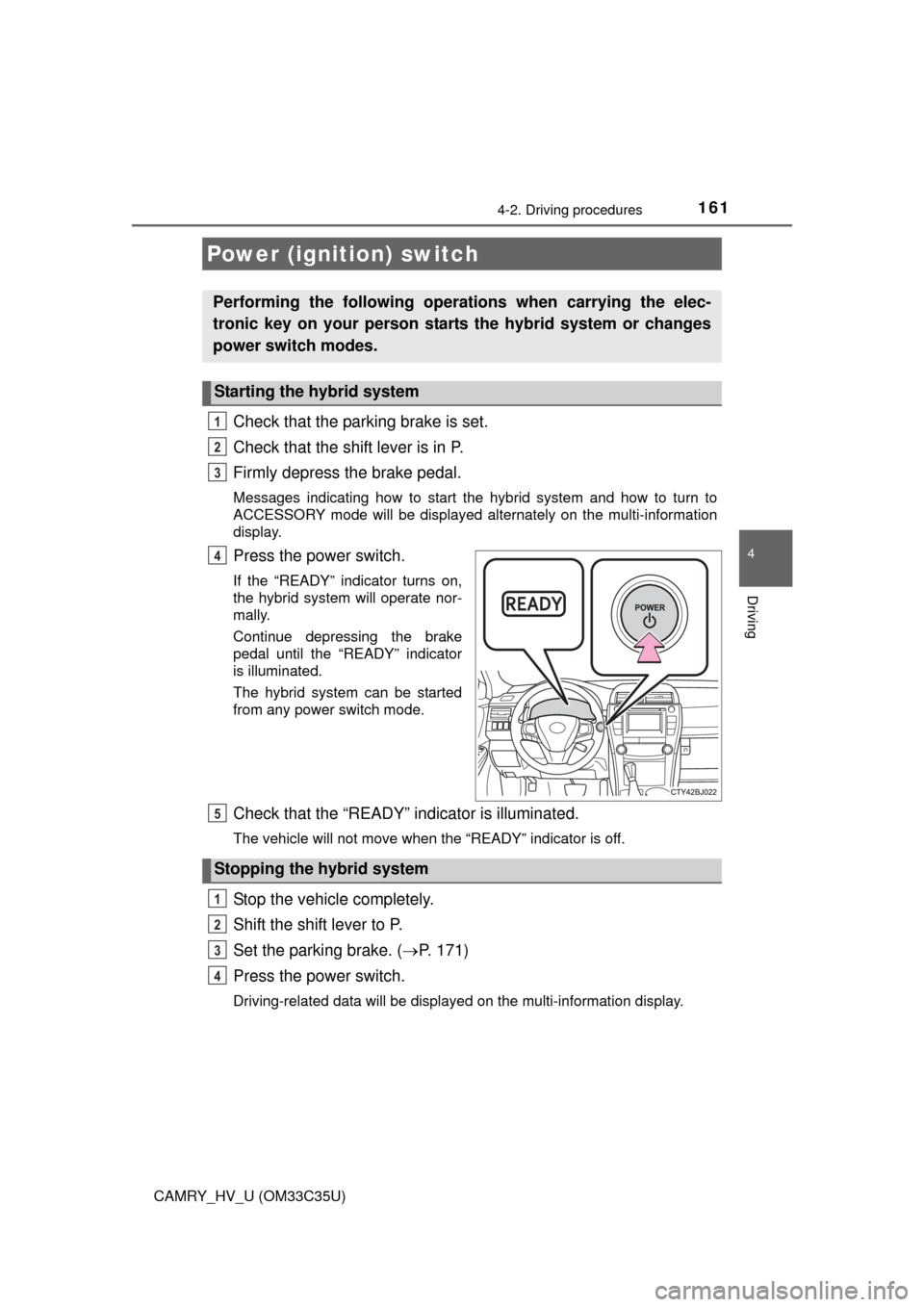
Press the power switch.
If the “READY” indicator turns on,
the hybrid system will operate nor-
mally.
Continue depressing the brake
pedal until the “READY” indicator
is illuminated.
The hybrid system can be started
from any power switch mode.
Check that the “READY” indicator is illuminated.
The vehicle will not move when the “READY” indicator is off.
Stop the vehicle completely.
Shift the shift lever to P.
Set the parking brake. (P. 171)
Press the power switch.
Driving-related data will be displayed on the multi-information display.
Power (ignition) switch
Performing the following operati ons when carrying the elec-
tronic key on your person starts the hybrid system or changes
power switch modes.
Starting the hybrid system
1
2
3
4
Stopping the hybrid system
5
1
2
3
4
Page 162 of 572
1624-2. Driving procedures
CAMRY_HV_U (OM33C35U)
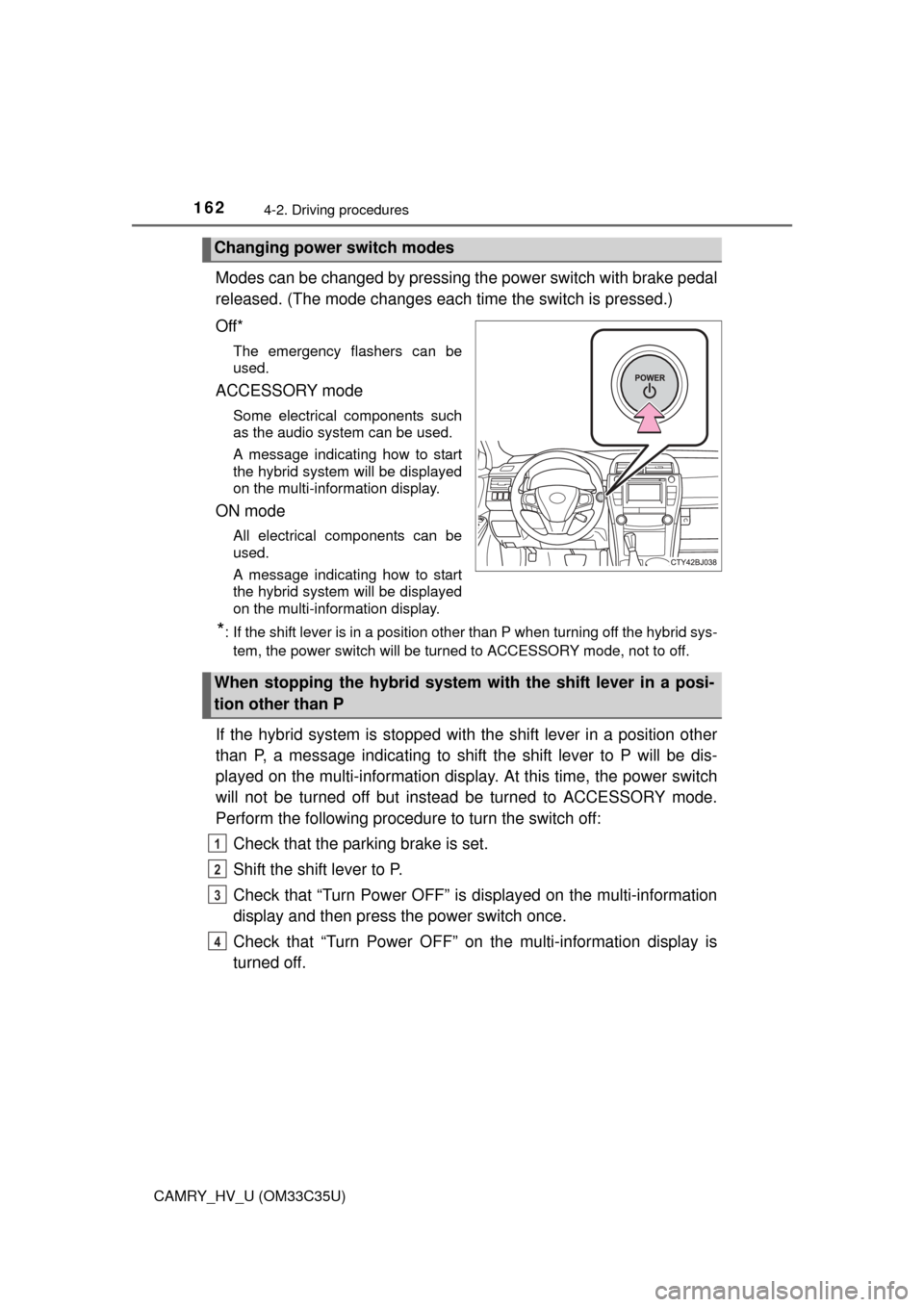
Modes can be changed by pressing the power switch with brake pedal
released. (The mode c hanges each time the switch is pressed.)
Off*
The emergency flashers can be
used.
ACCESSORY mode
Some electrical components such
as the audio system can be used.
A message indicating how to start
the hybrid system will be displayed
on the multi-information display.
ON mode
All electrical components can be
used.
A message indicating how to start
the hybrid system will be displayed
on the multi-information display.
*: If the shift lever is in a position other than P when turning off the hybrid sys- tem, the power switch will be turned to ACCESSORY mode, not to off.
If the hybrid system is stopped with the shift lever in a position other
than P, a message indicating to shift the shift lever to P will be dis-
played on the multi-information disp lay. At this time, the power switch
will not be turned off but instead be turned to ACCESSORY mode.
Perform the following procedure to turn the switch off:
Check that the parking brake is set.
Shift the shift lever to P.
Check that “Turn Power OFF” is displayed on the multi-information
display and then press the power switch once.
Check that “Turn Power OFF” on the multi-information display is
turned off.
Changing power switch modes
When stopping the hybrid system with the shift lever in a posi-
tion other than P
1
2
3
4
Page 168 of 572
1684-2. Driving procedures
CAMRY_HV_U (OM33C35U)
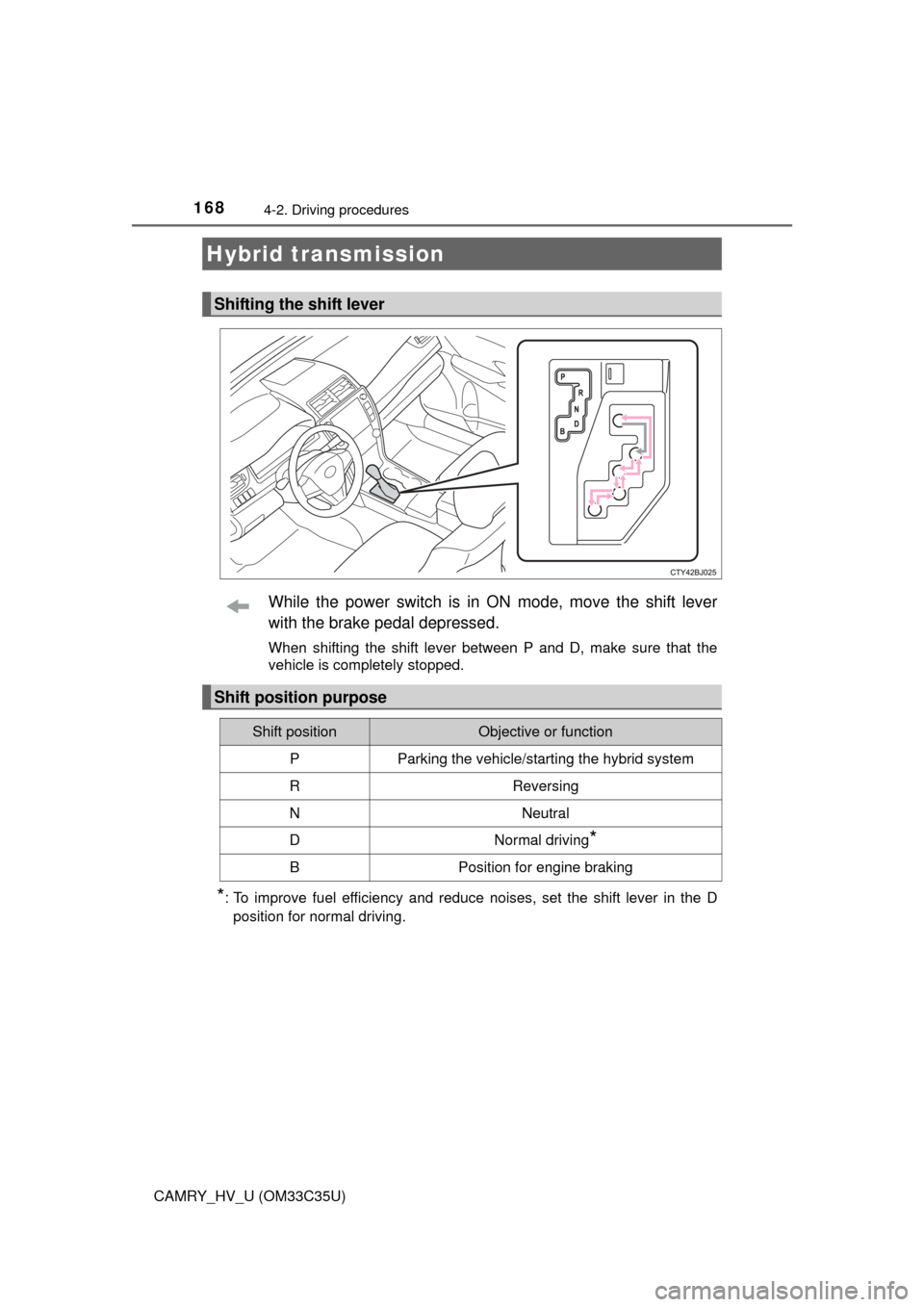
While the power switch is in ON mode, move the shift lever
with the brake pedal depressed.
When shifting the shift lever between P and D, make sure that the
vehicle is completely stopped.
*: To improve fuel efficiency and reduce noises, set the shift lever in the Dposition for normal driving.
Hybrid transmission
Shifting the shift lever
Shift position purpose
Shift positionObjective or function
PParking the vehicle/starting the hybrid system
RReversing
NNeutral
DNormal driving*
BPosition for engine braking
Page 171 of 572
1714-2. Driving procedures
4
Driving
CAMRY_HV_U (OM33C35U)
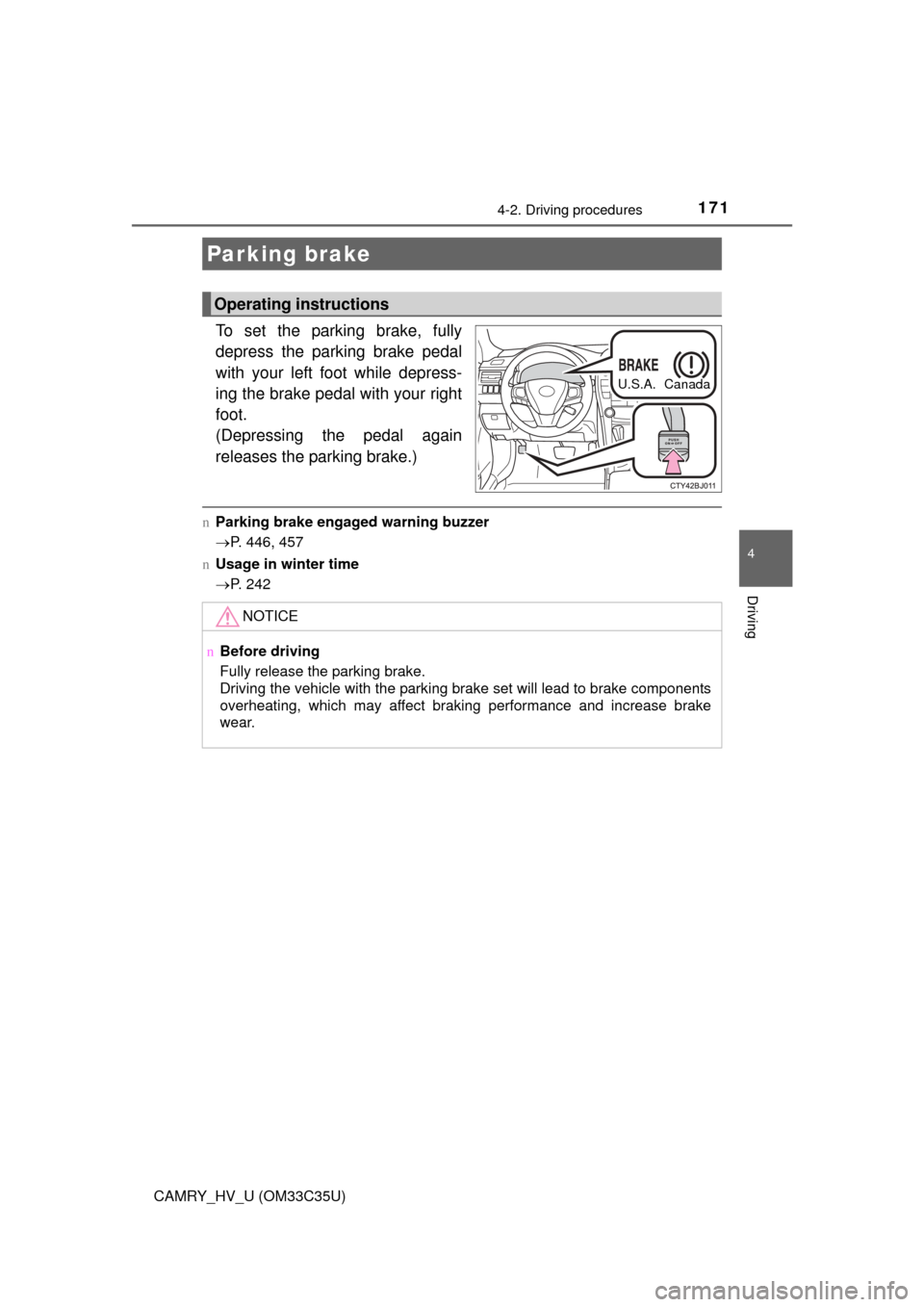
To set the parking brake, fully
depress the parking brake pedal
with your left foot while depress-
ing the brake pedal with your right
foot.
(Depressing the pedal again
releases the parking brake.)
nParking brake engaged warning buzzer
P. 446, 457
n Usage in winter time
P. 242
Parking brake
Operating instructions
U.S.A. Canada
NOTICE
nBefore driving
Fully release the parking brake.
Driving the vehicle with the parking brake set will lead to brake components
overheating, which may affect braking performance and increase brake
wear.
Page 173 of 572
1734-3. Operating the lights and wipers
4
Driving
CAMRY_HV_U (OM33C35U)
nDaytime running light system
lVehicles with halogen daytime running lights:
To make your vehicle more visible to other drivers during daytime driving,
the daytime running lights turn on automatically whenever the hybrid system
is started and the parking brake is released with the headlight switch in the
“AUTO” position. (Illuminate darker than headlight high beams.) Daytime
running lights are not designed for use at night.
Vehicles with LED daytime running lights:
To make your vehicle more visible to other drivers during daytime driving,
the daytime running lights turn on automatically whenever the hybrid system
is started and the parking brake is released with the headlight switch in the
“AUTO” position. (Illuminate brighter than parking lights.) Daytime running
lights are not designed for use at night.
U.S.A.: Daytime running lights can be turned off by operating the switch.
Canada: Daytime running lights are turned on even when the headlight
switch is in position.
l Compared to turning on the headlights, the daytime running light system
offers greater durability and consumes less electricity, so it can help improve
fuel economy.
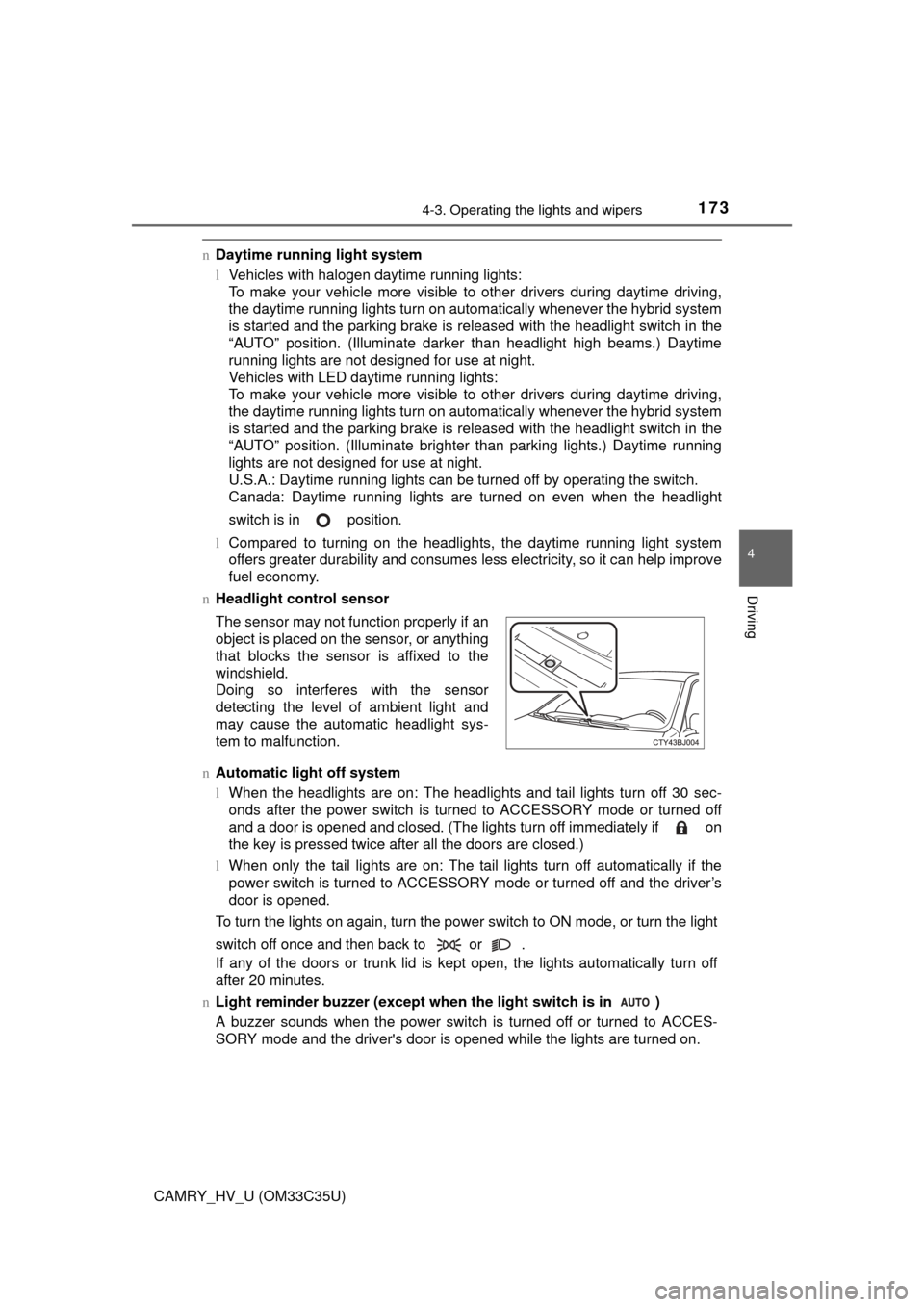
n Headlight control sensor
n Automatic light off system
lWhen the headlights are on: The headlights and tail lights turn off 30 sec-
onds after the power switch is turned to ACCESSORY mode or turned off
and a door is opened and closed. (The lights turn off immediately if on
the key is pressed twice after all the doors are closed.)
l When only the tail lights are on: The tail lights turn off automatically if the
power switch is turned to ACCESSORY mode or turned off and the driver’s
door is opened.
To turn the lights on again, turn the power switch to ON mode, or turn the light
switch off once and then back to or .
If any of the doors or trunk lid is kept open, the lights automatically turn off
after 20 minutes.
n Light reminder buzzer (except when the light switch is in )
A buzzer sounds when the power switch is turned off or turned to ACCES-
SORY mode and the driver's door is opened while the lights are turned on. The sensor may not function properly if an
object is placed on the sensor, or anything
that blocks the sensor is affixed to the
windshield.
Doing so interferes with the sensor
detecting the level of ambient light and
may cause the automatic headlight sys-
tem to malfunction.
Page 186 of 572
1864-5. Using the driving support systems
CAMRY_HV_U (OM33C35U)
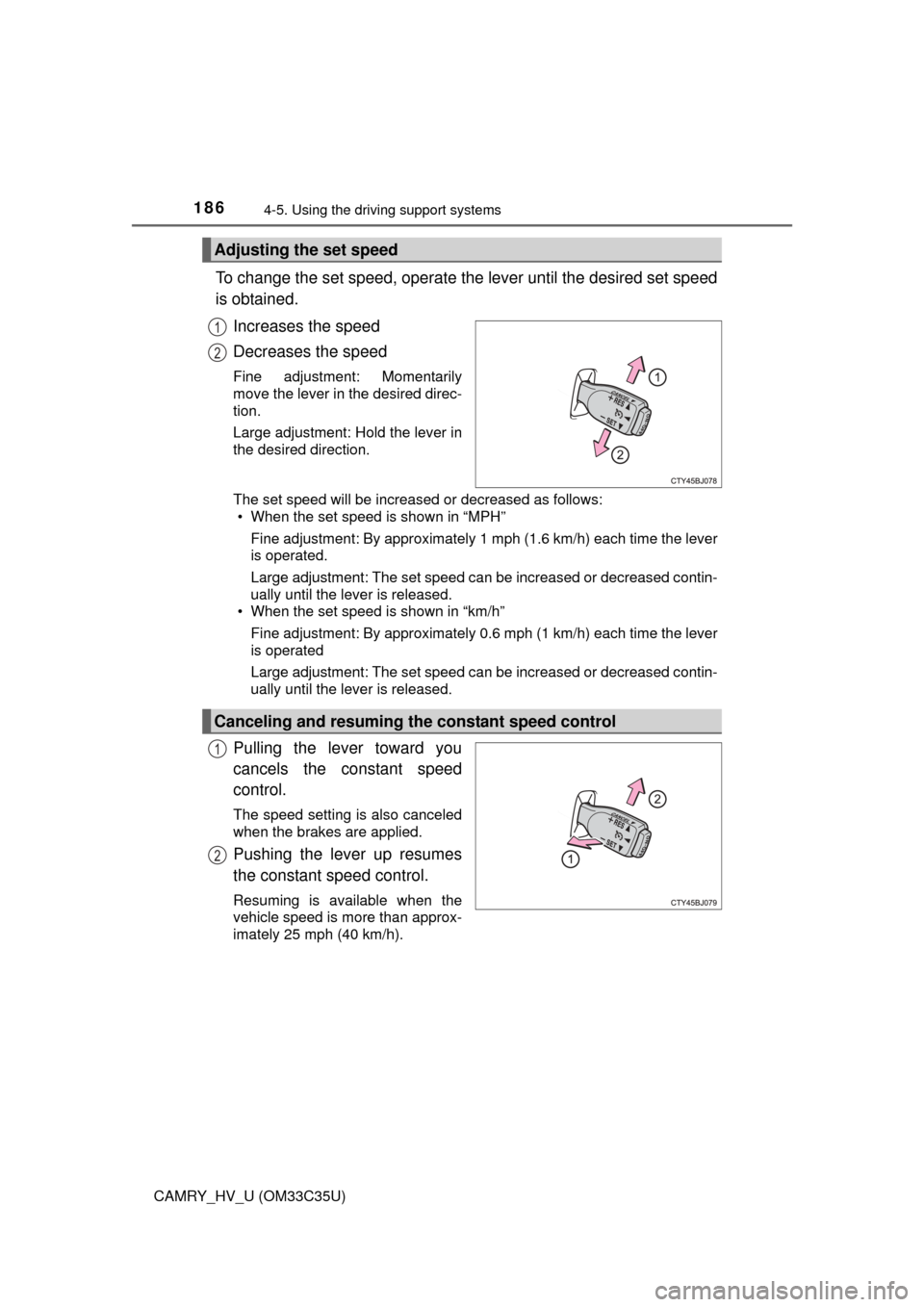
To change the set speed, operate the lever until the desired set speed
is obtained.
Increases the speed
Decreases the speed
Fine adjustment: Momentarily
move the lever in the desired direc-
tion.
Large adjustment: Hold the lever in
the desired direction.
The set speed will be increased or decreased as follows:• When the set speed is shown in “MPH”
Fine adjustment: By approximately 1 mph (1.6 km/h) each time the lever
is operated.
Large adjustment: The set speed can be increased or decreased contin-
ually until the lever is released.
• When the set speed is shown in “km/h”
Fine adjustment: By approximately 0.6 mph (1 km/h) each time the lever
is operated
Large adjustment: The set speed can be increased or decreased contin-
ually until the lever is released.
Pulling the lever toward you
cancels the constant speed
control.
The speed setting is also canceled
when the brakes are applied.
Pushing the lever up resumes
the constant speed control.
Resuming is available when the
vehicle speed is more than approx-
imately 25 mph (40 km/h).
Adjusting the set speed
1
2
Canceling and resuming the constant speed control
1
2