Page 322 of 572
3225-9. Bluetooth® phone
CAMRY_HV_U (OM33C35U)
In other situations
Even though all conceivable measures have been taken, the symptom sta-
tus does not change.
The cellular phone is not close enough to this system.
Bring the cellular phone closer to this system.
The cellular phone is the most likely cause of the symptom.
Turn the cellular phone off, remo ve and reinstall the battery pack,
and then restart the cellular phone.
Enable the cellular phone’s Bluetooth
® connection.
Stop the cellular phone’s security software and close all applica-
tions.
Before using an application installed on the cellular phone, care-
fully check its source and how its operation might affect this sys-
tem.
Page 323 of 572
323
5
Audio system
CAMRY_HV_U (OM33C35U)
5-10. Bluetooth®
nWhen using the Bluetooth® audio system
l In the following conditions, the system may not function.
• If the portable audio player is turned off
• If the portable audio player is not connected
• If the portable audio player’s battery is low
l There may be a delay if a cellular phone connection is made during
Bluetooth
® audio play.
l Depending on the type of portable audio player that is connected to the sys-
tem, operation may differ slightly and certain functions may not be available.
n When using the hands-free system
lThe multimedia system is muted when making a call.
l If both parties speak at the same time, it may be difficult to hear.
l If the received call volume is overly loud, an echo may be heard.
If the Bluetooth
® phone is too close to the system, quality of the sound may
deteriorate and connection status may deteriorate.
l In the following circumstances, it may be difficult to hear the other party:
• When driving on unpaved roads
• When driving at high speeds
• If a roof or window is open
• If the air conditioning is blowing directly on the microphone
• If there is interference from the network of the cellular phone
n Conditions under which th e system will not operate
l If using a cellular phone that does not support Bluetooth
®
lIf the cellular phone is turned off
l If you are outside of cellular phone service coverage
l If the cellular phone is not connected
l If the cellular phone’s battery is low
l When outgoing calls are controlled, due to heavy traffic on telephone lines,
etc.
l When the cellular phone itself cannot be used
l When transferring contact data from the cellular phone
Bluetooth®
Page 324 of 572

3245-10. Bluetooth®
CAMRY_HV_U (OM33C35U)n
Bluetooth
® antenna
The antenna is built into the display.
If the portable audio player is behind the seat or in the glove box or console
box, or is touching or covered by metal objects, the connection status may
deteriorate.
If the cellular phone is behind the seat or in the console box, or touching or
covered by metal objects, the connection status may deteriorate.
n Battery charge/signal status
lThis display may not correspond exactly with the portable audio player or
cellular phone itself.
l This system does not have a charging function.
l The portable audio player or cellular phone battery will be depleted quickly
when the device is connected to Bluetooth
®.
n When using the Bluetooth
® audio and hands-free system at the same
time
The following problems may occur.
l The Bluetooth
® audio connection may be interrupted.
l Noise may be heard during Bluetooth
® audio playback.
n About the contact in this system
The following data is stored for every registered cellular phone. When
another phone is connecting, you cannot read the registered data.
lContact data
l Call history
l Favorite
l Message
When removing a Bluetooth
® phone from the system, the above-mentioned
data is also deleted.
Page 340 of 572
3406-1. Using the air conditioning system and defogger
CAMRY_HV_U (OM33C35U)
NOTICE
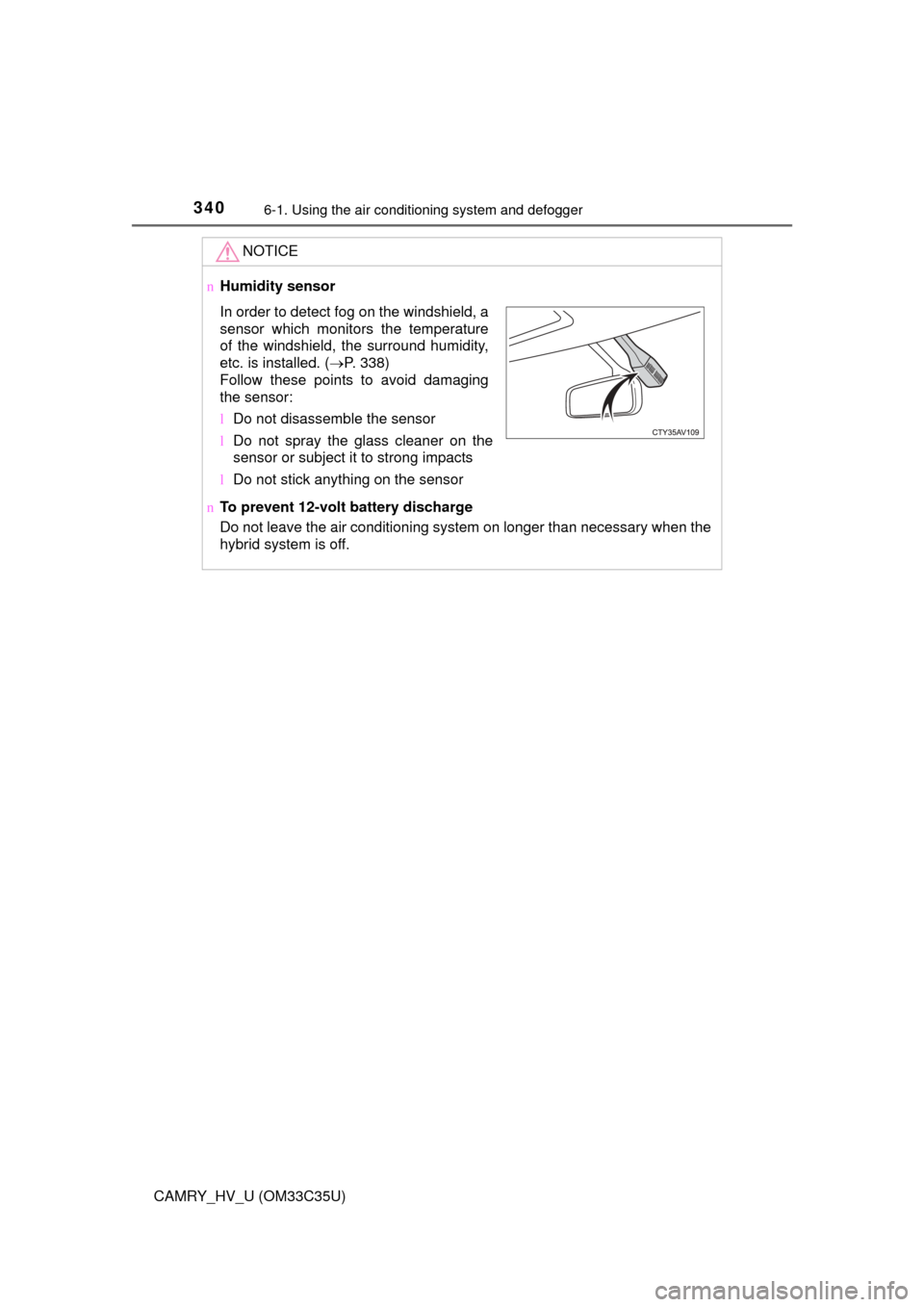
nHumidity sensor
n To prevent 12-volt battery discharge
Do not leave the air conditioning system on longer than necessary when the
hybrid system is off.
In order to detect fog on the windshield, a
sensor which monitors the temperature
of the windshield, the surround humidity,
etc. is installed. ( P. 338)
Follow these points to avoid damaging
the sensor:
l Do not disassemble the sensor
l Do not spray the glass cleaner on the
sensor or subject it to strong impacts
l Do not stick anything on the sensor
Page 341 of 572
3416-1. Using the air conditioning system and defogger
6
Interior features
CAMRY_HV_U (OM33C35U)
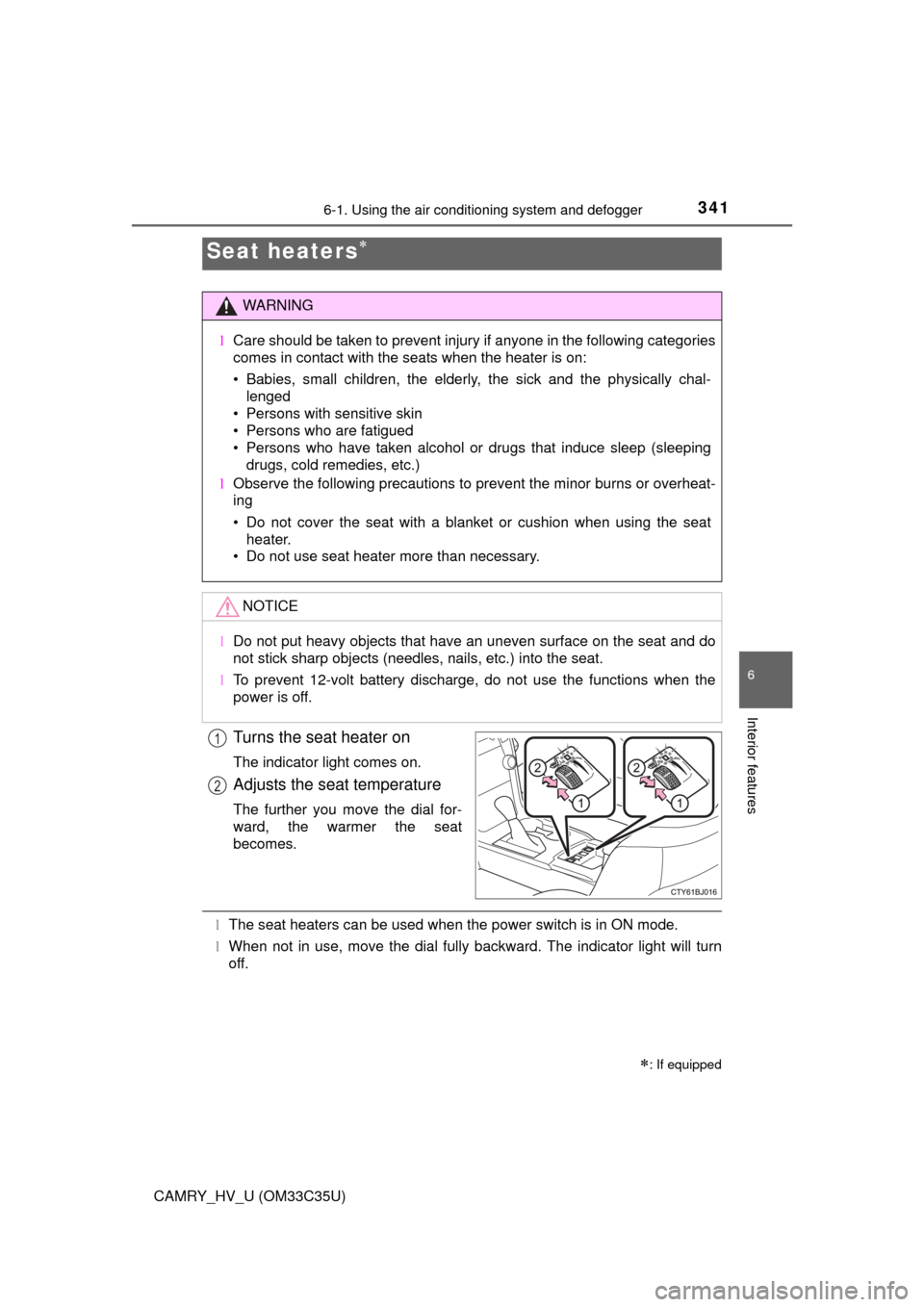
Turns the seat heater on
The indicator light comes on.
Adjusts the seat temperature
The further you move the dial for-
ward, the warmer the seat
becomes.
lThe seat heaters can be used when the power switch is in ON mode.
l When not in use, move the dial fully backward. The indicator light will turn
off.
Seat heaters
: If equipped
WARNING
l Care should be taken to prevent injury if anyone in the following categories
comes in contact with the seats when the heater is on:
• Babies, small children, the elderly, the sick and the physically chal-
lenged
• Persons with sensitive skin
• Persons who are fatigued
• Persons who have taken alcohol or drugs that induce sleep (sleeping drugs, cold remedies, etc.)
l Observe the following precautions to prevent the minor burns or overheat-
ing
• Do not cover the seat with a blanket or cushion when using the seat
heater.
• Do not use seat heater more than necessary.
NOTICE
l Do not put heavy objects that have an uneven surface on the seat and do
not stick sharp objects (needles, nails, etc.) into the seat.
l To prevent 12-volt battery discharge, do not use the functions when the
power is off.
1
2
Page 353 of 572
3536-3. Using the storage features
6
Interior features
CAMRY_HV_U (OM33C35U)
NOTICE
nConditions in which the wireless ch arger may not operate correctly
(vehicles with a wireless charger)
In the following situations, the wireless charger may not operate correctly:
l When a portable device is fully charged
l When there is a foreign object between the charging area and portable
device
l When a portable device becomes hot while charging
l When a portable device is placed on the wireless area with its charging
surface facing up
l When a portable device is not centered on the charging area
l When the vehicle is near a TV tower, electric power plant, gas station,
radio station, large display, airport or other facility that generates strong
radio waves or electrical noise
l When the portable device is in contact with, or is covered by any of the fol-
lowing metallic objects
• Cards to which aluminum foil is attached
• Cigarette boxes that have aluminum foil inside
• Metallic wallets or bags
• Coins
• Metal hand warmers
• Media such as CDs and DVDs
l When wireless keys (that emit radio waves) other than those of your vehi-
cle are being used nearby.
If in situations other than above the wireless charger does not operate prop-
erly or the operation indicator light is blinking, the wireless charger may be
malfunctioning. Contact your Toyota dealer.
n To prevent failure or damage to da ta (vehicles with a wireless charger)
l Do not bring magnetic cards, such as a credit card, or magnetic recording
media, close to the wireless charger. Otherwise, data may be erased due
to the influence of magnetism.
Additionally, do not bring precision instruments such as wrist watches,
close to the wireless charger, as such objects may malfunction.
l Do not leave portable devices in the cabin. The temperature inside the
cabin may become high when parked in the sun, and cause damage to the
device.
n To prevent 12-volt battery discharge (vehicles with a wireless charger)
Do not use the wireless charger for a long period of time with the hybrid sys-
tem is stopped.
Page 357 of 572
3576-4. Other interior features
6
Interior features
CAMRY_HV_U (OM33C35U)
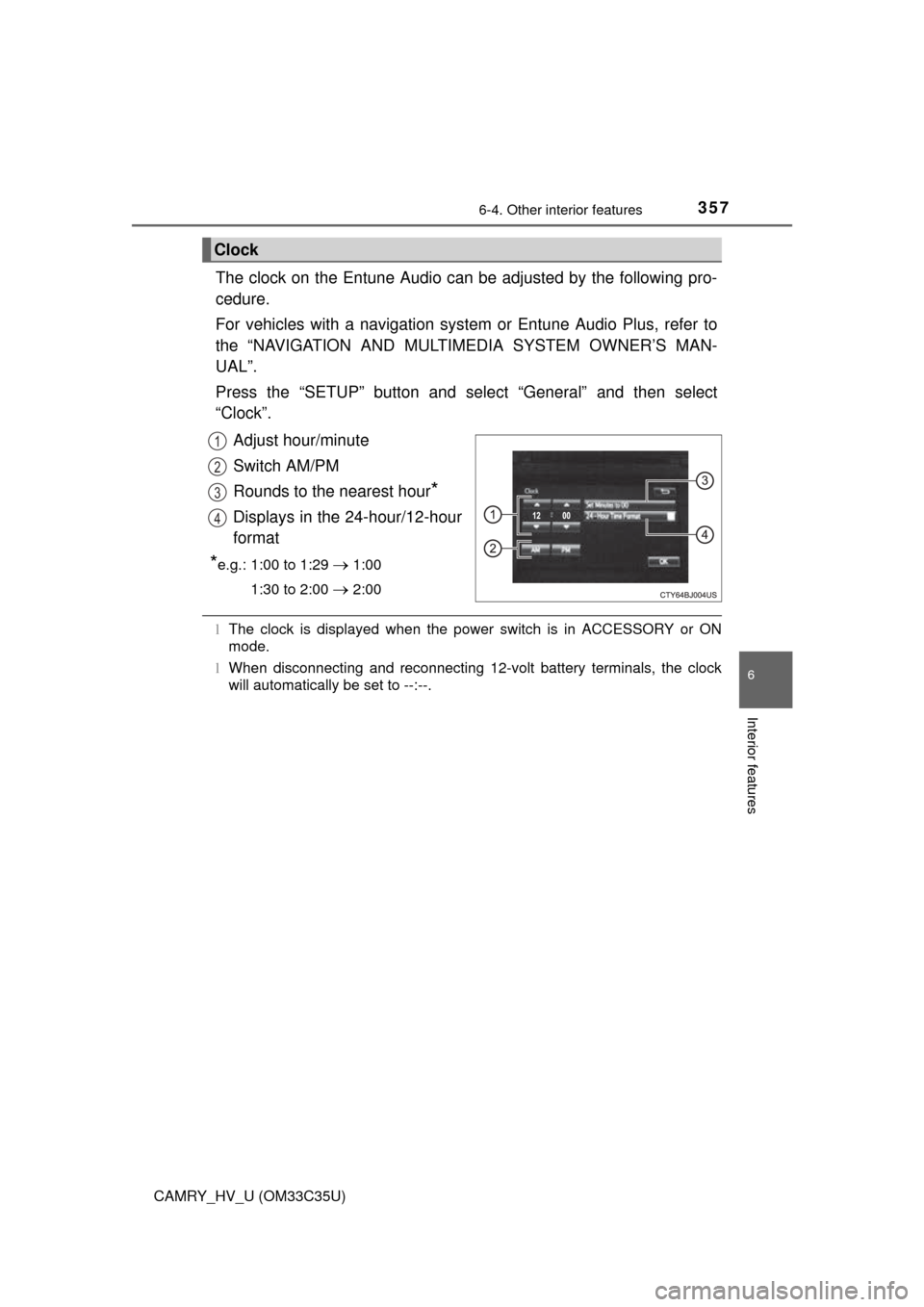
The clock on the Entune Audio can be adjusted by the following pro-
cedure.
For vehicles with a navigation system or Entune Audio Plus, refer to
the “NAVIGATION AND MULTIMEDIA SYSTEM OWNER’S MAN-
UAL”.
Press the “SETUP” button and select “General” and then select
“Clock”.
Adjust hour/minute
Switch AM/PM
Rounds to the nearest hour
*
Displays in the 24-hour/12-hour
format
*e.g.: 1:00 to 1:29 1:00
1:30 to 2:00
2:00
l The clock is displayed when the power switch is in ACCESSORY or ON
mode.
l When disconnecting and reconnecting 12-volt battery terminals, the clock
will automatically be set to --:--.
Clock
1
2
3
4
Page 359 of 572
3596-4. Other interior features
6
Interior features
CAMRY_HV_U (OM33C35U)
Please use as a power supply for electronic goods that use less than
12 VDC/10 A (power consumption of 120 W).
When using electronic goods, make su re that the power consumption
of all the connected power outlets is less than 120 W.
l The power outlets can be used when, the power switch is in ACCESSORY
or ON mode.
l Cable pass through
P. 347, 349
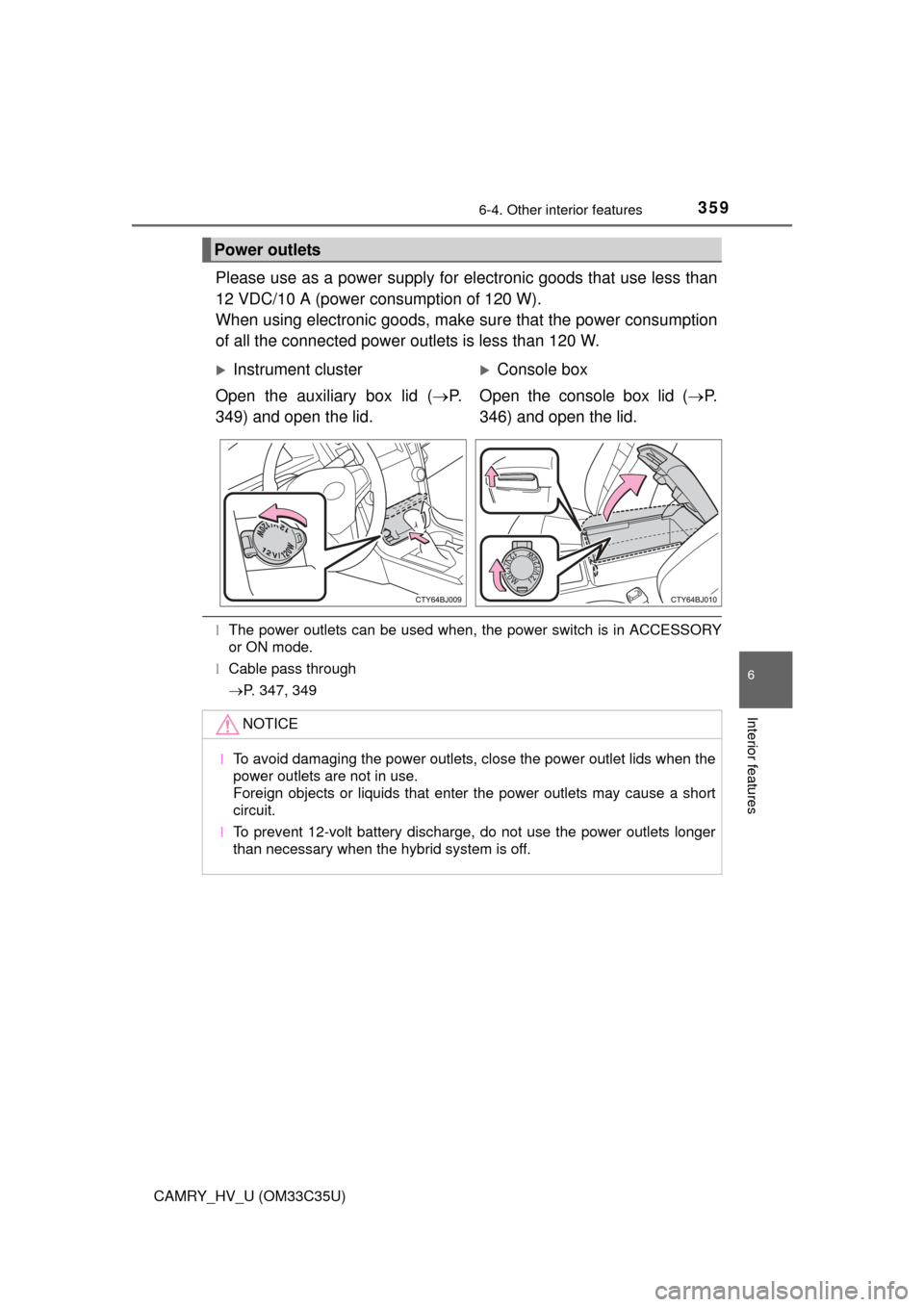
Power outlets
Instrument cluster
Open the auxiliary box lid ( P.
349) and open the lid.Console box
Open the console box lid ( P.
346) and open the lid.
NOTICE
l To avoid damaging the power outlets, close the power outlet lids when the
power outlets are not in use.
Foreign objects or liquids that enter the power outlets may cause a short
circuit.
l To prevent 12-volt battery discharge, do not use the power outlets longer
than necessary when the hybrid system is off.