Page 169 of 572
1694-2. Driving procedures
4
Driving
CAMRY_HV_U (OM33C35U)
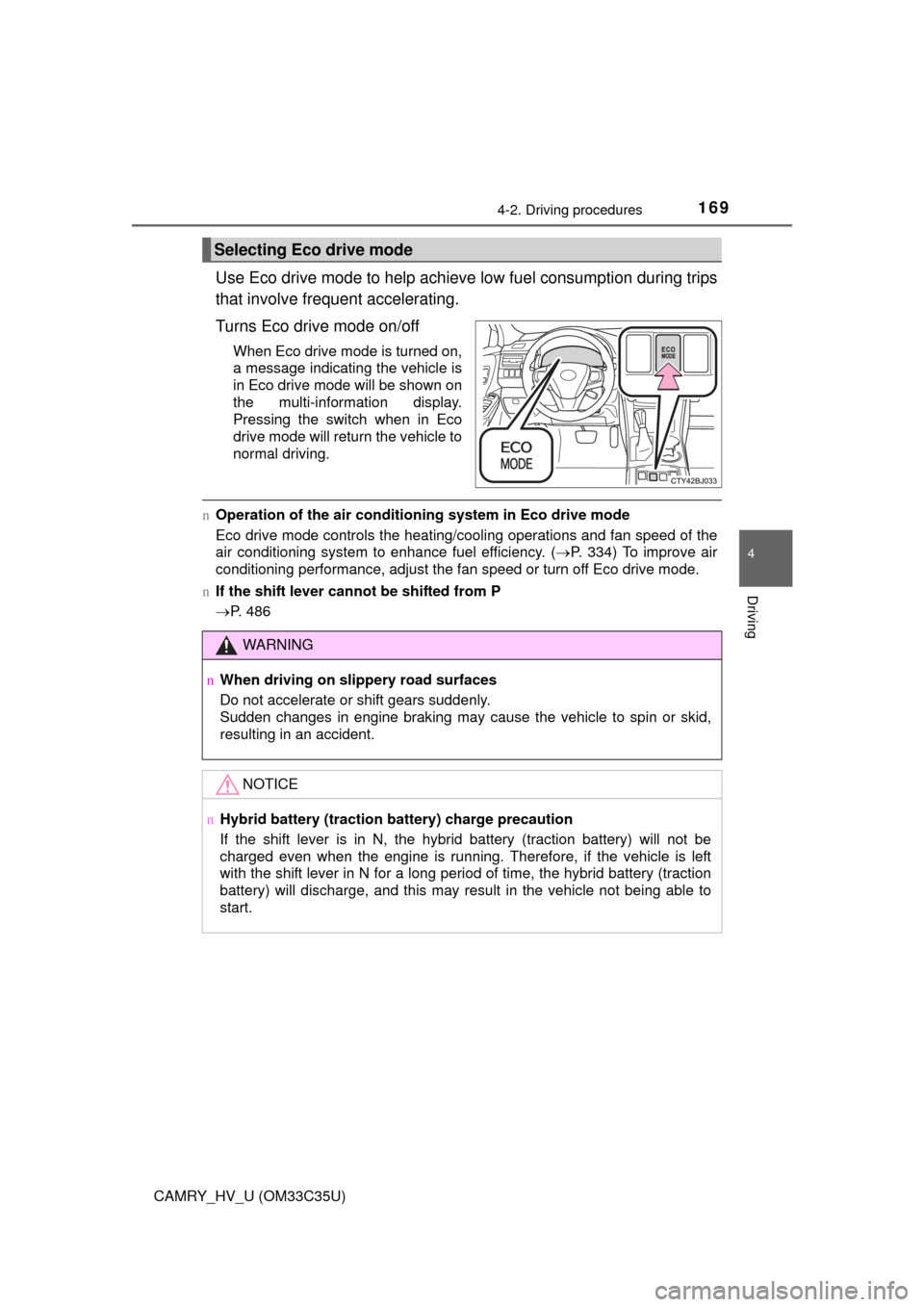
Use Eco drive mode to help achieve low fuel consumption during trips
that involve frequent accelerating.
Turns Eco drive mode on/off
When Eco drive mode is turned on,
a message indicating the vehicle is
in Eco drive mode will be shown on
the multi-information display.
Pressing the switch when in Eco
drive mode will return the vehicle to
normal driving.
n Operation of the air conditioning system in Eco drive mode
Eco drive mode controls the heating/cooling operations and fan speed of the
air conditioning system to enhance fuel efficiency. (P. 334) To improve air
conditioning performance, adjust the fan speed or turn off Eco drive mode.
n If the shift lever cannot be shifted from P
P. 486
Selecting Eco drive mode
WARNING
nWhen driving on slippery road surfaces
Do not accelerate or shift gears suddenly.
Sudden changes in engine braking may cause the vehicle to spin or skid,
resulting in an accident.
NOTICE
nHybrid battery (traction battery) charge precaution
If the shift lever is in N, the hybrid battery (traction battery) will not be
charged even when the engine is running. Therefore, if the vehicle is left
with the shift lever in N for a long period of time, the hybrid battery (traction
battery) will discharge, and this may result in the vehicle not being able to
start.
Page 174 of 572
1744-3. Operating the lights and wipers
CAMRY_HV_U (OM33C35U)n
Battery-saving function
In the following conditions, the remaining lights will go off automatically after
20 minutes in order to prevent the vehicle battery from being discharged:
lThe headlights and/or tail lights are on.
l The power switch is in ACCESSORY mode or turned off.
This function will be canceled in any of the following situations:
l When the power switch is turned to ON mode.
l When the light switch is operated.
l When a door or the trunk is opened or closed.
n Customization
Settings (e.g. light sensor sensitivity) can be changed.
(Customizable features: P. 535)
NOTICE
nTo prevent 12-volt battery discharge
Do not leave the lights on longer than necessary when the hybrid system is
off.
Page 239 of 572
239
4
Driving
CAMRY_HV_U (OM33C35U)
4-6. Driving tips
uUsing Eco drive mode
When using Eco drive mode, the torque corresponding to the accel-
erator pedal depression amount can be generated more smoothly
than it is in normal conditions. In addition, the operation of the air
conditioning system (h eating/cooling) will be minimized, improving
the fuel economy. ( P. 334)
uUse of Hybrid System Indicator
The Eco-friendly driving is possible by keeping the needle of Hybrid
System Indicator within Eco area. ( P. 90)
uShift lever operation
Shift the shift lever to D when stopped at a traffic light, or driving in
heavy traffic etc. Shift the shift lever to P when parking. When using
the N, there is no positive effect on fuel consumption. In the N, the
gasoline engine operates but el ectricity cannot be generated. Also,
when using the air conditioning s ystem, etc., the hybrid battery
(traction battery) power is consumed.
uAccelerator pedal/brake pedal operation
l Drive your vehicle smoothly. Avoid abrupt acceleration and
deceleration. Gradual accelerati on and deceleration will make
more effective use of the electric motor (traction motor) without
having to use gasoline engine power.
l Avoid repeated acceleration. Repeated acceleration consumes
hybrid battery (traction battery) power, resulting in poor fuel con-
sumption. Battery power can be restored by driving with the
accelerator pedal slightly released.
Hybrid vehicle driving tips
For economical and ecological driv ing, pay attention to the fol-
lowing points:
Page 256 of 572

2565-1. Basic Operations
CAMRY_HV_U (OM33C35U)
WARNING
nLaser product
This product is a class 1 laser product.
Do not open the cover of the player or attempt to repair the unit yourself.
Refer servicing to qualified personnel.
lLaser products
• Do not take this unit apart or attempt to make any changes yourself.
This is an intricate unit that uses a laser pickup to retrieve information
from the surface of compact discs. The laser is carefully shielded so
that its rays remain inside the cabinet. Therefore, never try to disassem-
ble the player or alter any of its parts since you may be exposed to laser
rays and dangerous voltages.
• This product utilizes a laser.
Use of controls or adjustments or performance of procedures other than
those specified herein may result in hazardous radiation exposure.
THE USE OF OPTICAL INSTRUMENTS WITH THIS PRODUCT WILL
INCREASE EYE HAZARD.
NOTICE
n To prevent 12-volt battery discharge
Do not leave the multimedia system on longer than necessary when the
hybrid system is off.
n To avoid damaging the multimedia system
Take care not to spill drinks or other fluids on the multimedia system.
Page 276 of 572

nAbout iPod
l“Made for iPod”, “Made for iPhone” and “Made for iPad”\
mean that an elec-
tronic accessory has been designed to connec")
2765-6. Using an external device
CAMRY_HV_U (OM33C35U)
nAbout iPod
l“Made for iPod”, “Made for iPhone” and “Made for iPad”\
mean that an elec-
tronic accessory has been designed to connect specifically to iPod or
iPhone, or iPad, respectively, and has been certified by the developer to
meet Apple performance standards.
l Apple is not responsible for the operation of this device or its compliance
with safety and regulatory standards. Please note that the use of this acces-
sory with iPod, iPhone or iPad may affect wireless performance.
l iPad, iPhone, iPod, iPod classic, iPod nano, and iPod touch are trademarks
of Apple Inc., registered in the U.S. and other countries. Lightning is a trade-
mark of Apple Inc.
n iPod cover art
lDepending on the iPod and songs in the iPod, iPod cover art may be dis-
played.
l This function can be changed to on/off. ( P. 260)
l It may take time to display iPod cover art, and the iPod may not be operated
while the cover art display is in process.
l Only iPod cover art that is saved in JPEG format can be displayed.
n iPod functions
lWhen an iPod is connected and the audio source is changed to iPod mode,
the iPod will resume play from the same point in which it was last used.
l Depending on the iPod that is connected to the system, certain functions
may not be available. If a function is unavailable due to a malfunction (as
opposed to a system specification), disconnecting the device and recon-
necting it may resolve the problem.
l While connected to the system, the iPod cannot be operated with its own
controls. It is necessary to use the controls of the vehicle's multimedia sys-
tem instead.
l When the battery level of an iPod is very low, the iPod may not operate. If
so, charge the iPod before use.
l Compatible models ( P. 277)
n iPod problems
To resolve most problems encountered when using your iPod, disconnect
your iPod from the vehicle iPod connection and reset it. For instructions on
how to reset your iPod, refer to your iPod Owner's Manual.
Page 296 of 572
296
CAMRY_HV_U (OM33C35U)
5-8.Bluetooth® Audio
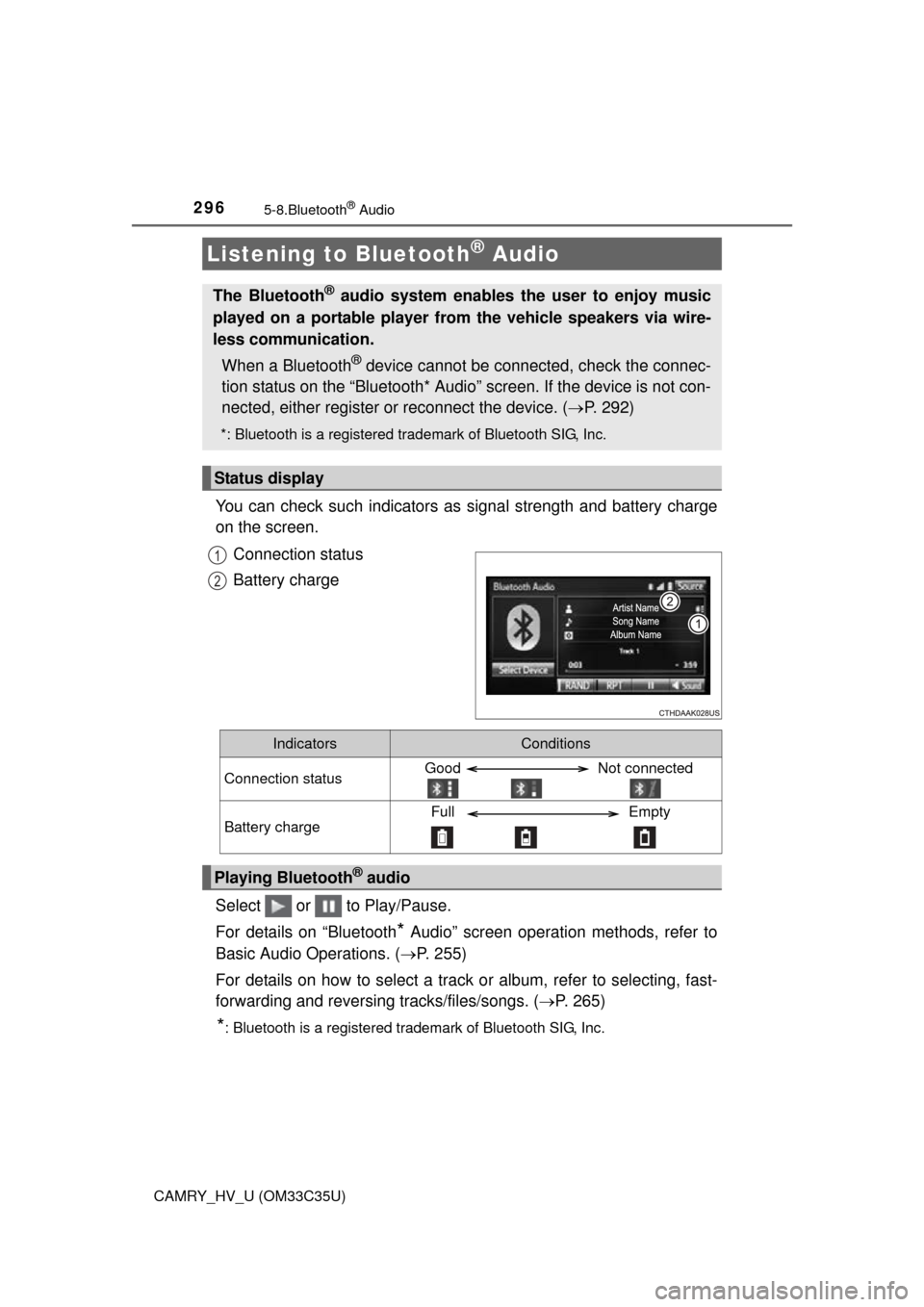
You can check such indicators as signal strength and battery charge
on the screen.
Connection status
Battery charge
Select or to Play/Pause.
For details on “Bluetooth
* Audio” screen operation methods, refer to
Basic Audio Operations. ( P. 255)
For details on how to select a track or album, refer to selecting, fast-
forwarding and reversing tracks/files/songs. ( P. 265)
*: Bluetooth is a registered trademark of Bluetooth SIG, Inc.
Listening to Bluetooth® Audio
The Bluetooth® audio system enables the user to enjoy music
played on a portable player from the vehicle speakers via wire-
less communication.
When a Bluetooth
® device cannot be connected, check the connec-
tion status on the “Bluetooth* Audio” screen. If the device is not con-
nected, either register or reconnect the device. ( P. 292)
*: Bluetooth is a registered trademark of Bluetooth SIG, Inc.
Status display
1
2
IndicatorsConditions
Connection statusGood Not connected
Battery chargeFull Empty
Playing Bluetooth® audio
Page 297 of 572
297
5
Audio system
CAMRY_HV_U (OM33C35U)
5-9.Bluetooth® phone
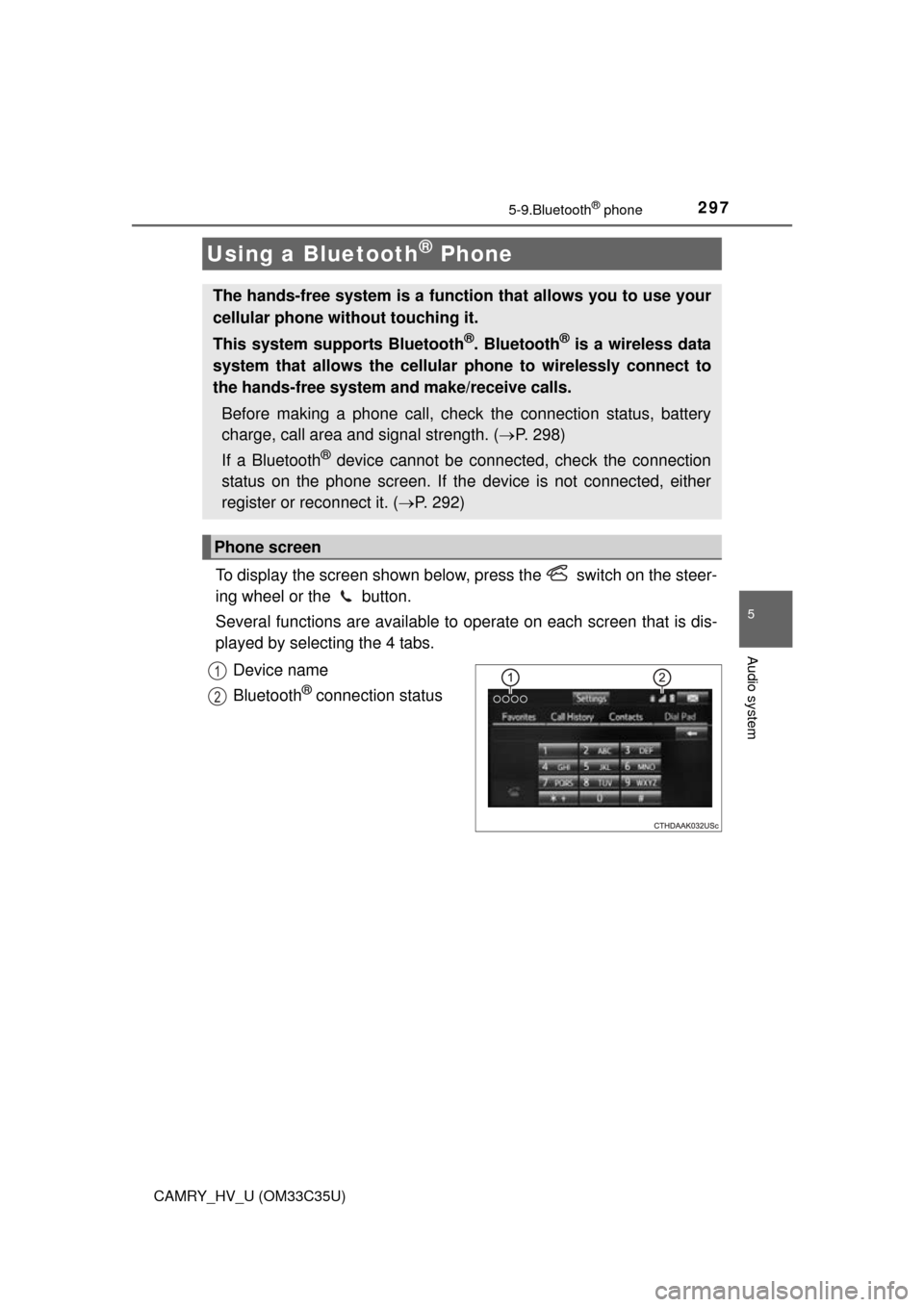
To display the screen shown below, press the switch on the steer-
ing wheel or the button.
Several functions are available to operate on each screen that is dis-
played by selecting the 4 tabs.
Device name
Bluetooth
® connection status
Using a Bluetooth® Phone
The hands-free system is a function that allows you to use your
cellular phone without touching it.
This system supports Bluetooth
®. Bluetooth® is a wireless data
system that allows the cellular phone to wirelessly connect to
the hands-free system and make/receive calls.
Before making a phone call, check the connection status, battery
charge, call area and signal strength. ( P. 298)
If a Bluetooth
® device cannot be connected, check the connection
status on the phone screen. If th e device is not connected, either
register or reconnect it. ( P. 292)
Phone screen
1
2
Page 298 of 572
2985-9. Bluetooth® phone
CAMRY_HV_U (OM33C35U)n
Telephone switch (
P. 309)
nMicrophone
The vehicle’s built in micro-
phone is used when talking on
the phone.
The person you are speaking to
can be heard from the front
speakers.
To use the hands-free system, you must register your Bluetooth
®
phone in the system. (P. 290)
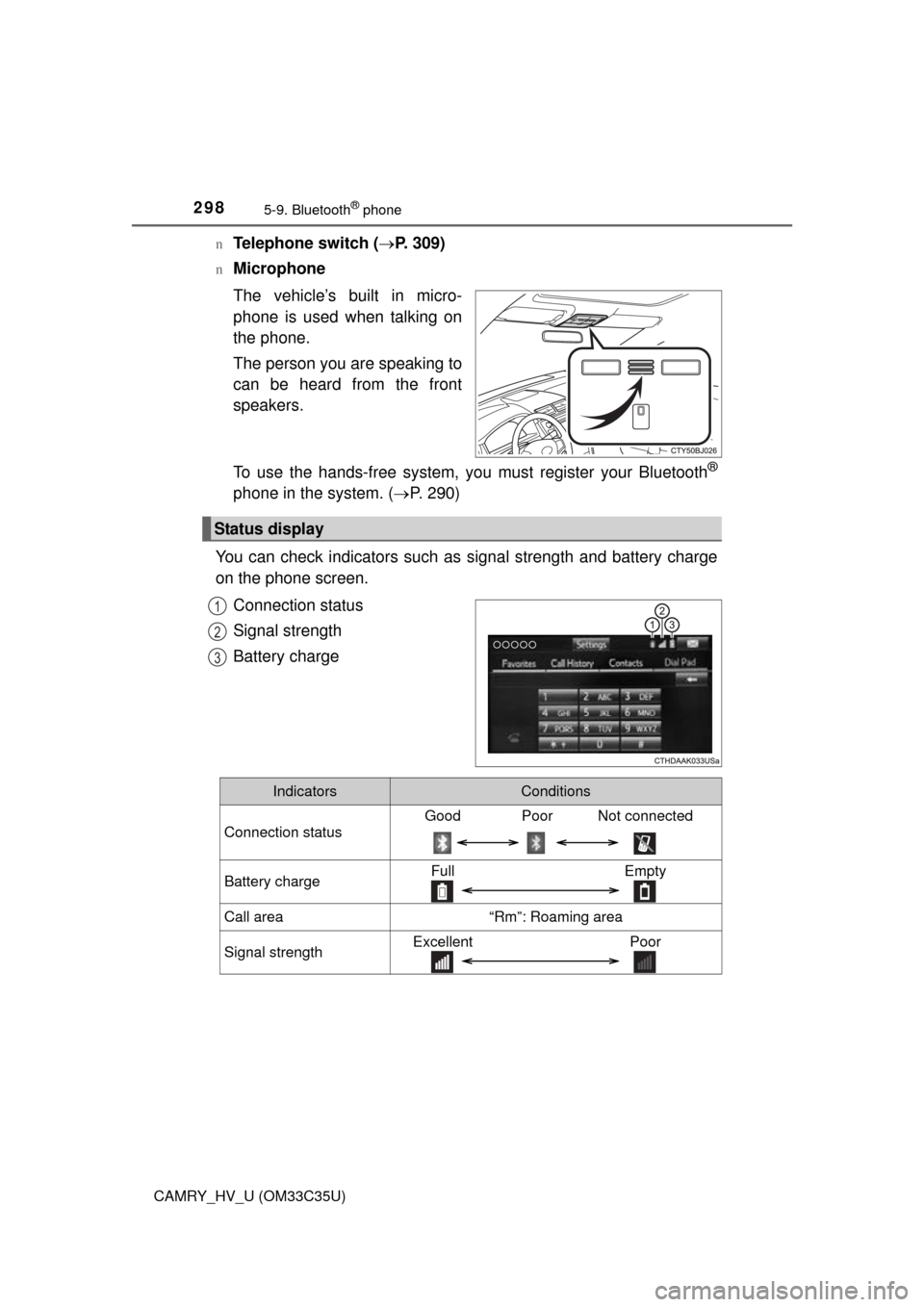
You can check indicators such as signal strength and battery charge
on the phone screen.
Connection status
Signal strength
Battery charge
Status display
1
2
3
IndicatorsConditions
Connection status
Good Poor Not connected
Battery chargeFull Empty
Call area“Rm”: Roaming area
Signal strengthExcellent Poor