2016 TOYOTA CAMRY HYBRID battery
[x] Cancel search: batteryPage 123 of 572
1233-2. Opening, closing and locking the doors
3
Operation of each component
CAMRY_HV_U (OM33C35U)n
Battery-saving function
The battery-saving function will be activated in order to prevent the electronic
key battery and the 12-volt battery from being discharged while the vehicle is
not in operation for a long time.
lIn the following situations, the smart key system may take some time to
unlock the doors.
• The electronic key has been left in an area of approximately 6 ft. (2 m) of
the outside of the vehicle for 10 minutes or longer.
• The smart key system has not been used for 5 days or longer.
l If the smart key system has not been used for 14 days or longer, the doors
cannot be unlocked at any doors except the driver’s door. In this case, take
hold of the driver’s door handle, or use the wireless remote control or the
mechanical key, to unlock the doors.
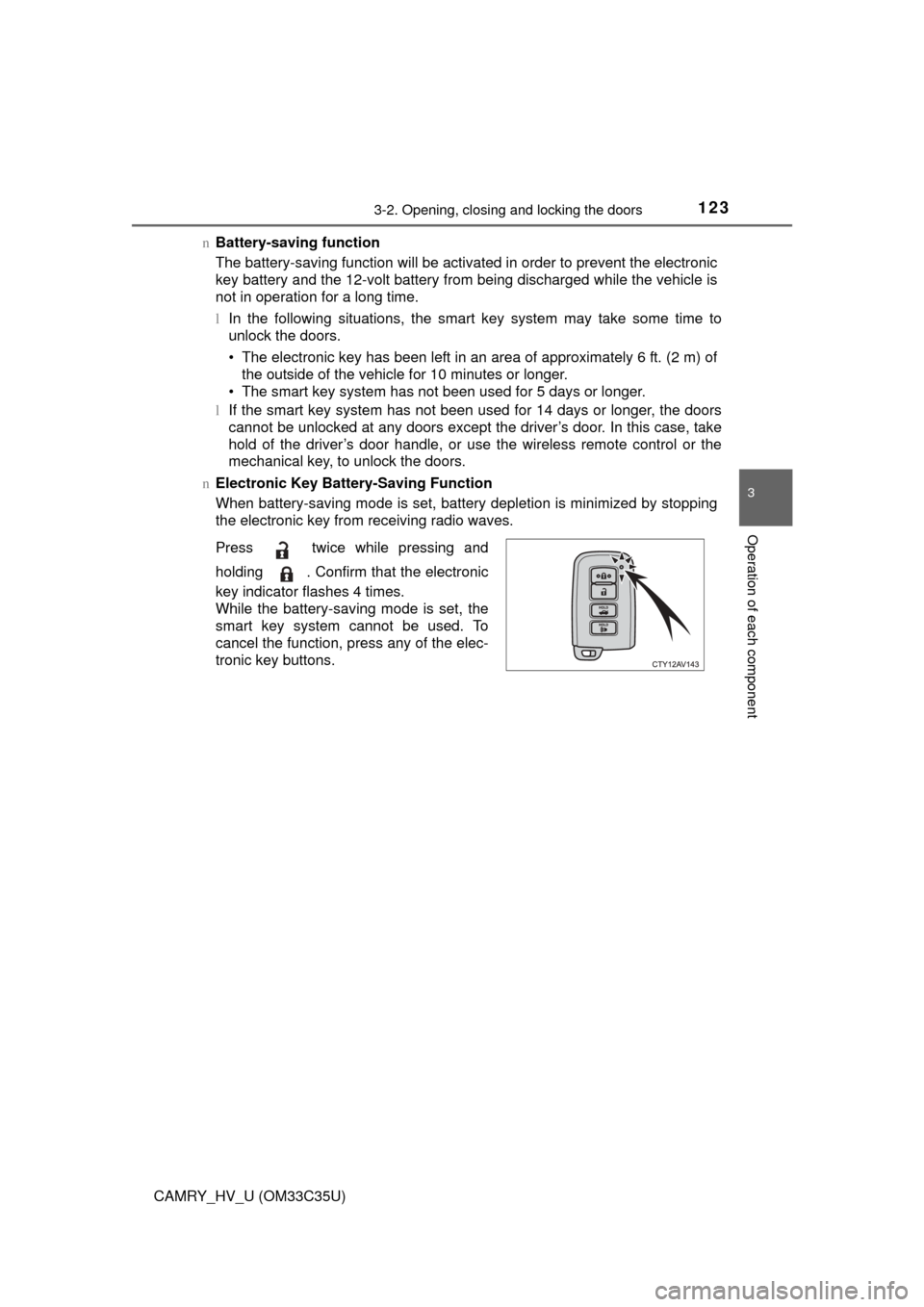
n Electronic Key Battery-Saving Function
When battery-saving mode is set, battery depletion is minimized by stopping
the electronic key from receiving radio waves.
Press twice while pressing and
holding . Confirm that the electronic
key indicator flashes 4 times.
While the battery-saving mode is set, the
smart key system cannot be used. To
cancel the function, press any of the elec-
tronic key buttons.
Page 124 of 572

1243-2. Opening, closing and locking the doors
CAMRY_HV_U (OM33C35U)n
Conditions affecting operation
The smart key system uses weak radio waves. In the following situations, the
communication between the electronic key and the vehicle may be affected,
preventing the smart key system, wireless remote control and immobilizer
system from operating properly. (Ways of coping: P. 487)
l When the electronic key battery is depleted
l Near a TV tower, electric power plant, gas station, radio station, large dis-
play, airport or other facility that generates strong radio waves or electrical
noise
l When carrying a portable radio, cellular phone, cordless phone or other
wireless communication device
l When the electronic key is in contact with, or is covered by the following
metallic objects
• Cards to which aluminum foil is attached
• Cigarette boxes that have aluminum foil inside
• Metallic wallets or bags
• Coins
• Hand warmers made of metal
• Media such as CDs and DVDs
l When other wireless keys (that emit radio waves) are being used nearby
l When carrying the electronic key together with the following devices that
emit radio waves
• Another vehicle’s electronic key or a wireless key that emits radio waves
• Personal computers or personal digital assistants (PDAs)
• Digital audio players
• Portable game systems
l If window tint with a metallic content or metallic objects are attached to the
rear window
l When the electronic key is placed near a battery charger or electronic
devices
Page 125 of 572

1253-2. Opening, closing and locking the doors
3
Operation of each component
CAMRY_HV_U (OM33C35U)n
Note for the entry function
lEven when the electronic key is within the effective range (detection areas),
the system may not operate properly in the following cases:
• The electronic key is too close to the window or outside door handle, near
the ground, or in a high place when the doors are locked or unlocked.
• The electronic key is near the ground or in a high place, or too close to
the rear bumper center when the trunk is opened.
• The electronic key is on the instrument panel, rear package tray or floor, or in the door pockets or glove box when the hybrid system is started or
power switch modes are changed.
l Do not leave the electronic key on top of the instrument panel or near the
door pockets when exiting the vehicle. Depending on the radio wave recep-
tion conditions, it may be detected by the antenna outside the cabin and the
door will become lockable from the outside, possibly trapping the electronic
key inside the vehicle.
l As long as the electronic key is within the effective range, the doors may be
locked or unlocked by anyone. However, only the doors detecting the elec-
tronic key can be used to unlock the vehicle.
l Even if the electronic key is not inside the vehicle, it may be possible to start
the hybrid system if the electronic key is near the window.
l The doors may unlock or lock if a large amount of water splashes on the
door handle, such as in the rain or in a car wash, when the electronic key is
within the effective range. (The doors will automatically be locked after
approximately 60 seconds if the doors are not opened and closed.)
l If the wireless remote control is used to lock the doors when the electronic
key is near the vehicle, there is a possibility that the door may not be
unlocked by the entry function. (Use the wireless remote control to unlock
the doors.)
l Touching the door lock or unlock sensor while wearing gloves may prevent
lock or unlock operation.
l When the lock operation is performed using the lock sensor, recognition sig-
nals will be shown up to two consecutive times. After this, no recognition
signals will be given.
l If the door handle becomes wet while the electronic key is within the effec-
tive range, the door may lock and unlock repeatedly. In this case, follow the
following correction procedures to wash the vehicle:
• Place the electronic key in a location 6 ft. (2 m) or more away from the
vehicle. (Take care to ensure that the key is not stolen.)
• Set the electronic key to battery-saving mode to disable the smart key
system. ( P. 123)
l If the electronic key is inside the vehicle and a door handle becomes wet
during a car wash, a message may be shown on the multi-information dis-
play and a buzzer will sound outside the vehicle. To turn off the alarm, lock
all the doors.
Page 163 of 572
1634-2. Driving procedures
4
Driving
CAMRY_HV_U (OM33C35U)
nAuto power off function
If the vehicle is left in ACCESSORY mode for more than 20 minutes or ON
mode (the hybrid system is not operating) for more than an hour with the shift
lever in P, the power switch will automatically turn off. However, this function
cannot entirely prevent 12-volt battery discharge. Do not leave the vehicle
with the power switch in ACCESSORY or ON mode for long periods of time
when the hybrid system is not operating.
n Sounds and vibrations specific to a hybrid vehicle
P. 7 2
n Electronic key battery depletion
P. 108
n When the ambient temperature is low, such as during winter driving con-
ditions
When starting the hybrid system, the flashing time of the “READY” indicator
may be long. Leave the vehicle as it is until the “READY” indicator is steady
on, as steady means the vehicle is able to move.
n Conditions affecting operation
P. 124
n Notes for the entry function
P. 125
n If the hybrid system does not start
lThe immobilizer system may not have been deactivated. ( P. 78)
Contact your Toyota dealer.
l Check that the shift lever is securely set in P. The hybrid system may not
start if the shift lever is displaced out of P.
n Steering lock
After turning the power switch off and opening and closing the doors, the
steering wheel will be locked due to the steering lock function. Operating the
power switch again automatically cancels the steering lock.
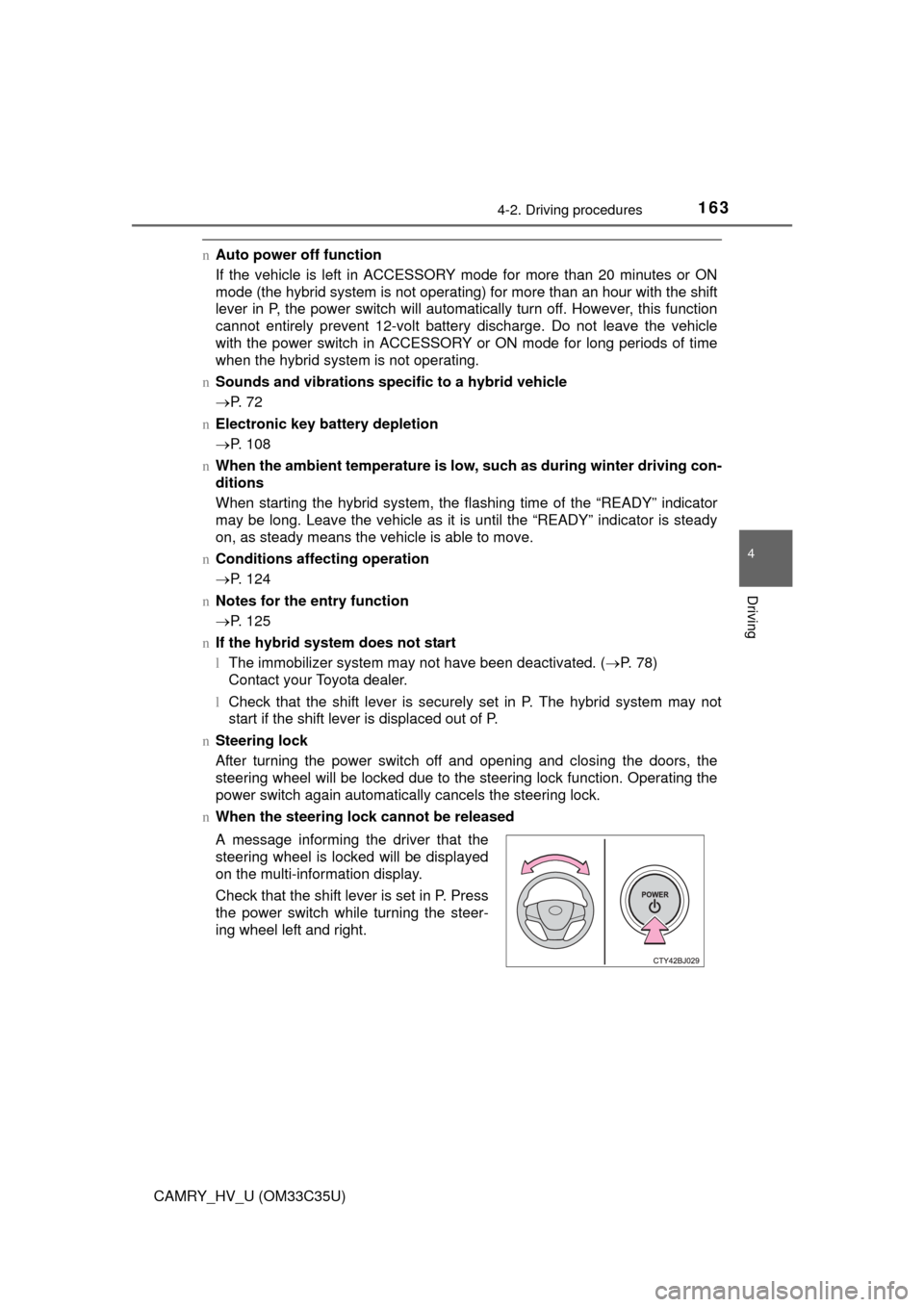
n When the steering lock cannot be released
A message informing the driver that the
steering wheel is locked will be displayed
on the multi-information display.
Check that the shift lever is set in P. Press
the power switch while turning the steer-
ing wheel left and right.
Page 164 of 572

1644-2. Driving procedures
CAMRY_HV_U (OM33C35U)n
Steering lock motor overheating prevention
To prevent the steering lock motor from overheating, the motor may be sus-
pended if the hybrid system is turned on and off repeatedly in a short period
of time. In this case, refrain from operating the hybrid system. After about 10
seconds, the steering lock motor will resume functioning.
n When a message requesting the smart key system be inspected is dis-
played on the multi-information display
The system may be malfunctioning. Have the vehicle inspected by your
Toyota dealer immediately.
n If the “READY” indicator does not come on
In the event that the “READY” indicator does not come on even after perform-
ing the proper procedures for starting the vehicle, contact your Toyota dealer
immediately.
n If the hybrid system is malfunctioning
P. 457
n If the electronic key battery is depleted
P. 425
n Operation of the power switch
lWhen operating the power switch, one short, firm press is enough. If the
switch is pressed improperly, the hybrid system may not start or the power
switch mode may not change. It is not necessary to press and hold the
switch.
l If attempting to restart the hybrid system immediately after turning the power
switch off, the hybrid system may not start in some cases. After turning the
power switch off, wait a few seconds before restarting the hybrid system.
n If the smart key system has been deactivated in a customized setting
P. 487
Page 165 of 572

1654-2. Driving procedures
4
Driving
CAMRY_HV_U (OM33C35U)
WARNING
nWhen starting the hybrid system
Always start the hybrid system while sitting in the driver’s seat. Do not
depress the accelerator pedal while starting the hybrid system under any
circumstances.
Doing so may cause an accident resulting in death or serious injury.
n Caution while driving
If hybrid system failure occurs while the vehicle is moving, do not lock or
open the doors until the vehicle reaches a safe and complete stop. Activa-
tion of the steering lock in this circumstance may lead to an accident, result-
ing in death or serious injury.
n Stopping the hybrid syst em in an emergency
If you want to stop the hybrid system in an emergency while driving the
vehicle, press and hold the power switch for more than 2 seconds, or press
it briefly 3 times or more in succession. ( P. 441)
However, do not touch the power switch while driving except in an emer-
gency. Turning the hybrid system off while driving will not cause loss of
steering or braking control, however, power assist to the steering will be
lost. This will make it more difficult to steer smoothly, so you should pull over
and stop the vehicle as soon as it is safe to do so.
NOTICE
n To prevent 12-volt battery discharge
lDo not leave the power switch in ACCESSORY or ON mode for long peri-
ods of time without the hybrid system on.
l Do not stop the hybrid system when the shift lever is in a position other
than P. If the hybrid system is stopped in another shift lever position, the
power switch will not be turned off but instead be turned to ACCESSORY
mode. If the vehicle is left in ACCESSORY mode, 12-volt battery dis-
charge may occur.
n When starting the hybrid system
lDo not depress the accelerator pedal unnecessarily.
l If the hybrid system becomes difficult to start, have your vehicle checked
by your Toyota dealer immediately.
n Symptoms indicating a malf unction with the power switch
If the power switch seems to be operating somewhat differently than usual,
such as the switch sticking slightly, there may be a malfunction. Contact
your Toyota dealer immediately.
Page 166 of 572
1664-2. Driving procedures
CAMRY_HV_U (OM33C35U)
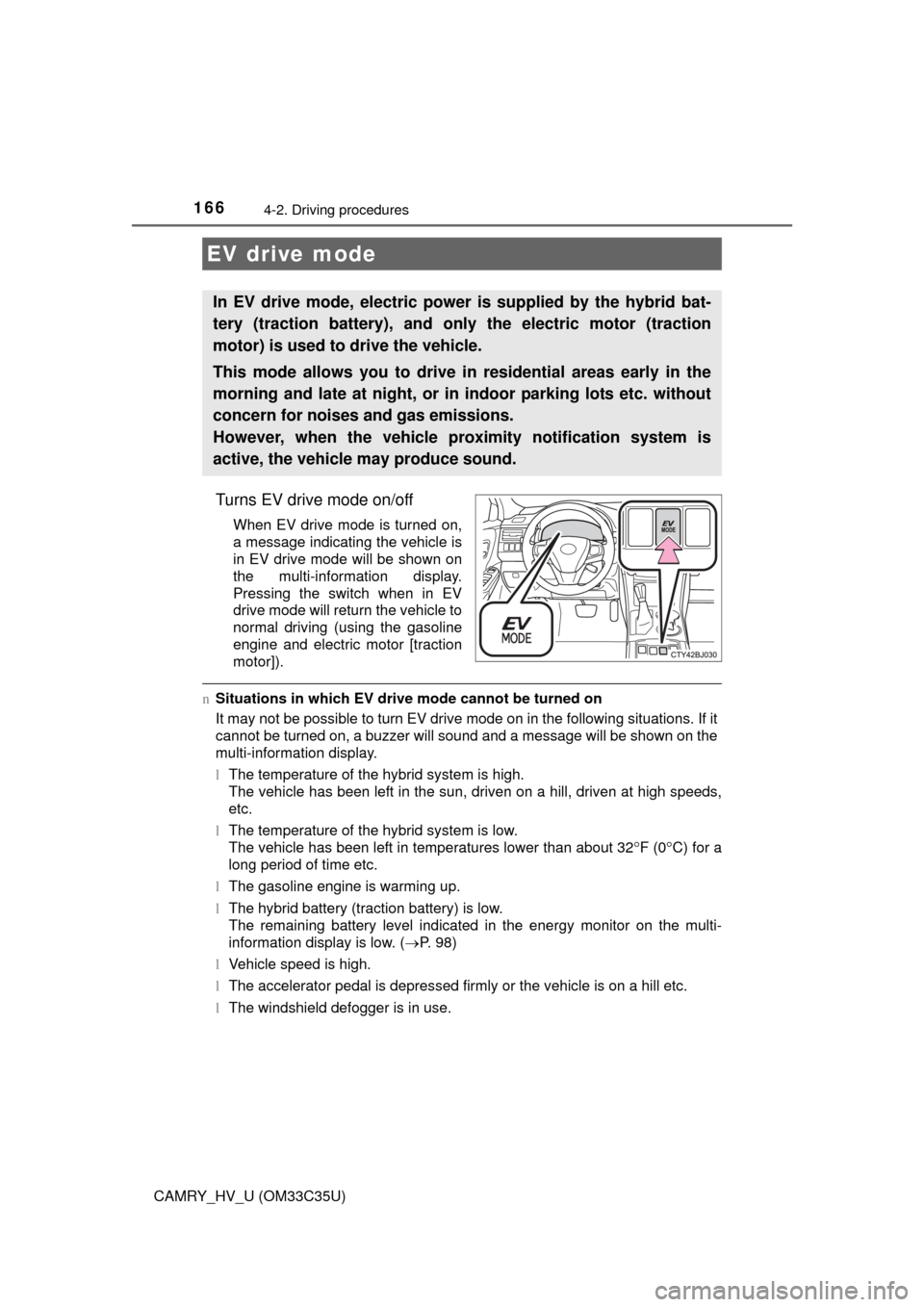
Turns EV drive mode on/off
When EV drive mode is turned on,
a message indicating the vehicle is
in EV drive mode will be shown on
the multi-information display.
Pressing the switch when in EV
drive mode will return the vehicle to
normal driving (using the gasoline
engine and electric motor [traction
motor]).
nSituations in which EV dri ve mode cannot be turned on
It may not be possible to turn EV drive mode on in the following situati\
ons. If it
cannot be turned on, a buzzer will sound and a message will be shown on the
multi-information display.
l The temperature of the hybrid system is high.
The vehicle has been left in the sun, driven on a hill, driven at high speeds,
etc.
l The temperature of the hybrid system is low.
The vehicle has been left in temperatures lower than about 32
F (0C) for a
long period of time etc.
l The gasoline engine is warming up.
l The hybrid battery (traction battery) is low.
The remaining battery level indicated in the energy monitor on the multi-
information display is low. ( P. 98)
l Vehicle speed is high.
l The accelerator pedal is depressed firmly or the vehicle is on a hill etc.
l The windshield defogger is in use.
EV drive mode
In EV drive mode, electric power is supplied by the hybrid bat-
tery (traction battery), and only the electric motor (traction
motor) is used to drive the vehicle.
This mode allows you to drive in residential areas early in the
morning and late at night, or in indoor parking lots etc. without
concern for noises and gas emissions.
However, when the vehicle proximity notification system is
active, the vehicle may produce sound.
Page 167 of 572

1674-2. Driving procedures
4
Driving
CAMRY_HV_U (OM33C35U)n
Switching to EV drive mode when the gasoline engine is cold
If the hybrid system is started while the gasoline engine is cold, the gasoline
engine will start automatically after a short period of time in order to warm up.
In this case, you will become unable to switch to EV drive mode.
After the hybrid system has started and the “READY” indicator has illumi-
nated, press the EV drive mode switch before the gasoline engine starts to
switch to EV drive mode.
n Automatic cancelatio n of EV drive mode
When driving in EV drive mode, the gas oline engine may automatically restart
in the following situations. When EV drive mode is canceled, a buzzer will
sound and the EV drive mode indicator will flash and go off.
l The hybrid battery (traction battery) becomes low.
The remaining battery level indicated in the energy monitor on the multi-
information display is low. ( P. 98)
l Vehicle speed is high.
l The accelerator pedal is depressed firmly or the vehicle is on a hill etc.
n Possible driving distance when driving in EV drive mode
EV drive mode’s possible driving distance ranges from a few hundred meters
to approximately 1.3 miles (2 km). However, depending on vehicle conditions,
there are situations when EV drive mode cannot be used.
(The distance that is possible depends on the hybrid battery [traction battery]
level and driving conditions.)
n Fuel economy
The hybrid system is designed to achieve the best possible fuel economy
during normal driving (using the gasoline engine and electric motor [traction
motor]). Driving in EV drive mode more than necessary may lower fuel econ-
omy.
WARNING
nCaution while driving
When driving in EV drive mode no engine noise is made. As such, pedestri-
ans, people riding bicycles or other people and vehicles in the surrounding
area may not be aware of the vehicle starting off or approaching them.
Therefore, take extra care while driving even if the vehicle proximity notifica-
tion system is active.