Page 98 of 179
1. CloseTouch the circled X in the top left corner of a window to close it (or you can touch anywhere
outside the window).
2. Doors
Touch to open or close front doors or falcon wing doors.
3. Suspension
If Model X is equipped with Smart Air Suspension, touch to manually raise or lower Model X,or to remove a previously saved auto-raising location (see Smart Air Suspension on page
110). Model X must be powered on and you must press the brake pedal before you can
change suspension settings. Smart Air Suspension causes Model X to self-level, even when powered
off. Therefore, when towing or lifting, you must disable self-leveling (see Instructions
for Transporters on page 164 and Jacking and Lifting on page 149).
Controls
98Model X Owner
Page 121 of 179
About the Security System
If Model X does not detect a key nearby and a
locked door or trunk is opened, an alarm sounds and headlights and turn signals
flash.To deactivate the alarm, press any button on the key.
To manually enable or disable the alarm system, touch Controls > Settings > Safety &
Security > Alarm. When set to on, Model X activates its alarm one minute after the doors
lock and a recognized key is no longer
detected nearby.
Security Settings
Using the Touchscreen121
Page 128 of 179
Opening the Charge PortThe charge port is located on the passenger
side of Model X, behind a door that is part of
the rear tail light assembly.
Park Model X so that the charge cable easily
reaches the charge port.
With Model X unlocked, or a recognized key
nearby, press and release the button on a Tesla
charge cable to open the charge port door. If the cable you are using does not have this
button, you can also open the charge port door using any of these methods:
Page 130 of 179
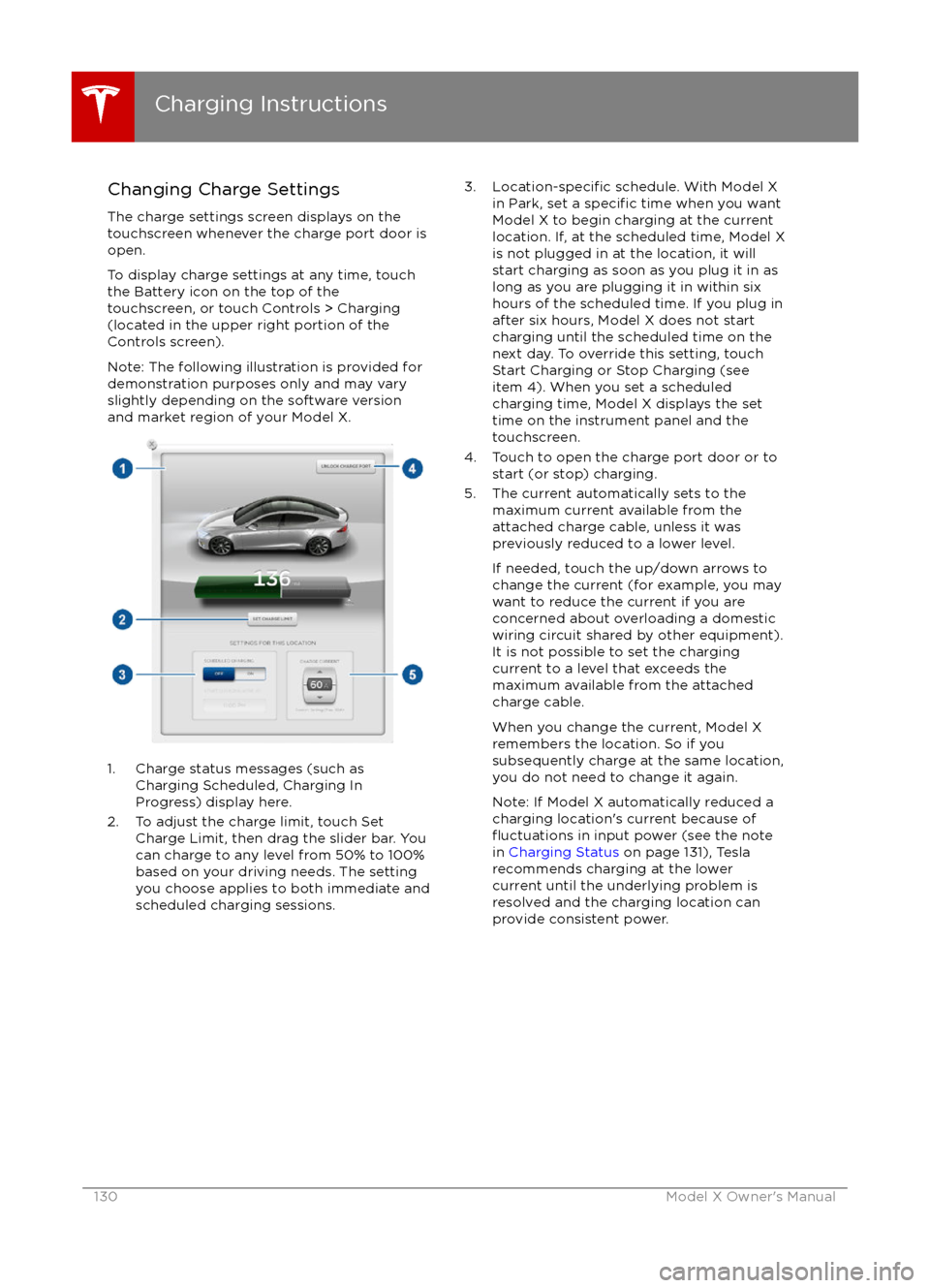
Changing Charge SettingsThe charge settings screen displays on the
touchscreen whenever the charge port door is
open.
To display charge settings at any time, touch the Battery icon on the top of the
touchscreen, or touch Controls > Charging
(located in the upper right portion of the
Controls screen).
Note: The following illustration is provided for
demonstration purposes only and may vary
slightly depending on the software version
and market region of your Model X.
1. Charge status messages (such as
Charging Scheduled, Charging In
Progress) display here.
2. To adjust the charge limit, touch Set Charge Limit, then drag the slider bar. You
can charge to any level from 50% to 100%
based on your driving needs. The setting
you choose applies to both immediate and scheduled charging sessions.
3.Location-specific schedule. With Model X
in Park, set a specific time when you want
Model X to begin charging at the current
location. If, at the scheduled time, Model X
is not plugged in at the location, it will
start charging as soon as you plug it in as
long as you are plugging it in within six
hours of the scheduled time. If you plug in
after six hours, Model X does not start
charging until the scheduled time on the
next day. To override this setting, touch Start Charging or Stop Charging (see
item 4). When you set a scheduled
charging time, Model X displays the set
time on the instrument panel and the
touchscreen.
4. Touch to open the charge port door or to start (or stop) charging.
5. The current automatically sets to the maximum current available from the
attached charge cable, unless it was
previously reduced to a lower level.
If needed, touch the up/down arrows to change the current (for example, you may
want to reduce the current if you are
concerned about overloading a domestic wiring circuit shared by other equipment).
It is not possible to set the charging
current to a level that exceeds the
maximum available from the attached
charge cable.
When you change the current, Model X
remembers the location. So if you
subsequently charge at the same location,
you do not need to change it again.
Note: If Model X automatically reduced a charging location
Page 133 of 179
Maintaining Tire Pressures
If you are not towing a trailer, keep tires
inflated to the pressures shown on the Tire
and Loading Information label, even if it differsfrom the pressure printed on the tire itself. The
Tire and Loading Information label is located
on the center door pillar and is visible when
the driver
Page 142 of 179

Cleaning the ExteriorTo prevent damage to the paint, immediately
remove corrosive substances (bird droppings, tree resin, dead insects, tar spots, road salt,
industrial fallout, etc). Do not wait until
Model X is due for a complete wash. If
necessary, use denatured alcohol to remove
tar spots and stubborn grease stains, then
immediately wash the area with water and a
mild, non-detergent soap to remove the
alcohol.
Follow these steps when washing the exterior
of Model X:
1. Rinse Thoroughly Before washing,
flush grime and grit from
the bodywork using a hose. Flush away
accumulations of mud in areas where
debris easily collects (such as wheel
arches and panel seams). If salt has been used on the highways (such as during
winter months), thoroughly rinse all traces of road salt from the underside of thevehicle.
2. Hand Wash
Hand wash Model X using a clean soft
cloth and cold or lukewarm water
containing a mild, good quality car
shampoo.
3. Rinse with Clean Water
After washing, rinse with clean water to
prevent soap from drying on the surfaces.
4. Dry Thoroughly and Clean Exterior Glass
After washing and rinsing, dry thoroughly
with a chamois.
Clean windows and mirrors using an automotive glass cleaner. Do not scrape,
or use any abrasive cleaning
fluid on glass
or mirrored surfaces.
Cautions for Exterior CleaningCaution: Do not use windshield treatmentfluids. Doing so can interfere with wiper
friction and cause a chattering sound.Caution: Do not use hot water and
detergents.Caution: In hot weather, do not wash in direct sunlight.Caution: If using a pressure washer,
maintain a distance of at least 30 cm
between the nozzle and the surface of
Model X. Keep the nozzle moving and do
not concentrate the water jet on any one
area.Caution: Do not aim water hoses directly
at window, door or hood seals, or through
wheel apertures onto brake components.Caution: Avoid using tight-napped or
rough cloths, such as washing mitts.Caution: If washing in an automatic car
wash, use Touchless car washes only. These car washes have no parts (brushes,
etc.) that touch the surfaces of Model X.
Using any other type of car wash could
cause damage that is not covered by the
warranty.Caution: Do not used chemical based
wheel cleaners. These can damage the
finish on the wheels.
Caution: Avoid using a high pressure
power washer on the rear view camera or
parking sensors (if equipped) and do not
clean a sensor or camera lens with a
sharp or abrasive object that can scratch
or damage its surface.
Cleaning
142Model X Owner
Page 152 of 179
Load Capacity LabelingIt is important to understand how much
weight your Model X can safely carry. This
weight is called the vehicle capacity weight
and includes the weight of all occupants, cargo and any additional equipment added toyour Model X since it was manufactured.
There are three labels attached to Model X
that state how much weight it can safely carry.
These labels are located on the center door
pillar and are visible when the driver
Page 175 of 179
AABS (Anti-lock Braking System) 54
Acceleration (dual motor) 97
access panel, removing 146accessoriesinstalling 150
plugging into power socket 114
active hood 61
adaptive headlights 51
air circulation 106
air conditioning 105
air distribution 106
air
filter 109
air suspension 111
air vents 109
airbag, front passenger, disabling 34
airbags 32
alarm 121
all-season tires 135
always connected, setting 63
antennas 9
anti-lock braking (ABS) 54
audioplaying files 112
steering wheel buttons 37
volume control 112
Auto High Beam 51
Auto Lane Change 82
auto-raising suspension 110
Autopark 84
Autopilot 72
Autosteer 80
B
backup camera 65
battery (12V)complete discharge 127specifications 158Battery (high voltage)care of 127
coolant 146
specifications 159
temperature limits 127
battery (key), replacing 5
blind spot warning 86
Bluetoothdevices, playing audio files from 113
general information 115
phone, pairing and using 115
body repairs 150
body touch up 144
brake
fluid replacement 132
brakesautomatic in emergencies 88fluid level 147
overview of 54brakes (continued)specifications 158
brightness of displays 101
C cabin temperature control 105
calendar 119
camera (rear view) 65
car cover 144
car washes 142
Cargo Mode 20
cargo space, maximizing 20
carpets, cleaning 143
CE
certifications 173
CHAdeMO 126
chains 136
change of ownership 104
charge port 128
charge port light 129
chargingcharge settings 130
components and equipment 125
instructions 128
public charging stations 126
scheduling 130
status of 131child protectiondisabling liftgate and rear door handles 9
disabling rear window switches 11child seatscleaning 143
disabling front passenger airbag 34
installing and using 24
cleaning 142
climate controls 105
climate ionizer 101
clock 37
Cold Weather controls 97
collision avoidance assist 88
console12V power socket 114
cup holders 17
USB ports 114contact informationroadside assistance 163coolantBattery, checking level of 146
Battery, replacement interval 132
copyrights 166, 167
Creep 97
cruise control 75
cup holders 17
customizing 101
Index
Index175


