Page 14 of 179
Opening
To open the front trunk: Touch ControlsFront Trunk on the
touchscreen, or double-click the front
trunk button on the key.
Pull the hood up.The door open indicator displays on
the instrument panel when the front
trunk is open. The image of the
Model X on the touchscreen Controls window also displays the open trunk.
The front trunk locks whenever Model X is
locked using the touchscreen, externally using
the key or walk-away locking, or when Valet
mode is active (see Valet Mode).
To open the front trunk in the unlikely
situation in which Model X has no electrical
power, see Opening with No Power .
Closing
The Model X body is made of lightweight
aluminum. Therefore, the hood is not heavy
enough to latch under its own weight and
applying pressure on the front edge or center of the hood can cause damage. To close the
hood:
Page 20 of 179
Note: When an outside seat has tilted forward
for easy entry, its back rest resets to the
neutral position and may need to be re-
adjusted.
Note: If an obstacle is detected while a seat is
moving forward for easy entry, forward
movement stops and the seat moves back.
Folding Third Row Seats
Before folding, remove items from the seats
and the rear foot well. To allow the third row
seat backs to fold completely
flat, you may
need to move the second row seats forward.
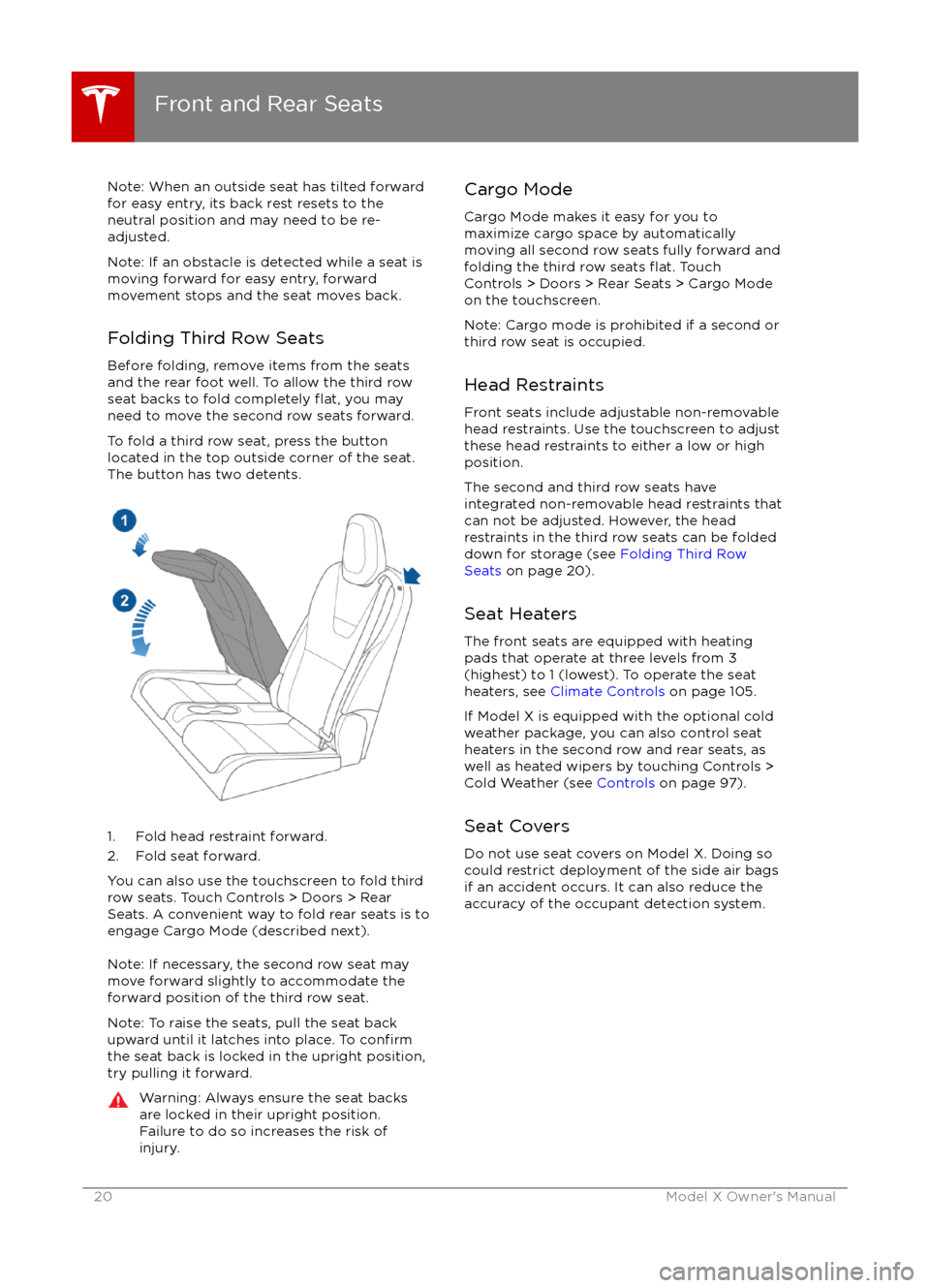
To fold a third row seat, press the button
located in the top outside corner of the seat.
The button has two detents.
1. Fold head restraint forward.
2. Fold seat forward.
You can also use the touchscreen to fold third
row seats. Touch Controls > Doors > Rear
Seats. A convenient way to fold rear seats is to engage Cargo Mode (described next).
Note: If necessary, the second row seat may
move forward slightly to accommodate the forward position of the third row seat.
Note: To raise the seats, pull the seat back
upward until it latches into place. To
confirmthe seat back is locked in the upright position, try pulling it forward.
Warning: Always ensure the seat backs
are locked in their upright position.
Failure to do so increases the risk of injury.Cargo Mode
Cargo Mode makes it easy for you to
maximize cargo space by automatically
moving all second row seats fully forward and
folding the third row seats
flat. Touch
Controls > Doors > Rear Seats > Cargo Mode
on the touchscreen.
Note: Cargo mode is prohibited if a second or
third row seat is occupied.
Head Restraints Front seats include adjustable non-removable
head restraints. Use the touchscreen to adjust
these head restraints to either a low or high
position.
The second and third row seats have
integrated non-removable head restraints that
can not be adjusted. However, the head
restraints in the third row seats can be folded
down for storage (see Folding Third Row
Seats on page 20).
Seat Heaters
The front seats are equipped with heating
pads that operate at three levels from 3
(highest) to 1 (lowest). To operate the seat
heaters, see Climate Controls on page 105.
If Model X is equipped with the optional cold
weather package, you can also control seat
heaters in the second row and rear seats, as
well as heated wipers by touching Controls >
Cold Weather (see Controls on page 97).
Seat Covers Do not use seat covers on Model X. Doing so
could restrict deployment of the side air bags
if an accident occurs. It can also reduce the
accuracy of the occupant detection system.
Front and Rear Seats
20Model X Owner
Page 38 of 179
automatically changes to display navigation
instructions (if applicable), or to let you know
if a door or trunk is open when Model X is in a driving gear.
Using Right Steering Wheel Buttons Use the buttons on the right side of thesteering wheel to access call options while on
a phone call, to browse the phonebook of a
Bluetooth-connected phone, to choose what
displays on the right side of the instrument
panel, to adjust Model X features, and to use
voice commands.
Note: Whenever you receive or make a phone call, the right side of the instrument panelautomatically displays call options to help you
easily handle phone calls on your Bluetooth-
connected phone.
1. Touch to browse the phonebook of a
Bluetooth-connected phone and touch
again to close it.
Press and hold to use voice commands to
navigate to a destination. When you hear
the tone, speak your command. Release
the button when you
finish speaking. For
details, see Using Voice Commands on
page 39.
2. Scroll Wheel
Page 41 of 179
StartingWhen you open a door, Model X powers on
the instrument panel and touchscreen. The
center circle on the instrument panel displays the status of doors and the charge level, and
you can operate all controls.
To drive:
Page 45 of 179
IndicatorDescriptionTire pressure warning. The pressure of a tire is out of range. If a fault with the
Tire Pressure Monitoring System (TPMS) is detected, the indicator flashes.For a TPMS fault, contact Tesla. See Tire Care and Maintenance on page 133.A door or trunk is open. See Front doors.A seat belt for an occupied seat is not fastened. See Seat Belts on page 21.The front passenger
Page 48 of 179
Controlling LightsTouch Controls on the bottom corner of the touchscreen to control most of the lights.In addition to the lights that you can control from the touchscreen, Model X has convenience
lights that turn on and
off automatically based on what you are doing. For example, you will
notice interior lights, marker lights, tail lights, door handle lights, and puddle lights that turn on
when you unlock Model X, when you open a door, and when you shift into Park. They turn
offautomatically after a minute or two or when you shift into a driving gear or lock Model X.
Lights
48Model X Owner
Page 49 of 179
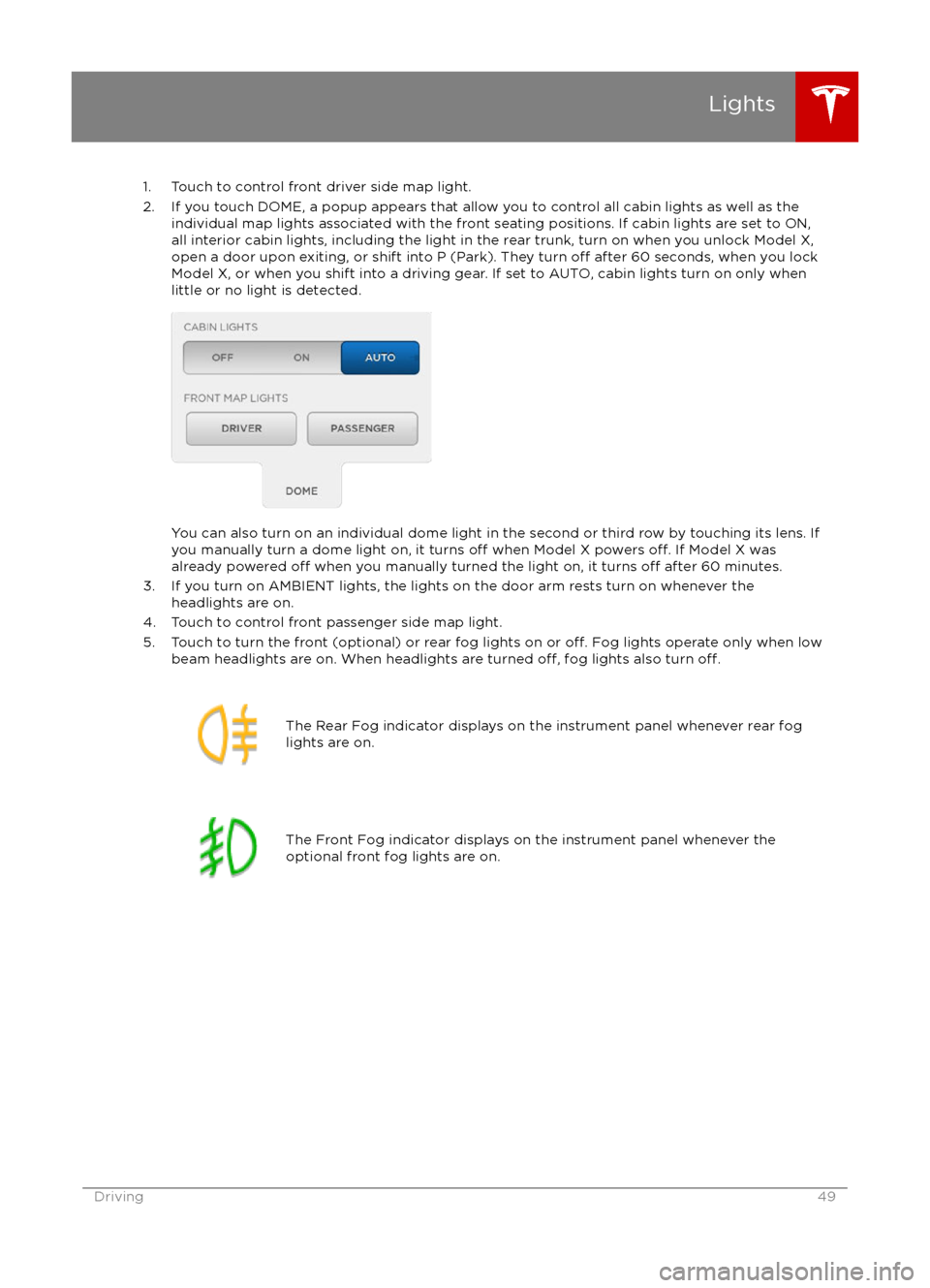
1. Touch to control front driver side map light.
2. If you touch DOME, a popup appears that allow you to control all cabin lights as well as the individual map lights associated with the front seating positions. If cabin lights are set to ON,all interior cabin lights, including the light in the rear trunk, turn on when you unlock Model X,open a door upon exiting, or shift into P (Park). They turn
off after 60 seconds, when you lock
Model X, or when you shift into a driving gear. If set to AUTO, cabin lights turn on only when
little or no light is detected.
You can also turn on an individual dome light in the second or third row by touching its lens. If
you manually turn a dome light on, it turns off when Model X powers off. If Model X was
already powered off when you manually turned the light on, it turns off after 60 minutes.
3. If you turn on AMBIENT lights, the lights on the door arm rests turn on whenever the headlights are on.
4. Touch to control front passenger side map light.
5. Touch to turn the front (optional) or rear fog lights on or
off. Fog lights operate only when low
beam headlights are on. When headlights are turned off, fog lights also turn off.
The Rear Fog indicator displays on the instrument panel whenever rear fog
lights are on.The Front Fog indicator displays on the instrument panel whenever the
optional front fog lights are on.Lights
Driving49
Page 96 of 179
3. Main viewing areaThe main viewing area changes depending on the app you have chosen (in the example, the
Nav and Media apps are displayed). For some apps (such as Nav and Web), you can zoom in and out using standard touchscreen
finger gestures.
4. Maximize/minimize app
Touch the small rectangle to expand the associated app to
fill the entire main viewing area
(some apps are not expandable). Touch again to display two apps in half-screen view.
5. Volume control
Touch the up and down arrows to increase or decrease the volume of the speakers. You can
also adjust the volume using the scroll wheel on the left side of the steering wheel.
6. Climate controls (see Climate Controls on page 105).
7. Controls
Touch to access all Model X controls and settings (doors, locks, lights, etc).
8. Reverse the position of the two currently displayed apps.
Warning: Paying attention to road and traffic conditions must always be the driver


