2016 SUBARU WRX ESP
[x] Cancel search: ESPPage 410 of 594
![SUBARU WRX 2016 Owners Manual The auto mode has 3 modes as follows. Mode Operation
AUTO [+] This mode emphasizes traction
control and strengthens the
limitation of differential action
that is suitable for driving on
slippery roads](/manual-img/17/59229/w960_59229-409.png "SUBARU WRX 2016 Owners Manual The auto mode has 3 modes as follows. Mode Operation
AUTO [+] This mode emphasizes traction
control and strengthens the
limitation of differential action
that is suitable for driving on
slippery roads")
The auto mode has 3 modes as follows. Mode Operation
AUTO [+] This mode emphasizes traction
control and strengthens the
limitation of differential action
that is suitable for driving on
slippery roads for vehicle stabi-
lity.
AUTO This mode is suitable for most
driving situations.
AUTO [ − ] This mode is suitable when you
seek quick response from the
steering wheel and smooth
driving.
! Mode setting method
In most situations, it is recommended that
the “ AUTO ” mode is selected.
Push the control switch forward to select the “ AUTO [+] ” mode. After setting the
mode, “ AUTO [+] ” appears.
Pull the control switch rearward to select
the “ AUTO [ − ] ” mode. After setting the
mode, “ AUTO [ − ] ” appears.
When the “ AUTO [+] ” mode is selected,
pull the control switch rearward to change
to the “ AUTO ” mode. When the “ AUTO
[ − ] ” mode is set, push the control switch
forward to change to the “ AUTO ” mode.& Manual mode
In the manual mode, you can use the
center differential control switch to adjust
the initial LSD torque as desired. When
this mode is selected, the “ AUTO ” indica-
tor disappears.Starting and operating/Driver ’ s Control Center Differential (C.DIFF/DCCD) (STI)
– CONTINUED –7-21
Page 412 of 594

– When a temporary spare tire
is installed
– When your vehicle is towed
– When the vehicle is stopped
with the manual mode se-
lected
NOTE . A higher initial LSD torque setting
gives the vehicle greater traction when
driving straight ahead but makes cor-
nering more difficult. Remember this
when adjusting the initial LSD torque.
In general, higher initial LSD torque
settings assist driving on slippery
roads and lower settings for non-slip-
pery roads. When the vehicle is stuck
in snow or mud, setting the initial LSD
torque to the maximum will help to free
the vehicle.
. The setting of the initial LSD torque
will remain even when the auto mode is
selected or the ignition switch is turned
to the “ LOCK ” / “ OFF ” position. How-
ever, the initial LSD torque will be
minimized when the battery is discon-
nected and reconnected.
. During cornering or when making
turns (especially when going into the
garage), the rotational difference be-
tween the front and rear wheels may cause a braking effect accompanied by
vibration and noise. This does not
indicate a problem. The phenomenon
will disappear when setting the initial
LSD torque to the minimum.
In the auto mode, it controls the initial
LSD torque automatically. While in the
auto mode, this phenomenon some-
times occurs depending on the driving
condition, however, it does not indicate
a problem.
. Use the center differential indicator
only as a rough indication of the initial
LSD torque.
. If you operate the center differential
control switch while quickly accelerat-
ing or turning a tight corner, you may
feel slight shocks. This is due to
differential action by the center differ-
ential and does not indicate a problem.
& Temporary release When the driver stops the vehicle and
pulls the parking brake lever after manu-
ally setting the initial LSD torque, the LSD
torque is temporarily minimized. However
the indicator on the combination meter
continues to show the driver ’ s selected
initial LSD torque. When the driver re-
leases the parking brake lever, the initial
LSD torque set by the driver is restored. Continuously variable trans-
mission The continuously variable transmission is
electronically controlled and provides an
infinite number of forward speeds and 1
reverse speed. It also has a manual mode.
WARNINGDo not shift from the “ P ” or “ N ”
position into the “ D ” or “ R ” position
while depressing the accelerator
pedal. This may cause the vehicle
to jump forward or backward.
CAUTION. Shift into the “ P ” or “ R ” position
only after the vehicle is comple-
tely stopped. Shifting while the
vehicle is moving may cause
damage to the transmission.
. Do not race the engine for more
than 5 seconds in any position
except the “ N ” or “ P ” position
when the brake is applied or
when chocks are used in the
wheels. This may cause the
transmission fluid to overheat.
. Never move the vehicle rearwardStarting and operating/Continuously variable transmission
– CONTINUED –7-23
Page 415 of 594
Starting and operating/Continuously variable transmission
! D (Drive)
This position is for normal driving. The
transmission shifts automatically and con-
tinuously into a suitable gear according to
the vehicle speed and the acceleration
you require. Also, while driving up and
down a hill, the transmission assists and
controls the driving performance and
engine braking while corresponding to
the road grade.
When more acceleration is required in the
“ D ” position, depress the accelerator
pedal fully to the floor and hold that
position. The transmission will automati-
cally downshift. If the Intelligent (I) mode
or the Sport (S) mode has been selected,
the transmission will operate like a con-
ventional automatic transmission. When
you release the pedal, the transmission
will return to the original gear position.
If one of the shift paddles behind the
steering wheel is operated while driving in
the “ D ” position, the transmission will
temporarily switch to the manual mode.
In this mode, you can shift into any gear
position using the shift paddles. For de-
tails about the manual mode, refer to
“ Selection of manual mode ” F 7-26. Once
the vehicle speed stabilizes, the transmis-
sion will switch from the manual mode
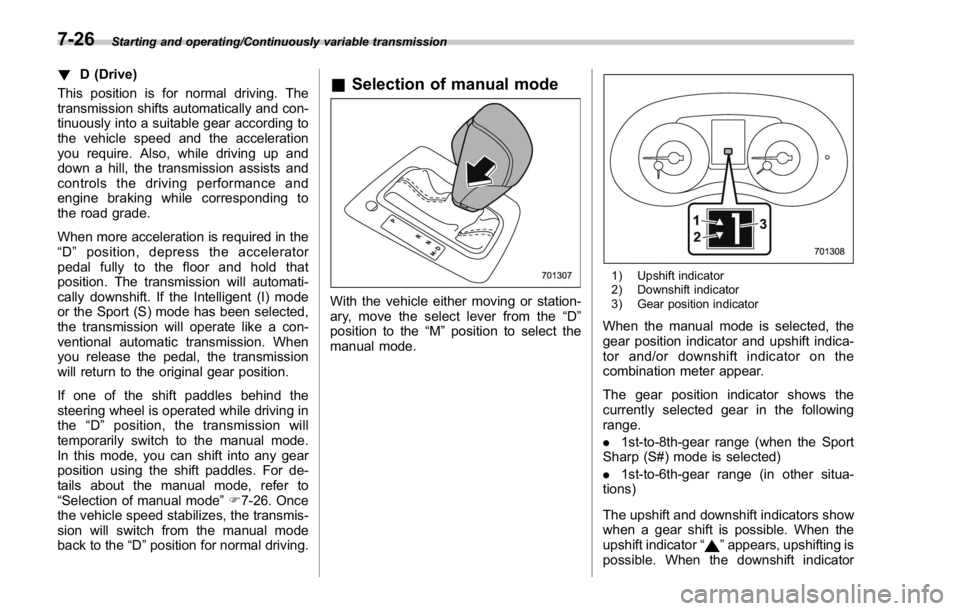
back to the “ D ” position for normal driving. & Selection of manual mode
With the vehicle either moving or station-
ary, move the select lever from the “ D ”
position to the “ M ” position to select the
manual mode. 1) Upshift indicator
2) Downshift indicator
3) Gear position indicator
When the manual mode is selected, the
gear position indicator and upshift indica-
tor and/or downshift indicator on the
combination meter appear.
The gear position indicator shows the
currently selected gear in the following
range.
. 1st-to-8th-gear range (when the Sport
Sharp (S#) mode is selected)
. 1st-to-6th-gear range (in other situa-
tions)
The upshift and downshift indicators show
when a gear shift is possible. When the
upshift indicator “
” appears, upshifting is
possible. When the downshift indicator7-26
Page 416 of 594

“ ” appears, downshifting is possible.
When both indicators appear, upshifting
and downshifting are both possible. When
the vehicle stops (for example, at traffic
signals), the downshift indicator turns off.
Gearshifts can be performed using the
shift paddle behind the steering wheel.
To upshift to the next higher gear position,
pull the shift paddle that has “ + ” indicated
on it. To downshift to the next lower gear
position, pull the shift paddle that has “ – ”
indicated on it.
To deselect the manual mode, return the
select lever to the “ D ” position from the “ M ”
position. CAUTIONDo not place or hang anything on
the shift paddles. Doing so may
result in accidental gear shifting.
NOTE Please read the following points care-
fully and bear them in mind when using
the manual mode.
. If you attempt to shift down when
the engine speed is too high, i.e., when
a downshift would push the tachometer
needle beyond the red zone, beeps will
be emitted to warn you that the down-
shift is not possible.
. If you attempt to shift up when the
vehicle speed is too low, the transmis-
sion will not respond.
. You can perform a skip-shift (for
example, from 4th to 2nd) by operating
the shift paddle twice in rapid succes-
sion.
. The transmission automatically se-
lects 1st gear when the vehicle stops
moving.
. If the temperature of the transmis-
sion fluid becomes too high, the “ AT
OIL TEMP ” warning light on the combi-
nation meter will illuminate. Immedi-
ately stop the vehicle in a safe location and let the engine idle until the warning
light turns off.
. By selecting the Sport Sharp (S#)
mode, upshifting will not occur auto-
matically. According to the road condi-
tions, shift change manually so that the
tachometer needle does not enter the
red zone. Also, if the engine revolu-
tions reach the specified number, the
fuel supply will be cut. In this case,
perform shift up operation.
& Shift lock function The shift lock function helps prevent the
improper operation of the select lever.
. The select lever cannot be operated
unless the ignition switch is turned to the
“ ON ” position and the brake pedal is
depressed.
. The select lever cannot be moved from
the “ P ” position to any other position
before the brake pedal is depressed.
Depress the brake pedal first, and then
operate the select lever.
. Only the “ P ” position allows you to turn
the ignition switch from the “ ACC ” position
to the “ LOCK ” / “ OFF ” position and remove
the key from the ignition switch.
. If the ignition switch is turned to the
“ LOCK ” / “ OFF ” position while the select
lever is in the “ N ” position, the select leverStarting and operating/Continuously variable transmission
– CONTINUED –7-27
Page 418 of 594

. Do not keep the vehicle in a stationary
position on an uphill grade by using the
“ D ” position. Use the brake instead.
. The engine may, on rare occasions,
knock when the vehicle rapidly acceler-
ates or rapidly pulls away from a standstill.
This phenomenon does not indicate a
malfunction.
SI-DRIVE (STI) SI-DRIVE (SUBARU Intelligent Drive)
works to maximize engine performance,
control and efficiency.
This system consists of three modes:
Intelligent (I), Sport (S), and Sport Sharp
(S#). By adjusting the SI-DRIVE selector,
the character of the power unit changes.
& Intelligent (I) mode ! For smooth, efficient performance
driving
The Intelligent (I) mode provides well-
balanced performance with greater fuel
efficiency and smooth driveability without
stress. Power delivery is moderate during
acceleration for maximum fuel efficiency. This is ideal for around-town driving and
situations that do not require full power
output. It provides better control in difficult
driving conditions, such as slippery roads
or loose surfaces, due to gentler throttle
response.
When the Intelligent (I) mode is selected,
a shift-up indicator “
” on the combina-
tion meter will blink to signal the best time
to shift gears for maximum fuel efficiency. Starting and operating/SI – DRIVE (STI)
– CONTINUED –7-29
Page 419 of 594
Starting and operating/SI – DRIVE (STI)
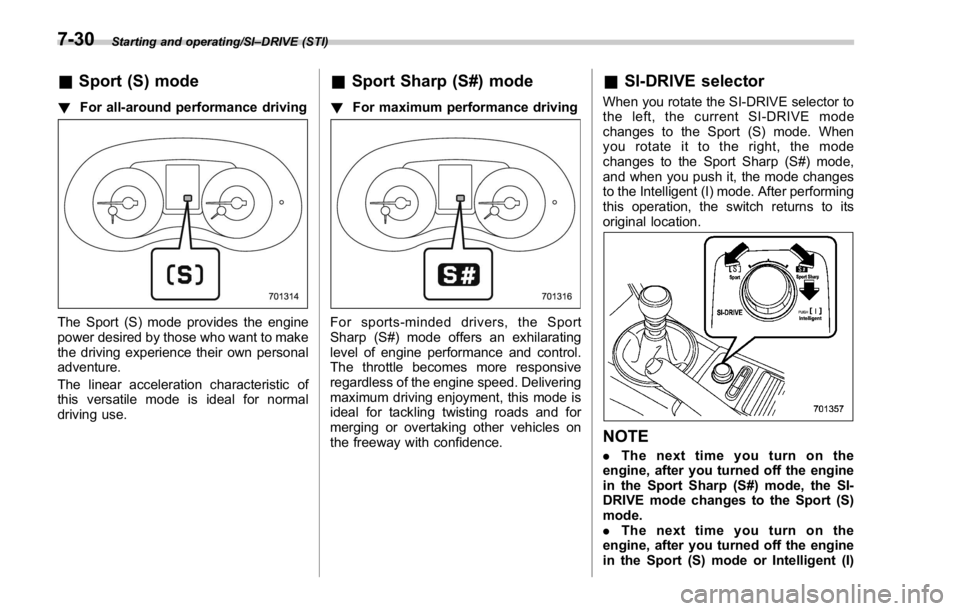
& Sport (S) mode! For all-around performance driving
The Sport (S) mode provides the engine
power desired by those who want to make
the driving experience their own personal
adventure.
The linear acceleration characteristic of
this versatile mode is ideal for normal
driving use. & Sport Sharp (S#) mode ! For maximum performance driving
For sports-minded drivers, the Sport
Sharp (S#) mode offers an exhilarating
level of engine performance and control.
The throttle becomes more responsive
regardless of the engine speed. Delivering
maximum driving enjoyment, this mode is
ideal for tackling twisting roads and for
merging or overtaking other vehicles on
the freeway with confidence. & SI-DRIVE selector When you rotate the SI-DRIVE selector to
the left, the current SI-DRIVE mode
changes to the Sport (S) mode. When
yourotateittotheright,themode
changes to the Sport Sharp (S#) mode,
and when you push it, the mode changes
to the Intelligent (I) mode. After performing
this operation, the switch returns to its
original location.
NOTE . Thenexttimeyouturnonthe
engine, after you turned off the engine
in the Sport Sharp (S#) mode, the SI-
DRIVE mode changes to the Sport (S)
mode.
. Thenexttimeyouturnonthe
engine, after you turned off the engine
in the Sport (S) mode or Intelligent (I)7-30
Page 420 of 594

mode, the SI-DRIVE mode will stay in
the same mode as when the engine
was turned off.
. While the engine is running, if the
CHECK ENGINE warning light/malfunc-
tion indicator light illuminates, the SI-
DRIVE mode changes to the Sport (S)
mode. In this case, it is not possible to
change to the Sport Sharp (S#) mode or
Intelligent (I) mode.
. If there is a possibility that the
engine could overheat because of a
temperature increase of the engine
coolant, it is not possible to change to
the Sport Sharp (S#) mode. While the
vehicle is in the Sport Sharp (S#) mode,
it changes to the Sport (S) mode when
the engine coolant temperature in-
creases.
. If any of the SI-DRIVE indicators
blink, the SI-DRIVE system may be
malfunctioning. Contact your SUBARU
dealer.
. While the engine is cool, you cannot
change to Sport Sharp (S#) mode. SI-DRIVE (except STI: CVT
models) SI-DRIVE (SUBARU Intelligent Drive)
works to maximize engine performance,
control and efficiency.
This system consists of three modes:
Intelligent (I), Sport (S), and Sport Sharp
(S#). By operating the SI-DRIVE switches,
the character of the power unit changes.
& Intelligent (I) mode ! For smooth, efficient performance
driving
The linear acceleration characteristic of
the Intelligent (I) mode is ideal for normal
driving usage. The Intelligent (I) mode provides well-
balanced performance with greater fuel
efficiency and smooth driveability without
stress. Power delivery is moderate during
acceleration for maximum fuel efficiency.
This is ideal for around-town driving and
situations that do not require full power
output. It provides better control in difficult
driving conditions, such as slippery roads
or loose surfaces, due to gentler throttle
response.
& Sport (S) mode ! For all-around performance driving
The Sport (S) mode provides the engine
power desired by those who want to make
the driving experience their own personal
adventure.Starting and operating/SI – DRIVE (except STI: CVT models)
– CONTINUED –7-31
Page 421 of 594

Starting and operating/SI – DRIVE (except STI: CVT models)
& Sport Sharp (S#) mode! For maximum performance driving
For sports-minded drivers, the Sport
Sharp (S#) mode offers an exhilarating
level of engine performance and control.
The throttle becomes more responsive
regardless of the engine speed. Delivering
maximum driving enjoyment, this mode is
ideal for tackling twisting roads and for
merging or overtaking other vehicles on
the freeway with confidence.
When you select the Sport Sharp (S#)
mode while the select lever is in the “ D ”
position, the transmission gear ratio will
shift from variable speed to eight-speed.
The select lever/gear position indicator
display will change from “ D ” to the gear
position. When selecting Sport Sharp (S#) mode,
the following controls will be applied.
Uphill control: Prevents unnecessary
shift-up/shift-down during ascent.
Cornering control: While turning, if there
is a large centrifugal force, shift-up will not
occur: during re-acceleration.
Braking control: At the beginning of
corners etc., heavy application of the
brake pedal will cause automatic down-
shift and gently re-accelerate.
Sudden acceleration return control:
During acceleration, if acceleration pedal
is returned suddenly (for example, at
corners etc.), shift-up will not be applied. & SI-DRIVE switches
NOTE If any of the SI-DRIVE indicators blink,
the SI-DRIVE system may be malfunc-
tioning. Contact your SUBARU dealer.
SI-DRIVE switches
To select the Intelligent (I) mode, perform
either of the following procedures.
. Press the “ S/I ” switch when the Sport
(S) mode is selected
. Press the “ S#/I ” switch when the Sport
Sharp (S#) mode is selected
To select the Sport (S) mode, press the “ S/
I ” switch when any mode other than Sport
(S) mode is selected.
To select the Sport Sharp (S#) mode,
press the “ S#/I ” switch when any mode7-32