2016 SUBARU WRX ESP
[x] Cancel search: ESPPage 127 of 594
Keys and doors/Moonroof
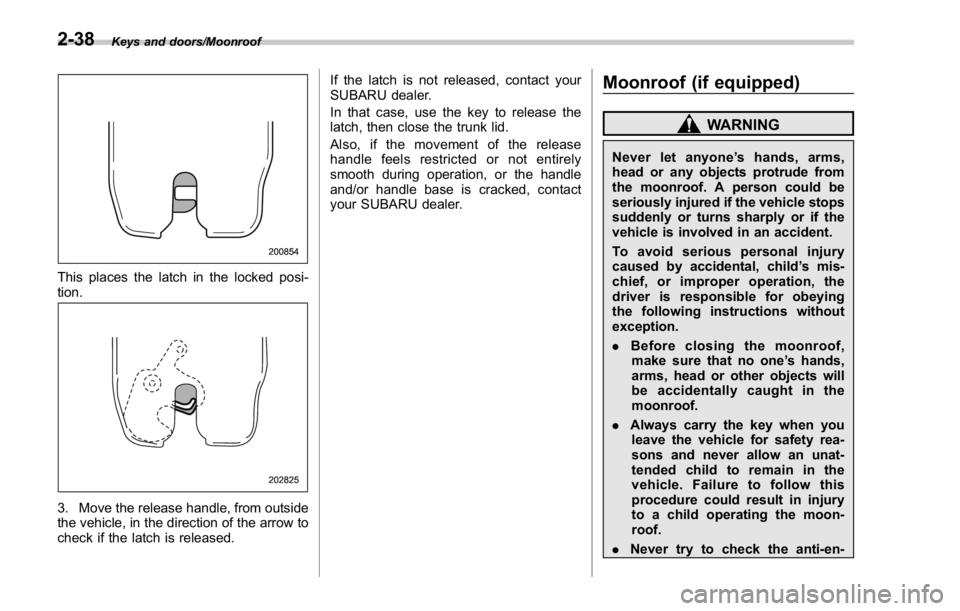
This places the latch in the locked posi-
tion.
3. Move the release handle, from outside
the vehicle, in the direction of the arrow to
check if the latch is released. If the latch is not released, contact your
SUBARU dealer.
In that case, use the key to release the
latch, then close the trunk lid.
Also, if the movement of the release
handle feels restricted or not entirely
smooth during operation, or the handle
and/or handle base is cracked, contact
your SUBARU dealer.
Moonroof (if equipped) WARNINGNever let anyone ’ shands,arms,
head or any objects protrude from
the moonroof. A person could be
seriously injured if the vehicle stops
suddenly or turns sharply or if the
vehicle is involved in an accident.
To avoid serious personal injury
caused by accidental, child ’ s mis-
chief, or improper operation, the
driver is responsible for obeying
the following instructions without
exception.
. Before closing the moonroof,
make sure that no one ’ s hands,
arms, head or other objects will
be accidentally caught in the
moonroof.
. Always carry the key when you
leave the vehicle for safety rea-
sons and never allow an unat-
tended child to remain in the
vehicle. Failure to follow this
procedure could result in injury
to a child operating the moon-
roof.
. Never try to check the anti-en-2-38
Page 131 of 594

Instruments and controls
Warning chimes and warning indicator of the
keyless access with push-button start system (if
equipped) ......................................................... 3-28
Security indicator light ....................................... 3-33
SI-DRIVE indicator (if equipped) .......................... 3-34
Shift-up indicator (STI) ........................................ 3-34
Select lever/gear position indicator (CVT
models). ........................................................... 3-34
Turn signal indicator lights ................................. 3-35
High beam indicator light ................................... 3-35
Cruise control indicator ...................................... 3-35
Cruise control set indicator ................................ 3-35
Automatic headlight beam leveler warning light
(models with LED headlights) ........................... 3-35
Front fog light indicator light (if equipped) .......... 3-35
Headlight indicator light ..................................... 3-35
Driver ’ s control center differential auto indicator
(STI) ................................................................. 3-35
Driver ’ s control center differential indicator and
warning (STI) .................................................... 3-36
REV indicator light (STI) ..................................... 3-37
Steering responsive fog lights warning indicator/
Steering responsive fog lights OFF indicator (if
equipped) ......................................................... 3-37
BSD/RCTA warning indicator (if equipped) .......... 3-37
BSD/RCTA OFF indicator (if equipped) ................ 3-37
Multi information display ................................... 3-37
Basic operation .................................................. 3-38
Welcome screen ................................................. 3-38
Good-bye screen ................................................ 3-39
Warning screen .................................................. 3-39
Basic screens .................................................... 3-44 Menu screens .................................................... 3-45
Multi function display ........................................ 3-48Basic operation ................................................. 3-49
Welcome screen ................................................ 3-49
Date screen ....................................................... 3-50
Ending screen ................................................... 3-50
Self-check screen .............................................. 3-50
Interruption screen ............................................ 3-52
Basic screens .................................................... 3-52
Selection screen ................................................ 3-58
Date and time settings ....................................... 3-62
Image quality and volume settings ..................... 3-69
Screen settings. ................................................. 3-71
Maintenance settings ......................................... 3-79
Driving history registration ................................. 3-82
Car settings ....................................................... 3-83
Initialize ............................................................. 3-92
Light control switch ........................................... 3-94Headlights ......................................................... 3-95
High/low beam change (dimmer) ... ..................... 3-96
Headlight flasher ............................................... 3-96
Daytime running light system ............................. 3-97
Turn signal lever ................................................ 3-97
One-touch lane changer ..................................... 3-98
Illumination brightness control ......................... 3-98
Headlight beam leveler (if equipped) ............... 3-99
Automatic headlight beam leveler (models with
LED headlights) ............................................... 3-99
Fog light switch (if equipped) ........................... 3-99
Steering responsive fog lights system (models
with EyeSight system) ..................................... 3-99
Page 143 of 594

Instruments and controls/Warning and indicator lights
: Vehicle Dynamics Control warning
light/Vehicle Dynamics Control opera-
tion indicator light
: Vehicle Dynamics Control OFF indica-
tor light
: LED headlight warning light
: Headlight indicator light
: Automatic headlight beam leveler
warning light (if equipped)
: Traction mode indicator light
: Steering responsive fog lights OFF
indicator light
If any lights fail to illuminate, it indicates a
burned-out bulb or a malfunction of the
corresponding system.
Consult your authorized SUBARU dealer
for repair.
& Seatbelt warning light
and chimeYour vehicle is equipped with a seatbelt
warning device at the driver ’ s and front
passenger ’ s seat, as required by current
safety standards.
With the ignition switch turned to the “ ON ”
position, this device reminds the driver
and front passenger to fasten their seat-
belts by illuminating the warning lights in the locations indicated in the following
illustration and sounding a chime.
Driver ’ s warning light
Front passenger ’ s warning light ! Operation
If the driver and/or front passenger have/
has not yet fastened the seatbelt(s) when
the ignition switch is turned to the “ ON ”
position, the seatbelt warning light(s) will
flash for 6 seconds, to warn that the
seatbelt(s) is/are unfastened. If the dri-
ver ’ s seatbelt is not fastened, a chime will
also sound simultaneously.
NOTE . If the driver ’ s and/or front passen-
ger ’ s seatbelt(s) are/is still not fastened
6 seconds later, the seatbelt warning
device operates as follows according
to the vehicle speed.
– At speeds lower than approxi-
mately 9 mph (15 km/h)
The warning light(s) for unfastened
seatbelt(s) will alternate between
steady illumination and flashing at
15-second intervals. The chime will
not sound.
– At speeds higher than approxi-
mately 9 mph (15 km/h)
The warning light(s) for unfastened
seatbelt(s) will alternate between
flashing and steady illumination at
15-second intervals and the chime
will sound while the warning light(s)
is/are flashing.
. It is possible to cancel the warning3-14
Page 148 of 594

& Low tire pressure
warning light (U.S.-spec.
models)When the ignition switch is turned to the
“ ON ” position, the low tire pressure warn-
ing light will illuminate for approximately 2
seconds to check that the tire pressure
monitoring system (TPMS) is functioning
properly. If there is no problem and all tires
are properly inflated, the light will turn off.
Each tire, including the spare (if provided),
should be checked monthly when cold
and inflated to the inflation pressure
recommended by the vehicle manufac-
turer on the vehicle placard or tire inflation
pressure label. (If your vehicle has tires of
a different size than the size indicated on
the vehicle placard or tire inflation pres-
sure label, you should determine the
proper tire inflation pressure for those
tires.)
As an added safety feature, your vehicle
has been equipped with a tire pressure
monitoring system (TPMS) that illuminates
a low tire pressure telltale when one or
more of your tires is significantly under-
inflated. Accordingly, when the low tire
pressure telltale illuminates, you should
stop and check your tires as soon as
possible, and inflate them to the proper
pressure. Driving on a significantly under- inflated tire causes the tire to overheat and
can lead to tire failure. Under-inflation also
reduces fuel efficiency and tire tread life,
and may affect the vehicle ’ s handling and
stopping ability.
Please note that the TPMS is not a
substitute for proper tire maintenance,
and it is the driver ’ s responsibility to
maintain correct tire pressure, even if
under-inflation has not reached the level
to trigger illumination of the TPMS low tire
pressure telltale.
Your vehicle has also been equipped with
a TPMS malfunction indicator to indicate
when the system is not operating properly.
The TPMS malfunction indicator is com-
bined with the low tire pressure telltale.
When the system detects a malfunction,
the telltale will flash for approximately one
minute and then remain continuously
illuminated. This sequence will continue
upon subsequent vehicle start-ups as long
as the malfunction exists. When the
malfunction indicator is illuminated, the
system may not be able to detect or signal
low tire pressure as intended. TPMS
malfunctions may occur for a variety of
reasons, including the installation of re-
placement or alternate tires or wheels on
the vehicle that prevent the TPMS from
functioning properly. Always check the
TPMS malfunction telltale after replacing one or more tires or wheels on your
vehicle to ensure that the replacement or
alternate tires and wheels allow the TPMS
to continue to function properly.
Should the warning light illuminate stea-
dily after blinking for approximately one
minute, have the system inspected by
your nearest SUBARU dealer as soon as
possible.
WARNINGIf this light does not illuminate
briefly after the ignition switch is
turned ON or the light illuminates
steadily after blinking for approxi-
mately one minute, you should have
your Tire Pressure Monitoring Sys-
tem checked at a SUBARU dealer as
soon as possible.
If this light illuminates while driving,
never brake suddenly and keep
driving straight ahead while gradu-
ally reducing speed. Then slowly
pull off the road to a safe place.
Otherwise an accident involving
serious vehicle damage and serious
personal injury could occur.
If this light still illuminates while
driving after adjusting the tire pres-
sure, a tire may have significant
damage and a fast leak that causesInstruments and controls/Warning and indicator lights
– CONTINUED –3-19
Page 155 of 594

Instruments and controls/Warning and indicator lights
& Vehicle Dynamics
Control warning light/
Vehicle Dynamics Con-
trol operation indicator
light! Vehicle Dynamics Control warning
light
CAUTIONThe Vehicle Dynamics Control sys-
tem provides its ABS control
through the electrical circuit of the
ABS. Accordingly, if the ABS is
inoperative, the Vehicle Dynamics
Control system becomes unable to
provide ABS control. As a result, the
Vehicle Dynamics Control system
also becomes inoperative, causing
the warning light to illuminate.
Though both the Vehicle Dynamics
Control and ABS are inoperative in
this case, the ordinary functions of
the brake system are still available.
You will be safe while driving with
this condition, but drive carefully
and have your vehicle checked at a
SUBARU dealer as soon as possi-
ble. NOTE . If the electrical circuit of the Vehicle
Dynamics Control system itself mal-
functions, the warning light only illumi-
nates. At this time, the ABS (Anti-lock
Brake System) remains fully opera-
tional.
. The warning light illuminates when
the electronic control system of the
ABS/Vehicle Dynamics Control system
malfunctions.
The Vehicle Dynamics Control system is
probably inoperative under any of the
following conditions. Have your vehicle
checked at a SUBARU dealer immedi-
ately.
. The warning light does not illuminate
when the ignition switch is turned to the
“ ON ” position.
. The warning light illuminates while the
vehicle is running.
NOTE If the warning light behavior is as
described in the following examples,
the Vehicle Dynamics Control system
may be considered normal.
. The warning light illuminates when
the ignition switch is turned to the
“ ON ” position and turns off approxi-
mately 2 seconds after the engine has
started. . The warning light illuminates right
after the engine is started but turns off
immediately, remaining off.
. The warning light illuminates after
the engine has started and turns off
while the vehicle is subsequently being
driven.
. The warning light illuminates during
driving, but it turns off immediately and
remains off.
. The warning light illuminates when
the engine has stalled and continues to
illuminate after the engine has been
restarted. However, it will turn off once
the vehicle starts moving.
! Vehicle Dynamics Control opera-
tion indicator light
The indicator light flashes during activa-
tion of the skid suppression function and
during activation of the traction control
function.
NOTE . The light may remain illuminated for
a short period of time after the engine
has been started, especially in cold
weather. This does not indicate the
existence of a problem. The light
should turn off as soon as the engine
has warmed up.
. The indicator light illuminates when
the engine has developed a problem3-26
Page 157 of 594

Instruments and controls/Warning and indicator lights
! Vehicle Dynamics Control OFF in-
dicator light
This light illuminates when the Vehicle
Dynamics Control OFF switch is operated
to select the traction mode or the Vehicle
Dynamic Control OFF mode. For details,
refer to “ Vehicle Dynamics Control sys-
tem ” F 7-38.
NOTE . The light may remain illuminated for
a while after the engine has been
started, especially in cold weather. This
does not indicate the existence of a
problem. The light should turn off as
soon as the engine has warmed up.
. The indicator light illuminates when
the engine has developed a problem
and the CHECK ENGINE warning light/
malfunction indicator light is on.
The Vehicle Dynamics Control system is
probably malfunctioning under the follow-
ing conditions. Have your vehicle checked
at a SUBARU dealer as soon as possible.
. The light does not illuminate when the
ignition switch is turned to the “ ON ”
position.
. The light does not turn off even after
the lapse of several minutes (the engine
has warmed up) after the engine has
started. ! Traction mode indicator light
The light illuminates when the Vehicle
Dynamics Control OFF switch is pressed
briefly to select the traction mode. For
details, refer to “ Traction mode ” F 7-41.
& Warning chimes and warning
indicator of the keyless ac-
cess with push-button start
system (if equipped)
Access key warning light
The keyless access with push-button start
system sounds a warning chime and the
access key warning indicator appears on
the combination meter in order to minimize
improper operations and help protect your
vehicle from theft.
When the warning chime sounds and/or
the warning indicator appears, take the appropriate action.
WARNINGNever drive the vehicle if the indi-
cator on the push-button ignition
switch is flashing in green when
starting the engine. This indicates
the status that the steering wheel is
not released and could result in an
accident involving serious injury or
death.
CAUTION. When starting the engine again
after the operation indicator on
the push-button ignition switch
flashes in green, if the operation
indicator is still flashing in green,
there could be a steering lock
malfunction. Contact your
SUBARU dealer as soon as pos-
sible.
. When the operation indicator on
the push-button ignition switch
flashes in orange, contact a
SUBARU dealer immediately.3-28
Page 166 of 594

& REV indicator light
(STI)This indicator light illuminates when the
engine speed reaches the level that was
previously set. This indicator light also
flashes when the tachometer needle en-
ters the red zone. For details, refer to
“ REV indicator light and buzzer (STI) ” F 3-
12.
& Steering responsive
fog lights warning indi-
cator/Steering respon-
sive fog lights OFF in-
dicator (if equipped)
NOTE For details about the steering respon-
sive fog lights system, refer to “ Steer-
ing responsive fog lights system (mod-
els with EyeSight system) ” F 3-99.
! Steering responsive fog lights
warning indicator
This indicator starts blinking when the
steering responsive fog lights system
malfunctions. When this indicator appears
while the system is activated, contact your
SUBARU dealer for an inspection. ! Steering responsive fog lights OFF
indicator
This indicator appears when the steering
responsive fog lights system is deacti-
vated. This indicator disappears when the
system is activated.
& BSD/RCTA warning in-
dicator (if equipped) This warning indicator appears when the
BSD/RCTA is malfunctioning. In this case
the BSD/RCTA warning indicator will be
shown on the multi information display of
the combination meter. When this indica-
tor appears, have your vehicle inspected
by your SUBARU dealer as soon as
possible.
& BSD/RCTA OFF indica-
tor (if equipped) The indicator appears when the BSD/
RCTA OFF switch is pressed to deactivate
the BSD/RCTA. In this case the BSD/
RCTA OFF indicator will be shown on the
multi information display of the combina-
tion meter. For details, refer to “ BSD/
RCTA ” F 7-56. Multi information display WARNINGAlways pay adequate attention to
safe driving when operating the
multi information display while the
vehicle is in motion. When operation
of the multi information display
interferes with your ability to con-
centrate on driving, stop the vehicle
before performing operations on the
screen. Also, do not concentrate on
the display while driving. Doing so
may cause you to look away from
the road and could result in an
accident.
Various information will be shown on the
multi information display. Also, a warning
message will appear on the display if a
malfunction, etc. is detected. In addition,
several settings for the displayed content
can be performed.Instruments and controls/Multi information display
– CONTINUED –3-37
Page 179 of 594

Instruments and controls/Multi function display
& Date screenIf you have set the date and time in the
selection screen, after the welcome
screen is displayed, the current date will
be displayed for a certain period of time. If
“ On/Off setting ” is set to “ On ” in the
“ Maintenance settings ” , the date will be
displayed after the self-check screen.
! Birthday/anniversary screen
Example of notification on an anniversary
If you have set a birthday or anniversary,
after the date screen is displayed, the
notification (reminder) will be displayed for
a certain period of time from 7 days prior
to the set date. NOTE . Displaying the birthday/anniversary
screen can be set to on or off. Refer to
“ Bypass screen setting ” F 3-77.
. Up to five items can be set for
birthdays and anniversaries respec-
tively. Refer to “ Selection screen ” F 3-
58.
& Ending screen If “ Eco Summary ” is set to “ On ” in the
“ Bypass screen setting ” , the “ Fuel con-
sumption results screen ” will be displayed
before the screen turns off when the
ignition switch is turned to the “ LOCK ” /
“ OFF ” position. Fuel consumption results screen
1) The average fuel consumption for the
entire driving distance, from when the
ignition switch was turned to the “ ON ”
position to when it was turned to the
“ LOCK ” / “ OFF ” position.
2) This display shows the average rate of
fuel consumption since the trip meter
was last reset. It displays the average
fuel consumption corresponding to the A
trip meter mileage or the one corre-
sponding to the B trip meter mileage.
& Self-check screen When the ignition switch is turned to the
“ ON ” position, the vehicle self-check will
be performed. The screens corresponding
to the following items will appear one after
another for several seconds each.3-50