2016 SUBARU WRX ESP
[x] Cancel search: ESPPage 340 of 594

tration may be displayed on the Blue-
tooth device ’ s screen. Respond and
operate the Bluetooth device accord-
ing to the confirmation message.
4. Check that the screen is displayed
when registration is complete.
. The system waits for connection
requests coming from the registered
device.
. At this stage, the Bluetooth func-
tions are not yet available.
! Deleting a Bluetooth device
1. Display the “ BT Devices Connection ”
screen. Refer to “ Registering a Bluetooth
phone for the first time ” F 5-81.
2. Select the desired device.
Press and hold the Trash box icon for the
device to be deleted, and then select
“ OK ” .
NOTE When deleting a Bluetooth phone, the
contact data will be deleted at the same
time.
! Connecting a Bluetooth device
Up to 5 Bluetooth devices (Phones (HFP)
and audio devices (AVP)) can be regis-
tered. If more than 1 Bluetooth device has been
registered, select which device to connect
to.
1. Display the “ BT Devices Connection ”
screen. Refer to “ Registering a Bluetooth
phone for the first time ” F 5-81.
2. Select the device to be connected.
. Supported profile icons will be dis-
played.
–
: Phone
– : Audio device
– : Smartphone Application
. Supported profile icons for currently
connected devices will illuminate.
. The Audio icon illuminates only
when in the Bluetooth audio mode.
. All icons are dimmed when Blue-
tooth is set to OFF or when the
connection cannot be made with the
device.
NOTE . It may take time if the device con-
nection is carried out during Bluetooth
audio playback.
. Depending on the type of Bluetooth
device being connected, it may be
necessary to perform additional steps
on the device.
. It is not possible to establish a
Bluetooth connection with iOS devices currently connected with a USB cable.
! Bluetooth ON/OFF
1. Display the “ BT Devices Connection ”
screen. Refer to “ Registering a Bluetooth
phone for the first time ” F 5-81.
2. Select the “ Bluetooth ON/OFF ” key.
. Select “ ON ” or “ OFF ” to connect/
disconnect the Bluetooth communica-
tion. “ ON ” establishes a connection,
and “ OFF ” disconnects the connec-
tion.
. The setting is fixed as “ OFF ” when
no device is registered.
! “ In-Car-Device setting ” screen
The Bluetooth settings can be confirmed
and changed.
1. Display the “ SETTINGS ” screen. Refer
to “ Registering a Bluetooth phone for the
first time ” F 5-81.
2. On the SETTINGS for In-Car-Device
setting select “ set ” key. Audio/Bluetooth ®
settings
– CONTINUED –5-85
Page 363 of 594

Audio/Voice command system operation
! Voice command system operation
1. Press the talk switch.
. After the voice command top screen
has been displayed, speech guidance
will commence.
NOTE When the voice command mode is
audio mode, voice guidance for the
voice command system can be skipped
by pressing the talk switch. 2. Say the command.
. Say “ Help ” or “ Phone ” .
. Say “ Audio ” .
. Commands related with each func-
tion are displayed on the screen of the
each function tab. Some commonly used commands are displayed on the
screen of the main tab. Even if any tab
is selected, all commands can be
operated.
. Saying
Help (Help) prompts gui-
dance to offer examples of commands
and operation methods.
. To cancel voice recognition, select
“ 6 ” , or press and hold the talk switch.
NOTE If the system does not respond or the
confirmation screen does not disap-
pear, press the talk switch and try
again.
! Voice command example: Call
name
1. Press the talk switch.
2. Say
“ Call
. A confirmation screen will be dis-
played showing the recognition re-
sults. If multiple matching items are
found, a selection screen will be
displayed. Say
“
the number.
NOTE
. In the same manner as it is dis-
played on the screen, “ Call
Page 369 of 594
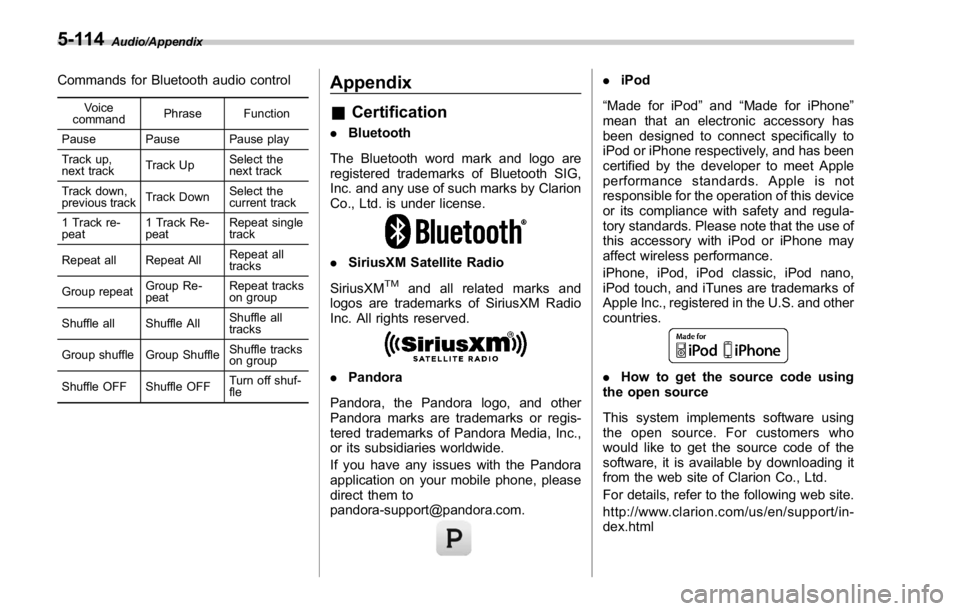
Audio/Appendix
Commands for Bluetooth audio control Voice
command Phrase Function
Pause Pause Pause play
Track up,
next track Track Up Select the
next track
Track down,
previous track Track Down Select the
current track
1 Track re-
peat 1 Track Re-
peat Repeat single
track
Repeat all Repeat All Repeat all
tracks
Group repeat Group Re-
peat Repeat tracks
on group
Shuffle all Shuffle All Shuffle all
tracks
Group shuffle Group Shuffle Shuffle tracks
on group
Shuffle OFF Shuffle OFF Turn off shuf-
fleAppendix & Certification . Bluetooth
The Bluetooth word mark and logo are
registered trademarks of Bluetooth SIG,
Inc. and any use of such marks by Clarion
Co., Ltd. is under license.
. SiriusXM Satellite Radio
SiriusXM TM
and all related marks and
logos are trademarks of SiriusXM Radio
Inc. All rights reserved.
. Pandora
Pandora, the Pandora logo, and other
Pandora marks are trademarks or regis-
tered trademarks of Pandora Media, Inc.,
or its subsidiaries worldwide.
If you have any issues with the Pandora
application on your mobile phone, please
direct them to
[email protected]. . iPod
“ Made for iPod ” and “ Made for iPhone ”
mean that an electronic accessory has
been designed to connect specifically to
iPod or iPhone respectively, and has been
certified by the developer to meet Apple
performance standards. Apple is not
responsible for the operation of this device
or its compliance with safety and regula-
tory standards. Please note that the use of
this accessory with iPod or iPhone may
affect wireless performance.
iPhone, iPod, iPod classic, iPod nano,
iPod touch, and iTunes are trademarks of
Apple Inc., registered in the U.S. and other
countries.
. How to get the source code using
the open source
This system implements software using
the open source. For customers who
would like to get the source code of the
software, it is available by downloading it
from the web site of Clarion Co., Ltd.
For details, refer to the following web site.
http://www.clarion.com/us/en/support/in-
dex.html5-114
Page 370 of 594

& Certification for the Hands-
free system This device complies with Part 15 of FCC
Rules and Industry Canada licence-ex-
empt RSS standard(s). Operation is sub-
ject to the following two conditions: (1) this
device may not cause harmful interfer-
ence, and (2) this device must accept any
interference received, including interfer-
ence that may cause undesired operation.
Le présent appareil est conforme aux la
partie 15 des règles de la FCC et CNR
d ’ Industrie Canada applicables aux appa-
reils radio exempts de licence. L ’ exploita-
tion est autorisée aux deux conditions
suivantes : (1) l ’ appareil ne doit pas
produire de brouillage, et (2) l ’ utilisateur
de l ’ appareil doit accepter tout brouillage
radioélectrique subi, même si le brouillage
est susceptible d ’ en compromettre le
fonctionnement.
This equipment complies with FCC/IC
radiation exposure limits set forth for an
uncontrolled environment and meets the
FCC radio frequency (RF) Exposure
Guidelines in Supplement C to OET65
and RSS-102 of the IC radio frequency
(RF) Exposure rules. This equipment has
very low levels of RF energy that it
deemed to comply without maximum
permissive exposure evaluation (MPE). Cet équipement est conforme aux limites
d ’ exposition aux rayonnements énoncées
pour un environnement non contrôlé et
respecte les règles les radioélectriques
(RF) de la FCC lignes directrices d ’ expo-
sition dans le Supplément C à OET65 et
d ’ exposition aux fréquences radioélectri-
ques (RF) CNR-102 de l ’ IC. Cet équipe-
ment émet une énergie RF très faible qui
est considérée conforme sans évaluation
de l ’ exposition maximale autorisée.
FCC CAUTION
Changes or modifications not expressly
approved by the party responsible for
compliance could void the user ’ s authority
to operate the equipment.
This transmitter must not be co-located or
operated in conjunction with any other
antenna or transmitter. & Certification for Mexico mod-
els . IFETEL RCPCLPF14-0253-A2
Clarion PF-3678
. IFETEL RCPCLPF14-0253-A3
Clarion PF-3755 Audio/Appendix
5-115
Page 379 of 594
Interior equipment/Accessory power outlets
trim can be used to hold a beverage bottle
and other items.
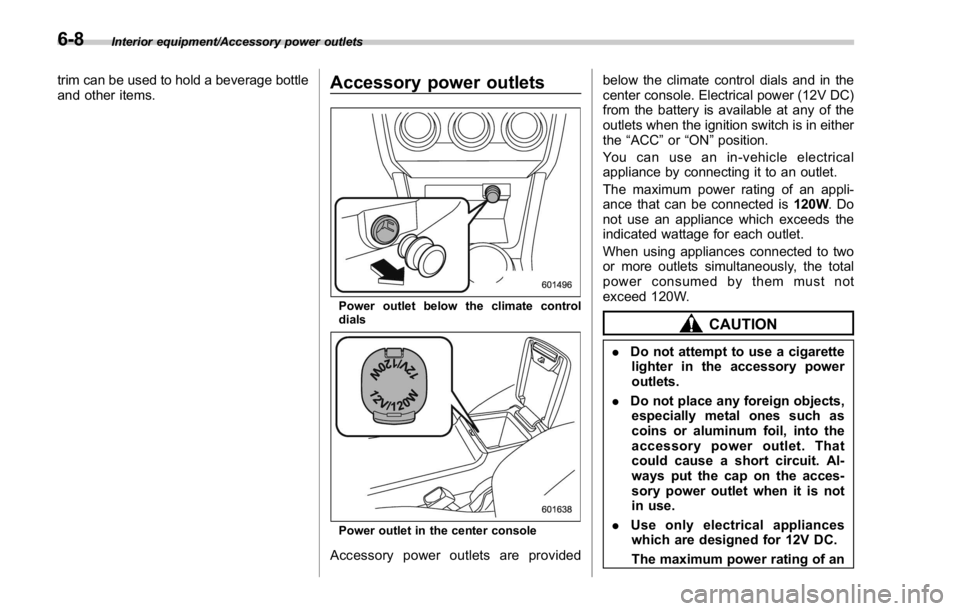
Accessory power outlets
Power outlet below the climate control
dials
Power outlet in the center console
Accessory power outlets are provided below the climate control dials and in the
center console. Electrical power (12V DC)
from the battery is available at any of the
outlets when the ignition switch is in either
the “ ACC ” or “ ON ” position.
You can use an in-vehicle electrical
appliance by connecting it to an outlet.
The maximum power rating of an appli-
ance that can be connected is 120W .Do
not use an appliance which exceeds the
indicated wattage for each outlet.
When using appliances connected to two
or more outlets simultaneously, the total
power consumed by them must not
exceed 120W.
CAUTION. Do not attempt to use a cigarette
lighter in the accessory power
outlets.
. Do not place any foreign objects,
especially metal ones such as
coins or aluminum foil, into the
accessory power outlet. That
could cause a short circuit. Al-
ways put the cap on the acces-
sory power outlet when it is not
in use.
. Use only electrical appliances
which are designed for 12V DC.
The maximum power rating of an6-8
Page 395 of 594

Starting and operating/Fuel
left. Do not remove the cap
quickly. Fuel may be under pres-
sure and spray out of the fuel
filler neck, especially in hot
weather. If you hear a hissing
sound while you are removing
the cap, wait for the sound to
stop and then slowly open the
cap to prevent fuel from spraying
out and creating a fire hazard.
3. Set the fuel filler cap on the cap holder
inside the fuel filler lid.
WARNING
. When refueling, insert the fuel
nozzle securely into the fuel filler
pipe. If the nozzle is lifted or not
fully inserted, its automatic stop- ping mechanism may not func-
tion, causing fuel to overflow the
tank and creating a fire hazard.
. Stop refueling when the auto-
matic stop mechanism on the
fuel nozzle activates. If you con-
tinue to add fuel, temperature
changes or other conditions
may cause fuel to overflow from
the tank and create a fire hazard.
4. Stop filling the tank after the fuel filler
pump automatically stops. Do not add any
more fuel.
5. Put the cap back on, turn it clockwise
until you hear a clicking noise. Be certain
not to catch the tether under the cap while
tightening.
CAUTION
Make sure that the cap is tightened
until it clicks to prevent fuel spillage
in the event of an accident.
6. Close the fuel filler lid completely.
CAUTION
If you spill any fuel on the painted
surface, rinse it off immediately.
Otherwise, the painted surface could be damaged.
NOTE . You will see the “ ” sign in the fuel
gauge. This indicates that the fuel filler
door (lid) is located on the right side of
the vehicle.
. If the fuel filler cap is not tightened
until it clicks or if the tether is caught
under the cap, the CHECK ENGINE
warning light/malfunction indicator
light may illuminate. Refer to “ CHECK
ENGINE warning light/Malfunction in-
dicator light ” F 3-16.
CAUTION. Never add any cleaning agents to
the fuel tank. The addition of a
cleaning agent may cause da-
mage to the fuel system.
. After refueling, turn the cap
clockwise until it clicks to ensure
that it is fully tightened. If the cap
is not securely tightened, fuel
may leak out while the vehicle is
being driven or fuel spillage
could occur in the event of an
accident, creating a fire hazard.
. Do not let fuel spill on the exterior7-6
Page 396 of 594
surfaces of the vehicle. Because
fuel may damage the paint, be
sure to wipe off any spilled fuel
quickly. Paint damage caused by
spilled fuel is not covered under
the SUBARU Limited Warranty.
. Always use a genuine SUBARU
fuel filler cap. If you use the
wrong cap, it may not fit or have
proper venting and your fuel tank
and emission control system
may be damaged. It could also
lead to fuel spillage and a fire.
. Immediately put fuel in the tank
whenever the low fuel warning
light illuminates. Engine misfires
as a result of an empty tank
could cause damage to the en-
gine. Continuing to operate your
vehicle at an extremely low fuel
level may result in a reduction of
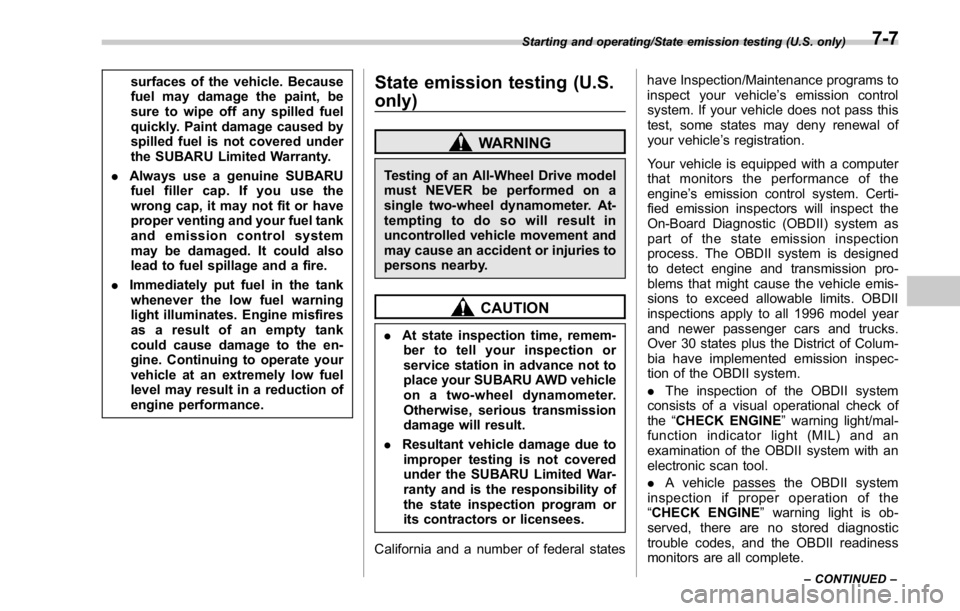
engine performance. State emission testing (U.S.
only) WARNINGTesting of an All-Wheel Drive model
must NEVER be performed on a
single two-wheel dynamometer. At-
tempting to do so will result in
uncontrolled vehicle movement and
may cause an accident or injuries to
persons nearby.
CAUTION. At state inspection time, remem-
ber to tell your inspection or
service station in advance not to
place your SUBARU AWD vehicle
on a two-wheel dynamometer.
Otherwise, serious transmission
damage will result.
. Resultant vehicle damage due to
improper testing is not covered
under the SUBARU Limited War-
ranty and is the responsibility of
the state inspection program or
its contractors or licensees.
California and a number of federal states have Inspection/Maintenance programs to
inspect your vehicle ’ s emission control
system. If your vehicle does not pass this
test, some states may deny renewal of
your vehicle ’ s registration.
Your vehicle is equipped with a computer
that monitors the performance of the
engine ’ s emission control system. Certi-
fied emission inspectors will inspect the
On-Board Diagnostic (OBDII) system as
part of the state emission inspection
process. The OBDII system is designed
to detect engine and transmission pro-
blems that might cause the vehicle emis-
sions to exceed allowable limits. OBDII
inspections apply to all 1996 model year
and newer passenger cars and trucks.
Over 30 states plus the District of Colum-
bia have implemented emission inspec-
tion of the OBDII system.
. The inspection of the OBDII system
consists of a visual operational check of
the “ CHECK ENGINE ” warning light/mal-
function indicator light (MIL) and an
examination of the OBDII system with an
electronic scan tool.
. A vehicle
passes the OBDII system
inspection if proper operation of the
“ CHECK ENGINE ” warning light is ob-
served, there are no stored diagnostic
trouble codes, and the OBDII readiness
monitors are all complete.Starting and operating/State emission testing (U.S. only)
– CONTINUED –7-7
Page 405 of 594

Starting and operating/Remote engine start system (dealer option)
! Stopping the engine
Press and hold the lock button to stop the
engine with remote engine start system.
! Automatic engine shutdown
The remote engine start system will
automatically shut down or will not start
the engine under the following conditions.
. The total run-time has exceeded 20
minutes.
. Any door is opened.
. The select lever is moved to any
position other than “ P ” .
. The engine hood is opened.
. Thepush-buttonignitionswitchis
pressed.
. The brake pedal is depressed.
. The engine speed is 3,000 rpm or
more.
The time setting until the engine auto-
matically stops can be changed. To
change it, please contact your SUBARU
dealer. Note that some settings may
violate state, provincial, or local laws and
regulations. Check the laws in your area to
determine which setting is permitted. & Entering the vehicle while it
is running via remote start 1. Unlock the vehicle doors using the
keyless access function. If the vehicle ’ s
doors are unlocked manually using the
key, the vehicle ’ s alarm system will trigger
(if the alarm system is armed prior to
activating the remote engine start system)
and the engine will turn off. Perform either
of the following procedures to disarm the
alarm system. Refer to “ Alarm system ”
F 2-25.
. Switch the ignition to the “ ACC ” or
“ ON ” state by pressing the push-button
ignition switch once or twice, respec-
tively.
. Press any button on the access key/
transmitter.
2. Enter the vehicle.
3. The engine will shut down when any
door is opened.
4. Press the push-button ignition switch
while depressing the brake pedal to restart
the engine.
& Entering the vehicle follow-
ing remote engine start shut-
down
An alarm trigger may occur if the vehicle is
opened by the remote keyless entry
transmitter within a few seconds immedi- ately following remote engine start shut-
down.
& Pre-heating or pre-cooling
the interior of the vehicle Before exiting the vehicle, set the tem-
perature controls to the desired setting
and operation. After the system starts the
engine, the heater or air conditioning will
activate and heat or cool the interior to
your setting.
& System maintenance For models with “ keyless access with
push-button start system ” :
Perform the procedure described in “ Re-
placing battery of access key ” F 11-50.7-16