2016 SUBARU WRX light
[x] Cancel search: lightPage 429 of 594
Starting and operating/Vehicle Dynamics Control system
the following conditions occur.
– Slight twitching of the brake
pedal is felt.
– The vehicle or steering wheel
shakes to a small degree.
– An operating sound from the
engine compartment is heard
briefly when starting the engine
and when driving off after starting
the engine.
– The brake pedal seems to jolt
when driving off after starting the
engine.
. In the circumstances shown in the
following list, the vehicle may be less
stable than it feels to the driver. The
Vehicle Dynamics Control System may
therefore operate. Such operation does
not indicate a system malfunction.
– on gravel-covered or rutted
roads
– on unfinished roads
– when the vehicle is fitted with
snow tires or winter tires
. Activation of the Vehicle Dynamics
Control system will cause operation of
the steering wheel to feel slightly
different compared to that for normal
conditions.
. It is always important to reduce
speed when approaching a corner,
even if your vehicle is equipped with the Vehicle Dynamics Control system.
. Always turn off the engine before
replacing a tire. Failure to do so may
render the Vehicle Dynamics Control
system unable to operate correctly.
& Vehicle Dynamics Control
system monitor Refer to “ Vehicle Dynamics Control warn-
ing light/Vehicle Dynamics Control opera-
tion indicator light ” F 3-26 and “ Vehicle
Dynamics Control OFF indicator light/
Traction mode indicator light ” F 3-27.& Vehicle Dynamics Control
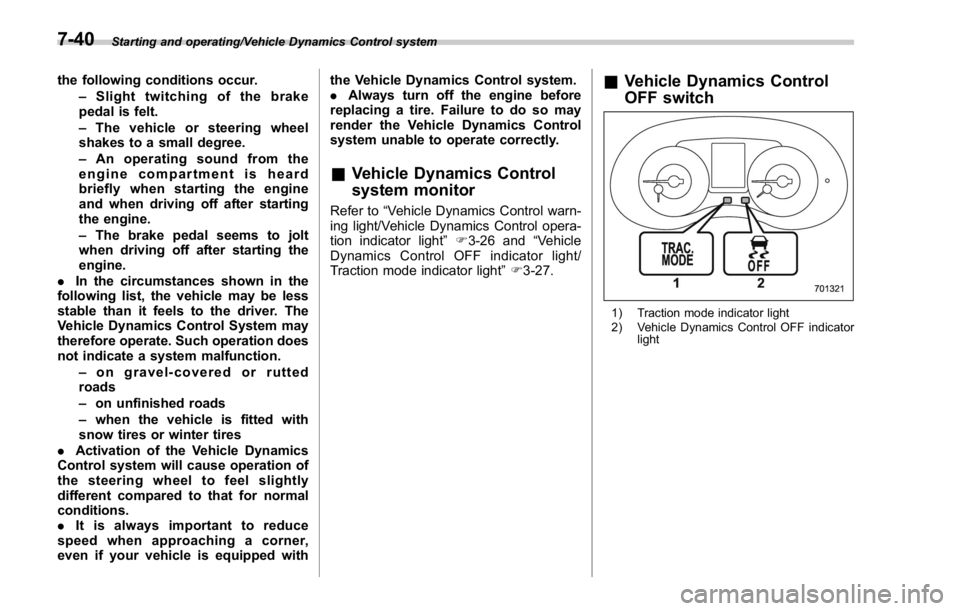
OFF switch
1) Traction mode indicator light
2) Vehicle Dynamics Control OFF indicator
light7-40
Page 430 of 594
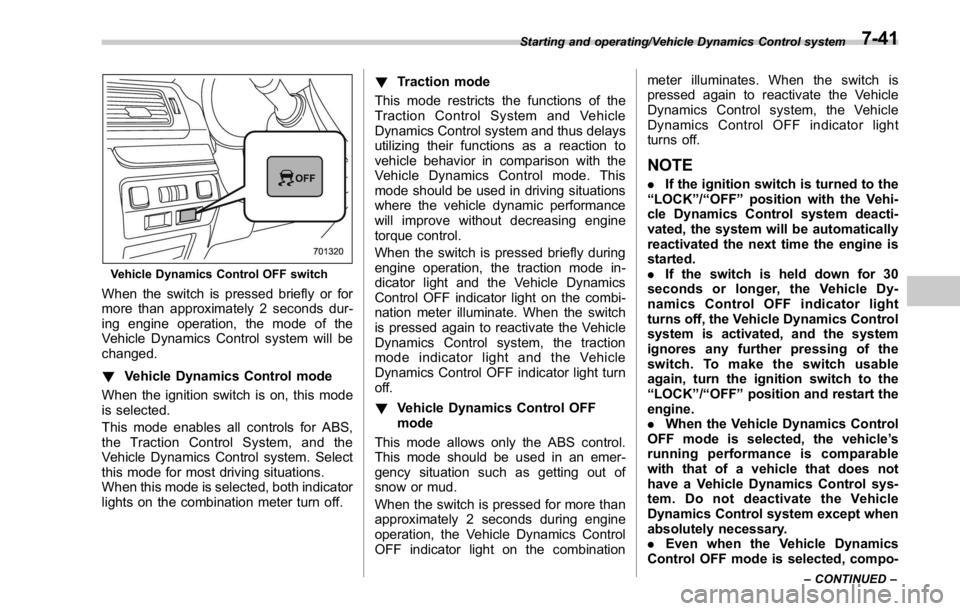
Vehicle Dynamics Control OFF switch
When the switch is pressed briefly or for
more than approximately 2 seconds dur-
ing engine operation, the mode of the
Vehicle Dynamics Control system will be
changed.
! Vehicle Dynamics Control mode
When the ignition switch is on, this mode
is selected.
This mode enables all controls for ABS,
the Traction Control System, and the
Vehicle Dynamics Control system. Select
this mode for most driving situations.
When this mode is selected, both indicator
lights on the combination meter turn off. ! Traction mode
This mode restricts the functions of the
Traction Control System and Vehicle
Dynamics Control system and thus delays
utilizing their functions as a reaction to
vehicle behavior in comparison with the
Vehicle Dynamics Control mode. This
mode should be used in driving situations
where the vehicle dynamic performance
will improve without decreasing engine
torque control.
When the switch is pressed briefly during
engine operation, the traction mode in-
dicator light and the Vehicle Dynamics
Control OFF indicator light on the combi-
nation meter illuminate. When the switch
is pressed again to reactivate the Vehicle
Dynamics Control system, the traction
mode indicator light and the Vehicle
Dynamics Control OFF indicator light turn
off.
! Vehicle Dynamics Control OFF
mode
This mode allows only the ABS control.
This mode should be used in an emer-
gency situation such as getting out of
snow or mud.
When the switch is pressed for more than
approximately 2 seconds during engine
operation, the Vehicle Dynamics Control
OFF indicator light on the combination meter illuminates. When the switch is
pressed again to reactivate the Vehicle
Dynamics Control system, the Vehicle
Dynamics Control OFF indicator light
turns off.
NOTE . If the ignition switch is turned to the
“ LOCK ” / “ OFF ” position with the Vehi-
cle Dynamics Control system deacti-
vated, the system will be automatically
reactivated the next time the engine is
started.
. If the switch is held down for 30
seconds or longer, the Vehicle Dy-
namics Control OFF indicator light
turns off, the Vehicle Dynamics Control
system is activated, and the system
ignores any further pressing of the
switch. To make the switch usable
again, turn the ignition switch to the
“ LOCK ” / “ OFF ” position and restart the
engine.
. When the Vehicle Dynamics Control
OFF mode is selected, the vehicle ’ s
running performance is comparable
with that of a vehicle that does not
have a Vehicle Dynamics Control sys-
tem. Do not deactivate the Vehicle
Dynamics Control system except when
absolutely necessary.
. Even when the Vehicle Dynamics
Control OFF mode is selected, compo-Starting and operating/Vehicle Dynamics Control system
– CONTINUED –7-41
Page 431 of 594

Starting and operating/Tire pressure monitoring system (TPMS) (U.S. – spec. models)
nents of the brake control system may
still activate. When the brake control
system is activated, the Vehicle Dy-
namics Control operation indicator
light illuminates.
Tire pressure monitoring
system (TPMS) (U.S.-spec.
models)
Low tire pressure warning light
The tire pressure monitoring system pro-
vides the driver with a warning message
by sending a signal from a sensor that is
installed in each wheel when tire pressure
is severely low.
The tire pressure monitoring system will
activate only when the vehicle is driven at
speeds above 20 mph (32 km/h). Also,
this system may not react immediately to a
sudden drop in tire pressure (for example,
a blow-out caused by running over a
sharp object). WARNING. If the low tire pressure warning
light illuminates while driving,
never brake suddenly. Instead,
perform the following procedure.
Otherwise, an accident involving
serious vehicle damage and ser-
ious personal injury could occur.
(1) Keep driving straight ahead
while gradually reducing
speed.
(2) Slowly pull off the road to a
safe place.
(3) Check the pressure for all four
tires and adjust the pressure
to the COLD tire pressure
shown on the vehicle placard
on the door pillar on the
driver ’ s side.
Even when the vehicle is driven a
very short distance, the tires get
warm and their pressures in-
crease accordingly. Be sure to
let the tires cool thoroughly be-
fore adjusting their pressures to
the standard values shown on
the tire placard. Refer to “ Tires
and wheels ” F 11-31. The tire
pressure monitoring system
does not function when the ve-7-42
Page 432 of 594

hicle is stationary. After adjusting
the tire pressures, increase the
vehicle speed to at least 20 mph
(32 km/h) to start the TPMS
rechecking of the tire inflation
pressures. If the tire pressures
are now above the severe low
pressure threshold, the low tire
pressure warning light should
turn off a few minutes later.
If this light still illuminates while
driving after adjusting the tire
pressure, a tire may have signifi-
cant damage and a fast leak that
causes the tire to lose air rapidly.
If you have a flat tire, replace it
with a spare tire as soon as
possible.
. When a spare tire is mounted or a
wheel rim is replaced without the
original pressure sensor/trans-
mitter being transferred, the low
tire pressure warning light will
illuminate steadily after blinking
for approximately one minute.
This indicates the TPMS is un-
able to monitor all four road
wheels. Contact your SUBARU
dealer as soon as possible for
tire and sensor replacement and/
or system resetting.
. When a tire is repaired with liquid sealant, the tire pressure warning
valve and transmitter may not
operate properly. If a liquid sea-
lant is used, contact your nearest
SUBARU dealer or other qualified
service shop as soon as possi-
ble. Make sure to replace the tire
pressure warning valve and
transmitter when replacing the
tire. You may reuse the wheel if
there is no damage to it and if the
sealant residue is properly
cleaned off. Do not inject any tire
liquid or aerosol tire sealant into
the tires, as this may cause a
malfunction of the tire pressure
sensors. If the light illuminates
steadily after blinking for ap-
proximately one minute,
promptly contact a SUBARU
dealer to have the system in-
spected.
CAUTION
Do not place metal film or any metal
parts in the trunk. This may cause
poor reception of the signals from
the tire pressure sensors, and the
tire pressure monitoring system will
not function properly. FCC ID: CWTWD1U781
NOTE This device complies with part 15 of the
FCC Rules. Operation is subject to the
following two conditions: (1) This de-
vice may not cause harmful interfer-
ence, and (2) this device must accept
any interference received, including
interference that may cause undesired
operation.
FCC CAUTION
Changes or modifications not ex-
pressly approved by the party respon-
sible for compliance could void the
user ’ s authority to operate the equip-
ment.Starting and operating/Tire pressure monitoring system (TPMS) (U.S. – spec. models)
7-43
Page 433 of 594

Starting and operating/Parking your vehicle
Parking your vehicle WARNING. Never leave unattended children
or pets in the vehicle. They could
accidentally injure themselves or
others through inadvertent op-
eration of the vehicle. Also, on
hot or sunny days, the tempera-
ture in a closed vehicle could
quickly become high enough to
cause severe or possibly fatal
injuries to them.
. Do not park the vehicle over
flammable materials such as dry
grass, waste paper or rags, as
they may burn easily if they come
near hot engine or exhaust sys-
tem parts.
. Be sure to stop the engine if you
take a nap in the vehicle. If
engine exhaust gas enters the
passenger compartment, occu-
pants in the vehicle could die
from carbon monoxide (CO) con-
tained in the exhaust gas. & Parking brake (models with-
out electronic parking brake
system) To set the parking brake, depress the
brake pedal firmly and hold it down until
the parking brake lever is fully pulled up.
To release the parking brake, perform the
following procedure.
1. Pull the lever up slightly.
2. Press the release button.
3. Lower the lever while keeping the
button pressed.
When the parking brake is set while the
engine is running, the parking brake
warning light illuminates. After starting
the vehicle, be sure that the warning light
has turned off before the vehicle is driven.
Refer to “ Parking brake indicator (models without electronic parking brake system) ”
F 3-21.
CAUTIONNever drive while the parking brake
is set because this will cause un-
necessary wear on the brake lin-
ings. Before starting to drive, always
make sure that the parking brake
has been fully released.
& Electronic parking brake
(models with electronic
parking brake system)
1) Parking brake switch
2) Indicator light
3) Release the electronic parking brake
4) Apply the electronic parking brake7-44
Page 434 of 594

WARNING. Before exiting the vehicle, make
sure that you turn off the engine.
Otherwise, the parking brake
may be released and an accident
may occur.
. If the brake system warning light
turns on, the electronic parking
brake system may be malfunc-
tioning. Immediately stop your
vehicle in a safe location, use
tire stops under the tires to
prevent the vehicle from moving
and contact your SUBARU deal-
er.
. If the electronic parking brake is
operated when the brake is over-
heated or the vehicle is on a
steep slope, the electronic park-
ing brake indicator light may
flash. In this case, the vehicle
may start to move and it may lead
to an accident. Always use the
tire stops.
CAUTION
. When the electronic parking
brake system has a malfunction
and the parking brake cannot be applied, contact your SUBARU
dealer immediately for an inspec-
tion. If you have to park your
vehicle in such conditions, per-
form the following procedure.
– Stop your vehicle in a flat
location.
– Shift the select lever in the “ P ”
position. When the select le-
ver cannot be shifted into the
“ P ” position, you must re-
lease shift lock. Refer to “ Shift
lock function ” F 7-27.
– Use tire stops under the tires
to prevent the vehicle from
moving.
. Never drive while the parking
brake is applied because this will
cause unnecessary wear on the
brake linings. Before starting to
drive, always make sure that the
parking brake has been released
and the brake system warning
light has turned off.
Your vehicle is equipped with an electronic
parking brake. You can apply/release the
parking brake by operating the parking
brake switch.
To apply: Depress the brake pedal and
pull up the parking brake switch. To release: Press the parking brake
switch firmly while the ignition switch is
in the “ ON ” position and the brake pedal is
depressed.
When the parking brake is applied while
the ignition switch is in the “ ON ” position,
the electronic parking brake indicator light
and the indicator light on the parking brake
switch illuminate. Refer to “ Brake system
warning light ” F 3-21.
NOTE . If the parking brake switch is
pressed with the ignition switch in the
“ ACC ” or “ LOCK ” / “ OFF ” position, the
parking brake is not released.
. If the parking brake switch is
pressed without depressing the brake
pedal, the parking brake is not re-
leased.
. The electronic parking brake system
uses motors to apply the parking
brake. Therefore, operating sounds
from the motors will be heard when
applying or releasing the parking
brake. Make sure that the motor
sounds are heard when applying or
releasing the parking brake.
. When the electronic parking brake
system has a malfunction or the elec-
tronic parking brake operation is pro-
hibited temporarily, if the parking brake Starting and operating/Parking your vehicle
– CONTINUED –7-45
Page 435 of 594

Starting and operating/Parking your vehicle
switch is operated, a chirp sound is
heard and the electronic parking brake
indicator light flashes.
. When you cannot release the park-
ing brake due to, for example, a system
malfunction, contact your SUBARU
dealer and have your SUBARU dealer
release the parking brake.
. If the operation of the electronic
parking brake switch is stopped mid-
way or performed extremely slowly, the
system may detect an error and turn on
the brake system warning light. How-
ever, this does not indicate a malfunc-
tion if the brake system warning light
turns off after operating the switch.
. When the electronic parking brake
has not been used for a long period of
time, the electronic parking brake may
operate automatically after the ignition
switch is turned to the “ LOCK ” / “ OFF ”
position. This occurs due to checking
the proper operation of the electronic
parking brake and does not indicate a
malfunction.
. If the electronic parking brake
switch is malfunctioning and the elec-
tronic parking brake cannot be re-
leased, refer to the instructions de-
scribed in “ Automatic release function
by accelerator pedal ” F 7-46.
After activating the EPB, you may hear a short sound several minutes after the
electronic parking brake indicator light
illuminates as the system confirms
proper engagement. This sound is
different from the apply and release
sound.
This can occur:
– If the brakes are extremely hot.
– If the car is parked on a steep
incline.
– If the electronic parking brake is
applied after the ignition switch is
turned OFF.
This is a normal operating sound under
any of these conditions.
! Automatic release function by ac-
celerator pedal
The electronic parking brake system has
an automatic release function. The park-
ing brake will be automatically released by
depressing the accelerator pedal. How-
ever, the automatic release function does
not operate under the following conditions.
. Any door (other than the trunk lid) is
open.
. The driver ’ s seatbelt is not fastened.
If the parking brake is automatically
released, the electronic parking brake
indicator light and the indicator light on the parking brake switch turn off.
NOTE Even if you have applied the parking
brake, the parking brake will be auto-
matically released when the accelera-
tor pedal is depressed.
! Hill Holder function
The electronic parking brake system has a
Hill Holder function. If the Hill Holder
function is activated, the parking brake
will be automatically applied when stop-
ping on an uphill slope with the brake
pedal depressed. In this case, the electro-
nic parking brake indicator light and the
indicator light on the parking brake switch
illuminate.
The Hill Holder function also operates
while driving uphill in reverse.
NOTE . The Hill Holder function may not
activate on a gentle uphill slope. In this
case, manually apply the electronic
parking brake.
. If you do not depress the brake
pedal sufficiently, the Hill Holder func-
tion may not operate properly. How-
ever, this is not a malfunction. When
stopping on an uphill slope, depress
the brake pedal firmly and release it
after the electronic parking brake in-7-46
Page 436 of 594
dicator light illuminates.
. Depending on the condition of the
road surface and braking force, the
brakes operate temporarily and feel
different than usual.
. When the electronic parking brake
system has a malfunction while the Hill
Holder function is activated, a chirp
sound is heard, the Hill Holder indica-
tor light turns off and the brake system
warning light turns on.
. When the hill holder activates on a
slope, the electronic parking brake is
engaged. The electronic parking brake
will release when you accelerate from
the stop. If you manually release the
electronic parking brake while the hill
holder is activated, the hill holder
function is cancelled and will not re-
engage until the vehicle has moved
some distance. In that case, you will
need to manually engage the electronic
parking brake if needed. ! Hill Holder switch
WARNINGWhen stopping on an uphill slope
with the Hill Holder function acti-
vated, release the brake pedal after
the electronic parking brake indica-
tor light has illuminated. Otherwise,
the Hill Holder function may not
operate properly and an accident
may occur.
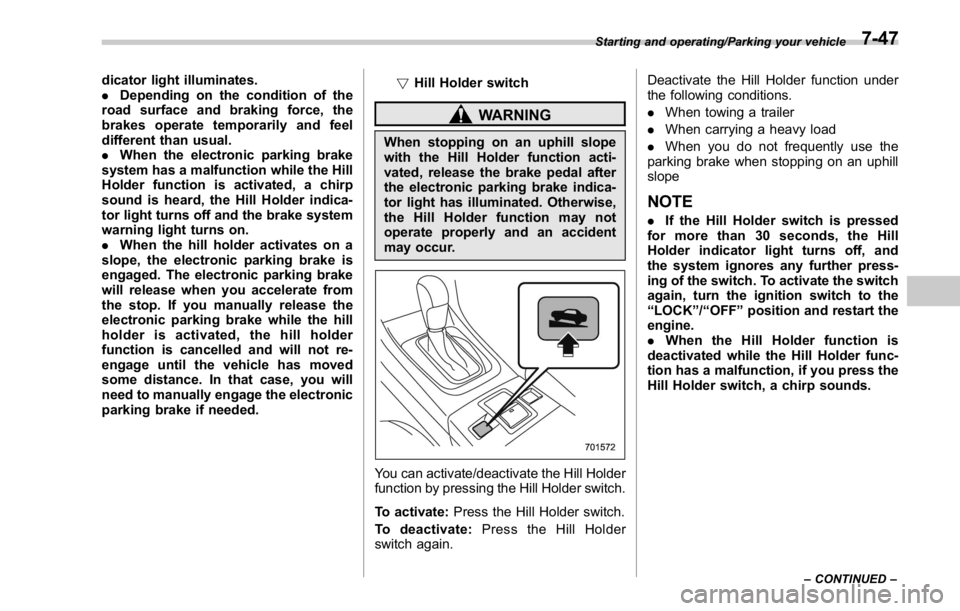
You can activate/deactivate the Hill Holder
function by pressing the Hill Holder switch.
To activate: Press the Hill Holder switch.
To deactivate: Press the Hill Holder
switch again. Deactivate the Hill Holder function under
the following conditions.
. When towing a trailer
. When carrying a heavy load
. When you do not frequently use the
parking brake when stopping on an uphill
slope
NOTE . If the Hill Holder switch is pressed
for more than 30 seconds, the Hill
Holder indicator light turns off, and
the system ignores any further press-
ing of the switch. To activate the switch
again, turn the ignition switch to the
“ LOCK ” / “ OFF ” position and restart the
engine.
. When the Hill Holder function is
deactivated while the Hill Holder func-
tion has a malfunction, if you press the
Hill Holder switch, a chirp sounds. Starting and operating/Parking your vehicle
– CONTINUED –7-47