Page 186 of 594
! Guidance screen
When the button is pushed and held,
the selection screen can be displayed.
The displayed contents can be set or
customized from the selection screen. For
details, refer to “ Selection screen ” F 3-58. ! Clock/calendar/screen OFF
Clock (Type A)
Clock (Type B) Calendar
1) Today ’ s date
2) Birthday/Anniversary
In addition to the clock/calendar, the out-
side temperature and average fuel con-
sumption can also be displayed.
You can select clock (Type A), clock (Type
B) or calendar. The clock/calendar can
also be set so that it is not displayed. For
details, refer to “ Clock/calendar screen
setting ” F 3-76.Instruments and controls/Multi function display
– CONTINUED –3-57
Page 188 of 594

Top menu Menu option Description Initial setting Page
Screen
Setting Top Display Set and customize the top display information
contents. Avg Cons, Inst Cons, Range
or Off Avg Cons 3-71
Cons Customize the fuel consumption information display. Upper part: Driv-
ing range, lower
part: Fuel con-
sumption 3-72
Eco History Set and customize the time of logging fuel
consumption history. 30 min, 60 min or 120 min 30 min 3-73
Triple Meter Set and customize the triple meter. Left: Lifetime fuel
consumption,
center: Average
fuel consumption,
right: Accelerator
opening ratio 3-75
Clock Select the clock format. Type A clock, Type B clock,
Calendar or Off Analog clock 3-76
Bypass Screen Set the bypass screen for each item. On or Off Welcome screen:
On
Eco Summary: Off
Birthday Remin-
der: On
Anniversary Re-
minder: On 3-77
Languages Select the display language. English or French or Spanish
(U.S.-spec. models only) The default lan-
guage settings
vary depending
on individual
countries. 3-78
Go Back Return to the top menu. ——Instruments and controls/Multi function display
– CONTINUED –3-59
Page 189 of 594

Instruments and controls/Multi function display
Top menu Menu option Description Initial setting Page
Mainte-
nance Engine Oil Set and adjust the oil maintenance notification date.
The default va-
lues for the main-
tenance settings
vary depending
on individual
countries. 3-79
Oil Filter Set and adjust the oil filter maintenance notification date. 3-80
Tires Set and adjust the tire maintenance notification date. 3-80
Maintenance Schedule Set and adjust the vehicle maintenance notification date. 3-80
On/Off Turn on or off the self-check screen that is
activated when the ignition switch is turned to
the “ ON ” position. On or Off Off 3-80
Clear All Settings Clear all items to the factory default settings. Yes or No — 3-81
Go Back Return to the top menu. ——
Driving
History Set Register and overwrite the driving record. — 3-82
Go Back Return to the top menu. ——
Car
Setting Keyless Buzzer Vo-
lume Set the audible signal volume. 0 (OFF) to 7 On 3-84
Hazard Warning
Flasher Set the hazard warning flasher. On or Off On 3-84
Defogger Set and customize the operation of the
defogger. 15 minutes or Continuous 15 minutes 3-85
Interior Light Set and customize the interior light off delay
timer. 10, 20, 30 seconds or Off 30 seconds 3-87
Auto Light Sensor (if
equipped) Set and customize the sensitivity of the auto
light sensor. Low, Mid, High or Max Mid 3-88
Keyless Access
Setting Driver ’ s Door
Unlock (if equipped) Set and customize the keyless access func-
tion. Driver ’ s Door Only, All Driver ’ s Door
Only 3-89
Welcome Lighting Set the leaving time and approaching time. 30, 60, 90 seconds or Off 30 seconds 3-90
Go Back Return to top menu. ——3-60
Page 191 of 594

Instruments and controls/Multi function display
& Date and time settingsThe items in the date and time settings
can be set. To change the items, operate
the “
” or “ ” switch.
NOTE . The “ Time/Date ” item must be set to
display the “ Birthday ” , “ Anniversary ”
and notifications for vehicle mainte-
nance.
. The “ Birthday ” and “ Anniversary ”
items can be entered after the “ Time/
Date ” item has been set.
. Dates that do not exist in the
Gregorian calendar cannot be set (for
example, April 31).
. If your vehicle is equipped with the
genuine SUBARU navigation system,
the clock of navigation system must be
set separately.
! Preparation for date setting
1. Turn the ignition switch to the “ ON ”
position.
2. Push and hold the
button to show
the selection screen. 3. After the selection screen is displayed,
operate the “
” or “ ” switch to show the
“ Time/Date ” item. Then, push the
button.
! Current date and time setting
1. Perform the preparation steps accord-
ing to “ Preparation for date setting ” F 3-
62. 2. Operate the “ ” or “ ” switch to
select the “ Time/Date ” item. Then push
the
button.
3. Select the item to set by operating the
“
” or “ ” switch. Then push the
button.3-62
Page 192 of 594
4. Select a number by operating the “ ”
or “
” switch. Then push the button.
When “ 12 h ” is selected, the clock will be
set to a 12-hour display. When “ 24 h ” is
selected, the clock will be set to a 24-hour
display. 5. After entering the date and time, select
“ Set ” by operating the “
” switch and
confirm the setting by pushing the
button.
6. The system will notify you that the
setting is complete.
! Birthday setting
1. Perform the preparation steps accord-
ing to “ Preparation for date setting ” F 3-
62. 2. Operate the “ ” or “ ” switch to
select the “ Birthday ” item. Then push the
button.
3. Select an entry in the list to set by
operating the “
” or “ ” switch. Then
push the
button.Instruments and controls/Multi function display
– CONTINUED –3-63
Page 205 of 594
Instruments and controls/Multi function display
switch, and confirm the setting by pushing
the
button.
6. The system will notify you that the
setting is complete.
! Clock/calendar screen setting
1. Perform the preparation steps accord-
ing to “ Preparation for screen settings ”
F 3-71. 2. Operate the “ ” or “ ” switch to
select the “ Clock ” item. Then push the
button.
3. Push the button once more. 4. Select “ Type A clock ” , “ Type B clock ” ,
“ Calendar ” or “ OFF ” by operating the “
”
switch. Then push the
button.
5. Select “ Set ” by operating the “ ”
switch, and confirm the setting by pushing
the
button.3-76
Page 218 of 594
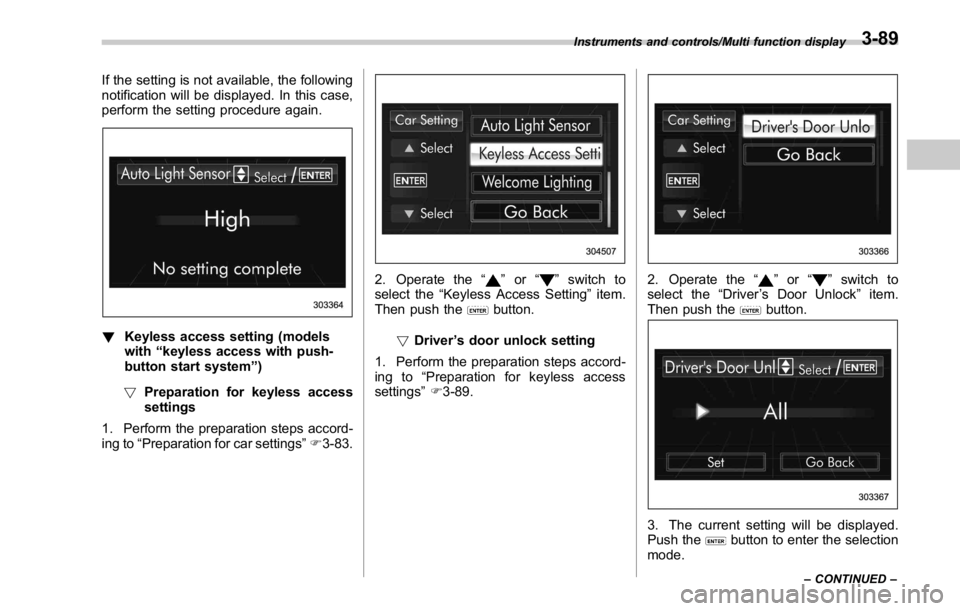
If the setting is not available, the following
notification will be displayed. In this case,
perform the setting procedure again.
! Keyless access setting (models
with “ keyless access with push-
button start system ” )
! Preparation for keyless access
settings
1. Perform the preparation steps accord-
ing to “ Preparation for car settings ” F 3-83. 2. Operate the “ ” or “ ” switch to
select the “ Keyless Access Setting ” item.
Then push the
button.
! Driver ’ s door unlock setting
1. Perform the preparation steps accord-
ing to “ Preparation for keyless access
settings ” F 3-89. 2. Operate the “ ” or “ ” switch to
select the “ Driver ’ s Door Unlock ” item.
Then push the
button.
3. The current setting will be displayed.
Push the
button to enter the selection
mode.Instruments and controls/Multi function display
– CONTINUED –3-89
Page 227 of 594

Instruments and controls/Illumination brightness control
& One-touch lane changerTo flash the turn signal and turn signal
indicator light three times, push the turn
signal lever up or down slightly and
immediately release it.
The operational/non-operational setting of
the one-touch lane changer ’ s can be
changed by a SUBARU dealer. Contact
the nearest SUBARU dealer for details. Illumination brightness con-
trol
You can adjust the illumination brightness
of the combination meter, the climate
control panel, etc. by turning the control
dial.
. To brighten, turn the control dial up-
ward.
. To darken, turn the control dial down-
ward.
The multi function display automatically
adjusts its brightness together with the
brightness level of the instrument panel.
To adjust the display ’ s contrast, refer to
“ Contrast setting ” F 3-69. NOTE . When the control dial is turned fully
upward, the illumination brightness
becomes the maximum and the auto-
matic dimming function does not work
at all.
. The brightness setting is not can-
celed even when the ignition switch is
turned to the “ LOCK ” / “ OFF ” position.3-98