2016 SUBARU OUTBACK change wheel
[x] Cancel search: change wheelPage 311 of 572

steering wheel and try again.
.The notations used in the com-
mands are as follows.
–< >: Numbers, titles or names to
be spoken
!Voice command example: Call
name
1. Press the talk switch on the steering
wheel.
2. Say
“Call
.A confirmation screen will be dis-
played showing the recognition re-
sults. If multiple matching items are
found, a selection screen will be
displayed. Say
“
the number.
NOTE
.In the same manner as it is dis-
played on the screen,“Call
“Call a contact”say the name of a contact. For exam-
ple:“Call a contact”,“John Smith”or“Call a contact”,“Mary Davis”.Short or abbreviated names in the
contacts list may not be recognized.
Change names in the contacts list to
full names.
.Sometimes a voice recognition re-
sult confirmation screen will be dis-
played. After confirming the result, say
“Ye s”or“No”.
.When the system recognizes multi-
ple names from the contacts list, a
name candidate list will be displayed
on the screen. If the desired name is
not displayed on the top of the screen,
say or select the number of the name
from the candidate list (number 1,
number 2, etc.) to select a name from
the candidate list.
.When a contact has multiple phone
numbers registered in the contacts list,
a candidate list will be displayed. If the
desired phone number is not displayed
on the top of the screen, say or select
the number of the desired phone
number from the candidate list (num-
ber 1, number 2, etc.) to select a phone
number from the candidate list.
!Voice command example: Dial
number
1. Press the talk switch on the steering
wheel.
2. Say
“Dial a number”.
3. Say
“Dial
For example, if the phone number is
2345678:
Say
“two three four five six seven
eight”
Do not say“twenty three forty five sixty
seven eight”
4. Say“Call”or press the off hook switch
on the steering wheel.
NOTE
.When the system recognizes multi-
ple phone numbers, a phone number
candidate list will be displayed on the
screen. Pressing the off hook switch on
the steering wheel makes a call to the
top entry on the list. If the desired
phone number is not displayed on the
top of the screen, say the number of
the desired phone number from the
candidate list to select a phone number
from the candidate list.
.Calling to the following phone num-
bers
–3 digit numbers (911, 411, 611)
–7 digit numbers (Local phone
numbers)
–10 digit numbers (Area code +
Local phone number)
–11 digit phone numbers (1 + Area
code + Local phone number)
.As the system cannot recognize
additional numbers, say the complete
number without stopping.
Audio/Voice command system
–CONTINUED–5-83
Page 378 of 572
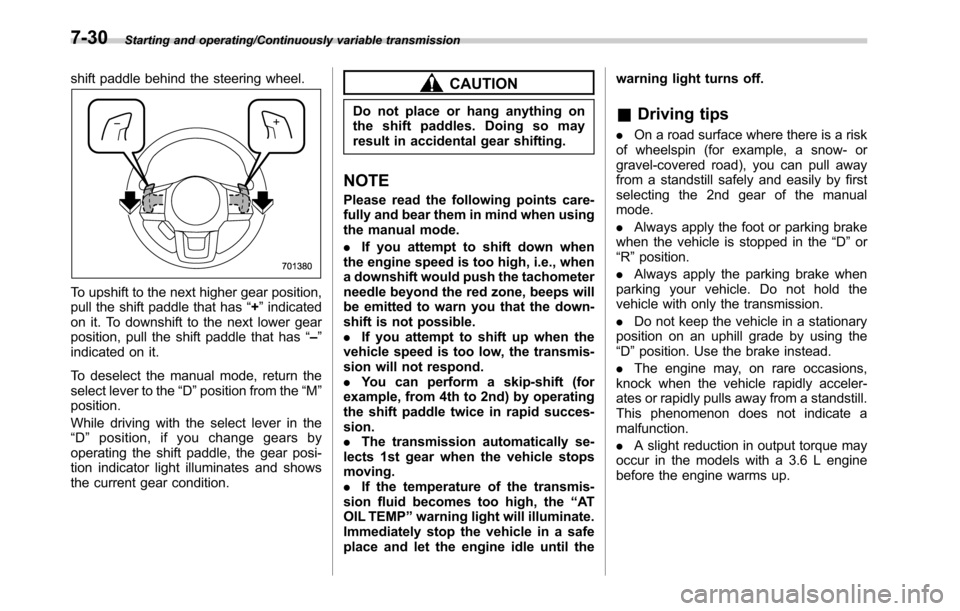
Starting and operating/Continuously variable transmission
shift paddle behind the steering wheel.
To upshift to the next higher gear position,
pull the shift paddle that has“+”indicated
on it. To downshift to the next lower gear
position, pull the shift paddle that has“–”
indicated on it.
To deselect the manual mode, return the
select lever to the“D”position from the“M”
position.
While driving with the select lever in the
“D”position, if you change gears by
operating the shift paddle, the gear posi-
tion indicator light illuminates and shows
the current gear condition.
CAUTION
Do not place or hang anything on
the shift paddles. Doing so may
result in accidental gear shifting.
NOTE
Please read the following points care-
fully and bear them in mind when using
the manual mode.
.If you attempt to shift down when
the engine speed is too high, i.e., when
a downshift would push the tachometer
needle beyond the red zone, beeps will
be emitted to warn you that the down-
shift is not possible.
.If you attempt to shift up when the
vehicle speed is too low, the transmis-
sion will not respond.
.You can perform a skip-shift (for
example, from 4th to 2nd) by operating
the shift paddle twice in rapid succes-
sion.
.The transmission automatically se-
lects 1st gear when the vehicle stops
moving.
.If the temperature of the transmis-
sion fluid becomes too high, the“AT
OIL TEMP”warning light will illuminate.
Immediately stop the vehicle in a safe
place and let the engine idle until thewarning light turns off.
&Driving tips
.On a road surface where there is a risk
of wheelspin (for example, a snow- or
gravel-covered road), you can pull away
from a standstill safely and easily by first
selecting the 2nd gear of the manual
mode.
.Always apply the foot or parking brake
when the vehicle is stopped in the“D”or
“R”position.
.Always apply the parking brake when
parking your vehicle. Do not hold the
vehicle with only the transmission.
.Do not keep the vehicle in a stationary
position on an uphill grade by using the
“D”position. Use the brake instead.
.The engine may, on rare occasions,
knock when the vehicle rapidly acceler-
ates or rapidly pulls away from a standstill.
This phenomenon does not indicate a
malfunction.
.A slight reduction in output torque may
occur in the models with a 3.6 L engine
before the engine warms up.
7-30
Page 388 of 572

Starting and operating/Tire pressure monitoring system (TPMS)
The function will operate when the vehicle
speed is less than approximately 12 mph
(20 km/h) and the accelerator ratio is less
than approximately 10%.
The function will turn off when the vehicle
speed is more than approximately 12 mph
(20 km/h) and the accelerator pedal is
depressed.
NOTE
.Even while the hill descent control
function is operating, you can vary the
vehicle speed by using the brake pedal
or accelerator pedal.
.During braking by the hill descent
control function, the hill descent con-
trol indicator will flash.
.The hill descent control function is
operable regardless of the gradient of
the road.
.The hill descent control function
may be considered normal when the
following conditions occur.
–An operating sound is heard
briefly from the engine compart-
ment while the hill descent control
function is operating.
–The sensation of depressing the
brake pedal is different, (harder
than usual etc.) when the brake
pedal is depressed during hill des-
cent control function operation.!Hill descent control indicator
This indicator appears while the hill
descent control function is in the standby
mode. It flashes while the function is
operating. It will disappear when the
function is in the disabled mode. When
this function is changed from operational
to non-operational, it will disappear when
the vehicle speed reaches more than
approximately 18 mph (30 km/h).
Tire pressure monitoring
system (TPMS) (if equipped)
Low tire pressure warning light
The tire pressure monitoring system pro-
vides the driver with a warning message
by sending a signal from a sensor that is
installed in each wheel when tire pressure
is severely low.
The tire pressure monitoring system will
activate only when the vehicle is driven at
speeds above 20 mph (32 km/h). Also,
this system may not react immediately to a
sudden drop in tire pressure (for example,
a blow-out caused by running over a
sharp object).
7-40
Page 434 of 572
Driving tips/Trailer towing (Outback)
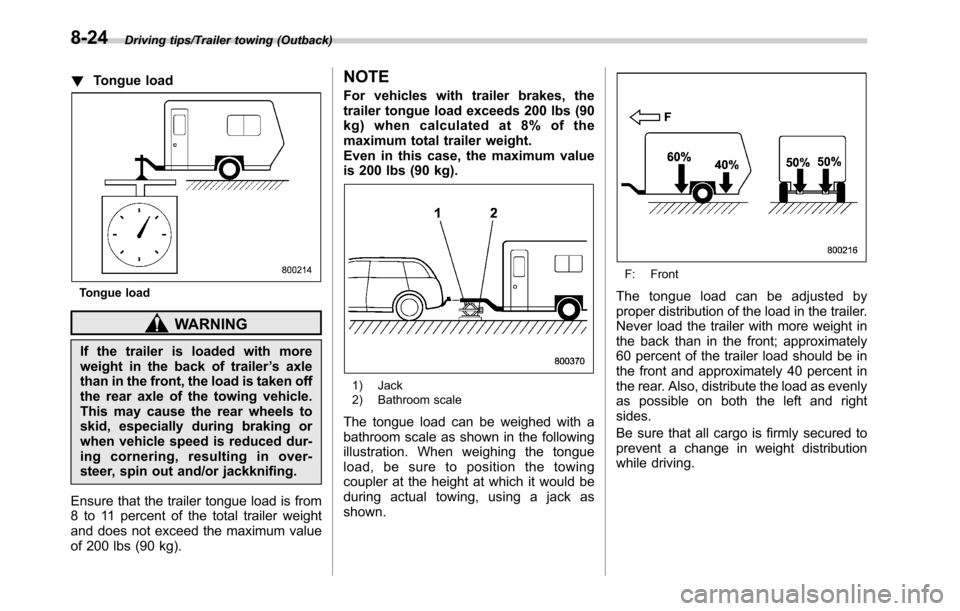
!Tongue load
Tongue load
WARNING
If the trailer is loaded with more
weight in the back of trailer’s axle
than in the front, the load is taken off
the rear axle of the towing vehicle.
This may cause the rear wheels to
skid, especially during braking or
when vehicle speed is reduced dur-
ing cornering, resulting in over-
steer, spin out and/or jackknifing.
Ensure that the trailer tongue load is from
8 to 11 percent of the total trailer weight
and does not exceed the maximum value
of 200 lbs (90 kg).
NOTE
For vehicles with trailer brakes, the
trailer tongue load exceeds 200 lbs (90
kg) when calculated at 8% of the
maximum total trailer weight.
Even in this case, the maximum value
is 200 lbs (90 kg).
1) Jack
2) Bathroom scale
The tongue load can be weighed with a
bathroom scale as shown in the following
illustration. When weighing the tongue
load, be sure to position the towing
coupler at the height at which it would be
during actual towing, using a jack as
shown.
F: Front
The tongue load can be adjusted by
proper distribution of the load in the trailer.
Never load the trailer with more weight in
the back than in the front; approximately
60 percent of the trailer load should be in
the front and approximately 40 percent in
the rear. Also, distribute the load as evenly
as possible on both the left and right
sides.
Be sure that all cargo is firmly secured to
prevent a change in weight distribution
while driving.
8-24
Page 437 of 572

operation. You should never
drive at excessive speeds but
always employ extra caution
when towing a trailer. You should
also keep the following tips in
mind.
!Before starting out on a trip
.Check the towing regulations for trailer
or caravan vehicles that vary by state/
region. Failure to comply with the proce-
dures set forth will not only compromise
your safety, but will also negate your
insurance coverage and/or may violate
the state road and traffic acts and regula-
tions.
.Check that the vehicle and vehicle-to-
hitch mounting are in good condition. If
any problems are apparent, do not tow the
trailer.
.Check that the vehicle rests horizon-
tally with the trailer attached. If the vehicle
is tipped sharply up at the front and down
at the rear, check the total trailer weight,
GVW, GAWs and tongue load again, then
confirm that the load and its distribution
are acceptable.
.Check that the tire pressures are
correct.
.Check that the vehicle and trailer are
connected properly. Confirm that–the trailer tongue is connected
properly to the hitch ball.
–the trailer lights connector is con-
nected properly and trailer’s stop lights
illuminate when the vehicle’s brake
pedal is pressed, and that the trailer’s
turn signal lights flash when the
vehicle’s turn signal lever is operated.
–the safety chains are connected
properly.
–all cargo in the trailer is secured
safely in position.
–the side mirrors provide a good
rearward field of view without a sig-
nificant blind spot.
.Sufficient time should be taken to learn
the“feel”of the vehicle/trailer combination
before starting out on a trip. In an area free
of traffic, practice turning, stopping and
backing up.
!Driving with a trailer
.You should allow for considerably more
stopping distance when towing a trailer.
Avoid sudden braking because it may
result in skidding or jackknifing and loss of
control.
.Avoid abrupt starts and sudden accel-
erations. For MT models, always start out
in first gear and release the clutch pedal at
moderate engine revolution.
.Avoid uneven steering, sharp turns andrapid lane changes.
.Slow down before turning. Make a
longer than normal turning radius because
the trailer wheels will be closer than the
vehicle wheels to the inside of the turn. In
a tight turn, the trailer could hit your
vehicle.
.Crosswinds will adversely affect the
handling of your vehicle and trailer, caus-
ing sway. Crosswinds can be due to
weather conditions or the passing of large
trucks or buses. If swaying occurs, firmly
grip the steering wheel and promptly begin
decelerating your vehicle at a gradual
pace.
.When passing other vehicles, consid-
erable distance is required because of the
added weight and length caused by
attaching the trailer to your vehicle.
Driving tips/Trailer towing (Outback)
–CONTINUED–8-27
Page 494 of 572

Maintenance and service/Tires and wheels
System resetting is necessary when the
wheels are changed (for example, a
switch to snow tires) and new TPMS
valves are installed on the newly fitted
wheels. Have this work performed by a
SUBARU dealer following wheel replace-
ment.
It may not be possible to install TPMS
valves on certain wheels that are on the
market. Therefore, if you change the
wheels (for example, a switch to snow
tires), use wheels that have the same part
number as the standard-equipment
wheels. Without four operational TPMS
valve/sensors on the wheels, the TPMS
will not fully function and the warning light
in the instrument panel will illuminate
steadily after blinking for approximately
one minute.
When a tire is replaced, adjustments are
necessary to ensure continued normal
operation of the tire pressure monitoring
system. As with wheel replacement, there-
fore, you should have the work performed
by a SUBARU dealer.
WARNING
If the low tire pressure warning light
does not illuminate briefly after the
ignition switch is turned ON or the
light illuminates steadily after blink-ing for approximately one minute,
you should have your Tire Pressure
Monitoring System checked at a
SUBARU dealer as soon as possi-
ble.
If this light illuminates while driving,
never brake suddenly and keep
driving straight ahead while gradu-
ally reducing speed. Then slowly
pull off the road to a safe place.
Otherwise an accident involving
serious vehicle damage and serious
personal injury could occur.
If this light still illuminates while
driving after adjusting the tire pres-
sure, a tire may have significant
damage and a fast leak that causes
the tire to lose air rapidly. If you have
a flat tire, replace it with a spare tire
as soon as possible.
When a spare tire is mounted or a
wheel rim is replaced without the
original pressure sensor/transmitter
being transferred, the low tire pres-
sure warning light will illuminate
steadily after blinking for approxi-
mately one minute. This indicates
the TPMS is unable to monitor all
four road wheels. Contact your
SUBARU dealer as soon as possible
for tire and sensor replacement and/
or system resetting. If the lightilluminates steadily after blinking for
approximately one minute, promptly
contact a SUBARU dealer to have
the system inspected.
&Tire inspection
Check on a daily basis that the tires are
free from serious damage, nails, and
stones. At the same time, check the tires
for abnormal wear.
Contact your SUBARU dealer immedi-
ately if you find any problem.
NOTE
.When the wheels and tires strike
curbs or are subjected to harsh treat-
ment as when the vehicle is driven on a
rough surface, they can suffer damage
that cannot be seen with the naked eye.
This type of damage does not become
evident until time has passed. Try not
to drive over curbs, potholes or on
other rough surfaces. If doing so is
unavoidable, keep the vehicle’s speed
down to a walking pace or less, and
approach the curbs as squarely as
possible. Also, make sure the tires are
not pressed against the curb when you
park the vehicle.
.If you feel unusual vibration while
driving or find it difficult to steer the
11-26
Page 498 of 572
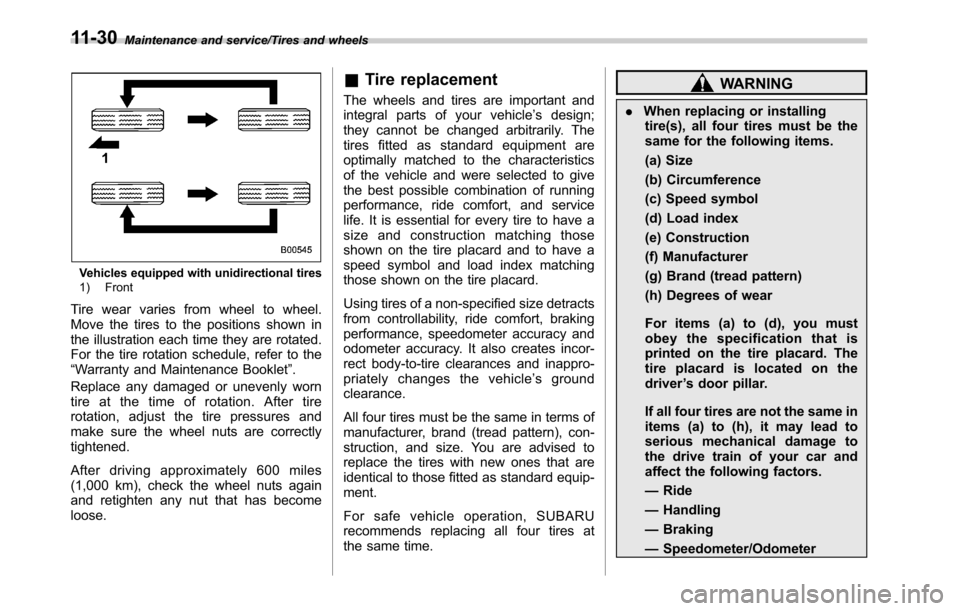
Maintenance and service/Tires and wheels
Vehicles equipped with unidirectional tires
1) Front
Tire wear varies from wheel to wheel.
Move the tires to the positions shown in
the illustration each time they are rotated.
For the tire rotation schedule, refer to the
“Warranty and Maintenance Booklet”.
Replace any damaged or unevenly worn
tire at the time of rotation. After tire
rotation, adjust the tire pressures and
make sure the wheel nuts are correctly
tightened.
After driving approximately 600 miles
(1,000 km), check the wheel nuts again
and retighten any nut that has become
loose.
&Tire replacement
The wheels and tires are important and
integral parts of your vehicle’s design;
they cannot be changed arbitrarily. The
tires fitted as standard equipment are
optimally matched to the characteristics
of the vehicle and were selected to give
the best possible combination of running
performance, ride comfort, and service
life. It is essential for every tire to have a
size and construction matching those
shown on the tire placard and to have a
speed symbol and load index matching
those shown on the tire placard.
Using tires of a non-specified size detracts
from controllability, ride comfort, braking
performance, speedometer accuracy and
odometer accuracy. It also creates incor-
rect body-to-tire clearances and inappro-
priately changes the vehicle’s ground
clearance.
All four tires must be the same in terms of
manufacturer, brand (tread pattern), con-
struction, and size. You are advised to
replace the tires with new ones that are
identical to those fitted as standard equip-
ment.
For safe vehicle operation, SUBARU
recommends replacing all four tires at
the same time.WARNING
.When replacing or installing
tire(s), all four tires must be the
same for the following items.
(a) Size
(b) Circumference
(c) Speed symbol
(d) Load index
(e) Construction
(f) Manufacturer
(g) Brand (tread pattern)
(h) Degrees of wear
For items (a) to (d), you must
obey the specification that is
printed on the tire placard. The
tire placard is located on the
driver’s door pillar.
If all four tires are not the same in
items (a) to (h), it may lead to
serious mechanical damage to
the drive train of your car and
affect the following factors.
—Ride
—Handling
—Braking
—Speedometer/Odometer
11-30
Page 499 of 572
calibration
—Clearance between the body
and tires
It also may be dangerous and
lead to loss of vehicle control,
and it can lead to an accident.
.Use only radial tires. Do not use
radial tires together with belted
bias tires and/or bias-ply tires.
Doing so can dangerously re-
duce controllability, resulting in
an accident.
&Wheel replacement
When replacing wheels due, for example,
to damage, make sure the replacement
wheels match the specifications of the
wheels that are fitted as standard equip-
ment. Replacement wheels are available
from SUBARU dealers.
WARNING
Use only those wheels that are
specified for your vehicle. Wheels
not meeting specifications could
interfere with brake caliper opera-
tion and may cause the tires to rub
against the wheel well housing dur-
ing turns. The resulting loss ofvehicle control could lead to an
accident.
Aluminum wheels
Aluminum wheels can be scratched and
damaged easily. Handle them carefully to
maintain their appearance, performance,
and safety.
.When any of the wheels is removed
and replaced for tire rotation or to change
a flat, always check the tightness of the
wheel nuts after driving approximately 600
miles (1,000 km). If any nut is loose,
tighten it to the specified torque.
.Never apply oil to the threaded parts,
wheel nuts, or tapered surface of the
wheel.
.Never let the wheel rub against sharp
protrusions or curbs.
.When wheel nuts, balance weights, or
the center cap is replaced, be sure to
replace them with genuine SUBARU parts
designed for aluminum wheels.
Maintenance and service/Aluminum wheels11-31