2016 SKODA KODIAQ transmission
[x] Cancel search: transmissionPage 212 of 344

WARNING (Continued)■If the vehicle stalls, with engine running, in the D, S , R or Tiptronic mode,
then the vehicle must be prevented from rolling away by means of the
brake pedal, parking brake or using the Auto Hold function. Even when the
engine is idling, the power transmission is never completely interrupted –
the vehicle creeps.■
When leaving the vehicle, the selector lever must always be set to P .
Otherwise, the vehicle could start to move - risk of accident.
CAUTION
■ If you want to move the selector lever from position N to position D / S whilst
driving, the engine must be running at idling speed.■
When stopping on a slope, never try to hold the vehicle using the accelerator
pedal – this may lead to gear damage.
Select selector lever position
Fig. 259
Selector lever settings / display
Read and observe and on page 209 first.
Move the selector lever to change to the following positions » Fig. 259. In
some positions you have to push the locking button » page 210, Selector lever
lock .
When the ignition is switched on, the gearbox mode and the currently selected
gear are indicated in the display » Fig. 259.
Park - the position can be set only when the vehicle is at a standstill.
The drive wheels are mechanically locked.
Reverse gear - the position can be set only when the vehicle is at a stand-
still and the engine is at idling speed.
Neutral (idle position) - the power transmission to the drive wheels is in-
terrupted.
PRNForward mode / sports programme - the gear change takes place in the
position S at higher engine speeds than in mode D
(Sprung position) - choice between positions D and S
If the Sport driving mode is selected with the engine running » page 251, Se-
lect the driving mode (Driving Mode Selection) , the transmission is automati-
cally set in the S mode.
E – Economical driving mode
If the driving mode Eco or Individual (engine - Eco) » page 251 is selected and
the selection lever is in the setting D/S, the transmission is automatically set
to mode E. This mode cannot be selected with the selector lever.
The forwards mode is switched up or down automatically in mode E at lower
engine speeds than in mode D.
Selector lever lock
Fig. 260
Shift lock button
Read and observe
and on page 209 first.
The selector lever is locked in mode P and N to prevent that the forward driv-
ing is selected accidentally, thereby setting the vehicle in motion.
The selector lever is locked only when the vehicle is stationary and at speeds
up to 5 km/h.
The selector lever lock is indicated by the illumination of the warning light.
Disengage selector lever from P mode or N
›
Press the brake pedal and the lock button at the same time in the direction
of
1
» Fig. 260
-
.
D/S210Driving
Page 242 of 344

OperationFig. 296
MAXI DOT display (monochrome): Examples of status displays
the CCS
Fig. 297
Segment display: Examples of status displays the CCS
Read and observe
on page 239 first.
CCS status displays » Fig. 296 , » Fig. 297
Speed is set, control is inactive (in the colour display the digits of speed
limits is shown in grey).
Control active (in the colour display the digits of the speed limits are high-
lighted).
No speed set.
System fault - seek assistance from a specialist garage immediately.
Basic requirements for start of control The CCS is activated.
On vehicles with a manual transmission , the second gear or higher is en-
gaged.
On vehicles with an automatic transmission , the selector lever is in the
D/S position or in the Tiptronic position.
The current speed is greater than approx. 20 km/h.
This is only possible within the range which is permitted by the power output
and braking power of the engine.WARNINGIf the engine power and engine braking effect is insufficient in order to
maintain the set speed, the acceleration and brake pedals must be taken
over!
Operation description
Fig. 298
Cruise control system controls
Read and observe on page 239 first.
Overview of the CCS controls » Fig. 298AActivate CCS (regulation deactivated) Interrupt control (sprung position) Deactivate CCS (delete set speed)BTake control again a)
/ Increase speedCLaunch control / reduce speedDSwitching between CCS and speed limiter » page 241a)
If no speed is set the current speed is adopted.
After the start of the regulation, the CCS regulates the vehicle to the current
speed and the warning light illuminates in the instrument cluster.
240Driving
Page 247 of 344

ACC displays » Fig. 304
Vehicle detected (control active)
Line that marks the shift in distance when setting » page 246, Set the
clearance level
Set distance to the vehicle ahead
Vehicle detected (control deactivated)
ACC status displays » Fig. 305
Regulation is inactive (in the colour display the digits of speed limits is
shown in grey).
Regulation active - no vehicle detected (in the colour display the digits of
the speed limits are highlighted).
Regulation deactivated - no speed stored.
Regulation active - vehicle detected (in the colour display the digits of the
speed limits are highlighted).
Note to reduce speed
If the delay of the ACC is insufficient in relation to the vehicle in front, the
warning light lights up in the instrument cluster and the display shows a
message to engage the brake pedal.
Regulation according to the vehicle in the adjacent lane
During regulation your vehicle may be regulated according to the vehicle in the
adjacent lane.
This could occur at speeds above about 80 km/h when your vehicle is moving
faster than the vehicle in the adjacent lane on the driver's side. The display
shows the detected vehicle is in the adjacent lane.
Note
Some ACC notifications in the display of the instrument cluster may be hidden
by notifications for other functions. An ACC notification automatically appears
for a brief moment when there is a change in status of the ACC.
Automatic stopping and starting
Read and observe
on page 243 first.
Vehicles with an automatic transmission can decelerate to a standstill and
start moving again using the ACC.
1234Decelerate to a standstill
If a vehicle ahead decelerates to a standstill, the ACC will also decelerate your
vehicle to a standstill.
Starting to drive again after a holding period
As soon as the vehicle ahead starts moving again after a holding period, your
vehicle will also move and the speed will continue to be regulated.
If the vehicle in front starts moving again after a long break, press the acceler-
ator pedal or set the lever to position
in order to continue control
» page 245 .
Operation overview
Fig. 306
Operating lever
Read and observe
on page 243 first.
Overview of ACC functions operated with the lever » Fig. 3061Activate ACC (regulation deactivated)2Start control (resume) / increase speed by 1 km/h at a time
(sprung position)3Interrupt control (spring-tensioned position)4Deactivate ACC5 Increase speed by 10 km/h at a time6 Decrease speed by 10 km/h at a timeA Set proximity levelBStart control / reduce speed in increments of 1 km/h
If the lever is set from the position
directly into the sprung position
the current speed is stored and the control process is started.
245Assist systems
Page 248 of 344

Start controlRead and observe
on page 243 first.
Basic requirements for start of control The ACC is activated.
On vehicles with manual transmission , the second gear or a higher gear is
selected and the current speed is greater than 25 km/h.
On vehicles with automatic transmission , the selector lever is in the D/S
position or in the Tiptronic position.
Start control
›
Press the button
» Fig. 306 on page 245 the button.
›
or: Set the lever to the sprung position
» Fig. 306 on page 245 .
The ACC takes the current driving speed and performs the control, the warning
light illuminates in the instrument cluster.
If the control is started by moving the lever to the position and should
the speed be stored already, the ACC adopts this speed and carries out the
control.
Note
If control is started at a speed of less than 30 km/h on vehicles with an auto-
matic transmission, the speed of 30 km/h is stored. The speed increases auto-
matically to 30 km/h or is regulated with respect to the speed of the vehicle
ahead.
Stop/resume control
Read and observe
on page 243 first.
Stop control
›
Set the lever into the sprung position
» Fig. 306 on page 245 .
›
or: apply the brake pedal.
Control stops, the speed remains stored.
Resume control
›
Start control » page 246, Start control .
Note
Control is also stopped when the clutch pedal is held down for longer than 30
s or the TCS is deactivated.Set/change desired speed
Read and observe
on page 243 first.
The desired speed can be set or changed using the control lever » Fig. 306 on
page 245 .
Setting/changing the speed by increments of 10 km/h at a time (
) - re-
quirements
The ACC is activated.
Increasing/reducing the speed by increments of 1 km/h at a time (
/
-
requirements
The ACC is activated.
Vehicle control takes place.
Changing the speed by adopting the current speed ( ) - requirements
The ACC is activated.
The vehicle is moving at a speed other than that which is stored.
Note
■
If during control the speed is increased by pressing the accelerator, control is
temporarily stopped. Upon releasing the accelerator, control is automatically
resumed.■
If during control the speed is reduced by applying the brake, control is stop-
ped. Control needs to be restarted in order to resume » page 246.
■
If the vehicle is controlled by a lower speed than the stored speed, then
the current speed is stored by pressing the button again
and the speed is
reduced in increments of 1 km/h.
Set the clearance level
Read and observe
on page 243 first.
The proximity to the vehicle ahead can be set with the lever » Fig. 306 on
page 245 or in Infotainment » page 244, Settings in Infotainment .
Setting by means of the lever
›
Set the switch to the spring-tensioned position
or
» Fig. 306 on
page 245 .
The display of the instrument cluster shows line
2
» Fig. 304 on page 244 ,
which indicates the proximity.
246Driving
Page 254 of 344

Air conditioning (Climatronic)
The air conditioning is controlled so as to save energy. For this reason, for ex-
ample, it may take longer to reach the desired interior temperature in modeNormal
.
Note
■ If a trailer or other accessory is to be connected to the trailer socket, driving
mode Eco
is not available.■
The maximum vehicle acceleration (kick down function) is possible also in
driving mode
Eco
.
Mode
Comfort
Read and observe on page 251 first.
This mode is suitable for driving on roads with poorer surface or for long mo- torway journeys.
Mode
normal
Read and observe on page 251 first.
This mode is suitable for a conventional driving.
Mode
Sports
Read and observe on page 251 first.
This mode is suitable for a sporty driving.
Selecting this mode primarily affects the function of the following systems.
DCC
The DCC adjusts the chassis for the sporty driving style.
Steering
The power steering is reduced slightly, i.e., the driver needs to exert more
force for steering .
Drive
The vehicle acceleration is more dynamic than in
Normal
mode.
Adaptive Cruise Control (ACC)
The acceleration is quicker than in
Normal
mode with distance control
» page 243 .
Headlights with LED lamps
The headlamps adapt to the driving style more dynamically than in mode Nor-mal
» page 68 .
ProActive passenger protection
The first level of protection is deactivated » page 253.
mode
individual
Read and observe on page 251 first.
In the mode
Individual
each system can be set independently » page 253, Indi-
vidual mode
settings
.
Mode
Snow
Read and observe on page 251 first.
The mode is suitable for driving on slippery or snow-covered roads.
The driving profile
Snow
does not allow the automatic transmission to be set to
S mode.
Mode selection and Infotainment display
Fig. 312
Button for selecting the driving mode / Display in Infotainment
screen
Read and observe
on page 251 first.
Procedure for the selection of the driving mode
›
Press the
» Fig. 312 button.
In Infotainment screen, a running mode menu » Fig. 312 appears.
252Driving
Page 255 of 344
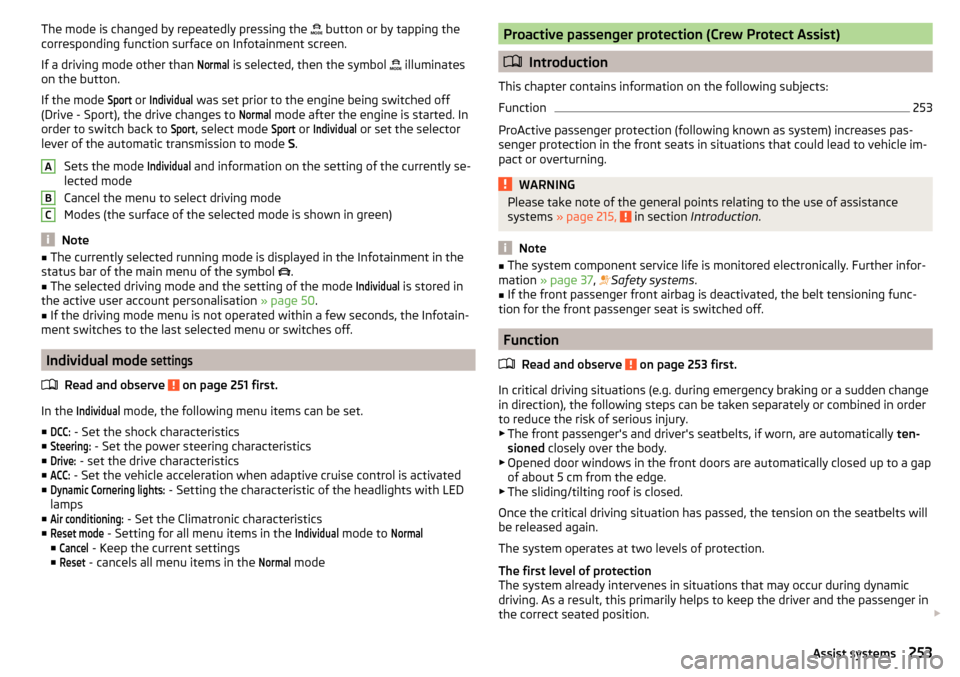
The mode is changed by repeatedly pressing the button or by tapping the
corresponding function surface on Infotainment screen.
If a driving mode other than Normal
is selected, then the symbol
illuminates
on the button.
If the mode
Sport
or
Individual
was set prior to the engine being switched off
(Drive - Sport), the drive changes to
Normal
mode after the engine is started. In
order to switch back to
Sport
, select mode
Sport
or
Individual
or set the selector
lever of the automatic transmission to mode S.
Sets the mode
Individual
and information on the setting of the currently se-
lected mode
Cancel the menu to select driving mode
Modes (the surface of the selected mode is shown in green)
Note
■ The currently selected running mode is displayed in the Infotainment in the
status bar of the main menu of the symbol .■
The selected driving mode and the setting of the mode
Individual
is stored in
the active user account personalisation » page 50.
■
If the driving mode menu is not operated within a few seconds, the Infotain-
ment switches to the last selected menu or switches off.
Individual mode
settings
Read and observe on page 251 first.
In the
Individual
mode, the following menu items can be set.
■
DCC:
- Set the shock characteristics
■
Steering:
- Set the power steering characteristics
■
Drive:
- set the drive characteristics
■
ACC:
- Set the vehicle acceleration when adaptive cruise control is activated
■
Dynamic Cornering lights:
- Setting the characteristic of the headlights with LED
lamps
■
Air conditioning:
- Set the Climatronic characteristics
■
Reset mode
- Setting for all menu items in the
Individual
mode to
Normal
■
Cancel
- Keep the current settings
■
Reset
- cancels all menu items in the
Normal
mode
ABCProactive passenger protection (Crew Protect Assist)
Introduction
This chapter contains information on the following subjects:
Function
253
ProActive passenger protection (following known as system) increases pas-
senger protection in the front seats in situations that could lead to vehicle im-
pact or overturning.
WARNINGPlease take note of the general points relating to the use of assistance
systems » page 215, in section Introduction .
Note
■
The system component service life is monitored electronically. Further infor-
mation » page 37 , Safety systems .■
If the front passenger front airbag is deactivated, the belt tensioning func-
tion for the front passenger seat is switched off.
Function
Read and observe
on page 253 first.
In critical driving situations (e.g. during emergency braking or a sudden changein direction), the following steps can be taken separately or combined in order
to reduce the risk of serious injury.
▶ The front passenger's and driver's seatbelts, if worn, are automatically ten-
sioned closely over the body.
▶ Opened door windows in the front doors are automatically closed up to a gap
of about 5 cm from the edge.
▶ The sliding/tilting roof is closed.
Once the critical driving situation has passed, the tension on the seatbelts will
be released again.
The system operates at two levels of protection.
The first level of protection
The system already intervenes in situations that may occur during dynamic
driving. As a result, this primarily helps to keep the driver and the passenger in
the correct seated position.
253Assist systems
Page 258 of 344

Activation / deactivationRead and observe
and on page 254 first.
The activation/deactivation of the system can be carried out in one of two
ways. ▶ In the instrument cluster display » page 49, Menu item
Assist systems
.
▶ In Infotainment » page 254, Settings in Infotainment .
Adaptive tracking can also be enabled or disabled In Infotainment.
After switching off and switching on the ignition, the system setting is re-
tained.
Note
The system setting is stored (depending on Infotainment type) in the active
user account personalisation » page 50.
Malfunctions
Read and observe
and on page 254 first.
If, for some unknown reason, the system is not available, an appropriate mes-
sage appears in the display of the instrument cluster.
Sensor covered / dirty
If the windscreen is dirty, iced or misted up in the sensor area, a message ap-
pears indicating that there is no sensor view. Clean the windscreen or remove
the obstacles from the sensor area.
System unavailable
If the system is currently unavailable, a message concerning the unavailability
appears. Try to re-activate the machine. If the system still is not available, seek
the assistance of a specialist garage.
System fault
In the case of a system fault, an error message appears. Seek help from a spe-
cialist garage.
Request to take over steering
If the system detects that there are no hands are on the steering wheel, this
will not work properly. You will be prompted to take over steering. Place your
hands on the steering wheel.
Traffic jam assistant
Introduction
This chapter contains information on the following subjects:
Function
256
Operating conditions
256WARNING■ Please take note of the general points relating to the use of assistance
systems » page 215, in section Introduction .■
The driver must always have hands on the steering wheel and be ready to
take over steering of the vehicle himself (accelerate or brake).
Note
The system is designed primarily for use on motorways.
Function
Read and observe
on page 256 first.
The traffic jam assistant (referred to as system) helps to keep the vehicle with-
in the lane at speeds below 65 km/h while keeping the distance to the vehicle
ahead.
The system is only available for vehicles with Automatic transmission.
The traffic jam assistant is an extension of the systems Lane Assist » page 254
and ACC » page 243 and works by using the functions of these two systems.
For this reason, the chapters on System Lane Assist and ACC are to be read
carefully and the safety notes are to be observed.
Operating conditions
Read and observe
on page 256 first.
The system activation occurs automatically whilst fulfilling the following ba-sic conditions.
Lane Assist with the adaptive tracking is enabled, the boundary lines on
both sides are recognized lane » page 254.
ACC is activated and the regulation » page 243 follows.
The vehicle speed is below 65 km/h.
256Driving
Page 259 of 344

Assistant for emergencies
Introduction
This chapter contains information on the following subjects:
Function
257
Operating conditions
257WARNING■ Please take note of the general points relating to the use of assistance
systems » page 215, in section Introduction .■
The system is intended for emergency situations when the driver is sud-
denly unable to take over the steering task. Therefore, never try to test out
the system - there is a risk of an accident!
Function
Read and observe
on page 257 first.
The assistant for emergencies (following known as system) detects inactivityof the driver, which for example can be caused by a sudden loss of conscious-
ness. The system then performs measures as safely as possible to decelerate
the vehicle to a stop.
The system is only available for vehicles with Automatic transmission.
The assistant for emergencies is an extension of the systems Lane Assist
» page 254 and ACC » page 243 and works by using the functions of these two
systems.
For this reason, the chapters on System Lane Assist and ACC are to be read
carefully and the safety notes are to be observed.
System intervention
If the system detects the driver's inactivity, it draws attention to this fact by a beep and a message on the display of the instrument cluster. It keeps the ve-
hicle in its lane.
If the driver does not take over the steering even after a repeated warning,
the system automatically brakes the vehicle and after it has come to a stand-
still the parking brake switch on.
With automatic braking, the hazard warning system is switched on.
The automatic braking interventions can be cancelled by pressing the acceler-
ator pedal or by means of a steering intervention.
Operating conditions
Read and observe
on page 257 first.
The system can intervene when the following basic conditions are present. Lane Assist is activated and the boundary line is detected at least on one
side of the lane » page 254.
ACC is activated and the regulation » page 243 follows.
Traffic sign recognition
Introduction
This chapter contains information on the following subjects:
Settings in Infotainment
258
Operation
258
Additional display
259
Malfunctions and information messages
259
The traffic sign recognition (following known as system) shows certain traffic
signs (e.g. speed limits) on the display of the instrument cluster and if necessa-
ry warns against excessive speeds.
WARNING■ Please take note of the general points relating to the use of assistance
systems » page 215, in section Introduction .■
Vertical traffic signs must always take precedence over the traffic signs
shown in the display. The driver is always responsible for correctly assess-
ing the traffic situation.
■
Speed specifications in the displayed road signs refer to the country-spe-
cific speed units. For example, the display
on the display can therefore
be country specific and refer to either km/h or mph.
257Assist systems