2016 Seat Alhambra mirror
[x] Cancel search: mirrorPage 143 of 324

Lights and visibility
Exterior mirrors Fig. 149
In the driver door: exterior mirror
c ontr
o
ls Read the additional information carefully
› ›
›
page 15
Turn the knob to the required position:
Electric folding exterior mirrors
››› .
Switch on the exterior mirror heating This only
heats up if the ambient temperature is less
than +20°C (+68°F).
Adjust the left-hand exterior mirror by turning
the knob forward, backward, to the right or to
the left.
Adjust the right-hand exterior mirror by turning
the knob forward, backward, to the right or to
the left .
Zero position. Exterior mirror unfolded, exterior
mirror heating off, adjustment of exterior mir-
ror not possible. Synchronised mirror adjustment
●
In the Settings - Convenience menu,
sel ect
whether or not
the mirrors should
move in synchronisation ›››
page 26.
● Turn the knob to position L.
● Adjust the left-hand exterior mirror. The
right ext
erior mirror will be adjusted at the
same time (synchronised).
● If necessary the right exterior mirror adjust-
ment ma
y need correcting. turn the control to
position R.
Automatic anti-dazzle exterior mirror, driver
side
The automatic anti-dazzle exterior mirror is
controlled in the same way as the automatic
anti-dazzle rear vision mirror ››› page 140.
Store the reverse settings for the passenger
exterior mirror ● Select the vehicle key in which the setting
is t
o be stored.
● Use this key to unlock the vehicle.
● Connect the automatic parking brake.
● Switch the ignition on.
● Move the gear lever to neutral.
● In the menu Settings - Convenience
activate the f
unction Mirror adjustment .
● Select reverse gear. ●
Adjust
the front passenger side exterior
mirror so that you can see, for example, the
kerb area.
● The new position of the mirror will be stor-
ed automatic
ally and allocated to the vehicle
key that was used to unlock the vehicle. For
vehicles with seat memory, please see
››› page 146.
Activating the passenger exterior mirror set-
tings
● Turn the exterior mirror knob to position R.
● With the ignition switched on, select re-
verse g
ear.
● The stored position of the passenger exteri-
or mirror for r
everse gear is deleted when
driving forwards at 15 km/h (9 mph), or if the
knob is turned from position R to another po-
sition. WARNING
Fold and unfold the exterior mirror, taking
car e t
o avoid injuries.
● Only fold or unfold the exterior mirror when
there is
no-one in the way of the mirror.
● When moving the mirror, take care not to
trap fing
ers between the mirror and the mir-
ror bracket. » 141
Technical data
Advice
Operation
Emergencies
Safety
Page 144 of 324

Operation
WARNING
Failure to correctly estimate the distance of
the v ehic
le behind could lead to serious acci-
dent.
● Rear-view convex or aspheric mirrors in-
cre
ase the field of vision, however objects ap-
pear smaller and further away in the mirrors.
● The use of these mirrors to estimate the
dist
ance to the next vehicle when changing
lane is imprecise and could result in serious
accident.
● If possible, use the rear vision mirror to es-
timate di
stances to vehicles behind you or in
other circumstances.
● Make sure that the rear visibility is ade-
quate. CAUTION
● Bef or
e entering a car wash, always ensure
that the exterior mirrors are correctly folded
in.
● Electrically-folding exterior mirrors should
not be fo
lded and unfolded mechanically as
this may damage the electrical operation. For the sake of the environment
The exterior mirror heating should be switch-
ed off when it i
s no longer needed. Other-
wise, it is an unnecessary fuel waste. Note
● The ext erior mirr
or heating initially heats
up with a high power, after two minutes the
heat will depend upon the ambient tempera-
ture.
● In the event of a fault, the electric exterior
mirrors
can be adjusted manually by pressing
the edge of the mirror surface. Seats and head restraints
Adju
s
tin
g the seats and head
restraints
Manual adjustment of seats Read the additional information carefully
›› ›
page 13 WARNING
The safe driving chapter contains important
inform ation, tip
s, suggestions and warnings
that you should read and observe for your
own safety and the safety of your passengers
››› page 56. WARNING
● Adjus t
the front seats only when the vehi-
cle is stationary. Failure to follow this instruc-
tion could result in an accident.
● Be careful when adjusting the seat height.
Carel
ess or uncontrolled adjustment can
cause injuries.
● The front seat backrests must not be re-
clined for driv
ing. Otherwise, seat belts and
the airbag system might not protect as they
should in the case of an accident, increasing
risk of injury. 142
Page 150 of 324

Operation
Automatic off
● The lumbar massage will disconnect auto-
m atic
al
ly after approx. 10 minutes.
Seat with position memory* Fig. 158
Memory buttons on the outside of
the driv er se
at Memory buttons
Indiv
idual
settin
gs for the driver seat and the
exterior mirror can be assigned to each mem-
ory button.
Storing exterior mirror settings for driving
forwards
● Connect the automatic parking brake.
● Move the gear lever to neutral.
● Switch the ignition on.
● Adjust the front seat and the exterior mir-
rors. ●
K
eep the
SET button held down for more
th an one sec
ond ›
›› Fig. 158.
● Press the required memory button for the
fol
lowing 10 seconds. An audible warning
confirms the settings have been stored.
Storing front passenger exterior mirror set-
tings for driving in reverse gear
● Connect the automatic parking brake.
● Move the gear lever to neutral.
● Switch the ignition on.
● Press the required memory button.
● Select reverse gear.
● Adjust the front passenger side exterior
mirror so that
you can see, for example, the
kerb area.
● The new position of the mirror will be stor-
ed automatic
ally and allocated to the vehicle
key that was used to unlock the vehicle.
Activating exterior mirror settings
● With the driver door open and the ignition
turned off, p
ush the memory button of the
corresponding door briefly.
● OR: with the ignition switched on, hold in
the corr
esponding memory button until the
memorised position is reached. To activate the memory function of the vehi-
cle k
ey
Important: a position must be memorised in
the memory.
● Open the driver-side door.
● Press and hold any memory button.
● Within the following three seconds, push
the button to open the vehicle on the vehi-
c l
e k
ey. An audible warning confirms the set-
tings have been activated.
Adjusting the wing mirrors for driving and
assigning driver seat settings to a vehicle
key
● Activate the memory function of the vehicle
key
● Adjus
t the front seat and the exterior mir-
rors.
● L
ock the vehicle. The settings are assigned
to the v
ehicle key.
To deactivate the memory function of the ve-
hicle key
Important: a position must be memorised in
the memory.
● Press and hold the SET button.
● Within the following 10 seconds, push the
open b utt
on on the vehicle key. An audi-
b l
e w
arning confirms the settings have been
deactivated.
148
Page 151 of 324

Seats and head restraints
Initialising the seat position memory
The po s
ition memor
y system must be restar-
ted if, for example, the driver seat has been
changed.
Restarting deletes all memories and assign-
ments for the seat with position memory. The
memory buttons can then be reprogrammed
and the vehicle keys re-assigned.
● Open the driver door and do not get into
the vehic
le.
● Operating the seat settings from outside
the vehic
le.
● Move the angle of the seat backrest com-
plet
ely forwards.
● Release the control to set the angle and
then pres
s again until an audible warning is
heard. Note
The front passenger side exterior mirror auto-
matic a
lly changes from the position stored
for reversing as soon as the vehicle moves
forward at a speed of at least 15 km/h
(9 mph) or when the gear selection lever is
changed to a position other than R. Convenient entry function for the third
r
o
w of
seats Fig. 159
Second row of seats: convenient en-
tr y
f
unction controls The outer seats of the second row can be fol-
ded t
o m
ak
e it easier to get in and out of the
third row of seats.
Folding down the second row seats
● If necessary, open the belt loop and wind
up the seat belt
by hand.
● If necessary, remove the side head restraint
of the inte
grated child seat ›››
page 78.
● If necessary, raise the armrests.
● Remove any objects located in the footwell
of the second r
ow of seats, where applicable
››› .●
Pu sh the he
ad restraint down as far as it
will go ››› page 57.
● Push the lever ›››
Fig. 159 1 forwards and
f o
l
d the backrest of the rear seat. This seat
folds forward completely ››› and can still
be mo v
ed f
urther forward.
● Always take care when entering and leav-
ing the v
ehicle ››› .
R epo
s
itioning the seat in the second row
● Lift the backrest of the rear seat in an up-
right pos
ition. The entire seat folds back-
wards ››› .
● Make sure that the rear seat is securely en-
g ag
ed so th
at the seat belts can provide
proper protection in the rear seats. The red
mark ››› Fig. 159 2 should no longer be visi-
b l
e ›
›› in Folding down rear seats to create
lo a
d s
pace on page 156.
Emergency exit function
If the lever ››› Fig. 159 1 does not work, e.g.
af t
er an ac
cident, the seats on the second
row can be folded forwards from the third row
to allow vehicle occupants of the third row of
seats to get out of the vehicle ››› .
● Pull the handle ››
›
Fig. 159 3 back and
f o
l
d the backrest of the rear seat. The com-
plete rear seat folds forward ››› .
»
149
Technical data
Advice
Operation
Emergencies
Safety
Page 227 of 324

Driver assistance systems
Blind spot detector (BSD) with
p ark
in
g assistant (RTA)
Introduction The blind spot detector (BSD) helps detect
the traffic
s
ituation to the sides and behind
the vehicle.
The integrated parking assistant (RTA) helps
the driver when backing out of a parallel
parking spot and in manoeuvring.
The blind spot detector has been developed
for driving on paved roads. WARNING
The smart technology incorporated into the
blind s pot
detector (BSD) with parking assis-
tance (RTA) included cannot overcome the
limits imposed by the laws of physics; it only
works within the limits of the system. Acci-
dents and severe injury may occur if the blind
spot detection system or the parking assis-
tant are used negligently or involuntarily. The
system is not a replacement for driver aware-
ness.
● Adapt your speed and safe distance to the
vehicl
e in front of you at all times to suit visi-
bility, weather, road and traffic conditions.
● Keep your hands on the wheel at all times,
and be rea
dy to intervene in the steering at
any time. ●
Pa y
attention to the control lamps that may
come on in the external rear view mirrors and
on the instrument panel, and follow any in-
structions they may give.
● The blind spot assistant may react in the
face of
any special constructions that may be
present on the sides of the vehicle: e.g., high
or irregular protective fences. This may cause
erroneous warnings.
● Never use the blind spot detector with
parkin
g assistance on unpaved roads. The
blind spot detector with parking assistance
has been designed for use on paved roads.
● Always pay attention to the vehicle's sur-
roundin
gs.
● Never use the blind spot detector with
parkin
g assistance if the radar sensors are
dirty, covered or damaged. The system may
work incorrectly in these cases. CAUTION
● The ra d
ar sensors on the rear bumper may
be damaged or shifted in the event of a colli-
sion, for example, when entering or exiting a
parking space. This may result in the system
disconnecting itself, or at least having its
functionality diminished.
● In order to ensure that the radar sensors
work pr
operly, keep the rear bumper free of
snow and ice and do not cover it.
● The rear bumper should only be painted
with paint
authorised by SEAT. The blind spot detector's functions may be limited or work
incorr
ectly
if other paints are used.
● The external rear view mirror control lamps
may
have their functionality limited in the
event of solar radiation. Note
If the blind spot detector with the parking as-
s is
tant does not work as described in this
chapter, do not use it and have it checked by
a specialised workshop. Control lamps
Control lamp in external rear view mirrors:
Lights up
Lights up once briefly: the blind spot detector is activa-
ted and ready to operate.
Lights up: blind spot detector has detected a vehicle in
the blind spot.
Flashes
The blind spot detector has detected a vehicle in the
blind spot and the turn signal has been turned on in the
direction of the detected vehicle
›››
.
For vehicles that are also equipped with Lane Assist
››› page 222, a warning to switch lanes will also appear
even though the turn signal has not been engaged.
» 225
Technical data
Advice
Operation
Emergencies
Safety
Page 228 of 324

Operation
If there are no indications from the control
l amp in the e
xt
ernal rear view mirror, this
means that the blind spot detector has not
detected any other vehicles in the area ››› in Introduction on page 225.
If
the dip
ped be
am is on, then the control
lamps in the external rear view mirrors will be
dimmed (night mode). WARNING
If the warning lamps and the corresponding
mes s
ages are ignored when they light up, the
vehicle may stall in traffic and cause acci-
dents and severe injuries.
● Never ignore the warning lamps or messag-
es.
● Carr
y out the necessary operations. CAUTION
Failure to heed the control lamps and corre-
spondin g t
ext messages when they light up
may result in damage to the vehicle. Blind spot detector (BSD)
Fig. 221
In the exterior mirrors: indication of
the b lind s
pot
detector. Fig. 222
Rear view of the vehicle: radar sen-
sor z one
s. The Blind spot detector uses radar sensors to
monit
or the ar
e
as to the side and behind the
vehicle. The system does this by measuring
the vehicle's distance from other vehicles
and its speed differential. The blind spot de-
tector will not work at speeds of less than ap-
prox. 15 km/h (9 mph). The system uses opti-
cal signals in the external rear view mirrors to
notify the driver.
Indication in the external rear view mirrors
The control lamp (expanded view) provides
an indication in the corresponding external
mirror ››› Fig. 221 regarding the traffic situa-
tion behind the vehicle, if it is deemed to be
critical. The control lamp of the left-hand ex-
ternal mirror A indicates the traffic situation
to the left of the vehicle, and the control lamp
of the right-hand external mirror B, indicates
the traffic situation to the right of the vehicle.
226
Page 229 of 324

Driver assistance systems
In the case of tinted windows or windows
w ith tint
ed fi
lm, the indications of the exter-
nal mirrors may not be seen clearly or correct-
ly.
Keep the external mirrors clean and free of
snow and ice, and do not cover them with ad-
hesives or other similar materials.
Radar sensors
The radar sensor are located on the left and
right of the bumper, and are not visible from the outside
››› Fig. 222. The sensors have a
range of approx. 20 metres behind the vehi-
cle, including the blind spots to the left and
right of the vehicle. The range to the sides of
the vehicle is roughly larger than the width of
a lane.
The lane width is not detected individually,
but is rather pre-configured in the system.
Thus if you are driving in wide lanes or in be-
tween two lanes, the indications may be in-
correct. Furthermore, the system can detect vehicles driving in the lane next to you (if
there are an
y), and can also detect stationary
objects such as dividers, and thus give an in-
correct indication.
227
Technical data
Advice
Operation
Emergencies
Safety
Page 230 of 324
Operation
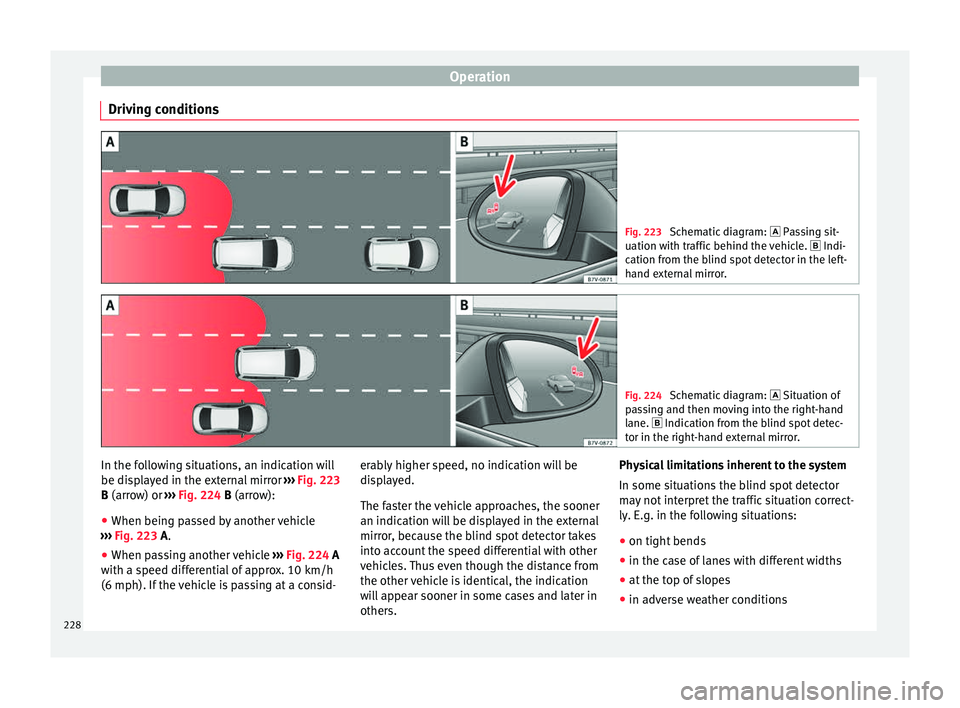
Driving conditions Fig. 223
Schematic diagram: Pas sing sit-
uation with traffic behind the vehicle. Indi-
cation from the blind spot detector in the left-
hand external mirror. Fig. 224
Schematic diagram: Situation of
p a
ssing and then moving into the right-hand
lane. Indication from the blind spot detec- tor in the right-hand external mirror. In the following situations, an indication will
be di
s
p
layed in the external mirror ››› Fig. 223
B (arrow) or ››› Fig. 224 B (arrow):
● When being passed by another vehicle
›››
Fig. 223 A.
● When passing another vehicle ›››
Fig. 224 A
with a speed differential of approx. 10 km/h
(6 mph). If the vehicle is passing at a consid- erably higher speed, no indication will be
disp
layed.
The faster the vehicle approaches, the sooner
an indication will be displayed in the external
mirror, because the blind spot detector takes
into account the speed differential with other
vehicles. Thus even though the distance from
the other vehicle is identical, the indication
will appear sooner in some cases and later in
others. Physical limitations inherent to the system
In some situation
s the blind spot detector
may not interpret the traffic situation correct-
ly. E.g. in the following situations:
● on tight bends
● in the case of lanes with different widths
● at the top of slopes
● in adverse weather conditions
228