2016 RENAULT TALISMAN card
[x] Cancel search: cardPage 210 of 328
3.20
ELECTRIC SUNROOF (2/3)Closing the sunroof by
remote control
(depending on the vehicle)
If you press the locking button on
the card twice in quick succession
RENAULT,, the windows and the elec-
tric sunroof will close automatically.
It is recommended that the user only
operates the system when the vehi-
cle can be seen clearly and no one is
inside.
Special features
Your vehicle is fitted with an anti-pinch
facility: when the sunroof encounters
resistance whilst closing (branch of
a tree, etc.), it stops and then moves
back a few centimetres.
After closing the sunroof by remote
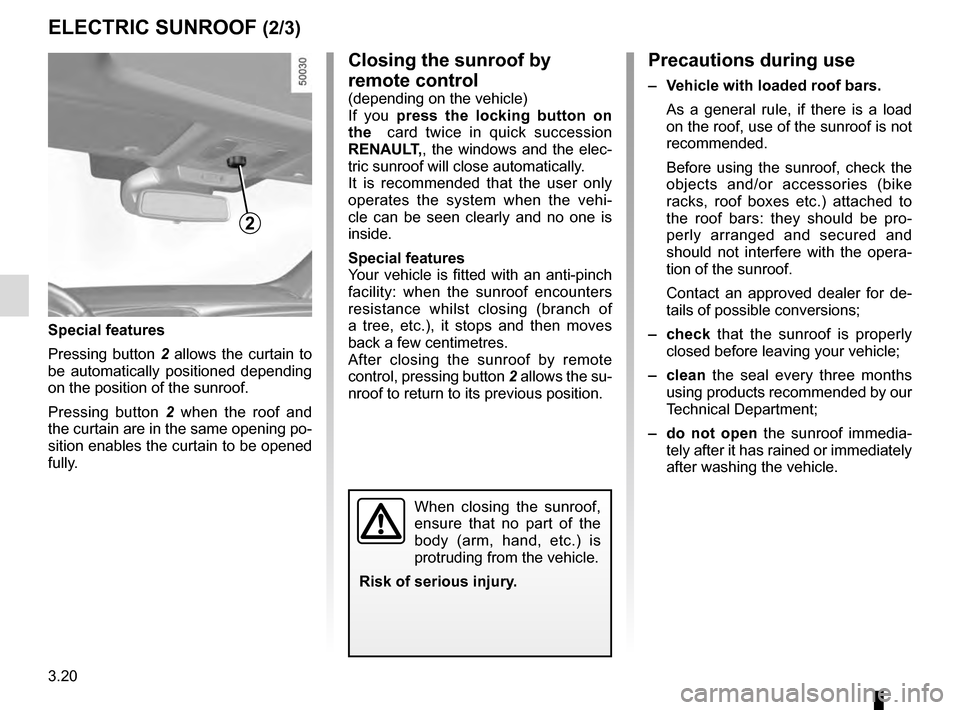
control, pressing button 2 allows the su-
nroof to return to its previous position.
Precautions during use
– Vehicle with loaded roof bars.
As a general rule, if there is a load
on the roof, use of the sunroof is not
recommended.
Before using the sunroof, check the
objects and/or accessories (bike
racks, roof boxes etc.) attached to
the roof bars: they should be pro-
perly arranged and secured and
should not interfere with the opera-
tion of the sunroof.
Contact an approved dealer for de-
tails of possible conversions;
– check that the sunroof is properly
closed before leaving your vehicle;
– clean the seal every three months using products recommended by our
Technical Department;
– do not open the sunroof immedia-
tely after it has rained or immediately
after washing the vehicle.
2
Special features
Pressing button 2 allows the curtain to
be automatically positioned depending
on the position of the sunroof.
Pressing button 2 when the roof and
the curtain are in the same opening po-
sition enables the curtain to be opened
fully.
When closing the sunroof,
ensure that no part of the
body (arm, hand, etc.) is
protruding from the vehicle.
Risk of serious injury.
Page 223 of 328

3.33
LUGGAGE COMPARTMENT: 4 door versions (2/3)
Using the hands-free functionThe hands-free function grants access
to the boot or allows it to be closed
while you have your hands full.
With the RENAULT card on your
person and the ignition turned off, make
a movement with your foot forwards/
backwards within the range of the sen-
sors 2.
The sensor detects the approach and
then the removal of your foot and trig-
gers the opening of the boot lid.
Do not keep your foot in the air. Carry
out the movement without stopping.
2
Activation/deactivation of the
hands-free function
Using the multifunction screen, select
menu “vehicle”, “User settings” then
“Use handsfree card: open/close”.
Select «ON" or "OFF" to activate or
deactivate the function.
Usage features of the hands-free
function
– the hands-free function is no longer available after a few days of lack of
movement of the vehicle, or after
around 15 minutes if the vehicle is
unlocked. To reactivate it, use the
unlocking button on the RENAULT
card.
– The «Hands-free» function is only available if the vehicle is stationary
and the engine is switched off (and
not on standby with the Stop and
Start function).
– The hands-free feature may not work if the vehicle is equipped with
a towbar or is in an area with high
electromagnetic radiation. Precautions during use
Before opening the tailgate, ensure
that the surrounding space is suffi-
cient to permit operation of the tailgate.
Otherwise, stop the movement of the
boot lid before it makes contact.
Make sure that the sensors are not
obscured (by dirt, mud, snow, road salt
etc.).
Note
In very cold weather conditions, the au-
tomatic opening may not operate if the
trunk lid joints are frozen.
Disable the «hands-free»
function before washing the
vehicle manually or han-
dling the emergency spare
wheel or the towbar.
Risk of accidental opening or clo-
sing of the tailgate which may
cause injury.
Page 227 of 328

3.37
If fitted on the vehicle, the tailgate locks
and unlocks at the same time as the
doors.
Depending on the vehicle, you have se-
veral different ways to manoeuvre the
tailgate:
– using the RENAULT card remote control;
– using the controls on the tailgate;
– using the dashboard control;
– using the hands-free function.
AUTOMATIC TAILGATE (1/5)
Conditions of use
– Immobilise the vehicle.
– If there is any ice or snow prevent-ing the tailgate from opening, this ice
or snow must be removed to free the
tailgate.
– In the event that the battery is dis- charged or if it is changed, the tail-
gate should be closed (manually
if necessary) to restart the tailgate
motor.
Ensure that nobody is close
to the moving parts when
opening/closing the tail-
gate.
Risk of injury.
Opening/Closing
Activating the automatic tailgate ope-
ning or closing using the dashboard
control or using the RENAULT card
causes three beeps to sound just
before the tailgate begins to move.
When opening or closing the tail-
gate, ensure that nothing interferes
with the manoeuvre.
To avoid damaging the tailgate
system, do not manually force the
tailgate to open or close while it is
moving.
The attaching of any
carrying device (bike rack,
luggage box, etc.) resting
on the luggage compart-
ment lid is prohibited. To install a
carrying device on your vehicle,
contact an Approved Dealer.
Page 228 of 328

3.38
AUTOMATIC TAILGATE (2/5)
Using the tailgate interior closing
control
Press control 3.Using the tailgate exterior opening
control
Press control 2.
1
Using the RENAULT card remote
control
With the ignition off, press and hold
switch 1 on the RENAULT card.
As a safety precaution,
the doors should only be
opened or closed when the
vehicle is stationary.
Risk of injury.
2
3
Page 229 of 328

3.39
Do not keep your foot in the air. Carry
out the movement without stopping.
Note: With the tailgate open, after de-
tecting a closure control, it waits around
3 seconds before triggering the closure
(a beep is emitted every second).
Using the dashboard control
Press and hold switch
4.
Using the hands-free function
The hands-free function grants access
to the boot or allows it to be closed
while you have your hands full.
With the RENAULT card on your person
and with the ignition off, perform a for-
wards/backwards movement with your
foot in the area delimited by the sen-
sors 5.
The sensor detects the approach and
removal of your foot and triggers the
opening or closing of the tailgate.
AUTOMATIC TAILGATE (3/5)
Activation/deactivation of the
hands-free function
Using the multifunction screen, select
menu “Vehicle”, “User settings” then
“Use handsfree card: open/close”.
Select “ON” or “OFF” to activate or de-
activate the function.
Usage features of the hands-free
function
– the hands-free function is no longer available after a few days of lack of
movement of the vehicle, or after
around 15 minutes if the vehicle is
unlocked. To reactivate it, use the
unlocking button on the RENAULT
card.
– The “Hands-free” function is only available if the vehicle is stationary
and the engine is switched off (and
not on standby with the Stop and
Start function).
– The «hands-free» feature may not work if the vehicle is equipped with a
towbar or is in an area of high elec-
tromagnetic radiation.
5
4
Page 241 of 328
3.51
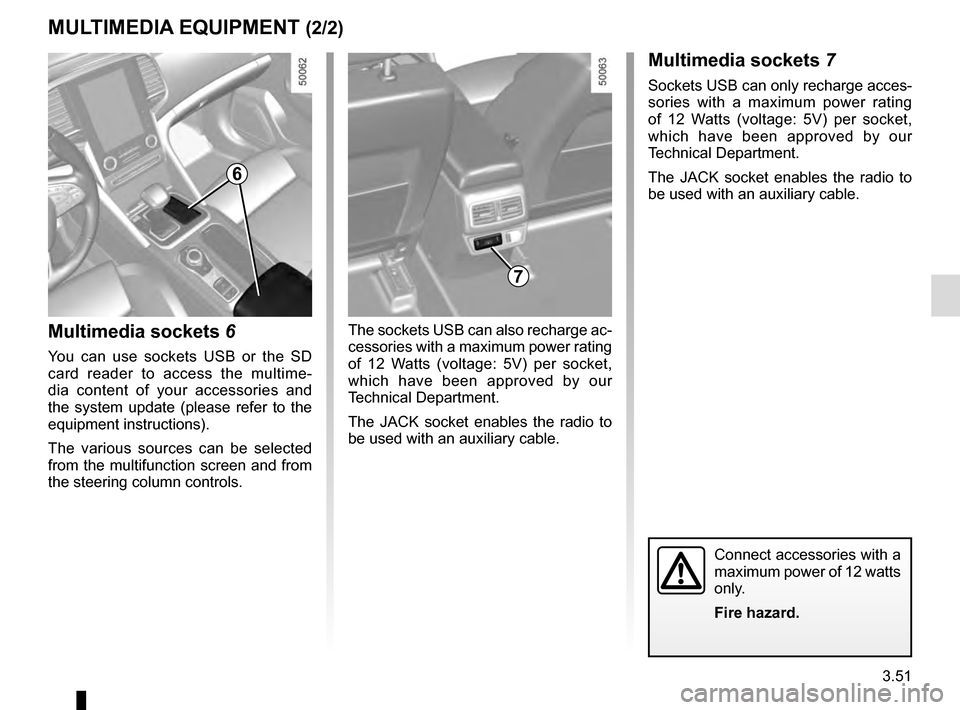
Multimedia sockets 6
You can use sockets USB or the SD
card reader to access the multime-
dia content of your accessories and
the system update (please refer to the
equipment instructions).
The various sources can be selected
from the multifunction screen and from
the steering column controls.
7
MULTIMEDIA EQUIPMENT (2/2)Multimedia sockets 7
Sockets USB can only recharge acces-
sories with a maximum power rating
of 12 Watts (voltage: 5V) per socket,
which have been approved by our
Technical Department.
The JACK socket enables the radio to
be used with an auxiliary cable.
The sockets USB can also recharge ac-
cessories with a maximum power rating
of 12 Watts (voltage: 5V) per socket,
which have been approved by our
Technical Department.
The JACK socket enables the radio to
be used with an auxiliary cable.
Connect accessories with a
maximum power of 12 watts
only.
Fire hazard.
6
Page 261 of 328

5.1
Section 5: Practical advice
Puncture, emergency spare wheel . . . . . . . . . . . . . . . . . . . . . . . . . . . . . . . . . . . .\
. . . . . . . . . . . . . . 5.2
Tyre inflation kit . . . . . . . . . . . . . . . . . . . . . . . . . . . \
. . . . . . . . . . . . . . . . . . . . . . . . . . . . . . . . . . . . . . 5.3
Tools . . . . . . . . . . . . . . . . . . . . . . . . . . . . . . . . . . . .\
. . . . . . . . . . . . . . . . . . . . . . . . . . . . . . . . . . . . . 5.7
Wheel trims - wheel . . . . . . . . . . . . . . . . . . . . . . . . . . . . . . . . . . . . \
. . . . . . . . . . . . . . . . . . . . . . . . . . 5.8
Changing a wheel . . . . . . . . . . . . . . . . . . . . . . . . . . . . . . . . . . . .\
. . . . . . . . . . . . . . . . . . . . . . . . . . . 5.9
Tyres (tyre and wheel safety, use in winter) . . . . . . . . . . . . . . . . . . . . . . . . . . . . . . . . . . . .\
. . . . . . . 5.11
Headlights (changing bulbs) . . . . . . . . . . . . . . . . . . . . . . . . . . . . . . . . . . . .\
. . . . . . . . . . . . . . . . . . . 5.14
Rear lights (changing bulbs) . . . . . . . . . . . . . . . . . . . . . . . . . . . . . . . . . . . .\
. . . . . . . . . . . . . . . . . . . 5.16
Indicator lights (changing bulbs) . . . . . . . . . . . . . . . . . . . . . . . . . . . . . . . . . . . .\
. . . . . . . . . . . . . . . . 5.20
interior lighting:
Fuses . . . . . . . . . . . . . . . . . . . . . . . . . . . . . . . . . . . . \
. . . . . . . . . . . . . . . . . . . . . . . . . . . . . . . . . . . . . 5.24
Battery: . . . . . . . . . . . . . . . . . . . . . . . . . . . . . . . . . . . .\
. . . . . . . . . . . . . . . . . . . . . . . . . . . . . . . . . . . 5.26
Remote control key: battery. . . . . . . . . . . . . . . . . . . . . . .\
. . . . . . . . . . . . . . . . . . . . . . . . . . . . . . . . . 5.28
RENAULT card: battery . . . . . . . . . . . . . . . . . . . . . . . . . . . . . . . . . . . . \
. . . . . . . . . . . . . . . . . . . . . . . 5.29
Accessories . . . . . . . . . . . . . . . . . . . . . . . . . . . . . . . . . . . . \
. . . . . . . . . . . . . . . . . . . . . . . . . . . . . . . . 5.30
Wipers (replacing blades) . . . . . . . . . . . . . . . . . . . . . . . . . . . . . . . . . . . .\
. . . . . . . . . . . . . . . . . . . . . 5.31
Towing . . . . . . . . . . . . . . . . . . . . . . . . . . . . . . . . . . . . \
. . . . . . . . . . . . . . . . . . . . . . . . . . . . . . . . . . . . 5.33
Tow eye . . . . . . . . . . . . . . . . . . . . . . . . . . . . . . . . . . . . \
. . . . . . . . . . . . . . . . . . . . . . . . . . . . . . . . . . . 5.34
Operating faults . . . . . . . . . . . . . . . . . . . . . . . . . . . . . . . . . . . . \
. . . . . . . . . . . . . . . . . . . . . . . . . . . . . 5.35
Page 289 of 328

5.29
Operating faults
If the battery is too weak to ensure cor-
rect operation, you can still start and
lock/unlock the vehicle (please refer to
the information on “Locking/unlocking
the opening elements” in Section 1).
RENAULT CARD: battery
Replacing the battery
When the message “Keycard battery
low” appears on the instrument panel,
replace the battery in the RENAULT
card:
– slide the rear casing 1 downwards
while pressing on zone A;
– remove the battery cover 2;
– remove the battery by pressing on
one side and lifting the other;
– replace it according to the direc-
tion and template shown inside the
cover.
Do not throw away your
used batteries; give them to
an organisation responsible
for collecting and recycling
batteries.
When refitting, proceed in the reverse
order, then press one of the buttons on
the card four times, close to the vehicle:
the message will disappear.
Note: it is not advisable to touch the
electronic circuit or contacts on the
RENAULT card when replacing the bat-
tery.
The batteries are available from ap-
proved Dealers, and their service
life approximately two years. Check
that there is no dye on the battery:
risk of an incorrect electrical con-
tact.
2
A
1