Page 144 of 328

Active emergency braking
Limitation of the system operation
– The system will only respond to vehicles which are moving or which have \
been sensed as")
2.36
DRIVER CORRECTION DEVICES AND AIDS (9/12)
Active emergency braking
Limitation of the system operation
– The system will only respond to vehicles which are moving or which have \
been sensed as moving.
– A vehicle travelling in the opposite direction will not trigger any alert\
or any action on the system operation.
– The sensor area should be kept clean and free of any modifications in or\
der to ensure the proper operation of the system.
– The system cannot respond to small vehicles such as motorbikes or bicycl\
es as effectively as to other vehicles.
Deactivating the function
The function should be deactivated if:
– the brake lights are not functioning;
– the front of the vehicle has undergone an impact or been damaged;
– the vehicle is being towed (breakdowns).
Halting the function
You can halt the active braking function at any time by tapping the accel\
erator pedal or by turning the steering wheel in a avo id-
ance manoeuvre.
If the driver notices any unusual behaviour in the system, please consul\
t an authorised dealer.
Page 173 of 328

Limitation of the system operation
– A vehicle travelling in the opposite direction will not trigger any alert\
or any action on the system operation.
– The sen")
2.65
ADAPTIVE CRUISE CONTROL (7/7)
Limitation of the system operation
– A vehicle travelling in the opposite direction will not trigger any alert\
or any action on the system operation.
– The sensor area should be kept clean and free of any modifications in or\
der to ensure the proper operation of the
system.
– Fixed obstacles (vehicles at a standstill, traffic jams, toll booths, etc.) or objects travelling at low speed or of a\
small size
(motorbikes, bicycles, pedestrians, etc.) may not be detected by the s\
ystem.
– A vehicle entering the same lane will only be detected once it has entere\
d the detection zone. Sudden or late braking may then take place.
– When entering a bend or curve, the sensor may temporarily no longer dete\
ct the vehicle in front, and this may lead to ac- celeration.
– When exiting a curve, the detection of the vehicle in front may be affected or delayed. Sudden or late braking may then take place.
– A slower vehicle travelling in an adjacent lane may be detected and cause\
a slowing down if one of the two vehicles is trav- elling too close to the lane of the other.
– The system is deactivated below around 20 mph (40 km/h). Drivers must \
react accordingly.
– Sudden changes in situation are not instantly taken into account by the \
system. Drivers must remain vigilant at all times and
under all circumstances.
Deactivating the function
The function should be deactivated if:
– the brake lights are not functioning;
– the front of the vehicle has undergone an impact or been damaged;
– the vehicle is being towed (breakdowns);
– traffic is heavy;
– the vehicle is travelling in a tunnel;
– the vehicle is travelling on a windy road;
– the vehicle is travelling on a slippery road or in poor weather conditio\
ns (fog, snow, rain, side winds etc.).
If the driver notices abnormal system behaviour, please consult an authorised dealer.
Page 189 of 328
2.81
AUTOMATIC GEARBOX (3/3)Operating faults
– when driving , if the message
"CHECK AUTO GEARBOX" ap-
pears on the instrument panel, it in-
dicates a failure.
Contact your approved Dealer as
soon as possible;
– when driving, if the message
"Gearbox overheating" appears on
the instrument panel, stop as soon
as possible to let the gearbox cool
down and wait for the message to
disappear;
– If a vehicle with an automatic
gearbox breaks down, refer to the
information on “Towing” in Section 5.
For safety reasons, do not
switch off the ignition before
the vehicle has come to a
complete standstill.
Parking the vehicle
When the vehicle is stopped, move the
lever to position P while keeping your
foot on the brake pedal: the gearbox is
in neutral and the drive wheels are me-
chanically locked by the driveshaft.
Ensure that the electronic parking
brake is engaged.
An impact to the under-
side of the vehicle while
manoeuvring (e.g.: strik-
ing a post, raised kerb or
other street furniture) may result in
damage to the vehicle (e.g.: defor-
mation of an axle).
To avoid any risk of accident, have
your vehicle checked by an ap-
proved Dealer.
2
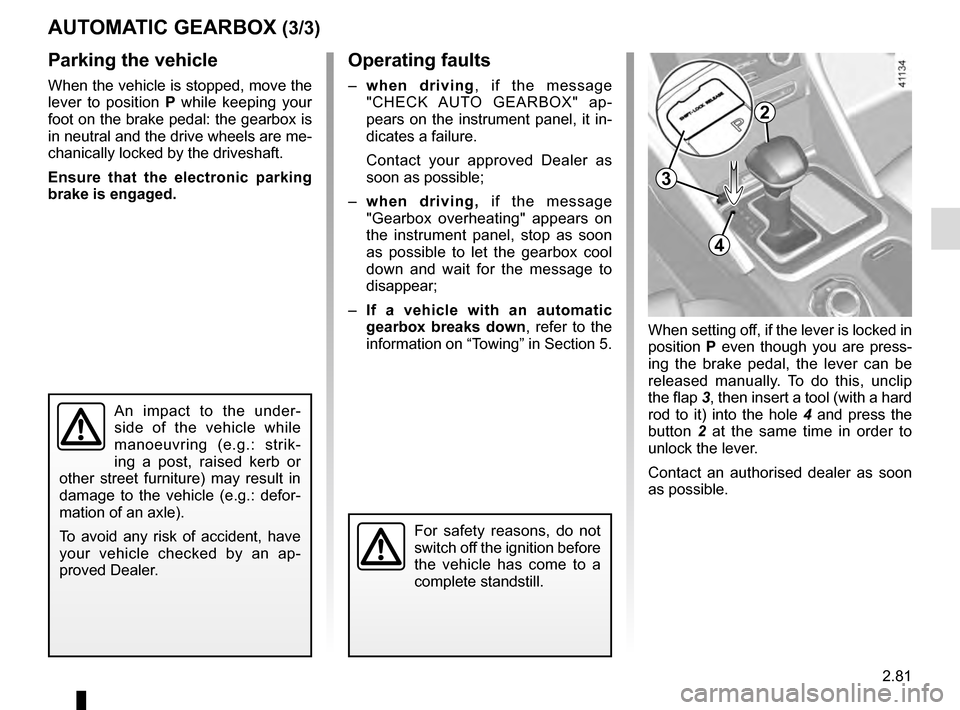
When setting off, if the lever is locked in
position P even though you are press-
ing the brake pedal, the lever can be
released manually. To do this, unclip
the flap 3, then insert a tool (with a hard
rod to it) into the hole 4 and press the
button 2 at the same time in order to
unlock the lever.
Contact an authorised dealer as soon
as possible.
3
4
Page 274 of 328
5.14
FRONT HEADLIGHTS: changing bulbs (1/2)
Main beam/Dipped beam
halogen headlights
Turn cover A or B a quarter turn, then
remove connector 1 or 4.
Remove clip 2, pressing down on it, or
turn bulb holder 3 then remove the bulb
holder.
Replace the bulb. Dipped beam 1 → H7
Main beam 3 → H9
It is essential to use anti-U.V. 55W
bulbs so as not to damage the plastic
on the headlights.
Do not touch the bulb glass. Hold it
by its base.
When the bulb has been changed,
make sure you refit the cover correctly.
The bulbs are under pres-
sure and can break when
replaced.
Risk of injury.
The engine may be hot
when carrying out opera-
tions in close proximity. In
addition, the engine cooling
fan can come on at any moment.
Risk of injury.
BA1
2
4
3
Before performing any
action in the engine com-
partment, the ignition must
be switched off (please see
the information on “Starting, stop-
ping the engine” in Section 2).
Page 275 of 328

5.15
LED daytime running lights
and side lights 1
Please consult an authorised dealer.
LED Main beam headlights 2
Please consult an authorised dealer.
LED dipped beam
headlights 3
Please consult an authorised dealer.
LED direction indicators 4
Please consult an authorised dealer.
Front fog lights 5
Please consult an authorised dealer.
FRONT HEADLIGHTS: changing bulbs (2/2)
The bulbs are under pres-
sure and can break when
replaced.
Risk of injury.
1
23
4
To comply with current legislation,
or as a precaution, you can obtain
an emergency kit from an approved
dealer containing a set of spare
bulbs and fuses.
15
Additional lights
If you wish to fit fog lights to your ve-
hicle, please see an authorised dealer.
Any operation on (or modi-
fication to) the electrical
system must be performed
by an approved dealer
since an incorrect connection might
damage the electrical equipment
(harness, components and in partic-
ular the alternator). In addition, your
Dealer has all the parts required for
fitting these units.
Page 276 of 328
5.16
Reversing lights
Open the boot lid, unclip the cover on
the interior trim 1 of the boot lid using
the tool 2 (refer to the information on
“Tools” in Section 5). Replace the bulb
3.
Bulb type: W16W.
Refitting
To refit, proceed in the reverse order,
taking care not to damage the wiring.
REAR LIGHTS AND SIDE LIGHTS: replacing the bulbs (1/5)
The bulbs are under pres-
sure and can break when
replaced.
Risk of injury.
4-door version
LED side lights, brake lights, fog
lights and direction indicators
Consult an approved Dealer.
1
3
2
Page 278 of 328
5.18
Estate versions
Side lights/brake and direction
indicator lights
Open the boot lid and remove screws 8.
To release the light unit, start by moving
the outside edge (movement A) far
enough to release it then pull the light
unit backwards (movement B).
Turn the bulb holder a quarter turn.
Remove the bulb.
Refit the bulb holder and push the unit
in fully until it locks in place.
Tighten screws 1.
Check that the light is properly locked
in position.
9 Direction indicator lights
Bulb type: PY21.
10 Side light and brake light
Bulb type: P21W.
8
REAR LIGHTS AND SIDE LIGHTS: replacing the bulbs (3/5)
910
AB
The bulbs are under pres-
sure and can break when
replaced.
Risk of injury.
Page 282 of 328
5.22
The bulbs are under pres-
sure and can break when
replaced.
Risk of injury.
INTERIOR LIGHTING: changing bulbs (2/3)
345
2
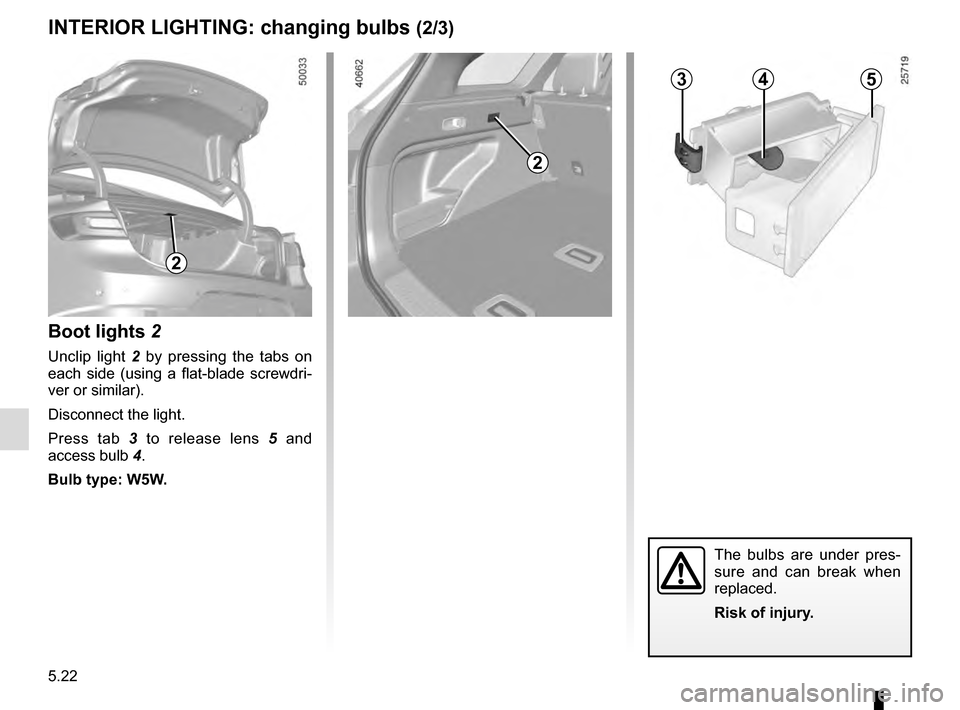
Boot lights 2
Unclip light 2 by pressing the tabs on
each side (using a flat-blade screwdri-
ver or similar).
Disconnect the light.
Press tab 3 to release lens 5 and
access bulb 4.
Bulb type: W5W.
2