Page 18 of 328
1.12
LOCKING, UNLOCKING THE DOORS (1/3)
If the remote control or,
depending on the vehicle, the
RENAULT card does not work
In some cases, the radio frequency
remote control or the RENAULT card
may not work:
– RENAULT card/radio frequency remote control battery worn or run
flat, vehicle battery flat, etc.
– use of appliances operating on the same frequency as the card (mobile
phone, etc.);
– vehicle located in a high electromag- netic radiation zone.
It is then possible:
– depending on the vehicle, use the radio frequency remote control or
the emergency key integrated in the
card to unlock the front left-hand
door;
– to lock each of the doors manually;
– to use the interior door locking/un- locking control (refer to the following
pages).
Vehicles with key/remote
control
Using the key
Insert the key 2 into the lock 1 and lock
or unlock the front left-hand door.
2
1
Page 19 of 328
1.13
LOCKING, UNLOCKING THE DOORS (2/3)
6
Locking the doors manually
Turn screw 6 with the door open (using
the end of the key) and close the door.
This means that the doors are then
locked from the outside.
The doors may then only be opened
from the inside or by using the key in
the front left-hand door.
A
Using the key integrated in the
RENAULT card
– Insert the tip of the key 3 into the
notch 5 at the bottom of the cover A
on the front left-hand door;
– move it upwards to remove cover A;
– Insert the key 3 into the lock and lock or unlock the front left-hand door.
Once you are inside the vehicle, put the
key back in its casing in the RENAULT
card.
3
4
Vehicles with RENAULT card
The card’s built-in key
The built-in key 3 is used to lock or
unlock the front left-hand door if the
RENAULT card is not working.
Access with key 3
Slide the back 4 of the casing down-
wards, while pressing down on the front
side at the top 4.
5
3
Page 20 of 328

1.14
LOCKING, UNLOCKING THE DOORS (3/3)
Interior locking/unlocking
door control
Switch 7 controls the doors, the boot
and the fuel filler flap simultaneously.
If a door or the tailgate is open or not
closed properly, the doors and tailgate
lock/unlock quickly.
If transporting an object with the tail-
gate open, you can still lock the doors:
with the engine stopped, press and
hold switch 7 for more than five sec-
onds to lock the other doors.
Locking the opening
elements without the
RENAULT card or the key
For example, in the event of a dis-
charged battery or the RENAULT card
or key temporarily not working, etc.
With the engine switched off and a
door or tailgate open, press and hold
switch 7 for more than five seconds.
When the door is closed, all the doors
and the tailgate will be locked.
Unlocking the vehicle from the outside
is only possible with the RENAULT card
in the vehicle’s access zone or using
the key.
Door and tailgate status
indicator
When the ignition is on, the indicator
light integrated in switch 7 informs you
of the status of the doors and tailgate:
– indicator light on, the doors and tail- gate are locked;
– indicator light off, the doors and tail- gate are unlocked.
When you lock the doors from the out-
side, the indicator light remains lit for a
moment, and then goes out.
Never leave your vehicle
with the key or RENAULT
card inside.
7
Driver’s responsibility
If you decide to keep the
doors locked when you are
driving, remember that it
may be more difficult for those as-
sisting you to gain access to the
passenger compartment in the
event of an emergency.
Page 21 of 328
1.15
OPENING AND CLOSING THE DOORS (1/3)
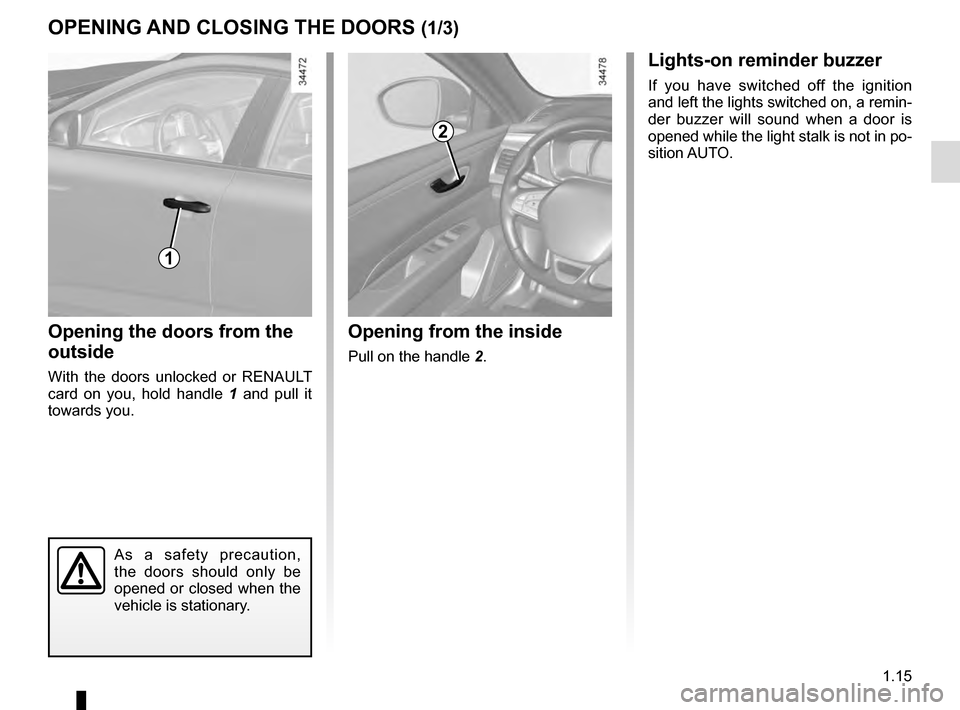
Opening the doors from the
outside
With the doors unlocked or RENAULT
card on you, hold handle 1 and pull it
towards you.
Opening from the inside
Pull on the handle 2.
2
As a safety precaution,
the doors should only be
opened or closed when the
vehicle is stationary.
1
Lights-on reminder buzzer
If you have switched off the ignition
and left the lights switched on, a remin-
der buzzer will sound when a door is
opened while the light stalk is not in po-
sition AUTO.
Page 32 of 328
1.26
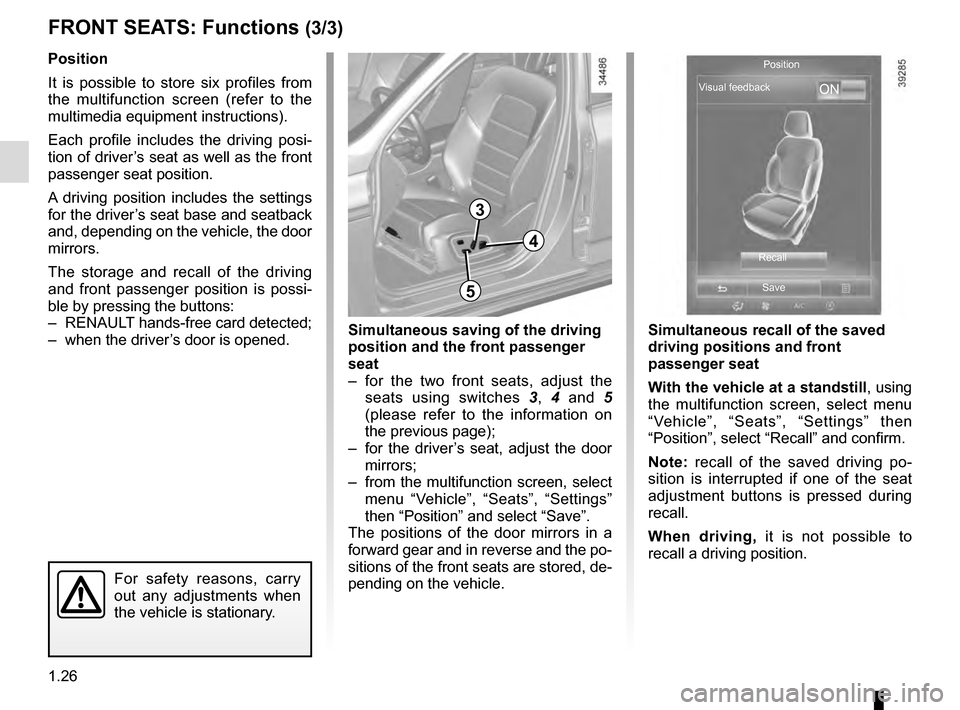
FRONT SEATS: Functions (3/3)
Position
It is possible to store six profiles from
the multifunction screen (refer to the
multimedia equipment instructions).
Each profile includes the driving posi-
tion of driver’s seat as well as the front
passenger seat position.
A driving position includes the settings
for the driver’s seat base and seatback
and, depending on the vehicle, the door
mirrors.
The storage and recall of the driving
and front passenger position is possi-
ble by pressing the buttons:
– RENAULT hands-free card detected;
– when the driver’s door is opened.
3
3
Simultaneous recall of the saved
driving positions and front
passenger seat
With the vehicle at a standstill, using
the multifunction screen, select menu
“Vehicle”, “Seats”, “Settings” then
“Position”, select “Recall” and confirm.
Note: recall of the saved driving po-
sition is interrupted if one of the seat
adjustment buttons is pressed during
recall.
When driving, it is not possible to
recall a driving position.
4
5
For safety reasons, carry
out any adjustments when
the vehicle is stationary.
Simultaneous saving of the driving
position and the front passenger
seat
– for the two front seats, adjust the seats using switches 3, 4 and 5
(please refer to the information on
the previous page);
– for the driver’s seat, adjust the door mirrors;
– from the multifunction screen, select menu “Vehicle”, “Seats”, “Settings”
then “Position” and select “Save”.
The positions of the door mirrors in a
forward gear and in reverse and the po-
sitions of the front seats are stored, de-
pending on the vehicle.
ON
Position
Visual feedback
RecallSave
Page 61 of 328

1.55
DRIVING POSITION (2/2)
The equipment fitted, described below, DEPENDS ON THE VERSION AND COUNTRY.
1 Side air vent.
2 Demister outlet.
3 Stalk for:
– direction indicator lights;
– exterior lights;
– fog lights.
4 Driver Airbag and horn location.
5 Instrument panel.
6 Head-up display.
7 Controls for:
– on-board computer information
read-out and vehicle settings cus-
tomisation menu,
– remote radio and navigation
system.
8 Steering column stalk for winds-
creen and rear screen wash/wiper.
9 Centre air vents.
10 Windscreen demister outlet.
11 Multimedia touchscreen.
12 Multifunction screen controls:
– screen activation/deactivation;
– volume;
– welcome menu;
– driving aids menu;
– settings.
13 Switches for:
– hazard warning lights,
– electric door locking.
14 Heating or air conditioning con-
trols.
15 Passenger Airbag location.
16 Glovebox.
17 Storage compartment.
18 Accessories and multimedia
socket
19 Cup holders
20 Controls for:
– electronic parking brake.
– cruise control/speed limiter.
21 Central multifunction and Multi-
Sense control.
22 Gearstick.
23 Controls for:
– heated front seats,
– ventilated front seats,
– activation/deactivation of ECO
mode,
– activation/deactivation of assisted
parking,
– activation/deactivation of the Stop
and Start function.
24 Engine start/stop button (vehicles
with RENAULT
card).
25 Ignition switch (vehicles with key).
26 Control for adjusting steering
wheel height and reach.
27 Cruise control/speed limiter and
adaptive cruise control controls.
28 Bonnet release control.
29 Controls for:
– electric headlight beam adjust-
ment,
– instrument panel lighting dimmer,
– lane departure warning,
– ESP and traction control system,
– heated steering wheel.
Page 87 of 328
1.81
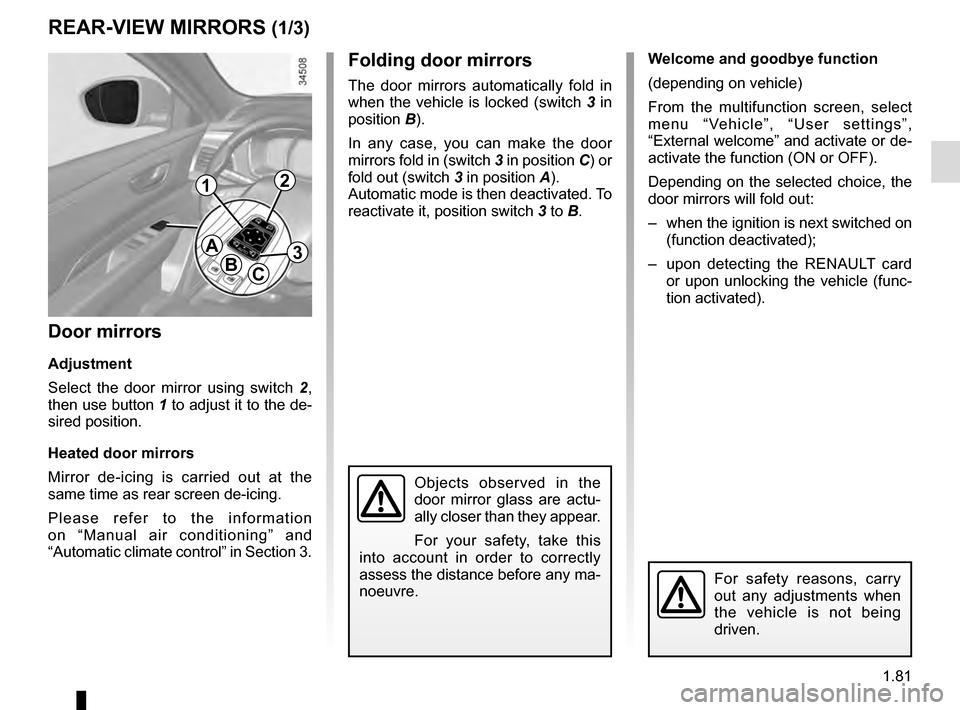
Folding door mirrors
The door mirrors automatically fold in
when the vehicle is locked (switch 3 in
position B).
In any case, you can make the door
mirrors fold in (switch 3 in position C) or
fold out (switch 3 in position A).
Automatic mode is then deactivated. To
reactivate it, position switch 3 to B.
REAR-VIEW MIRRORS (1/3)
Door mirrors
Adjustment
Select the door mirror using switch 2 ,
then use button 1 to adjust it to the de-
sired position.
Heated door mirrors
Mirror de-icing is carried out at the
same time as rear screen de-icing.
Please refer to the information
on “Manual air conditioning” and
“Automatic climate control” in Section 3.
For safety reasons, carry
out any adjustments when
the vehicle is not being
driven.
A
BC
12
3
Objects observed in the
door mirror glass are actu-
ally closer than they appear.
For your safety, take this
into account in order to correctly
assess the distance before any ma-
noeuvre.
Welcome and goodbye function
(depending on vehicle)
From the multifunction screen, select
menu “Vehicle”, “User settings”,
“External welcome” and activate or de-
activate the function (ON or OFF).
Depending on the selected choice, the
door mirrors will fold out:
– when the ignition is next switched on (function deactivated);
– upon detecting the RENAULT card or upon unlocking the vehicle (func-
tion activated).
Page 94 of 328

1.88
EXTERIOR LIGHTING AND SIGNALS (4/5)
Welcome and goodbye
function
(depending on the vehicle)
Once the function is activated, the day-
time running lights and the rear side
light light up automatically upon detec-
ting the Renault card or when the vehi-
cle is unlocked.
They switch off automatically:
– approximately one minute after li-ghting up;
– when starting the engine based on the position of the lighting stalk;
or
– upon locking the vehicle.
“See-me-home lighting”
function
This function allows you to briefly switch
on the dipped beam headlights (to pro-
vide light when opening a gate, etc.).
With the engine and lights switched
off and the ring 4 in position 0 or
AUTO, pull the stalk 1 towards you:
the dipped beam headlights come on
for approximately 30 seconds. To in-
crease this duration, you may pull the
stalk up to four times (total time limited
to approximately 2 minutes). The mes-
sage “Follow-me home for _ _ _” along
with the time the lights will be on for is
displayed on the instrument panel to
confirm this action. You can then lock
your vehicle.
To switch off the lights before they go
out automatically, turn ring 4 to any po-
sition, then return it to position AUTO. Welcome lighting under the door
mirrors
With the function activated, the lights
located under the door mirrors come
on automatically upon detection of the
RENAULT card, upon unlocking the
vehicle or when opening a door.
They switch off automatically:
– approximately one minute after li-
ghting up;
– upon starting the engine;
or
– upon locking the vehicle.
Activating/deactivating the function
From the multifunction screen, select
menu “vehicle”, “User settings” then
“External welcome”. Choose “ ON”
or “OFF” to activate or deactivate the
function.