Page 176 of 328

2.68
An impact to the under-
side of the vehicle while
manoeuvring (e.g.: strik-
ing a post, raised kerb or
other street furniture) may result in
damage to the vehicle (e.g.: defor-
mation of an axle).
To avoid any risk of accident, have
your vehicle checked by an ap-
proved Dealer.
Detection of obstacles to the side
Depending on the direction of the
wheels, the system determines the tra-
jectory of the vehicle and notifies the
driver of any risk or otherwise of a col-
lision with an obstacle 3 to the side of
the vehicle.
PARKING DISTANCE CONTROL (3/5)
If a side obstacle is detected:
– the beeps become faster and then sound continuously as the obstacle
gets nearer. Green, orange and red
zones will be displayed on the dis-
play D;
– if there is no risk of collision, no beep will sound when approaching the ob-
stacle. Green, orange and red zones
will be displayed interspersed on the
display D.
Note: in the event of a change in tra-
jectory during a manoeuvre, the risk of
collision with an obstacles may be sig-
nalled late.
3
D
Page 177 of 328

2.69
– press the switch 5 OK;
– using the control 6, select the set-
tings to be changed;
– press the switch 5 OK.
PARKING DISTANCE CONTROL (4/5)
When the vehicle is being driven
at a speed below approximately
6.2 mph (10 km/h), certain noises
(motorcycle, lorry, pneumatic drill
etc.) may trigger the beeping sound
of the parking distance control.
4
System sound
Enables the system sound to be se-
lected from a choice of 3.
Deactivating the system sound
Activate or deactivate the parking dis-
tance control sound.
Note: If you deactivate the sound, you
will no longer be notified with beeps
when approaching an obstacle.
Deactivating the system
Activate or deactivate parking distance
control.
Vehicles not fitted with a navigation
system
Vehicle stationary:
– press and hold the switch 5 OK to
access the settings menu;
– repeatedly press the control 6 up or
down until you reach the “Driving as-
sistance” menu;
– press the switch 5 OK;
– repeatedly press the control 6 up or
down until you reach the “Parking
distance control settings” menu;
Adjustment
You can adjust certain settings from the
multifunction screen 4. Please see the
equipment instructions for further infor-
mation.
Vehicles fitted with a navigation
system
Select “Vehicle”, “PARKING ASSIST”,
“Obstacle detection”.
Parking distance control audio
volume
Adjust the volume of the parking dis-
tance control by pressing + or -.
5
6
Page 178 of 328
2.70
PARKING DISTANCE CONTROL (5/5)
Automatic deactivation of the
parking distance control
The system deactivates:
– when the vehicle speed is above ap-proximately 6.2 mph (10 km/h);
– depending on the model, when the vehicle is stationary for more than
approximately 5 seconds and an ob-
stacle is detected (such as when in a
traffic jam, etc.);
– when the vehicle is in neutral for manual gearboxes, or in position N
or P for automatic gearboxes.
Operating faults
When the system detects an operating
fault, a beep sounds for approximately
3 seconds each time reverse gear is se-
lected and is accompanied by the mes-
sage “Check parking sensor” shown on
the instrument panel. Please consult an
authorised dealer.
Page 179 of 328
2.71
REVERSING CAMERA (1/3)
Operation
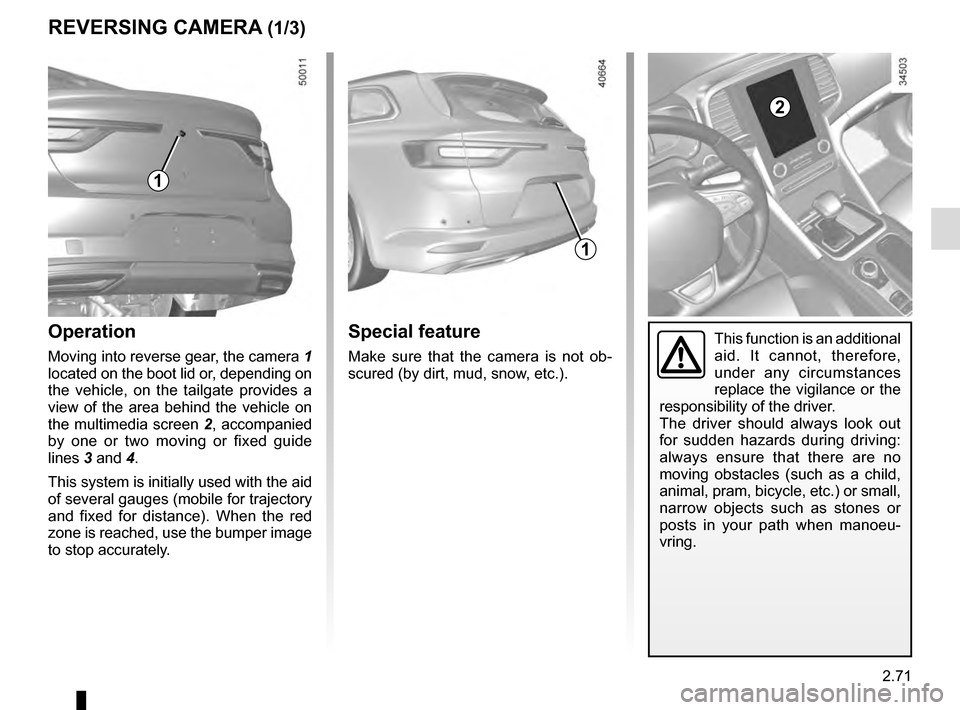
Moving into reverse gear, the camera 1
located on the boot lid or, depending on
the vehicle, on the tailgate provides a
view of the area behind the vehicle on
the multimedia screen 2, accompanied
by one or two moving or fixed guide
lines 3 and 4.
This system is initially used with the aid
of several gauges (mobile for trajectory
and fixed for distance). When the red
zone is reached, use the bumper image
to stop accurately.
1
2
Special feature
Make sure that the camera is not ob-
scured (by dirt, mud, snow, etc.).
1
This function is an additional
aid. It cannot, therefore,
under any circumstances
replace the vigilance or the
responsibility of the driver.
The driver should always look out
for sudden hazards during driving:
always ensure that there are no
moving obstacles (such as a child,
animal, pram, bicycle, etc.) or small,
narrow objects such as stones or
posts in your path when manoeu-
vring.
Page 180 of 328
2.72
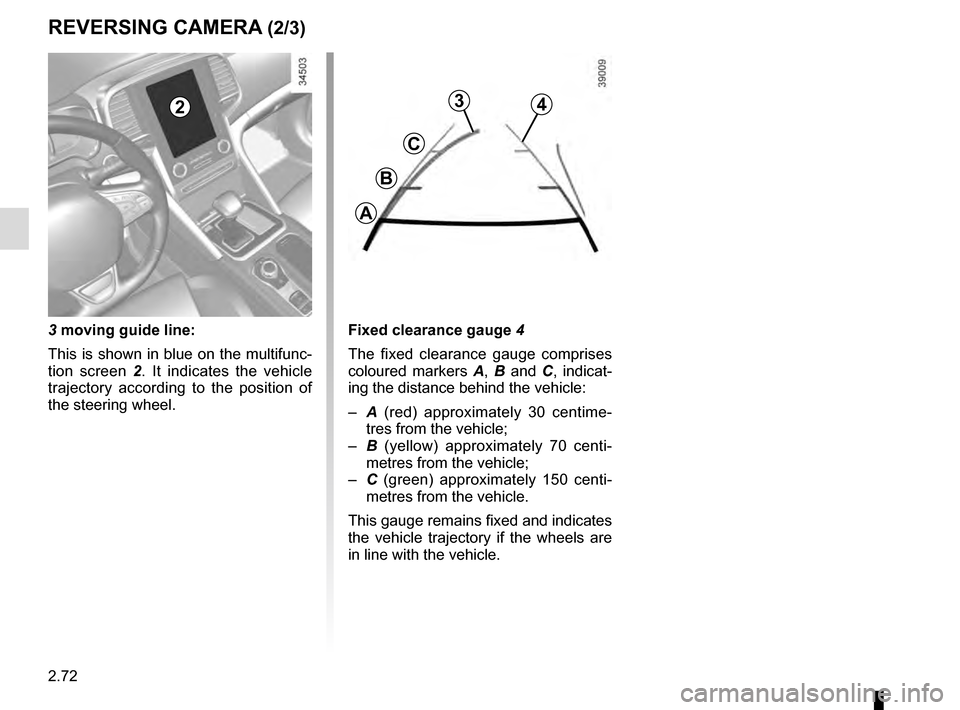
3 moving guide line:
This is shown in blue on the multifunc-
tion screen 2. It indicates the vehicle
trajectory according to the position of
the steering wheel.
3
C
B
A
4
Fixed clearance gauge 4
The fixed clearance gauge comprises
coloured markers A, B and C , indicat-
ing the distance behind the vehicle:
– A (red) approximately 30 centime-
tres from the vehicle;
– B (yellow) approximately 70 centi-
metres from the vehicle;
– C (green) approximately 150 centi-
metres from the vehicle.
This gauge remains fixed and indicates
the vehicle trajectory if the wheels are
in line with the vehicle.
2
REVERSING CAMERA (2/3)
Page 186 of 328
2.78
ADAPTIVE SUSPENSION
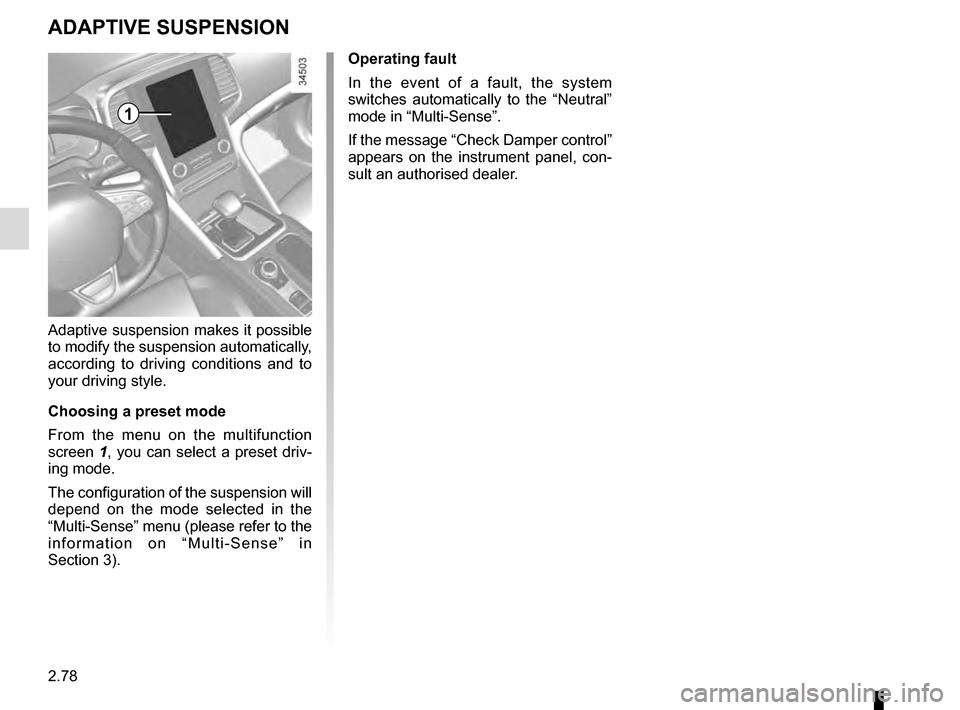
Adaptive suspension makes it possible
to modify the suspension automatically,
according to driving conditions and to
your driving style.
Choosing a preset mode
From the menu on the multifunction
screen 1, you can select a preset driv-
ing mode.
The configuration of the suspension will
depend on the mode selected in the
“Multi-Sense” menu (please refer to the
information on “Multi-Sense” in
Section 3). Operating fault
In the event of a fault, the system
switches automatically to the “Neutral”
mode in “Multi-Sense”.
If the message “Check Damper control”
appears on the instrument panel, con-
sult an authorised dealer.
1
Page 187 of 328
2.79
AUTOMATIC GEARBOX (1/3)
2
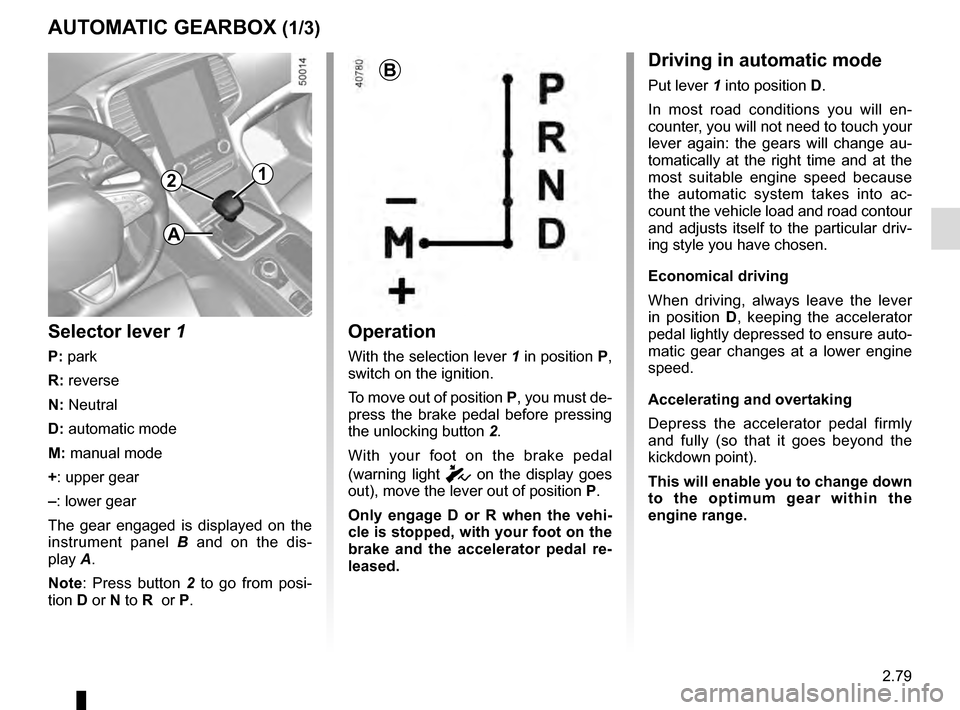
Operation
With the selection lever 1 in position P,
switch on the ignition.
To move out of position P, you must de-
press the brake pedal before pressing
the unlocking button 2.
With your foot on the brake pedal
(warning light
c on the display goes
out), move the lever out of position P.
Only engage D or R when the vehi-
cle is stopped, with your foot on the
brake and the accelerator pedal re-
leased.
1
B
Selector lever 1
P: park
R: reverse
N: Neutral
D: automatic mode
M: manual mode
+: upper gear
–: lower gear
The gear engaged is displayed on the
instrument panel B and on the dis-
play A.
Note: Press button 2 to go from posi-
tion D or N to R or P.
Driving in automatic mode
Put lever 1 into position D.
In most road conditions you will en-
counter, you will not need to touch your
lever again: the gears will change au-
tomatically at the right time and at the
most suitable engine speed because
the automatic system takes into ac-
count the vehicle load and road contour
and adjusts itself to the particular driv-
ing style you have chosen.
Economical driving
When driving, always leave the lever
in position D, keeping the accelerator
pedal lightly depressed to ensure auto-
matic gear changes at a lower engine
speed.
Accelerating and overtaking
Depress the accelerator pedal firmly
and fully (so that it goes beyond the
kickdown point).
This will enable you to change down
to the optimum gear within the
engine range.
A
Page 188 of 328

2.80
The gear selected is displayed on the
instrument panel.
Special casesIn certain driving conditions (result-
ing in, for example, engine protection,
operation of the Electronic Stability
Control programme: ESC, etc.) the au-
tomated system may change the gear
automatically.
Likewise, to prevent incorrect manoeu-
vres, a gear change may be refused by
the automatic system: in this case the
gear display flashes for a few seconds
as a warning.
AUTOMATIC GEARBOX (2/3)
Driving in manual mode
Move the selector lever 1 to position D,
then move the lever to the left into po-
sition M.
Shifting the lever repeatedly allows you
to change gears manually:
– to move down through the gears, push the lever forwards;
– to move up through the gears, push the lever backwards.
1
When facing uphill, to remain
stopped, do not keep your foot on
the accelerator.
Risk of overheating the automatic
gearbox.
Check that warning light P
on the instrument panel and
the warning light integrated
on the button 2 are acti-
vated before leaving the vehicle.
Risk of loss of immobilisation of the
vehicle
2
Special circumstances
– If the bends and road surface do
not allow you to stay in automatic
mode (e.g. in the mountains), we
recommend that you change to
manual mode. This will prevent the
automatic gearbox from changing
gear repeatedly when climbing, and
permit engine braking on long de-
scents.
– In cold weather , start the engine
and wait a few seconds before
moving the selector lever from posi-
tion P or N and engaging it in D or R
to prevent the engine stalling.