Page 154 of 328

2.46
Operating faults
If the system detects a fault, the mes-
sage “Check blind spot alert” is dis-
played on the instrument panel. Call an
approved Dealer.
Note: when the engine is started, the
indicator light 6, display B , flashes
three times. It is normal.
– The system’s detection
range operates according
to a standard lane width. If
you are driving in wide traf-
fic lanes, the system might not
be able to detect a vehicle in the
blind spot.
– The system might be disrupted momentarily if it is exposed to
strong electromagnetic waves
(as beneath high-tension power
lines) or to very poor weather
conditions (heavy rain, snow
etc.). Remain aware of driving
conditions.
There is a risk of accidents.
Because sensors have
been installed in the bum-
pers, any work (repairs, re-
placements, touching up of
paintwork) must be carried out by a
qualified professional.
6
B
C
D
Conditions for non-function
– If the object is not moving;
– if traffic is heavy;
– the road is winding;
– if front and rear sensors both detect objects at the same time (e.g. when
passing an articulated lorry).
– ...
BLIND SPOT WARNING (4/4)
Page 155 of 328
2.47
SAFE DISTANCE ALERT (1/2)
Activating/deactivating the
function
From the multifunction screen 2, select
menu “Vehicle”, “Driving assistance”,
“Distance warning” then choose “ON”
or “OFF”.
1
Using the sensor 1 , this function noti-
fies the driver about the time interval
separating them from the vehicle in
front, so they can respect a safe dis-
tance between the two vehicles.
Note: make sure that the sensor 1 is
not obscured (by dirt, mud, snow, etc.).
The function is activated when the vehi-
cle speed is between about 18.6 and
124 mph (30 and 200 km/h).
When the engine is started, the func-
tion maintains the same status that was
active when the engine was last stop-
ped.
You can access menu “Driving as-
sistance” directly from button 3
.
23
This function is an additio-
nal driving aid. However,
this function is not under
any circumstances in-
tended to replace the due care and
attention of the driver, who should at
all times be in control of the vehicle.
Page 157 of 328

2.49
CRUISE CONTROL/SPEED LIMITER: speed limiter function (1/3)
Switching on
Press switch 1 on side . The indica-
tor light
comes on, lit orange, and
the message “Speed limiter” appears
on the instrument panel, accompanied
by dashes to indicate that the speed
limiter function is activated and waiting
to store a limited speed.
To store the current speed, press
switch 2 side a (+): the limited speed
replaces the dashes.
The minimum stored speed is 20 mph
(30 km/h).
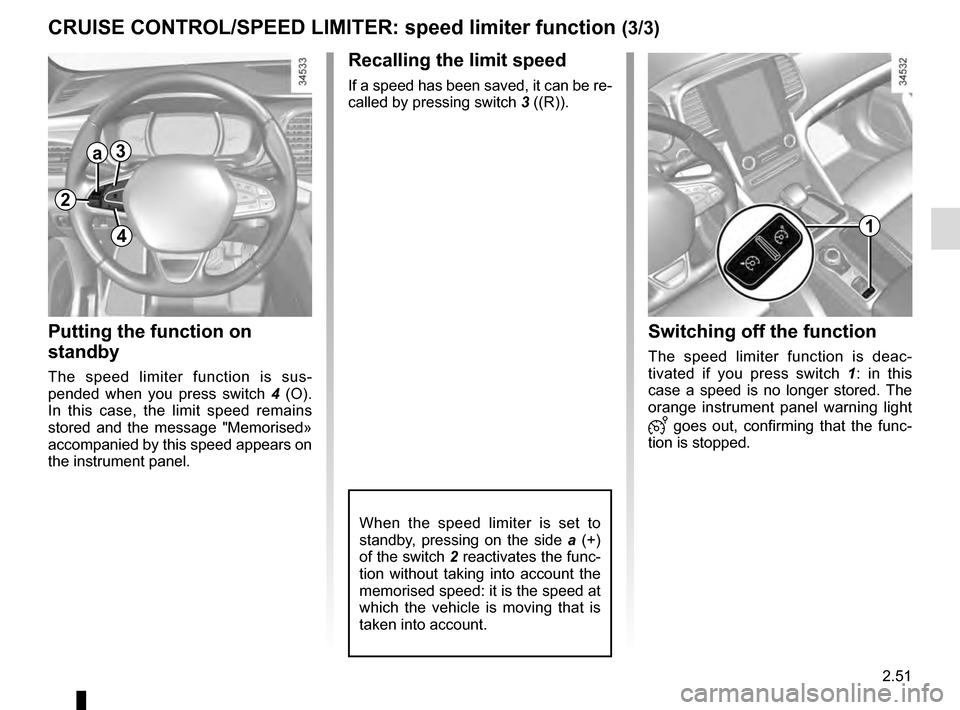
Controls
1 Main “On/Off” switch.
2 Controls for:
a speed limiter activation, memory
and increase (+);
b decreasing the speed limiter (-).
3 Activation and recall of memorised limited speed (R).
4 Speed limiter function standby (with limited speed memory) (O).
The speed limiter function helps you
stay within the driving speed limit that
you choose, known as the
limit speed.
If you wish, you can associate the
speed limiter and the “Overspeed
alert” function (please refer to the in-
formation on the “Overspeed alert”
in Section 2).
1
2
a3
4b
Page 158 of 328

2.50
CRUISE CONTROL/SPEED LIMITER: speed limiter function (2/3)
Varying the limit speed
The speed limiter can be changed by
repeatedly pressing the switch 2:
– side a (+) to increase the speed;
– side b (-) to reduce the speed.
Driving
When a limited speed has been stored
and this speed is not reached, driving is
similar to driving a vehicle without the
speed limiter function.
Once you have reached the stored
speed, no effort on the accelerator pedal
will allow you to exceed the program-
med speed except in an emergency
(refer to information on “Exceeding the
limit speed”).
The speed limiter function is
in no way linked to the bra-
king system.
a
b
2
Exceeding the limit speed
It is possible to exceed the limit speed
at any time. To do this: press the acce-
lerator pedal firmly and fully (beyond
the resistance point).
While the speed is being exceeded, the
programmed speed displayed on the
instrument panel flashes.
Then, release the accelerator: the
speed limiter function will return as
soon as you reach a speed lower than
the stored speed.
Limited speed cannot be maintained
When driving down a steep gradient,
the system is unable to maintain the
limit speed: the memorised speed will
flash on the instrument panel and an
audible signal sounds at regular inter-
vals to inform you of this situation.
Page 159 of 328
2.51
CRUISE CONTROL/SPEED LIMITER: speed limiter function (3/3)
Recalling the limit speed
If a speed has been saved, it can be re-
called by pressing switch 3 ((R)).
Putting the function on
standby
The speed limiter function is sus-
pended when you press switch 4 (O).
In this case, the limit speed remains
stored and the message "Memorised»
accompanied by this speed appears on
the instrument panel.
Switching off the function
The speed limiter function is deac-
tivated if you press switch 1 : in this
case a speed is no longer stored. The
orange instrument panel warning light
goes out, confirming that the func-
tion is stopped.
1
2
a3
4
When the speed limiter is set to
standby, pressing on the side a (+)
of the switch 2 reactivates the func-
tion without taking into account the
memorised speed: it is the speed at
which the vehicle is moving that is
taken into account.
Page 161 of 328

2.53
OVERSPEED ALERT (2/3)
23
4
a
b
56
Activating/deactivating the
system
Vehicles fitted with a navigation
system
On the multifunction screen 2, select
the “Vehicle” menu, “Driving assist-
ance”, and “Speed alert settings”, and
then choose “ON” or “OFF”.
With the function activated and de-
pending on local laws, you can activate
the “increased vigilance zones”. The
system will notify you of the distance
separating you from this zone, and
while you are travelling in the zone.
Vehicles not fitted with a navigation
system
– With the vehicle at a standstill, press and hold the switch 5 OK to access
the settings menu;
– repeatedly press the control 6 up or
down until you reach the “Driving as-
sistance” menu. Press the switch 5
OK; – repeatedly press the control
6 up or
down until you reach the Speed alert
menu, then press the switch 5 OK.
– Press OK to turn the function on or
off.
Varying the limit speed
If the speed limiter notification differs
from the detected speed value, press
and hold the switch 4:
– side a (+) to increase the notification
speed to the detected speed;
– side b (-) to reduce the notification
speed to the detected speed.
You can access menu “Driving as-
sistance” directly from button 3
.
Page 163 of 328
2.55
CRUISE CONTROL/SPEED LIMITER: cruise control function (1/4)
The cruise control function
is in no way linked to the
braking system.
This function is an addi-
tional driving aid. However,
the function does not take
the place of the driver.
Therefore, it can under no circum-
stances replace the driver’s respon-
sibility to respect speed limits and to
be vigilant (the driver must always
be ready to brake). Cruise control
must not be used in heavy traffic, on
undulating or slippery roads (black
ice, aquaplaning, gravel) and during
bad weather (fog, rain, side winds
etc.).
There is a risk of accidents.
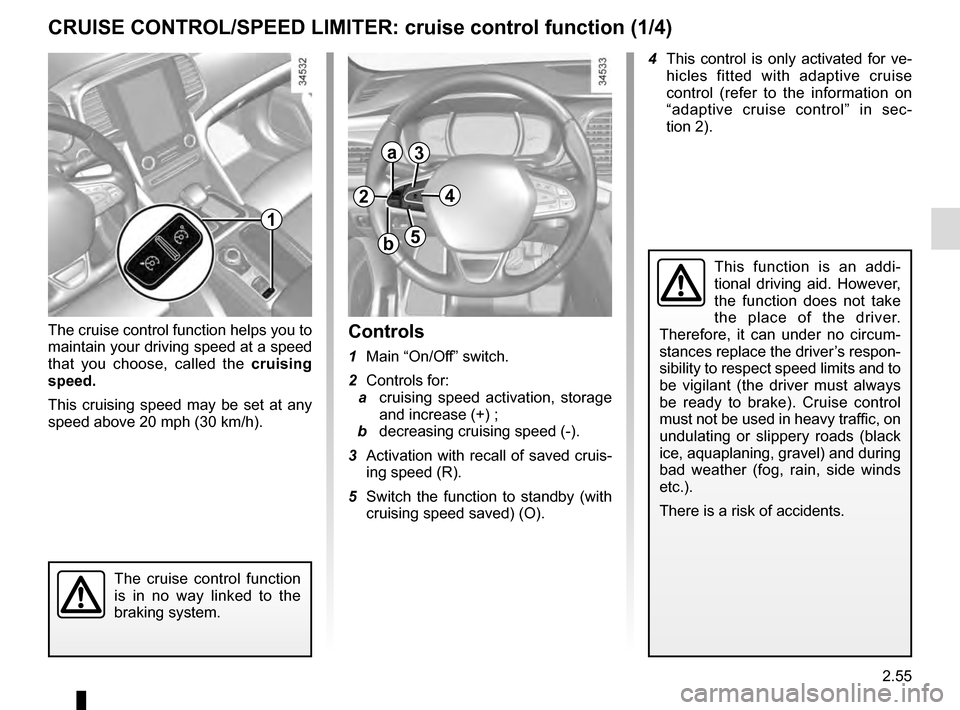
Controls
1 Main “On/Off” switch.
2 Controls for:
a cruising speed activation, storage
and increase (+) ;
b decreasing cruising speed (-).
3 Activation with recall of saved cruis- ing speed (R).
5 Switch the function to standby (with cruising speed saved) (O).
1
2
a
b
3
5
The cruise control function helps you to
maintain your driving speed at a speed
that you choose, called the cruising
speed.
This cruising speed may be set at any
speed above 20 mph (30 km/h). 4 This control is only activated for ve-
hicles fitted with adaptive cruise
control (refer to the information on
“adaptive cruise control” in sec-
tion 2).
4
Page 164 of 328

2.56
CRUISE CONTROL/SPEED LIMITER: cruise control function (2/4)
Driving
Once a cruising speed is memorised
and the cruise control function is active,
you may lift your foot off the accelera-
tor pedal.
Please note that you are
strongly advised to keep
your feet close to the pedals
in order to react in an emer-
gency.
Switching on
Press switch 1 on side .
Indicator light
comes on, lit green,
and the message “Cruise Control”
appears on the instrument panel,
accompanied by dashes to indicate that
the cruise control function is activated
and waiting to store a cruising speed.
1
2
a
Activating cruise control
At a steady speed (above approxi-
mately 18.6 mph (30 km/h)) press
switch 2 side a (+): the function is acti-
vated and the current speed is memo-
rised.
The cruising speed replaces the dashes
and cruise control is confirmed by dis-
playing of the cruising speed, the mes-
sage “Cruise control” and depending on
the vehicle the indicator light
, in ad-
dition to the indicator light
or .
If you try to activate the function below
20 mph (30 km/h), the message “Invalid
speed” will be displayed and the func-
tion will remain inactive.