2016 Peugeot Partner Tepee ECO mode
[x] Cancel search: ECO modePage 261 of 296
259
The services available depend on
the network, the SIM card and the
compatibility of the Bluetooth telephone
used. Check the telephone manual and
with your network provider for details of
the services available to you.
The ability of the system to connect
with only one profile depends on the
telephone. The three profiles may all
connect by default.
Visit www.peugeot.co.uk for more information
(compatibility, additional help, ...).
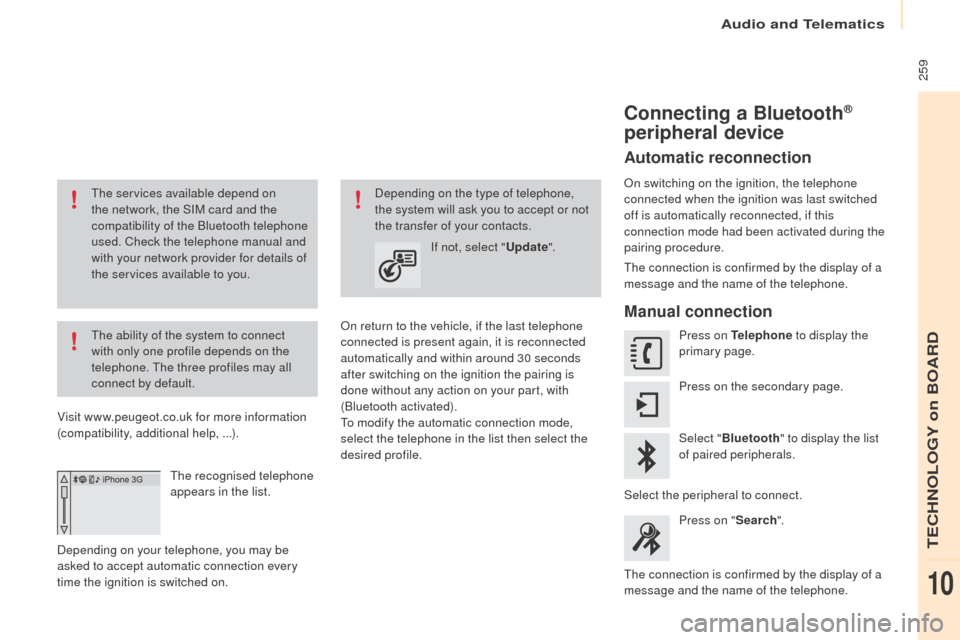
The recognised telephone
appears in the list.
Depending on your telephone, you may be
asked to accept automatic connection every
time the ignition is switched on.
on r
eturn to the vehicle, if the last telephone
connected is present again, it is reconnected
automatically and within around 30 seconds
after switching on the ignition the pairing is
done without any action on your part, with
(Bluetooth activated).
To modify the automatic connection mode,
select the telephone in the list then select the
desired profile. Depending on the type of telephone,
the system will ask you to accept or not
the transfer of your contacts.
If not, select "
upd
ate".
Connecting a Bluetooth®
peripheral device
Automatic reconnection
on switching on the ignition, the telephone
connected when the ignition was last switched
off is automatically reconnected, if this
connection mode had been activated during the
pairing procedure.
The connection is confirmed by the display of a
message and the name of the telephone.
Manual connection
Press on tel ephone to display the
primary page.
Press on the secondary page.
Select " Bluetooth " to display the list
of paired peripherals.
Select the peripheral to connect. Press on " Search".
The connection is confirmed by the display of a
message and the name of the telephone.
Audio and Telematics
TeCHNoLogY on BoARD
10
Page 269 of 296

267
QueStIoNA NSWeRS oLutIoN
T
here is a difference in
sound quality between the
different audio sources. For optimum sound quality, the audio settings for Volume, Bass,
Treble,
e
q
ualizer and Loudness can be adapted to the different
sound sources, which may result in audible differences when
changing source. Check that the audio settings for (Volume, Bass,
Treble,
e
q
ualizer, Loudness) are adapted to the
sources listened to. It is advisable to set the
audio functions (Bass, Treble, Fr-Re balance,
Le-Ri balance) to the middle position, select the
"Linear", musical ambience and set the loudness
correction to the "Inactive" position in radio
mode.
With the engine off, the
system switches off after a
few minutes of use. When the engine is switched off, the system's operating time
depends on the state of charge of the battery.
The switch-off is normal: the system switches to economy mode
and switches off to prevent discharging of the vehicle's battery. Start the vehicle's engine to increase the battery
charge.
Audio and telematics
teCHNoLogY on BoARD
10
Page 276 of 296

274Media
uSB player
This unit consists of a uSB port
and an auxiliary Jack socket,
depending on model.
Insert a
u
S
B memory stick into the u
S
B port
or connect a
u
S
B peripheral device to the u
S
B
port using a suitable cable (not supplied).
The system creates playlists
(temporary memory), which can take
from a few seconds to several minutes
on the first connection.
Reducing the number of non-music
files and the number of folders reduces
this waiting time. Playlists are updated
every time the ignition is switched off or
a
u
S
B memory stick is connected.
The lists are memorised: if the lists are
not changed, the subsequent loading
time is reduced. Press and hold R
eF
R
eS
H LIS
t t
o
display the different classifications.
Select by " Folder" / "Artist " /
"
ge
nre" / "Playlist ".
Press
o
K t
o select the classification
required, then press
o
K a
gain to
confirm. Press ReF
ReS H LISt b riefly to
display the previously selected
classification.
Navigate through the list using the
left /right and up/down buttons.
Confirm the selection by
pressing
o K.
Press one of these buttons to gain
access to the previous / next track in
the list.
Press and hold one of the buttons for
fast for ward or back.
Press one of these buttons to
gain access to the previous / next
" Folder " / "Artist " / "
ge
nre" /
" Playlist " in the list.
Audio and Telematics
Page 280 of 296

278Telephone
Pairing a Bluetooth® telephone
Screen C
(Available according to model and version)
As a safety measure and because they
require prolonged attention on the part
of the driver, the operations for pairing
of the Bluetooth mobile telephone with
the Bluetooth hands-free system of
your audio equipment must be carried
out with the vehicle stationary and the
ignition on.
go
to www.peugeot.co.uk for more information
(compatibility, more help, ...).
Activate the telephone's Bluetooth function
and ensure that it is "visible to all" (telephone
configuration).
Press the M
eN
u
b
utton. In the menu, select:
-
"Bluetooth:
tel ephone - Audio"
-
"Bluetooth configuration "
-
"Perform a Bluetooth search "
A window is displayed with a message that a
search is in progress. The services available depend on
the network, the SIM card and the
compatibility of the Bluetooth device
used.
Consult your telephone's manual and
your operator to find out which services
are available to you.
* If your telephone is fully compatible. The first 4 telephones recognised are displayed
in this window.
The "
tel
ephone" menu permits access to the
following functions in particular: " Directory" *,
" Calls list ", "Consult the paired equipment ".Select the telephone to be connected from the
list.
on ly one telephone can be connected at
a time.
A virtual keypad is displayed in the screen:
enter a code with at least 4 digits.
Confirm by pressing
o K.
A message in the screen indicates the telephone
chosen. To accept the pairing, enter the same
code on the telephone, then confirm with
o K.
If pairing fails, the number of attempts is not
limited.
A message that the pairing has been
successful appears in the screen.
The automatic connection authorised is only
active after the telephone has been configured.
The directory and the call list can be accessed
after the necessary synchronisation period.
Audio and Telematics
Page 286 of 296

284
The table below gives answers to the most frequently asked questions on your audio system.Q
ueStIoN A
NSW
eRS
o
LutIoN
W
ith the engine off, the
audio system switches off
after a few minutes of use. When the engine is switched off, the audio system operating time
depends on the state of charge of the battery.
The switch-off is normal: the audio equipment switches to economy
mode and switches off to prevent discharging of the vehicle's
battery. Start the vehicle's engine to increase the battery
charge.
The message "the audio
system is overheated"
appears on the display. In order to protect the installation if the surrounding temperature
is too high, the audio system switches to an automatic thermal
protection mode leading to a reduction in volume or CD play
stopping. Switch the audio system off for a few minutes to
allow the system to cool.
Frequently asked questions
QueStIoN
A NSWeRS oLutIoN
T
here is a difference in
sound quality between the
different audio sources
(radio, CD...). For optimum sound quality, the audio settings (Volume, Bass,
Treble, Ambience, Loudness) can be adapted to the different sound
sources, which may result in audible differences when changing
source (radio, CD...). Check that the audio settings (Volume, Bass,
Treble, Ambience, Loudness) are adapted to
the sources listened to. It is advisable to set
the audio functions (Bass, Treble, Front-Rear
Balance, Left-Right Balance) to the middle
position, select the musical ambience "None"
and set the loudness correction to the "Active"
position in CD mode or to the "Inactive" position
in radio mode.
Radio
Audio and Telematics
Page 287 of 296

285
QueStIoNA NSWeRS oLutIoN
T
he stored stations do not
function (no sound,
87.5 Mhz is displayed...). An incorrect waveband is selected.
Press the BAND AST button to return to the
waveband (AM, FM1, FM2, FMAST) on which the
stations are stored.
The traffic announcement
(TA) is displayed. I do
not receive any traffic
information. The radio station is not part of the regional traffic information
network.
Tune to a radio station which broadcasts traffic
information.
The quality of reception of
the radio station listened
to gradually deteriorates
or the stored stations do
not function (no sound,
87.5
Mhz is displayed...). The vehicle is too far from the transmitter used by the station
listened to or there is no transmitter in the geographical area
through which the vehicle is travelling.
Activate the RDS function to enable the system
to check whether there is a more power ful
transmitter in the geographical area.
The environment (hills, buildings, tunnels, underground car parks...)
block reception, including in RDS mode. This phenomenon is normal and does not
indicate a failure of the audio equipment.
The aerial is absent or has been damaged (for example when going
through an automatic car wash or into an underground car park). Have the aerial checked by a P
e
ugeo
T d
ealer.
Sound cut-outs of 1 to
2
seconds in radio mode. During this brief sound cut-out, the RDS searches for another
frequency giving better reception of the station. Deactivate the RDS function if the phenomenon
is too frequent and always on the same route.
Audio and Telematics
TeCHNoLogY on BoARD
10
Page 294 of 296
198
Weights
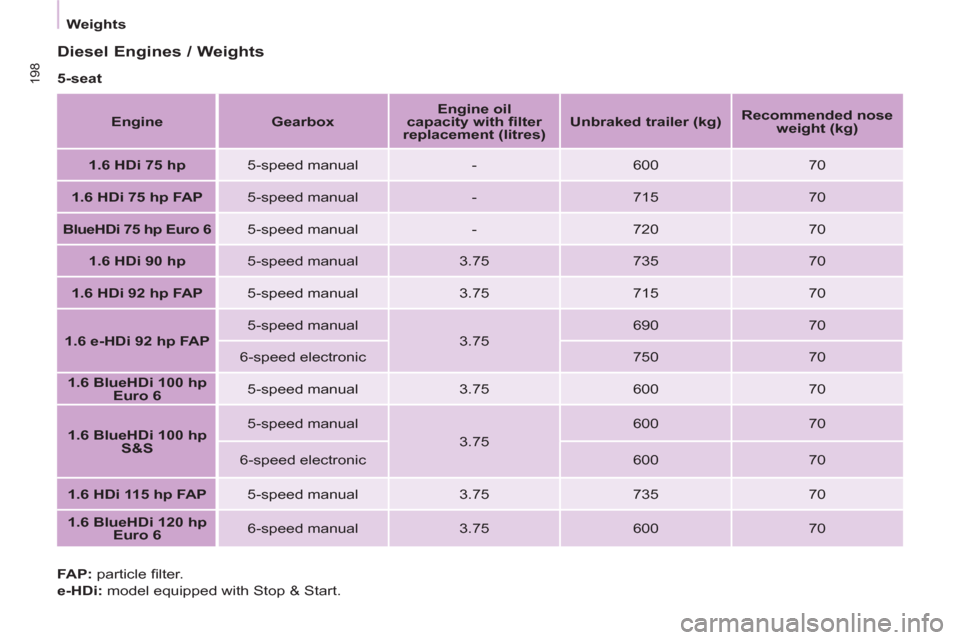
Diesel Engines / Weights
5-seat
Engine
Gearbox
Engine oil
capacity with fi lter
replacement (litres)
Unbraked trailer (kg)
Recommended nose
weight (kg)
1.6 HDi 75 hp
5-speed manual
-
600
70
1.6 HDi 75 hp FAP
5-speed manual
-
715
70
BlueHDi 75 hp Euro 6
5-speed manual
-
720
70
1.6 HDi 90 hp
5-speed manual
3.75
735
70
1.6 HDi 92 hp FAP
5-speed manual
3.75
715
70
1.6 e-HDi 92 hp FAP
5-speed manual
3.75
690
70
6-speed electronic
750
70
1.6 BlueHDi 100 hp
Euro 6
5-speed manual
3.75
600
70
1.6 BlueHDi 100 hp
S&S
5-speed manual
3.75
600
70
6-speed electronic
600
70
1.6 HDi 115 hp FAP
5-speed manual
3.75
735
70
1.6 BlueHDi 120 hp
Euro 6
6-speed manual
3.75
600
70
FAP:
particle fi lter.
e-HDi:
model equipped with Stop & Start.
Page 295 of 296

199
TECHNICAL DATA
9
Weights
7-seat
Engine
Gearbox
Engine oil
capacity with fi lter
replacement (litres)
Unbraked trailer (kg)
Recommended nose
weight (kg)
1.6 HDi 92 hp FAP
5-speed manual
3.75
750
70
1.6 BlueHDi 100 hp
Euro 6
5-speed manual
3.75
600
70
1.6 BlueHDi 100 hp
Euro 6 S&S
5-speed manual
3.75
600
70
1.6 HDi 115 hp FAP
5-speed manual
3.75
750
70
1.6 BlueHDi 120 hp
Euro 6
6-speed manual
3.75
600
70
FAP:
particle fi lter.
e-HDi:
model equipped with Stop & Start.