Page 198 of 296

196
eNgINe CHARACteRIStICS
The engine characteristics (capacity,
maximum power, maximum power
speed, fuel, Co
2 emissions...) for your
vehicle are given in the registration
certificate.
These characteristics correspond
to the values type-approved
on a test bed, under conditions
defined in European legislation
(Directive
1999/99/ e C).
For more information, refer to the
manufacturer's website or sales
brochure for the model. Contact
a PEUGEOT dealer or a qualified
workshop.
WeIgHtS AND to W e D L o ADS
These values, expressed in kg, can be
found on the manufacturer's VIN plate
or label.
The maximum weights and towed
loads for your vehicle can be found on
the vehicle's registration certificate.
The kerb weight is equal to the weight
without load + driver (75 kg) + fuel tank
filled to 90%.
The
g TW and towed load values
indicated are valid up to a maximum
altitude of 1000 metres. The value of
the towed load mentioned must be
reduced by 10 % for each additional
1000 metres.
With load transfer, the braked trailer
weight can be increased, on condition
that the equivalent of this load is
removed from the vehicle so that the
g
TW is not exceeded. High ambient temperatures
may result in a reduction in the
performance of the vehicle in
order to protect the engine. When the
ambient temperature is higher than
37
°C, limit the towed weight.Towing with a lightly loaded
vehicle can adversely affect road
holding.
Towing a trailer increases braking
distances.
When towing, the maximum permitted
speed is reduced (comply with the
legislation in force in the country). The recommended nose weight is
the downward force on the towball
(removable with or without tools).
g
VW: gross vehicle weight, the
maximum authorised weight.
gt
W: gross train weight, the maximum
weight for vehicle plus trailer.
The location of the manufacturer's
plate is given in chapter 9,
"Identification markings" section.
In each country, it is imperative that
the maximum towed loads authorised
by local legislation are complied
with. To find out your vehicle's towing
capacities and its gross train weight,
consult a P
eugeo T dealer.
Weights
Page 200 of 296
198
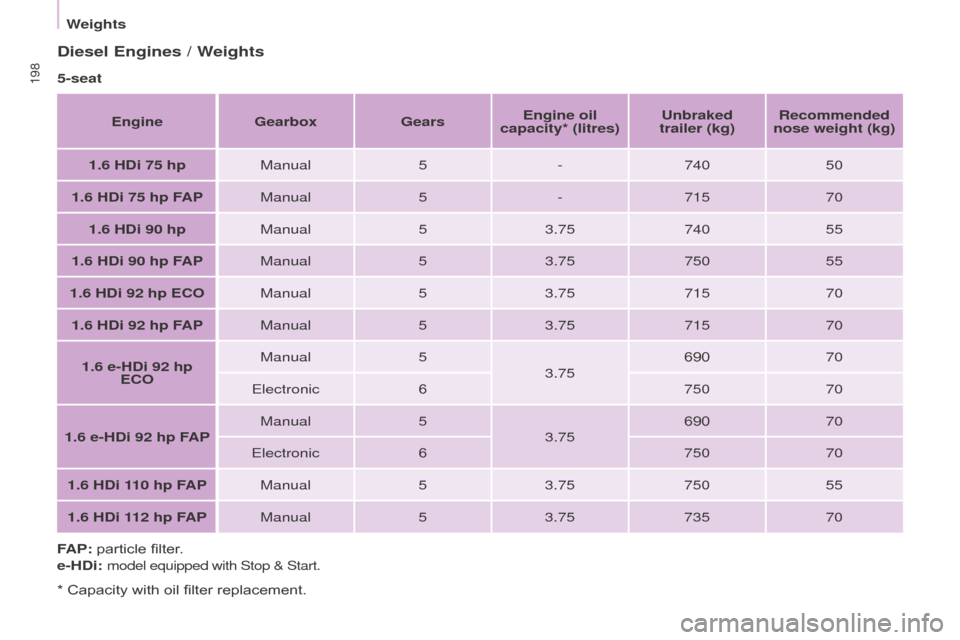
Diesel engines / Weights
5-seat
e
ngine
g
earbox
g
ears
e
ngine oil
capacity* (litres)
u
nbraked
trailer (kg) Recommended
nose weight (kg)
1.6 HDi 75 hp Manual5-740 50
1.6 HDi 75 hp FAP Manual5-715 70
1.6 HDi 90 hp Manual53.75 740 55
1.6 HDi 90 hp FAP Manual53.75 750 55
1.6 HDi 92 hp
e C o
Manual 53.75 715 70
1.6 HDi 92 hp F
APManual 53.75 715 70
1.6 e-HDi 92 hp
e
C o
Manual 5
3.75 690
70
e
lectronic6 75070
1.6 e-HDi 92 hp FAP Manual
5
3.75 690
70
e
lectronic6 75070
1.6 HDi 110 hp FAP Manual53.75 750 55
1.6 HDi 112 hp FAP Manual53.75 735 70
FAP: particle filter.
e-HDi:
model equipped with Stop & Start.
* Capacity with oil filter replacement.
Weights
Page 201 of 296
1997-seat
e
ngine
g
earbox
g
ears
e
ngine oil
capacity* (litres)
u
nbraked
trailer (kg) Recommended
nose weight (kg)
1.6 HDi 90 hp Manual53.75 750 70
1.6 HDi 90 hp FAP Manual53.75 750 70
1.6 HDi 92 hp FAP Manual53.75 750 70
1.6 e-HDi 92 hp FAP Manual53.75 750 70
1.6 HDi 110 hp FAP Manual53.75 750 70
1.6 HDi 112 hp FAP Manual53.75 750 70
FAP: particle filter.
e-HDi: model equipped with Stop & Start.
* Capacity with oil filter replacement.
TeCHNICAL DATA
9
Weights
Page 203 of 296
2017-inch touch screen
gPS satellite navigation - Multimedia audio - Bluetooth® telephone
Contents
First steps
2 02
Steering mounted controls
20
4
Menus
205
Navigation
2
06
Navigation -
g
u
idance
2
14
Tr a f fi c
2
18
Radio Media
2
20
Radio
2
26
DAB (Digital Audio Broadcasting) radio
2
28
Media
230
Settings
234
Connected services
2
42
Internet browser
2
43
MirrorLink
TM 24 6
CarPlay® 250
T
elephone
254
Frequently asked questions
2
62
The system is protected in such a way that it will only operate in
your vehicle. As a safety measure, the driver should only carry out operations
which require prolonged attention while the vehicle is stationary.
The display of the energy economy mode message signals
that the system is about to go into standby. Refer to the
e
n
ergy
economy (mode) section.
Audio and Telematics
TeCHNoLogY on BoARD
10
Page 225 of 296
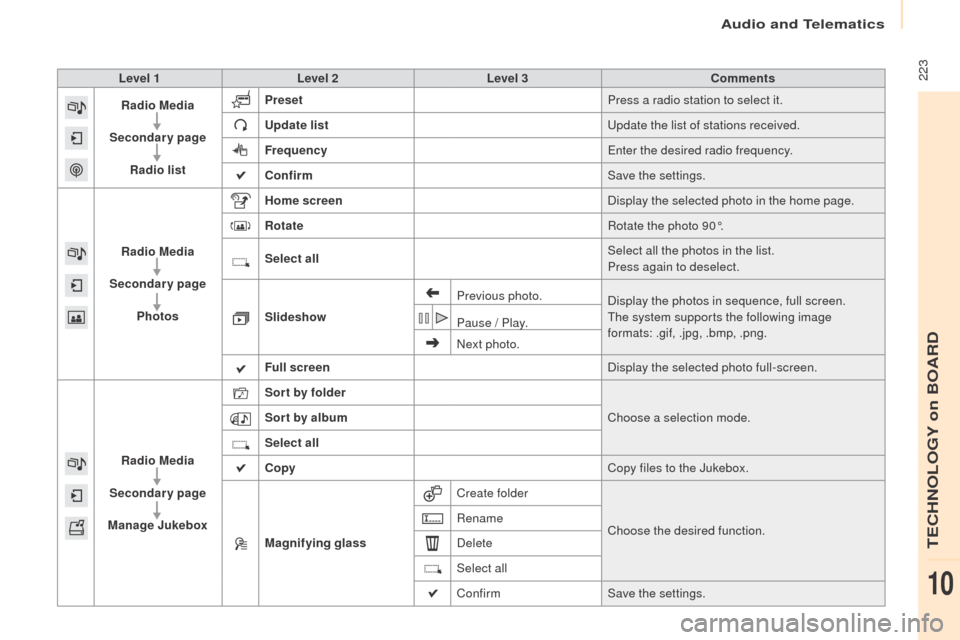
223Level 1Level 2 Level 3 Comments
Radio Media
Secondary page Radio list Preset
Press a radio station to select it.
up
date list
up
date the list of stations received.
Frequency
en
ter the desired radio frequency.
Confirm Save the settings.
Radio Media
Secondary page Photos Home screen
Display the selected photo in the home page.
Rotate Rotate the photo 90°.
Select all Select all the photos in the list.
Press again to deselect.
Slideshow Previous photo.
Display the photos in sequence, full screen.
The system supports the following image
formats: .gif, .jpg, .bmp, .png.
Pause / Play.
Next photo.
Full screen Display the selected photo full-screen.
Radio Media
Secondary page
Manage Jukebox Sor t by folder
Choose a selection mode.
Sor t by album
Select all
Copy Copy files to the Jukebox.
Magnifying glass Create folder
Choose the desired function.
Rename
Delete
Select all
Confirm
Save the settings.
Audio and Telematics
TeCHNoLogY on BoARD
10
Page 228 of 296

226
Press on Radio Media to display the
primary page.
Press on Radio Media to display the
primary page. Select "
Preset".
If necessary, select change of
source. Press on Radio Media
to display the
primary page.
Select change source.
"
AM Radio ". By automatic frequency search
Select "FM Radio ".
" AM Radio ".
Press on the secondary page.
o
r Select a preset radio station
in the list.
Select " FM Radio ".
Select a radio station from
the list offered.
Select "
up
date list" to refresh the
list. Select " List" in the primary page.
Press on Radio Media to display the
primary page.
Radio
Changing a radio frequency
Selecting a station
tHeN
R
adio reception may be affected by
the use of electrical equipment not
approved by P
e
ugeo
T
, such as a
u
S
B
charger connected to the 12 V socket.
The exterior environment (hills,
buildings, tunnel, car park, below
ground...) may prevent reception,
even in RDS station tracking mode.
This phenomenon is normal in the
propagation of radio waves and is in no
way indicative of a fault with the audio
system.
Select "
Radio list " in the secondary
page.
o
r Press 3 or 4 to move the cursor for an
automatic search down or up for a radio
frequency.
o
r
To select a preset radio station.
Audio and Telematics
Page 233 of 296

231
The audio equipment will only play audio files
with ".wma, .aac, .flac, .ogg and. mp3" file
extensions and with a bit rate of between
32 Kbps and 320 Kbps.
It also supports VBR (Variable Bit Rate) mode.
No other type of file (.mp4, ...) can be played.
".wma" files must be of the standard wma 9 type.
The sampling rates supported are 32, 44 and
48 KHz.
It is advisable to restrict file names to
20
characters, without using of special
characters (e.g.: " " ? ; ù) to avoid any playing
and displaying problems.
Information and advice
use only uS B memory sticks formatted FAT32
(file allocation table).
The system supports
uS
B mass
storage portable players, BlackBerry
®
devices or Apple® players via uS B
ports. The adaptor cable not supplied.
Control of the peripheral device is with
the audio system controls.
ot
her peripherals, not recognised on
connection, must be connected to the
auxiliary socket using a Jack cable (not
supplied).
It is recommended that the
u
S
B cable
for the portable device is used. The system does not support the
simultaneous connection of two
identical devices (two memory sticks
or two Apple
® players) but it is possible
t
o connect one memory stick and one
Apple
® player at the same time.
Audio and Telematics
TeCHNoLogY on BoARD
10
Page 234 of 296

232
Bluetooth® audio streaming
Streaming allows audio files on your telephone
to be played through the vehicle's speakers.
Connect the telephone: see the "
tel
ephone"
section, then " Bluetooth".
Choose the " Audio" or "All" profile.
If play does not start automatically, it may be
necessary to start the audio playback from the
telephone.
Control is from the peripheral device or by
using the audio system buttons.
on
ce connected in streaming mode,
the telephone is considered to be a
media source.
It is recommended that you activate
" Repeat " on the Bluetooth peripheral.
Connecting Apple® players
Connect the Apple® player to the uS B port
using a suitable cable (not supplied).
Play starts automatically.
Control is via the audio system. The classifications available are those
of the portable device connected
(artists / albums / genres / playlists /
audiobooks / podcasts).
The default classification used is by
artist. To modify the classification used,
return to the first level of the menu
then select the desired classification
(playlists for example) and confirm
to go down through the menu to the
desired track.
The version of software in the audio system
may not be compatible with the generation of
your Apple
® p l aye r.
Audio and Telematics