2016 Peugeot 308 ignition
[x] Cancel search: ignitionPage 68 of 398
66
308_en_Chap02_ouvertures_ed02-2015
Deactivation
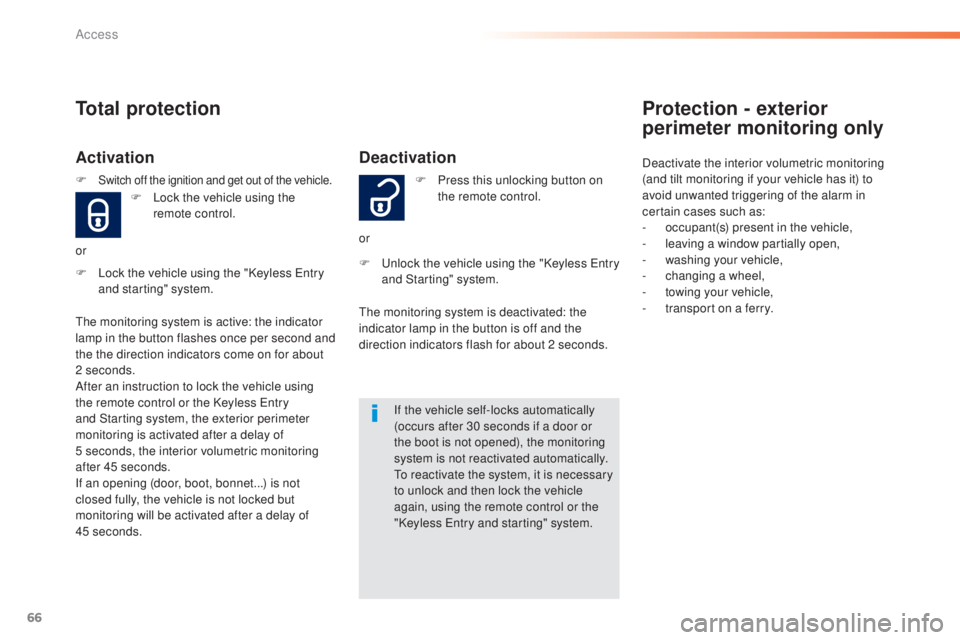
F Lock the vehicle using the "Keyless entry
and starting" system. F
Pr
ess this unlocking button on
the remote control.
or
F unl ock the vehicle using the "Keyless ent ry
and Starting" system.
If the vehicle self-locks automatically
(occurs after 30 seconds if a door or
the boot is not opened), the monitoring
system is not reactivated automatically.
to re
activate the system, it is necessary
to unlock and then lock the vehicle
again, using the remote control or the
"Keyless
ent
ry and starting" system.
the m
onitoring system is deactivated: the
indicator lamp in the button is off and the
direction indicators flash for about 2 seconds.
Total protection
Activation
F Lock the vehicle using the
r emote control.
or
the m
onitoring system is active: the indicator
lamp in the button flashes once per second and
the the direction indicators come on for about
2 seconds.
After an instruction to lock the vehicle using
the remote control or the Keyless
ent
ry
and Starting system, the exterior perimeter
monitoring is activated after a delay of
5
s
econds, the interior volumetric monitoring
after 45 seconds.
If an opening (door, boot, bonnet...) is not
closed fully, the vehicle is not locked but
monitoring will be activated after a delay of
45
se
conds.
F
Switch off the ignition and get out of the vehicle.
Protection - exterior
perimeter monitoring only
Deactivate the interior volumetric monitoring
(and tilt monitoring if your vehicle has it) to
avoid unwanted triggering of the alarm in
certain cases such as:
-
oc
cupant(s) present in the vehicle,
-
le
aving a window partially open,
-
was
hing your vehicle,
-
chan
ging a wheel,
-
to
wing your vehicle,
-
tr
ansport on a ferry.
Access
Page 69 of 398

67
308_en_Chap02_ouvertures_ed02-2015
Volumetric monitoring
Deactivationthe tilt alarm is deactivated as well, if your
vehicle has it.
F
Sw
itch of the ignition and within
ten seconds press this button
until its indicator lamp is on fixed.
F
g
et o
ut of the vehicle. Reactivationthe t
ilt alarm is reactivated as well, if your
vehicle has it.
the i
ndicator lamp in the button goes off.
F
Im
mediately lock the vehicle
using the remote control or the
"Keyless
ent
ry and Starting"
system.
Only the exterior perimeter protection system is
active: the indicator lamp in the button flashes
once per second.
to be e
ffective, this deactivation must be done
every time the ignition is switched off. F
Dea
ctivate the exterior perimeter
monitoring by unlocking the
vehicle using the remote control
or the Keyless
ent
ry and starting
system.
F
Re
activate the full alarm system
by locking the vehicle using the
remote control or the "Keyless
ent
ry and starting" system.
the i
ndicator lamp in the button flashes once
per second again.
Triggering of the alarm
this is indicated by sounding of the siren
a nd flashing of the direction indicators for
thirty
s
econds.
the m
onitoring functions remain active until
the alarm has been triggered eleven times in
succession.
When the vehicle is unlocked using
the remote control or the Keyless
ent
ry and starting system, rapid
flashing of the indicator lamp in the
button informs you that the alarm was
triggered during your absence.
When the ignition is switched on, this
flashing stops immediately.
2
Access
Page 70 of 398

68
308_en_Chap02_ouvertures_ed02-2015
Failure of the remote control
to deactivate the monitoring functions:
F unl ock the vehicle using the key (integral
with the remote control) in the driver's door
lock.
F
Op
en the door; the alarm is triggered.
F
Sw
itch on the ignition; the alarm stops.
the
i
ndicator lamp in the button goes off.
Locking the vehicle without
activating the alarm
F Lock or deadlock the vehicle using the key
( integral with the remote control) in the
driver's door lock.
Operating fault
When the ignition is switched on,
fixed illumination of the indicator
lamp in the button indicates a fault in
the system.
Have it checked by a P
eu
ge
Ot
d
ealer or a qualified workshop.
Automatic activation
this function is either not available, an option
o r is standard.
2 minutes after the last door or the boot is
closed, the system is activated automatically.
F
t
o av
oid triggering the alarm on entering
the vehicle, first press the unlocking button
on the remote control or unlock the vehicle
using the Keyless
ent
ry and starting
system.
Access
Page 71 of 398
69
308_en_Chap02_ouvertures_ed02-2015
electric windows
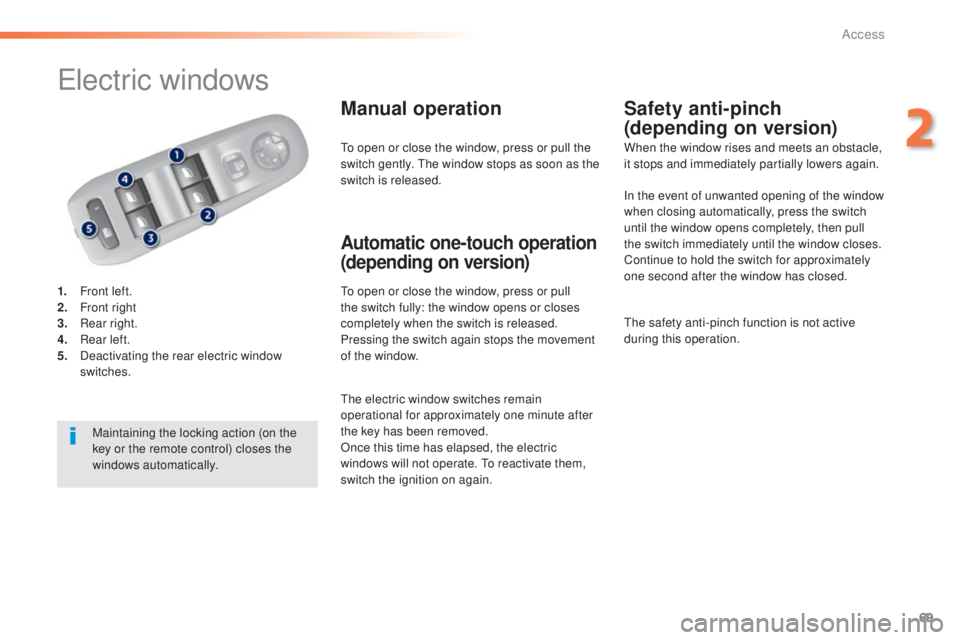
1. Front left.
2. Fr ont right
3.
Re
ar right.
4.
Re
ar left.
5.
Dea
ctivating the rear electric window
switches.
Manual operation
to open or close the window, press or pull
t he switch fully: the window opens or closes
completely when the switch is released.
Pressing the switch again stops the movement
of the window.
Safety anti-pinch
(depending on version)
Automatic one-touch operation
(depending on version)
to open or close the window, press or pull the
s witch gently. the w indow stops as soon as the
switch is released. When the window rises and meets an obstacle,
it stops and immediately partially lowers again.
Maintaining the locking action (on the
key or the remote control) closes the
windows automatically.
the e
lectric window switches remain
operational for approximately one minute after
the key has been removed.
Once this time has elapsed, the electric
windows will not operate.
to re
activate them,
switch the ignition on again. In the event of unwanted opening of the window
when closing automatically, press the switch
until the window opens completely, then pull
the switch immediately until the window closes.
Continue to hold the switch for approximately
one second after the window has closed.
the s
afety anti-pinch function is not active
during this operation.
2
Access
Page 76 of 398
74
308_en_Chap03_ergonomie-et-confort_ed02-2015
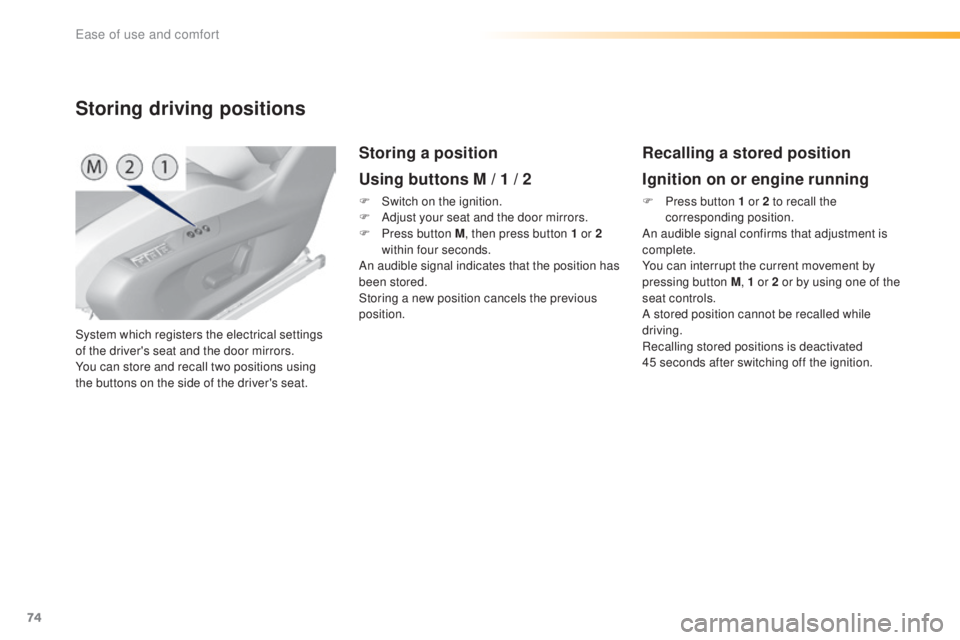
System which registers the electrical settings
of the driver's seat and the door mirrors.
You can store and recall two positions using
the buttons on the side of the driver's seat.
Storing driving positions
Storing a position
Using buttons M / 1 / 2
F Switch on the ignition.
F Ad just your seat and the door mirrors.
F
Pr
ess button M , then press button 1 or 2
within four seconds.
An audible signal indicates that the position has
been stored.
Storing a new position cancels the previous
position.
Recalling a stored position
Ignition on or engine running
F Press button 1 or 2 to recall the
c orresponding position.
An audible signal confirms that adjustment is
complete.
You can interrupt the current movement by
pressing button M , 1 or 2 or by using one of the
seat controls.
A stored position cannot be recalled while
driving.
Recalling stored positions is deactivated
45
s
econds after switching off the ignition.
ease of use and comfort
Page 98 of 398
96
308_en_Chap03_ergonomie-et-confort_ed02-2015
Dual-zone digital air conditioning (touch screen)
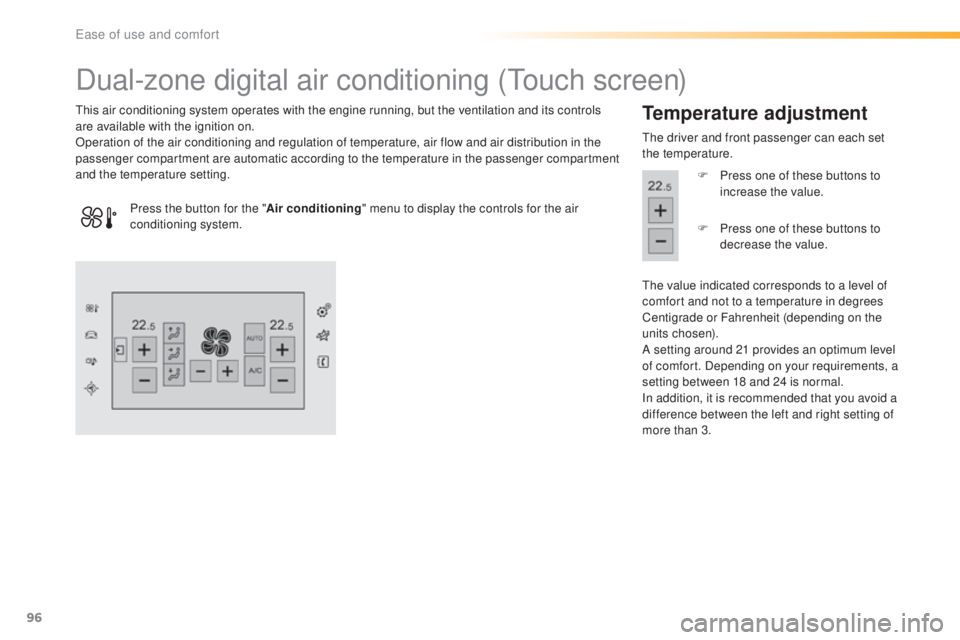
this air conditioning system operates with the engine running, but the ventilation and its controls
a re available with the ignition on.
Operation of the air conditioning and regulation of temperature, air flow and air distribution in the
passenger compartment are automatic according to the temperature in the passenger compartment
and the temperature setting.Temperature adjustment
the driver and front passenger can each set
t he temperature.
F
Pr
ess one of these buttons to
increase the value.
the v
alue indicated corresponds to a level of
comfort and not to a temperature in degrees
Centigrade or Fahrenheit (depending on the
units chosen).
A setting around 21 provides an optimum level
of comfort. Depending on your requirements, a
setting between 18 and 24 is normal.
In addition, it is recommended that you avoid a
difference between the left and right setting of
more than 3.
Press the button for the "
Air conditioning" menu to display the controls for the air
conditioning system. F
Pr
ess one of these buttons to
decrease the value.
ease of use and comfort
Page 101 of 398
99
308_en_Chap03_ergonomie-et-confort_ed02-2015
"Mono" function
the comfort setting for the passenger's side
c an be indexed to the driver's comfort setting
(mono-zone).
From the secondary page of the " Air
conditioning " menu:
F
Pr
ess this button to activate /
deactivate the "Mono" function.
the i
ndicator lamp in the button
is on when the function is
activated.
the f
unction is deactivated automatically when
the passenger uses their temperature setting
buttons.
It allows you:
-
in s
ummer, to lower the temperature,
-
in w
inter, above 3 °C, to improve demisting.
Switching off Switching on
Air conditioning On/Off
the air conditioning is designed to
o perate efficiently in all seasons, with
the windows closed.
Ventilation with "ignition
on" function
With the ignition on, you can use the
ventilation system and have access to the
" Air conditioning " menu to adjust the air
flow and air distribution in the passenger
compartment.
thi
s function is available for a few minutes,
depending on the state of charge of the battery
of your vehicle.
thi
s function does not activate the air
conditioning.
You can make use of the residual heat in the
engine to warm the passenger compartment
using the temperature setting buttons.
F
Pr
ess the " A/C" button to activate the air
conditioning.
When the indicator lamp under the button is on,
the air conditioning function is activated.
the a
ir conditioning cannot operate when the
air flow is set to off.
F
Pr
ess the "A /C " button again to deactivate
the air conditioning.
When the indicator lamp under the button is off,
the air conditioning function is deactivated.
3
ease of use and comfort
Page 105 of 398
103
308_en_Chap03_ergonomie-et-confort_ed02-2015
Panoramic sunroof
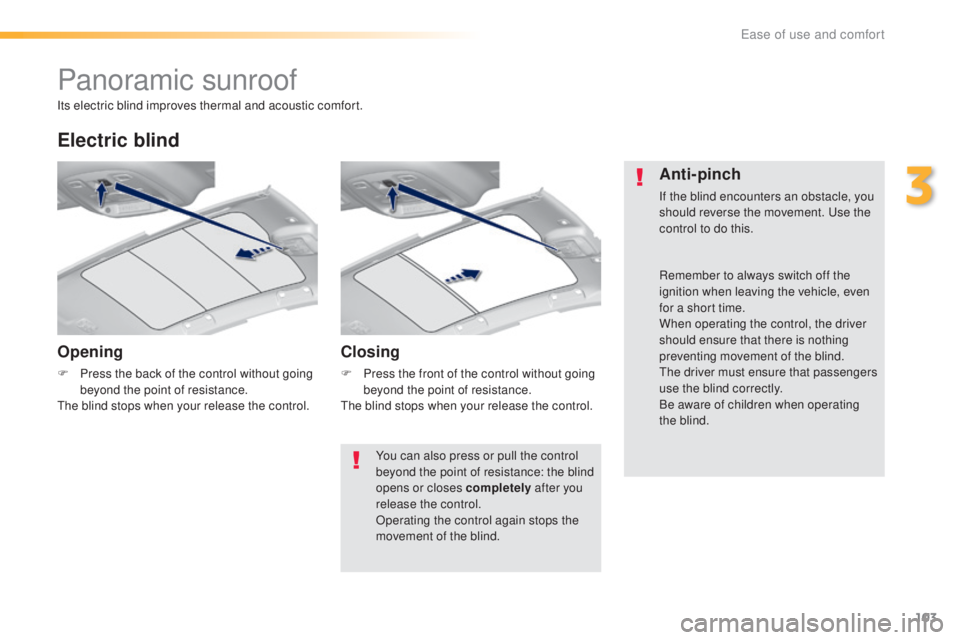
Opening
F Press the back of the control without going
beyond the point of resistance.
the b
lind stops when your release the control.
Electric blind
Closing
F Press the front of the control without going
beyond the point of resistance.
the b
lind stops when your release the control.
Anti-pinch
If the blind encounters an obstacle, you
should reverse the movement. use t he
control to do this.
Its electric blind improves thermal and acoustic comfort.
You can also press or pull the control
beyond the point of resistance: the blind
opens or closes completely after you
release the control.
Operating the control again stops the
movement of the blind. Remember to always switch off the
ignition when leaving the vehicle, even
for a short time.
When operating the control, the driver
should ensure that there is nothing
preventing movement of the blind.
the d
river must ensure that passengers
use the blind correctly.
Be aware of children when operating
the blind.
3
ease of use and comfort