2016 Peugeot 308 services
[x] Cancel search: servicesPage 346 of 398
344
308_en_Chap10c_SMegplus_ed02-2015
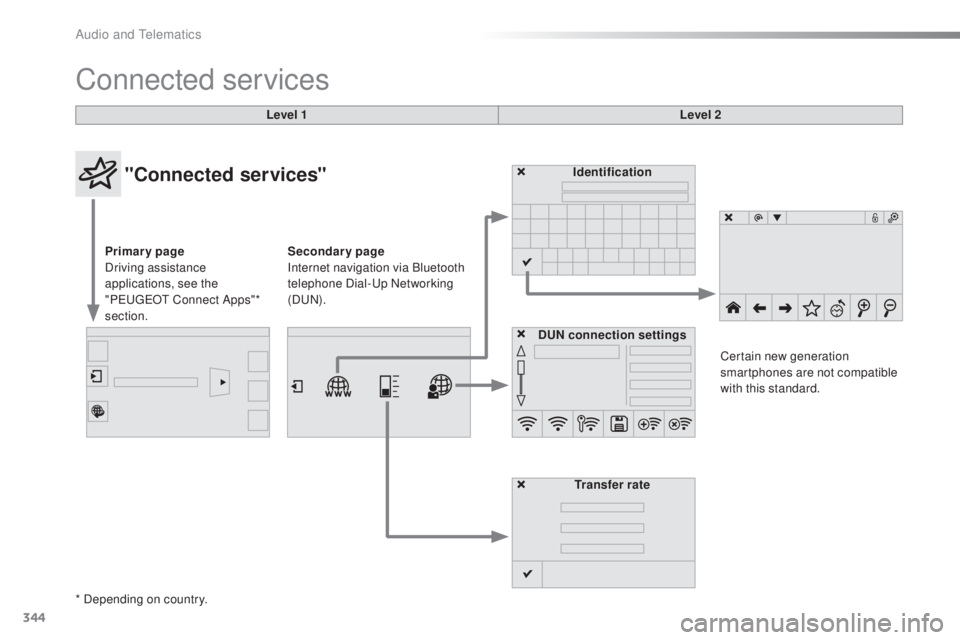
Connected services
Level 1Level 2
"Connected services"
Primary page
Driving assistance
applications, see the
"P
eu
ge
Ot C
onnect Apps"*
section. Identification
DUN connection settings Transfer rate Certain new generation
smartphones are not compatible
with this standard.
Secondary page
Internet navigation via Bluetooth
telephone Dial-
up
Networking
(D
uN).
*
Depending on country.
Audio and telematics
Page 347 of 398
345
308_en_Chap10c_SMegplus_ed02-2015
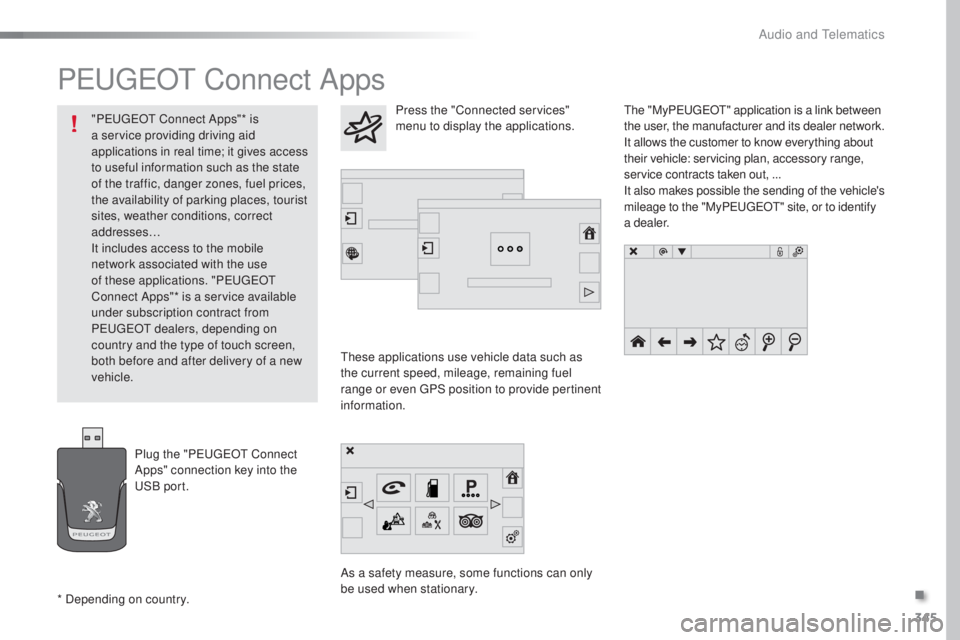
PeugeOt Connect Apps
these applications use vehicle data such as
t he current speed, mileage, remaining fuel
range or even
gPS p
osition to provide pertinent
information.
As a safety measure, some functions can only
be used when stationary.
the "
My
Peuge
Ot" a
pplication is a link between
the user, the manufacturer and its dealer network.
It allows the customer to know everything about
their vehicle: servicing plan, accessory range,
service contracts taken out, ...
It also makes possible the sending of the vehicle's
mileage to the "My Peuge
Ot" s
ite, or to identify
a dealer.
Press the "Connected services"
menu to display the applications.
Plug the "P
eu
ge
Ot C
onnect
Apps" connection key into the
uSB
port.
* Depending on country. "P
eu
ge
Ot C
onnect Apps"* is
a service providing driving aid
applications in real time; it gives access
to useful information such as the state
of the traffic, danger zones, fuel prices,
the availability of parking places, tourist
sites, weather conditions, correct
addresses…
It includes access to the mobile
network associated with the use
of these applications. "P
eu
ge
Ot
C
onnect Apps"* is a service available
under subscription contract from
P
eu
ge
Ot dea
lers, depending on
country and the type of touch screen,
both before and after delivery of a new
vehicle.
.
Audio and telematics
Page 353 of 398
351
308_en_Chap10c_SMegplus_ed02-2015
the services available depend on
t he network, the SIM card and the
compatibility of the Bluetooth telephone
used. Check the telephone manual and
with your network provider for details of
the services available to you.
the a
bility of the system to connect
with only one profile depends on the
telephone.
the
three profiles may all
connect by default.
Visit www.peugeot.co.uk for more information
(compatibility, additional help, ...).
the r
ecognised telephone
appears in the list.
Depending on your telephone, you may be
asked to accept automatic connection every
time the ignition is switched on. On return to the vehicle, if the last telephone
connected is present again, it is reconnected
automatically and within around 30 seconds
after switching on the ignition the pairing is
done without any action on your part, with
(Bluetooth activated).
to mo
dify the automatic connection mode,
select the telephone in the list then select the
desired profile. Depending on the type of telephone,
the system will ask you to accept or not
the transfer of your contacts.
If not, select " Update".
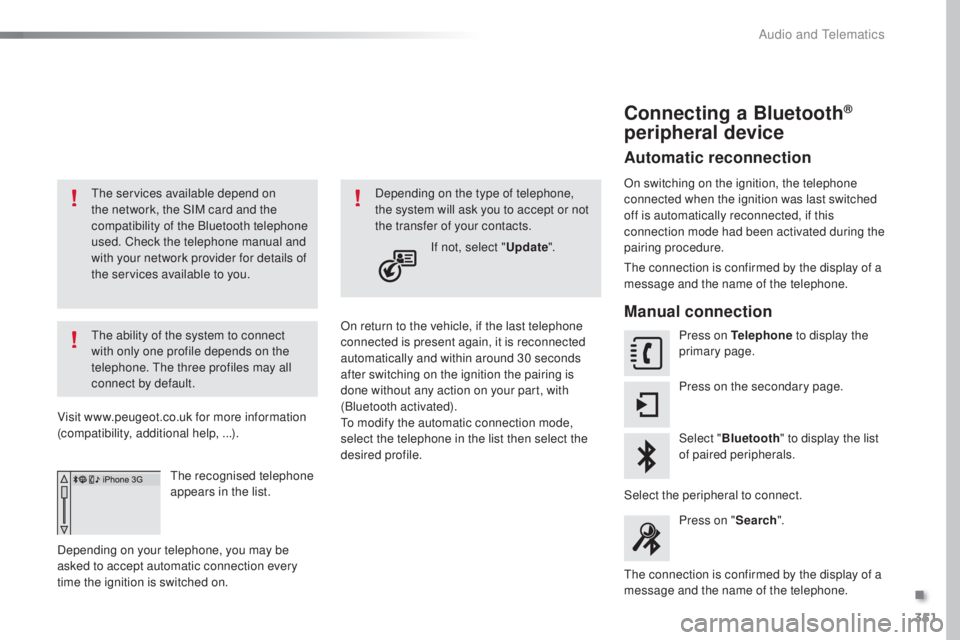
Connecting a Bluetooth®
peripheral device
Automatic reconnection
On switching on the ignition, the telephone
connected when the ignition was last switched
off is automatically reconnected, if this
connection mode had been activated during the
pairing procedure.
the c
onnection is confirmed by the display of a
message and the name of the telephone.
Manual connection
Press on Telephone to display the
primary page.
Press on the secondary page.
Select " Bluetooth " to display the list
of paired peripherals.
Select the peripheral to connect. Press on " Search".
the c
onnection is confirmed by the display of a
message and the name of the telephone.
.
Audio and telematics
Page 363 of 398
361
308_en_Chap10c_SMegplus_ed02-2015
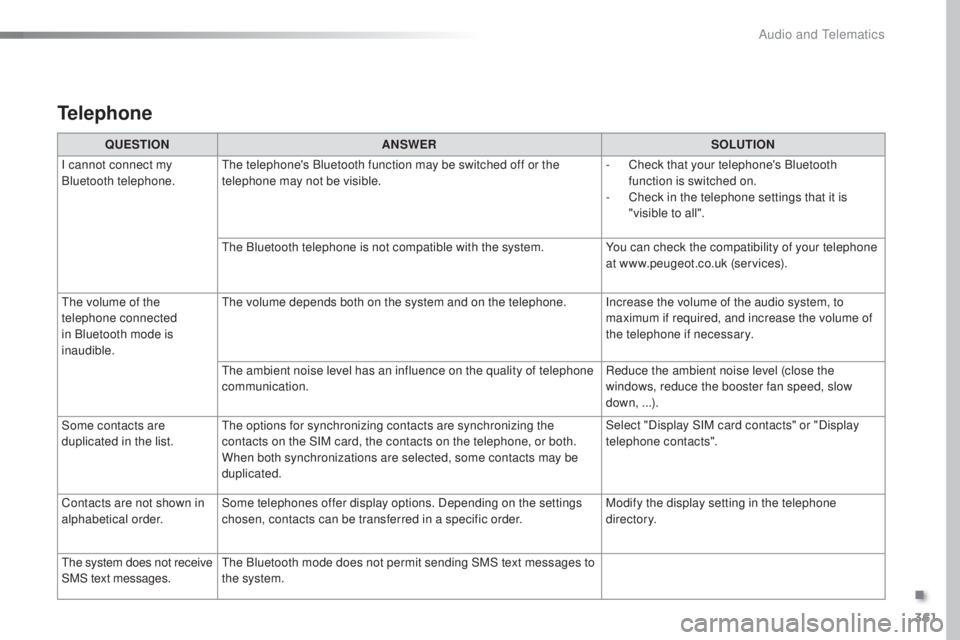
Telephone
QUESTIONANSWER SOLUTION
I cannot connect my
Bluetooth telephone.
the t
elephone's Bluetooth function may be switched off or the
telephone may not be visible. -
Ch
eck that your telephone's Bluetooth
function is switched on.
-
Ch
eck in the telephone settings that it is
"visible to all".
the B
luetooth telephone is not compatible with the system. You can check the compatibility of your telephone
at www.peugeot.co.uk (services).
the v
olume of the
telephone connected
in Bluetooth mode is
inaudible.
the v
olume depends both on the system and on the telephone. Increase the volume of the audio system, to maximum if required, and increase the volume of
the telephone if necessary.
the a
mbient noise level has an influence on the quality of telephone
communication. Reduce the ambient noise level (close the
windows, reduce the booster fan speed, slow
down, ...).
Some contacts are
duplicated in the list.
the o
ptions for synchronizing contacts are synchronizing the
contacts on the SIM card, the contacts on the telephone, or both.
When both synchronizations are selected, some contacts may be
duplicated. Select "Display SIM card contacts" or "Display
telephone contacts".
Contacts are not shown in
alphabetical order. Some telephones offer display options. Depending on the settings
chosen, contacts can be transferred in a specific order. Modify the display setting in the telephone
di r e c to r y.
the s
ystem does not receive
SMS text messages.
the B
luetooth mode does not permit sending SMS text messages to
the system.
.
Audio and telematics
Page 371 of 398
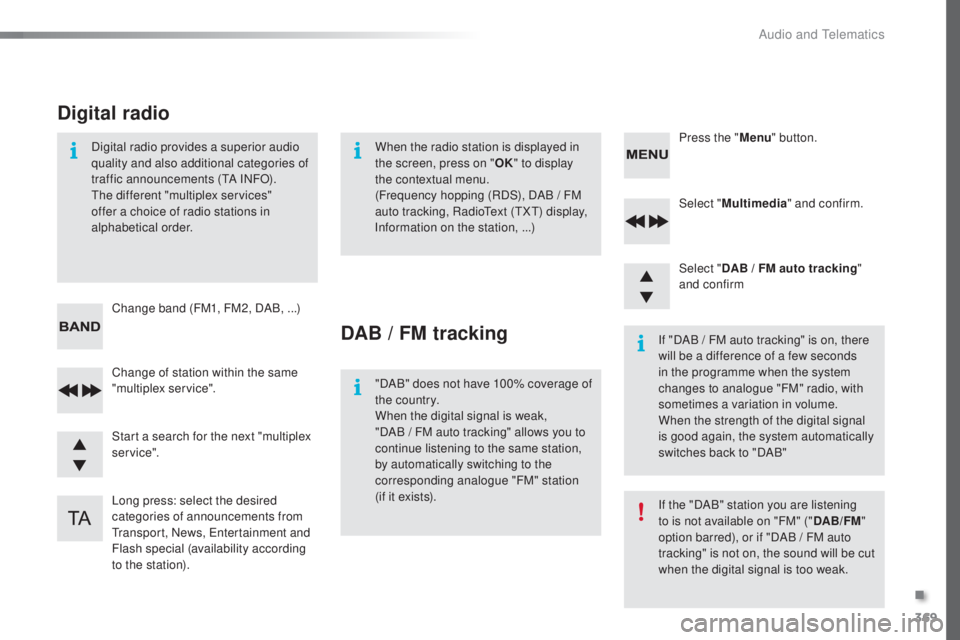
369
308_en_Chap10d_RD45_ed02-2015
Select "Multimedia " and confirm.
Select " DAB / FM auto tracking "
and confirm
Long press: select the desired
categories of announcements from
tra
nsport, News,
ent
ertainment and
Flash special (availability according
to the station). Change of station within the same
"multiplex service". Press the "
Menu" button.
Start a search for the next "multiplex
service". Change band (FM1, FM2, DAB,
.
..)
Digital radio provides a superior audio
quality and also additional categories of
traffic announcements (
tA IN
FO).the d
ifferent "multiplex services"
offer a choice of radio stations in
alphabetical order.
Digital radio
When the radio station is displayed in
the screen, press on " OK" to display
the contextual menu.
(Frequency hopping (RDS), DAB
/ F
M
auto tracking, Radio
tex
t (
tXt) di
splay,
Information on the station, ...)
DAB / FM tracking
"DAB" does not have 100% coverage of
the country.
When the digital signal is weak,
"DAB
/ F
M auto tracking" allows you to
continue listening to the same station,
by automatically switching to the
corresponding analogue "FM" station
(if it exists). If "DAB / FM auto tracking" is on, there
will be a difference of a few seconds
in the programme when the system
changes to analogue "FM" radio, with
sometimes a variation in volume.
When the strength of the digital signal
is good again, the system automatically
switches back to "DAB"
If the "DAB" station you are listening
to is not available on "FM" ("
DAB/FM"
option barred), or if "DAB / FM auto
tracking" is not on, the sound will be cut
when the digital signal is too weak.
.
Audio and telematics
Page 376 of 398
374
308_en_Chap10d_RD45_ed02-2015
telephone
Pairing a Bluetooth® telephone
Screen C
(Available according to model and version)
As a safety measure and because they
require prolonged attention on the part
of the driver, the operations for pairing
of the Bluetooth mobile telephone with
the Bluetooth hands-free system of
your audio equipment must be carried
out with the vehicle stationary and the
ignition on.
go t
o www.peugeot.co.uk for more information
(compatibility, more help, ...).
Activate the telephone's Bluetooth function
and ensure that it is "visible to all" (telephone
configuration).
Press the MENU button. In the menu, select:
- "
Bl
uetooth: Telephone - Audio "
-
" B
luetooth configuration"
-
" P
erform a Bluetooth search"
A window is displayed with a message that a
search is in progress.
the ser
vices available depend on
the network, the SIM card and the
compatibility of the Bluetooth device
used.
Consult your telephone's manual and
your operator to find out which services
are available to you.
* If your telephone is fully compatible.
the f
irst 4 telephones recognised are displayed
in this window.
the " T
elephone" menu permits access to the
following functions in particular: " Directory" *,
" Calls list ", "Consult the paired equipment ".Select the telephone to be connected from the
list. Only one telephone can be connected at
a time.
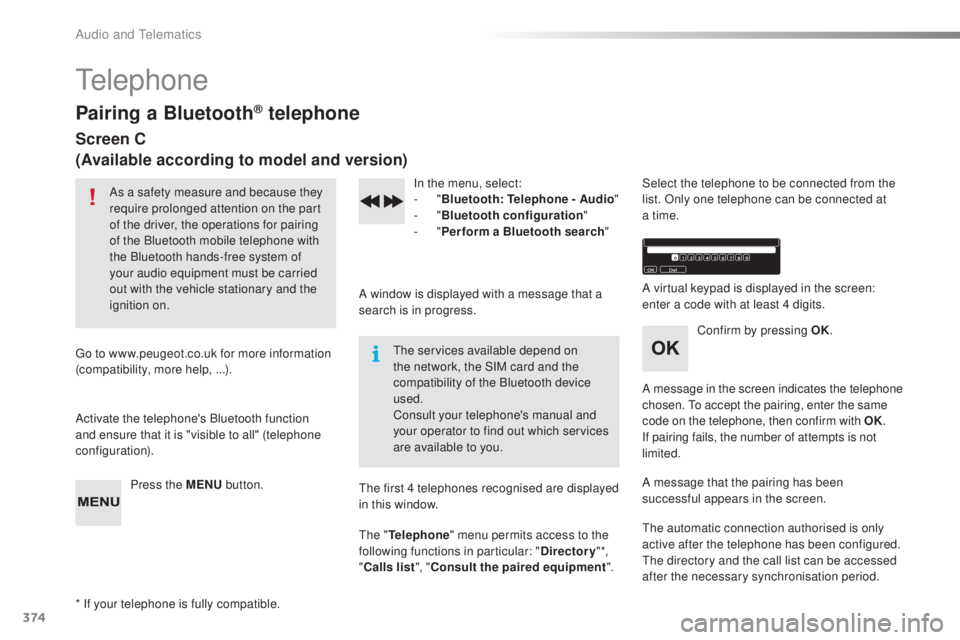
A virtual keypad is displayed in the screen:
enter a code with at least 4 digits.
Confirm by pressing OK.
A message in the screen indicates the telephone
chosen.
to a
ccept the pairing, enter the same
code on the telephone, then confirm with OK.
If pairing fails, the number of attempts is not
limited.
A message that the pairing has been
successful appears in the screen.
the a
utomatic connection authorised is only
active after the telephone has been configured.
the d
irectory and the call list can be accessed
after the necessary synchronisation period.
Audio and telematics