Page 144 of 636
The E-Lock system can help provide added trac-
tion if the vehicle is stuck or becoming stuck.
To activate the E-Lock system:● the 4WD switch must be in the 4LO position
(4-wheel drive vehicles) ,
● the vehicle must be stopped or moving at
4 mph (7 km/h) or less, and
● the E-Lock system switch must be turned
ON. When the E-Lock system switch is turned ON,
the indicator light will flash until the system en-
gages. However, if all operation conditions listed
above are not met or the system becomes disen-
gaged, the indicator light will continue to flash.
The Anti-Lock Brake (ABS) system is disabled
and the ABS light illuminates when the E-Lock
system is ON. Also, the Vehicle Dynamic Control
(VDC) system is disabled and the VDC light
illuminates when the E-Lock system is ON.
For additional information, refer to “Electronic
locking rear differential (E-Lock) system” in the
“Starting and driving” section of this manual for
further explanation and system limitations.
WARNING
●
Never leave the E-Lock system ON when
driving on paved or hard-surfaced
roads. Turning the vehicle may result in
the rear wheels slipping and result in an
accident and personal injury. After us-
ing the E-Lock system to free the ve-
hicle, turn the system OFF. ●
Use the rear differential lock only in an
emergency when it is not possible to
free a stuck vehicle even using 4LO.
Never use the E-Lock system on a slip-
pery road surface such as snow or ice
surface. Using the E-Lock system when
driving in these road conditions may
cause unexpected movement of the ve-
hicle during engine braking, accelerat-
ing or turning, which may result in an
accident and serious personal injury.
● Avoid quick starts while the E-Lock sys-
tem is in operation. Otherwise the
power train system parts could be
damaged.
● Observe the above warnings. Other-
wise, loss of normal steering control
may result This may result in an acci-
dent and serious personal injury.
LIC3157
ELECTRONIC LOCKING REAR
DIFFERENTIAL (E-Lock) SYSTEM
SWITCH (if so equipped)
Instruments and controls2-63
Page 145 of 636
CAUTION
●After using the E-Lock system, or during
normal driving, turn the switch OFF to
prevent possible damage to driveline
components from extended use.
● When the E-Lock system is in operation,
turning the vehicle becomes difficult.
This can be dangerous, especially at
high speeds. Doing so could damage
drivetrain components.
● Do not operate the E-Lock system when
the vehicle is turning or when one side
wheel is rotating. Otherwise, the power
train system parts could be damaged.
● The E-Lock system operates only when
the engine is running.
● In 4H mode, the E-Lock system does not
operate when the E-Lock system switch
is turned to the ON position. (The
E-Lock system indicator light will flash.)
● Observe the above cautions. Otherwise,
loss of normal steering may result. To use the outlets for devices that require 120v
power, place the ignition in the ON position and
push the power inverter switch.
The 400W or 150W on the switch will illuminate
according to the mode selected. Only the 150W
is available when the ignition switch is placed in
the ON position and the vehicle is being driven.
For additional information, refer to “120v outlets”
in this section of the manual regarding using
devices that require the power inverter switch
activated.
CAUTION
●
Use power outlets with the engine run-
ning to avoid discharging the vehicle
battery.
● Do not attempt to use this while driving.
● Do not use double adapters or more
than one electrical accessory, doing so
could significantly drain the battery of
your vehicle.
LIC2075
POWER INVERTER SWITCH (if so
equipped)
2-64Instruments and controls
Page 153 of 636
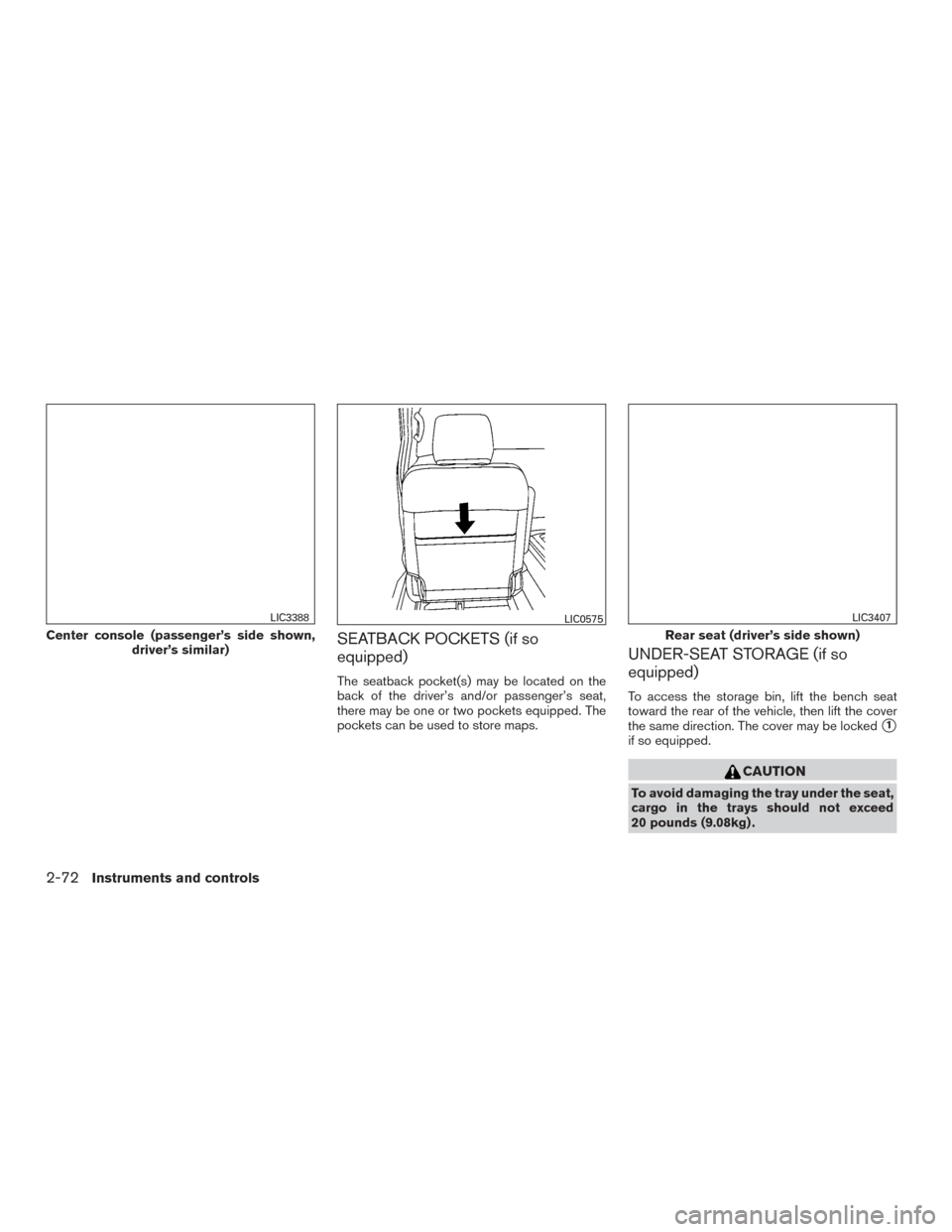
SEATBACK POCKETS (if so
equipped)
The seatback pocket(s) may be located on the
back of the driver’s and/or passenger’s seat,
there may be one or two pockets equipped. The
pockets can be used to store maps.
UNDER-SEAT STORAGE (if so
equipped)
To access the storage bin, lift the bench seat
toward the rear of the vehicle, then lift the cover
the same direction. The cover may be locked
�1
if so equipped.
CAUTION
To avoid damaging the tray under the seat,
cargo in the trays should not exceed
20 pounds (9.08kg) .
Center console (passenger’s side shown,driver’s similar)
LIC3388LIC0575
Rear seat (driver’s side shown)
LIC3407
2-72Instruments and controls
Page 155 of 636
GLOVE BOX
Open the glove box by pulling the handle.
Use the master key to lock or unlock the glove box
lock. The valet key cannot be used to lock or
unlock the glove box lock.
WARNING
Keep glove box lid closed while driving to
help prevent injury in an accident or a
sudden stop.
CONSOLE BOX (if so equipped)
WARNING
The center console box should not be
used while driving so full attention may be
given to vehicle operation.
LIC3386LIC3399LIC3400
2-74Instruments and controls
Page 160 of 636
CAUTION
●Do not use bottle holder for any other
objects that could be thrown about in
the vehicle and possibly injure people
during sudden braking or an accident.
● Do not use bottle holder for open liquid
containers.
GROCERY HOOKS (if so equipped)
The grocery hooks allow for standard size plastic
grocery bags to hang side by side.
To access the grocery hooks, fold up the rear
bench seat. For additional information, refer to
“Folding the rear bench seat” in the “Safety —
Seats, seat belts and supplemental restraint sys-
tem” section of this manual.
CAUTION
Do not apply a total load of more than
18 lbs (8 kg) to a single grocery hook.
BED LINER STORAGE BINS (if so
equipped)
To open the bed liner storage bins on the top of
the wheel wells, unlock the bin and lift the lid
toward the inside of the truck bed.
To close, replace the lid and lock the bin.
Bottle holder
LIC3396LIC3389LIC3449
Instruments and controls2-79
Page 161 of 636
To open the bed liner storage bins on the tail gate
end of the bed liner, lift the tab away from the
truck bed, pull the lid up and away from the truck.
POWER WINDOWS
WARNING
●Make sure that all passengers have
their hands, etc. inside the vehicle while
it is in motion and before closing the
windows. Use the window lock switch to
prevent unexpected use of the power
windows.
● To help avoid risk of injury or death
through unintended operation of the
vehicle and or its systems, including
entrapment in windows or inadvertent
door lock activation, do not leave chil-
dren, people who require the assistance
of others or pets unattended in your
vehicle. Additionally, the temperature
inside a closed vehicle on a warm day
can quickly become high enough to
cause a significant risk of injury or
death to people and pets.
The power windows operate when the ignition
switch is placed in the ON position, or for a
period of time after the ignition switch is placed in
the OFF position. If the driver’s or passenger’s
door is opened during this period of time, the
power to the windows is canceled.
1. Left rear passenger window switch
2. Driver side automatic window switch
3. Window lock button
4. Front passenger side automatic window switch
5. Right rear passenger window switch
LIC3450LIC3404
WINDOWS
2-80Instruments and controls
Page 162 of 636
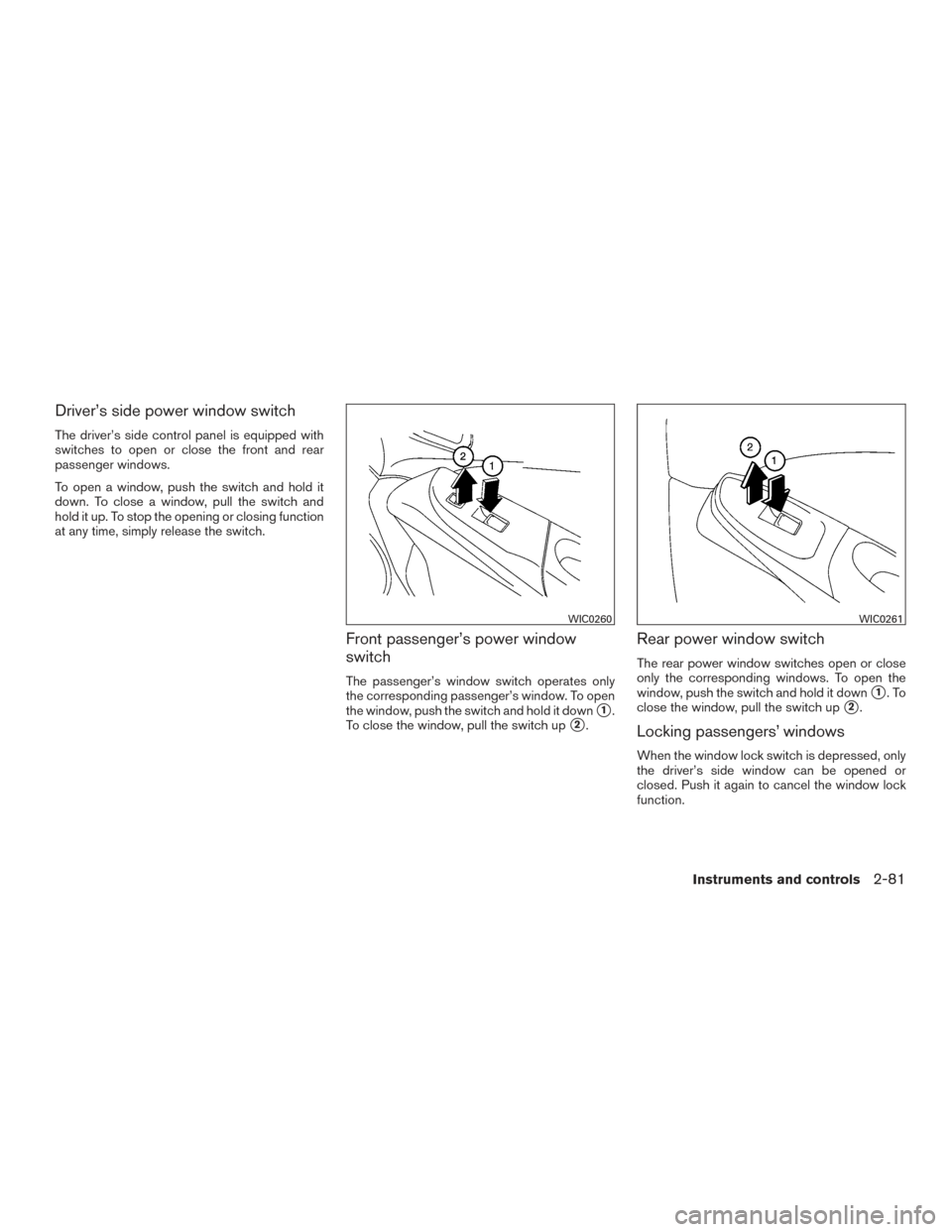
Driver’s side power window switch
The driver’s side control panel is equipped with
switches to open or close the front and rear
passenger windows.
To open a window, push the switch and hold it
down. To close a window, pull the switch and
hold it up. To stop the opening or closing function
at any time, simply release the switch.
Front passenger’s power window
switch
The passenger’s window switch operates only
the corresponding passenger’s window. To open
the window, push the switch and hold it down
�1.
To close the window, pull the switch up
�2.
Rear power window switch
The rear power window switches open or close
only the corresponding windows. To open the
window, push the switch and hold it down
�1.To
close the window, pull the switch up
�2.
Locking passengers’ windows
When the window lock switch is depressed, only
the driver’s side window can be opened or
closed. Push it again to cancel the window lock
function.
WIC0260WIC0261
Instruments and controls2-81
Page 164 of 636
●Do not place objects through the
opened rear window. Do not use the
rear window as a cargo area pass-
through. This may result in damage to
the rear window system, or personal
injury.
Squeeze the handles of the lever
�1, then slide
the window open
�2.
REAR POWER WINDOW SWITCH
(if so equipped)
WARNING
● You must ensure all occupants and ob-
jects are free of the rear window area
prior to and during operation. Failure to
do so may result in injury and/or dam-
age to the rear window system.
● The rear window is not designed to
carry long items through it. ●
Do not place objects through the
opened rear window. Do not use the
rear window as a cargo area pass-
through. This may result in damage to
the rear window system, or personal
injury.
WARNING
● To help avoid risk of injury or death
through unintended operation of the
vehicle and or its systems, including
entrapment in windows or inadvertent
door lock activation, do not leave chil-
dren, people who require the assistance
of others or pets unattended in your
vehicle. Additionally, the temperature
inside a closed vehicle on a warm day
can quickly become high enough to
cause a significant risk of injury or
death to people and pets.
To open the rear power window, push in and hold
the switch.
To close the rear power window, pull out and hold
the switch.
To stop the opening or closing function at any
time, simply release the switch.
LIC3448
Instruments and controls2-83