2016 NISSAN NV PASSENGER VAN wheel
[x] Cancel search: wheelPage 88 of 380
17. Rear sonar system OFF switch(if so equipped) (P. 2-32)
Tow mode ON switch (if so equipped)
(P. 2-33)
Front and rear sonar system OFF
switch (if so equipped) (P. 2-33)
Heated seat switch (if so equipped)
(P. 2-30)
Power inverter switch (if so equipped)
(P. 2-31)
18. 12v power outlet (P. 2-34)
19. Ignition switch (P. 5-8)
20. Tilt steering wheel control (P. 3-15)
21. Hood release switch (P. 3-12)
22. Fuse box (P. 8-24)
23. Outside power mirror switch (P. 3-18) Vehicle Dynamic Control (VDC) OFF
switch (P. 2-31)
*: Refer to the separate Navigation System Own-
er’s Manual (if so equipped) .
Refer to the page number indicated in pa-
rentheses for operating details.
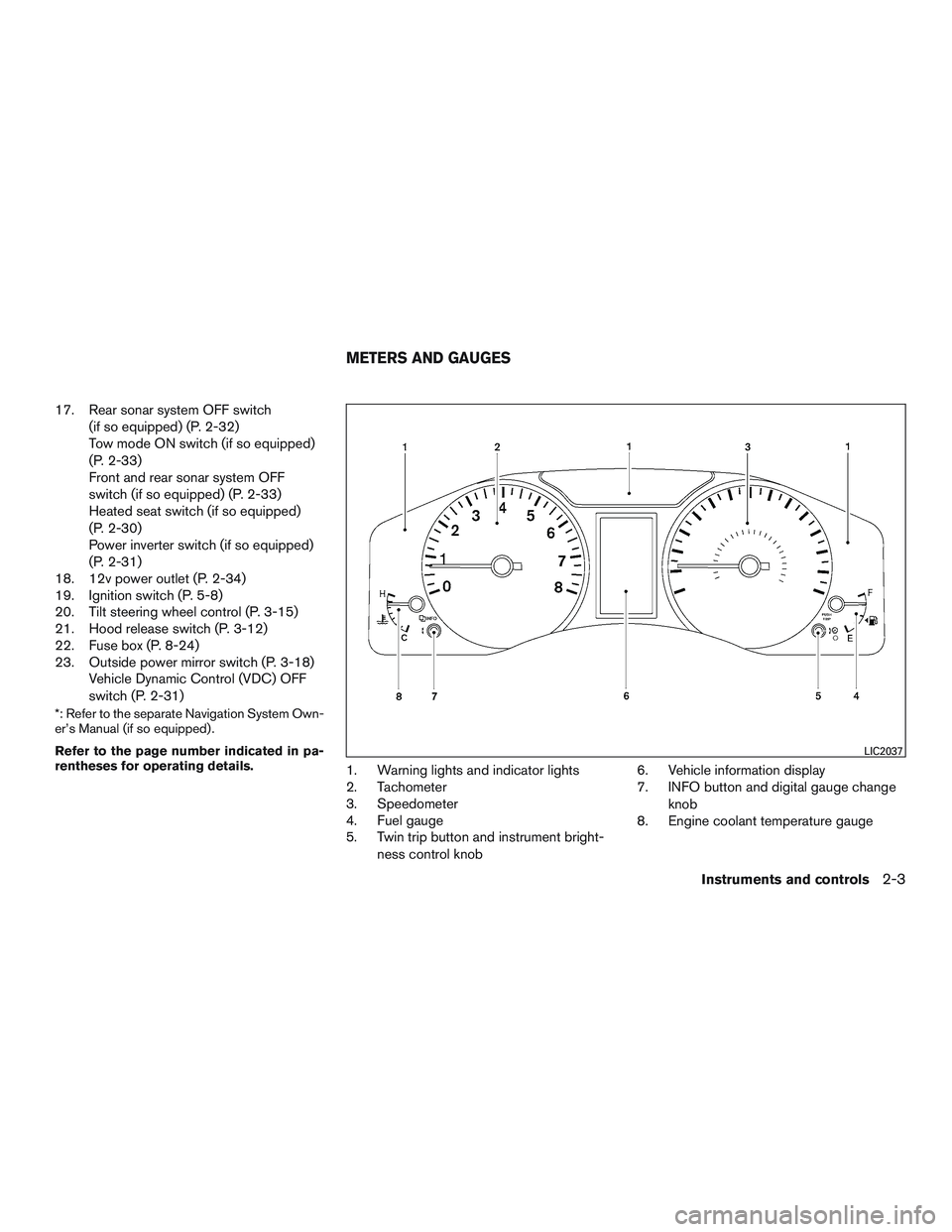
1. Warning lights and indicator lights
2. Tachometer
3. Speedometer
4. Fuel gauge
5. Twin trip button and instrument bright-
ness control knob 6. Vehicle information display
7. INFO button and digital gauge change
knob
8. Engine coolant temperature gauge
LIC2037
METERS AND GAUGES
Instruments and controls2-3
Page 99 of 380
Tire and Loading Information label located
in the driver’s door opening. The low tire
pressure warning light does not automati-
cally turn off when the tire pressure is ad-
justed. After the tire is inflated to the rec-
ommended pressure, the vehicle must be
driven at speeds above 16 mph (25 km/h) to
activate the TPMS and turn off the low tire
pressure warning light. Use a tire pressure
gauge to check the tire pressure.
The CHECK TIRE pressure warning is active as
long as the low tire pressure warning light re-
mains illuminated.
For additional information, refer to “Vehicle infor-
mation display” in this section and “Tire Pressure
Monitoring System (TPMS)” in the “Starting and
driving” section and in the “In case of emergency”
section of this manual.
TPMS malfunction
If the TPMS is not functioning properly, the low
tire pressure warning light will flash for approxi-
mately 1 minute when the ignition switch is
placed in the ON position. The light will remain on
after the 1 minute. Have the system checked by a
NISSAN dealer. The CHECK TIRE pressure
warning does not appear if the low tire pressure
warning light illuminates to indicate a TPMS mal-
function.For additional information, refer to “Tire Pressure
Monitoring System (TPMS)” in the “Starting and
driving” section and “Tire pressure” in the “Main-
tenance and do-it-yourself” section of this
manual.
WARNING
●
Radio waves could adversely affect
electric medical equipment. Those who
use a pacemaker should contact the
electrical medical equipment manufac-
turer for the possible influences before
use.
● If the light does not illuminate with the
ignition switch in the ON position, have
the vehicle checked by a NISSAN dealer
as soon as possible.
● If the light illuminates while driving,
avoid sudden steering maneuvers or
abrupt braking, reduce vehicle speed,
pull off the road to a safe location and
stop the vehicle as soon as possible.
Driving with under-inflated tires may
permanently damage the tires and in-
crease the likelihood of tire failure. Se-
rious vehicle damage could occur and
may lead to an accident and could result
in serious personal injury or death.
Check the tire pressure for all four tires. Adjust the tire pressure to the recom-
mended COLD tire pressure shown on
the Tire and Loading Information label
located in the driver’s door opening to
turn the low tire pressure warning light
OFF. If the light still illuminates while
driving after adjusting the tire pressure,
a tire may be flat or the TPMS may be
malfunctioning. If you have a flat tire,
replace it with a spare tire as soon as
possible. If no tire is flat and all tires are
properly inflated, have the vehicle
checked by a NISSAN dealer.
● Since the spare tire if not equipped with
TPMS, when a spare tire is mounted or a
wheel is replaced, tire pressure will not
be indicated, the TPMS will not function
and the low tire pressure warning light
will flash for approximately 1 minute.
The light will remain on after 1 minute.
Contact a NISSAN dealer as soon as
possible for tire replacement and/or
system resetting.
● Replacing tires with those not originally
specified by NISSAN could affect the
proper operation of the TPMS.
2-14Instruments and controls
Page 100 of 380
CAUTION
●The TPMS is not a substitute for the
regular tire pressure check. Be sure to
check the tire pressure regularly.
● If the vehicle is being driven at speeds
of less than 16 mph (25 km/h), the
TPMS may not operate correctly.
● Be sure to install the specified size of
tires to the four wheels correctly.
Low windshield-washer fluid
warning light (if so equipped)
This light comes on when the windshield-washer
fluid is at a low level. Add windshield-washer fluid
as necessary. For additional information, refer to
“Windshield-washer fluid” in the “Maintenance
and do-it-yourself” section of this manual.
Master warning light
This light comes on when various vehicle infor-
mation display warnings appear.
● Check tire pressure
● Door open warning
● Low fuel warning
● Low washer fluid warning ●
No key warning
● Parking brake release warning
Passenger’s seat belt warning
light
The light reminds you to notify the passenger to
fasten their seat belt. The light illuminates when-
ever the ignition is placed in the ON or START
position and remains illuminated until the passen-
ger’s seat belt is fastened.
The light will remain on for 30 seconds when the
vehicle is shifted out of P (Park) and the passen-
ger seat belt is unfastened. If the passenger seat
belt is fastened within 30 seconds, the light will
turn off.
For additional information, refer to “Seat belts” in
the “Safety-Seats, seat belts and supplemental
restraint system” section of this manual for pre-
cautions on seat belt usage.
Supplemental air bag warninglight
When the ignition switch is placed in the ON or
START position, the supplemental air bag warn-
ing light illuminates for about 7 seconds and then
turns off. This means the system is operational. If any of the following conditions occur, the front
air bag, side air bag, curtain air bag, and preten-
sioner seat belt systems need servicing and your
vehicle must be taken to a NISSAN dealer:
● The supplemental air bag warning light re-
mains on after approximately 7 seconds.
● The supplemental air bag warning light
flashes intermittently.
● The supplemental air bag warning light does
not come on at all.
Unless checked and repaired, the supplemental
restraint systems (air bag systems) and/or the
seat belts with pretensioner system may not
function properly. For additional information, refer
to “Supplemental restraint system (SRS)” in the
“Safety—Seats, seat belts and supplemental re-
straint system” section of this manual.
WARNING
If the supplemental air bag warning light
is on, it could mean that the front air bag,
side air bag, curtain air bag and/or preten-
sioner systems will not operate in an acci-
dent. To help avoid injury to yourself or
others, have your vehicle checked by a
NISSAN dealer as soon as possible.
Instruments and controls2-15
Page 103 of 380
AUDIBLE REMINDERS
Brake pad wear warning
The disc brake pads have audible wear warnings.
When a disc brake pad requires replacement, it
makes a high pitched scraping sound when the
vehicle is in motion, whether or not the brake
pedal is depressed. Have the brakes checked as
soon as possible if the warning sound is heard.
Key reminder chime
A chime sounds if the driver’s door is opened
while the key is left in the ignition switch. Remove
the key and take it with you when leaving the
vehicle.
Light reminder chime
With the ignition switch placed in the OFF posi-
tion, a chime sounds when the driver’s door is
opened if the headlights or parking lights are on.
Turn the headlight control switch off before leav-
ing the vehicle.
Parking brake reminder chime
A chime sounds if the parking brake is set and the
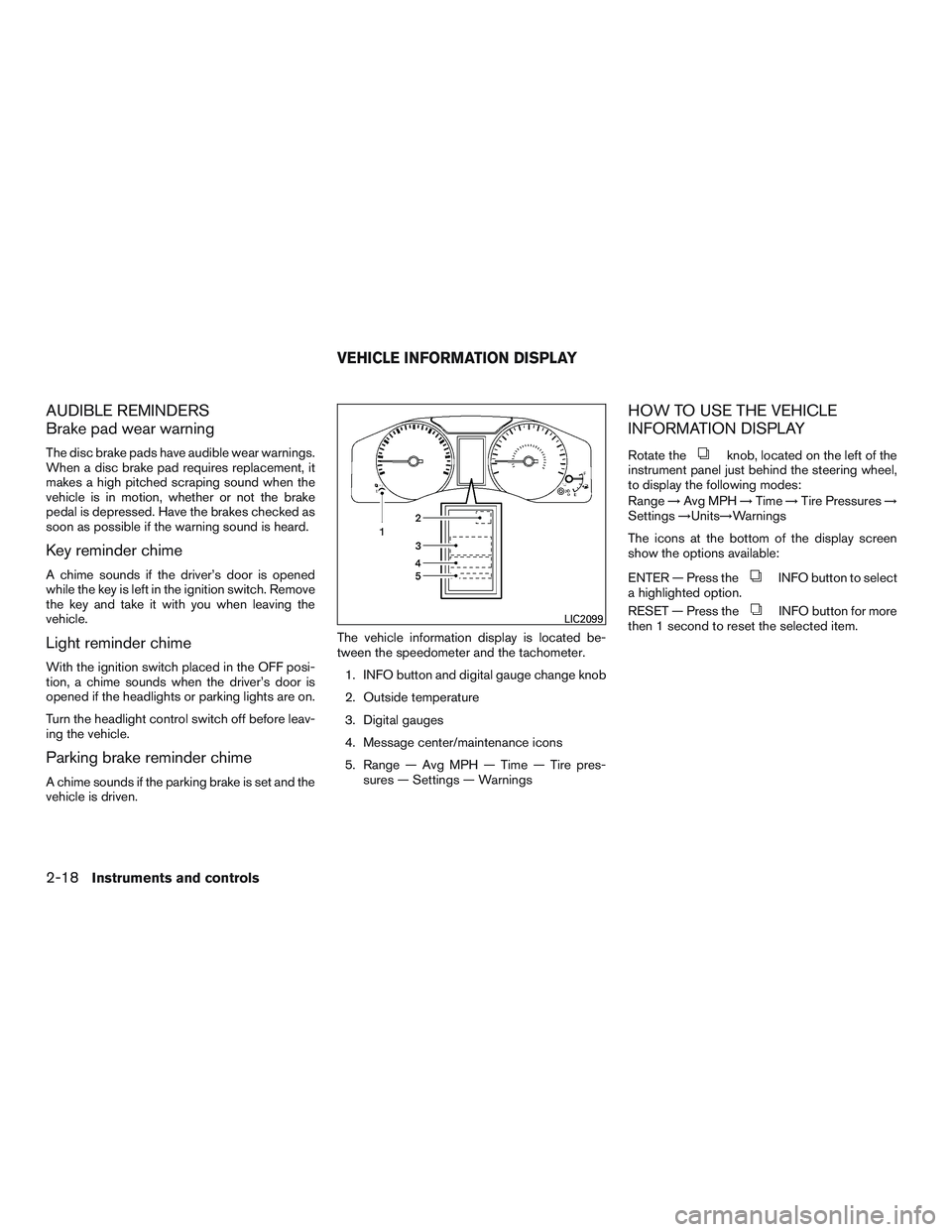
vehicle is driven.The vehicle information display is located be-
tween the speedometer and the tachometer.
1. INFO button and digital gauge change knob
2. Outside temperature
3. Digital gauges
4. Message center/maintenance icons
5. Range — Avg MPH — Time — Tire pres- sures — Settings — Warnings
HOW TO USE THE VEHICLE
INFORMATION DISPLAY
Rotate theknob, located on the left of the
instrument panel just behind the steering wheel,
to display the following modes:
Range →Avg MPH →Time →Tire Pressures →
Settings →Units→Warnings
The icons at the bottom of the display screen
show the options available:
ENTER — Press the
INFO button to select
a highlighted option.
RESET — Press the
INFO button for more
then 1 second to reset the selected item.LIC2099
VEHICLE INFORMATION DISPLAY
2-18Instruments and controls
Page 106 of 380
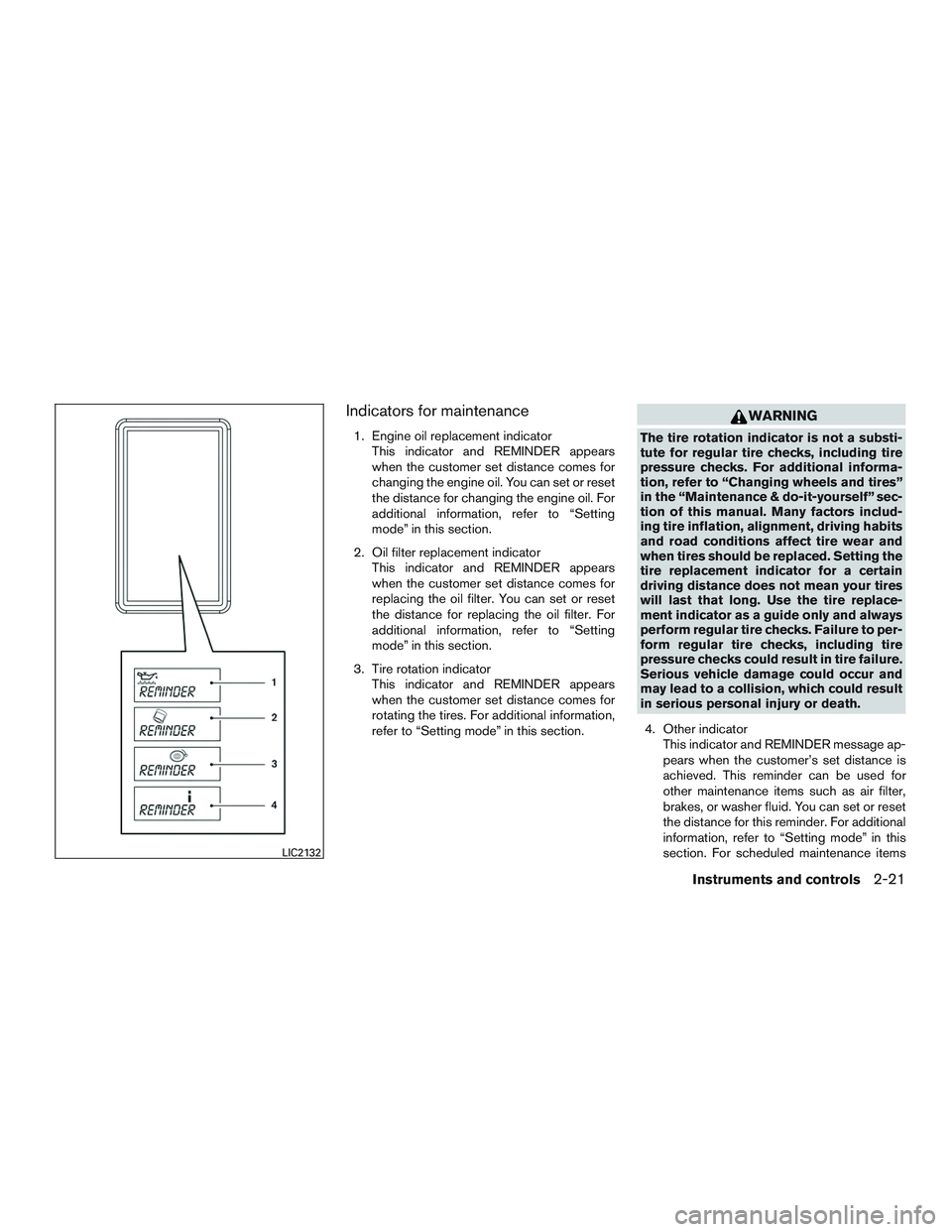
Indicators for maintenance
1. Engine oil replacement indicatorThis indicator and REMINDER appears
when the customer set distance comes for
changing the engine oil. You can set or reset
the distance for changing the engine oil. For
additional information, refer to “Setting
mode” in this section.
2. Oil filter replacement indicator This indicator and REMINDER appears
when the customer set distance comes for
replacing the oil filter. You can set or reset
the distance for replacing the oil filter. For
additional information, refer to “Setting
mode” in this section.
3. Tire rotation indicator This indicator and REMINDER appears
when the customer set distance comes for
rotating the tires. For additional information,
refer to “Setting mode” in this section.
WARNING
The tire rotation indicator is not a substi-
tute for regular tire checks, including tire
pressure checks. For additional informa-
tion, refer to “Changing wheels and tires”
in the “Maintenance & do-it-yourself” sec-
tion of this manual. Many factors includ-
ing tire inflation, alignment, driving habits
and road conditions affect tire wear and
when tires should be replaced. Setting the
tire replacement indicator for a certain
driving distance does not mean your tires
will last that long. Use the tire replace-
ment indicator as a guide only and always
perform regular tire checks. Failure to per-
form regular tire checks, including tire
pressure checks could result in tire failure.
Serious vehicle damage could occur and
may lead to a collision, which could result
in serious personal injury or death.
4. Other indicator This indicator and REMINDER message ap-
pears when the customer’s set distance is
achieved. This reminder can be used for
other maintenance items such as air filter,
brakes, or washer fluid. You can set or reset
the distance for this reminder. For additional
information, refer to “Setting mode” in this
section. For scheduled maintenance items
LIC2132
Instruments and controls2-21
Page 115 of 380
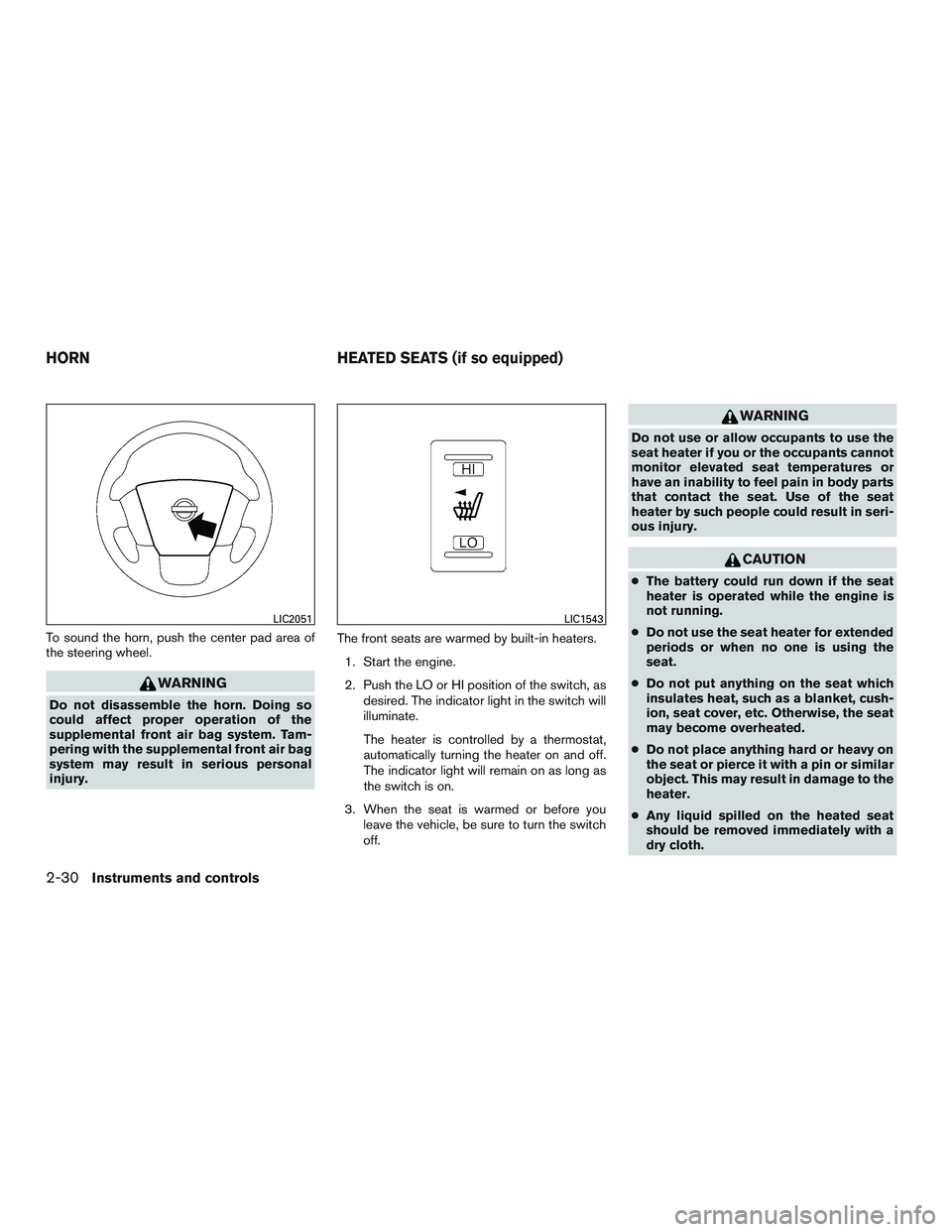
To sound the horn, push the center pad area of
the steering wheel.
WARNING
Do not disassemble the horn. Doing so
could affect proper operation of the
supplemental front air bag system. Tam-
pering with the supplemental front air bag
system may result in serious personal
injury.The front seats are warmed by built-in heaters.
1. Start the engine.
2. Push the LO or HI position of the switch, as desired. The indicator light in the switch will
illuminate.
The heater is controlled by a thermostat,
automatically turning the heater on and off.
The indicator light will remain on as long as
the switch is on.
3. When the seat is warmed or before you leave the vehicle, be sure to turn the switch
off.
WARNING
Do not use or allow occupants to use the
seat heater if you or the occupants cannot
monitor elevated seat temperatures or
have an inability to feel pain in body parts
that contact the seat. Use of the seat
heater by such people could result in seri-
ous injury.
CAUTION
●The battery could run down if the seat
heater is operated while the engine is
not running.
● Do not use the seat heater for extended
periods or when no one is using the
seat.
● Do not put anything on the seat which
insulates heat, such as a blanket, cush-
ion, seat cover, etc. Otherwise, the seat
may become overheated.
● Do not place anything hard or heavy on
the seat or pierce it with a pin or similar
object. This may result in damage to the
heater.
● Any liquid spilled on the heated seat
should be removed immediately with a
dry cloth.
LIC2051LIC1543
HORN HEATED SEATS (if so equipped)
2-30Instruments and controls
Page 116 of 380
●When cleaning the seat, never use
gasoline, benzine, thinner, or any simi-
lar materials.
● If any malfunctions are found or the
heated seat does not operate, turn the
switch off and have the system checked
by a NISSAN dealer.
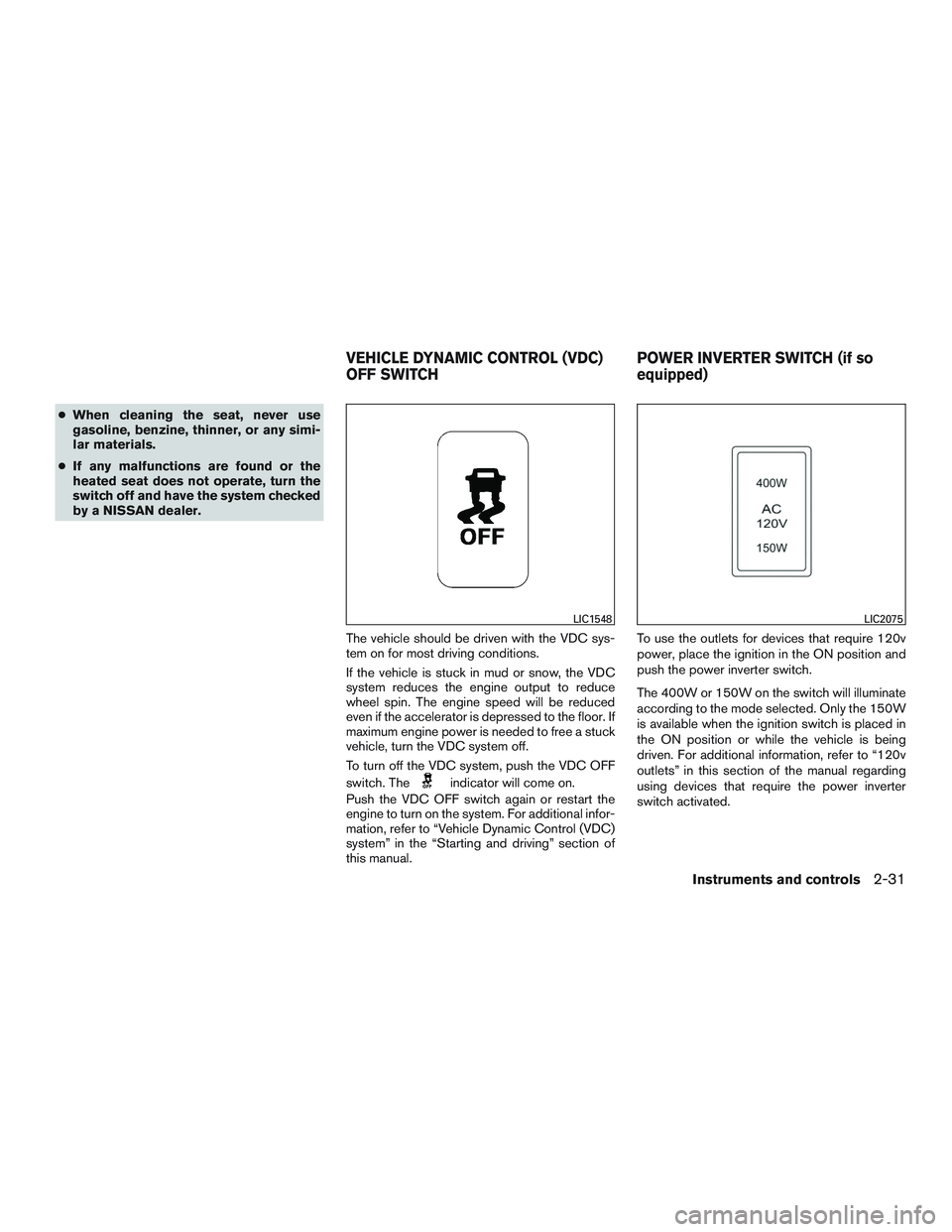
The vehicle should be driven with the VDC sys-
tem on for most driving conditions.
If the vehicle is stuck in mud or snow, the VDC
system reduces the engine output to reduce
wheel spin. The engine speed will be reduced
even if the accelerator is depressed to the floor. If
maximum engine power is needed to free a stuck
vehicle, turn the VDC system off.
To turn off the VDC system, push the VDC OFF
switch. The
indicator will come on.
Push the VDC OFF switch again or restart the
engine to turn on the system. For additional infor-
mation, refer to “Vehicle Dynamic Control (VDC)
system” in the “Starting and driving” section of
this manual. To use the outlets for devices that require 120v
power, place the ignition in the ON position and
push the power inverter switch.
The 400W or 150W on the switch will illuminate
according to the mode selected. Only the 150W
is available when the ignition switch is placed in
the ON position or while the vehicle is being
driven. For additional information, refer to “120v
outlets” in this section of the manual regarding
using devices that require the power inverter
switch activated.
LIC1548LIC2075
VEHICLE DYNAMIC CONTROL (VDC)
OFF SWITCH
POWER INVERTER SWITCH (if so
equipped)
Instruments and controls2-31
Page 136 of 380
3 Pre-driving checks and adjustments
Keys .............................................3-2NISSAN Vehicle Immobilizer System keys
(if so equipped) ................................3-2
Doors ............................................3-3
Locking with key ................................3-3
Locking with inside lock knob ....................3-4
Locking with power door lock switch
(if so equipped) ................................3-5
Operating the sliding door .......................3-6
Back doors ....................................3-7
Automatic door locks (if so equipped). . . ..........3-8
Child safety sliding door lock ....................3-8
Remote keyless entry system (if so equipped) .........3-8
How to use remote keyless entry system ..........3-9Hood
........................................... 3-12
Fuel-filler door ................................... 3-13
Opening the fuel-filler door .....................3-13
Fuel-filler cap ................................. 3-13
Steering wheel ................................... 3-15
Tilt operation .................................. 3-15
Sun visors ....................................... 3-16
Storage Clip .................................. 3-16
Mirrors .......................................... 3-17
Rearview mirror (if so equipped) .................3-17
Automatic anti-glare rearview mirror
(if so equipped) ............................... 3-17
Outside mirrors ............................... 3-18