2016 NISSAN NOTE AF sensor
[x] Cancel search: AF sensorPage 2106 of 3641

INL-12
< SYSTEM DESCRIPTION >
DIAGNOSIS SYSTEM (BCM) (WITH INTELLIGENT KEY SYSTEM)
ACTIVE TEST
WORK SUPPORT
*: Initial setting
INTELLIGENT KEY
INTELLIGENT KEY : CONSULT Function (BCM - INTELLIGENT KEY)INFOID:0000000012542972
SELF DIAGNOSTIC RESULT
Refer to BCS-50, "DTCIndex".
DATA MONITOR
Monitor Item [Unit] Description
REQ SW -DR [On/Off] Indicates condition of door request switch LH.
REQ SW -AS [On/Off] Indicates condition of door request switch RH.
PUSH SW [On/Off] Indicates condition of push-button ignition switch.
UNLK SEN -DR [On/Off] Indicates condition of door unlock sensor.
DOOR SW-DR [On/Off] Indicates condition of front door switch LH.
DOOR SW-AS [On/Off] Indicates condition of front door switch RH.
DOOR SW-RR [On/Off] Indicates condition of rear door switch RH.
DOOR SW-RL [On/Off] Indicates condition of rear door switch LH.
DOOR SW-BK [On/Off] Indicates condition of back door switch.
CDL LOCK SW [On/Off] Indicates condition of lock signal from door lock and unlock switch.
CDL UNLOCK SW [On/Off] Indicates condition of unlock signal from door lock and unlock switch.
KEY CYL LK-SW [On/Off] Indicates condition of lock signal from door key cylinder switch.
KEY CYL UN-SW [On/Off] Indicates condition of unlock signal from door key cylinder switch.
RKE-LOCK [On/Off] Indicates condition of lock signal from Intelligent Key.
RKE-UNLOCK [On/Off] Indicates condition of unlock signal from Intelligent Key.
Te s t I t e m D e s c r i p t i o n
INT LAMP This test is able to check interior room lamp operation [On/Off].
Support ItemSetting Description
R LAMP TIMER LOGIC SET MODE 2
Interior room lamp timer activates with all doors.
MODE 1* Interior room lamp timer activates with the driver door only.
SET I/L D-UNLCK INTCON On*
Interior room lamp timer function ON.
Off Interior room lamp timer function OFF.
ROOM LAMP TIMER SET MODE 4 30 sec.
Sets the interior room lamp ON time. (Timer operating time).
MODE 3* 15 sec.
MODE 2 7.5 sec.
Monitor Item [Unit] Main Description
REQ SW -DR [On/Off] ×Indicates condition of door request switch LH.
REQ SW -AS [On/Off] ×Indicates condition of door request switch RH.
REQ SW -BD/TR [On/Off] ×Indicates condition of back door request switch.
PUSH SW [On/Off] Indicates condition of push-button ignition switch.
CLUCH SW [On/Off] ×Indicates condition of clutch interlock switch.
BRAKE SW 1 [On/Off] ×Indicates condition of brake switch.
Revision: August 2015 2016 Versa Note
cardiagn.com
Page 2107 of 3641
![NISSAN NOTE 2016 Service Repair Manual DIAGNOSIS SYSTEM (BCM) (WITH INTELLIGENT KEY SYSTEM)
INL-13
< SYSTEM DESCRIPTION >
C
D E
F
G H
I
J
K
M A
B
INL
N
O P
ACTIVE TEST
BRAKE SW 2 [On/Off] Indicates condition of brake switch.
DETE/CANCL SW](/manual-img/5/57363/w960_57363-2106.png "NISSAN NOTE 2016 Service Repair Manual DIAGNOSIS SYSTEM (BCM) (WITH INTELLIGENT KEY SYSTEM)
INL-13
< SYSTEM DESCRIPTION >
C
D E
F
G H
I
J
K
M A
B
INL
N
O P
ACTIVE TEST
BRAKE SW 2 [On/Off] Indicates condition of brake switch.
DETE/CANCL SW")
DIAGNOSIS SYSTEM (BCM) (WITH INTELLIGENT KEY SYSTEM)
INL-13
< SYSTEM DESCRIPTION >
C
D E
F
G H
I
J
K
M A
B
INL
N
O P
ACTIVE TEST
BRAKE SW 2 [On/Off] Indicates condition of brake switch.
DETE/CANCL SW [On/Off] ×Indicates condition of P (park) position.
SFT PN/N SW [On/Off] ×Indicates condition of P (park) or N (neutral) position.
UNLK SEN -DR [On/Off] ×Indicates condition of door unlock sensor.
PUSH SW -IPDM [On/Off] Indicates condition of push-button ignition switch received from IPDM E/R on
CAN communication line.
IGN RLY1 -F/B [On/Off] Indicates condition of ignition relay 1 received from IPDM E/R on CAN commu-
nication line.
DETE SW -IPDM [On/Off] Indicates condition of detent switch received from TCM on CAN communication
line.
SFT PN -IPDM [On/Off] Indicates condition of P (park) or N (neutral) position from TCM on CAN com-
munication line.
SFT P -MET [On/Off] Indicates condition of P (park) position from TCM on CAN communication line.
SFT N -MET [On/Off] Indicates condition of N (neutral) position from IPDM E/R on CAN communica-
tion line.
ENGINE STATE [Stop/Start/Crank/Run] ×Indicates condition of engine state from ECM on CAN communication line.
VEH SPEED 1 [mph/km/h] ×Indicates condition of vehicle speed si
gnal received from ABS on CAN commu-
nication line.
VEH SPEED 2 [mph/km/h] ×Indicates condition of vehicle speed signal received from combination meter on
CAN communication line.
DOOR STAT -DR [LOCK/READY/UNLK] ×Indicates condition of driver side door status.
DOOR STAT -AS [LOCK/READY/UNLK] ×Indicates condition of passenger side door status.
ID OK FLAG [Set/Reset] Indicates condition of Intelligent Key ID.
PRMT ENG STRT [Set/Reset] Indicates condition of engine start possibility.
RKE OPE COUN1 [0-19] ×When remote keyless entry receiver receives the signal transmitted while oper-
ating on Intelligent Key, the numerical value start changing.
RKE OPE COUN2 [0-19] ×When remote keyless entry receiver receives the signal transmitted while oper-
ating on Intelligent Key, the numerical value start changing.
RKE-LOCK [On/Off] Indicates condition of lock signal from Intelligent Key.
RKE-UNLOCK [On/Off] Indicates condition of unlock signal from Intelligent Key.
RKE-PANIC [On/Off] Indicates condition of panic signal from Intelligent Key.
RKE-MODE CHG [On/Off] Indicates condition of mode change signal from Intelligent Key.
Monitor Item [Unit]
Main Description
Test Item Description
INSIDE BUZZER This test is able to check combination meter warning chime operation [Take Out/Knob/Key/
Off].
LCD This test is able to check combination me
ter display information [Off/LK WN/OUTKEY/NO
KY/BATT/INSRT/SFT P/ROTAT/ID NG/B&P I/B&P N].
BATTERY SAVER This test is able to check battery saver operation [On/Off].
ENGINE SW ILLUMI This test is able to check push-button ignition switch START indicator operation [On/Off].
PUSH SWITCH INDICATOR This test is able to check push-button ignition switch indicator operation [On/Off].
INT LAMP This test is able to check interior room lamp operation [On/Off].
INDICATOR This test is able to check combination mete r warning lamp operation [KEY ON/KEY IND/Off].
FLASHER This test is able to check hazard lamp operation [LH/RH/Off].
OUTSIDE BUZZER This test is able to check Intelligent Key warning buzzer operation [On/Off].
HORN This test is able to check horn operation [On].
P RANGE This test is able to check CVT shift selector illumination operation [On/Off].
Revision: August 2015 2016 Versa Note
cardiagn.com
Page 2109 of 3641
![NISSAN NOTE 2016 Service Repair Manual DIAGNOSIS SYSTEM (BCM) (WITH INTELLIGENT KEY SYSTEM)
INL-15
< SYSTEM DESCRIPTION >
C
D E
F
G H
I
J
K
M A
B
INL
N
O P
ACTIVE TEST
WORK SUPPORT
*: Initial setting Monitor Item [Unit]
Description
REQ SW](/manual-img/5/57363/w960_57363-2108.png "NISSAN NOTE 2016 Service Repair Manual DIAGNOSIS SYSTEM (BCM) (WITH INTELLIGENT KEY SYSTEM)
INL-15
< SYSTEM DESCRIPTION >
C
D E
F
G H
I
J
K
M A
B
INL
N
O P
ACTIVE TEST
WORK SUPPORT
*: Initial setting Monitor Item [Unit]
Description
REQ SW")
DIAGNOSIS SYSTEM (BCM) (WITH INTELLIGENT KEY SYSTEM)
INL-15
< SYSTEM DESCRIPTION >
C
D E
F
G H
I
J
K
M A
B
INL
N
O P
ACTIVE TEST
WORK SUPPORT
*: Initial setting Monitor Item [Unit]
Description
REQ SW -DR [On/Off] Indicates condition of door request switch LH.
REQ SW -AS [On/Off] Indicates condition of door request switch RH.
PUSH SW [On/Off] Indicates condition push-button ignition switch.
UNLK SEN -DR [On/Off] Indicates condition of door unlock sensor.
DOOR SW-DR [On/Off] Indicates condition of front door switch LH.
DOOR SW-AS [On/Off] Indicates condition of front door switch RH.
DOOR SW-RR [On/Off] Indicates condition of rear door switch RH.
DOOR SW-RL [On/Off] Indicates condition of rear door switch LH.
DOOR SW-BK [On/Off] Indicates condition of back door switch.
CDL LOCK SW [On/Off] Indicates condition of lock signal from door lock and unlock switch.
CDL UNLOCK SW [On/Off] Indicates condition of unlock signal from door lock and unlock switch.
KEY CYL LK-SW [On/Off] Indicates condition of lock signal from door key cylinder switch.
KEY CYL UN-SW [On/Off] Indicates condition of unlock signal from door key cylinder switch.
RKE-LOCK [On/Off] Indicates condition of lock signal from Intelligent Key.
RKE-UNLOCK [On/Off] Indicates condition of unlock signal from Intelligent Key.
Test item Description
BATTERY SAVER This test is able to check battery saver operation [On/Off].
Support ItemSetting Description
BATTERY SAVER SET ON*
Exterior lamp battery saver function ON.
OFF Exterior lamp battery saver function OFF.
ROOM LAMP TIMER SET MODE 3* 10 min.
Sets interior room lamp battery saver timer operating time.
MODE 2 60 min.
MODE 1 15 min.
Revision: August 2015 2016 Versa Note
cardiagn.com
Page 2154 of 3641
PRECAUTIONSINT-3
< PRECAUTION >
C
DE
F
G H
I
K L
M A
B
INT
N
O P
PRECAUTION
PRECAUTIONS
Precaution for Supplemental Restraint System (SRS) "AIR BAG" and "SEAT BELT
PRE-TENSIONER"
INFOID:0000000012431852
The Supplemental Restraint System such as “AIR BAG” and “SEAT BELT PRE-TENSIONER”, used along
with a front seat belt, helps to reduce the risk or severi ty of injury to the driver and front passenger for certain
types of collision. Information necessary to service the system safely is included in the SR and SB section of
this Service Manual.
WARNING:
• To avoid rendering the SRS inoper ative, which could increase the risk of personal injury or death in
the event of a collision which would result in air bag inflation, all maintenance must be performed by
an authorized NISSAN/INFINITI dealer.
• Improper maintenance, including in correct removal and installation of the SRS, can lead to personal
injury caused by unintentional act ivation of the system. For removal of Spiral Cable and Air Bag
Module, see the SR section.
• Do not use electrical test equipm ent on any circuit related to the SRS unless instructed to in this
Service Manual. SRS wiring harnesses can be identi fied by yellow and/or orange harnesses or har-
ness connectors.
PRECAUTIONS WHEN USING POWER TOOLS (AIR OR ELECTRIC) AND HAMMERS
WARNING:
• When working near the Airbag Diagnosis Sensor Un it or other Airbag System sensors with the Igni-
tion ON or engine running, DO NOT use air or el ectric power tools or strike near the sensor(s) with a
hammer. Heavy vibration could activate the sensor( s) and deploy the air bag(s), possibly causing
serious injury.
• When using air or electric power tools or hammers, always switch the Ignition OFF, disconnect the
battery and wait at least three mi nutes before performing any service.
Precaution for WorkINFOID:0000000012431853
• When removing or disassembling each component, be ca reful not to damage or deform it. If a component
may be subject to interference, be sure to protect it with a shop cloth.
• When removing (disengaging) components with a screwdriver or similar tool, be sure to wrap the component with a shop cloth or vinyl tape to protect it.
• Protect the removed parts with a shop cloth and prevent them from being dropped.
• Replace a deformed or damaged clip.
• If a part is specified as a non-reusabl e part, always replace it with a new one.
• Be sure to tighten bolts and nuts securely to the specified torque.
• After installation is complete, be sure to check that each part works properly.
• Follow the steps below to clean components:
- Water soluble dirt:
• Dip a soft cloth into lukewarm water, wring the water out of the cloth and wipe the dirty area.
• Then rub with a soft, dry cloth.
-Oily dirt:
• Dip a soft cloth into lukewarm water with mild detergent (concentration: within 2 to 3%) and wipe the dirty
area.
• Then dip a cloth into fresh water, wring the water out of the cloth and wipe the detergent off.
• Then rub with a soft, dry cloth.
- Do not use organic solvent such as thinner, benzene, alcohol or gasoline.
- For genuine leather seats, use a genuine leather seat cleaner.
Revision: August 2015 2016 Versa Note
cardiagn.com
Page 2179 of 3641
INT-28
< REMOVAL AND INSTALLATION >
FLOOR TRIM
6. Disconnect negative and positive battery terminals, then wait at least three minutes. Refer to PG-70,
"Removal and Installation (Battery)".
WARNING:
Before servicing the SRS, turn th e ignition switch off, disconnect both battery terminals then wait
at least three minutes.
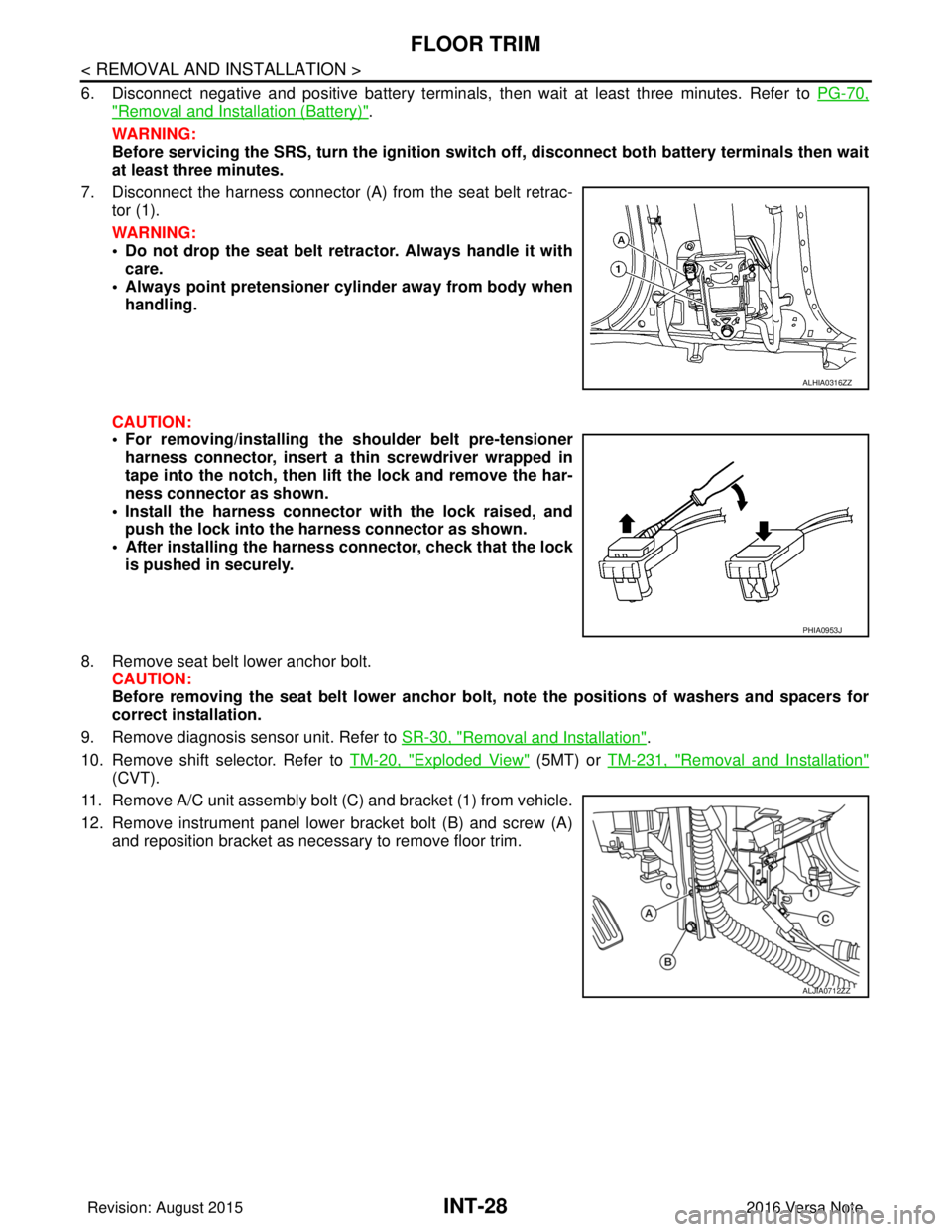
7. Disconnect the harness connector (A ) from the seat belt retrac-
tor (1).
WARNING:
• Do not drop the seat belt retractor. Always handle it with care.
• Always point pretensioner cylinder away from body when handling.
CAUTION:
• For removing/installing the shoulder belt pre-tensioner harness connector, insert a thin screwdriver wrapped in
tape into the notch, then lift the lock and remove the har-
ness connector as shown.
• Install the harness connector with the lock raised, and push the lock into the harness connector as shown.
• After installing the harness connector, check that the lock
is pushed in securely.
8. Remove seat belt lower anchor bolt. CAUTION:
Before removing the seat belt lower anchor bolt , note the positions of washers and spacers for
correct installation.
9. Remove diagnosis sensor unit. Refer to SR-30, "
Removal and Installation".
10. Remove shift selector. Refer to TM-20, "
Exploded View" (5MT) or TM-231, "Removal and Installation"
(CVT).
11. Remove A/C unit assembly bolt (C) and bracket (1) from vehicle.
12. Remove instrument panel lower bracket bolt (B) and screw (A) and reposition bracket as necessary to remove floor trim.
ALHIA0316ZZ
PHIA0953J
ALJIA0712ZZ
Revision: August 2015 2016 Versa Note
cardiagn.com
Page 2209 of 3641
![NISSAN NOTE 2016 Service Repair Manual LAN
HOW TO USE THIS SECTIONLAN-21
< HOW TO USE THIS MANUAL > [CAN]
C
D
E
F
G H
I
J
K L
B A
O P
N
HOW TO USE THIS MANUAL
HOW TO USE THIS SECTION
InformationINFOID:0000000012433340
• “CAN” of LAN](/manual-img/5/57363/w960_57363-2208.png "NISSAN NOTE 2016 Service Repair Manual LAN
HOW TO USE THIS SECTIONLAN-21
< HOW TO USE THIS MANUAL > [CAN]
C
D
E
F
G H
I
J
K L
B A
O P
N
HOW TO USE THIS MANUAL
HOW TO USE THIS SECTION
InformationINFOID:0000000012433340
• “CAN” of LAN")
LAN
HOW TO USE THIS SECTIONLAN-21
< HOW TO USE THIS MANUAL > [CAN]
C
D
E
F
G H
I
J
K L
B A
O P
N
HOW TO USE THIS MANUAL
HOW TO USE THIS SECTION
InformationINFOID:0000000012433340
• “CAN” of LAN Section describes information
peculiar to a vehicle and inspection procedures.
• For trouble diagnosis procedure, refer to LAN-16, "
Trouble Diagnosis Flow Chart" of “CAN FUNDAMEN-
TA L ” .
Abbreviation ListINFOID:0000000012433341
Unit name abbreviations in CONSULT CAN diagnosis and in this section are as per the following list.
Abbreviation Unit name
A-BAG Air bag diagnosis sensor unit
ABS ABS actuator and electric unit (control unit)
AV AV control unit
AVM Around view monitor control unit
BCM BCM
DLC Data link connector
ECM ECM
EPS EPS control unit
IPDM-E IPDM E/R
M&A Combination meter
STRG Steering angle sensor
TCM TCM
Revision: August 2015 2016 Versa Note
cardiagn.com
Page 2210 of 3641
![NISSAN NOTE 2016 Service Repair Manual LAN-22
< PRECAUTION >[CAN]
PRECAUTIONS
PRECAUTION
PRECAUTIONS
Precaution for Supplemental Restraint Syst
em (SRS) "AIR BAG" and "SEAT BELT
PRE-TENSIONER"
INFOID:0000000012433342
The Supplemental Rest](/manual-img/5/57363/w960_57363-2209.png "NISSAN NOTE 2016 Service Repair Manual LAN-22
< PRECAUTION >[CAN]
PRECAUTIONS
PRECAUTION
PRECAUTIONS
Precaution for Supplemental Restraint Syst
em (SRS) \"AIR BAG\" and \"SEAT BELT
PRE-TENSIONER\"
INFOID:0000000012433342
The Supplemental Rest")
LAN-22
< PRECAUTION >[CAN]
PRECAUTIONS
PRECAUTION
PRECAUTIONS
Precaution for Supplemental Restraint Syst
em (SRS) "AIR BAG" and "SEAT BELT
PRE-TENSIONER"
INFOID:0000000012433342
The Supplemental Restraint System such as “A IR BAG” and “SEAT BELT PRE-TENSIONER”, used along
with a front seat belt, helps to reduce the risk or severity of injury to the driver and front passenger for certain
types of collision. Information necessary to service the system safely is included in the SR and SB section of
this Service Manual.
WARNING:
• To avoid rendering the SRS inopera tive, which could increase the risk of personal injury or death in
the event of a collision which would result in air bag inflation, all maintenance must be performed by
an authorized NISSAN/INFINITI dealer.
• Improper maintenance, including in correct removal and installation of the SRS, can lead to personal
injury caused by unintent ional activation of the system. For re moval of Spiral Cable and Air Bag
Module, see the SR section.
• Do not use electrical test equipmen t on any circuit related to the SRS unless instructed to in this
Service Manual. SRS wiring harn esses can be identified by yellow and/or orange harnesses or har-
ness connectors.
PRECAUTIONS WHEN USING POWER TOOLS (AIR OR ELECTRIC) AND HAMMERS
WARNING:
• When working near the Airbag Diagnosis Sensor Unit or other Airbag System sensors with the Igni-
tion ON or engine running, DO NOT use air or electri c power tools or strike near the sensor(s) with a
hammer. Heavy vibration could activate the sensor( s) and deploy the air bag(s), possibly causing
serious injury.
• When using air or electric power tools or hammers , always switch the Ignition OFF, disconnect the
battery and wait at least three minutes before performing any service.
Precautions for Trouble DiagnosisINFOID:0000000012433343
CAUTION:
Follow the instructions listed below. Fail ure to do this may cause damage to parts:
• Never apply 7.0 V or more to the measurement terminal.
• Use a tester with open terminal voltage of 7.0 V or less.
• Turn the ignition switch OFF and disconnect th e battery cable from the negative terminal when
checking the harness.
Precautions for Harness RepairINFOID:0000000012433344
• Solder the repaired area and wrap tape around the soldered area. NOTE:
A fray of twisted lines must be within 110 mm (4.33 in).
SKIB8766E
Revision: August 2015 2016 Versa Note
cardiagn.com
Page 2212 of 3641
![NISSAN NOTE 2016 Service Repair Manual LAN-24
< SYSTEM DESCRIPTION >[CAN]
COMPONENT PARTS
SYSTEM DESCRIPTION
COMPONENT PARTS
Component Parts LocationINFOID:0000000012433345
Around view monitor control unit Air bag diagnosis sensor unit
Ste](/manual-img/5/57363/w960_57363-2211.png "NISSAN NOTE 2016 Service Repair Manual LAN-24
< SYSTEM DESCRIPTION >[CAN]
COMPONENT PARTS
SYSTEM DESCRIPTION
COMPONENT PARTS
Component Parts LocationINFOID:0000000012433345
Around view monitor control unit Air bag diagnosis sensor unit
Ste")
LAN-24
< SYSTEM DESCRIPTION >[CAN]
COMPONENT PARTS
SYSTEM DESCRIPTION
COMPONENT PARTS
Component Parts LocationINFOID:0000000012433345
Around view monitor control unit Air bag diagnosis sensor unit
Steering angle sensor
Combination meter ABS actuator and electric unit (con-
trol unit) AV control unit
EPS control unit Data link connectorTCM
IPDM E/R ECM BCM
ALMIA0644ZZ
Revision: August 2015 2016 Versa Note
cardiagn.com