2016 NISSAN NOTE abs
[x] Cancel search: absPage 309 of 3641
![NISSAN NOTE 2016 Service Repair Manual BCS-48
< ECU DIAGNOSIS INFORMATION >[WITH INTELLIGENT KEY SYSTEM]
BCM
Fail-safe
INFOID:0000000012432333
BCM performs fail-safe control when the following DTCs are detected.
CONSULT Display Fail-safe C](/manual-img/5/57363/w960_57363-308.png "NISSAN NOTE 2016 Service Repair Manual BCS-48
< ECU DIAGNOSIS INFORMATION >[WITH INTELLIGENT KEY SYSTEM]
BCM
Fail-safe
INFOID:0000000012432333
BCM performs fail-safe control when the following DTCs are detected.
CONSULT Display Fail-safe C")
BCS-48
< ECU DIAGNOSIS INFORMATION >[WITH INTELLIGENT KEY SYSTEM]
BCM
Fail-safe
INFOID:0000000012432333
BCM performs fail-safe control when the following DTCs are detected.
CONSULT Display Fail-safe Cancellation
B2192: ID DISCORD BCM-ECM Inhibit engine cranking Erase DTC
B2193: CHAIN OF BCM-ECM Inhibit engine cranking Erase DTC
B2195: ANTI SCANNING Inhibit engine cranking Ignition switch ON → OFF
B2196: DONGLE NG Inhibit engine cranking Erase DTC
B2198: NATS ANTENNA AMP Inhibit engine cranking Erase DTC
B2557: VEHICLE SPEED —When the following CAN signal status (vehicle speed signal) becomes
consistent
• Vehicle speed signal (ABS)
• Vehicle speed signal (Meter)
B2601: SHIFT P SIGNAL —500 ms after the following signal reception status becomes consistent
• Park position switch signal
• P range signal (CAN)
B2602: SHIFT P DIAG —5 seconds after the following BCM recognition conditions are fulfilled
• Ignition switch is in the ON position
• Park position switch signal: P position (push selector button) or ex-
cept P position (9 – 16 V)
• Vehicle speed: 4 km/h (2.5 MPH) or more
B2603: SHIFT POSITION —500 ms after any of the following BCM recognition conditions are fulfilled
•Status 1
- Ignition switch is in the ON position
- Park position switch signal: P position (push selector button) or ex-
cept P position (9 – 16 V)
- P/N position signal: Except P and N positions (0 – 1.5 V)
•Status 2
- Ignition switch is in the ON position
- Park position switch signal: P position (release selector button) (0 – 1.5 V)
- P/N position signal: P or N positions (9 – 16 V)
B2604: SHIFT PN DIAG CAN —500 ms after any of the following BCM recognition conditions are fulfilled
•Status 1
- Ignition switch is in the ON position
- P/N position signal: P or N position (9 – 16 V)
- Shift position signal (CAN): P or N position
•Status 2
- Ignition switch is in the ON position
- P/N position signal: Except P and N positions (0 – 1.5 V)
- Shift position signal (CAN): Except P and N position
B2605: SHIFT PN DIAG IPDM —500 ms after any of the following BCM recognition conditions are fulfilled
•Status 1
- Ignition switch is in the ON position
- P/N position signal: Except P and N positions (0 – 1.5 V)
•Status 2
- Ignition switch is in the ON position
- P/N position signal: P or N position (9 – 16 V)
B2608: STARTER RELAY Inhibit engine cranking 500 ms after the following signal communication status becomes con-
sistent
• Starter motor relay control signal
• Starter relay status signal (CAN)
B260F: ECM CAN COMM Inhibit engine cranking When any of the following conditions are fulfilled
• Ignition switch changes to ACC
• Receives engine status signal (CAN)
Revision: August 2015
2016 Versa Note
cardiagn.com
Page 321 of 3641
![NISSAN NOTE 2016 Service Repair Manual BCS-60
< BASIC INSPECTION >[WITH INTELLIGENT KEY SYSTEM]
CONFIGURATION (BCM)
>> GO TO 4.
4.OPERATION CHECK
Confirm that each function controlled by BCM operates normally.
>> WORK END
Configuration Lis](/manual-img/5/57363/w960_57363-320.png "NISSAN NOTE 2016 Service Repair Manual BCS-60
< BASIC INSPECTION >[WITH INTELLIGENT KEY SYSTEM]
CONFIGURATION (BCM)
>> GO TO 4.
4.OPERATION CHECK
Confirm that each function controlled by BCM operates normally.
>> WORK END
Configuration Lis")
BCS-60
< BASIC INSPECTION >[WITH INTELLIGENT KEY SYSTEM]
CONFIGURATION (BCM)
>> GO TO 4.
4.OPERATION CHECK
Confirm that each function controlled by BCM operates normally.
>> WORK END
Configuration ListINFOID:0000000012432341
CAUTION:
• Thoroughly read and understand the vehicle speci fication. ECU control may not operate normally if
the setting is not correct.
• The “setting value” of this vehicle is as follows: Never select any other value than the setting value
shown below. (If there is only 1 item in “setting value” that means that item is the only choice for this
certain vehicle.)
⇔ : Items which confirm vehicle specifications SETTING ITEM
NOTE
Items Setting value
I-KEY SYS FREQUENCY TYPE MODE2 ⇔ MODE3 • MODE2: 315 MHz
• MODE3: 433.92 MHz
TRANSMISSION AT with ABS ⇔ MT with ABS • AT with ABS: CVT models
• MT with ABS: M/T models
THEFT ALM AREA MODE2 ⇔ WITHOUT • MODE2: With vehicle security system
• WITHOUT: Without vehicle security system
ASCD CANCEL SW TYPE MODE1 ⇔ MODE2 • MODE1: With ASCD and CVT
• MODE2: With ASCD and M/T
AUTO DOOR LOCK SELECT WITH ⇔ WITHOUT • WITH: With automatic door lock function
• WITHOUT: Without automatic door lock function
I-KEY TUNING MODE2 —
DTRL MODE2 ⇔ WITHOUT • MODE2: With daytime running lamps
• WITHOUT: Without daytime running lamps
Revision: August 2015
2016 Versa Note
cardiagn.com
Page 324 of 3641
![NISSAN NOTE 2016 Service Repair Manual BCS
U1000 CAN COMM CIRCUITBCS-63
< DTC/CIRCUIT DIAGNOSIS > [WITH INTELLIGENT KEY SYSTEM]
C
D
E
F
G H
I
J
K L
B A
O P
N
DTC/CIRCUIT DIAGNOSIS
U1000 CAN COMM CIRCUIT
DescriptionINFOID:0000000012432344
R](/manual-img/5/57363/w960_57363-323.png "NISSAN NOTE 2016 Service Repair Manual BCS
U1000 CAN COMM CIRCUITBCS-63
< DTC/CIRCUIT DIAGNOSIS > [WITH INTELLIGENT KEY SYSTEM]
C
D
E
F
G H
I
J
K L
B A
O P
N
DTC/CIRCUIT DIAGNOSIS
U1000 CAN COMM CIRCUIT
DescriptionINFOID:0000000012432344
R")
BCS
U1000 CAN COMM CIRCUITBCS-63
< DTC/CIRCUIT DIAGNOSIS > [WITH INTELLIGENT KEY SYSTEM]
C
D
E
F
G H
I
J
K L
B A
O P
N
DTC/CIRCUIT DIAGNOSIS
U1000 CAN COMM CIRCUIT
DescriptionINFOID:0000000012432344
Refer to
LAN-25, "CAN COMMUNICATION SYSTEM : System Description".
DTC LogicINFOID:0000000012432345
DTC DETECTION LOGIC
NOTE:
U1000 can be set if a module harness was disconnected and reconnected, perhaps during a repair. Confirm
that there are actual CAN diagnostic symptoms and a present DTC by performing the Self Diagnostic Result
procedure.
Diagnosis ProcedureINFOID:0000000012432346
1. PERFORM SELF DIAGNOSTIC RESULT
1. Turn ignition switch ON and wait for 2 second or more.
2. Perform “Self Diagnostic Result” of “BCM” using CONSULT.
Is
“CAN COMM CIRCUIT” displayed?
YES >> Perform CAN Diagnosis as described in DI AGNOSIS section of CONSULT Operation manual.
NO >> Refer to GI-42, "
Intermittent Incident".
CONSULT Display DTC Detection Condition Possible Cause
CAN COMM CIRCUIT
[U1000] When any listed module cannot communicate
with CAN communication signal continuously for
2 seconds or more with ignition switch ON In CAN communication system, any item (or
items) of the following listed below is malfunc-
tioning.
•Transmission
• Receiving (ECM)
• Receiving (VDC/TCS/ABS)
• Receiving (METER/M&A)
• Receiving (TCM)
• Receiving (IPDM E/R)
Revision: August 2015
2016 Versa Note
cardiagn.com
Page 326 of 3641
![NISSAN NOTE 2016 Service Repair Manual BCS
U0415 VEHICLE SPEEDBCS-65
< DTC/CIRCUIT DIAGNOSIS > [WITH INTELLIGENT KEY SYSTEM]
C
D
E
F
G H
I
J
K L
B A
O P
N
U0415 VEHICLE SPEED
DTC LogicINFOID:0000000012432349
DTC DETECTION LOGIC
NOTE:
• I](/manual-img/5/57363/w960_57363-325.png "NISSAN NOTE 2016 Service Repair Manual BCS
U0415 VEHICLE SPEEDBCS-65
< DTC/CIRCUIT DIAGNOSIS > [WITH INTELLIGENT KEY SYSTEM]
C
D
E
F
G H
I
J
K L
B A
O P
N
U0415 VEHICLE SPEED
DTC LogicINFOID:0000000012432349
DTC DETECTION LOGIC
NOTE:
• I")
BCS
U0415 VEHICLE SPEEDBCS-65
< DTC/CIRCUIT DIAGNOSIS > [WITH INTELLIGENT KEY SYSTEM]
C
D
E
F
G H
I
J
K L
B A
O P
N
U0415 VEHICLE SPEED
DTC LogicINFOID:0000000012432349
DTC DETECTION LOGIC
NOTE:
• If DTC U0415 is displayed with DTC U1000, first perform the trouble diagnosis for DTC U1000. Refer to
BCS-63, "
DTC Logic".
• If DTC U0415 is displayed with DTC U1010, first perform the trouble diagnosis for DTC U1010. Refer to BCS-64, "
DTC Logic".
DTC CONFIRMATION PROCEDURE
1. DTC CONFIRMATION
1. Erase the DTC.
2. Turn ignition switch OFF.
3. Perform Self Diagnostic Result of BCM with CONSULT, after the ignition switch has been turned ON for 2
seconds or more.
Is any DTC detected?
YES >> Refer to BCS-65, "Diagnosis Procedure".
NO >> Inspection End.
Diagnosis ProcedureINFOID:0000000012432350
1. ABS ACTUATOR AND ELECTRIC UNIT (CONTROL UNIT) SELF DIAGNOSTIC RESULT
Perform “Self Diagnostic Result” of “ABS” with CONSULT. Refer to BRC-31, "
CONSULT Function (ABS)".
Is any DTC detected?
YES >> Perform the trouble diagnosis related to the detected DTC. Refer to BRC-43, "DTC Index".
NO >> GO TO 2.
2. CHECK ABS ACTUATOR AND ELECTRIC UNIT (CONTROL UNIT) POWER SUPPLY AND GROUND
CIRCUIT
Check ABS actuator and electric unit (control unit) power and ground. Refer to BRC-121, "
Diagnosis Proce-
dure".
Is the inspection result normal?
YES >> GO TO 3.
NO >> Repair or replace harness or connectors.
3. COMBINATION METER SE LF DIAGNOSTIC RESULT
Perform “Self Diagnostic Result” of “ME TER M&A” with CONSULT. Refer to MWI-71, "
CONSULT Function
(METER/M&A)".
Is any DTC detected?
YES >> Perform the trouble diagnosis related to the detected DTC. Refer to MWI-77, "DTC Index".
NO >> Refer to GI-42, "
Intermittent Incident".
CONSULT Display DTC Detection Condition Probable Cause
VDC CAN CIR2
[U0415] When the vehicle speed signal received from the
ABS actuator and electric
unit (control unit) re-
mains abnormal for 2 seconds or more. • ABS system
• Combination meter system
• CAN bus harness
Revision: August 2015
2016 Versa Note
cardiagn.com
Page 360 of 3641
![NISSAN NOTE 2016 Service Repair Manual BCS
DIAGNOSIS SYSTEM (BCM)BCS-99
< SYSTEM DESCRIPTION > [WITHOUT INTELLIGENT KEY SYSTEM]
C
D
E
F
G H
I
J
K L
B A
O P
N
AIR PRESSURE MONITOR
AIR PRESSURE MONITOR : CONSULT Function (BCM - AIR PRESSURE](/manual-img/5/57363/w960_57363-359.png "NISSAN NOTE 2016 Service Repair Manual BCS
DIAGNOSIS SYSTEM (BCM)BCS-99
< SYSTEM DESCRIPTION > [WITHOUT INTELLIGENT KEY SYSTEM]
C
D
E
F
G H
I
J
K L
B A
O P
N
AIR PRESSURE MONITOR
AIR PRESSURE MONITOR : CONSULT Function (BCM - AIR PRESSURE")
BCS
DIAGNOSIS SYSTEM (BCM)BCS-99
< SYSTEM DESCRIPTION > [WITHOUT INTELLIGENT KEY SYSTEM]
C
D
E
F
G H
I
J
K L
B A
O P
N
AIR PRESSURE MONITOR
AIR PRESSURE MONITOR : CONSULT Function (BCM - AIR PRESSURE MONI-
TOR)
INFOID:0000000012432387
NOTE:
The Signal Tech II Tool [– (J-50190)] can be used to perform the following functions. Refer to the Signal Tech
II User Guide for additional information.
• Activate and display TPMS transmitter IDs
• Display tire pressure repor
ted by the TPMS transmitter
• Read TPMS DTCs
• Register TPMS transmitter IDs
• Test remote keyless entry keyfob relative signal strength
SELF DIAGNOSTIC RESULT
NOTE:
Before performing self diagnostic result, be sure to register the ID, or else the actual malfunction may be differ-
ent from that displayed on CONSULT.
Refer to BCS-115, "
DTCIndex".
DATA MONITOR
ACTIVE TEST
WORK SUPPORT
PANIC ALARM
Monitor Item [Unit] Description
BRAKE SW [On/Off] Indicates condition of stop lamp
switch signal received from ABS actuator and electric unit
(control unit) on CAN communication line.
Monitor Item [Unit] Description
AIR PRESS FL [kPa, kg/cm
2 or Psi] Indicates air pressure of front LH tire.
AIR PRESS FR [kPa, kg/cm
2 or Psi] Indicates air pressure of front RH tire.
AIR PRESS RR [kPa, kg/cm
2 or Psi] Indicates air pressure of rear RH tire.
AIR PRESS RL [kPa, kg/cm
2 or Psi] Indicates air pressure of rear LH tire.
ID REGST FL1 [Done/Yet] Indicates ID registration status of front LH transmitter.
ID REGST FR1 [Done/Yet] Indicates ID registration status of front RH transmitter.
ID REGST RR1 [Done/Yet] Indicates ID registration status of rear RH transmitter.
ID REGST RL1 [Done/Yet] Indicates ID registration status of rear LH transmitter.
WARNING LAMP [Off/On] Indicates condition of low tire pressure warning lamp in combination meter.
BUZZER [Off/On] Indicates condition of buzzer in combination meter.
Test Item Description
HORN This test is able to check horn operation [On].
WARNING LAMP This test is able to check tire pressure warning lamp operation [On/Off].
ID REGIST WARNING This test is able to check ID registration warning chime operation [On/Off].
FLASHER This test is able to check turn signal lamp operation [Off/LH/RH].
Support Item Description
ID READ The registered ID number is displayed.
ID REGIST Refer to WT-22, "
Description".
Revision: August 2015 2016 Versa Note
cardiagn.com
Page 388 of 3641
![NISSAN NOTE 2016 Service Repair Manual BCS
U1000 CAN COMMBCS-127
< DTC/CIRCUIT DIAGNOSIS > [WITHOUT INTELLIGENT KEY SYSTEM]
C
D
E
F
G H
I
J
K L
B A
O P
N
DTC/CIRCUIT DIAGNOSIS
U1000 CAN COMM
DescriptionINFOID:0000000012432401
Refer to
LAN](/manual-img/5/57363/w960_57363-387.png "NISSAN NOTE 2016 Service Repair Manual BCS
U1000 CAN COMMBCS-127
< DTC/CIRCUIT DIAGNOSIS > [WITHOUT INTELLIGENT KEY SYSTEM]
C
D
E
F
G H
I
J
K L
B A
O P
N
DTC/CIRCUIT DIAGNOSIS
U1000 CAN COMM
DescriptionINFOID:0000000012432401
Refer to
LAN")
BCS
U1000 CAN COMMBCS-127
< DTC/CIRCUIT DIAGNOSIS > [WITHOUT INTELLIGENT KEY SYSTEM]
C
D
E
F
G H
I
J
K L
B A
O P
N
DTC/CIRCUIT DIAGNOSIS
U1000 CAN COMM
DescriptionINFOID:0000000012432401
Refer to
LAN-7, "CAN COMMUNICATION SYSTEM : System Description".
DTC LogicINFOID:0000000012432402
DTC DETECTION LOGIC
NOTE:
U1000 can be set if a module harness was disconnected and reconnected, perhaps during a repair. Confirm
that there are actual CAN diagnostic symptoms and a present DTC by performing the Self Diagnostic Result
procedure.
Diagnosis ProcedureINFOID:0000000012432403
1. PERFORM SELF DIAGNOSTIC RESULT
1. Turn ignition switch ON and wait for 2 second or more.
2. Check “Self Diagnostic Result” of “BCM” using CONSULT.
Is
“CAN COMM CIRCUIT” displayed?
YES >> Perform CAN Diagnosis as described in DI AGNOSIS section of CONSULT Operation Manual.
NO >> Refer to GI-42, "
Intermittent Incident".
CONSULT Display DTC Detection Condition Possible Cause
CAN COMM CIRCUIT
[U1000] When any listed module cannot communicate
with CAN communication signal continuously for
2 seconds or more with ignition switch ON In CAN communication system, any item (or
items) of the following listed below is malfunc-
tioning.
•Transmission
• Receiving (ECM)
• Receiving (VDC/TCS/ABS)
• Receiving (METER/M&A)
• Receiving (TCM)
• Receiving (IPDM E/R)
Revision: August 2015
2016 Versa Note
cardiagn.com
Page 403 of 3641

BRM-4
< PRECAUTION >
HANDLING PRECAUTIONS FOR PLASTICS
HANDLING PRECAUTIONS FOR PLASTICS
Precautions For PlasticsINFOID:0000000012430792
1. When repairing and painting a portion of the body adjacent to plastic parts, consider their characteristics
(influence of heat and solvent) and remove them if neces sary or take suitable measures to protect them.
2. Plastic parts should be repaired and painted using methods suiting the materials
, characteristics.
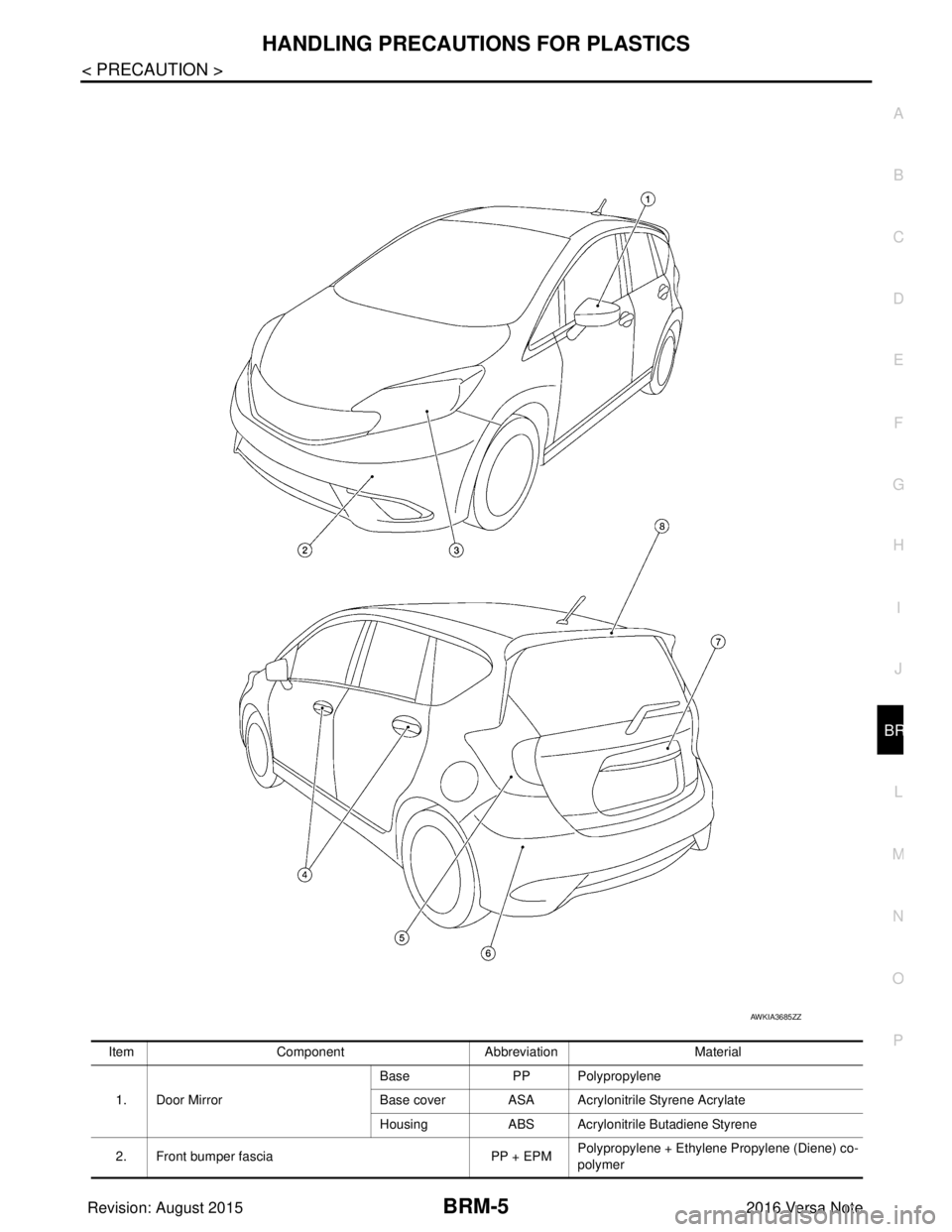
LOCATION OF PLASTIC PARTS
Abbre- viation Material name Heat resisting
temperature °C ( °F) Resistance to gasoline and
solvents Other cautions
PE Polyethylene 60 (140)Gasoline and most solvents are
harmless if applied for a very
short time (wipe up quickly). Flammable
PVC Poly Vinyl Chloride 80 (176) Same as above. Poison gas is emitted
when burned.
EPM/
EPDM Ethylene Propylene (Diene) co-
polymer
80 (176) Same as above.
Flammable
PP Polypropylene 90 (194) Same as above. Flammable, avoid bat-
tery acid.
UP Unsaturated Polyester 90 (194) Same as above. Flammable
PS Polystyrene 80 (176) Avoid solvents. Flammable
ABS Acrylonitrile Butadiene Styrene 80 (176) Avoid gasoline and solvents.
PMMA Poly Methyl Methacrylate 85 (185) Same as above.
EVAC Ethylene Vinyl Acetate 90 (194) Same as above.
ASA Acrylonitrile Styrene Acrylate 100 (222) Same as above. Flammable
PPE Poly Phenylene Ether 110 (230) Same as above.
PC Polycarbonate 120 (248) Same as above.
PAR Polyarylate 180 (356) Same as above.
PUR Polyurethane 90 (194) Same as above.
POM Poly Oxymethylene 120 (248) Same as above. Avoid battery acid.
PBT+
PC Poly Butylene Terephthalate +
Polycarbonate
120 (248) Same as above.
Flammable
PA Polyamide 140 (284) Same as above. Avoid immersing in wa-
ter.
PBT Poly Butylene Terephthalate 140 (284) Same as above.
PET Polyester 180 (356) Same as above.
PEI Polyetherimide 200 (392) Same as above.
Revision: August 2015 2016 Versa Note
cardiagn.com
Page 404 of 3641
HANDLING PRECAUTIONS FOR PLASTICSBRM-5
< PRECAUTION >
C
DE
F
G H
I
J
L
M A
B
BRM
N
O P
Item Component Abbreviation Material
1. Door Mirror Base
PP Polypropylene
Base cover ASA Acryloni trile Styrene Acrylate
Housing ABS Acrylonitrile Butadiene Styrene
2. Front bumper fascia PP + EPMPolypropylene + Ethylene Propylene (Diene) co-
polymer
AWKIA3685ZZ
Revision: August 2015
2016 Versa Note
cardiagn.com