Page 257 of 3641
A V -252
< REMOVAL AND INSTALLATION >[NAVIGATION]
SIDE CAMERA
SIDE CAMERA
Exploded ViewINFOID:0000000012433104
Removal and InstallationINFOID:0000000012433105
REMOVAL
1. Remove the door mirror. Refer to
MIR-15, "Removal and Installation".
2. Remove the door mirror glass.
3. Remove the door mirror actuator.
4. Disconnect the harness connector from the side camera.
5. Remove the side camera screws and remove.
INSTALLATION
Installation is in the reverse order of removal.
NOTE:
Perform camera image calibration. Refer to AV-179, "
CALIBRATING CAMERA IMAGE (AROUND VIEW
MONITOR) : Description".
1. Door mirror rear finisher 2.Side turn signal lamp (if
equipped)
3. Door mirror
4. Door mirror glass 5. Side camera 6. Door mirror base finisher
Pawl
AWLIA2708ZZ
Revision: August 2015 2016 Versa Note
cardiagn.com
Page 258 of 3641
AV
GPS ANTENNAAV-253
< REMOVAL AND INSTALLATION > [NAVIGATION]
C
D
E
F
G H
I
J
K L
M B A
O P
GPS ANTENNA
Removal and InstallationINFOID:0000000012433106
REMOVAL
1. Remove the combination meter. Refer to MWI-54, "Removal and Installation".
2. Remove the AV control unit in order to disconnect the GPS antenna harne ss connector. Refer to AV-241,
"Removal and Installation".
3. Remove the GPS antenna screw (A) from the GPS antenna.
4. Disconnect the harness clip (B) and remove the GPS antenna.
INSTALLATION
Installation is in the reverse order of removal.
AWNIA3076ZZ
Revision: August 2015 2016 Versa Note
cardiagn.com
Page 259 of 3641
AV-254
< REMOVAL AND INSTALLATION >[NAVIGATION]
SATELLITE RADIO ANTENNA
SATELLITE RADIO ANTENNA
Removal and InstallationINFOID:0000000012433107
The satellite radio antenna is part of the rod antenna. Refer to
AV-255, "Removal and Installation".
Revision: August 2015 2016 Versa Note
cardiagn.com
Page 260 of 3641
AV
ROD ANTENNAAV-255
< REMOVAL AND INSTALLATION > [NAVIGATION]
C
D
E
F
G H
I
J
K L
M B A
O P
ROD ANTENNA
Exploded ViewINFOID:0000000012433108
Removal and InstallationINFOID:0000000012433109
REMOVAL
1. Lower the rear portion of the headlining. Refer to INT-31, "Removal and Installation".
2. Disconnect the harness connectors from the antenna (satellite radio model shown).
3. Remove the antenna nut (A) and remove the antenna.
INSTALLATION
Installation is in the reverse order of removal.
CAUTION:
If the antenna nut is tightened l ess than the specified torque this will lower the sensitivity of the
antenna. If the antenna nut is tight ened more than the specified torque this will deform the roof panel.
AWNIA3124ZZ
1. Antenna rod 2. Antenna baseA. Antenna nut
AWNIA3115ZZ
Revision: August 2015 2016 Versa Note
cardiagn.com
Page 261 of 3641
AV-256
< REMOVAL AND INSTALLATION >[NAVIGATION]
ANTENNA FEEDER
ANTENNA FEEDER
Feeder LayoutINFOID:0000000012433110
1. Antenna base (antenna amp. and
satellite antenna) 2. Rod Antenna
3. M351
4. M352 5. M110, M3536. M67, M350
7. M109 8. M73
ALNIA1520ZZ
Revision: August 2015 2016 Versa Note
cardiagn.com
Page 847 of 3641
![NISSAN NOTE 2016 Service Repair Manual DLK-158
< REMOVAL AND INSTALLATION >[WITH INTELLIGENT KEY SYSTEM]
REAR DOOR
3. Remove rear door hinge bolts and nuts (body side) and rear door hinge.
INSTALLATION
Installation is in the reverse order](/manual-img/5/57363/w960_57363-846.png "NISSAN NOTE 2016 Service Repair Manual DLK-158
< REMOVAL AND INSTALLATION >[WITH INTELLIGENT KEY SYSTEM]
REAR DOOR
3. Remove rear door hinge bolts and nuts (body side) and rear door hinge.
INSTALLATION
Installation is in the reverse order")
DLK-158
< REMOVAL AND INSTALLATION >[WITH INTELLIGENT KEY SYSTEM]
REAR DOOR
3. Remove rear door hinge bolts and nuts (body side) and rear door hinge.
INSTALLATION
Installation is in the reverse order of removal.
CAUTION:
• Apply anticorrosive agent to
the door hinge mating surface.
• After installation, perform the rear door adjustment procedure. Refer to DLK-156, "
DOOR ASSEMBLY
: Adjustment".
• After adjusting, apply touch-up paint (body color) to the head of door hinge bolts and nuts.
• Check door hinge rota ting point for poor lubrication. If neces-
sary, apply a suitable multi-purpose grease.
DOOR CHECK LINK
DOOR CHECK LINK : Re moval and InstallationINFOID:0000000012430108
REMOVAL
1. Remove rear door speaker. Refer to AV-55, "Removal and Installation" (BASE AUDIO), AV-115, "Removal
and Installation" (DISPLAY AUDIO) or AV-244, "Removal and Installation" (NAVIGATION).
2. Remove door check link bolt (body side).
3. Remove door check link bolts (door side) and remove.
INSTALLATION
Installation is in the reverse order of removal.
CAUTION:
• After installation, check rear door open/close operation.
• Check door check link rotating point for poor lubrication. If
necessary, apply a suitable multi-purpose grease.
JMKIA8072ZZ
JMKIA8074ZZ
Revision: August 2015 2016 Versa Note
cardiagn.com
Page 2084 of 3641
IP-16
< REMOVAL AND INSTALLATION >
INSTRUMENT PANEL ASSEMBLY
12. Remove audio unit. Refer to AV-53, "Removal and Installation" (BASE AUDIO) or AV-113, "Removal and
Installation" (DISPLAY AUDIO).
13. Remove AV control unit (NAVIGATION). Refer to AV-241, "
Removal and Installation".
14. Remove front air control. Refer to HAC-52, "
Removal and Installation".
15. Remove glove box assembly. Refer to IP-25, "
Removal and Installation".
16. Remove front passenger air bag module. Refer to SR-19, "
Removal and Installation".
17. Remove instrument panel assembly.
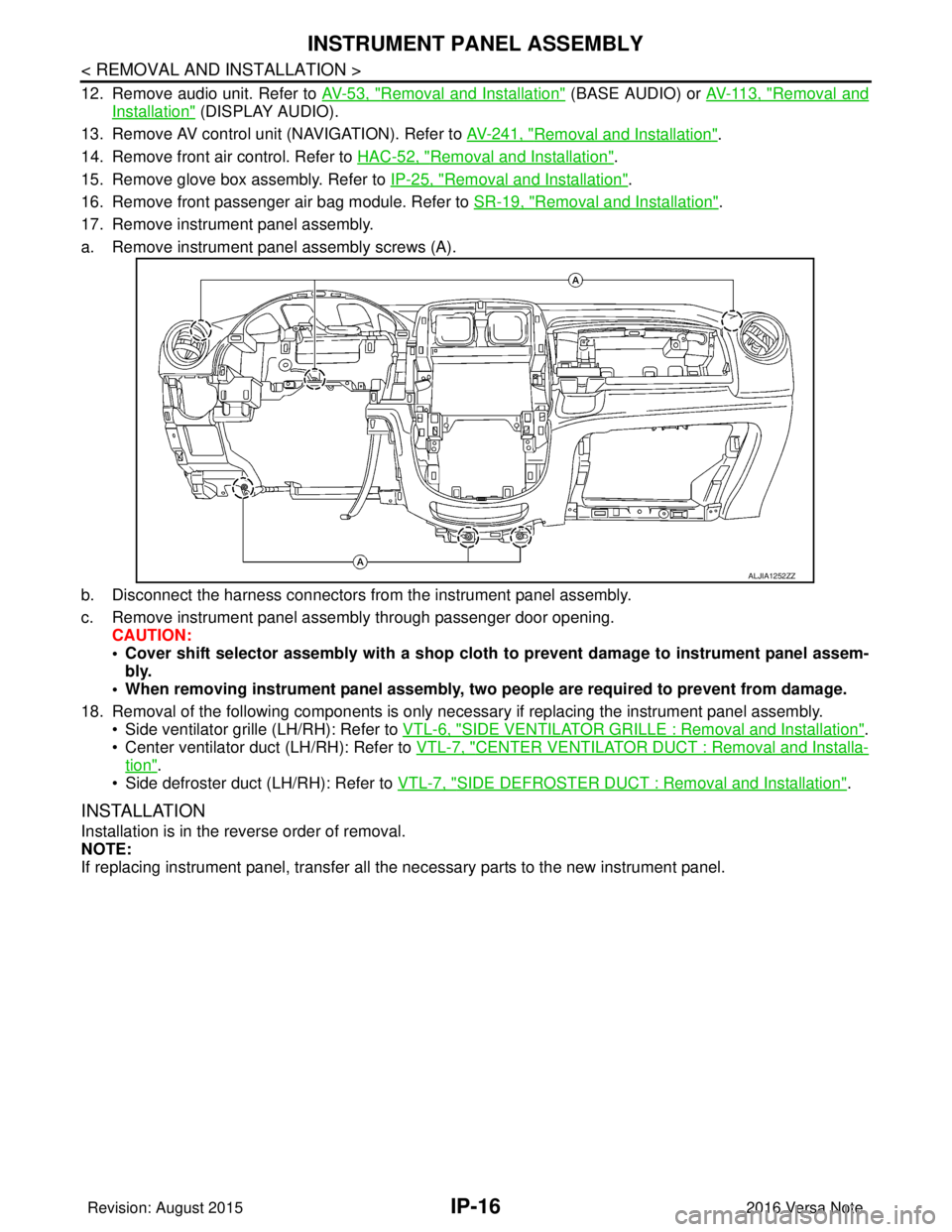
a. Remove instrument panel assembly screws (A).
b. Disconnect the harness connectors from the instrument panel assembly.
c. Remove instrument panel assembly through passenger door opening. CAUTION:
• Cover shift selector assembly with a shop cloth to prevent damage to instrument panel assem-
bly.
• When removing instrument panel assembly, two people are required to prevent from damage.
18. Removal of the following components is only necessary if replacing the instrument panel assembly.
• Side ventilator grille (LH/RH): Refer to VTL-6, "
SIDE VENTILATOR GRILLE : Removal and Installation".
• Center ventilator duct (LH/RH): Refer to VTL-7, "
CENTER VENTILATOR DUCT : Removal and Installa-
tion".
• Side defroster duct (LH/RH): Refer to VTL-7, "
SIDE DEFROSTER DUCT : Removal and Installation".
INSTALLATION
Installation is in the reverse order of removal.
NOTE:
If replacing instrument panel, transfer all the necessary parts to the new instrument panel.
ALJIA1252ZZ
Revision: August 2015 2016 Versa Note
cardiagn.com
Page 2100 of 3641
INL-6
< SYSTEM DESCRIPTION >
COMPONENT PARTS
5. BCM• Activates the interior room lamp timer depending on the vehicle condition to turn the
interior room lamps ON/OFF.
• Operates the interior room lamp battery saver depending on the vehicle condition to cut the interior room lamp power supply.
• Detects each switch condition by the combination switch reading function.
• Judges the illumination lamp ON/OFF status depending on the vehicle condition.
And then it transmits position light request signal to IPDM E/R and combination
meter (with CAN communication).
Refer to BCS-6, "
BODY CONTROL SYSTEM : Component Part s Location" (with Intel-
ligent Key system) or BCS-77, "
BODY CONTROL SYSTEM : Component Parts Loca-
tion" (without Intelligent Key system) for detailed installation location.
6. Back door switch Refer to DLK-18, "
INTELLIGENT KEY SYSTEM : Ba
ck Door Lock Assembly" (with In-
telligent Key system) or DLK-195, "
REMOTE KEYLESS ENTRY SYSTEM : Back Door
Lock Assembly" (without Intelligent Key system).
7. Push-button ignition switch (if
equipped) Refer to PCS-34, "
POWER DISTRIBUTION SYSTEM : System Description".
8. Combination switch Refer to
BCS-9, "
COMBINATION SWITCH READING SY STEM : System Description"
(with Intelligent Key system) or BCS-79, "
COMBINATION SWITCH READING SYS-
TEM : System Description" (without Intelligent Key system).
9. Combination meter Receives the dimmer signal from BCM. Refer to
MWI-13, "
METER ILLUMINATION
CONTROL : System Description" (type A) or MWI-66, "METER ILLUMINATION CON-
TROL : System Description" (type B).
10. Audio unit (without navigation)
AV control unit (with navigation) Receives the dimmer signal from BCM. Refer to
AV- 8 , "
Audio unit" (base audio), AV-
65, "Audio Unit" (display audio) or AV- 1 3 0 , "AV Control Unit" (navigation).
11. Front door switch LH (RH side similar) Refer to DLK-19, "
INTELLIGENT KEY SYSTEM : Door Switch" (with Intelligent Key
system) or DLK-195, "
REMOTE KEYLESS ENTRY SYSTEM : Door Switch" (without
Intelligent Key system).
12. Rear door switch LH (RH side similar) Refer to DLK-19, "
INTELLIGENT KEY SYSTEM : Door Switch" (with Intelligent Key
system) or DLK-195, "
REMOTE KEYLESS ENTRY SYSTEM : Door Switch" (without
Intelligent Key system).
No.
Part Description
Revision: August 2015 2016 Versa Note
cardiagn.com
![NISSAN NOTE 2016 Service Repair Manual A V -252
< REMOVAL AND INSTALLATION >[NAVIGATION]
SIDE CAMERA
SIDE CAMERA
Exploded ViewINFOID:0000000012433104
Removal and InstallationINFOID:0000000012433105
REMOVAL
1. Remove the door mirror. Refer](/manual-img/5/57363/w960_57363-256.png "NISSAN NOTE 2016 Service Repair Manual A V -252
< REMOVAL AND INSTALLATION >[NAVIGATION]
SIDE CAMERA
SIDE CAMERA
Exploded ViewINFOID:0000000012433104
Removal and InstallationINFOID:0000000012433105
REMOVAL
1. Remove the door mirror. Refer")
![NISSAN NOTE 2016 Service Repair Manual AV
GPS ANTENNAAV-253
< REMOVAL AND INSTALLATION > [NAVIGATION]
C
D
E
F
G H
I
J
K L
M B A
O P
GPS ANTENNA
Removal and InstallationINFOID:0000000012433106
REMOVAL
1. Remove the combination meter. Refer](/manual-img/5/57363/w960_57363-257.png "NISSAN NOTE 2016 Service Repair Manual AV
GPS ANTENNAAV-253
< REMOVAL AND INSTALLATION > [NAVIGATION]
C
D
E
F
G H
I
J
K L
M B A
O P
GPS ANTENNA
Removal and InstallationINFOID:0000000012433106
REMOVAL
1. Remove the combination meter. Refer")
![NISSAN NOTE 2016 Service Repair Manual AV-254
< REMOVAL AND INSTALLATION >[NAVIGATION]
SATELLITE RADIO ANTENNA
SATELLITE RADIO ANTENNA
Removal and InstallationINFOID:0000000012433107
The satellite radio antenna is part of the rod antenna.](/manual-img/5/57363/w960_57363-258.png "NISSAN NOTE 2016 Service Repair Manual AV-254
< REMOVAL AND INSTALLATION >[NAVIGATION]
SATELLITE RADIO ANTENNA
SATELLITE RADIO ANTENNA
Removal and InstallationINFOID:0000000012433107
The satellite radio antenna is part of the rod antenna.")
![NISSAN NOTE 2016 Service Repair Manual AV
ROD ANTENNAAV-255
< REMOVAL AND INSTALLATION > [NAVIGATION]
C
D
E
F
G H
I
J
K L
M B A
O P
ROD ANTENNA
Exploded ViewINFOID:0000000012433108
Removal and InstallationINFOID:0000000012433109
REMOVAL
1.](/manual-img/5/57363/w960_57363-259.png "NISSAN NOTE 2016 Service Repair Manual AV
ROD ANTENNAAV-255
< REMOVAL AND INSTALLATION > [NAVIGATION]
C
D
E
F
G H
I
J
K L
M B A
O P
ROD ANTENNA
Exploded ViewINFOID:0000000012433108
Removal and InstallationINFOID:0000000012433109
REMOVAL
1.")
![NISSAN NOTE 2016 Service Repair Manual AV-256
< REMOVAL AND INSTALLATION >[NAVIGATION]
ANTENNA FEEDER
ANTENNA FEEDER
Feeder LayoutINFOID:0000000012433110
1. Antenna base (antenna amp. and
satellite antenna) 2. Rod Antenna
3. M351
4. M352](/manual-img/5/57363/w960_57363-260.png "NISSAN NOTE 2016 Service Repair Manual AV-256
< REMOVAL AND INSTALLATION >[NAVIGATION]
ANTENNA FEEDER
ANTENNA FEEDER
Feeder LayoutINFOID:0000000012433110
1. Antenna base (antenna amp. and
satellite antenna) 2. Rod Antenna
3. M351
4. M352")