2016 NISSAN NOTE ignition
[x] Cancel search: ignitionPage 2693 of 3641
PWC-32
< DTC/CIRCUIT DIAGNOSIS >
REAR POWER WINDOW SWITCH
REAR POWER WINDOW SWITCH
Component Function CheckINFOID:0000000012431816
1. CHECK FUNCTION
Check rear power window motor operation with rear power window switch.
Is the inspection result normal?
YES >> Inspection End.
NO >> Refer to PWC-32, "
Diagnosis Procedure".
Diagnosis ProcedureINFOID:0000000012431817
Regarding Wiring Diagram information, refer to PWC-16, "Wiring Diagram".
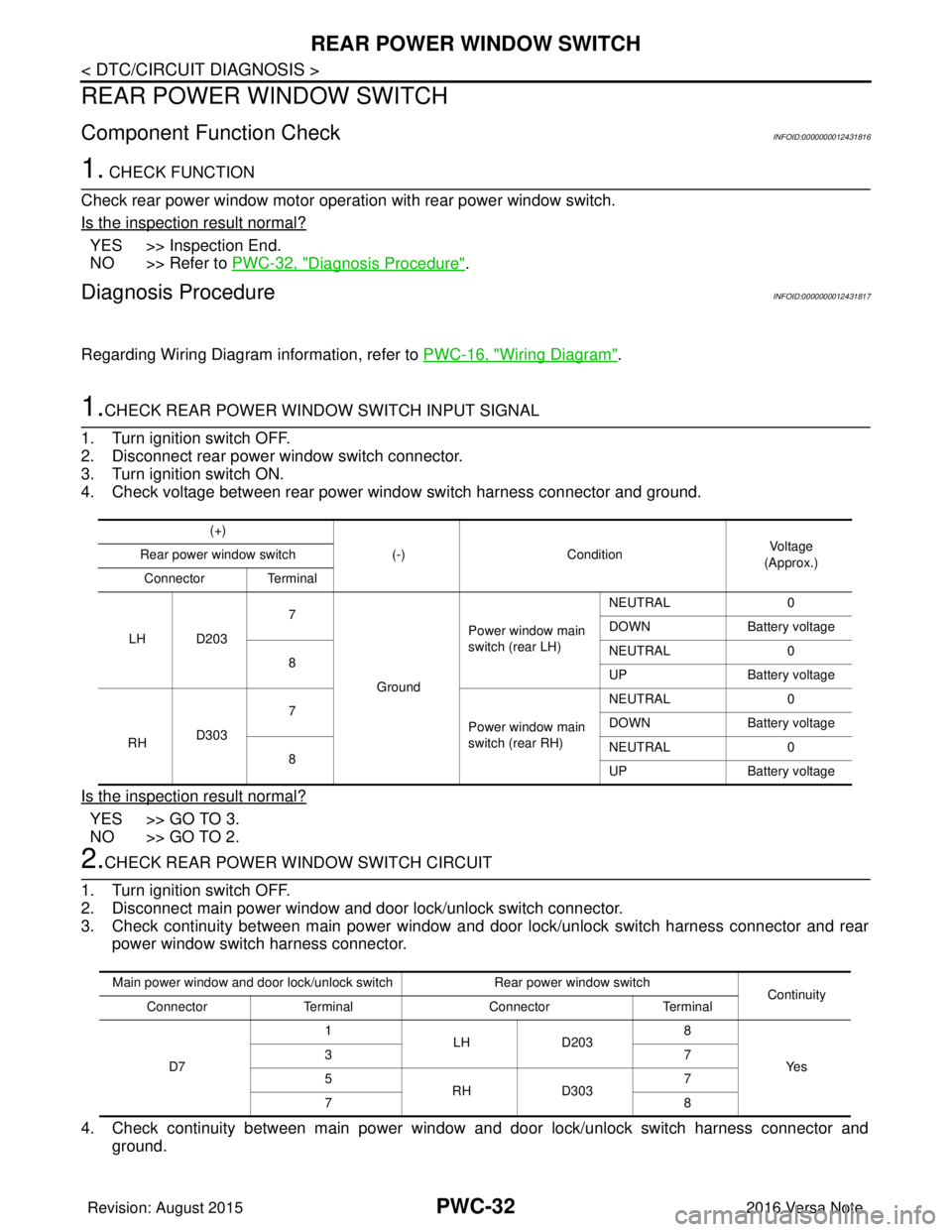
1.CHECK REAR POWER WINDOW SWITCH INPUT SIGNAL
1. Turn ignition switch OFF.
2. Disconnect rear power window switch connector.
3. Turn ignition switch ON.
4. Check voltage between rear power window switch harness connector and ground.
Is the inspection result normal?
YES >> GO TO 3.
NO >> GO TO 2.
2.CHECK REAR POWER WINDOW SWITCH CIRCUIT
1. Turn ignition switch OFF.
2. Disconnect main power window and door lock/unlock switch connector.
3. Check continuity between main power window and door lock/unlock switch harness connector and rear power window switch harness connector.
4. Check continuity between main power window and door lock/unlock switch harness connector and
ground.
(+)
(-)Condition Vo l ta g e
(Approx.)
Rear power window switch
Connector Terminal
LH D203 7
Ground Power window main
switch (rear LH)
NEUTRAL
0
DOWN Battery voltage
8 NEUTRAL
0
UP Battery voltage
RH D303 7
Power window main
switch (rear RH)NEUTRAL
0
DOWN Battery voltage
8 NEUTRAL
0
UP Battery voltage
Main power window and door lock/unlock switch Rear power window switch
Continuity
Connector Terminal ConnectorTerminal
D7 1
LHD203 8
Ye s
37
5
RHD303 7
78
Revision: August 2015 2016 Versa Note
cardiagn.com
Page 2694 of 3641
REAR POWER WINDOW SWITCHPWC-33
< DTC/CIRCUIT DIAGNOSIS >
C
DE
F
G H
I
J
L
M A
B
PWC
N
O P
Is the inspection result normal?
YES >> Replace main power window and door lock/unlock switch. Refer to PWC-55, "Removal and Instal-
lation".
NO >> Repair or replace harness.
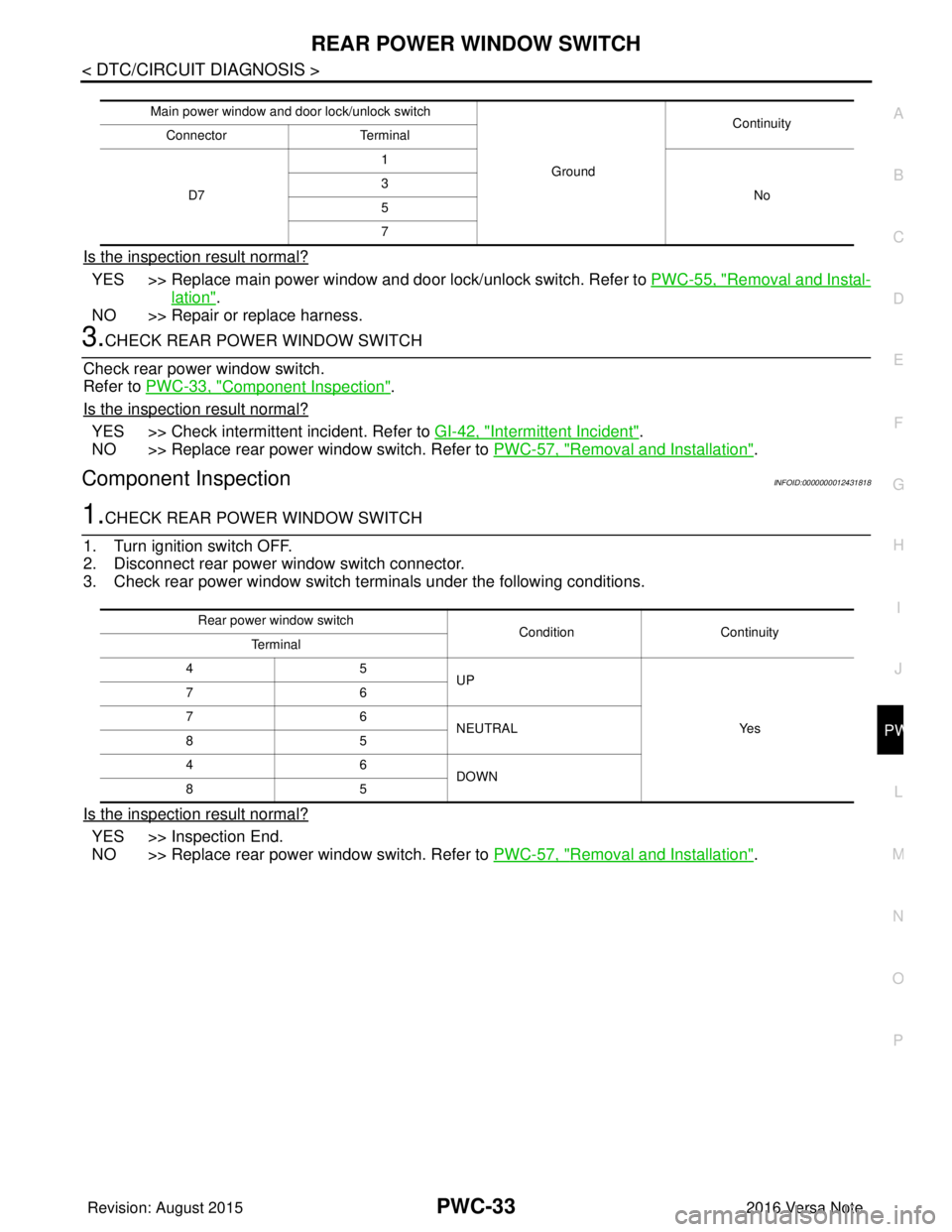
3.CHECK REAR POWER WINDOW SWITCH
Check rear power window switch.
Refer to PWC-33, "
Component Inspection".
Is the inspection result normal?
YES >> Check intermittent incident. Refer to GI-42, "Intermittent Incident".
NO >> Replace rear power window switch. Refer to PWC-57, "
Removal and Installation".
Component InspectionINFOID:0000000012431818
1.CHECK REAR POWER WINDOW SWITCH
1. Turn ignition switch OFF.
2. Disconnect rear power window switch connector.
3. Check rear power window switch terminals under the following conditions.
Is the inspection result normal?
YES >> Inspection End.
NO >> Replace rear power window switch. Refer to PWC-57, "
Removal and Installation".
Main power window and door lock/unlock switch
GroundContinuity
Connector Terminal
D7 1
No
3
5
7
Rear power window switch
Condition Continuity
Terminal
45 UP
Ye s
76
76
NEUTRAL
85
46 DOWN
85
Revision: August 2015 2016 Versa Note
cardiagn.com
Page 2695 of 3641
PWC-34
< DTC/CIRCUIT DIAGNOSIS >
POWER WINDOW MOTOR
POWER WINDOW MOTOR
DRIVER SIDE
DRIVER SIDE : Component Function CheckINFOID:0000000012431819
1. CHECK FUNCTION
Check front power window motor LH operation with main power window and door lock/unlock switch.
Is the inspection result normal?
YES >> Inspection End.
NO >> Refer to PWC-34, "
DRIVER SIDE : Diagnosis Procedure".
DRIVER SIDE : Diagnosis ProcedureINFOID:0000000012431820
Regarding Wiring Diagram information, refer to PWC-16, "Wiring Diagram".
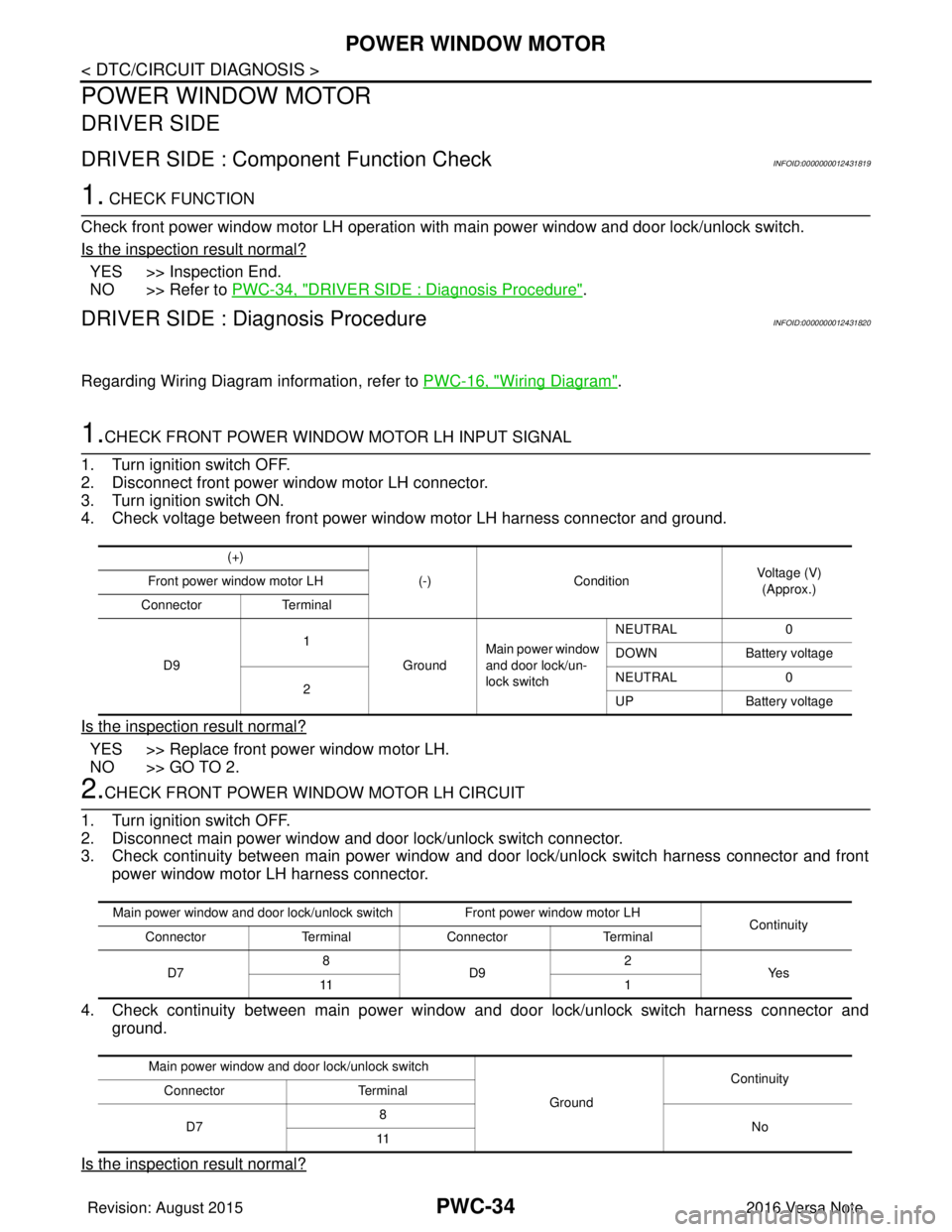
1.CHECK FRONT POWER WINDOW MOTOR LH INPUT SIGNAL
1. Turn ignition switch OFF.
2. Disconnect front power window motor LH connector.
3. Turn ignition switch ON.
4. Check voltage between front power window motor LH harness connector and ground.
Is the inspection result normal?
YES >> Replace front power window motor LH.
NO >> GO TO 2.
2.CHECK FRONT POWER WINDOW MOTOR LH CIRCUIT
1. Turn ignition switch OFF.
2. Disconnect main power window and door lock/unlock switch connector.
3. Check continuity between main power window and door lock/unlock switch harness connector and front power window motor LH harness connector.
4. Check continuity between main power window and door lock/unlock switch harness connector and
ground.
Is the inspection result normal?
(+) (-)Condition Voltage (V)
(Approx.)
Front power window motor LH
Connector Terminal
D9 1
GroundMain power window
and door lock/un-
lock switch NEUTRAL
0
DOWN Battery voltage
2 NEUTRAL
0
UP Battery voltage
Main power window and door lock/unlock switch Front power window motor LH
Continuity
Connector TerminalConnector Terminal
D7 8
D9 2
Ye s
11 1
Main power window and door lock/unlock switch GroundContinuity
Connector Terminal
D7 8
No
11
Revision: August 2015 2016 Versa Note
cardiagn.com
Page 2696 of 3641
POWER WINDOW MOTORPWC-35
< DTC/CIRCUIT DIAGNOSIS >
C
DE
F
G H
I
J
L
M A
B
PWC
N
O P
YES >> Replace main power window and door lock/unlock switch. Refer to PWC-55, "Removal and Instal-
lation".
NO >> Repair or replace harness.
PASSENGER SIDE
PASSENGER SIDE : Comp onent Function CheckINFOID:0000000012431821
1. CHECK FUNCTION
Check front power window motor RH operation with main power window and d\
oor lock/unlock switch or power
window and door lock/unlock switch RH.
Is the inspection result normal?
YES >> Inspection End.
NO >> Refer to PWC-35, "
PASSENGER SIDE : Diagnosis Procedure".
PASSENGER SIDE : Dia gnosis ProcedureINFOID:0000000012431822
Regarding Wiring Diagram information, refer to PWC-16, "Wiring Diagram".
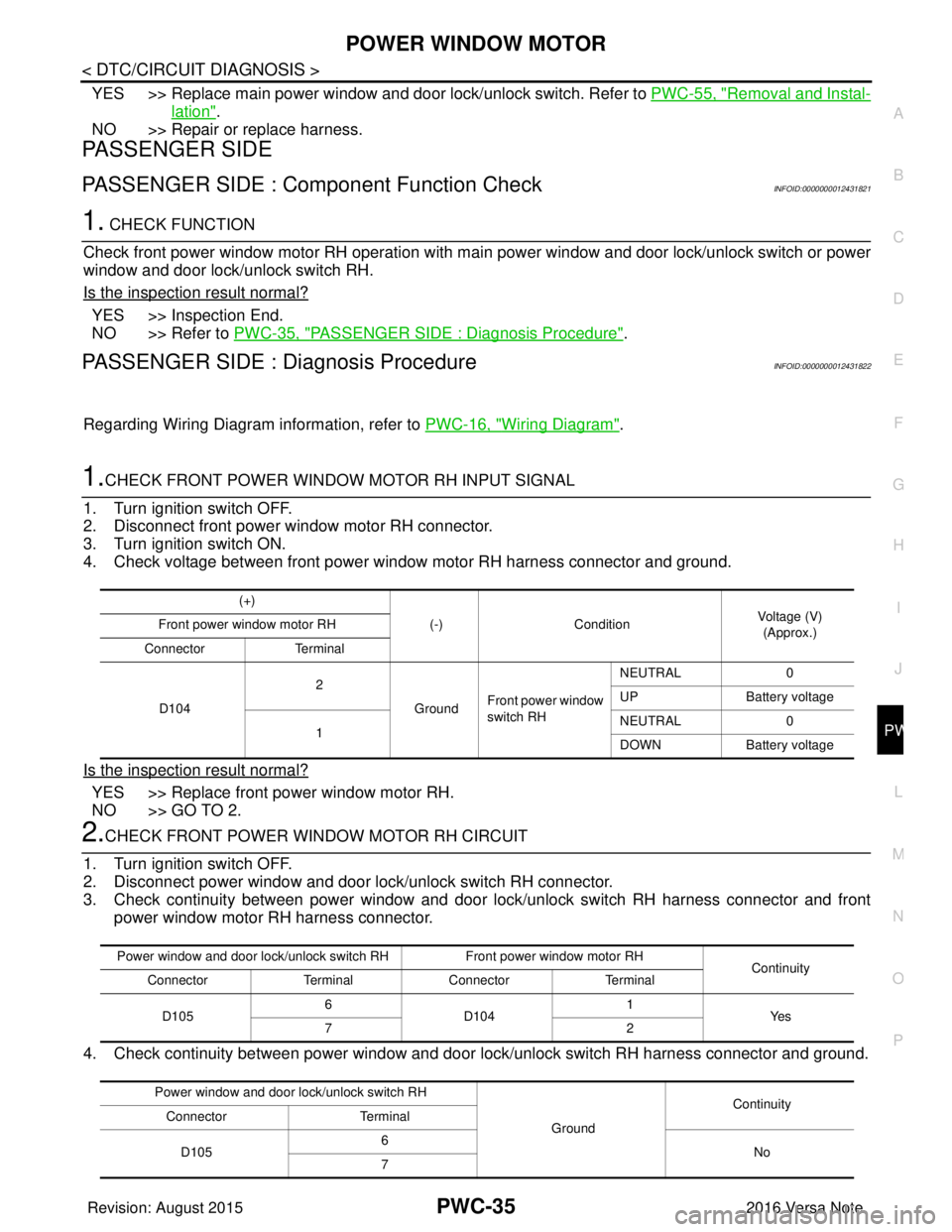
1.CHECK FRONT POWER WINDOW MOTOR RH INPUT SIGNAL
1. Turn ignition switch OFF.
2. Disconnect front power window motor RH connector.
3. Turn ignition switch ON.
4. Check voltage between front power window motor RH harness connector and ground.
Is the inspection result normal?
YES >> Replace front power window motor RH.
NO >> GO TO 2.
2.CHECK FRONT POWER WINDOW MOTOR RH CIRCUIT
1. Turn ignition switch OFF.
2. Disconnect power window and door lock/unlock switch RH connector.
3. Check continuity between power window and door lock/unlock switch RH harness connector and front power window motor RH harness connector.
4. Check continuity between power window and door lock/unlock switch RH harness connector and ground.
(+)
(-)Condition Voltage (V)
(Approx.)
Front power window motor RH
Connector Terminal
D104 2
GroundFront power window
switch RH NEUTRAL
0
UP Battery voltage
1 NEUTRAL
0
DOWN Battery voltage
Power window and door lock/unlock switch RH Front power window motor RH
Continuity
Connector TerminalConnector Terminal
D105 6
D104 1
Ye s
72
Power window and door lock/unlock switch RH GroundContinuity
Connector Terminal
D105 6
No
7
Revision: August 2015 2016 Versa Note
cardiagn.com
Page 2697 of 3641
PWC-36
< DTC/CIRCUIT DIAGNOSIS >
POWER WINDOW MOTOR
Is the inspection result normal?
YES >> Replace power window and door lock/unlock switch RH. Refer to PWC-56, "Removal and Installa-
tion".
NO >> Repair or replace harness.
REAR LH
REAR LH : Componen t Function CheckINFOID:0000000012431823
1.CHECK FUNCTION
Check rear power window motor LH operation with main power window and door lock/unlock switch or rear
power window switch LH.
Is the inspection result normal?
YES >> Inspection End.
NO >> Refer to PWC-36, "
REAR LH : Diagnosis Procedure".
REAR LH : Diagnosis ProcedureINFOID:0000000012431824
Regarding Wiring Diagram information, refer to PWC-16, "Wiring Diagram".
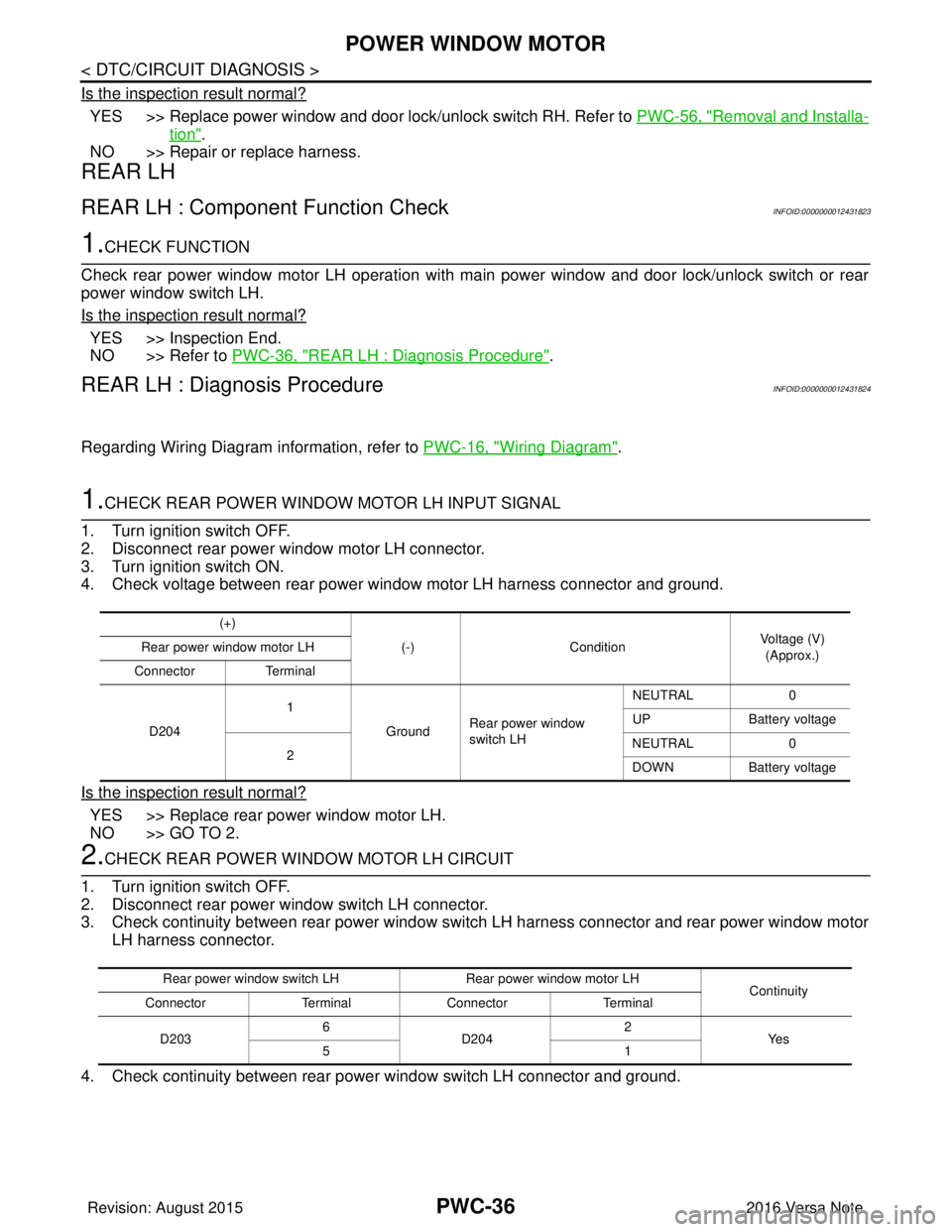
1.CHECK REAR POWER WINDOW MOTOR LH INPUT SIGNAL
1. Turn ignition switch OFF.
2. Disconnect rear power window motor LH connector.
3. Turn ignition switch ON.
4. Check voltage between rear power window motor LH harness connector and ground.
Is the inspection result normal?
YES >> Replace rear power window motor LH.
NO >> GO TO 2.
2.CHECK REAR POWER WINDOW MOTOR LH CIRCUIT
1. Turn ignition switch OFF.
2. Disconnect rear power window switch LH connector.
3. Check continuity between rear power window switch LH harness connector and rear power window motor LH harness connector.
4. Check continuity between rear power window switch LH connector and ground.
(+) (-)Condition Voltage (V)
(Approx.)
Rear power window motor LH
Connector Terminal
D204 1
GroundRear power window
switch LH NEUTRAL
0
UP Battery voltage
2 NEUTRAL
0
DOWN Battery voltage
Rear power window switch LH Rear power window motor LH
Continuity
Connector TerminalConnector Terminal
D203 6
D204 2
Ye s
51
Revision: August 2015 2016 Versa Note
cardiagn.com
Page 2698 of 3641
POWER WINDOW MOTORPWC-37
< DTC/CIRCUIT DIAGNOSIS >
C
DE
F
G H
I
J
L
M A
B
PWC
N
O P
Is the inspection result normal?
YES >> Replace rear power window switch LH. Refer to PWC-57, "Removal and Installation".
NO >> Repair or replace harness.
REAR RH
REAR RH : Component Function CheckINFOID:0000000012431825
1. CHECK FUNCTION
Check rear power window motor RH operation with main power window and door lock/unlock switch or rear
power window switch RH.
Is the inspection result normal?
YES >> Inspection End.
NO >> Refer to PWC-37, "
REAR RH : Diagnosis Procedure".
REAR RH : Diagnosis ProcedureINFOID:0000000012431826
Regarding Wiring Diagram information, refer to PWC-16, "Wiring Diagram".
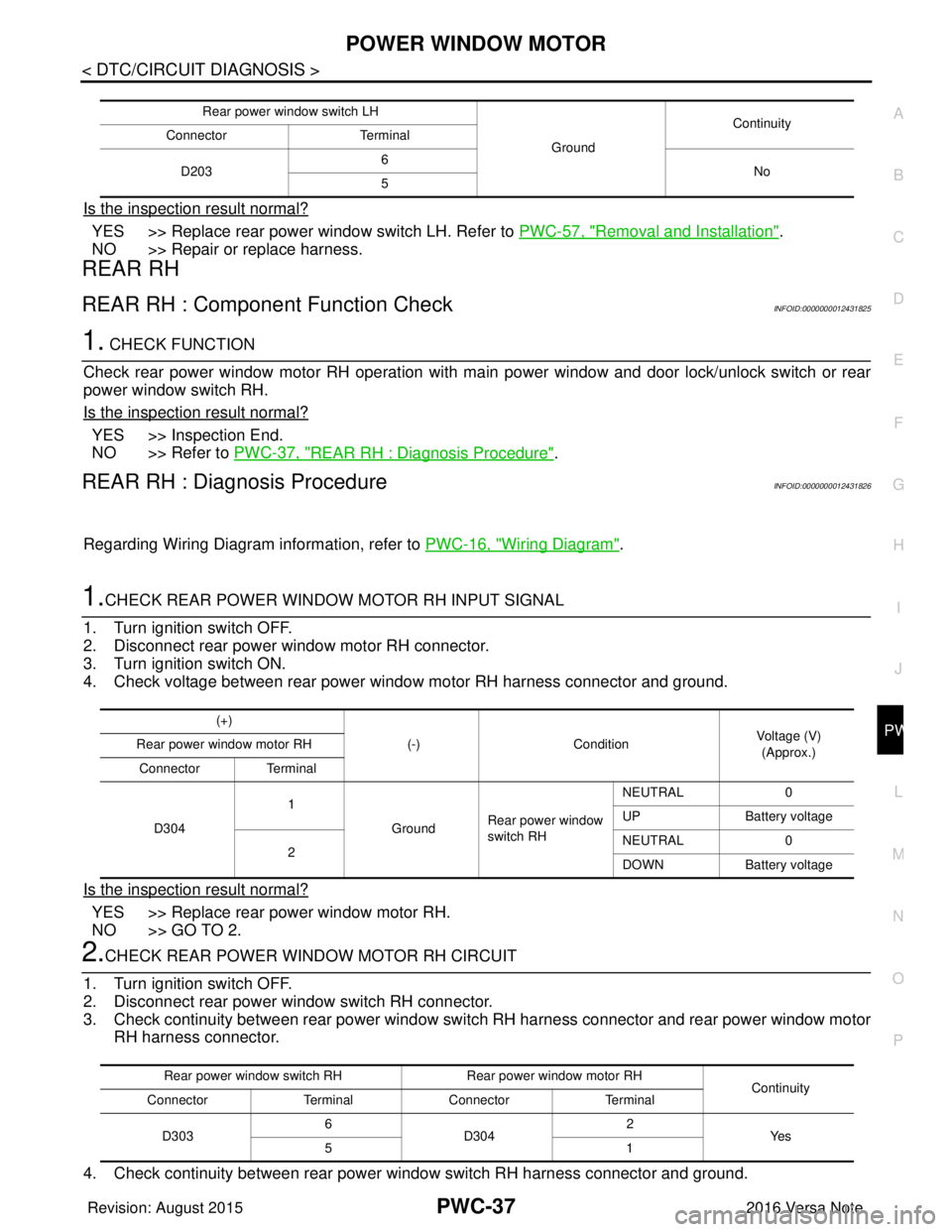
1.CHECK REAR POWER WINDOW MOTOR RH INPUT SIGNAL
1. Turn ignition switch OFF.
2. Disconnect rear power window motor RH connector.
3. Turn ignition switch ON.
4. Check voltage between rear power window motor RH harness connector and ground.
Is the inspection result normal?
YES >> Replace rear power window motor RH.
NO >> GO TO 2.
2.CHECK REAR POWER WINDOW MOTOR RH CIRCUIT
1. Turn ignition switch OFF.
2. Disconnect rear power window switch RH connector.
3. Check continuity between rear power window swit ch RH harness connector and rear power window motor
RH harness connector.
4. Check continuity between rear power window switch RH harness connector and ground.
Rear power window switch LH GroundContinuity
Connector Terminal
D203 6
No
5
(+)
(-)Condition Voltage (V)
(Approx.)
Rear power window motor RH
Connector Terminal
D304 1
GroundRear power window
switch RH NEUTRAL
0
UP Battery voltage
2 NEUTRAL
0
DOWN Battery voltage
Rear power window switch RH Rear power window motor RH
Continuity
Connector TerminalConnector Terminal
D303 6
D304 2
Ye s
51
Revision: August 2015 2016 Versa Note
cardiagn.com
Page 2700 of 3641
DOOR SWITCHPWC-39
< DTC/CIRCUIT DIAGNOSIS >
C
DE
F
G H
I
J
L
M A
B
PWC
N
O P
DOOR SWITCH
WITH INTELLIGENT KEY SYSTEM
WITH INTELLIGENT KEY SYST EM : Component Function CheckINFOID:0000000012431827
1.CHECK FUNCTION
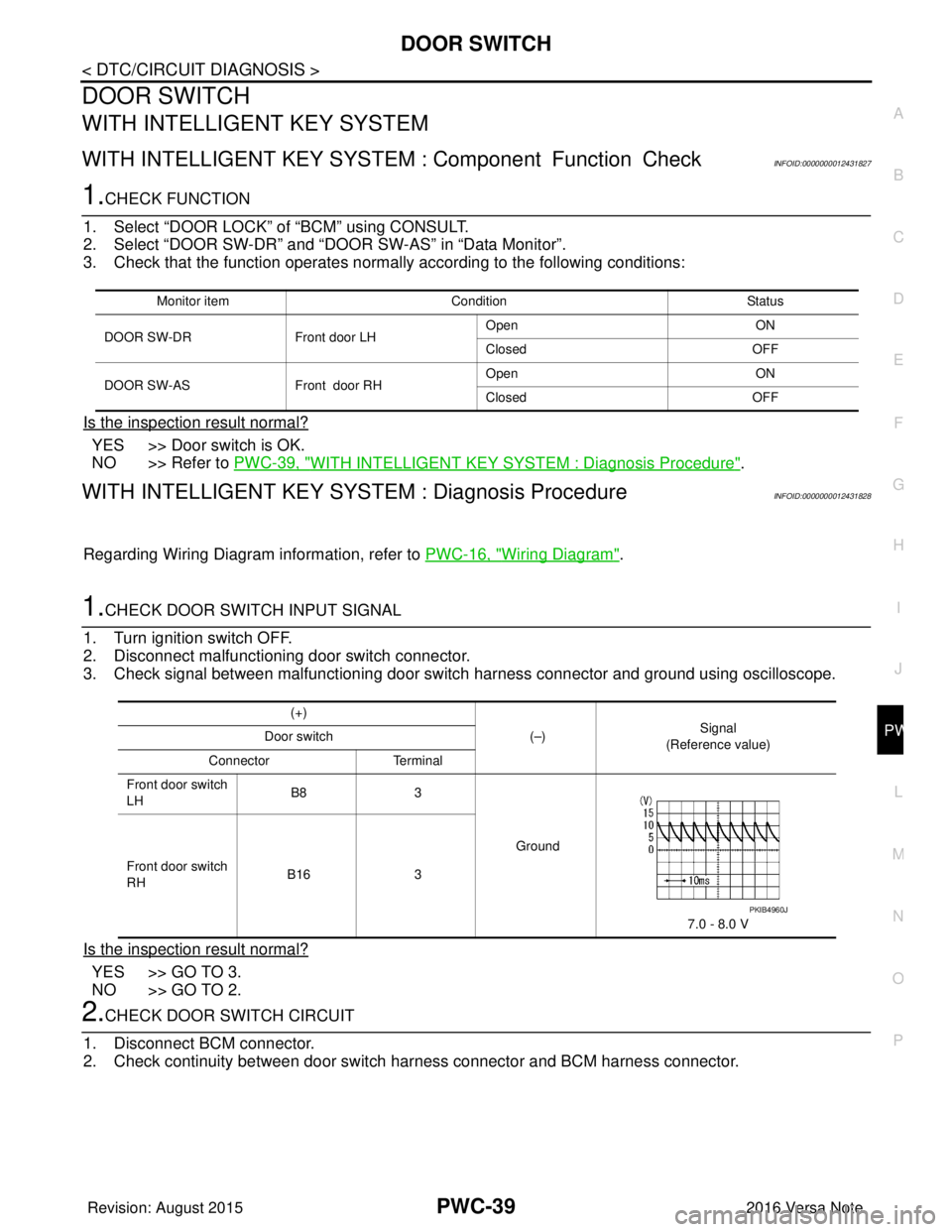
1. Select “DOOR LOCK” of “BCM” using CONSULT.
2. Select “DOOR SW-DR” and “DOOR SW-AS” in “Data Monitor”.
3. Check that the function operates normall y according to the following conditions:
Is the inspection result normal?
YES >> Door switch is OK.
NO >> Refer to PWC-39, "
WITH INTELLIGENT KEY SYSTEM : Diagnosis Procedure".
WITH INTELLIGENT KEY SYST EM : Diagnosis ProcedureINFOID:0000000012431828
Regarding Wiring Diagram information, refer to PWC-16, "Wiring Diagram".
1.CHECK DOOR SWITCH INPUT SIGNAL
1. Turn ignition switch OFF.
2. Disconnect malfunctioning door switch connector.
3. Check signal between malfunctioning door switch harness connector and ground using oscilloscope.
Is the inspection result normal?
YES >> GO TO 3.
NO >> GO TO 2.
2.CHECK DOOR SWITCH CIRCUIT
1. Disconnect BCM connector.
2. Check continuity between door switch harness connector and BCM harness connector.
Monitor item Condition Status
DOOR SW-DR Front door LH Open
ON
Closed OFF
DOOR SW-AS Front door RHOpen
ON
Closed OFF
(+)
(–)Signal
(Reference value)
Door switch
Connector Terminal
Front door switch
LH B8
3
Ground
7.0 - 8.0 V
Front door switch
RH
B16
3
PKIB4960J
Revision: August 2015 2016 Versa Note
cardiagn.com
Page 2701 of 3641
PWC-40
< DTC/CIRCUIT DIAGNOSIS >
DOOR SWITCH
3. Check continuity between door switch harness connector and ground.
Is the inspection result normal?
YES >> Replace BCM. Refer to BCS-74, "Removal and Installation".
NO >> Repair or replace harness.
3.CHECK DOOR SWITCH
Refer to PWC-40, "
WITH INTELLIGENT KEY SYSTEM : Component Inspection".
Is the inspection result normal?
YES >> GO TO 4.
NO >> Replace malfunctioning door switch. Refer to DLK-181, "
Removal and Installation".
4.CHECK INTERMITTENT INCIDENT
Refer to GI-42, "
Intermittent Incident".
>> Inspection End.
WITH INTELLIGENT KEY SYST EM : Component InspectionINFOID:0000000012431829
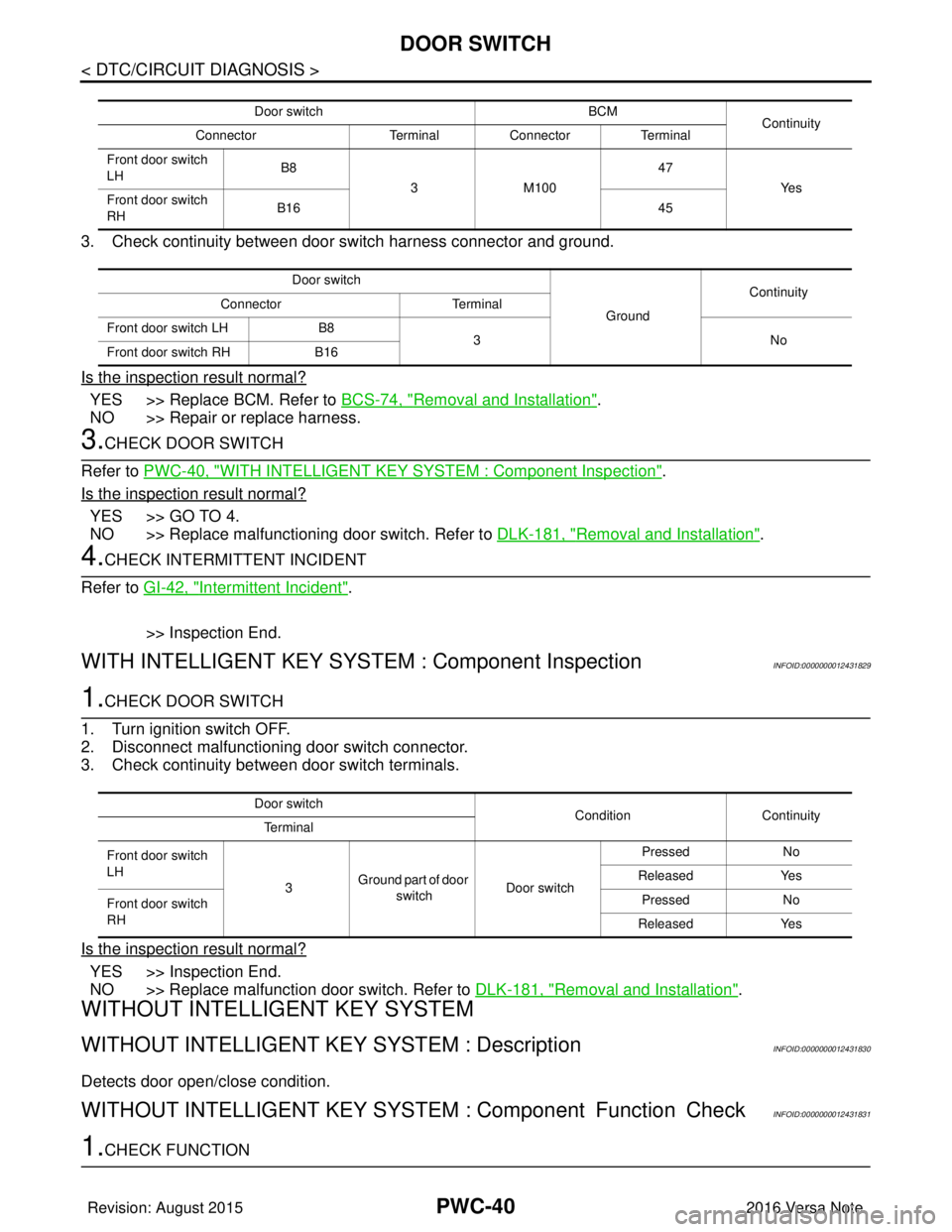
1.CHECK DOOR SWITCH
1. Turn ignition switch OFF.
2. Disconnect malfunctioning door switch connector.
3. Check continuity between door switch terminals.
Is the inspection result normal?
YES >> Inspection End.
NO >> Replace malfunction door switch. Refer to DLK-181, "
Removal and Installation".
WITHOUT INTELLIGENT KEY SYSTEM
WITHOUT INTELLIGENT KEY SYSTEM : DescriptionINFOID:0000000012431830
Detects door open/close condition.
WITHOUT INTELLIGENT KEY SYSTEM : Component Function CheckINFOID:0000000012431831
1.CHECK FUNCTION
Door switch BCM
Continuity
Connector TerminalConnector Terminal
Front door switch
LH B8
3M100 47
Ye s
Front door switch
RH B16
45
Door switch GroundContinuity
Connector Terminal
Front door switch LH B8
3N o
Front door switch RH B16
Door switch
Condition Continuity
Te r m i n a l
Front door switch
LH 3Ground part of door
switch Door switch Pressed
No
Released Yes
Front door switch
RH Pressed
No
Released Yes
Revision: August 2015 2016 Versa Note
cardiagn.com