2016 MITSUBISHI OUTLANDER SPORT buttons
[x] Cancel search: buttonsPage 69 of 398
Keyless entry system (if so equipped)
Features and controls 5-7
5
N0056230
1111
Your electronic immobilizer operates on a radio frequency subject to Federal Communi-cations Commission (FCC) Rules (For vehi- cles sold in U.S.A.) and Industry Canada Rules (For vehicles sold in Canada). Thisdevice complies with part 15 of FCC Rules and Industry Canada licence-exempt RSS standard(s).Operation is subject to the following two con-ditions. This device may not cause harmful inter- ference. This device must accept any interference received, including interference that may cause undesired operation.
N00509001988
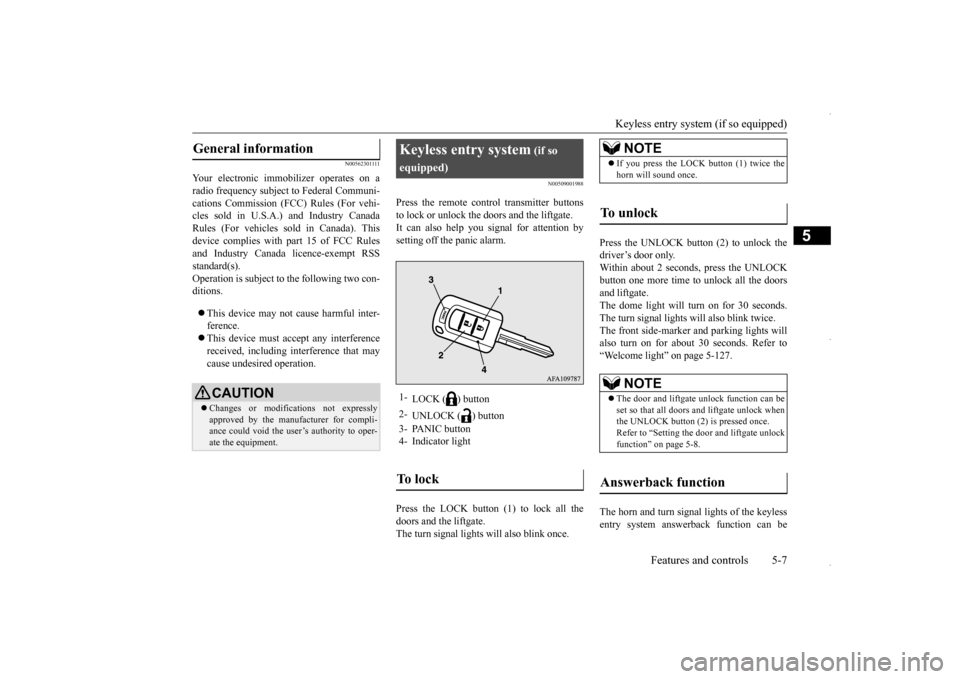
Press the remote control transmitter buttons to lock or unlock the doors and the liftgate. It can also help you signal for attention by setting off the panic alarm. Press the LOCK button (1) to lock all the doors and the liftgate.The turn signal lights will also blink once.
Press the UNLOCK button (2) to unlock the driver’s door only. Within about 2 seconds, press the UNLOCKbutton one more time to unlock all the doorsand liftgate. The dome light will turn on for 30 seconds. The turn signal lights will also blink twice.The front side-marker and parking lights will also turn on for about 30 seconds. Refer to “Welcome light” on page 5-127. The horn and turn signal lights of the keyless entry system answerback function can be
General information
CAUTION Changes or modifications not expressly approved by the manufacturer for compli-ance could void the user’s authority to oper- ate the equipment.
Keyless entry system
(if so
equipped)1-
LOCK ( ) button
2-
UNLOCK ( ) button
3- PANIC button 4- Indicator lightTo l o c k
NOTE
If you press the LOCK button (1) twice the horn will sound once.
To u n l o c k
NOTE
The door and liftgate unlock function can be set so that all doors and liftgate unlock when the UNLOCK button (2) is pressed once.Refer to “Setting the door and liftgate unlock function” on page 5-8.
Answerback function
BK0229600US.bo
ok 7 ページ 2015年10月1日 木曜日 午後2時29分
Page 72 of 398
Keyless entry system (if so equipped) 5-10 Features and controls
5
i) Press and hold both the LOCK and UNLOCK buttons for 2 seconds. ii) Release both the LOCK and UNLOCK buttons simultaneously for 1 second.iii) Press the UNLOCK button. The answerback function informs you that the ID code registration of the transmitter iscompleted. 5. To register the ID codes of additional remote control transmitters, repeat step 4within 60 seconds after step 4.6. If no ID code of a remote control trans- mitter is registered within 60 seconds after step 4, the registration mode is can-celed and the normal mode returns.
N00546101137
Your keyless entry system operates on a radiofrequency subject to Federal Communica-tions Commission (FCC) Rules (For vehicles sold in U.S.A.) and Industry Canada Rules (For vehicles sold in Canada). This devicecomplies with part 15 of FCC Rules and Industry Canada licence-exempt RSS stan- dard(s).Operation is subject to the following two con-ditions. This device may not cause harmful inter- ference. This device must accept any interference received, including interference that may cause undesired operation.
NOTE
For verification purposes, try to lock and unlock the doors with the re-coded remote control transmitters after the registration is completed. The indicator light (4) comes on each time a button is pressed. The keyless entry system does not work if the key is in the ignition switch. The remote control transmitter can be used from about 40 feet (12 m) away. However, this distance may change if your vehicle is near a TV transmitting tower, a power sta-tion, or a radio station.
If the UNLOCK button (2) is pressed when all doors and the liftgate are locked and no doors or the liftgate are opened within about 30 seconds, the doors and the liftgate will automatically re-lock. If the following conditions are observed after pressing the LOCK (1) or UNLOCK (2) but-ton on the remote control transmitter, the battery in the remote control transmitter may need to be replaced. • The doors and the liftgate cannot be locked or unlocked. • The panic alarm cannot be operated. • The indicator light (4) is dim or does not come on.
If you lose your remote control transmitter, please contact an authorized Mitsubishi Motors dealer for a replacement. If you wish to obtain an additional remote control transmitter, please contact an autho-rized Mitsubishi Motors dealer. A maximum of 8 remote control transmitters can be pro- grammed for your vehicle. To use the new remote control transmitters, it is necessary to regi
ster the key with both
the electronic immobilizer and keyless entry system. Also refer to “Electr
onic immobilizer (Anti-
theft starting system): Customer key pro- gramming” on page 5-6.NOTE
General information
CAUTION Changes or modifications not expressly approved by the manufacturer for compli-ance could void the user’s authority to oper- ate the equipment.
BK0229600US.bo
ok 10 ページ 2015年10月1日 木曜日 午後2時29分
Page 73 of 398
Keyless entry system (if so equipped)
Features and controls 5-11
5
N00544101162
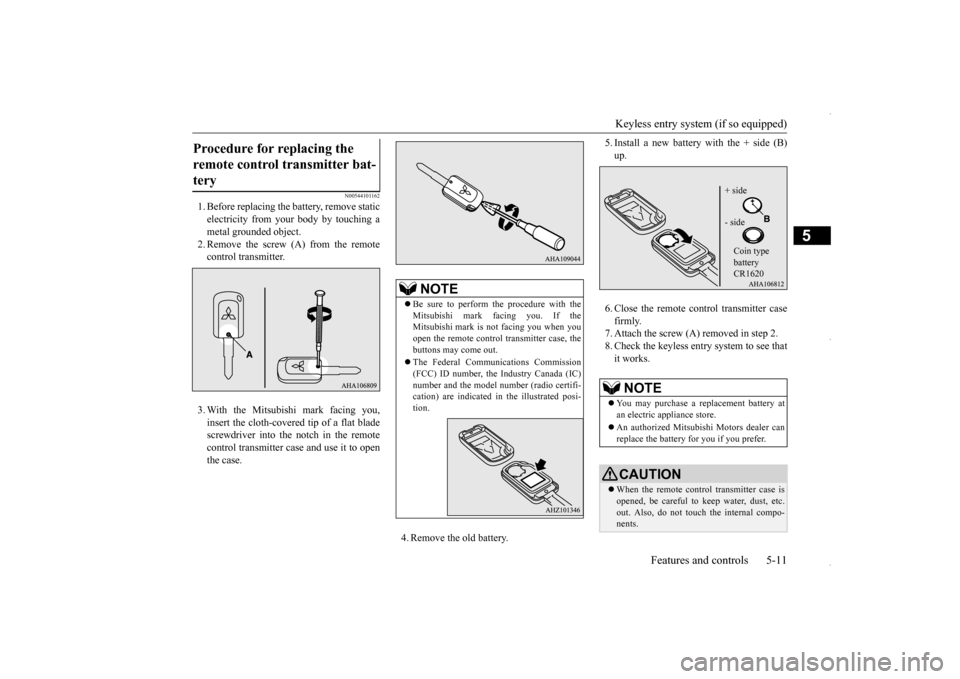
1. Before replacing the battery, remove static electricity from your body by touching a metal grounded object.2. Remove the screw (A) from the remote control transmitter. 3. With the Mitsubishi mark facing you, insert the cloth-covered tip of a flat blade screwdriver into the notch in the remote control transmitter case and use it to openthe case.
4. Remove the old battery.
5. Install a new battery with the + side (B) up. 6. Close the remote control transmitter case firmly. 7. Attach the screw (A) removed in step 2. 8. Check the keyless entry system to see thatit works.
Procedure for replacing the remote control transmitter bat- tery
NOTE
Be sure to perform the procedure with the Mitsubishi mark facing you. If the Mitsubishi mark is not facing you when youopen the remote control transmitter case, the buttons may come out. The Federal Communications Commission (FCC) ID number, the Industry Canada (IC) number and the model number (radio certifi-cation) are indicated in the illustrated posi- tion.
NOTE
You may purchase a replacement battery at an electric appliance store. An authorized Mitsubishi Motors dealer can replace the battery for you if you prefer.CAUTION When the remote control transmitter case is opened, be careful to keep water, dust, etc. out. Also, do not touch the internal compo- nents.
+ side - side Coin type battery CR1620
BK0229600US.bo
ok 11 ページ 2015年10月1日 木曜日 午後2時29分
Page 79 of 398
Free-hand Advanced Security Transmitt
er (F.A.S.T.-key) (if so equipped)
Features and controls 5-17
5
N00513500075
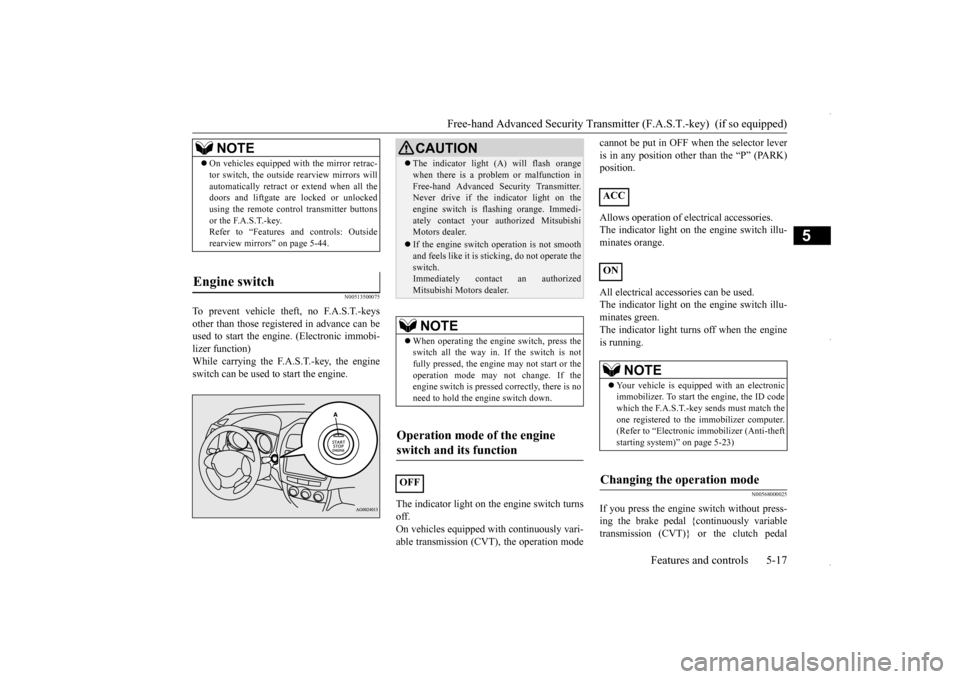
To prevent vehicle theft, no F.A.S.T.-keys other than those registered in advance can be used to start the engine. (Electronic immobi- lizer function)While carrying the F.A.S.T.-key, the engine switch can be used to start the engine.
The indicator light on the engine switch turns off.On vehicles equipped with continuously vari- able transmission (CVT), the operation mode
cannot be put in OFF when the selector lever is in any position other than the “P” (PARK) position. Allows operation of electrical accessories. The indicator light on the engine switch illu-minates orange. All electrical accessories can be used. The indicator light on the engine switch illu- minates green. The indicator light turn
s off when the engine
is running.
N00568000025
If you press the engine switch without press- ing the brake pedal {continuously variable transmission (CVT)} or the clutch pedal
NOTE
On vehicles equipped with the mirror retrac- tor switch, the outside rearview mirrors will automatically retract or extend when all the doors and liftgate are locked or unlocked using the remote control transmitter buttonsor the F.A.S.T.-key. Refer to “Features and controls: Outside rearview mirrors” on page 5-44.
Engine switch
CAUTION The indicator light (A) will flash orange when there is a problem or malfunction in Free-hand Advanced Security Transmitter. Never drive if the indicator light on the engine switch is flashing orange. Immedi-ately contact your authorized Mitsubishi Motors dealer. If the engine switch operation is not smooth and feels like it is sticking, do not operate the switch.Immediately contact an authorized Mitsubishi Motors dealer.NOTE
When operating the engine switch, press the switch all the way in. If the switch is not fully pressed, the engine may not start or the operation mode may not change. If theengine switch is pressed correctly, there is no need to hold the engine switch down.
Operation mode of the engine switch and its function
OFF
ACC ON
NOTE
Your vehicle is equipped with an electronic immobilizer. To start the engine, the ID code which the F.A.S.T.-key sends must match the one registered to the immobilizer computer.(Refer to “Electronic immobilizer (Anti-theft starting system)” on page 5-23)
Changing the operation mode
BK0229600US.bo
ok 17 ページ 2015年10月1日 木曜日 午後2時29分
Page 87 of 398
Free-hand Advanced Security Transmitt
er (F.A.S.T.-key) (if so equipped)
Features and controls 5-25
5
When registration of ID code is complete, the buzzer will sound 3 times and the immobilizer display will come on for 30 seconds.If an error occurs, F.A.S.T.-key program-ming will be terminated and the buzzer will sound for 3 seconds. 8. If you wish to register another F.A.S.T.- key, repeat the process from step 1 after the operation mode is put in OFF.
N00515501252
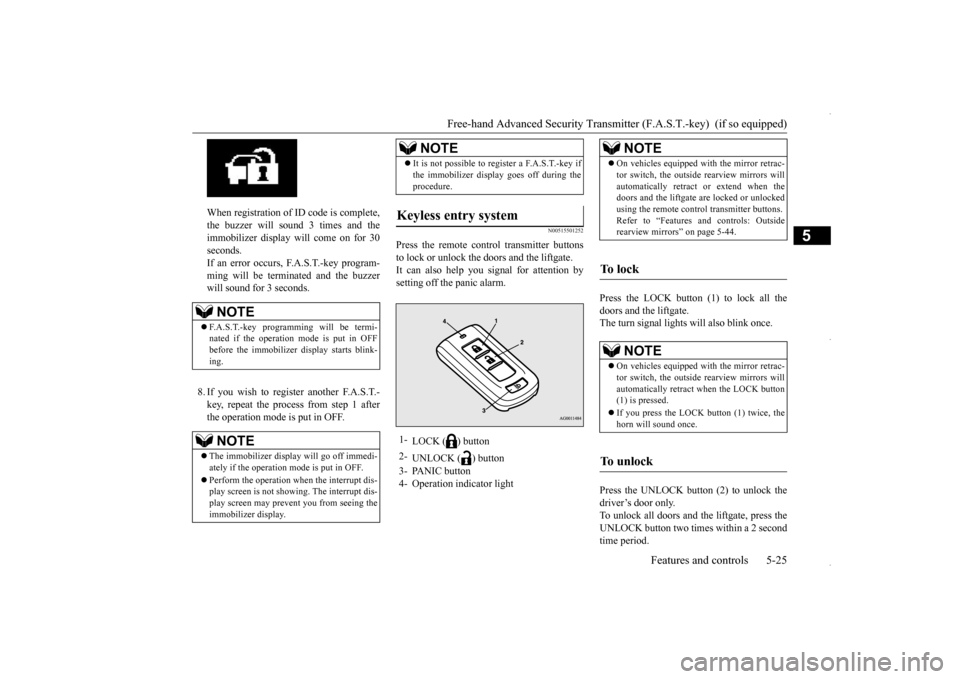
Press the remote control transmitter buttonsto lock or unlock the doors and the liftgate.It can also help you signal for attention bysetting off the panic alarm.
Press the LOCK button (1) to lock all the doors and the liftgate. The turn signal lights will also blink once. Press the UNLOCK button (2) to unlock the driver’s door only.To unlock all doors and the liftgate, press the UNLOCK button two times within a 2 second time period.
NOTE
F.A.S.T.-key programming will be termi- nated if the operation mode is put in OFF before the immobilizer display starts blink- ing.NOTE
The immobilizer display will go off immedi- ately if the operation mode is put in OFF. Perform the operation when the interrupt dis- play screen is not showing. The interrupt dis- play screen may prevent you from seeing the immobilizer display.
It is not possible to register a F.A.S.T.-key if the immobilizer display goes off during the procedure.
Keyless entry system
1-
LOCK ( ) button
2-
UNLOCK ( ) button
3- PANIC button 4- Operation indicator light
NOTE
NOTE
On vehicles equipped with the mirror retrac- tor switch, the outside rearview mirrors will automatically retract or extend when the doors and the liftgate are locked or unlocked using the remote control transmitter buttons.Refer to “Features and controls: Outside rearview mirrors” on page 5-44.
To l o c k
NOTE
On vehicles equipped with the mirror retrac- tor switch, the outside rearview mirrors will automatically retract when the LOCK button(1) is pressed. If you press the LOCK
button (1) twice, the
horn will sound once.
To u n l o c k
BK0229600US.bo
ok 25 ページ 2015年10月1日 木曜日 午後2時29分
Page 108 of 398

Ignition switch 5-46 Features and controls
5
On vehicles equipped with the F.A.S.T.-key, the mirrors automatically retract or extendwhen the doors are locked or unlocked using the remote control transmitter buttons or the F. A . S . T- k e y.Refer to “To operate using the F.A.S.T.-key”on page 5-14.
N00549300191
When the rear window defogger switch ispressed with the engine running, the outsiderearview mirrors are defogged or defrosted. Current will flow through the heater element inside the mirrors, thus clearing away frost orcondensation. The indicator light (A) will illuminate while the defogger is on.The heater will be turned off automatically inabout 20 minutes.
N00512400673
[For vehicles equipped with the Free-handAdvanced Security Transmitter (F.A.S.T.- key)]
For information on operations for vehicles equipped with the Free-hand Advanced Secu- rity Transmitter (F.A.S.T.-key), refer to “Free-hand Advanced Security Transmitter(F.A.S.T.-key): Engine switch”on page 5-17. [Except for vehicles equipped with the Free-hand Advanced Security Transmitter(F.A.S.T.-key)] The engine is off. The key can be inserted and removed only when the switch is in this posi-tion.
Retracting and extending the mir- rors without using the mirror retractor switch (automatic exten- sion function)
NOTE
Functions can be modified as stated below. Please consult an authorized Mitsubishi Motors dealer. • Automatically extend when the operation mode is put in ON with the driver’s door closed, and automatically retract when theoperation mode is put in OFF with the driver’s door opened. • Automatically extend when the vehicle speed reaches approximately 19 mph (30 km/h). • Deactivate the automatic extension func- tion.
Door mirror heater Ignition switch
OFF
BK0229600US.bo
ok 46 ページ 2015年10月1日 木曜日 午後2時29分
Page 227 of 398
HomeLink® Wireless Control System (if so equipped)
Features and controls 5-165
5
N00554301053
HomeLink
® Wireless Control System is a
registered trademark of Gentex Corporation. HomeLink
® provides a convenient way to
replace up to 3 hand-held radio-frequency(RF) transmitters used to activate devicessuch as gate operators, garage door openers, entry door locks, security systems, even home lighting. Additional HomeLink
® information
can be found at www.homelink.com, www.youtube.com/HomeLinkGentex, or by calling the toll-free HomeLink
®-Hotline at 1-
800-355-3515.HomeLink
® Wireless Con-
trol System
(if so equipped)
Floor console box
WA R N I N G Do not use HomeLink
® with any garage
door opener that lacks safety stop andreverse features as required by U.S. Fed- eral Regulations. A garage door opener which cannot detect an object in the pathof a closing garage door and then auto- matically stop and reverse, does not meet current U.S. Federal Regulations. Using agarage door opener without these features increases the risk of serious injury or death. During programming, your garage door or gate may open or close. Make sure thatpeople and objects ar
e clear of the garage
door or gate that you are programming.NOTE
Once HomeLink
® is programmed, retain the
original transmitter for future programming procedures (for example, new vehicle pur-chases). Upon sale of the vehicle, the pro- grammed HomeLink
® buttons should be
erased for security purposes. Refer to“Cleaning the programmed information” on page 5-169.
You can program a maximum of 3 devices. To change or replace any of the 3 devices after it has been initially programmed, you must first erase the current settings. See “Cleaning the programmed information”on page 5-169 or “Reprogramming a single HomeLink
® button” on page 5-169.
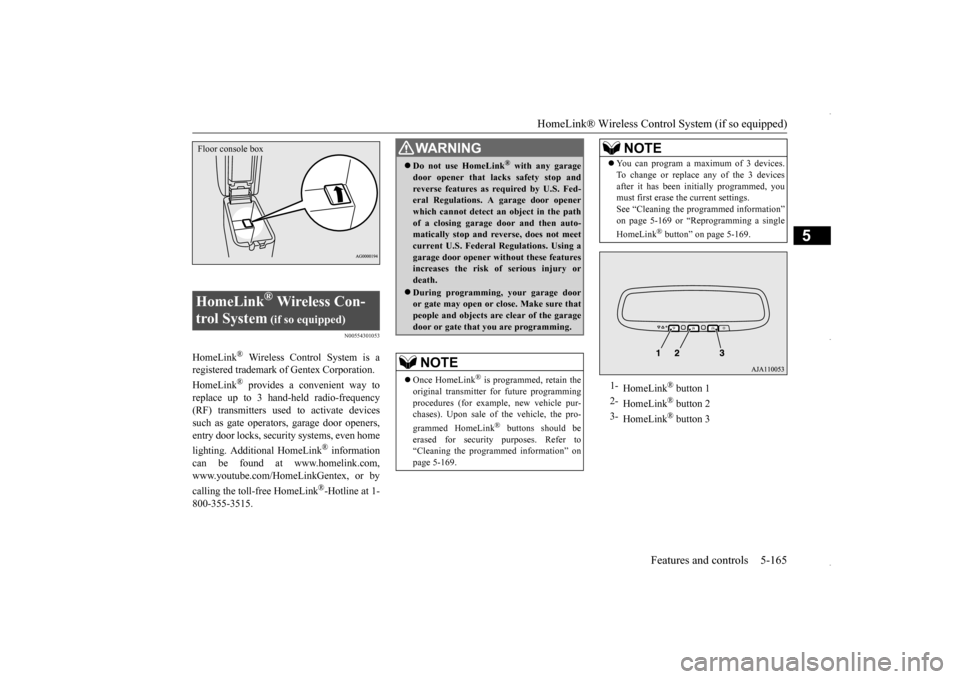
1-
HomeLink
® button 1
2-
HomeLink
® button 2
3-
HomeLink
® button 3
NOTE
BK0229600US.book
165 ページ 2015年10月1日 木曜日 午後2時29分
Page 228 of 398
HomeLink® Wireless Control System (if so equipped) 5-166 Features and controls
5
N00584600032
Some garage door openers manufactured after 1995 have “rolling code protection”. To program a garage door opener equipped with “rolling code protection”;you will need to access the garage door opener motor to press the motor’s “Learn” or “Smart” buttons. For conve-nience, use a ladder and another person toassist you. It is recommended that a new battery be placed in the hand-held transmitter of the device being programmed to HomeLink
®
for quicker training and accurate trans- mission of the radio-frequency signal.
N00584700033
To program HomeLink
® to operate a garage
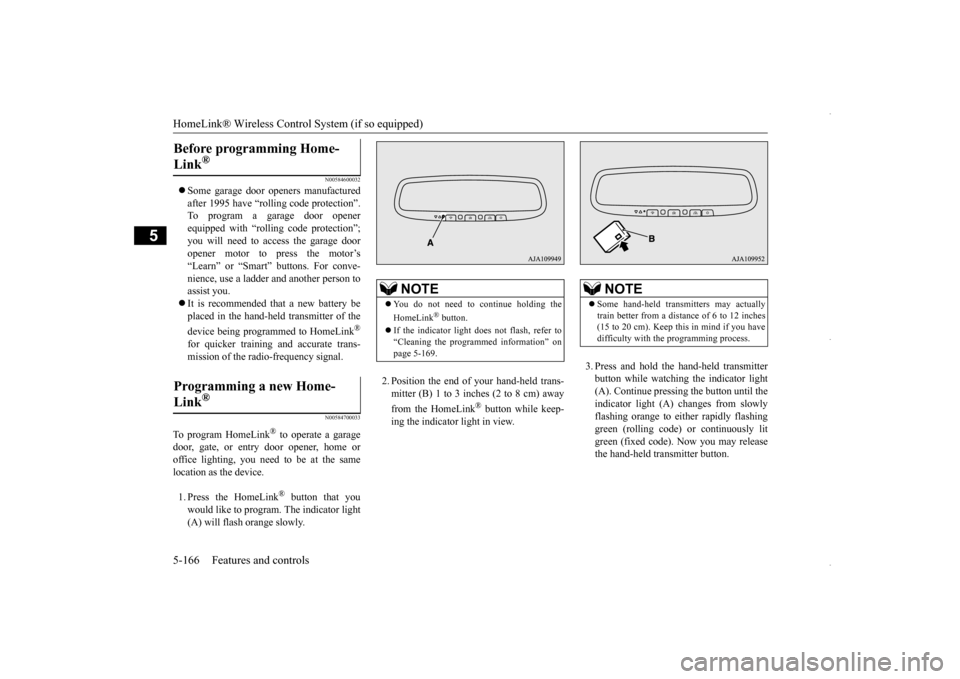
door, gate, or entry door opener, home or office lighting, you need to be at the same location as the device. 1. Press the HomeLink
® button that you
would like to program. The indicator light (A) will flash orange slowly.
2. Position the end of your hand-held trans- mitter (B) 1 to 3 inches (2 to 8 cm) away from the HomeLink
® button while keep-
ing the indicator light in view.
3. Press and hold the hand-held transmitter button while watching the indicator light(A). Continue pressing the button until theindicator light (A) changes from slowly flashing orange to either rapidly flashing green (rolling code) or continuously litgreen (fixed code). Now you may release the hand-held transmitter button.
Before programming Home- Link
®
Programming a new Home-Link
®
NOTE
You do not need to continue holding the HomeLink
® button.
If the indicator light does not flash, refer to “Cleaning the programmed information” on page 5-169.
NOTE
Some hand-held transmitters may actually train better from a distance of 6 to 12 inches (15 to 20 cm). Keep this in mind if you havedifficulty with the programming process.
BK0229600US.book
166 ページ 2015年10月1日 木曜日 午後2時29分