2016 MITSUBISHI OUTLANDER Back light
[x] Cancel search: Back lightPage 338 of 464
Automatic climate cont
rol air conditioner
7-10 Comfort controls
7
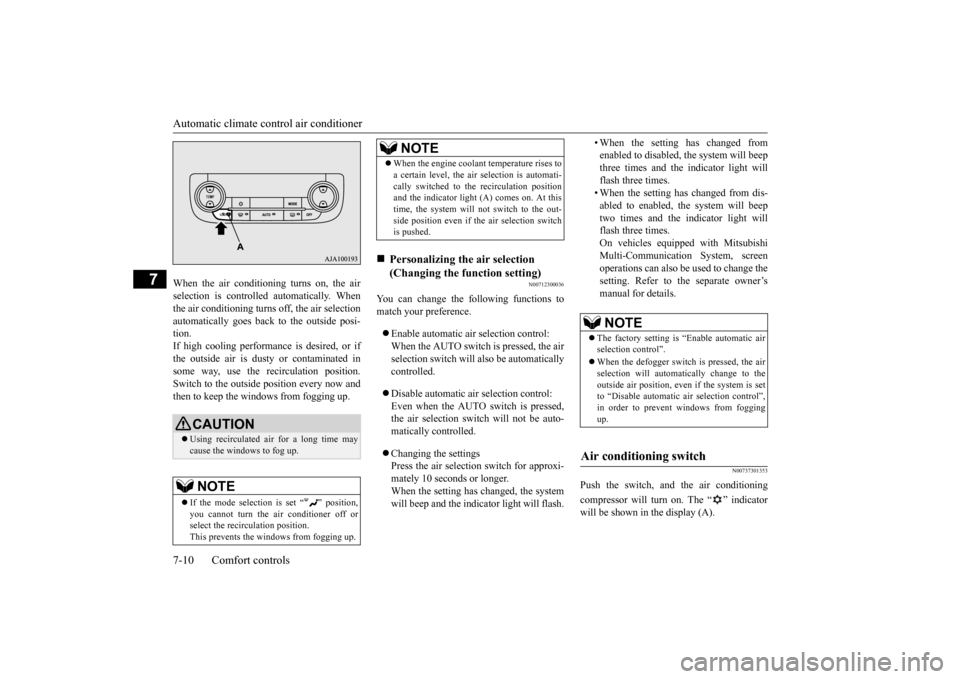
When the air conditioning turns on, the air selection is controlled automatically. Whenthe air conditioning turns
off, the air selection
automatically goes back
to the outside posi-
tion.If high cooling performanc
e is desired, or if
the outside air is dusty
or contaminated in
some way, use the
recirculat
ion position.
Switch to the outside position every now and then to keep the windows from fogging up.
N00712300036
You can change the following functions tomatch your preference. Enable automatic air selection control: When the AUTO switch is pressed, the airselection switch will also be automatically controlled. Disable automatic air selection control: Even when the AUTO switch is pressed,the air selection switch will not be auto- matically controlled. Changing the settings Press the air selection switch for approxi-mately 10 seconds or longer. When the setting has changed, the system will beep and the indi
cator light will flash.
• When the setting has changed from enabled to disabled, the system will beepthree times and the indicator light will flash three times. • When the setting has changed from dis-abled to enabled, the system will beep two times and the i
ndicator light will
flash three times.On vehicles equippe
d with Mitsubishi
Multi-Communication System, screen operations can also be used to change the setting. Refer to th
e separate owner’s
manual for details.
N00737301353
Push the switch, and the air conditioning compressor will turn on. The “ ” indicator will be shown in the display (A).
CAUTION Using recirculated air for a long time may cause the windows to fog up.NOTE
If the mode selection
is set “ ” position,
you cannot turn the ai
r conditioner off or
select the recirc
ulation position.
This prevents the windows from fogging up.
When the engine coolan
t temperature rises to
a certain level, the air selection is automati-cally switched to the recirculation positionand the indicator light (A) comes on. At this time, the system will not switch to the out- side position even if th
e air selection switch
is pushed.
Personalizing the air selection (Changing the function setting) NOTE
NOTE
The factory setting is “Enable automatic air selection control”. When the defogger switch is pressed, the air selection will automati
cally change to the
outside air position, even if the system is setto “Disable automatic air selection control”, in order to prevent windows from fogging up.
Air conditioning switch
BK0223400US.book 10 ページ 2015年2月13日 金曜日 午後12時15分
Page 339 of 464
Automatic climate cont
rol air conditioner
Comfort controls 7-11
7
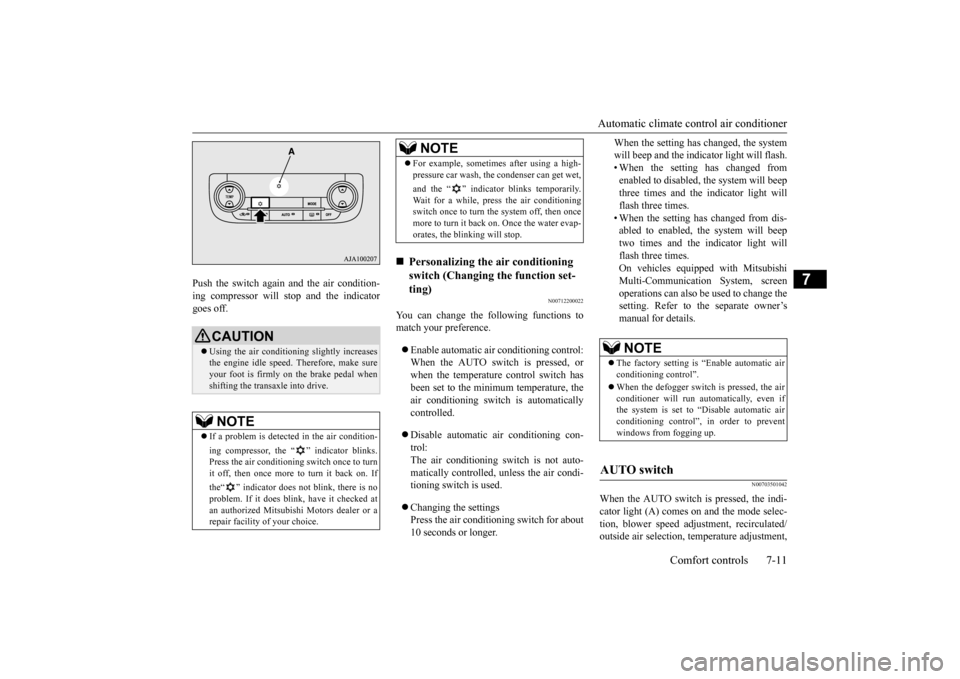
Push the switch again and the air condition- ing compressor will stop and the indicatorgoes off.
N00712200022
You can change the following functions tomatch your preference. Enable automatic air conditioning control: When the AUTO switch is pressed, or when the temperature control switch has been set to the minimum temperature, theair conditioning switch is automatically controlled. Disable automatic air conditioning con- trol:The air conditioning switch is not auto- matically controlled,
unless the air condi-
tioning switch is used. Changing the settings Press the air conditioning switch for about 10 seconds or longer.
When the setting has changed, the system will beep and the indi
cator light will flash.
• When the setting has changed from enabled to disabled,
the system will beep
three times and the indicator light willflash three times. • When the setting has changed from dis- abled to enabled, the system will beeptwo times and the indicator light will flash three times. On vehicles equippe
d with Mitsubishi
Multi-Communication System, screen operations can also be used to change thesetting. Refer to the separate owner’s manual for details.
N00703501042
When the AUTO switch is pressed, the indi-cator light (A) comes on and the mode selec- tion, blower speed adju
stment, reci
rculated/
outside air selection, temperature adjustment,
CAUTION Using the air conditioni
ng slightly increases
the engine idle speed. Therefore, make sure your foot is firmly on the brake pedal when shifting the transaxle into drive.NOTE
If a problem is detect
ed in the air condition-
ing compressor, the “ ” indicator blinks. Press the air conditioning
switch once to turn
it off, then once more to turn it back on. If the“ ” indicator does not blink, there is no problem. If it does blink,
have it checked at
an authorized Mitsubish
i Motors dealer or a
repair facility of your choice.
For example, sometimes after using a high- pressure car wash, the
condenser can get wet,
and the “ ” indicator blinks temporarily. Wait for a while, press the air conditioning switch once to turn the system off, then once more to turn it back on. Once the water evap-orates, the blinking will stop.
Personalizing the air conditioning switch (Changing the function set-ting) NOTE
NOTE
The factory setting is
“Enable automatic air
conditioning control”. When the defogger switch
is pressed, the air
conditioner will run au
tomatically, even if
the system is set to “Disable automatic air conditioning control”, in order to prevent windows from fogging up.
AUTO switch
BK0223400US.book 11 ページ 2015年2月13日 金曜日 午後12時15分
Page 347 of 464
Handling of Discs
Comfort controls 7-19
7
Fingerprints or other marks on the read surface of the disc may result in its con-tent being more difficult to read. When holding the disc, grip
both edges, or one
edge and the center hole, in order that theread surface is not touched. Do not affix paper or stickers, or other- wise damage the disc. Do not forcefully insert a disc if another is already within the device. This can result in damage to discs, or malfunction. Periodically clean the read surface of the disc. When cleaning, do not wipe in a cir- cular motion. Instead, wipe gently out-wards from the center of the disc to the outer edge. New discs may have burring around the outer edge or in the hole in the center. Ensure you check for these. If there are burrs, these may lead to faulty operation,therefore ensure these are removed. When not using discs, ensure these are kept in cases, and stor
ed out of direct sun-
light.
If discs are not going to be used for a long period of time, remove these from theproduct.
In cold environments such as in mid-winter when the interior of the vehicle is cold, turn- ing the heater on and
immediately trying to
use the product may cause condensation (water droplets) to form
on the disc and inter-
nal optical components,
and this may prevent
the product from operating correctly. In these conditions, rem
ove the disc
, and wait
a short time before use. Actions such as unauthorized reproduction, broadcast, public perfo
rmance, or rental of
discs that comprise other than personal useare prohibited by law.
N00715500026
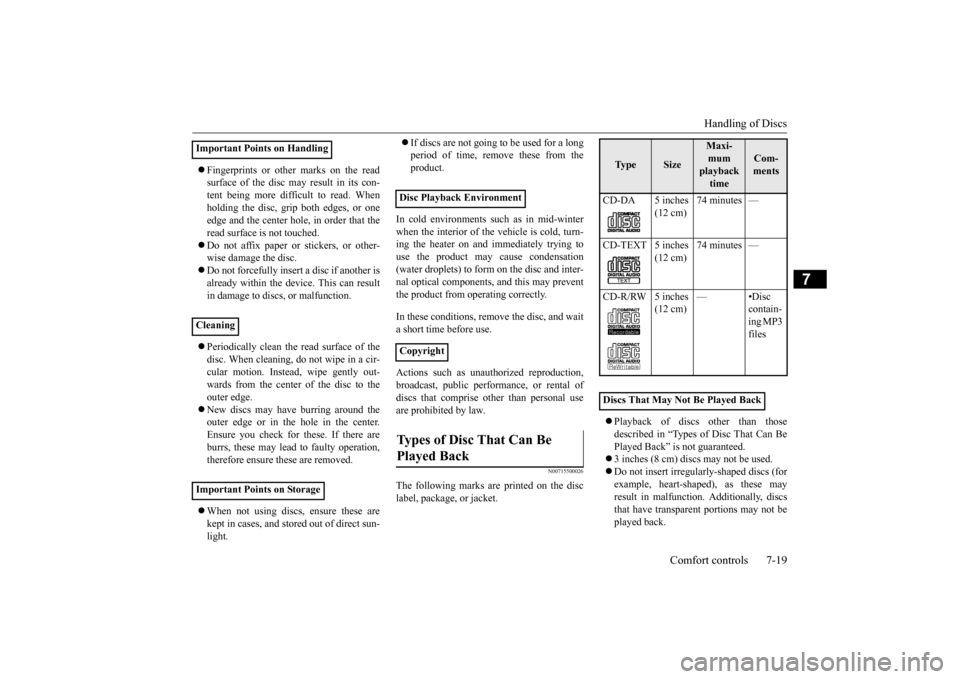
The following marks are printed on the disc label, package, or jacket.
Playback of discs
other than those
described in “Types of Disc That Can Be Played Back” is not guaranteed. 3 inches (8 cm) discs may not be used. Do not insert irregularly-shaped discs (for example, heart-shaped), as these mayresult in malfunction.
Additionally, discs
that have transparent portions may not be played back.
Important Points on Handling Cleaning Important Points on Storage
Disc Playback Environment CopyrightTypes of Disc That Can Be Played Back
Ty p e
Size
Maxi- mum playback time
Com- ments
CD-DA 5 inches
(12 cm)
74 minutes —
CD-TEXT 5 inches
(12 cm)
74 minutes —
CD-R/RW 5 inches
(12 cm)
—•Disc
contain-ing MP3 files
Discs That May Not Be Played Back
BK0223400US.book 19 ページ 2015年2月13日 金曜日 午後12時15分
Page 392 of 464
How to change a tire 8-10 For emergencies
8
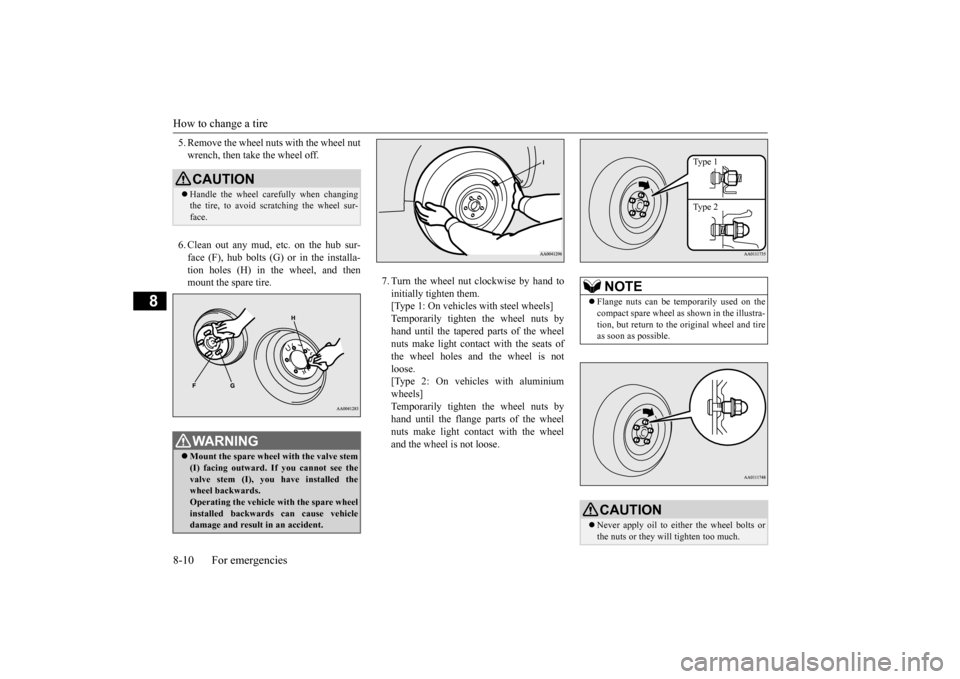
5. Remove the wheel nuts with the wheel nut wrench, then take the wheel off. 6. Clean out any mud, etc. on the hub sur- face (F), hub bolts (G)
or in the installa-
tion holes (H) in the wheel, and then mount the spare tire.
7. Turn the wheel nut clockwise by hand to initially tighten them. [Type 1: On vehicles
with steel wheels]
Temporarily tighten the wheel nuts by hand until the tapered parts of the wheel nuts make light contac
t with the seats of
the wheel holes and the wheel is not loose. [Type 2: On vehicles with aluminiumwheels] Temporarily tighten the wheel nuts by hand until the flange parts of the wheelnuts make light cont
act with the wheel
and the wheel is not loose.
CAUTION Handle the wheel carefully when changing the tire, to avoid scratching the wheel sur- face.WA R N I N G Mount the spare wheel with the valve stem (I) facing outward. If
you cannot see the
valve stem (I), you
have installed the
wheel backwards.Operating the vehicle with the spare wheel installed backwards can cause vehicle damage and result
in an ac
cident.
NOTE
Flange nuts can be te
mporarily used on the
compact spare wheel as shown in the illustra- tion, but return to the original wheel and tire as soon as possible.CAUTION Never apply oil to either the wheel bolts or the nuts or they will tighten too much.
Type 1 Type 2
BK0223400US.book 10 ページ 2015年2月13日 金曜日 午後12時15分
Page 397 of 464
Operation under adverse driving conditions
For emergencies 8-15
8
Release the parking brake. Set the selector lever to the “N” (NEUTRAL) position.
N00837201760
If your vehicle becomes
stuck in snow, sand,
or mud, it can often be moved by a rocking motion. Rock your vehicle back and forth to free it.Do not rev the engine or spin the wheels. Constant efforts to free a stuck vehicle can cause overheating and tr
ansaxle failure. Let
the engine idle for a few minutes to cool the transaxle before trying again. If your vehicle is still
stuck after several rock-
ing attempts, call for a commercial tow truck service.
[For front-wheel driv
e vehicle equipped with
the active stability control (ASC)]If the vehicle is towed with the ignitionswitch in the “ON” pos
ition or the operation
mode in ON and only the front wheels raised off the ground (Type C), the ASC may oper-ate, resulting in an accident. When towing the vehicle with the front wheels raised, keep the ignition switch or
the operation mode as
follows. [Except for vehicles equipped with the F. A . S . T. - k e y ]The ignition switch is in “LOCK”, “OFF” or “ACC” position. [Vehicles equipped with the F.A.S.T.-key]The operation mode is in OFF or ACC.
Towing a front-wheel drive vehi- cle with front wheels off the ground (Type C)
CAUTION
Operation under adverse driving conditions If your vehicle becomes stuck in sand, mud or snow
WA R N I N G When trying to rock
your vehicle out of a
stuck position, make sure that there are nopeople nearby. The
rocking motion can
make your vehicle suddenly lurch forward or backward, and inju
re any bystanders.
On wet roads
CAUTIONAvoid flooded roads. Water is often deeper than it looks, and you could be seriously hurtby driving into flood water. When driving in rain, on water-covered roads, or through a car
wash, water could get
into the brake discs and make them fail tem- porarily. In such cases, lightly press thebrake pedal to see if they are working prop- erly. If they are not, press the pedal lightly several times while driving to dry the brakepads or linings, then check them again. When driving in rain, a layer of water may form between the tires and the road surface (hydroplaning). This loosens your tires’ grip on the road, making it difficult to steer orbrake properly. When driving on a wet road:• Drive your vehicle at a safe speed.• Do not drive on worn tires.• Always keep the tires at the correct infla- tion pressures.
BK0223400US.book 15 ページ 2015年2月13日 金曜日 午後12時15分
Page 402 of 464
Engine hood 9-4 Vehicle care and maintenance
9
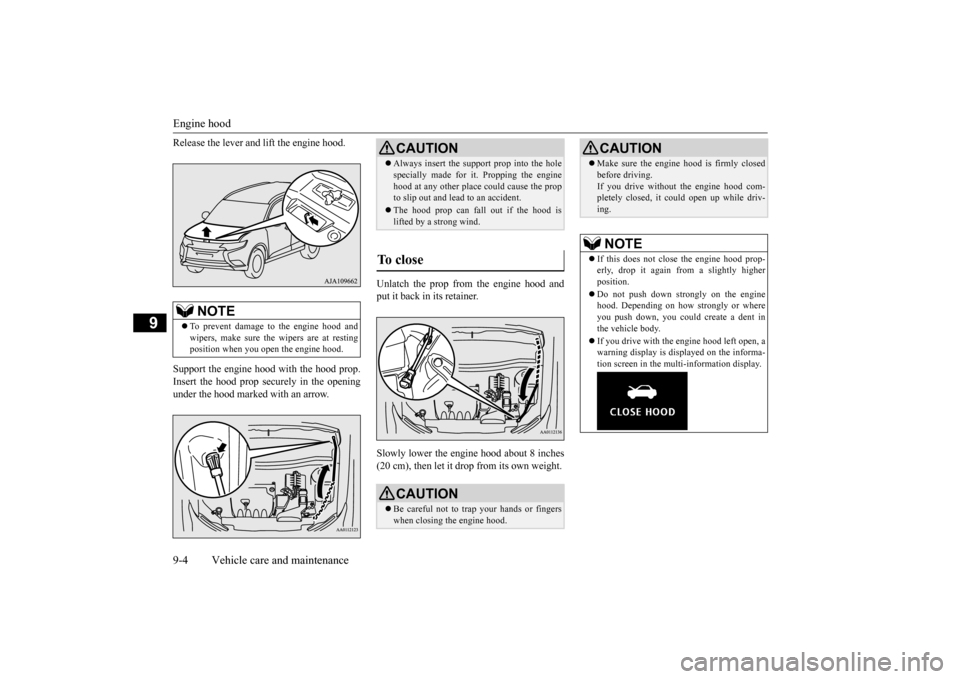
Release the lever and
lift the engine hood.
Support the engine hood with the hood prop. Insert the hood prop securely in the opening under the hood marked with an arrow.
Unlatch the prop from the engine hood and put it back in its retainer. Slowly lower the engine hood about 8 inches (20 cm), then let it drop from its own weight.
NOTE
To prevent damage to the engine hood and wipers, make sure the
wipers are at resting
position when you open the engine hood.
CAUTION Always insert the support prop into the hole specially made for it. Propping the enginehood at any other place
could cause the prop
to slip out and lead
to an accident.
The hood prop can fall out if the hood is lifted by a strong wind.
To close
CAUTION Be careful not to trap your hands or fingers when closing the engine hood.
Make sure the engine hood is firmly closed before driving.If you drive without the engine hood com-pletely closed, it c
ould open up while driv-
ing.NOTE
If this does not clos
e the engine hood prop-
erly, drop it again from a slightly higher position. Do not push down strongly on the engine hood. Depending on how strongly or whereyou push down, you could create a dent in the vehicle body. If you drive with the e
ngine hood left open, a
warning display is displayed on the informa- tion screen in the multi-information display.CAUTION
BK0223400US.book 4 ページ 2015年2月13日 金曜日 午後12時15分
Page 425 of 464
Fuses
Vehicle care and maintenance 9-27
9
*: Fusible link Some fuses may not be installed on your vehicle, depending on
the vehicle model
or specifications. The table above show
s the main equip-
ment corresponding to each fuse. 20 Back-up lights 7.5 A 21
Heated outside rearview mirrors
7.5 A
22
Outside rearview
mirrors
10 A
23
Cigarette lighter/ 12 V power outlet
15 A
24 Charge 7.5 A 25 Power seat 30 A*26 Heated seats 30 ANo.
Sym- bol
Electrical system
Capacity
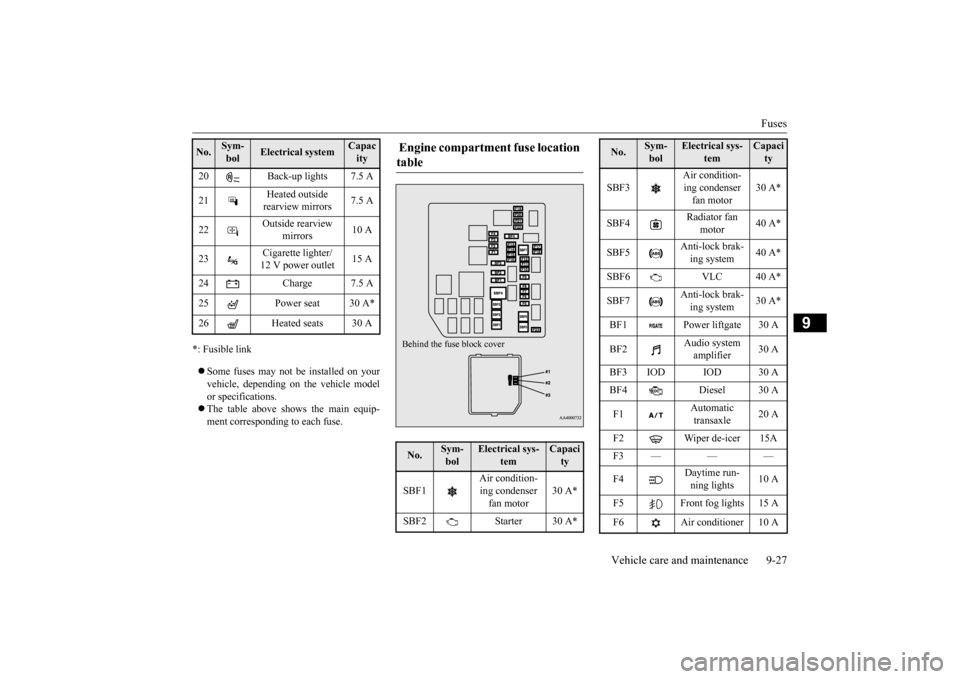
Engine compartment fuse location table No.
Sym- bol
Electrical sys-
tem
Capacity
SBF1
Air condition- ing condenser fan motor
30 A*
SBF2 Starter 30 A*Behind the fuse block cover
SBF3
Air condition- ing condenser fan motor
30 A*
SBF4
Radiator fan
motor
40 A*
SBF5
Anti-lock brak- ing system
40 A*
SBF6 VLC 40 A* SBF7
Anti-lock brak- ing system
30 A*
BF1 Power liftgate 30 A BF2
Audio system amplifier
30 A
BF3 IOD IOD 30 A BF4 Diesel 30 A F1
Automatic transaxle
20 A
F2 Wiper de-icer 15A F3——— F4
Daytime run- ning lights
10 A
F5 Front fog lights 15 A F6 Air conditioner 10 ANo.
Sym- bol
Electrical sys-
tem
Capacity
BK0223400US.book 27 ページ 2015年2月13日 金曜日 午後12時15分
Page 429 of 464
Replacement of light bulbs
Vehicle care and maintenance 9-31
9
Item
Watt- age
ANSI Tr a d e No. or Bulb type
1 - Front turn signal light 21 W PY21W 2 - Headlight, high beam 60 W
9005 HB3
3 -
Head- light, low beam
Halogen bulb
55 W H7
LED — —
4 - Parking light/
Daytime running light (if so equipped)
——
5 - Front side-marker
light
5 W W5W
6- Front fog light
(if so equipped)
19 W H16
7 - Side turn signal light
(if so equipped)
——
NOTE
The following lights us
e an LED instead of
the bulb.Check with an authorized Mitsubishi Motors dealer or a repair facility of your choice when either light needs to be repaired orreplaced. • Headlight, low be
am (LED type)
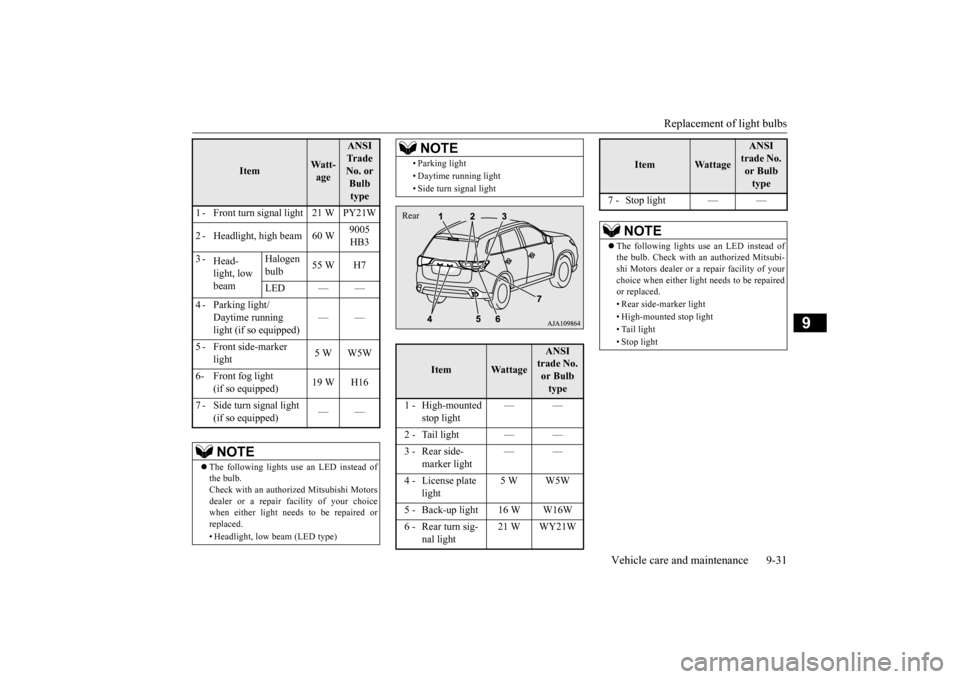
• Parking light • Daytime running light • Side turn signal light
Item
Wattage
ANSI trade No. or Bulb type
1 - High-mounted
stop light
——
2 - Tail light — — 3 - Rear side-
marker light
——
4 - License plate
light
5 W W5W
5 - Back-up light 16 W W16W 6 - Rear turn sig-
nal light
21 W WY21W
NOTE
Rear
7 - Stop light — —
NOTE
The following lights us
e an LED instead of
the bulb. Check with an authorized Mitsubi-shi Motors dealer or a repair facility of your choice when either light needs to be repaired or replaced. • Rear side-marker light • High-mounted stop light • Tail light• Stop light
Item
Wattage
ANSI trade No. or Bulb type
BK0223400US.book 31 ページ 2015年2月13日 金曜日 午後12時15分