2016 MERCEDES-BENZ SL ROADSTER seat memory
[x] Cancel search: seat memoryPage 14 of 333
Frequencies
Garage door opener ...................... .272
Mobile phone ................................. 320
Two-way radio ................................ 320
Front-passenger front airbag deac-
tivation
Display message ............................ 226
Front-passenger front airbag deac-
tivation system
Operation ......................................... 46
Problems ......................................... 50
System self-test ............................... 48
Front-passenger seat
Adjusting from the driver's seat ..... 103
Fuel
Additives ........................................ 324
Consumption statistics .................. 202
Displaying the current consump-
tion ................................................ 202
Displaying the range ..................... .202
Driving tips ................................... .156
Fuel gauge ....................................... 32
Grade (petrol) ................................ 323
Important safety notes .................. 322
Notes for Mercedes‑AMG vehi-
cles ................................................ 324
Problem (malfunction) ................... 153
Refuelling ....................................... 151
Tank content/reserve fuel ............. 323
Fuel filler flap
Opening ......................................... 152
Fuel level
Calling up the range (on-board
computer) ...................................... 202
Gauge .............................................. 32
Fuel tank
Capacity ........................................ 323
Problem (malfunction) ................... 153
Fuse allocation chart (vehicle tool
kit) ...................................................... 288
Fuses
Allocation chart ............................ .301
Before changing ............................ .301
Dashboard fuse box ....................... 301
Fuse box in the engine compart-
ment .............................................. 302
Fuse box in the rear compartment .. 302
Important safety notes .................. 301 G
Garage door opener Clearing the memory ..................... 271
Frequencies ................................... 272
General notes ................................ 269
Important safety notes .................. 270
Opening/closing the garage door .. 271
Problems when programming ....... .271
Programming (button in the rear-
view mirror) ................................... 270
Synchronising the rolling code ....... 271
Gear indicator (on-board com-
puter, Mercedes-AMG vehicles) ....... 213
Gearshift paddles
see Steering wheel gearshift paddles
Gearshift program
SETUP (on-board computer) .......... 213
Genuine Mercedes-Benz parts ........... 23
Glove compartment .......................... 262
Google™ Local Search
See also Digital Owner's Manual ... 253 H
HANDS-FREE ACCESS .......................... 87
Hazard warning lamps
Display message ............................ 242
Switching on/off ........................... 115
Head level heating (AIRSCARF) ........105
Head restraints
Adjusting ....................................... 103
see NECK-PRO head restraints
Headbag
Display message ............................ 225
Operation ......................................... 46
Headlamp flasher .............................. 115
Headlamps
see Automatic headlamp mode
Heating
see Climate control
High-pressure cleaners .................... 283
Hill start assist .................................. 135
HOLD function
Activating ....................................... 173
Activation conditions ..................... 173
Deactivating ................................... 173
Display message ............................ 232 Index
11
Page 19 of 333
R
RACE START important safety notes ................... 173
RACE START (Mercedes-AMG vehi-
cles) .................................................... 173
RACETIMER (on-board computer) .... 213
Radio
Selecting a station ......................... 204
see separate operating instructions
Radio mode
See also Digital Owner's Manua l... 253
Radio-based vehicle components
Declaration of conformity ................ 25
Reading lamp ..................................... 117
Rear foglamp
Display message ............................ 228
Switching on/of f........................... 114
Rear lamps
see Lights
Rear window heating
General notes ................................ 127
Problem (fault) ............................... 128
Switching on/of f........................... 127
Rear-view mirror
Anti-dazzle mode (automatic) ........ 109
Dipping (manual) ........................... 108
Refuelling
Fuel gaug e....................................... 32
Important safety notes .................. 151
Notes for Mercedes‑AMG vehi-
cles ................................................ 324
Refuelling process ......................... 152
see Fuel
Remote control
Programming (garage door
opener) .......................................... 270
Replacing bulbs
General notes ................................ 118
Rescue card ......................................... 28
Reserve (fuel tank)
see Fuel
Reserve fuel
Display message ............................ 231
Warning lamp ................................. 249
Residual heat (climate control) ........ 129
Restraint system
Display message ............................ 224 Introduction ..................................... 39
Warning lamp ................................. 248
Warning lamp (function) ................... 40
Rev counter ........................................ 199
Reverse gear (selector lever) ........... 143
Reversing camera
Cleaning instructions ..................... 285
Display in the multimedia system .. 187
Function/note s............................. 187
Switching on/of f........................... 187
Reversing feature
Side windows ................................... 90
Reversing function
Boot lid ............................................ 85
Reversing lamp (display message) .. 228
Roll bar
Display message ............................ 224
Operation ......................................... 50
Roller sunblind .................................... 98
Roof
Display message ............................ 242
Important safety notes .................... 93
Opening/closing (with key) .............. 95
Opening/closing (with roof
switch) ............................................. 94
Overview .......................................... 93
Problem (malfunction) ................... 100
Relocking ......................................... 95
Roof switch .......................................... 94
Route guidance
See also Digital Owner's Manua l... 253 S
Safety Children in the vehicle ..................... 54
see Occupant safety
Safety system
see Driving safety systems
SD memory card
Ejecting .......................................... 260
Inserting ........................................ 260
Inserting/removing ........................ 260
See also Digital Owner's Manua l... 253
Selecting ........................................ 205
Seat belt
Correct usage .................................. 42
Seat belt guide ............................... 103 16
Index
Page 20 of 333
Switching belt adjustment on/off
(on-board computer) ...................... 212
Seat belts
Adjusting the driver's and front-
passenger seat belt ......................... 43
Fastening ......................................... 42
Important safety guidelines ............. 41
Introduction ..................................... 41
Releasing ......................................... 43
Warning lamp ................................. 244
Warning lamp (function) ................... 43
Seats
Adjusting (electrically) ................... 102
Adjusting the head restraint .......... 103
Belt guide ...................................... 103
Correct driver's seat position ........ 101
Important safety notes .................. 101
Overview ........................................ 101
Seat heating problem .................... 105
Seat ventilation problem ................ 105
Sliding forward/back ..................... 104
Storing settings (memory func-
tion) ............................................... 111
Switching AIRSCARF on/of f.......... 105
Switching seat heating on/of f....... 104
Switching the seat ventilation on/
off .................................................. 105
Selector lever
Positions ........................................ 141
Sensors (cleaning instructions) ....... 285
Service
see ASSYST PLUS
Service Centre
see Qualified specialist workshop
Service menu (on-board com-
puter) .................................................. 208
Service message
see ASSYST PLUS
Service products
Brake fluid ..................................... 325
Coolant (engine) ............................ 325
Engine oil ....................................... 324
Fuel ................................................ 322
Important safety notes .................. 322
Washer fluid ................................... 326
Setting the air distribution ............... 126
Setting the airflow ............................ 126 Setting the date/time format
See also Digital Owner's Manua l... 253
Setting the language
See also Digital Owner's Manua l... 253
Setting the time
See also Digital Owner's Manua l... 253
Settings
Factory (on-board computer) ......... 212
On-board compute r....................... 208
SETUP (on-board computer) ............. 213
Side lamps
Switching on/of f........................... 114
Side windows
Convenience closing ........................ 91
Important safety notes .................... 89
Opening/closing (front) ................... 90
Opening/closing (rear) .................... 91
Opening/closing all ......................... 91
Overview .......................................... 89
Problem (malfunction) ..................... 93
Resetting ......................................... 92
Reversing feature ............................. 90
Sidebag ................................................ 45
SIM card
Inserting ........................................ 258
SMS
See also Digital Owner's Manua l... 253
Snow chains ...................................... 307
Socket
Front-passenger footwell ............... 268
Sockets
General notes ................................ 268
Sound
Switching on/of f........................... 254
Specialist workshop ............................ 27
Spectacles compartment ................. 263
Speed limiter
Display message ............................ 235
Important safety notes .................. 170
Selecting ........................................ 171
Speed, controlling
see Cruise control
Speedometer
Digital ............................................ 203
In the Instrument cluster ................. 32
Segments ...................................... 199
Selecting a display uni t.................. 209 Index
17
Page 104 of 333
Correct driver's seat position
G
WARNING
You could lose control of the vehicle while
driving if you:
R adjust the driver's seat, steering wheel or
mirrors
R fasten the seat belt
There is a risk of an accident.
Adjust the driver's seat, head restraint, steer-
ing wheel and mirrors and fasten your seat
belt before starting the engine. X
Observe the safety guidelines on seat adjust-
ment (Y page 101).
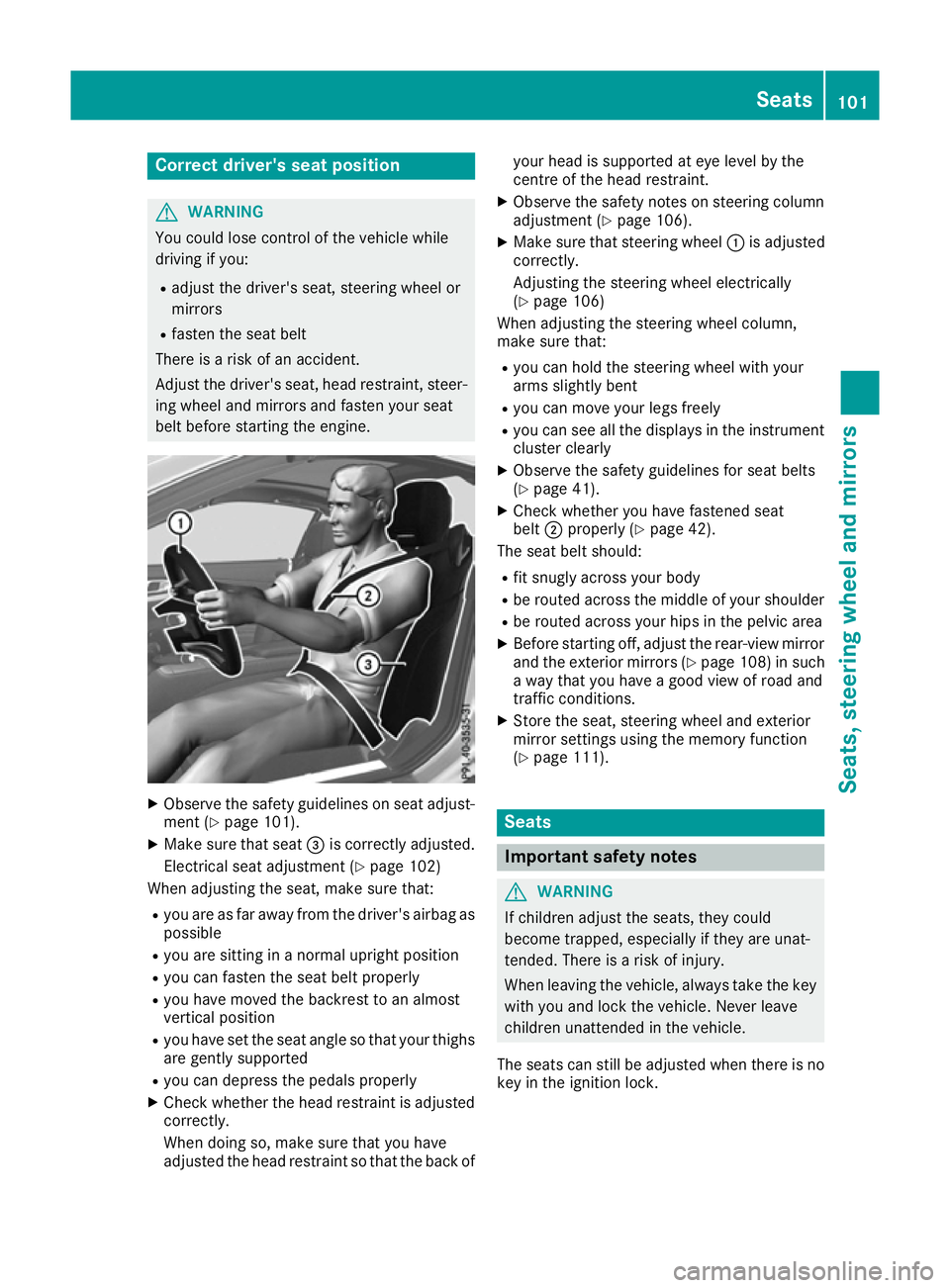
X Make sure that seat =is correctly adjusted.
Electrical seat adjustment (Y page 102)
When adjusting the seat, make sure that:
R you are as far away from the driver's airbag as
possible
R you are sitting in a normal upright position
R you can fasten the seat belt properly
R you have moved the backrest to an almost
vertical position
R you have set the seat angle so that your thighs
are gently supported
R you can depress the pedals properly
X Check whether the head restraint is adjusted
correctly.
When doing so, make sure that you have
adjusted the head restraint so that the back of your head is supported at eye level by the
centre of the head restraint.
X Observe the safety notes on steering column
adjustment (Y page 106).
X Make sure that steering wheel :is adjusted
correctly.
Adjusting the steering wheel electrically
(Y page 106)
When adjusting the steering wheel column,
make sure that:
R you can hold the steering wheel with your
arms slightly bent
R you can move your legs freely
R you can see all the displays in the instrument
cluster clearly
X Observe the safety guidelines for seat belts
(Y page 41).
X Check whether you have fastened seat
belt ;properly (Y page 42).
The seat belt should:
R fit snugly across your body
R be routed across the middle of your shoulder
R be routed across your hips in the pelvic area
X Before starting off, adjust the rear-view mirror
and the exterior mirrors (Y page 108) in such
a way that you have a good view of road and
traffic conditions.
X Store the seat, steering wheel and exterior
mirror settings using the memory function
(Y page 111). Seats
Important safety notes
G
WARNING
If children adjust the seats, they could
become trapped, especially if they are unat-
tended. There is a risk of injury.
When leaving the vehicle, always take the key with you and lock the vehicle. Never leave
children unattended in the vehicle.
The seats can still be adjusted when there is no
key in the ignition lock. Seats
101Seats, steering wheel and mirrors Z
Page 106 of 333
i
Further related subjects:
R You can store the seat settings using the
memory function (Y page 111).
R If PRE-SAFE ®
is triggered, the front-
passenger seat will be moved to a better
position if it was previously in an unfavour- able position (Y page 53). Adjusting the front-passenger seat
from the driver's seat G
WARNING
If the front seats are positioned too closely to the dashboard or steering wheel, the front
airbags could cause additional injuries to
vehicle occupants in the front. There is an
increased risk of injury, possibly even fatal.
Always adjust the front seats so that they are
as far away as possible from the front airbags.
In addition, observe the instructions on how to
adjust the seats correctly.
! Do not move the front-passenger seat fully
forwards if there are objects in the luggage
net in the front-passenger footwell. The
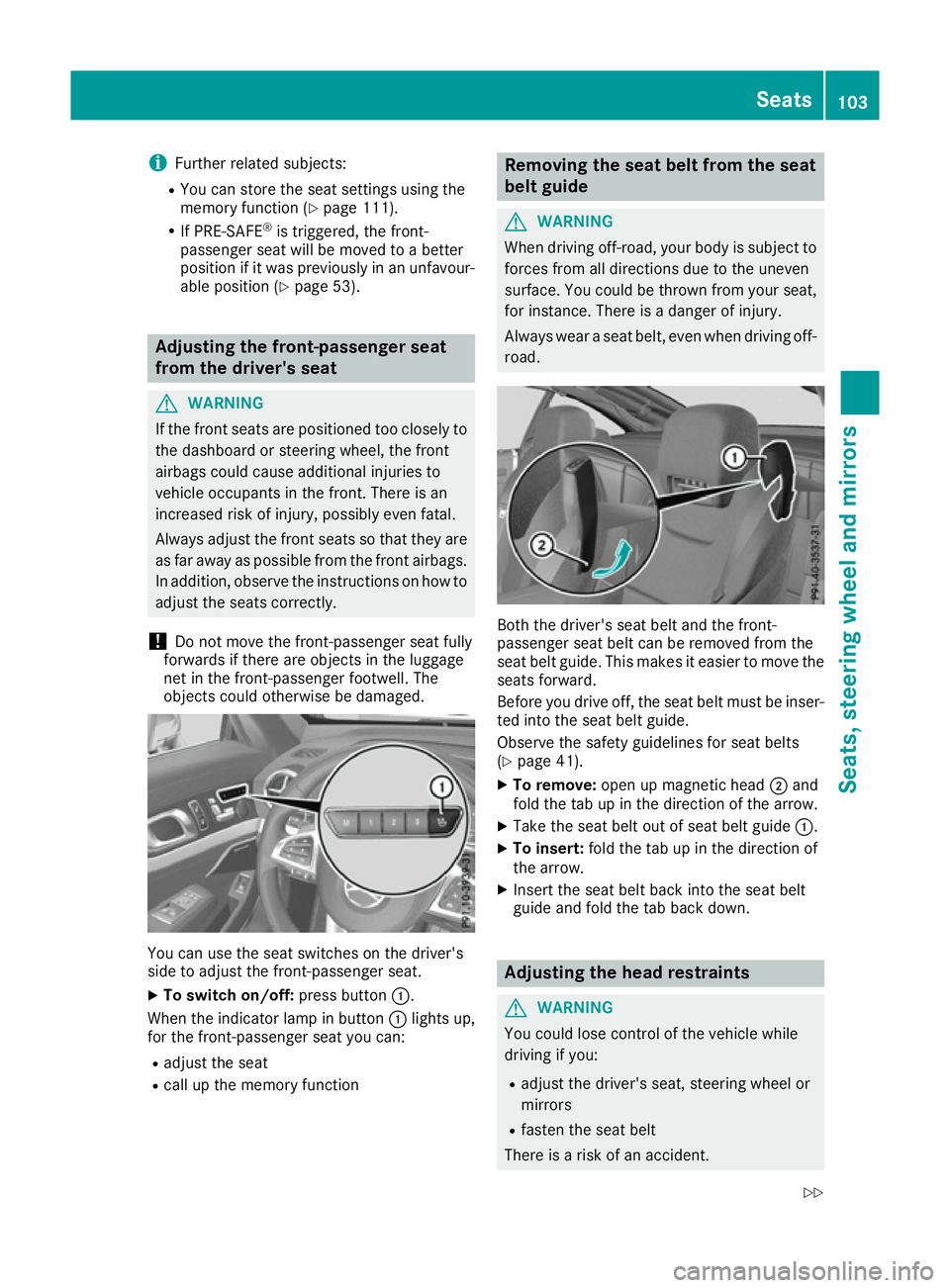
objects could otherwise be damaged. You can use the seat switches on the driver's
side to adjust the front-passenger seat.
X To switch on/off: press button:.
When the indicator lamp in button :lights up,
for the front-passenger seat you can:
R adjust the seat
R call up the memory function Removing the seat belt from the seat
belt guide
G
WARNING
When driving off-road, your body is subject to forces from all directions due to the uneven
surface. You could be thrown from your seat,
for instance. There is a danger of injury.
Always wear a seat belt, even when driving off-
road. Both the driver's seat belt and the front-
passenger seat belt can be removed from the
seat belt guide. This makes it easier to move the
seats forward.
Before you drive off, the seat belt must be inser-
ted into the seat belt guide.
Observe the safety guidelines for seat belts
(Y page 41).
X To remove: open up magnetic head ;and
fold the tab up in the direction of the arrow.
X Take the seat belt out of seat belt guide :.
X To insert: fold the tab up in the direction of
the arrow.
X Insert the seat belt back into the seat belt
guide and fold the tab back down. Adjusting the head restraints
G
WARNING
You could lose control of the vehicle while
driving if you:
R adjust the driver's seat, steering wheel or
mirrors
R fasten the seat belt
There is a risk of an accident. Seats
103Seats, steering wheel and mirrors
Z
Page 110 of 333

control of the vehicle. There is a risk of an
accident.
Always wait until the adjustment process is
complete before driving off. G
WARNING
When the EASY-ENTRY/EXIT feature adjusts
the steering wheel, you and other vehicle
occupants – particularly children – could
become trapped. There is a risk of injury.
While the EASY-ENTRY/EXIT feature is mak-
ing adjustments, make sure that no one has
any body parts in the sweep of the steering
wheel.
If someone is trapped:
R press one of the memory function position
buttons, or
R move the switch for steering wheel adjust-
ment in the opposite direction to that in
which the steering wheel is moving.
The adjustment process is stopped. G
WARNING
When the EASY-ENTRY/EXIT feature adjusts
the steering wheel and the driver's seat, you
and other vehicle occupants – particularly
children – could become trapped. There is a
risk of injury.
While the EASY-ENTRY/EXIT feature is mak-
ing adjustments, make sure that no one has
any body parts in the sweep of the seat and
the steering wheel.
If someone is trapped:
R press one of the memory function position
buttons, or
R press one of the memory function memory
buttons, or
R move the switch for steering wheel adjust-
ment in the opposite direction to that in
which the steering wheel is moving.
The adjustment process is stopped. G
WARNING
If you use openings in the bodywork or
detachable parts as steps, you could:
R slip and/or fall
R damage the vehicle and cause yourself to
fall.
There is a danger of injury.
Always use secure climbing aids, e.g. a suita-
ble ladder.
The EASY-ENTRY/EXIT feature makes getting in
and out of your vehicle easier.
You can activate and deactivate the EASY-
ENTRY/EXIT feature in the on-board computer
(Y page 211).
Position of the steering wheel when the EASY-ENTRY/EXIT feature is active The steering wheel tilts upwards if you:
R remove the key from the ignition lock
R open the driver's door and KEYLESS-GO is in
position 1
R open the driver's door and the key is in posi-
tion 0or 1in the ignition lock
i The steering wheel only moves upwards if it
has not already reached the upper end stop.
Position of the steering wheel for driv-
ing The steering wheel is moved to the previously
set position if:
R the driver's door is closed and
R you insert the key into the ignition lock
or
R you press the Start/Stop button once on vehi-
cles with KEYLESS-GO
If you close the driver's door with the key inser- ted in the ignition lock, the steering wheel is
automatically moved to the previously set posi-
tion.
The last position of the steering wheel is stored when you switch off the ignition or when you
store the setting with the memory function
(Y page 111). Steering wheel
107Seats, steering wheel and mirrors Z
Page 113 of 333
R
if electrolyte comes into contact with skin
or eyes or is swallowed, seek medical atten-
tion immediately.
R immediately change out of clothing that has
been in contact with electrolyte.
R if an allergic reaction occurs, seek medical
attention immediately.
The rear-view mirror and the exterior mirror on
the driver's side automatically go into anti-daz-
zle mode if the following conditions are met
simultaneously:
R the ignition is switched on and
R incident light from headlamps strikes the sen-
sor in the rear-view mirror
The mirrors do not dip if reverse gear is engaged or if the interior lighting is switched on. Parking position of the exterior mirror
on the front-passenger side
Setting and storing the parking position Using reverse gear
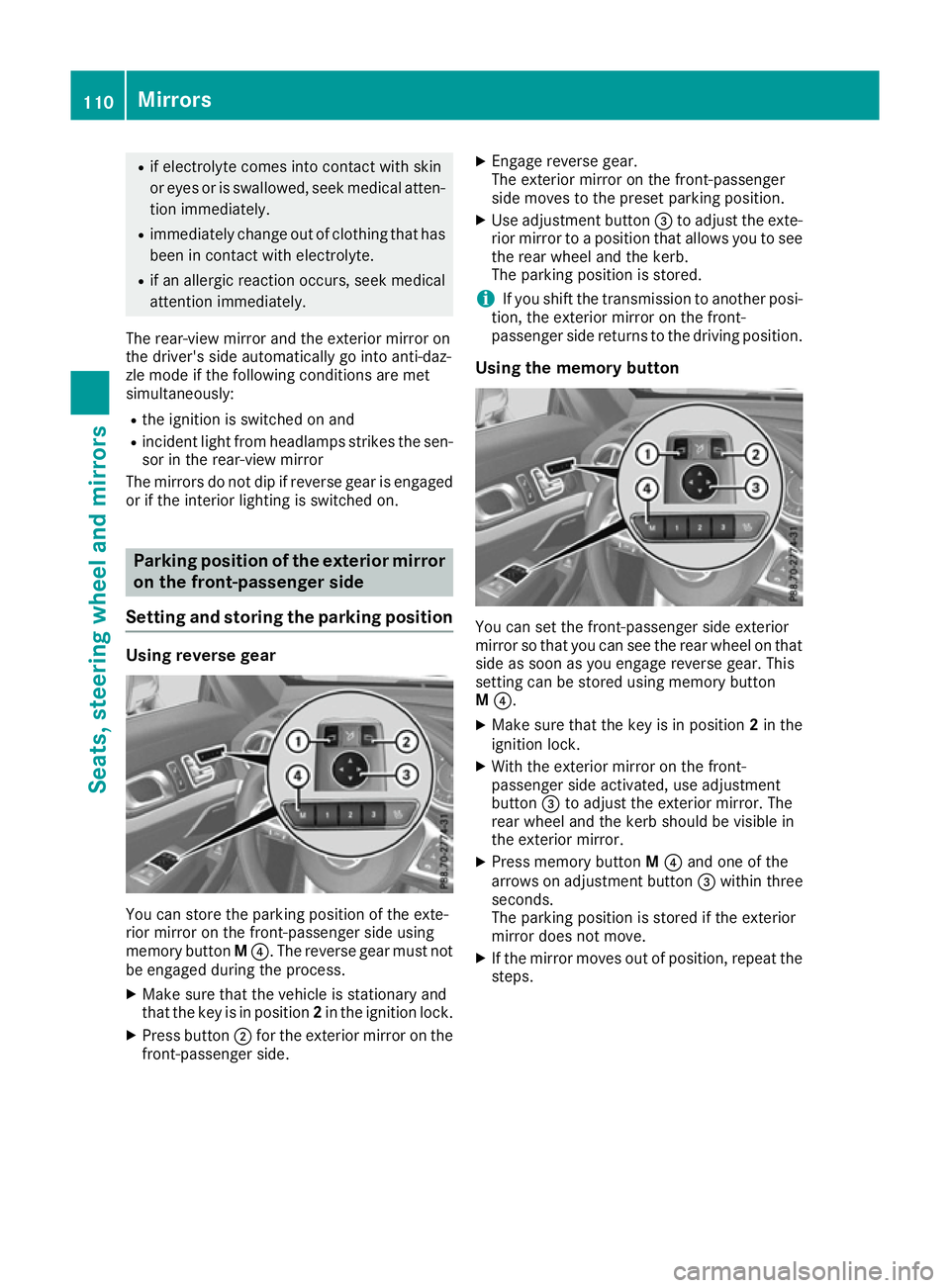
You can store the parking position of the exte-
rior mirror on the front-passenger side using
memory button M?. The reverse gear must not
be engaged during the process.
X Make sure that the vehicle is stationary and
that the key is in position 2in the ignition lock.
X Press button ;for the exterior mirror on the
front-passenger side. X
Engage reverse gear.
The exterior mirror on the front-passenger
side moves to the preset parking position.
X Use adjustment button =to adjust the exte-
rior mirror to a position that allows you to see
the rear wheel and the kerb.
The parking position is stored.
i If you shift the transmission to another posi-
tion, the exterior mirror on the front-
passenger side returns to the driving position.
Using the memory button You can set the front-passenger side exterior
mirror so that you can see the rear wheel on that side as soon as you engage reverse gear. This
setting can be stored using memory button
M ?.
X Make sure that the key is in position 2in the
ignition lock.
X With the exterior mirror on the front-
passenger side activated, use adjustment
button =to adjust the exterior mirror. The
rear wheel and the kerb should be visible in
the exterior mirror.
X Press memory button M? and one of the
arrows on adjustment button =within three
seconds.
The parking position is stored if the exterior
mirror does not move.
X If the mirror moves out of position, repeat the
steps. 110
MirrorsSeats, steering wheel and mirrors
Page 114 of 333

Calling up a stored parking position
X
Turn the key to position 2in the ignition lock.
X Adjust the exterior mirror on the front-
passenger side using button ;.
X Engage reverse gear.
The exterior mirror on the front-passenger
side moves to the stored parking position.
The exterior mirror on the front-passenger side
moves back to its original position:
R as soon as you exceed a speed of 15 km/h
R if you press button :for the exterior mirror
on the driver's side Memory function
Storing settings
G
WARNING
If you use the memory function on the driver's side while driving, the adjustments could
cause you to lose control of the vehicle. There
is a risk of an accident.
Only use the memory function on the driver's
side while the vehicle is stationary. G
WARNING
When the memory function adjusts the seat or steering wheel, you and other vehicle occu-
pants – particularly children – could become
trapped. There is a risk of injury.
While the memory function is making adjust-
ments, make sure that no one has any body
parts in the sweep of the seat or steering
wheel. If somebody becomes trapped, imme- diately release the memory function position
button. The adjustment process is stopped.
G
WARNING
If children activate the memory function, they
could become trapped, especially if they are
unattended. There is a risk of injury.
When leaving the vehicle, always take the key with you and lock the vehicle. Never leave
children unattended in the vehicle.
The memory function can be used at any time,
e.g. even when the key is not in the ignition lock.
With the memory function, you can store up to
three different settings, e.g. for three different
people.
The following settings are stored as a single
memory preset:
R position of the seat, backrest and head
restraint
R driver's side: steering wheel position
R driver's side: position of the exterior mirrors
on the driver's and front-passenger sides X
Adjust the seat electrically (Y page 102).
X On the driver's side, adjust the steering wheel
(Y page 106) and the exterior mirrors
(Y page 108).
X Press memory button Mand then press save
position button 1,2or 3within three sec-
onds.
The settings are stored in the selected mem-
ory position. A tone sounds when the settings
have been completed. Memory function
111Seats, steering wheel and mirrors Z