2016 MERCEDES-BENZ GLC COUPE ECU
[x] Cancel search: ECUPage 185 of 389
The electric parking brake secures the vehicle
automatically if DISTRONIC PLUS is activated
when the vehicle is stationary and:
R a system fault occurs
R the power supply is insufficient
If a fault occurs, the transmission may also shift
to position Pautomatically.
Setting a speed X
Push the cruise control lever up :for a
higher speed or down Afor a lower speed.
X Push and hold the cruise control lever until
the desired speed is reached.
X Release the cruise control lever.
The new speed is stored. DISTRONIC PLUS is
activated and adjusts the vehicle's speed to
the new speed stored.
X To adjust the set speed in1 km/hincre-
ments:
briefly push the cruise control lever
up : or down Ato the pressure point.
The last stored speed increases or decreases in 1 km/h increments.
X To adjust the set speed in10 km/hincre-
ments:
briefly push the cruise control lever
up : or down Abeyond the pressure point.
The last stored speed increases or decreases
in 10 km/h increments.
i If you accelerate to overtake, DISTRONIC
PLUS adjusts the vehicle's speed back to the
last speed stored after you have finished over-
taking.
Setting the specified minimum distance You can set the specified minimum distance for
DISTRONIC PLUS by varying the time span
between one and two seconds. This time span
determines the distance that DISTRONIC PLUS
is to maintain from the vehicle in front, depend- ing on the road speed. You can see this distance
on the multifunction display (Y page 183).
Make sure that you maintain the minimum dis-
tance to the vehicle in front as required by law.
Adjust the distance to the vehicle in front if nec- essary. X
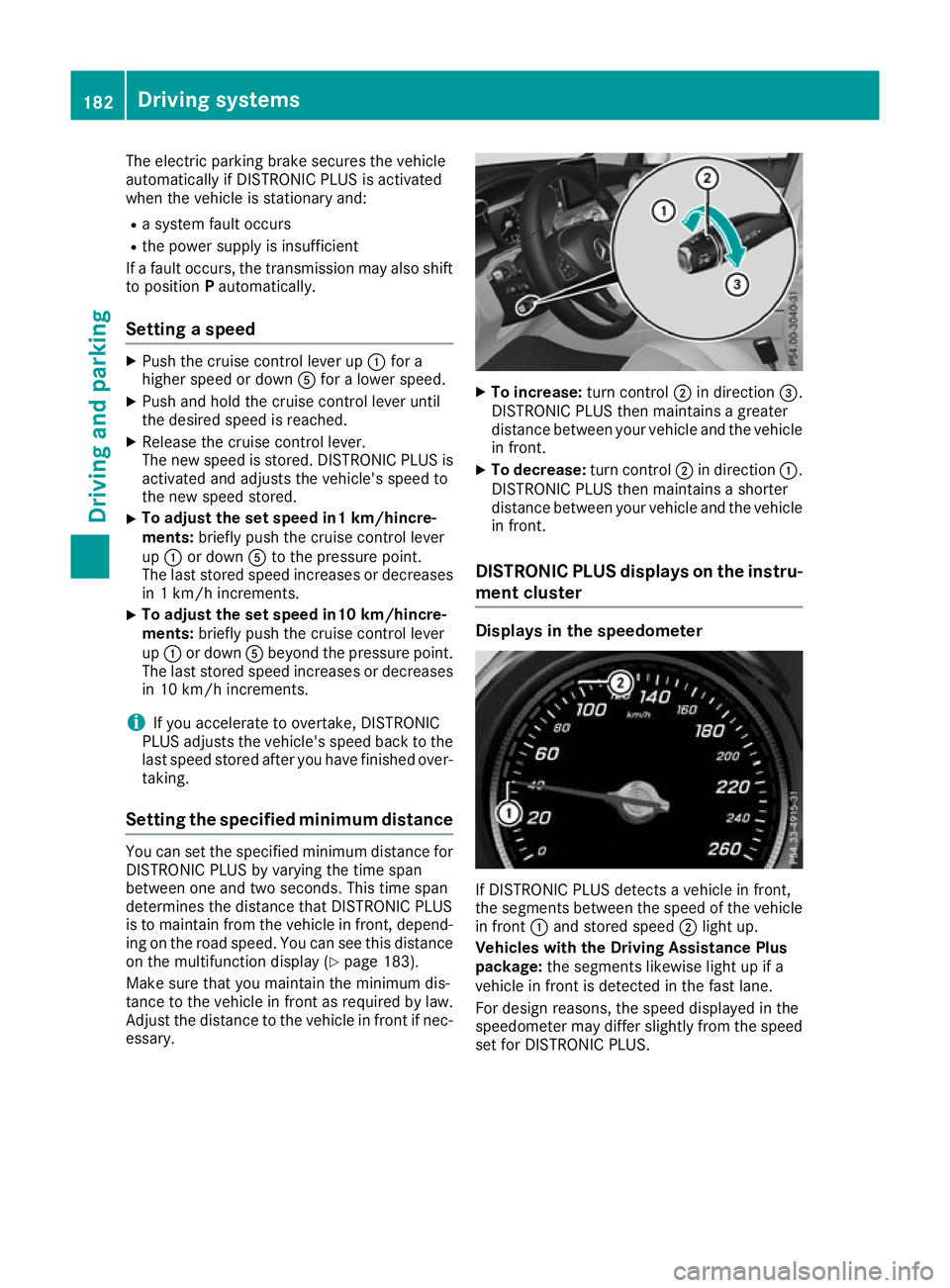
To increase: turn control;in direction =.
DISTRONIC PLUS then maintains a greater
distance between your vehicle and the vehicle in front.
X To decrease: turn control;in direction :.
DISTRONIC PLUS then maintains a shorter
distance between your vehicle and the vehicle
in front.
DISTRONIC PLUS displays on the instru- ment cluster Displays in the speedometer
If DISTRONIC PLUS detects a vehicle in front,
the segments between the speed of the vehicle
in front :and stored speed ;light up.
Vehicles with the Driving Assistance Plus
package: the segments likewise light up if a
vehicle in front is detected in the fast lane.
For design reasons, the speed displayed in the
speedometer may differ slightly from the speed
set for DISTRONIC PLUS. 182
Driving systemsDriving and parking
Page 186 of 389
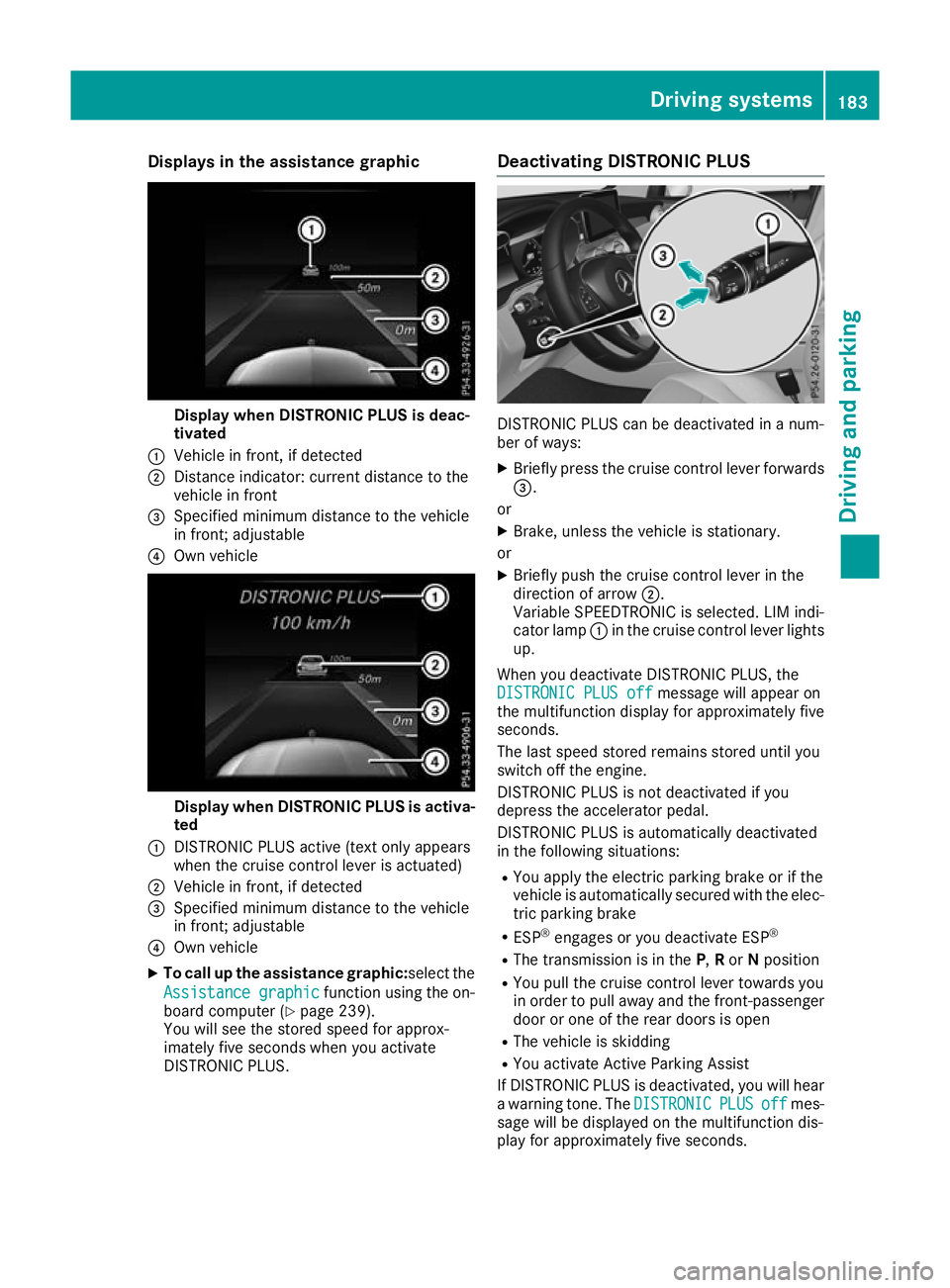
Displays in the assistance graphic
Display when DISTRONIC PLUS is deac-
tivated
: Vehicle in front, if detected
; Distance indicator: current distance to the
vehicle in front
= Specified minimum distance to the vehicle
in front; adjustable
? Own vehicle Display when DISTRONIC PLUS is activa-
ted
: DISTRONIC PLUS active (text only appears
when the cruise control lever is actuated)
; Vehicle in front, if detected
= Specified minimum distance to the vehicle
in front; adjustable
? Own vehicle
X To call up the assistance graphic:select the
Assistance graphic
Assistance graphic function using the on-
board computer (Y page 239).
You will see the stored speed for approx-
imately five seconds when you activate
DISTRONIC PLUS. Deactivating DISTRONIC PLUS
DISTRONIC PLUS can be deactivated in a num-
ber of ways:
X Briefly press the cruise control lever forwards
=.
or X Brake, unless the vehicle is stationary.
or X Briefly push the cruise control lever in the
direction of arrow ;.
Variable SPEEDTRONIC is selected. LIM indi-
cator lamp :in the cruise control lever lights
up.
When you deactivate DISTRONIC PLUS, the DISTRONIC PLUS off DISTRONIC PLUS off message will appear on
the multifunction display for approximately five
seconds.
The last speed stored remains stored until you
switch off the engine.
DISTRONIC PLUS is not deactivated if you
depress the accelerator pedal.
DISTRONIC PLUS is automatically deactivated
in the following situations:
R You apply the electric parking brake or if the
vehicle is automatically secured with the elec-
tric parking brake
R ESP ®
engages or you deactivate ESP ®
R The transmission is in the P,Ror Nposition
R You pull the cruise control lever towards you
in order to pull away and the front-passenger
door or one of the rear doors is open
R The vehicle is skidding
R You activate Active Parking Assist
If DISTRONIC PLUS is deactivated, you will hear
a warning tone. The DISTRONIC DISTRONICPLUS
PLUSoff
offmes-
sage will be displayed on the multifunction dis-
play for approximately five seconds. Driving syste
ms
183Driving an d parking Z
Page 189 of 389
Information on the multifunction display
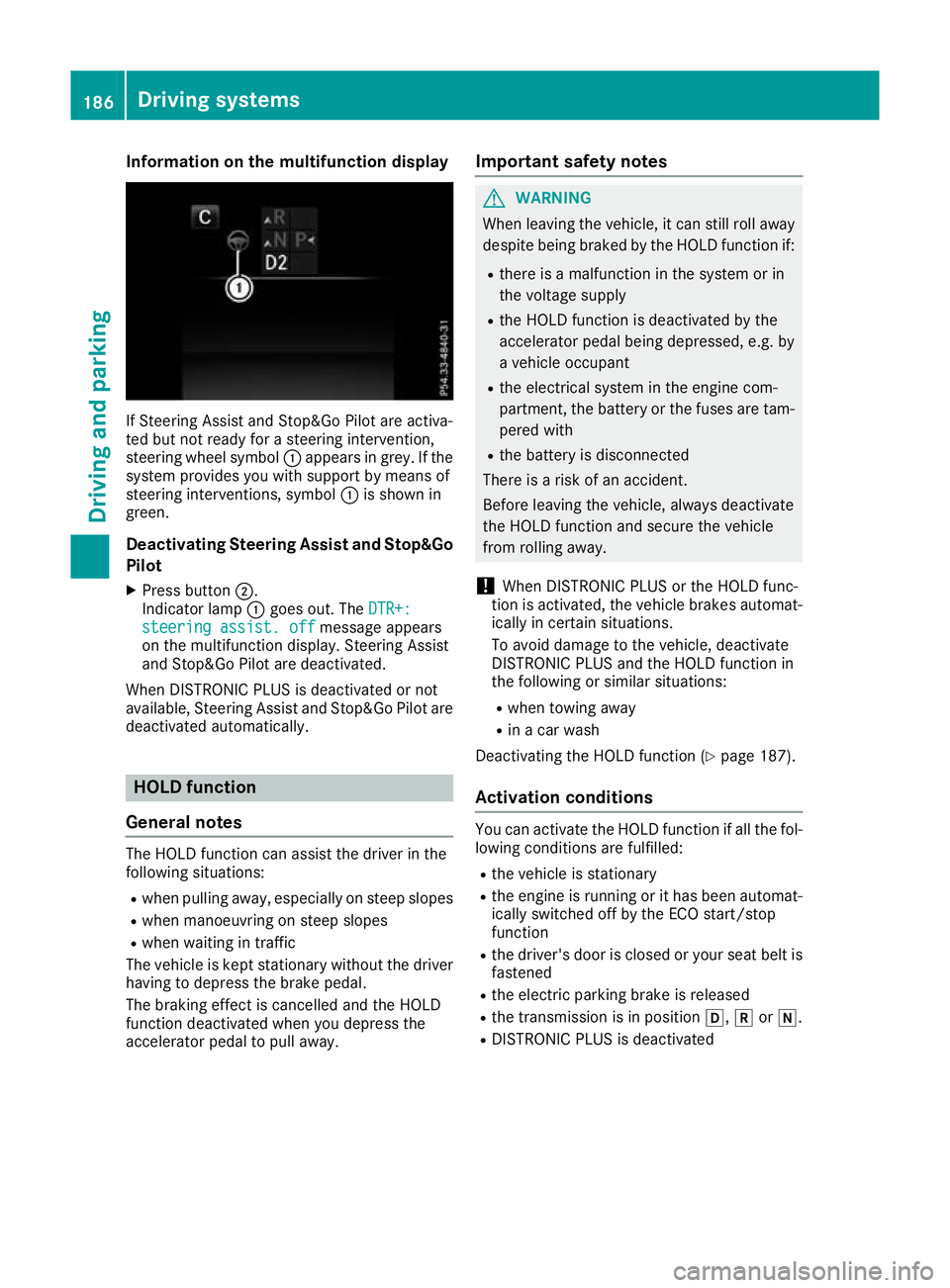
If Steering Assist and Stop&Go Pilot are activa-
ted but not ready for a steering intervention,
steering wheel symbol :appears in grey. If the
system provides you with support by means of
steering interventions, symbol :is shown in
green.
Deactivating Steering Assist and Stop&Go
Pilot
X Press button ;.
Indicator lamp :goes out. The DTR+:
DTR+:
steering assist. off
steering assist. off message appears
on the multifunction display. Steering Assist
and Stop&Go Pilot are deactivated.
When DISTRONIC PLUS is deactivated or not
available, Steering Assist and Stop&Go Pilot are deactivated automatically. HOLD function
General notes The HOLD function can assist the driver in the
following situations:
R when pulling away, especially on steep slopes
R when manoeuvring on steep slopes
R when waiting in traffic
The vehicle is kept stationary without the driver having to depress the brake pedal.
The braking effect is cancelled and the HOLD
function deactivated when you depress the
accelerator pedal to pull away. Important safety notes G
WARNING
When leaving the vehicle, it can still roll away despite being braked by the HOLD function if:
R there is a malfunction in the system or in
the voltage supply
R the HOLD function is deactivated by the
accelerator pedal being depressed, e.g. by
a vehicle occupant
R the electrical system in the engine com-
partment, the battery or the fuses are tam-
pered with
R the battery is disconnected
There is a risk of an accident.
Before leaving the vehicle, always deactivate
the HOLD function and secure the vehicle
from rolling away.
! When DISTRONIC PLUS or the HOLD func-
tion is activated, the vehicle brakes automat- ically in certain situations.
To avoid damage to the vehicle, deactivate
DISTRONIC PLUS and the HOLD function in
the following or similar situations:
R when towing away
R in a car wash
Deactivating the HOLD function (Y page 187).
Activation conditions You can activate the HOLD function if all the fol-
lowing conditions are fulfilled:
R the vehicle is stationary
R the engine is running or it has been automat-
ically switched off by the ECO start/stop
function
R the driver's door is closed or your seat belt is
fastened
R the electric parking brake is released
R the transmission is in position h,kori.
R DISTRONIC PLUS is deactivated 186
Driving systemsDriving and pa
rking
Page 190 of 389
Activating the HOLD function
X
Make sure that the activation conditions are
met.
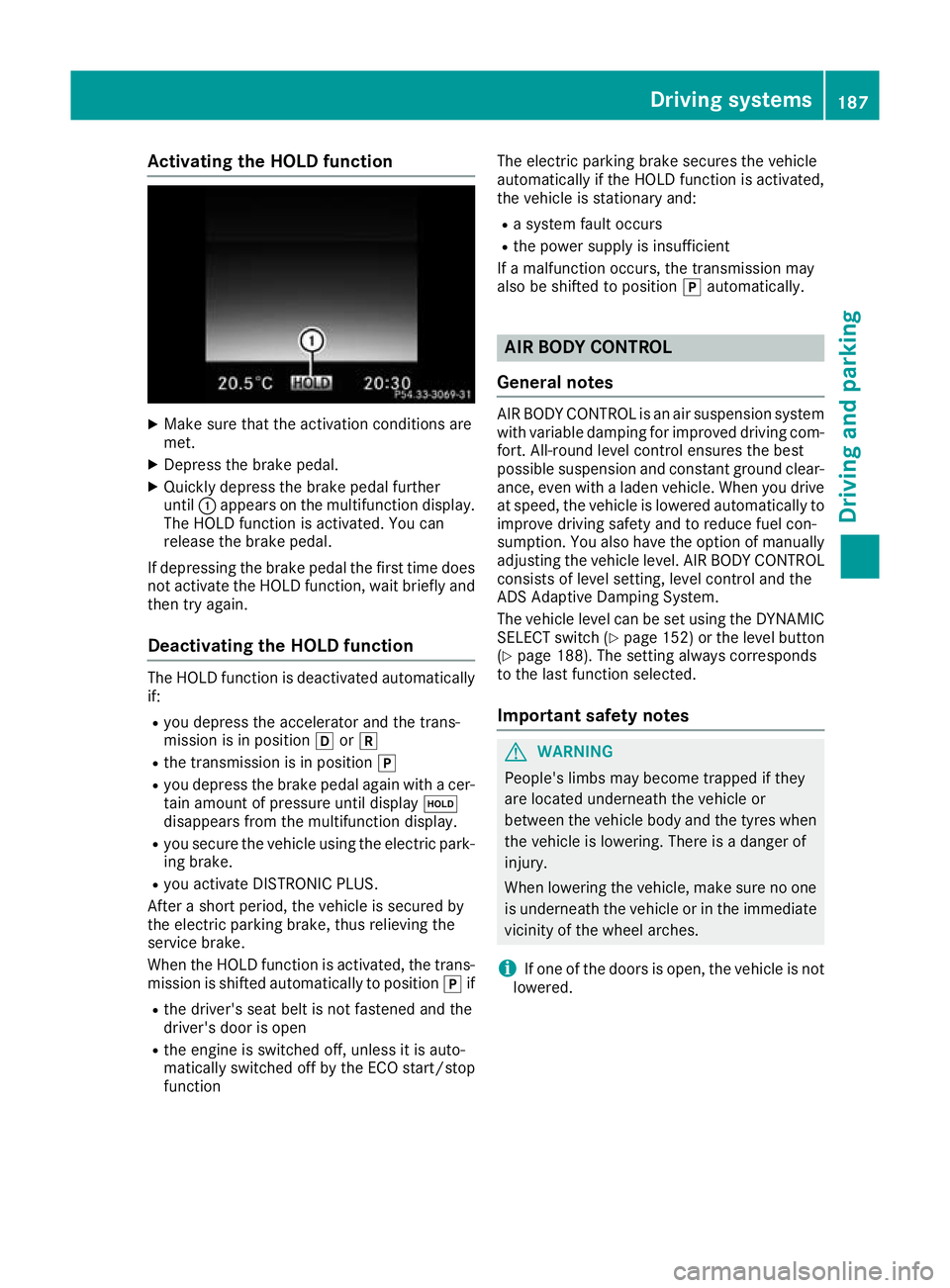
X Depress the brake pedal.
X Quickly depress the brake pedal further
until :appears on the multifunction display.
The HOLD function is activated. You can
release the brake pedal.
If depressing the brake pedal the first time does
not activate the HOLD function, wait briefly and then try again.
Deactivating the HOLD function The HOLD function is deactivated automatically
if:
R you depress the accelerator and the trans-
mission is in position hork
R the transmission is in position j
R you depress the brake pedal again with a cer-
tain amount of pressure until display ë
disappears from the multifunction display.
R you secure the vehicle using the electric park-
ing brake.
R you activate DISTRONIC PLUS.
After a short period, the vehicle is secured by
the electric parking brake, thus relieving the
service brake.
When the HOLD function is activated, the trans-
mission is shifted automatically to position jif
R the driver's seat belt is not fastened and the
driver's door is open
R the engine is switched off, unless it is auto-
matically switched off by the ECO start/stop
function The electric parking brake secures the vehicle
automatically if the HOLD function is activated,
the vehicle is stationary and:
R a system fault occurs
R the power supply is insufficient
If a malfunction occurs, the transmission may
also be shifted to position jautomatically. AIR BODY CONTROL
General notes AIR BODY CONTROL is an air suspension system
with variable damping for improved driving com-
fort. All-round level control ensures the best
possible suspension and constant ground clear- ance, even with a laden vehicle. When you driveat speed, the vehicle is lowered automatically to improve driving safety and to reduce fuel con-
sumption. You also have the option of manually
adjusting the vehicle level. AIR BODY CONTROL
consists of level setting, level control and the
ADS Adaptive Damping System.
The vehicle level can be set using the DYNAMIC SELECT switch (Y page 152) or the level button
(Y page 188). The setting always corresponds
to the last function selected.
Important safety notes G
WARNING
People's limbs may become trapped if they
are located underneath the vehicle or
between the vehicle body and the tyres when the vehicle is lowering. There is a danger of
injury.
When lowering the vehicle, make sure no one
is underneath the vehicle or in the immediate vicinity of the wheel arches.
i If one of the doors is open, the vehicle is not
lowered. Driving systems
187Driving and parking Z
Page 199 of 389
Parking
G
WARNING
If you leave the vehicle when it is only being
braked by Active Parking Assist it could roll
away if:
R there is a malfunction in the system or in
the voltage supply.
R the electrical system in the engine com-
partment, the battery or the fuses are tam-
pered with.
R the battery is disconnected.
R the vehicle is accelerated, e.g. by a vehicle
occupant.
There is a risk of an accident.
Before leaving the vehicle, always secure it
against rolling away.
i When PARKTRONIC detects obstacles,
Active Parking Assist brakes automatically
during the parking process. You are respon-
sible for braking in good time.
X Stop the vehicle when the parking symbol
shows the desired parking space in the instru-
ment cluster.
X Shift the transmission to position R.
The Start
Start Park ParkAssist?
Assist? Yes:
Yes:OK
OKNo:
No:%
message appears in the multifunction display.
X To cancel the procedure: press the%
button on the multifunction steering wheel or pull away.
or
X To park using Active Parking Assist: press
the a button on the multifunction steering
wheel.
The Park Assist active Accelerate Park Assist active Accelerate
and brake
and brake Observe surroundings
Observe surroundings mes-
sage appears in the multifunction display.
X Release the multifunction steering wheel.
X Reverse the vehicle, being ready to brake at
all times. When reversing, drive at a speed
below 10 km/h. Otherwise, Active Parking
Assist will be cancelled.
Active Parking Assist brakes the vehicle to a
standstill when the vehicle approaches the
rear border of the parking space.
Manoeuvring may be required in tight parking
spaces. The
Park
Park Assist Assist active
activeSelect D
Select D Observe
Observe
surroundings
surroundings message appears in the multi-
function display.
X Shift the transmission to position Dwhile the
vehicle is stationary.
Active Parking Assist immediately steers in
the other direction.
The Park Assist active Accelerate Park Assist active Accelerate
and brake
and brake Observe surroundings
Observe surroundings mes-
sage appears in the multifunction display.
i You will achieve the best results by waiting
for the steering procedure to complete before
pulling away.
X Drive forwards and be ready to brake at all
times.
Active Parking Assist brakes the vehicle to a
standstill when the vehicle approaches the
rear border of the parking space.
Manoeuvring may be required in tight parking
spaces.
The Park Park Assist
Assist active
activeSelect R
Select R Observe
Observe
surroundings
surroundings message appears in the multi-
function display.
As soon as the parking procedure is complete,
the Park Assist switched off
Park Assist switched off message
appears and a warning tone sounds. The vehicle
is now parked.
The vehicle is kept stationary without the driver having to depress the brake pedal. The braking
effect is cancelled when you depress the accel-
erator pedal.
Active Parking Assist no longer supports you
with steering interventions and brake applica-
tions. When Active Parking Assist is finished,
you must steer and brake again yourself.
PARKTRONIC is still available.
Parking tips:
R The way your vehicle is positioned in the park-
ing space after parking is dependent on vari-
ous factors. These include the position and
shape of the vehicles parked in front of and
behind it and the conditions of the location. It may be the case that Active Parking Assist
guides you too far into a parking space, or not
far enough into it. In some cases, it may also
lead you across or onto the kerb. If necessary,
you should cancel the parking procedure with Active Parking Assist.
R You can also preselect transmission position
D. The vehicle redirects and does not drive as
far into the parking space. Should the trans-
mission change take place too early, the park- 196
Driving systemsDriving and parking
Page 211 of 389

corresponds to the last selection activated
(standard/sensitive).
Warning on the multifunction display If fatigue or increasing lapses in concentration
are detected, a warning appears on the multi-
function display: ATTENTION ASSIST ATTENTION ASSIST Take a
Take a
break!
break!.
In addition to the message shown on the multi-
function display, you will then hear a warning
tone.
X If necessary, take a break.
X Confirm the message by pressing the a
button on the steering wheel.
On long journeys, take regular breaks that allow
for adequate recuperation. If you do not take a
break and ATTENTION ASSIST still detects
increasing lapses in concentration, you will be
warned again after 15 minutes at the earliest.
This will happen only if ATTENTION ASSIST still
detects typical indicators of fatigue or increas-
ing lapses in concentration.
Vehicles with COMAND Online multimedia
system: if a warning appears on the multifunc-
tion display, a service station search is per-
formed in the multimedia system. You can
select a service station and you will then be
navigated to this service station. This function
can be activated and deactivated in the
COMAND Online multimedia system (see Digital Owner's Manual). Traffic Sign Assist
General notes Traffic Sign Assist displays the maximum speed
permitted and overtaking restrictions to the
driver on the instrument cluster. Driving onto a section of road in the wrong direction triggers a
warning. Traffic Sign Assist detects traffic signs with multifunction camera :attached at the
top of the windscreen. The data and general
traffic regulations stored in the navigation sys-
tem are also used to determine the current
speed limit.
If a traffic sign that is relevant to your vehicle is passed, the display of the speed limits and over-
taking restrictions is updated.
The display can also be updated without a visible traffic sign in the following situations:
R The vehicle changes roads, e.g. motorway exit
or slip road
R A village or town boundary that is stored in the
digital map is passed
R The last traffic sign detected by the camera
has not been repeated
If a sign indicating the end of a restriction (speed limit or overtaking restriction) is passed, the
sign appears for five seconds. The currently
applicable traffic regulation continues to be
shown in the assistance graphic display
(Y page 239).
The camera also detects traffic signs with a
restriction indicated by an additional sign (e.g. in
wet conditions).
The traffic signs are displayed on the instrument cluster with the restrictions only in the following situations:
R The regulation must be observed with the
restriction, or
R Traffic Sign Assist is unable to determine
whether the restriction applies
If Traffic Sign Assist is unable to determine a
maximum permissible speed from any of the
available sources, no speed limit is displayed on the instrument cluster either. 208
Driving systemsDriving and parking
Page 223 of 389
This will use the braking effect of the engine, so
less braking will be required to maintain the
vehicle speed. This relieves the load on the
brake system and prevents the brakes from
overheating and wearing too quickly. If you need additional braking, depress the brake pedal
repeatedly rather than continuously.
Driving tips R
Maintain a greater distance to the vehicle in
front than when driving without a trailer.
R Avoid braking abruptly. If possible, brake gen-
tly at first to allow the trailer to run on. Then,
increase the braking force rapidly.
R The values given for gradient-climbing capa-
bilities from a standstill refer to sea level.
When driving in mountainous areas, note that
the power output of the engine, and conse-
quently the vehicle's gradient-climbing capa-
bility from a standstill, decrease with increas- ing altitude.
If the trailer swings from side to side:
X Do not accelerate under any circumstances.
X Do not countersteer.
X Brake, if necessary. Swivelling the ball coupling in/out
Important safety notes G
WARNING
If the ball coupling is not engaged, the trailer
may come loose. There is a risk of an accident.
Make sure that the ball coupling is securely
engaged and locked in position.
! Do not attempt to speed the up the swing-
out procedure by applying additional pressure
with your foot. The system could otherwise be
mechanically damaged.
In order to tow a trailer with the vehicle, you
must swivel the ball coupling out.
You can swivel the ball coupling out by means of the switch on the driver's door or the tailgate.
The trailer socket is integrated in the ball cou-
pling and swivels out with it.
Swivel the ball coupling in or out only when the
swivel range is unobstructed. Swivelling out using the switch on the
driver's door
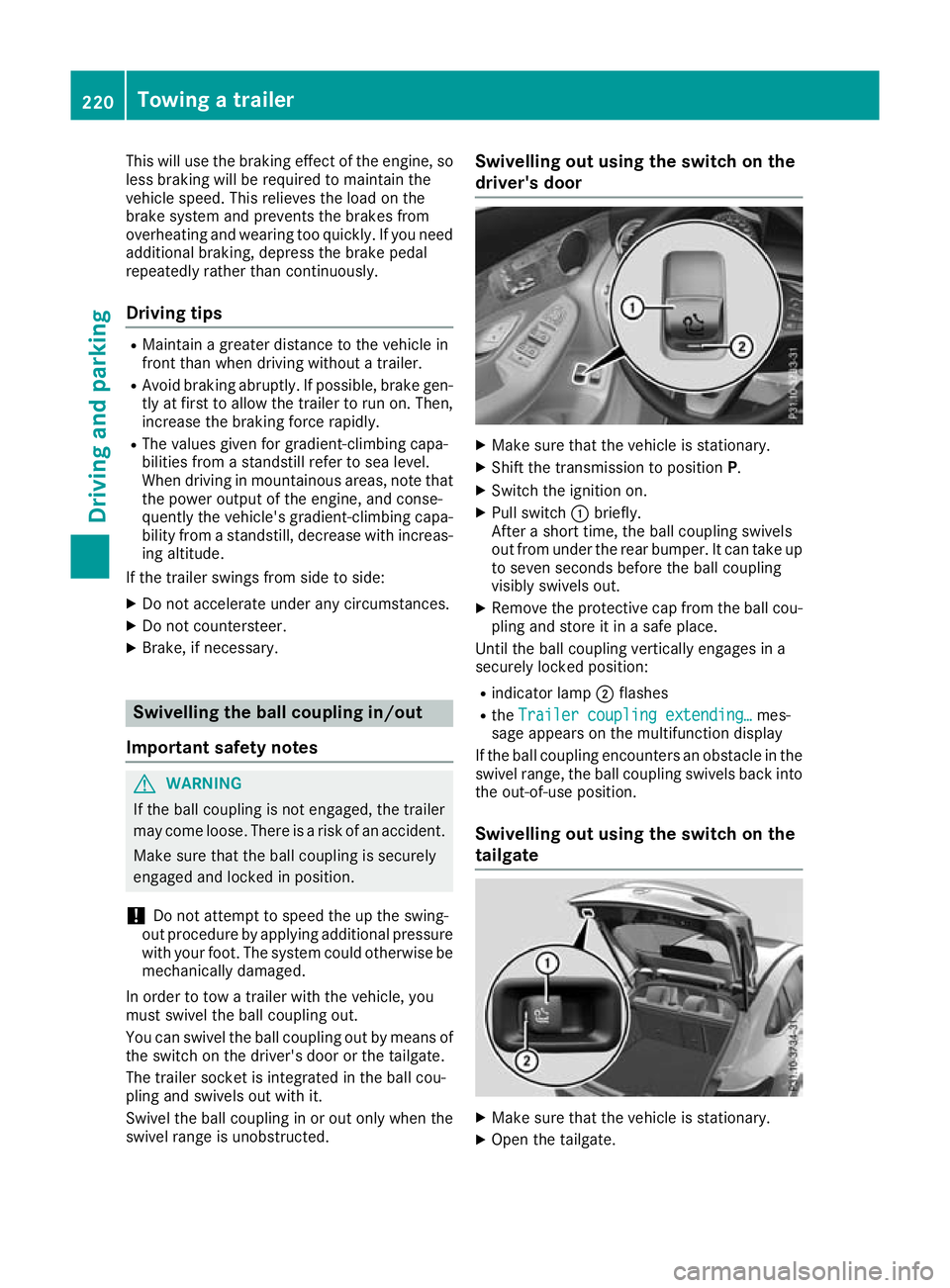
X
Make sure that the vehicle is stationary.
X Shift the transmission to position P.
X Switch the ignition on.
X Pull switch :briefly.
After a short time, the ball coupling swivels
out from under the rear bumper. It can take up to seven seconds before the ball coupling
visibly swivels out.
X Remove the protective cap from the ball cou-
pling and store it in a safe place.
Until the ball coupling vertically engages in a
securely locked position:
R indicator lamp ;flashes
R the Trailer coupling extending…
Trailer coupling extending… mes-
sage appears on the multifunction display
If the ball coupling encounters an obstacle in the
swivel range, the ball coupling swivels back into
the out-of-use position.
Swivelling out using the switch on the
tailgate X
Make sure that the vehicle is stationary.
X Open the tailgate. 220
Towing a trailerDriving and parking
Page 224 of 389
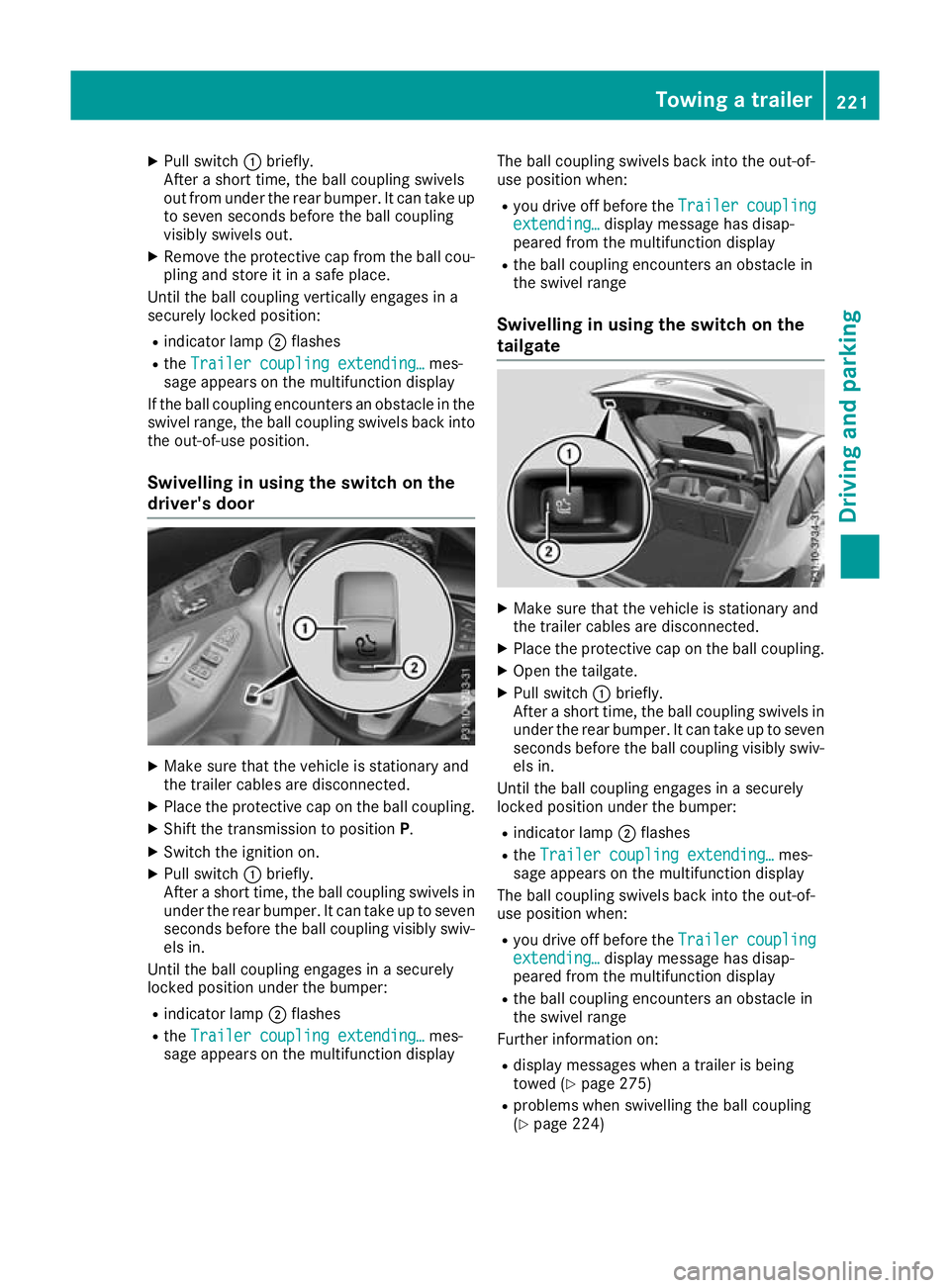
X
Pull switch :briefly.
After a short time, the ball coupling swivels
out from under the rear bumper. It can take up to seven seconds before the ball coupling
visibly swivels out.
X Remove the protective cap from the ball cou-
pling and store it in a safe place.
Until the ball coupling vertically engages in a
securely locked position:
R indicator lamp ;flashes
R the Trailer coupling extending… Trailer coupling extending… mes-
sage appears on the multifunction display
If the ball coupling encounters an obstacle in the
swivel range, the ball coupling swivels back into
the out-of-use position.
Swivelling in using the switch on the
driver's door X
Make sure that the vehicle is stationary and
the trailer cables are disconnected.
X Place the protective cap on the ball coupling.
X Shift the transmission to position P.
X Switch the ignition on.
X Pull switch :briefly.
After a short time, the ball coupling swivels in under the rear bumper. It can take up to sevenseconds before the ball coupling visibly swiv-
els in.
Until the ball coupling engages in a securely
locked position under the bumper:
R indicator lamp ;flashes
R the Trailer coupling extending… Trailer coupling extending… mes-
sage appears on the multifunction display The ball coupling swivels back into the out-of-
use position when:
R you drive off before the Trailer
Trailer coupling coupling
extending…
extending… display message has disap-
peared from the multifunction display
R the ball coupling encounters an obstacle in
the swivel range
Swivelling in using the switch on the
tailgate X
Make sure that the vehicle is stationary and
the trailer cables are disconnected.
X Place the protective cap on the ball coupling.
X Open the tailgate.
X Pull switch :briefly.
After a short time, the ball coupling swivels in under the rear bumper. It can take up to sevenseconds before the ball coupling visibly swiv-
els in.
Until the ball coupling engages in a securely
locked position under the bumper:
R indicator lamp ;flashes
R the Trailer coupling extending…
Trailer coupling extending… mes-
sage appears on the multifunction display
The ball coupling swivels back into the out-of-
use position when:
R you drive off before the Trailer Trailercoupling
coupling
extending…
extending… display message has disap-
peared from the multifunction display
R the ball coupling encounters an obstacle in
the swivel range
Further information on:
R display messages when a trailer is being
towed (Y page 275)
R problems when swivelling the ball coupling
(Y page 224) Towing a trailer
221Driving and parking Z