2016 MERCEDES-BENZ G-Class steering wheel
[x] Cancel search: steering wheelPage 188 of 302
Display messagesPossible causes/consequences andMSolutions
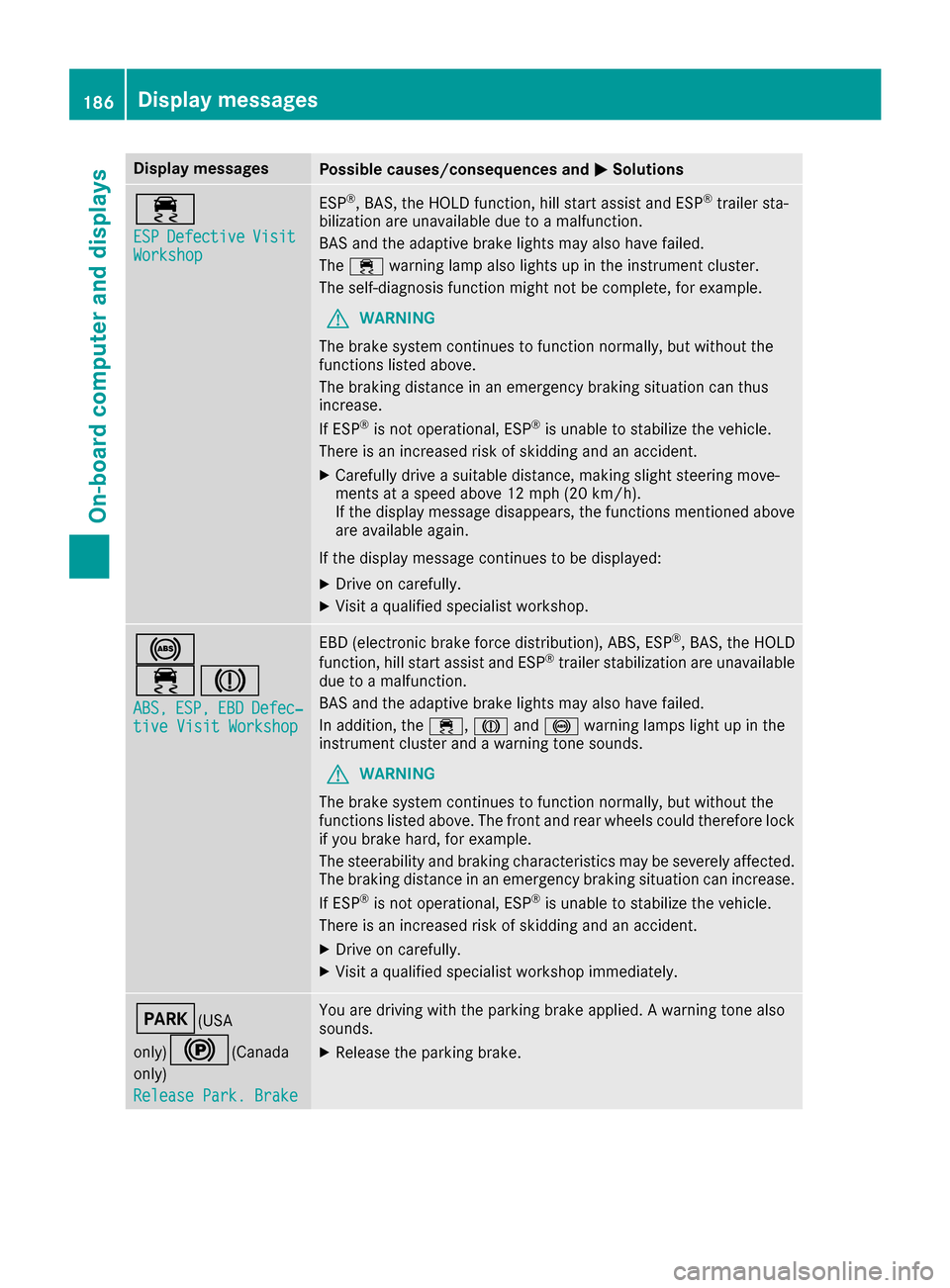
÷
ESPDefectiveVisitWorkshop
ESP®,BAS, th eHOLD function ,hill start assist and ES P®trailer sta-
bilization are unavailable due to amalfunction .
BA Sand th eadaptive brak elights may also hav efailed.
The ÷ warning lamp also lights up in th einstrumen tcluster.
The self-diagnosis function might no tbe complete, for example.
GWARNIN G
The brak esystem continues to function normally, but without th e
function slisted above.
The braking distanc ein an emergenc ybraking situation can thus
increase.
If ES P
®is no toperational, ES P®is unable to stabiliz eth evehicle.
There is an increased ris kof skiddin gand an accident.
XCarefully drive asuitable distance, making slight steering move-
ments at aspeed abov e12 mph (20 km/ h).
If the display message disappears, the functions mentioned above are available again.
If the display message continues to be displayed:
XDrive on carefully.
XVisit a qualified specialist workshop.
!
÷J
ABS,ESP,EBDDefec‐tive Visit Workshop
EBD (electronic brake force distribution), ABS, ESP®, BAS, the HOLD
function, hill start assist and ESP®trailer stabilization are unavailable
due to a malfunction.
BAS and the adaptive brake lights may also have failed.
In addition, the ÷,Jand! warning lamps light up in the
instrument cluster and a warning tone sounds.
GWARNING
The brake system continues to function normally, but without the
functions listed above. The front and rear wheels could therefore lock
if you brake hard, for example.
The steerability and braking characteristics may be severely affected.
The braking distance in an emergency braking situation can increase.
If ESP
®is not operational, ESP®is unable to stabilize the vehicle.
There is an increased risk of skidding and an accident.
XDrive on carefully.
XVisit a qualified specialist workshop immediately.
F(USA
only)
!(Canada
only)
Release Park. Brake
You are driving with the parking brake applied. A warning tone also
sounds.
XRelease the parking brake.
186Display messages
On-board computer and displays
Page 201 of 302

Display messagesPossible causes/consequences andMSolutions
Check TiresThe tire pressurein on eor mor etires has dropped significantly. The
whee lposition is displayed in th emultifunction display.
A warning tone also sounds.
GWARNIN G
Wit htire pressures whic hare to olow, there is aris kof th efollowin g
hazards :
Rthey may burst, especially as th eload and vehicl espeed increase.
Rthey may wear excessivel yand/o runevenly, whic hmay greatl y
impair tire traction .
Rthedrivin gcharacteristics ,as well as steering and braking ,may be
greatl yimpaired.
There is aris kof an accident.
XStop th evehicl ewithout making any sudden steering or braking
maneuvers .Pay attention to th etraffic condition sas you do so.
XSecur eth evehicl eagainst rollin gaway (Ypage 130).
XIf there is aflat tire, inspec tth etires (Ypage 250).
XChec kth etire pressur e (Ypage 268).
XIf necessary, correc tth etire pressure.
Warnin gTir eMal ‐functionThe tire pressur ein on eor mor etires has dropped suddenly. The whee l
position is shown in th emultifunction display.
A warning tone also sounds.
GWARNIN G
If you drive wit h aflat tire, there is aris kof th efollowin ghazards :
Raflat tire affects th eabilit yto steer or brak eth evehicle.
Ryou could lose control of th evehicle.
Rcontinued drivin gwit h a flat tire will caus eexcessive heat build-up
and possibl y afire.
There is aris kof an accident.
XStop th evehicl ewithout making any sudden steering or braking
maneuvers .Pay attention to th etraffic condition sas you do so.
XSecur eth evehicl eagainst rollin gaway (Ypage 130).
XIf there is aflat tire, inspec tth etires (Ypage 250).
Correc tTir ePres‐sur eThe tire pressur eis to olow in at least on eof th etires ,or th etire
pressur edifference between th ewheels is to ogreat.
XChec kth etire pressures at th enext opportunity (Ypage 268).
XIf necessary, correc tth etire pressure.
XRestart th etire pressur emonitor (Ypage 270).
TirePress .Sen ‐sor(s) Missin gThere is no signal from th etire pressur esensor of on eor several
wheels. The pressur eof th eaffecte dtire is no tdisplayed in th emul-
tifunction display.
XHav eth efault ytire pressur esensor replace dat aqualified special -
ist workshop .
Display messages199
On-board computer and displays
Z
Page 202 of 302

Display messagesPossible causes/consequences andMSolutions
TirePressure Moni‐tor CurrentlyUnavailable
Due to asource of radi ointerference, no signals can be received from
th ewhee lsensors. The tire pressur emonitor is temporarily malfunc -
tioning .
XDrive on .
The tire pressur emonitor restarts automatically as soo nas th e
problem has been solved.
h
Tir ePressure Warn‐ing ,Tir eMalfunc‐tio n
The tire pressur ein on eor mor etires has dropped suddenly. The whee l
position is shown in th emultifunction display.
A warning tone also sounds.
GWARNIN G
If you drive wit h aflat tire, there is aris kof th efollowin ghazards :
Raflat tire affects th eabilit yto steer or brak eth evehicle.
Ryou could lose control of th evehicle.
Rcontinued drivin gwit h a flat tire will caus eexcessive heat build-up
and possibl y afire.
There is aris kof an accident.
XStop th evehicl ewithout making any sudden steering or braking
maneuvers .Pay attention to th etraffic condition sas you do so.
XSecur eth evehicl eagainst rollin gaway (Ypage 130).
XIf there is aflat tire, inspec tth etires (Ypage 250).
h
Check Tir ePressure
The tire pressur ein on eor mor etires has dropped significantly. The
whee lposition is shown in th emultifunction display.
A warning tone also sounds.
GWARNIN G
Wit htire pressures whic hare to olow, there is aris kof th efollowin g
hazards :
Rthey may burst, especially as th eload and vehicl espeed increase.
Rthey may wear excessivel yand/o runevenly, whic hmay greatl y
impair tire traction .
Rthedrivin gcharacteristics ,as well as steering and braking ,may be
greatl yimpaired.
There is aris kof an accident.
XStop th evehicl ewithout making any sudden steering or braking
maneuvers .Pay attention to th etraffic condition sas you do so.
XSecur eth evehicl eagainst rollin gaway (Ypage 130).
XIf there is aflat tire, inspec tth etires (Ypage 250).
XChec kth etire pressur e (Ypage 268).
XIf necessary, correc tth etire pressure.
h
Correc tTir ePres‐sur e
The tire pressur eis to olow in at least on eof th etires ,or th etire
pressur edifference between th ewheels is to ogreat.
XChec kth etire pressures at th enext opportunity (Ypage 268).
XIf necessary, correc tth etire pressure.
200Display messages
On-board computer and displays
Page 208 of 302

ProblemPossible causes/consequences andMSolutions
!
The yellow ABS warning
lamp is lit while the
engine is running.ABS (Anti-lock Braking System) is deactivated due to a malfunction.
Other driving systems and driving safety systems may also be mal-
functioning.
GWARNING
The brake system continues to function normally, but without the
functions listed above. The wheels could therefore lock if you brake
hard, for example.
The steerability and braking characteristics may be severely affected.
The braking distance in an emergency braking situation can increase.
If ESP
®is not operational, ESP®is unable to stabilize the vehicle.
There is an increased risk of skidding and an accident.
XObserve the additional display messages in the multifunction dis-
play.
XDrive on carefully.
XVisit a qualified specialist workshop.
If the ABS control unit is faulty, there is also a possibility that other
systems, such as the navigation system or the automatic transmis-
sion, will not be available.
!
The yellow ABS warning
lamp is lit while the
engine is running.ABS is temporarily unavailable. BAS, ESP®, EBD (electronic brake
force distribution), the HOLD function, hill start assist, ESP®trailer
stabilization and the adaptive brake lights, for example, have also
been deactivated.
Possible causes are:
Rself-diagnosis is not yet complete.
Rthe on-board voltage may be insufficient.
GWARNING
The brake system continues to function normally, but without the
functions listed above. The wheels could therefore lock if you brake
hard, for example.
The steerability and braking characteristics may be severely affected.
The braking distance in an emergency braking situation can increase.
If ESP
®is not operational, ESP®is unable to stabilize the vehicle.
There is a risk of an accident.
XCarefully drive a suitable distance, making slight steering move-
ments at a speed above 12 mph (20 km/h).
The functions mentioned above are available again when the warn-
ing lamp goes out.
If the warning lamp is still on:
XObserve the additional display messages in the multifunction dis-
play.
XDrive on carefully.
XVisit a qualified specialist workshop.
206Warning and indicator lamps in the instrument cluster
On-board computer and displays
Page 216 of 302
Useful information
i
This Operator's Manual describes all models
and all standard and optional equipment of
your vehicle available at the time of publica-
tion of the Operator's Manual. Country-spe-
cific differences are possible. Please note
that your vehicle may not be equipped with all
features described. This also applies to
safety-related systems and functions.
iRead the information on qualified specialist
workshops: (Ypage 23).
Loading guidelines
GWARNING
If objects, luggage or loads are not secured or
not secured sufficiently, they could slip, tip
over or be flung around and thereby hit vehicle
occupants. There is a risk of injury, particu-
larly in the event of sudden braking or a sud-
den change in direction.
Always store objects so that they cannot be
flung around. Secure objects, luggage or
loads against slipping or tipping before the
journey.
GWARNING
If you distribute the load unevenly in the vehi- cle, the handling as well as the steering and
braking characteristics are severely affected.
There is a risk of an accident.
Distribute the load evenly in the vehicle.
Secure the load to prevent it from slipping.
GWARNING
The exhaust tail pipe and tail pipe trim can
become very hot. If you come into contact
with these parts of the vehicle, you could burn
yourself. There is a risk of injury.
Always be particularly careful around the
exhaust tail pipe and the tail pipe trim. Allow
these components to cool down before touch-
ing them.
GWARNING
Combustion engines emit poisonous exhaust
gases such as carbon monoxide. If the rear
door is open when the engine is running, par-
ticularly if the vehicle is moving, exhaust
fumes could enter the passenger compart-
ment. There is a risk of poisoning.
Turn off the engine before opening the rear
door. Never drive with the rear door open.
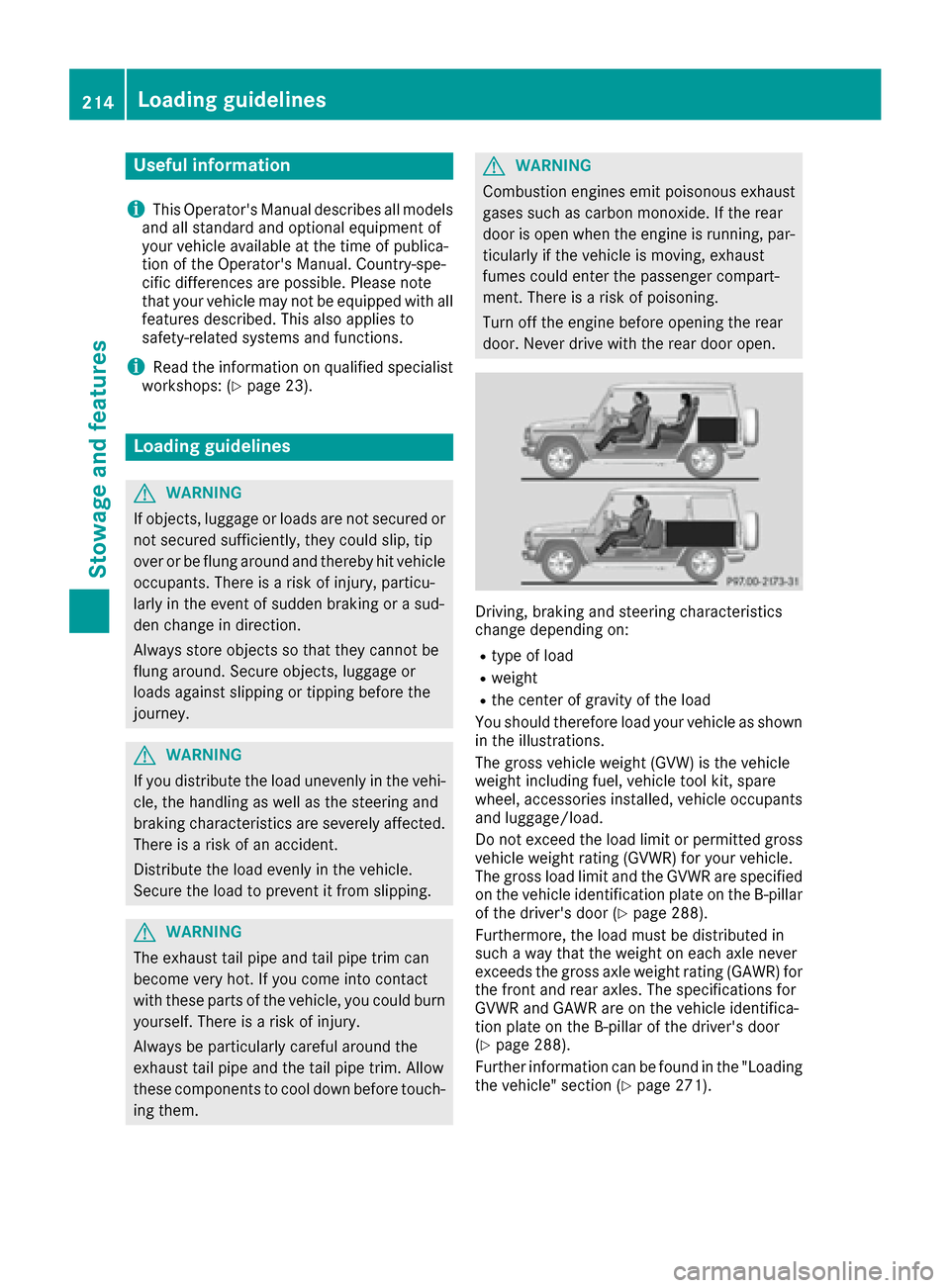
Driving, braking and steering characteristics
change depending on:
Rtype of load
Rweight
Rthe center of gravity of the load
You should therefore load your vehicle as shown
in the illustrations.
The gross vehicle weight (GVW) is the vehicle
weight including fuel, vehicle tool kit, spare
wheel, accessories installed, vehicle occupants
and luggage/load.
Do not exceed the load limit or permitted gross
vehicle weight rating (GVWR) for your vehicle.
The gross load limit and the GVWR are specified
on the vehicle identification plate on the B-pillar
of the driver's door (
Ypage 288).
Furthermore, the load must be distributed in
such a way that the weight on each axle never
exceeds the gross axle weight rating (GAWR) for
the front and rear axles. The specifications for
GVWR and GAWR are on the vehicle identifica-
tion plate on the B-pillar of the driver's door
(
Ypage 288).
Further information can be found in the "Loading
the vehicle" section (
Ypage 271).
214Loading guidelines
Stowage and features
Page 227 of 302
The mbrace system is available if:
Rit has been activated and is operational. Acti-vation requires an available mobile phone net-
work, a valid SIM card and a subscription to a
security service.
Rthe battery is sufficiently charged.
Rthe corresponding mobile phone network is
available for transmitting data to the Cus-
tomer Center.
iDetermining the location of the vehicle on a
map is only possible if there is sufficient GPS
reception and the vehicle position can be for-
warded to the Customer Center.
The mbrace system
To adjust the volume during an mbrace call, pro-
ceed as follows:
XPress the WorX button on the multi-
function steering wheel.
or
XUse the COMAND volume control.
The mbrace system provides three different
services:
RAutomatic and manual emergency call
RRoadside Assistance call
RMB Info call
USA only: you can find more information and a
description of all available features under "Own-
ers Online" at http://www.mbusa.com.
System self-test
GWARNING
A malfunction in the system has been detec-
ted if one of the following conditions occurs:
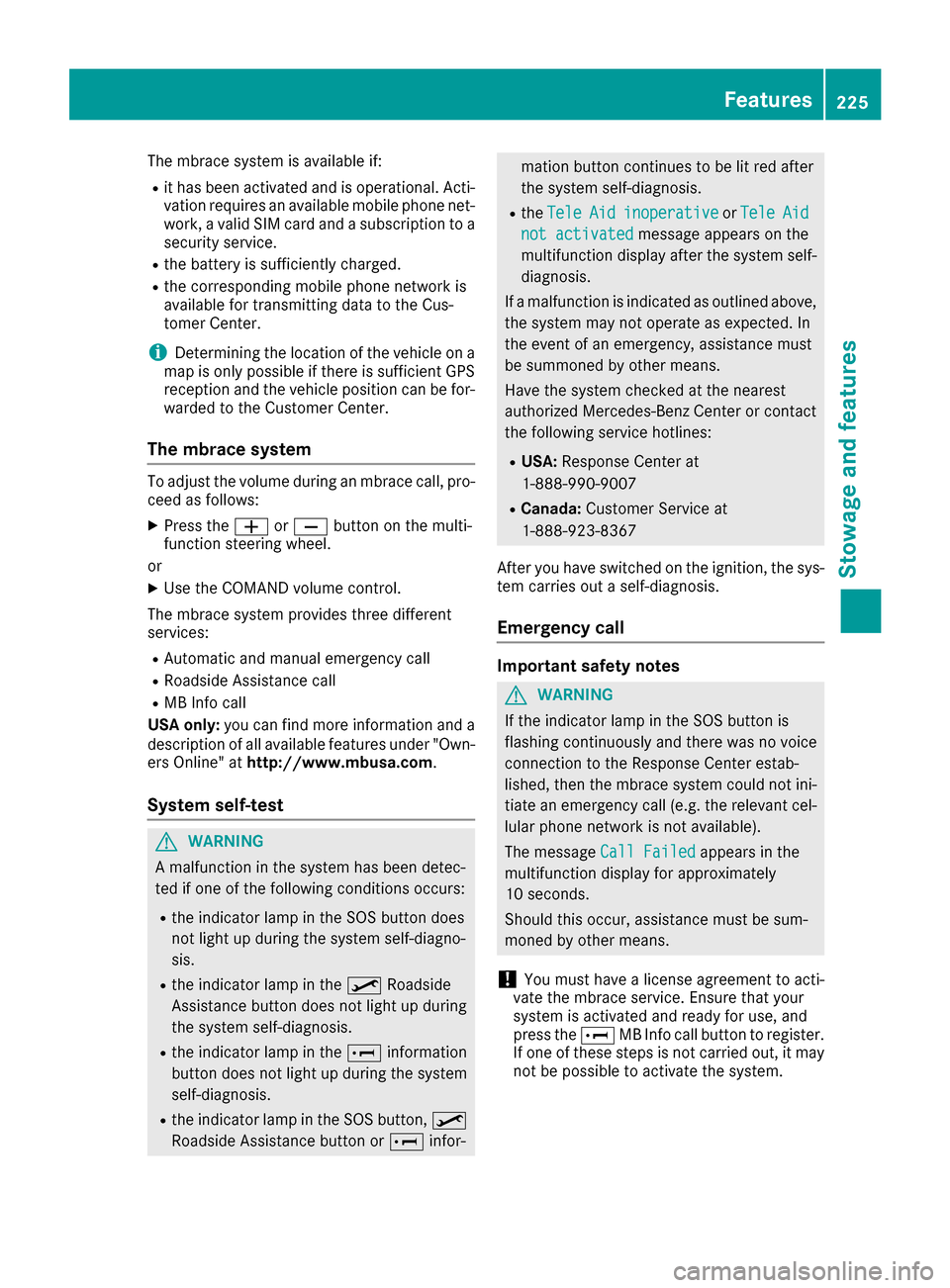
Rthe indicator lamp in the SOS button does
not light up during the system self-diagno-
sis.
Rthe indicator lamp in the ºRoadside
Assistance button does not light up during
the system self-diagnosis.
Rthe indicator lamp in the Einformation
button does not light up during the system
self-diagnosis.
Rthe indicator lamp in the SOS button, º
Roadside Assistance button or Einfor-
mation button continues to be lit red after
the system self-diagnosis.
RtheTeleAidinoperativeorTeleAid
not activatedmessage appears on the
multifunction display after the system self-
diagnosis.
If a malfunction is indicated as outlined above,
the system may not operate as expected. In
the event of an emergency, assistance must
be summoned by other means.
Have the system checked at the nearest
authorized Mercedes-Benz Center or contact
the following service hotlines:
RUSA: Response Center at
1-888-990-9007
RCanada: Customer Service at
1-888-923-8367
After you have switched on the ignition, the sys- tem carries out a self-diagnosis.
Emergency call
Important safety notes
GWARNING
If the indicator lamp in the SOS button is
flashing continuously and there was no voice
connection to the Response Center estab-
lished, then the mbrace system could not ini- tiate an emergency call (e.g. the relevant cel-
lular phone network is not available).
The message Call Failed
appears in the
multifunction display for approximately
10 seconds.
Should this occur, assistance must be sum-
moned by other means.
!You must have a license agreement to acti-
vate the mbrace service. Ensure that your
system is activated and ready for use, and
press the EMB Info call button to register.
If one of these steps is not carried out, it may
not be possible to activate the system.
Features225
Stowage and features
Z
Page 229 of 302
If a connection can be made, theCall Con‐nectedmessage appears in the multifunction
display.
If a mobile phone network is available and there
is sufficient GPS reception, the mbrace system
transmits data to the Response Center, for
example:
Rcurrent location of the vehicle
Rvehicle identification number
Rvehicle model
Rvehicle color
iThe COMAND display shows that an mbrace
call is active. You can change to the naviga-
tion menu by pressing the NAVI button on
COMAND during the call. Voice output is not
available.
A voice connection is established between the
Mercedes-Benz Roadside Assistance Represen- tative and the vehicle occupants.
The Mercedes-Benz Roadside Assistance Rep-
resentative either sends a qualified Mercedes-
Benz technician or makes arrangements for
your vehicle to be transported to the nearest
authorized Mercedes-Benz Center. You may be
charged for services such as repair work and/or
towing. Further details are available in your
mbrace manual.
XDescribe the type of assistance needed.
iIf the indicator lamp in Roadside Assistance
button :is flashing continuously and no
voice connection with the Response center
has been established, then the mbrace sys-
tem has not been able to initiate a Roadside
Assistance call (e.g. the relevant mobile
phone network is not available). The Call
Failedmessage appears in the multifunction
display.
XTo end a call: press the~button on the
multifunction steering wheel.
or
XPress the corresponding COMAND button to
end a phone call.
iSign and drive services1: you are not
charged for services such as jump-starting,
providing a few gallons of fuel for a fuel tank
that has been run dry or changing a faulty tire
with the vehicle's own spare wheel.
MB Info call button
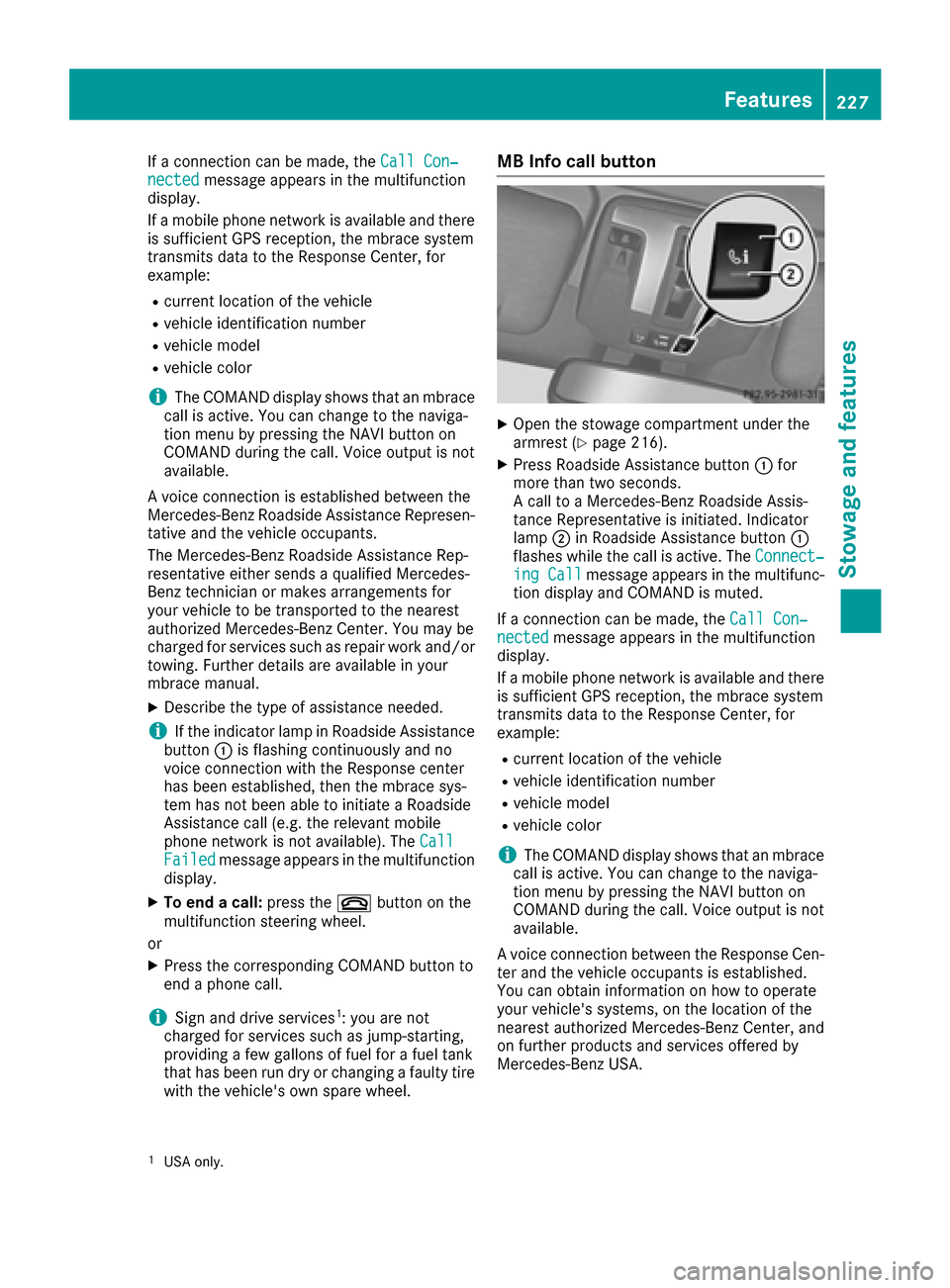
XOpen the stowage compartment under the
armrest (Ypage 216).
XPress Roadside Assistance button :for
more than two seconds.
A call to a Mercedes-Benz Roadside Assis-
tance Representative is initiated. Indicator
lamp ;in Roadside Assistance button :
flashes while the call is active. The Connect‐
ing Callmessage appears in the multifunc-
tion display and COMAND is muted.
If a connection can be made, the Call Con‐
nectedmessage appears in the multifunction
display.
If a mobile phone network is available and there
is sufficient GPS reception, the mbrace system
transmits data to the Response Center, for
example:
Rcurrent location of the vehicle
Rvehicle identification number
Rvehicle model
Rvehicle color
iThe COMAND display shows that an mbrace
call is active. You can change to the naviga-
tion menu by pressing the NAVI button on
COMAND during the call. Voice output is not
available.
A voice connection between the Response Cen- ter and the vehicle occupants is established.
You can obtain information on how to operate
your vehicle's systems, on the location of the
nearest authorized Mercedes-Benz Center, and
on further products and services offered by
Mercedes-Benz USA.
1USA only.
Features227
Stowage and features
Z
Page 230 of 302
You can find further information on the mbrace
system athttp://www.mbusa.com2Log in
under "Owners Online".
iIf the indicator lamp in MB Info call but-
ton :is flashing continuously and no voice
connection with the Response center has
been established, then the mbrace system
has not been able to initiate an MB Info call
(e.g. the relevant mobile phone network is not
available). The Call Failed
message
appears in the multifunction display.
XTo end a call: press the~button on the
multifunction steering wheel.
or
XPress the corresponding COMAND button to
end a phone call.
Call priority
When service calls are active, e.g. Roadside
Assistance or MB Info calls, an emergency call
can still be initiated. In this case, an emergency
call will take priority and override all other active
calls.
The indicator lamp of the respective button
flashes until the call is ended. An emergency call
can only be terminated by the Response Center.
All other calls can be ended by pressing the
~ button on the multifunction steering wheel
or the corresponding COMAND button for end-
ing a telephone call.
iWhen an mbrace call is initiated, COMAND
is muted. The mobile phone is no longer con-
nected to COMAND.
However, if you want to use your mobile
phone, do so only when the vehicle is station-
ary and in a safe location.
Downloading destinations in COMAND
Destination Download gives you access to a
database with over ten million points of interest
(POIs) which can be downloaded onto the navi-
gation system of your vehicle. If you know the
destination, you can download the address or
obtain the location of points of interest (POIs) or
important destinations in the surrounding area. You are prompted to confirm route guidance to
the address entered.
iFor information on the components and
operating principles of COMAND, (see the
separate operating instructions).
XSelect Yesusing the =or; buttons on
COMAND.
XConfirm using the 9button on COMAND.
The system calculates the route and subse-
quently starts the route guidance with the
address entered.
iIf you select No, the address can be stored in
the address book.
iThe Destination Download function is avail-
able if the corresponding mobile phone net-
work is available and data transfer is possible.
Search & Send
"Search & Send" is a destination entry service.
For more information on "Search & Send", see
the separate operating instructions.
Vehicle remote opening
If you have unintentionally locked your vehicle
(e.g. the SmartKey is inside the vehicle) and a
replacement key is not available:
XContact the following service hotlines:
RUSA: Response Center at
1-888-990-9007
RCanada: Customer Service at
1-888-923-8367
You will be asked for your password.
XReturn to your vehicle at the time arranged
with the Response Center.
XPress the release button on the door handle of
the rear door for at least 20 seconds until the
indicator lamp in the SOS button (
Ypage 225)
flashes.
The Connecting Call
message appears on
the multifunction display.
Alternatively, the vehicle can be opened via the
Internet in the "Owner's Online" section using
your identification number and password
3.
2USA only.3USA only.
228Features
Stowage and features