2016 MERCEDES-BENZ G-Class steering wheel
[x] Cancel search: steering wheelPage 133 of 302
Do not switch off the ignition while driving.
Switching off the engine
Important safety notes
GWARNING
If you switch off the ignition while driving,
safety-relevant functions are only available
with limitations, or not at all. This could affect, for example, the power steering and the brake
boosting effect. You will require considerably
more effort to steer and brake. There is a risk
of an accident.
Do not switch off the ignition while driving.
GWARNING
The automatic transmission switches to neu-
tral position Nwhen you switch off the engine.
The vehicle may roll away. There is a risk of an
accident.
After switching off the engine, always switch
to parking position P. Prevent the parked vehi-
cle from rolling away by applying the parking
brake.
Vehicles with automatic transmission
XShift the transmission to position P.
XTurn the SmartKey to position 0in the ignition
lock and remove it (Ypage 112).
The immobilizer is activated.
XApply the parking brake firmly.
XTurn the steering wheel until the steering
wheel lock engages.
iIf you switch off the engine using the Smart-
Key and then remove the SmartKey from the
ignition lock or open one of the front doors,
the automatic transmission automatically
shifts to park position P.
iThe SmartKey can only be removed if the
automatic transmission is in position P.
Parking brake
GWARNING
If you must brake the vehicle with the parking brake, the braking distance is considerably
longer and the wheels could lock. There is an
increased danger of skidding and accidents.
Only use the parking brake to brake the vehi-
cle when the service brake is faulty. Do not
apply the parking brake too firmly. If the
wheels lock, release the parking brake until
the wheels begin turning again.
GWARNING
If you leave children unsupervised in the vehi-
cle, they could set it in motion by, for example:
Rrelease the parking brake.
Rshift the automatic transmission out of the
parking position P.
Rstart the engine.
In addition, they may operate vehicle equip-
ment and become trapped. There is a risk of
an accident and injury.
When leaving the vehicle, always take the
SmartKey with you and lock the vehicle. Never
leave children unsupervised in the vehicle.
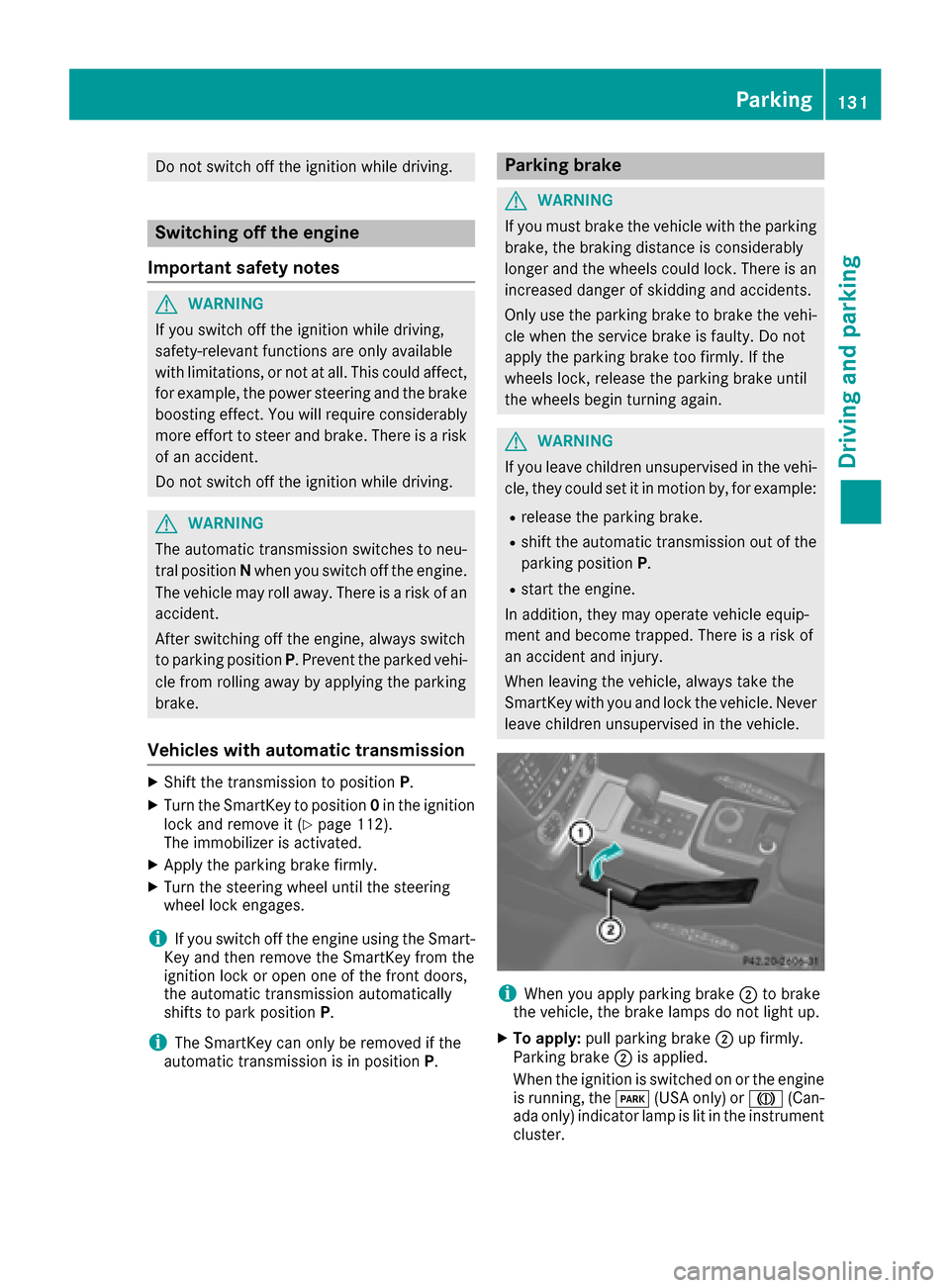
iWhen you apply parking brake ;to brake
the vehicle, the brake lamps do not light up.
XTo apply: pull parking brake ;up firmly.
Parking brake ;is applied.
When the ignition is switched on or the engine
is running, the F(USA only) or J(Can-
ada only) indicator lamp is lit in the instrument
cluster.
Parking131
Driving an d parking
Z
Page 139 of 302

GWARNING
If you activate the LOW off-road gear while
driving on a slippery road surface, the wheels
may lose traction:
Rif you remove your foot from the accelera-
tor pedal when driving
Rif off road ABS intervenes when braking
If the wheels lose traction. the vehicle can no
longer be steered. There is an increased dan- ger of skidding and accidents.
Never activate the LOW off-road gear while
driving on a slippery road surface.
Drive particularly carefully on slippery road sur-
faces. Avoid sudden acceleration, steering and
braking maneuvers. Do not use cruise control.
If the vehicle threatens to skid or cannot be
stopped when moving at low speed:
XShift the transmission to position N.
XTry to bring the vehicle under control using
corrective steering.
The outside temperature indicator is not
designed to serve as an ice-warning device and
is therefore unsuitable for that purpose.
Changes in the outside temperature are dis-
played after a short delay.
Indicated temperatures just above the freezing
point do not guarantee that the road surface is
free of ice. The road may still be icy, especially in
wooded areas or on bridges. You should pay
special attention to road conditions when tem-
peratures are around the freezing point.
For more information on driving with snow
chains, see (
Ypage 264).
Off-road driving
Important safety notes
GWARNING
Do not load items on the basic carrier bars. It
may cause instability during some maneuvers
which could result in an accident.
Drive slowly in unknown terrain. This will
make it easier to recognize unexpected obsta-
cles and avoid damage to the vehicle.
To help avoid the vehicle rolling over, never
turn it around on steep inclines. If the vehicle cannot complete the attempted climb, back it
down in reverse gear.
Do not drive along the side of a slope. The
vehicle might otherwise rollover. If in doing so
the vehicle begins to show a tendency to roll,immediately steer into a line of gravity
(straight up or downhill).
Never let the vehicle roll backwards in idle.
You may lose control of the vehicle if you use
only the service brake. For information on
driving downhill, see "Driving downhill".
When driving off-road, sand, mud and water,
possibly mixed with oil, for example, could get
into the brakes. This could result in a reduced
braking effect or in total brake failure and also in
increased wear and tear. The braking charac-
teristics change depending on the material
ingressing the brakes. Clean the brakes after
driving off-road. If you detect a reduced braking
effect or grinding noises, have the brake system checked in a qualified specialist workshop as
soon as possible. Adapt your driving style to the
different braking characteristics.
Driving off-road increases the likelihood of dam-
age to the vehicle, which, in turn, can lead to
failure of the mechanical assembly or systems.
Adapt your driving style to suit the terrain con-
ditions. Drive carefully. Have damage to the
vehicle rectified immediately at a qualified spe-
cialist workshop.
General notes
HEnvironmental note
Protection of the environment is of primary
importance. Treat nature with respect.
Observe all prohibiting signs.
Read this section carefully before driving your
vehicle off-road. Practice by driving over more
gentle off-road terrain first.
Familiarize yourself with the characteristics of
your vehicle and the gear shift operation before driving through difficult terrain.
Driving tips137
Driving and parking
Z
Page 141 of 302

XReplacedente dor damaged wheels.
XCarr y asoun dspar ewheel.
Checklist after driving off-road
Drivin gove rroug hterrain places greate r
demand son your vehicl ethan driving on normal
roads. Afte rdriving off-road, chec kth evehicle.
This allows you to detec tdamag epromptly and
reduce th eris kof an acciden tto yourself and
other road users.
XShift th etransfer cas eto HIG H
RANGE (Ypage 162).
XDisengage th edifferential locks
(Ypage 166).
XClean th eheadlamps and rear lights and
chec kfor damage.
XClean th efron tand rear license plates.
XClean th ewheels and tires wit h awater je t
and remove any foreign objects .
XClean thewheels, tires ,whee lhousing sand
th evehicl eunderside wit h awater jet; chec k
for any foreign objects and damage.
XChec kwhether twigs or other part sof plants
hav ebecome trapped .These increas eth eris k
of fir eand can damag efuel pipes ,brak e
hoses or th erubber bellows of th eaxl ejoint s
and propelle rshafts .
XAfterth etrip, examin ewithout fail th eentire
undercarriage, wheels, tires ,brakes, body-
wor kstructure, steering ,chassi sand exhaust
system for damage.
XAfte rdriving for extended periods across
sand, mud, gravel, water or in similarl ydirt y
conditions, hav eth ebrak ediscs, wheels,
brak epads/lining sand axl ejoint schecke d
and clea
ned.
XIf you notice stron
gvibration safter off-road
driving ,chec kfor foreign objects in th e
wheels and driv etrain and ,if necessary,
remove them.
Foreign objects can disturb th ebalance and
caus evibrations.
XTes tth ebrakes.
Driving on sand
Observ eth efollowin grule swhen driving on
sand:
RShift th etransfer cas eto LOW
RANGE (Ypage 162).
RAvoid high engin espeeds.
RLimit th eshif trange of th eautomatic trans -
mission according to th eoff-road conditions.
RDrive quickly to overcome th erollin gresist -
ance. Otherwise th evehicle's wheels could
become stuck in loos eground .
RDrive in th etrack sof other vehicles if possi-
ble. When doin gso, mak esur ethat:
-th etire rut sare no tto odeep .
-thesan dis sufficientl yfirm.
-your vehicl ehas sufficien tground clear-
anc e
Tire ruts and gravel roads
!Chec kthat th erut sare no tto odeep and
that your vehicl ehas sufficien tclearance .
Otherwise, your vehicl ecould be damaged or
botto mout and get stuck .
Observ eth efollowin grule swhen driving alon g
rut sin off-road terrain or on road swit hloos e
gravel:
RShift th etransfer cas eto LOW
RANGE (Ypage 162).
RAvoid high engin espeeds.
RObserv eth esafet ynote s (Ypage 137) and
th egeneral note s (Ypage 137) on off-road
driving .
RRestric tth eshif trange of th eautomatic
transmission to 1(Ypage 123).
RDrive slowly.
RWhererut sare to odeep ,driv ewit hth e
wheels of on eside on th ecenter grassy area,
if possible.
Driving over obstacles
!Obstacles could damag eth efloor of th e
vehicl eor component sof th echassis. As k
passenger sfor guidance when driving ove r
larg eobstacles. The passenger should always
keep asaf edistanc efrom th evehicl ewhen
doin gso in order to avoi dinjury as aresult of
unexpecte dvehicl emovements. Afte rdriving
off-road or ove robstacles, chec kth evehicl e
Driving tips139
Driving and parking
Z
Page 174 of 302

Operating the on-board computer
Overview
:Multifunction display
;Switches on the Voice Control System (see
the separate operating instructions)
=Right control panel
?Left control panel
ABack button
XTo activate the on-board computer: turn
the SmartKey to position 1in the ignition lock
(
Ypage 112).
You can control the multifunction display and
the settings in the on-board computer using the
buttons on the multifunction steering wheel.
Left control panel
=
;RCalls up the menu and menu bar
9
:Press briefly:
RScrolls in lists
RSelects a submenu or function
RIn the Audiomenu: selects a
stored station, an audio track or a
video scene
RIn the Tel(telephone) menu:
switches to the phone book and
selects a name or telephone num-
ber
9
:Press and hold:
RIn the Audiomenu: selects the
previous/next station or selects
an audio track or a video scene
using rapid scrolling
RIn the Tel(telephone) menu:
starts rapid scrolling if the phone
book is open
aRConfirms a selection/display mes-
sage
RIn the Tel(telephone) menu:
switches to the telephone book
and starts dialing the selected
number
RIn the Audiomenu: stops the sta-
tion search function at the desired
station
Right control panel
~RRejects or ends a call
RExits phone book/redial memory
6RMakes or accepts a call
RSwitches to the redial memory
W
XRAdjusts the volume
8RMute
Back button
%Press briefly:
RBack
RSwitches off the Voice Control
System (see the separate operat-
ing instructions)
RHides display messages/calls up
the last Tripmenu function used
RExits the telephone book/redial
memory
%Press and hold:
RCalls up the standard display in the
Tripmenu
172Displays and operation
On-board computer and displays
Page 175 of 302

Multifunction display
:Transmission position (Ypage 121)
;Drive program (Ypage 122)
=Text field
?Menu bar
AOutside temperature or speed
(Ypage 179)
BTime
CTransfer case position (Ypage 162)
XTo show menu bar?:press the =
or ; button on the steering wheel.
Menu bar ?disappears after a few seconds.
Text field =shows the selected menu or sub-
menu as well as display messages.
For further information on displaying the trans-
mission position, see (
Ypage 119).
iYou can set the time using COMAND (see
the separate operating instructions).
The following messages may appear in the mul-
tifunction display:
Z Shift recommendation (
Ypage 124)
¯ Cruise control (
Ypage 141)
LIM
SPEEDTRONIC (Ypage 145)
è ECO start/stop function
(
Ypage 114)
LOW
RANGELOW RANGE off-road gear
(Ypage 162)
ë HOLD function (
Ypage 157)
Menus and submenus
Menu overview
Press the=or; button on the steering
wheel to call up the menu bar and select a menu.
Operating the on-board computer (
Ypage 172).
Depending on the equipment installed in the
vehicle, you can call up the following menus:
RTripmenu (Ypage 173)
RNavimenu (navigation instructions)
(Ypage 174)
RAudiomenu (Ypage 176)
RTelmenu (telephone) (Ypage 177)
RDriveAssistmenu (assistance)
(Ypage 178)
RServmenu (Ypage 178)
RSettmenu (settings) (Ypage 178)
RAMGmenu in AMG vehicles (Ypage 182)
Trip menu
Standard display
XPress and hold the %button on the steer-
ing wheel until the Tripmenu with trip odom-
eter :and odometer ;is shown.
Trip computer "From start" or "From
reset"
Example: trip computer "From Start"
:
Distance
;Time
Menus and submenus173
On-board computer and displays
Z
Page 176 of 302

=Average speed
?Average fuel consumption
XPress the=or; button on the steering
wheel to select the Tripmenu.
XPress9or: to select From Startor
From Reset.
The values in the From
Startsubmenu are cal-
culated from the start of a journey whilst the
values in the From Reset
submenu are calcu-
lated from the last time the submenu was reset
(
Ypage 174).
The From Start
trip computer is automatically
reset when:
Rthe ignition has been switched off for more
than four hours.
R999 hours have been exceeded.
R9,999 miles have been exceeded.
The From Reset
trip computer is automatically
reset if the value exceeds 9999 hours or
99,999 miles.
Range
:Approximate range
XPress the =or; button on the steering
wheel to select the Tripmenu.
XPress9or: to select the approximate
range.
The approximate range that can be covered
depends on the fuel level and your current driv-
ing style. If there is only a small amount of fuel
left in the fuel tank, the display shows a vehicle
being refueled Cinstead of the range.
Digital speedometer
:Digital speedometer
XPress the =or; button on the steering
wheel to select the Tripmenu.
XPress the9or: button to select the
digital speedometer.
Resetting values
Example: resetting the trip computer "From Start"
XPress the =or; button on the steering
wheel to select the Tripmenu.
XPress the9or: button to select the
function that you wish to reset.
XPress the abutton.
XPress the :button to select Yesand press
the a button to confirm.
You can reset the values of the following func-
tions:
RTrip odometer
R"From Start" trip computer
R"From Reset" trip computer
Navigation system menu
Displaying navigation instructions
In the Navimenu, the multifunction display
shows navigation instructions.
For further information, see the separate oper-
ating instructions.
174Menus and submenus
On-board computer and displays
Page 177 of 302
XSwitch on COMAND (see the separate oper-
ating instructions).
XPress the=or; button on the steering
wheel to select the Navimenu.
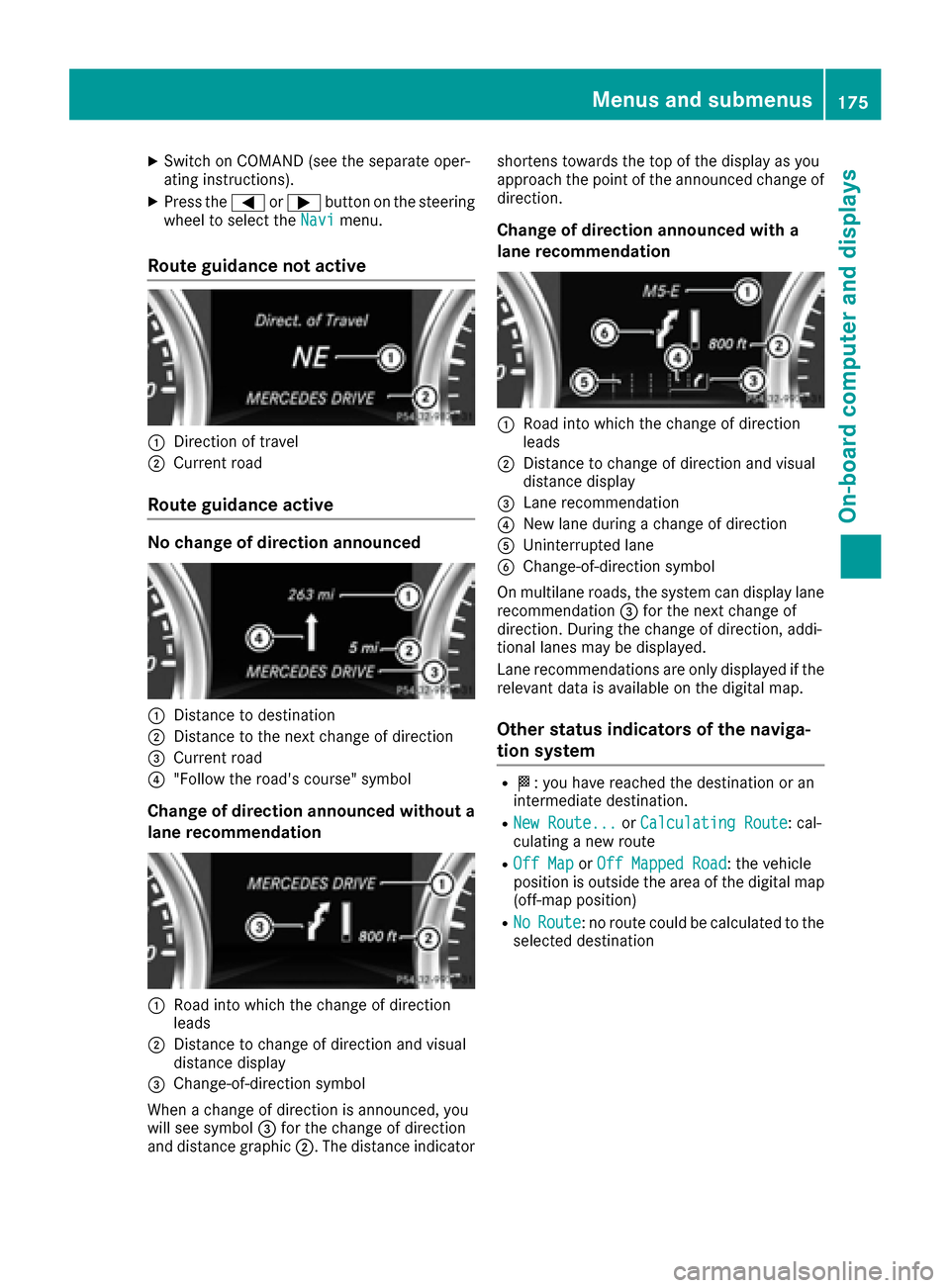
Route guidance not active
:Direction of travel
;Current road
Route guidance active
No change of direction announced
:Distance to destination
;Distance to the next change of direction
=Current road
?"Follow the road's course" symbol
Change of direction announced without a
lane recommendation
:Road into which the change of direction
leads
;Distance to change of direction and visual
distance display
=Change-of-direction symbol
When a change of direction is announced, you
will see symbol =for the change of direction
and distance graphic ;. The distance indicator shortens towards the top of the display as you
approach the point of the announced change of
direction.
Change of direction announced with a
lane recommendation
:Road into which the change of direction
leads
;Distance to change of direction and visual
distance display
=Lane recommendation
?New lane during a change of direction
AUninterrupted lane
BChange-of-direction symbol
On multilane roads, the system can display lane recommendation =for the next change of
direction. During the change of direction, addi-
tional lanes may be displayed.
Lane recommendations are only displayed if the
relevant data is available on the digital map.
Other status indicators of the naviga-
tion system
RO: you have reached the destination or an
intermediate destination.
RNew Route...or Calculating Route: cal-
culating a new route
ROff Mapor Off Mapped Road: the vehicle
position is outside the area of the digital map
(off-map position)
RNoRoute: no route could be calculated to the
selected destination
Menus and submenus175
On-board computer and displays
Z
Page 179 of 302

XTo select the next/previous scene:briefly
press the 9or: button.
XTo select a scene from the scene list
(rapid scrolling): press and hold the 9
or : button until desired scene ;has
been reached.
Telephone menu
Introduction
GWARNING
If you operate information systems and com-
munication equipment integrated in the vehi-
cle while driving, you will be distracted from
traffic conditions. You could also lose control
of the vehicle. There is a risk of an accident.
Only operate the equipment when the traffic
situation permits. If you are not sure that this
is possible, park the vehicle paying attention
to traffic conditions and operate the equip-
ment when the vehicle is stationary.
When telephoning, you must observe the legal
requirements for the country in which you are
currently driving.
XSwitch on the mobile phone (see the separate
operating instructions).
XSwitch on COMAND (see the separate oper-
ating instructions).
XEstablish a Bluetooth®connection to
COMAND, see the separate operating instruc-
tions.
XPress the =or; button on the steering
wheel to select the Telmenu.
You will see one of the following display mes-
sages in the multifunction display:
RPhone READYor the name of the network
provider: the mobile phone has found a net-
work and is ready to receive.
RPhone No Service: there is no network
available or the mobile phone is searching for a network.
Accepting a call
Example: incoming call
If someone calls you when you are in the Telmenu, a display message appears in the multi-
function display.
XPress the6button on the steering wheel
to accept an incoming call.
You can accept a call even if you are not in the
Tel
menu.
Rejecting or ending a call
XPress the ~button on the steering wheel.
You can end or reject a call even if you are not in
the Tel
menu.
Dialing a number from the phone book
XPress the =or; button on the steering
wheel to select the Telmenu.
XPress the9,:ora button to
switch to the phone book.
XPress the 9or: button to select the
desired name.
or
XTo begin rapid scrolling: press and hold the
9 or: button for longer than one sec-
ond.
Rapid scrolling stops when you release the
button or reach the end of the list.
XIf only one telephone number is stored for
a name: press the 6ora button to
start dialing.
or
XIf there is more than one number for a
particular name: press the6ora
button to display the numbers.
XPress the 9or: button to select the
number you want to dial.
XPress the 6ora button to start dialing.
Menus and submenus177
On-board computer and displays
Z