2016 MERCEDES-BENZ G-Class interior lights
[x] Cancel search: interior lightsPage 8 of 302

Notes .............................................294
Temperature (on-board com-
puter) ............................................. 182
Temperature gauge ........................ 171
Warning lamp ................................. 210
Cooling
see Climate control
Copyright ............................................. 25
Cruise control
Cruise control lever ....................... 141
Display message ............................ 198
Driving system ............................... 141
Function/notes .............................1 41
Resuming the stored speed ........... 142
Selecting ........................................ 142
Storing and maintaining current
speed ............................................. 142
Cup holder
Center console .............................. 220
Important safety notes .................. 220
Rear compartment ......................... 220
Customer Assistance Center
(CAC) ..................................................... 23
Customer Relations Department ....... 23
D
Data
see Technical data
Daytime running lamps
Display message ............................ 191
Switching on/off (on-board com-
puter) ............................................. 179
Switching on/off (switch) ................ 85
Declarations of conformity ................. 23
Delayed switch-off
Exterior lighting (on-board com-
puter) ............................................. 179
Interior lighting .............................. 180
Differential locks
Disengaging ................................... 166
Engaging ........................................ 165
Front axle ...................................... 166
General notes ................................ 164
Rear axle ........................................ 166
Terrain ...........................................1 64
Transfer case ................................. 165
Digital speedometer ......................... 174 Display (cleaning instructions)
........245
Display messages
Calling up (on-board computer) ..... 184
Driving systems .............................1 95
Engine ............................................ 192
General notes ................................ 184
Hiding (on-board computer) ........... 184
Lights ............................................. 189
Safety systems .............................. 185
Service interval display .................. 240
SmartKey ....................................... 202
Tires ............................................... 198
Vehicle ...........................................2 01
Distance display (on-board com-
puter) ..................................................1 78
Distance recorder
see Trip odometer
Distance warning (warning lamp) .... 212
DISTRONIC PLUS
Activating ....................................... 149
Activation conditions ..................... 149
Cruise control lever ....................... 149
Deactivating ................................... 153
Display message ............................ 197
Displays in the multifunction dis-
play ................................................ 151
Driving tips ....................................1 53
Function/notes ............................ .1
47
Important sa
fety notes .................. 147
Selecting ........................................ 149
Setting the specified minimum
distance ......................................... 152
Warning lamp ................................. 212
Door control panel
Overview .......................................... 33
Doors
Automatic locking (on-board com-
puter) ............................................. 180
Automatic locking (switch) ...............6 6
Central locking/unlocking
(Sm artKey) ...................................... .60
Display message ............................ 201
Emergency locking ........................... 66
Emergency unlocking ....................... 66
Important safety notes .................... 64
Opening (from inside) ...................... 64
Overview .......................................... 64
Drinking and driving ......................... 132
6Index
Page 12 of 302

K
Key positionsSmartKey ...................................... .112
L
Lap time (RACETIMER) ......................182
LATCH-type (ISOFIX) child seat
anchors ................................................ 48
License plate lamp (display mes-
sage) ................................................... 190
Light sensor (display message) ....... 191
Lights
Activating/deactivating the inte-
rior lighting delayed switch-off ....... 180
Automatic headlamp mode .............. 85
Hazard warning lamps ..................... 89
High beam flasher ............................ 88
High-beam headlamps ..................... 88
Light switch ..................................... 84
Low-beam headlamps ......................8 4
Parking lamps ..................................8 7
Rear fog lamp .................................. 86
Standin glamp s................................ 87
Switchin gth edaytime running
lamp son/off (on-boar dcom-
puter) ............................................ .179
Switching the daytime running
lamps on/off (switch) ......................8 5
Switching the exterior lighting
delayed switch-off on/off (on-
board computer) ............................ 179
Switching the surround lighting
on/off (on-board computer) .......... 179
Turn signals ..................................... 88
see Interior lighting
see Replacing bulbs
LIM indicator lamp
Cruise control ................................ 142
DISTRONIC PLUS ........................... 149
Variable SPEEDTRONIC ................. 145
Limit speed
Variable SPEEDTRONIC ................. 145
Load anchorage ................................. 218
Loading guidelines ............................ 214
Locking
Emergency locking ........................... 66 From inside the vehicle (central
locking button) ................................. 65
see C
entral locking
Locking (doors)
Automatic ........................................ 66
Locking centrally
see Central locking
Locking verification signal (on-
board computer) ............................... 180
LOW RANGE off-road gear ................ 162
Low-beam headlamps
Display message ............................ 189
Switching on/off .............................. 84
Luggage compartment enlarge-
ment
Overview ........................................ 216
Lumbar support
Adjusting the 4-way lumbar sup-
port .................................................. 76
Luxury head restraints ....................... 75
M
M+S tires............................................ 264
Malfunction message
see Display messages
Matte finish (cleaning instruc-
tions) .................................................. 243
mbrace
Call priority .................................... 228
Display message ............................ 187
Downloading destinations
(COMAND) ..................................... 228
Downloading routes ....................... 230
Emergency call .............................. 225
Geo fencing ................................... 230
Important safety notes .................. 224
Locating a stolen vehicle ............... 229
MB info call button ........................ 227
Remote vehicle locking .................. 229
Roadside Assistance button .......... 226
Self-test ......................................... 225
Speed alert .................................... 230
System .......................................... 225
Triggering the vehicle alarm ........... 231
Vehicle remote malfunction diag-
nosis .............................................. 229
Vehicle remote unlocking .............. 228
10Index
Page 52 of 302

XTension Top Tether belt=. Always comply
with the child restraint system manufactur-
er's installation instructions when doing so.
XMove head restraint back down again slightly if necessary (Ypage 75). Make sure that
you do not interfere with the correct routing of
Top Tether belt =.
BabySmart™ air bag deactivation sys-
tem
The BabySmart™ air bag deactivation system's
sensor system in the front-passenger seat
detects whether a special Mercedes-Benz child
restraint system with a transponder for the
BabySmart™ air bag deactivation system has
been installed. In this case, the PASSENGER AIR
BAG OFF indicator lamp lights up and remains
lit. The front-passenger front air bag is deacti-
vated.
When the SmartKey is removed from the ignition
lock or is in position 0, the PASSENGER AIR BAG
OFF indicator lamp is not lit.
iIf the front-passenger front air bag is deac-
tivated by the BabySmart™ air bag deactiva-
tion system, the following remain enabled on
the front-passenger side:
Rthe side impact air bag
Rthe pelvis air bag
Rthe window curtain air bag
Rthe Emergency Tensioning Device
GWARNING
If you secure a child in a child restraint system on the front-passenger seat and the
PASSENGER AIR BAG OFF indicator lamp is
off, the front-passenger front air bag can
deploy in the event of an accident. The child
could be struck by the air bag. This poses an
increased risk of injury or even fatal injury.
Make sure that the front-passenger front air
bag has been disabled. The PASSENGER AIR
BAG OFF indicator lamp must be lit.
GWARNING
If the PASSENGER AIR BAG OFF indicator
lamp is lit, the front-passenger front air bag is
deactivated. It will not be deployed in the
event of an accident and cannot perform its
intended protective function. A person in the
front-passenger seat could then, for example, come into contact with the vehicle's interior,
especially if the person is sitting too close to
the dashboard. This poses an increased risk of
injury or even fatal injury.
In this case the front-passenger seat may not
be used. You may only transport a child on the
front-passenger seat if they are seated in a
suitable rearward or forward-facing child
restraint system. Always observe the child
restraint system manufacturer's installation
instructions.
GWARNING
If you secure a child in a forward-facing child
restraint system on the front-passenger seat
and you position the front-passenger seat too close to the dashboard, in the event of an
accident, the child could:
Rcome into contact with the vehicle's inte-
rior if the PASSENGER AIR BAG OFF indi-
cator lamp is lit, for example
Rbe struck by the air bag if the PASSENGER
AIR BAG OFF indicator lamp is off
This poses an increased risk of injury or even fatal injury.
Move the front-passenger seat as far back as
possible. Always make sure that the shoulder belt strap is correctly routed from the vehicle
belt sash guide to the shoulder belt guide on
the child restraint system. The shoulder belt
strap must be routed forwards and down-
wards from the belt sash guide. If necessary,
adjust the belt sash guide and the front-
passenger seat accordingly. Always observe
the information about suitable positioning of
the child restraint system in this Operator's
Manual as well as the child restraint system
manufacturer's installation instructions.
50Children in the vehicle
Safety
Page 80 of 302
Steering wheel
Important safety notes
GWARNING
You could lose control of your vehicle if you do the following while driving:
Radjust the driver's seat, head restraint,
steering wheel or mirrors
Rfasten the seat belt
There is a risk of an accident.
Adjust the driver's seat, head restraint, steer-
ing wheel and mirror and fasten your seat belt before starting the engine.
GWARNING
Children could injure themselves if they
adjust the steering wheel. There is a risk of
injury.
When leaving the vehicle, always take the
SmartKey with you and lock the vehicle. Never
leave children unsupervised in the vehicle.
The electrically adjustable steering wheel can
still be adjusted when there is no SmartKey in
the ignition lock.
Adjusting the steering wheel
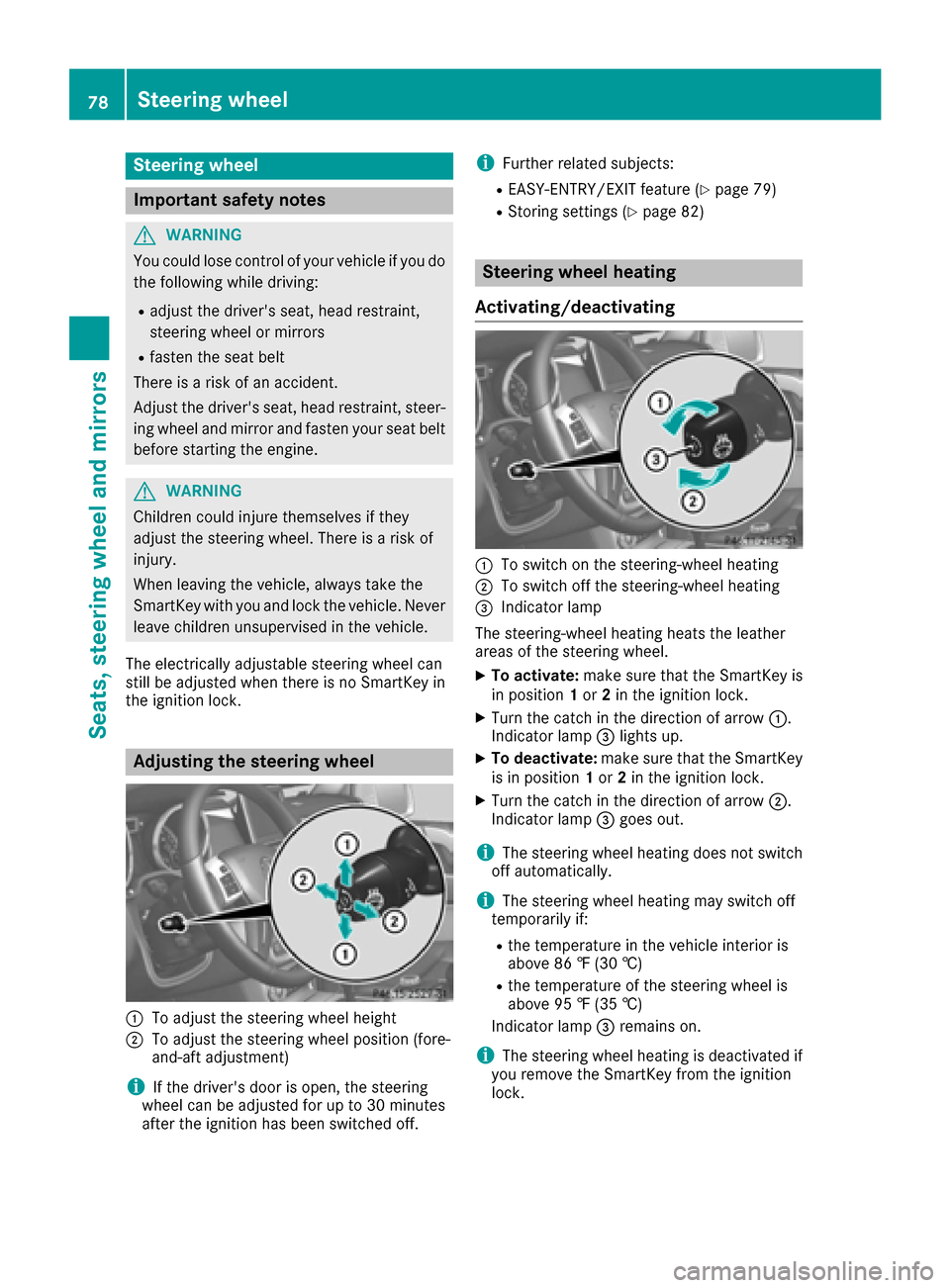
:To adjust the steering wheel height
;To adjust the steering wheel position (fore-
and-aft adjustment)
iIf the driver's door is open, the steering
wheel can be adjusted for up to 30 minutes
after the ignition has been switched off.
iFurther related subjects:
REASY-ENTRY/EXIT feature (Ypage 79)
RStoring settings (Ypage 82)
Steering wheel heating
Activating/deactivating
:To switch on the steering-wheel heating
;To switch off the steering-wheel heating
=Indicator lamp
The steering-wheel heating heats the leather
areas of the steering wheel.
XTo activate: make sure that the SmartKey is
in position 1or 2in the ignition lock.
XTurn the catch in the direction of arrow :.
Indicator lamp =lights up.
XTo deactivate: make sure that the SmartKey
is in position 1or 2in the ignition lock.
XTurn the catch in the direction of arrow ;.
Indicator lamp =goes out.
iThe steering wheel heating does not switch
off automatically.
iThe steering wheel heating may switch off
temporarily if:
Rthe temperature in the vehicle interior is
above 86 ‡ (30 †)
Rthe temperature of the steering wheel is
above 95 ‡ (35 †)
Indicator lamp =remains on.
iThe steering wheel heating is deactivated if
you remove the SmartKey from the ignition
lock.
78Steering wheel
Seats, steering wheel and mirrors
Page 91 of 302

Hazard warning lamps
XTo switch on the hazard warning lamps:
press button:.
All turn signals flash. If you now switch on a
turn signal using the combination switch, only
the turn signal lamp on the corresponding
side of the vehicle will flash.
XTo switch off the hazard warning lamps:
press button :.
The hazard warning lamps automatically switch
on if:
Ran air bag is deployed or
Rthe Emergency Tensioning Devices are trig-
gered, or
Rthe vehicle decelerates rapidly from a speed
of above 45 mph (70 km/h) and comes to a
standstill
The hazard warning lamps switch on automati-
cally if an air bag or the Emergency Tensioning
Devices are triggered and the SmartKey is in
position 1in the ignition lock.
The hazard warning lamps switch off automati-
cally if the vehicle reaches a speed of above
6 mph (10 km/h) again after a full brake appli-
cation.
iThe hazard warning lamps still operate if the
ignition is switched off.
Headlamps and indicator lamps fog-
ged up on the inside
The headlamps and the indicator lamps in the
exterior mirrors may fog up on the inside if there
is high atmospheric humidity.
XDrive with the headlamps switched on.
The level of moisture diminishes, depending
on the length of the journey and the weather
conditions (humidity and temperature).
If the level of moisture does not diminish:
XHave the headlamps checked at a qualified
specialist workshop.
Interior lighting
Overview of interior lighting
Front overhead control panel
:
p Switches the left-hand front reading
lamp on/off
;c Switches the front interior lighting on
=tSwitches the cargo compartment
lamp/rear compartment lighting on/off
?| Switches the front interior lighting/
automatic interior lighting control off
Ap Switches the right-hand reading lamp
on/off
BSwitches the automatic interior lighting con-
trol on
Interior lighting89
Lights and windshield wipers
Z
Page 92 of 302
Rear-compartmentoverhead control panel
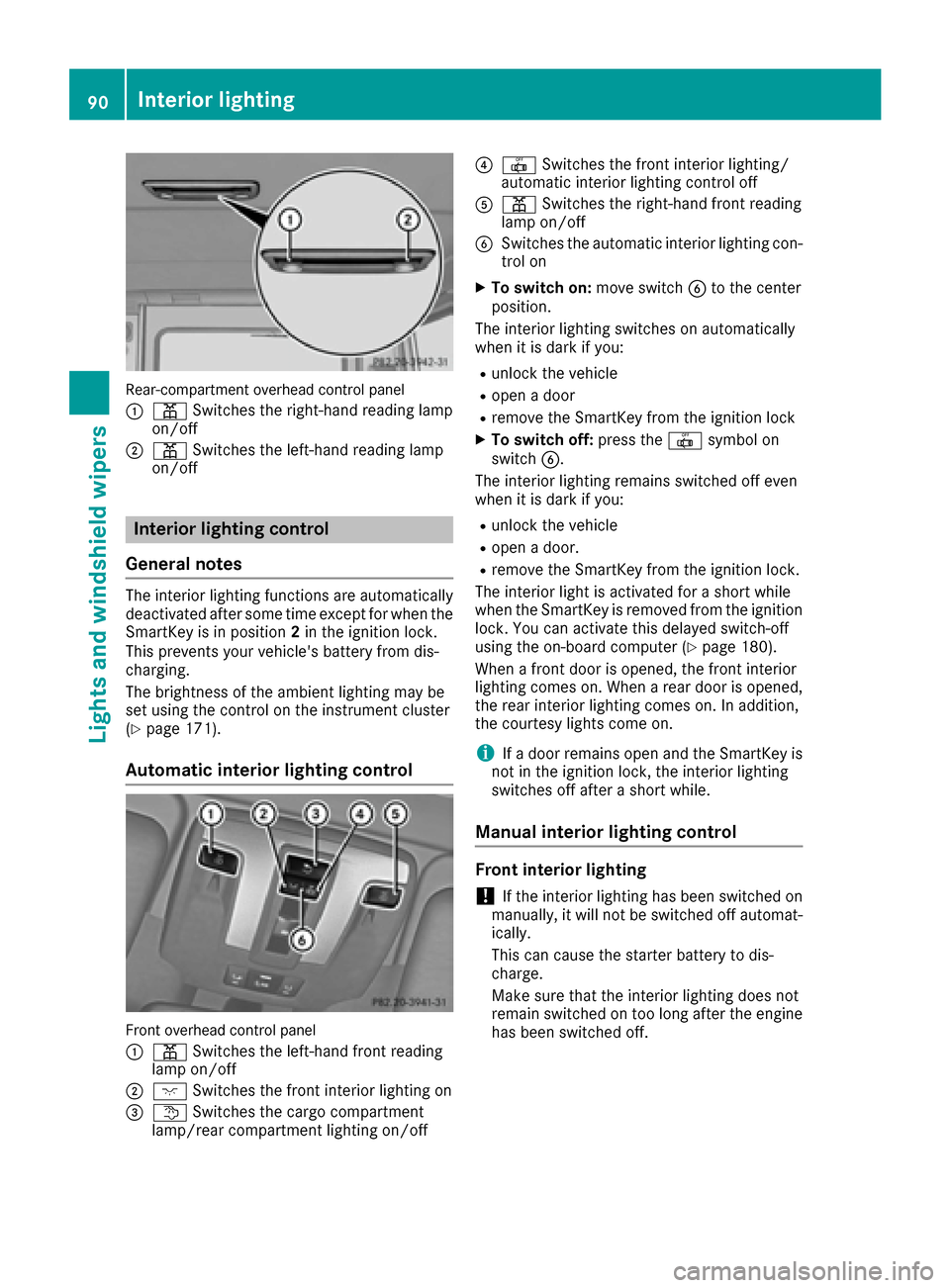
:
p Switches the right-hand read ing lamp
on/o ff
;p Switches the left-hand read ing lamp
on/o ff
Interior lighting control
General notes
The interior lighting functions are automatical ly
deactivated after some time except for whenthe
Sm artKey is in posi tion2in the igniti on lock.
This prevents your veh icle's battery fr om dis-
chargi ng.
The brightne ssofthe ambient lighting maybe
set using the co ntrol onthe instrument cluster
(
Ypage 171).
Automatic interior lighting control
Fron toverhead control panel
:
p Switches the left-hand fr ont read ing
lamp on/o ff
;cSwitches the fr ontint erior lighting on
=t Switches the cargo co mpartment
lamp/ rear co mpartment lighting on/o ff
?|Switches the fr ontint erior lighting /
automatic interior lighting control off
Ap Switches the rig ht-hand fr ont read ing
lamp on/off
BSwitches the automat icinterior lighting co n-
tr ol on
XTo switch on:mov e switch Bto the center
posi tion.
The interior lighting swit chesonautomatical ly
when it is darkifyou:
Runlock the vehicle
Ropen adoor
Rrem ove theSmartKey fr omthe igniti on lock
XToswitch off: press the|symbol on
switch B.
The interior lighting remains swit ched off even
when itis dark if you:
Runlo ck the vehicle
Ropen adoor .
Rremove theSmartKey fr omthe igniti on lock.
The interior light isactivated for a short while
when theSmartKey is rem oved from the igniti on
loc k.You can activate th isdelayed switch-off
using the on-board co mputer (
Ypage 180).
When a frontdoor isopen ed, the fr ontint erior
lighting comeson.When a rear door is open ed,
the rear interior lighting comeson.In addition ,
the courtesy lights co me on.
iIf adoor remains open and theSmartKey is
no t in the igniti onlock, the interior lighting
switches off after a short while.
Manual interior lighting control
Front interior lighting
!Ifthe interior lighting has been switched on
manually, it will notbe switched off automat-
ically.
This can cause the starter battery to dis-
charge.
Make sure that the interior lighting does not
remain switched ontoo long after the engine
has been switched off.
90Interior lighting
Lights and windshield wipers
Page 93 of 302
Front overhead control panel
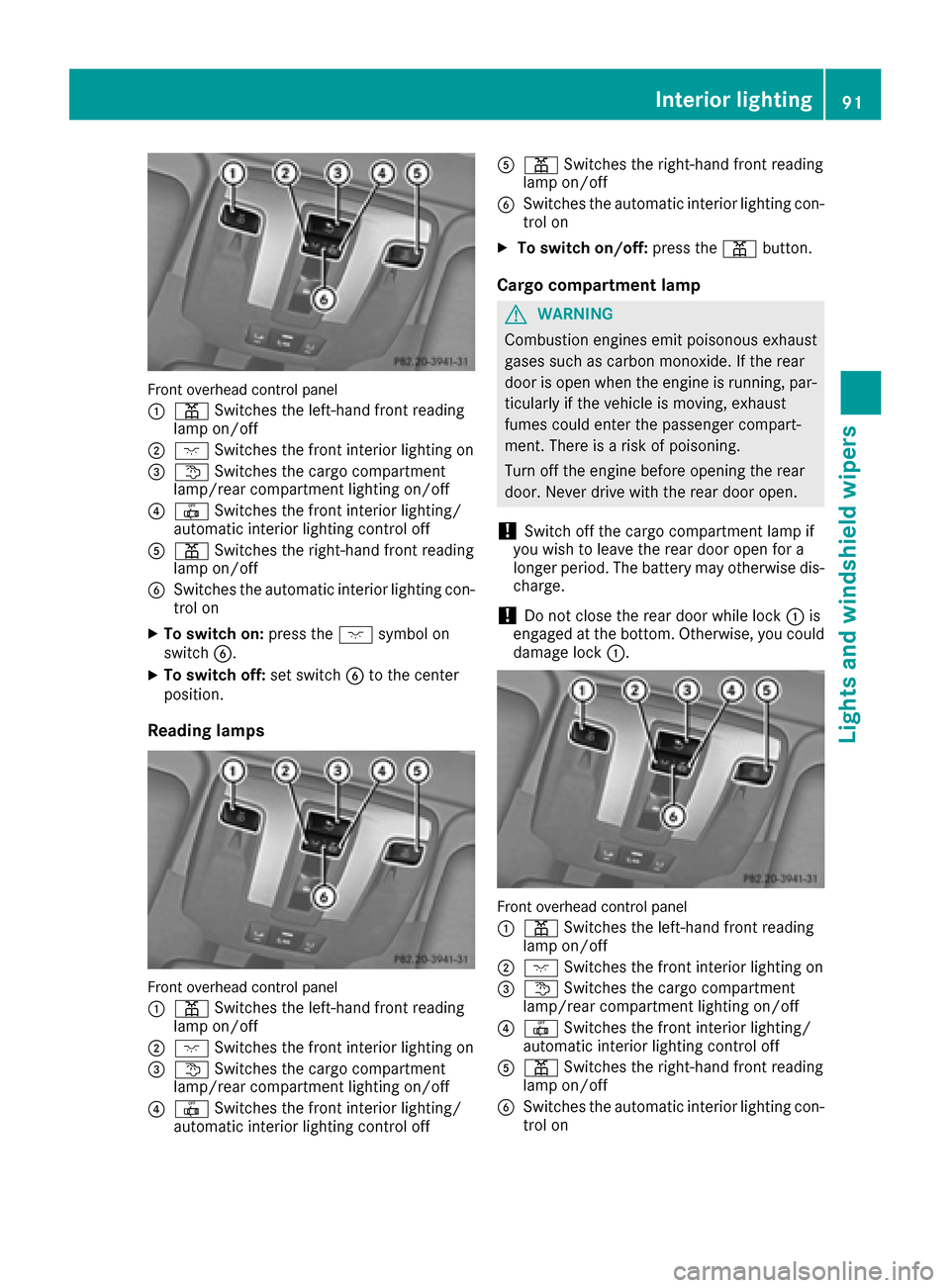
:
pSwitches the left-hand front reading
lamp on/off
;c Switches the front interior lighting on
=tSwitches the cargo compartment
lamp/rear compartment lighting on/off
?| Switches the front interior lighting/
automatic interior lighting control off
Ap Switches the right-hand front reading
lamp on/off
BSwitches the automatic interior lighting con-
trol on
XTo switch on: press thecsymbol on
switch B.
XTo switch off: set switchBto the center
position.
Reading lamps
Front overhead control panel
:
p Switches the left-hand front reading
lamp on/off
;c Switches the front interior lighting on
=tSwitches the cargo compartment
lamp/rear compartment lighting on/off
?| Switches the front interior lighting/
automatic interior lighting control off
Ap Switches the right-hand front reading
lamp on/off
BSwitches the automatic interior lighting con-
trol on
XTo switch on/off: press thepbutton.
Cargo compartment lamp
GWARNING
Combustion engines emit poisonous exhaust
gases such as carbon monoxide. If the rear
door is open when the engine is running, par-
ticularly if the vehicle is moving, exhaust
fumes could enter the passenger compart-
ment. There is a risk of poisoning.
Turn off the engine before opening the rear
door. Never drive with the rear door open.
!Switch off the cargo compartment lamp if
you wish to leave the rear door open for a
longer period. The battery may otherwise dis-
charge.
!Do not close the rear door while lock :is
engaged at the bottom. Otherwise, you could
damage lock :.
Front overhead control panel
:
pSwitches the left-hand front reading
lamp on/off
;c Switches the front interior lighting on
=tSwitches the cargo compartment
lamp/rear compartment lighting on/off
?| Switches the front interior lighting/
automatic interior lighting control off
Ap Switches the right-hand front reading
lamp on/off
BSwitches the automatic interior lighting con-
trol on
Interior lighting91
Lights and windshield wipers
Z
Page 94 of 302
XTo switch on/off:press thetbutton.
iIf you open the rear door, the cargo com-
partment lamp comes on. You will then be
unable to switch it off using the tbutton.
Switch off the cargo compartment lamp if you
wish to leave the rear door open for a longer
period. This prevents the battery from dis-
charging.
XOpen the rear door.
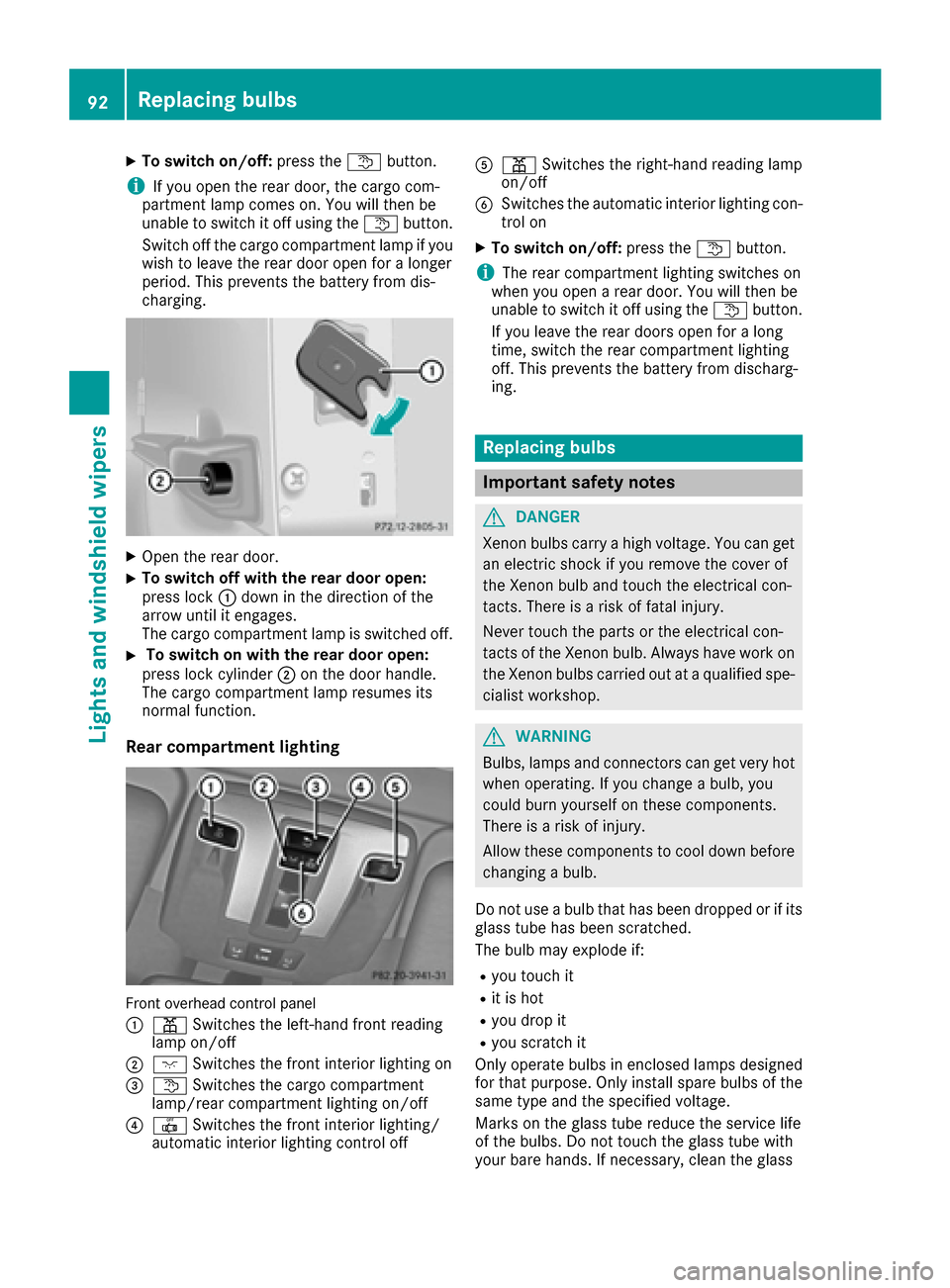
XTo switch off with the rear door open:
press lock :down in the direction of the
arrow until it engages.
The cargo compartment lamp is switched off.
XTo switch on with the rear door open:
press lock cylinder ;on the door handle.
The cargo compartment lamp resumes its
normal function.
Rear compartment lighting
Front overhead control panel
:
p Switches the left-hand front reading
lamp on/off
;c Switches the front interior lighting on
=tSwitches the cargo compartment
lamp/rear compartment lighting on/off
?| Switches the front interior lighting/
automatic interior lighting control off
Ap Switches the right-hand reading lamp
on/off
BSwitches the automatic interior lighting con-
trol on
XTo switch on/off: press thetbutton.
iThe rear compartment lighting switches on
when you open a rear door. You will then be
unable to switch it off using the tbutton.
If you leave the rear doors open for a long
time, switch the rear compartment lighting
off. This prevents the battery from discharg-
ing.
Replacing bulbs
Important safety notes
GDANGER
Xenon bulbs carry a high voltage. You can get an electric shock if you remove the cover of
the Xenon bulb and touch the electrical con-
tacts. There is a risk of fatal injury.
Never touch the parts or the electrical con-
tacts of the Xenon bulb. Always have work on
the Xenon bulbs carried out at a qualified spe-
cialist workshop.
GWARNING
Bulbs, lamps and connectors can get very hot
when operating. If you change a bulb, you
could burn yourself on these components.
There is a risk of injury.
Allow these components to cool down before
changing a bulb.
Do not use a bulb that has been dropped or if its
glass tube has been scratched.
The bulb may explode if:
Ryou touch it
Rit is hot
Ryou drop it
Ryou scratch it
Only operate bulbs in enclosed lamps designed
for that purpose. Only install spare bulbs of the same type and the specified voltage.
Marks on the glass tube reduce the service life
of the bulbs. Do not touch the glass tube with
your bare hands. If necessary, clean the glass
92Replacing bulbs
Lights and windshield wiper s