2016 MERCEDES-BENZ E-CLASS ESTATE stop start
[x] Cancel search: stop startPage 270 of 565
Operating saf
ety &
WARNING Risk of di stra ction from infor‐
mation sy stems and communications
equipment
If yo u operate information and communica‐
tions equipment integ rated in theve hicle
when driving, you will be distracted from the
traf fic situation. This could also cause youto
lose control of theve hicle. #
Only operate this equipment when the
traf fic situation permits. #
Ifyo u cannot be sure of this, stop the
ve hicle whilst paying attention toroad
and traf fic conditions and ope rate the
equipment with theve hicle stationar y. &
WARNING Risk of di stra ction from oper‐
ating mobile communication equipment
while theve hicle is in motion
If yo u operate mobile communication equip‐
ment when driving, you will be distracted from
the tra ffic situation. This could also
cause youto lose control of theve hicle.
Only operate this equipment when theve hi‐
cle is stationar y. Fo
ryo ur ow n sa fety, al ways obser vethefo llow‐
ing points when operating mobile communica‐
tions equipment and especially your voice con‐
trol sy stem:
R Obser vethe legal requ irements forth e coun‐
try in which you are driving.
R While driving, on ly operate mobile communi‐
cations equipment and your voice control
sy stem when the tra ffic conditions permit it.
Yo u may otherwise be distracted from the
traf fic conditions and cause an accident,
inju ring yourself and others.
R Do not use thevo ice control sy stem in an
emer gency as your voice can change and
yo ur telephone call can be unnecessarily
dela yed.
R Familiarise yourself with thevo ice control
sy stem functions before starting the journe y. Operation
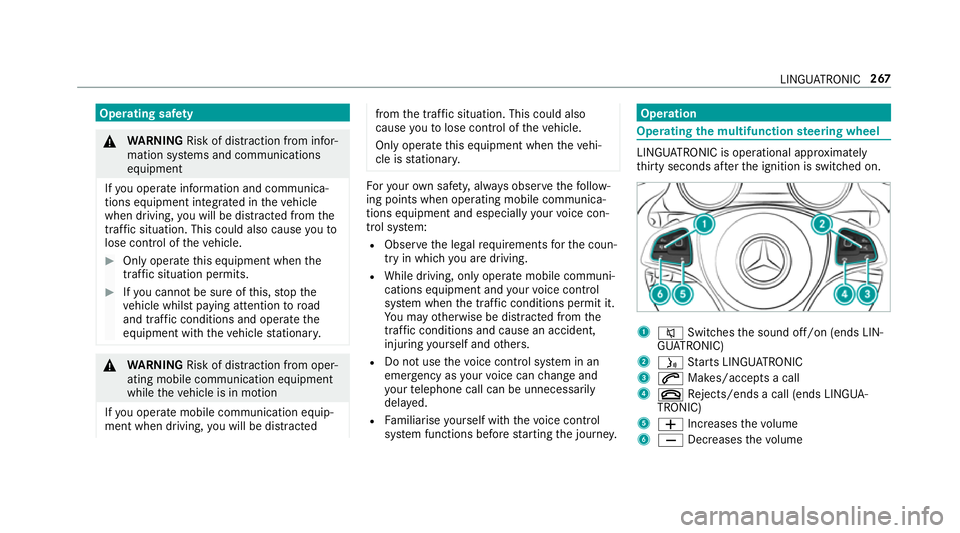
Operating
the multifunction steering wheel LINGU
ATRO NIC is operational appr oximately
th irty seconds af terth e ignition is switched on. 1
8 Switches the sound off/on (ends LIN‐
GU ATRO NIC)
2 ó Starts LINGU ATRO NIC
3 6 Makes/accepts a call
4 ~ Rejects/ends a call (ends LINGUA‐
TRONIC)
5 W Increases thevo lume
6 X Decreases thevo lume LINGU
ATRO NIC 267
Page 409 of 565
#
Tow- start theve hicle while the clutch pedal
is fully depressed. #
Slowly release the clutch pedal. #
Immediately shift toneutral if the engine
st arts. #
Pull over and stop theve hicle safely as soon
as possible, paying attention toroad and traf‐
fi c conditions. #
Remo vetheto w bar. #
Remo vetheto wing eye. #
Have theve hicle checked at a qualified spe‐
cialist workshop. Electrical fuses
Note
s on electrical fuses &
WARNING Risk of accident and inju ry
due to ov erloaded lines
If yo u manipulate or bridge a faulty fuse or if
yo ure place it with a fuse with a higher
amperage, the electric line could be overloa‐
ded. This could
result in a fire. #
Alw aysre place faulty fuses with speci‐
fi ed new fuses conta iningthe cor rect
amperage. *
NO
TEDama gecaused byincor rect fuses Incor
rect fuses may cause damage toelectri‐
cal components or sy stems. #
Only use Mercedes-Benz appr oved
fuses with the cor rect fuse rating. Blown fuses mu
stbe replaced with fuses of the
same rating, which you can recognise bythe col‐
our and fuse rating. The fuse ratings are li sted in
th e fuse assignment diagram.
Fu se assignment diag ram: onthe fuse box in
th e load compartment (→ page 408).
* NO
TEDama geor malfunctions caused
by moisture Moisture may cause dama
getothe electrical
sy stem or cause it tomalfunction. #
When the fuse box is open, make sure
th at no moisture can enter the fuse
box. #
When closing the fuse box, make sure
th at the seal of the lid is positioned cor‐
re ctly on the fuse box. If
th e newly inser ted fuse also blo ws, ha vethe
cause traced and rectified at a qualified special‐
ist workshop, e.g. a Mercedes-Benz Service
Centre.
Ensure thefo llowing before replacing a fuse:
R The vehicle is secured against rolling away.
R All electrical consumers are switched off.
R The ignition is switched off.
The electrical fuses are located in various fuse
bo xes:
R Fuse box in the engine compartment on the
driver's side (→ page 407)
R Fuse box on the driver's side of the cockpit
(→ page 408) 406
Breakdown assis tance
Page 458 of 565
Display messages
Possible causes/consequences and M
MSolutions
Brake immediately *
Ve hicles with manual transmission: a malfunction has occurred while the HOLD function was activated.
A tone may also sound at regular inter vals. If you attem pttolock theve hicle, theto ne becomes louder.
Yo u cannot start the engine. #
Immediately depress the brake pedal firm lyuntil the display message disappears.
Yo u can restart the engine.
J
Check brake fluid level *T
here is insuf ficient brake fluid in the brake fluid reser voir. &
WARNING Risk of an accident due tolow brake fluid le vel
If th e brake fluid le vel is too lo w,the braking ef fect and the braking characteristics may be impaired. #
Pull over and stop theve hicle safely as soon as possible, paying attention toroad and traf fic conditions.
Do not continue driving under any circums tances. #
Consult a qualified specialist workshop.
Do not top up the brake fluid. #
Pull over and stop theve hicle safely as soon as possible, paying attention toroad and traf fic conditions. Do not
continue driving under any circums tances. #
Consult a qualified specialist workshop.
Do not top up the brake fluid. Display messages and
warning/indicator lamps 455
Page 459 of 565
Display messages
Possible causes/consequences and M
MSolutions
# Check brake pad wear *T
he brake linings ha vereached thewe ar limit. #
Consult a qualified specialist workshop.
Active Brake Assist Func-
tions currently limited See
Owner's Manual *
Ve hicles with Driving Assistance Package: Active Brake Assi stwith cross-traf fic function, Evasi veSteering
Assist or PRE‑SAFE ®
PLUS are temp orarily una vailable or only partially available.
Ve hicles without the Driving Assistance pa ckage: Active Brake Assi stistemp orarily una vailable.
The ambient conditions are outside the sy stem borders . #
Drive on.
As soon as the ambient conditions are within the sy stem borders, the sy stem will become available again. #
Ifth e display message does not disappear, stop theve hicle while paying attention toroad and traf fic conditions
and restart the engine.
Active Brake Assist Func-
tions limited See Owner's
Manual *
Ve hicles with Driving Assistance Package: Active Brake Assi stwith cross-traf fic function, Evasi veSteering
Assist or PRE‑SAFE ®
PLUS is malfunctioning.
Ve hicles without the Driving Assistance Package: Active Brake Assi stis malfunctioning. #
Consult a qualified specialist workshop.
PRE-SAFE inoperative See
Owner's Manual *
PRE‑SAFE ®
functions are malfunctioning. #
Consult a qualified specialist workshop. 456
Display messages and warning/indicator lamps
Page 460 of 565
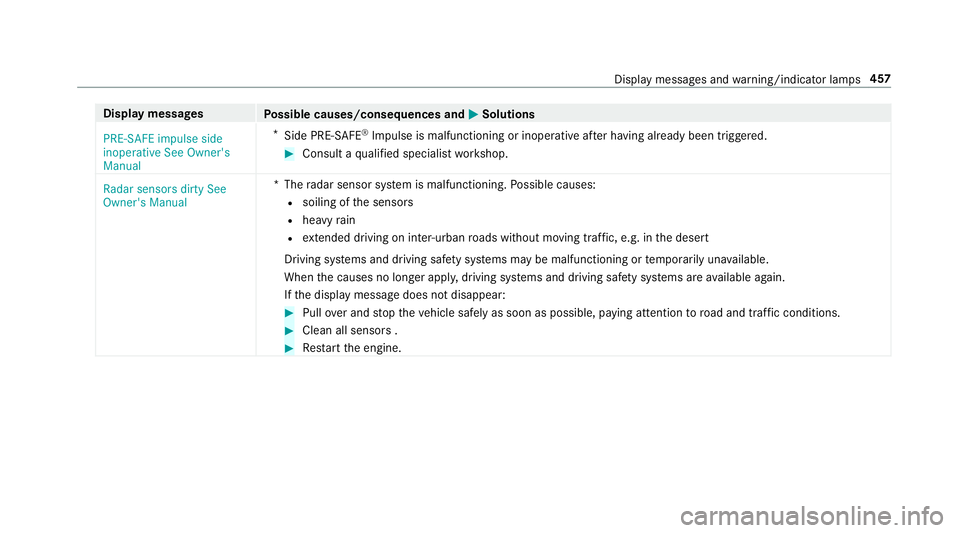
Display messages
Possible causes/consequences and M
MSolutions
PRE-SAFE impulse side
inoperative See Owner's
Manual *
Side PRE-SAFE ®
Impulse is malfunctioning or inoperative af ter having already been triggered. #
Consult a qualified specialist workshop.
Radar sensors dirty See
Owner's Manual *T
heradar sensor sy stem is malfunctioning. Possible causes:
R soiling of the sensors
R heavy rain
R extended driving on inter-urban roads without moving traf fic, e.g. in the desert
Driving sy stems and driving saf ety sy stems may be malfunctioning or temp orarily una vailable.
When the causes no longer apply, driving sy stems and driving saf ety sy stems are available again.
If th e display message does not disappear: #
Pull over and stop theve hicle safely as soon as possible, paying attention toroad and traf fic conditions. #
Clean all senso rs . #
Restart the engine. Display messages and
warning/indicator lamps 457
Page 470 of 565
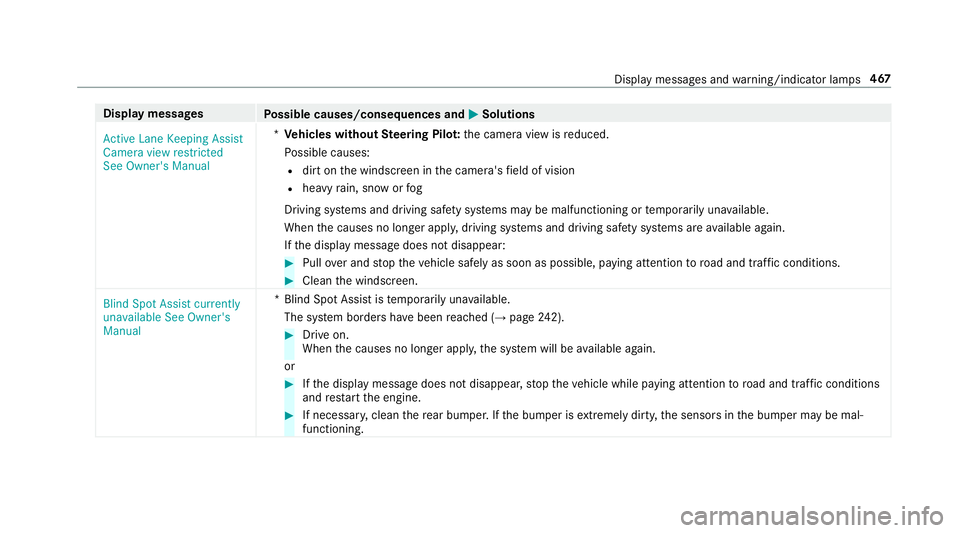
Display messages
Possible causes/consequences and M
MSolutions
Active Lane Keeping Assist
Camera view restricted
See Owner's Manual *
Ve hicles without Steering Pilo t:the camera view is reduced.
Po ssible causes:
R dirt on the windscreen in the camera's field of vision
R heavy rain, snow or fog
Driving sy stems and driving saf ety sy stems may be malfunctioning or temp orarily una vailable.
When the causes no longer appl y,driving sy stems and driving saf ety sy stems are available again.
If th e display message does not disappear: #
Pull over and stop theve hicle safely as soon as possible, paying attention toroad and traf fic conditions. #
Clean the windscreen.
Blind Spot Assist currently
unavailable See Owner's
Manual *B
lind Spot Assist is temp orarily una vailable.
The sy stem borders ha vebeen reached (→ page242). #
Drive on.
When the causes no longer appl y,the sy stem will be available again.
or #
Ifth e display message does not disappear, stop theve hicle while paying attention toroad and traf fic conditions
and restart the engine. #
If necessar y,clean there ar bumper. If the bumper is extreme lydirty, the sensors in the bumper may be mal‐
functioning. Display messages and
warning/indicator lamps 467
Page 471 of 565
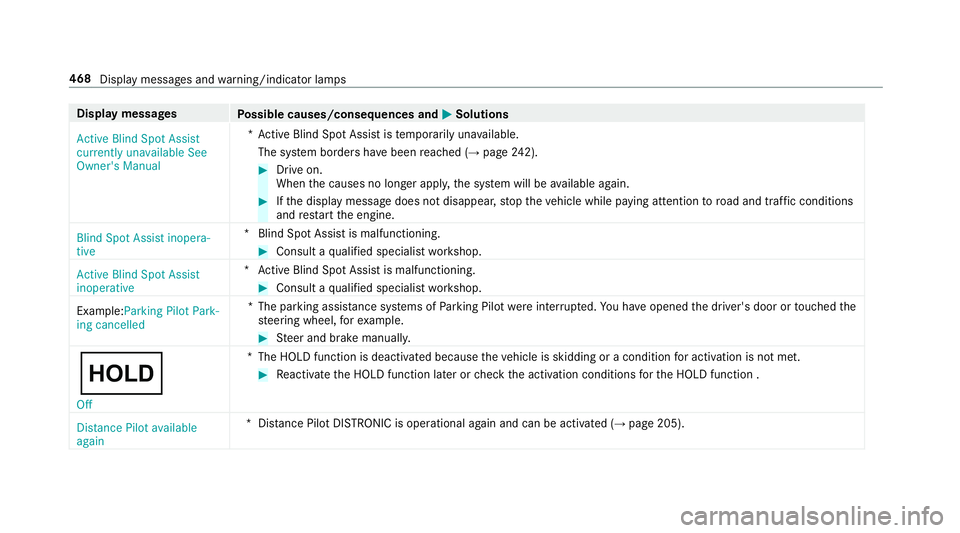
Display messages
Possible causes/consequences and M
MSolutions
Active Blind Spot Assist
currently unavailable See
Owner's Manual *A
ctive Blind Spot Assi stistemp orarily una vailable.
The sy stem borders ha vebeen reached (→ page242). #
Drive on.
When the causes no longer appl y,the sy stem will be available again. #
Ifth e display message does not disappear, stop theve hicle while paying attention toroad and traf fic conditions
and restart the engine.
Blind Spot Assist inopera-
tive *B
lind Spot Assist is malfunctioning. #
Consult a qualified specialist workshop.
Active Blind Spot Assist
inoperative *A
ctive Blind Spot Assi stis malfunctioning. #
Consult a qualified specialist workshop.
Example:Parking Pilot Park-
ing cancelled *T
he parking assis tance sy stems of Parking Pilot wereinter rupte d.You ha veopened the driver's door or touched the
st eering wheel, forex ample. #
Steer and brake manuall y.
ë Off *T
he HOLD function is deactivated because theve hicle is skidding or a condition for activation is not met. #
Reactivate the HOLD function later or check the activation conditions forth e HOLD function .
Distance Pilot available
again *D
ista nce Pilot DISTRONIC is operational again and can be acti vated (→ page 205). 468
Display messages and warning/indicator lamps
Page 474 of 565
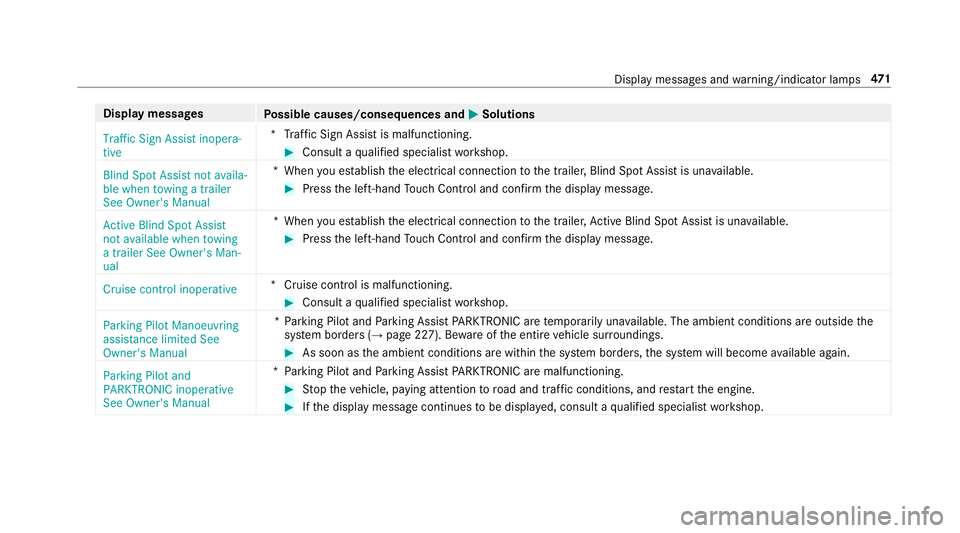
Display messages
Possible causes/consequences and M
MSolutions
Traffic Sign Assist inopera-
tive *T
raffic Sign Assist is malfunctioning. #
Consult a qualified specialist workshop.
Blind Spot Assist not availa-
ble when towing a trailer
See Owner's Manual *W
hen you es tablish the electrical connection tothe trailer, Blind Spot Assist is una vailable. #
Press the left-hand Touch Control and confirm the display message.
Active Blind Spot Assist
not available when towing
a trailer See Owner's Man-
ual *W
hen you es tablish the electrical connection tothe trailer, Active Blind Spot Assi stis una vailable. #
Press the left-hand Touch Control and confirm the display message.
Cruise control inoperative *C
ruise control is malfunctioning. #
Consult a qualified specialist workshop.
Parking Pilot Manoeuvring
assistance limited See
Owner's Manual *P
arking Pilot and Parking Assist PARKTRONIC are temp orarily una vailable. The ambient conditions are outside the
sy stem borders (→ page 227). Bewareofthe entire vehicle sur roundings. #
As soon as the ambient conditions are within the sy stem borders, the sy stem will become available again.
Parking Pilot and
PARKTRONIC inoperative
See Owner's Manual *P
arking Pilot and Parking Assist PARKTRONIC are malfunctioning. #
Stop theve hicle, paying attention toroad and traf fic conditions, and restart the engine. #
Ifth e display message continues tobe displa yed, consult a qualified specialist workshop. Display messages and
warning/indicator lamps 471