2016 LINCOLN MKZ tow
[x] Cancel search: towPage 350 of 544

Dissimilar Spare Wheel and Tire
Assembly Information
WARNING
Failure to follow these guidelines could
result in an increased risk of loss of
vehicle control, injury or death.
If you have a dissimilar spare wheel and tire,
then it is intended for temporary use only.
This means that if you need to use it, you
should replace it as soon as possible with a
road wheel and tire assembly that is the
same size and type as the road tires and
wheels that were originally provided by Ford.
If the dissimilar spare tire or wheel is
damaged, it should be replaced rather than
repaired.
A dissimilar spare wheel and tire assembly
is defined as a spare wheel and tire assembly
that is different in brand, size or appearance
from the road tires and wheels and can be
one of three types:
1. T-type mini-spare: This spare tire begins
with the letter T for tire size and may have
Temporary Use Only molded in the sidewall. 2. Full-size dissimilar spare with label on
wheel: This spare tire has a label on the
wheel that states: THIS WHEEL AND TIRE
ASSEMBLY FOR TEMPORARY USE ONLY.
When driving with one of the dissimilar spare
tires listed above, do not:
• Exceed 50 mph (80 km/h).
• Load the vehicle beyond maximum
vehicle load rating listed on the Safety
Compliance Label.
• Tow a trailer.
• Use snow chains on the end of the vehicle with the dissimilar spare tire.
• Use more than one dissimilar spare tire at a time.
• Use commercial car washing equipment.
• Try to repair the dissimilar spare tire.
Use of one of the dissimilar spare tires listed
above at any one wheel location can lead to
impairment of the following:
• Handling, stability and braking performance.
• Comfort and noise.
• Ground clearance and parking at curbs. • Winter weather driving capability.
• Wet weather driving capability.
• All-wheel driving capability (if applicable).
3. Full-size dissimilar spare without label
on wheel
When driving with the full-size dissimilar
spare wheel and tire assembly, do not:
• Exceed 70 mph (113 km/h).
• Use more than one dissimilar spare
wheel and tire assembly at a time.
• Use commercial car washing equipment.
• Use snow chains on the end of the vehicle with the dissimilar spare wheel
and tire assembly.
The usage of a full-size dissimilar spare
wheel and tire assembly can lead to
impairment of the following:
• Handling, stability and braking performance.
• Comfort and noise.
• Ground clearance and parking at curbs.
• Winter weather driving capability.
347
Wheels and Tires
Page 351 of 544

• Wet weather driving capability.
• All-wheel driving capability.
When driving with the full-size dissimilar
spare wheel and tire assembly additional
caution should be given to:
• Towing a trailer.
• Driving vehicles equipped with a camperbody.
• Driving vehicles with a load on the cargo rack.
Drive cautiously when using a full-size
dissimilar spare wheel and tire assembly and
seek service as soon as possible.
Tire Change Procedure
WARNINGS
When one of the front wheels is off the
ground, the transmission alone will not
prevent the vehicle from moving or slipping
off the jack, even if the transmission is in park
(P).
WARNINGS
To help prevent your vehicle from
moving when you change a tire, be
sure to place the transmission in park (P), set
the parking brake and block (in both
directions) the wheel that is diagonally
opposite (other side and end of the vehicle)
to the tire being changed.
Never get underneath a vehicle that is
supported only by a jack. If your vehicle
slips off the jack, you or someone else could
be seriously injured.
Do not attempt to change a tire on the
side of the vehicle close to moving
traffic. Pull far enough off the road to avoid
the danger of being hit when operating the
jack or changing the wheel.
Always use the jack provided as
original equipment with your vehicle.
If using a jack other than the one provided
as original equipment with your vehicle,
make sure the jack capacity is adequate for
the vehicle weight, including any vehicle
cargo or modifications.
Note: Passengers should not remain in your
vehicle when the vehicle is being jacked.
1. Park on a level surface, set the parking brake and activate the hazard flashers.
2. Place the transmission in park (P) and turn the engine off. For vehicles with a
manual transmission, place the
transmission in reverse (R) after the
engine is turned off.
E175447
3. Block both the front and rear of the wheeldiagonally opposite the flat tire. For
example, if the left front tire is flat, block
the right rear wheel.
4. Remove the carpeted wheel cover.
348
Wheels and Tires
Page 353 of 544

12. Replace the flat tire with the spare tire,making sure the valve stem is facing
outward. Reinstall the lug nuts until the
wheel is snug against the hub. Do not
fully tighten the lug nuts until the wheel
has been lowered. If you are using the
temporary tire, the lug nut washers will
not appear to be flush with the rim. This
is normal only when using the
temporary spare tire.
13. Lower the wheel by turning the jack handle counterclockwise.
1
2
3
4
5
E75442
14. Remove the jack and fully tighten the lug nuts in the order shown. See
Technical Specifications (page 351).
15. Put the flat tire, jack and lug wrench away. Make sure the jack is fastened
securely before you drive.
16. Unblock the wheel.
Stowing the flat tire
You can stow the full-size road wheel in the
spare tire compartment.
1. Lift the carpeted wheel cover at an angle to access the spare tire compartment.
2. Place the wheel in the spare tire well with the valve stem facing down. Use the
mini-spare bolt to secure the wheel
through one of the lug holes.
3. Place the jack and tools back into the spare tire compartment.
4. Replace the carpeted wheel cover.
E178187
350
Wheels and Tires
Page 372 of 544

GENERAL INFORMATION
Radio Frequencies and Reception
Factors
AM and FM frequencies are established by
the Federal Communications Commission
(FCC) and the Canadian Radio and
Telecommunications Commission (CRTC).
Those frequencies are:
• AM: 530, 540-1700, 1710 kHz
• FM: 87.9-107.7, 107.9 MHz
Radio Reception Factors
The further you travel from an AM or FM station, the weaker the signal a\
nd the weaker the reception.
Distance and strength
Hills, mountains, tall buildings, bridges, tunnels, freeway overpasses, \
parking garages, dense tree foliage and
thunderstorms can interfere with the reception.
Terrain
When you pass a ground-based broadcast repeating tower, a stronger signal may overtake a weaker one and
result in the audio system muting.
Station overload
CD and CD Player Information
Note:
CD units play commercially pressed
4.75-inch (12 centimeter) audio compact
discs only. Due to technical incompatibility,
certain recordable and re-recordable
compact discs may not function correctly
when used in Ford CD players. Note:
Do not insert CDs with homemade
paper (adhesive) labels into the CD player
as the label may peel and cause the CD to
become jammed. You should use a
permanent felt tip marker rather than
adhesive labels on your homemade CDs.
Ballpoint pens may damage CDs. Please
contact an authorized dealer for further
information. Note:
Do not use any irregularly shaped
discs or discs with a scratch protection film
attached.
Always handle discs by their edges only.
Clean the disc with an approved CD cleaner
only. Wipe it from the center of the disc
toward the edge. Do not clean in a circular
motion.
369
Audio System
Page 420 of 544

SIRIUS Satellite Radio Reception Factors and Troubleshooting
Potential reception issues
For optimal reception performance, keep the antenna clear of snow and ice build-up and keep luggage
and other materials as far away from the antenna as possible.
Antenna obstructions
Hills, mountains, tall buildings, bridges, tunnels, freeway overpasses, \
parking garages, dense tree foliage
and thunderstorms can interfere with your reception.
Terrain
When you pass a ground-based broadcast-repeating tower, a stronger signal may overtake a weaker
one and the audio system may mute.
Station overload
Your display may show ACQUIRING... to indicate the interference and the a\
udio system may mute.
Satellite radio signal interference
Troubleshooting tips
Action
Cause
Message
No action required. This message should disap-
pear shortly.
Radio requires more than two seconds to produce
audio for the selected channel.
Acquiring…
If this message does not clear shortly, or with an
ignition key cycle, your receiver may have a fault.
See an authorized dealer for service.
There is an internal module or system failure
present.
Satellite antenna fault
SIRIUS system failure
Tune to another channel or choose another preset.
The channel is no longer available.
Invalid Channel
417
MyLincoln Touch™
Page 421 of 544

Troubleshooting tipsAction
Cause
Message
Contact SIRIUS at 1-888-539-7474 to subscribe to
the channel, or tune to another channel.
Your subscription does not include this channel.
Unsubscribed Channel
The signal is blocked. When you move into an
open area, the signal should return.
The signal is lost from the SIRIUS satellite or SIRIUS
tower to your vehicle antenna.
No Signal
No action required. The process may take up to
three minutes.
Update of channel programming in progress.
Updating…
Contact SIRIUS at 1-888-539-7474 to resolve
subscription issues.
Your satellite service is no longer available.
Questions? Call
1-888-539-7474
Use the channel guide to turn off the Lock or Skip
function on that station.
All the channels in the selected category are either
skipped or locked.
None found
Check Channel Guide
No action required.
SIRIUS has updated the channels available for your
vehicle.
Subscription Updated
418
MyLincoln Touch™
Page 443 of 544
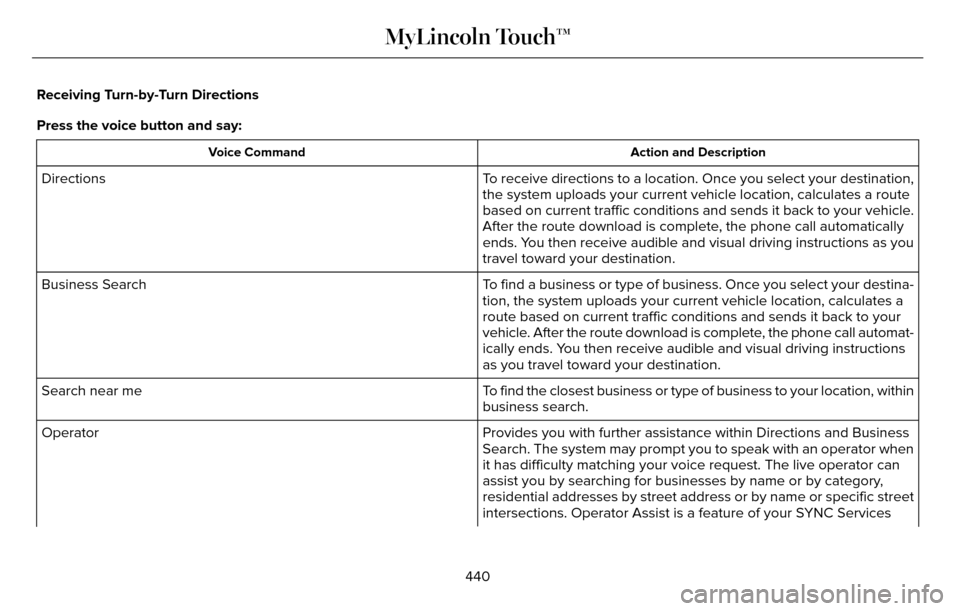
Receiving Turn-by-Turn Directions
Press the voice button and say:
Action and Description
Voice Command
To receive directions to a location. Once you select your destination,
the system uploads your current vehicle location, calculates a route
based on current traffic conditions and sends it back to your vehicle.
After the route download is complete, the phone call automatically
ends. You then receive audible and visual driving instructions as you
travel toward your destination.
Directions
To find a business or type of business. Once you select your destina-
tion, the system uploads your current vehicle location, calculates a
route based on current traffic conditions and sends it back to your
vehicle. After the route download is complete, the phone call automat-
ically ends. You then receive audible and visual driving instructions
as you travel toward your destination.
Business Search
To find the closest business or type of business to your location, within\
business search.
Search near me
Provides you with further assistance within Directions and Business
Search. The system may prompt you to speak with an operator when
it has difficulty matching your voice request. The live operator can
assist you by searching for businesses by name or by category,
residential addresses by street address or by name or specific street
intersections. Operator Assist is a feature of your SYNC Services
Operator
440
MyLincoln Touch™
Page 465 of 544

Avoid Area
Second Level Messages, Actions and Descriptions
Menu Item
Choose areas which you want the system to avoid when calculating a route\
for you
Avoid Areas
Then select any of the following:
Once you make a selection, the system tries to avoid the area(s) if po\
ssible for all routes. Select
this button to program an entry, then choose a destination entry method. You can edit the name
or location of a destination or remove it from your selections.
Add
To remove an area from your selection, choose the listing on the screen. \
The screen will change,
then press delete and confirm the deletion.
Delete
Map Mode
Press the green bar in the upper right area
of the touchscreen to view map mode. Map
mode shows advanced viewing comprised
of both 2D city maps as well as 3D landmarks
(when available). 2D city maps show detailed outlines of
buildings, visible land use and land elements
and detailed railway infrastructure for the
most essential cities around the globe. These
maps also contain features, such as town
blocks, building footprints and railways.
3D landmarks appear as clear, visible objects
that are typically recognizable and have a
certain tourist value. The 3D landmarks
appear in 3D map mode only. Coverage
varies and improves with updated map
releases.
462
MyLincoln Touch™