2016 LINCOLN MKZ tow
[x] Cancel search: towPage 207 of 544

Guidelines and the Centerline
Note:Active guidelines and fixed guidelines
are only available when the transmission is
in reverse (R).
Note: The centerline is only available if
Active or Fixed guidelines are on.
ABCD
F
E
E142436
Active guidelines
A
Centerline
B
Fixed guideline: Green zone
C Fixed guideline: Yellow zone
D
Fixed guideline: Red zone
E
Rear bumper
F
Active guidelines are only shown with fixed
guidelines. To use active guidelines, turn the
steering wheel to point the guidelines toward
an intended path. If you change the steering
wheel position while reversing, your vehicle
might deviate from the original intended
path.
The fixed and active guidelines fade in and
out depending on your steering wheel
position. When your steering wheel position
is straight, the active guidelines are not
visible.
Always use caution while reversing. Objects
in the red zone are closest to your vehicle
and objects in the green zone are farther
away. Objects are getting closer to your
vehicle as they move from the green zone
to the yellow or red zones. Use the side view
mirrors and rear view mirror to get better
coverage on both sides and rear of your
vehicle.
204
Parking Aids (If Equipped)
Page 215 of 544

System Not Available
Conditions that can cause the system to
deactivate or prevent the system from
activating when requested include:
• A blocked sensor.
• High brake temperature.
• A failure in the system or a relatedsystem.
Blocked Sensor
WARNINGS
Do not use the system when towing a
trailer with brake controls. Aftermarket
trailer brakes do not function properly when
you switch the system on because the
brakes are electronically controlled. Failing
to do so may result in loss of vehicle control,
which could result in serious injury. The
system does operate with non-electronic
trailer brake controllers, such as over-run or
surge brakes.
Do not use tire sizes other than those
recommended because this can affect
the normal operation of the system. Failing
to do so may result in a loss of vehicle
control, which could result in serious injury.
E145632
A message appears if something obstructs
the sensor's radar signals. The sensor is
located behind a cover near the driver side
of the lower grille. The system cannot detect
a vehicle ahead and does not function when
something obstructs the radar signal. The
following table lists possible causes and
actions for this message displaying.
212
Cruise Control
Page 219 of 544

Note:When Aid mode is on and the system
detects no steering activity for a short period,
the system will alert you to put your hands
on the steering wheel. The system may
detect a light grip or touch on the steering
wheel as hands off driving.
The system notifies you to stay in your lane
through the steering system and the
instrument cluster display when the front
camera detects an unintentional drift out of
your lane is likely to occur. The system
automatically detects and tracks the road
lane markings using a camera mounted
behind the interior rear view mirror.
Switching the System On and Off
Note: The system on or off setting is stored
until it is manually changed, unless a MyKey
is detected. If the system detects a MyKey
it defaults to on and the mode is set to Alert.
Note: If a MyKey is detected, pressing the
button will not affect the on or off status of
the system.
E144813
Press the button located on the left
steering wheel stalk to switch the
system on or off. System Settings
The system has optional setting menus
available. To view or adjust the settings, See
General Information (page 109). The system
stores the last-known selection for each of
these settings. You do not need to readjust
your settings each time you turn on the
system.
Mode: This setting allows you to select which
of the system features you can enable.
E165515
Alert only – Provides a steering wheel
vibration when the system detects an
unintended lane departure.
E165516
Aid only – Provides an assistance steering
torque input toward the lane center when
the system detects an unintended lane
departure.
216
Driving Aids
Page 220 of 544

E165517
AlertA
AidB
Alert + Aid – Provides an assistance steering
torque input toward the lane center. If your
vehicle continues drifting out of the lane, the
system provides a steering wheel vibration.
Note: The alert and aid diagrams illustrate
general zone coverage. They do not provide
exact zone parameters.
Intensity: This setting affects the intensity of
the steering wheel vibration used for the alert
and alert + aid modes. This setting does not
affect the aid mode. •Low
• Medium
• High
System Display
E151660
When you switch on the system, an overhead
graphic of a vehicle with lane markings will
display in the information display. If you
select aid mode when you switch on the
system, a separate white icon will also
appear or in some vehicles arrows will
display with the lane markings.
When you switch off the system, the lane
marking graphics will not display.
While the system is on, the color of the lane
markings will change to indicate the system
status.
Gray: Indicates that the system is temporarily
unable to provide a warning or intervention
on the indicated side(s). This may be
because:
• Your vehicle is under the activation
speed.
• The turn indicator is active.
• Your vehicle is in a dynamic maneuver.
• The road has no or poor lane markings in the camera field-of-view.
• The camera is obscured or unable to detect the lane markings due to
environmental conditions (significant sun
angles, shadows, snow, heavy rain or
fog), traffic conditions (following a large
vehicle that is blocking or shadowing the
lane), or vehicle conditions (poor
headlamp illumination).
See Troubleshooting for additional
information.
217
Driving Aids
Page 222 of 544
 when I can s\
ee the lane markings on the road?
Camera blockage due to dirt, grime, fog, frost or water on the windshield
Driving too close to")
Why is the feature not available (line markings are gray) when I can s\
ee the lane markings on the road?
Camera blockage due to dirt, grime, fog, frost or water on the windshield
Driving too close to the vehicle in front of you
Transitioning between no lane markings to lane markings or vice versa
Standing water on the road
Faint lane markings (partial yellow lane markings on concrete roads)
Lane width too narrow or too wide
Camera not calibrated after a windshield replacement
Driving on tight roads or on uneven roads
Why does the vehicle not come back toward the middle of the lane, as exp\
ected, in the Aid or Aid + Alert mode?
High cross winds
Large road crown
Rough roads, grooves, shoulder drop-offs
Heavy uneven loading of the vehicle or improper tire inflation pressure
If the tires have been exchanged (including snow tires), or the suspension has been modified219
Driving Aids
Page 237 of 544
Cargo Weight - includes all weight
added to the Base Curb Weight,
including cargo and optional equipment.
When towing, trailer tongue load or king
pin weight is also part of cargo weight.
GAW (Gross Axle Weight) - is the total
weight placed on each axle (front and
rear) including vehicle curb weight and
all payload.GAWR (Gross Axle Weight Rating) - is
the maximum allowable weight that can
be carried by a single axle (front or rear).
These numbers are shown on the Safety
Compliance Certification Label. The
label shall be affixed to either the door
hinge pillar, door-latch post, or the door
edge that meets the door-latch post,
next to the driver's seating position. The
total load on each axle must never
exceed its Gross Axle Weight Rating.Note:
For trailer towing information
refer to the RV and Trailer Towing Guide
available at an authorized dealer.
E143818
GVW
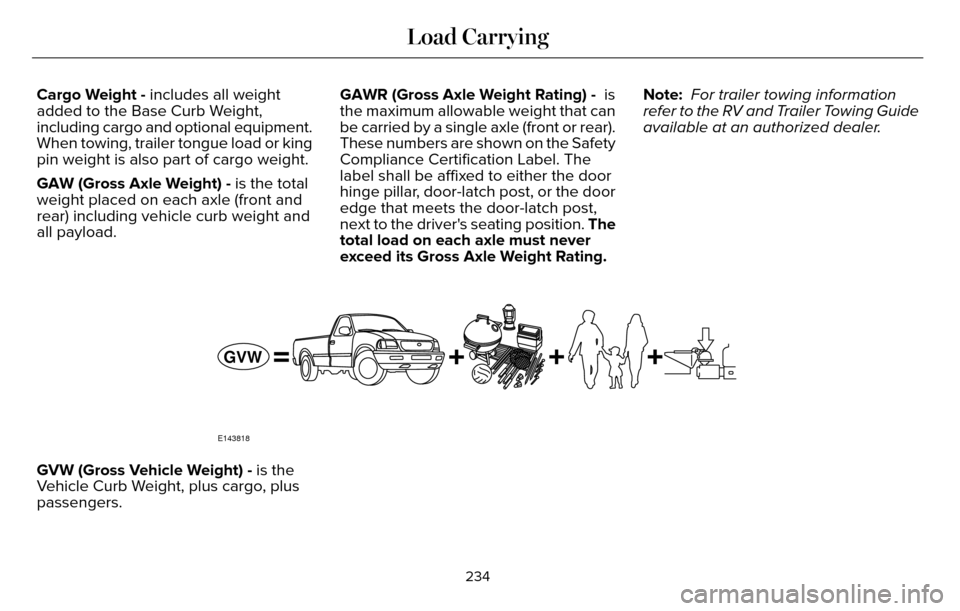
GVW (Gross Vehicle Weight) - is the
Vehicle Curb Weight, plus cargo, plus
passengers.
234
Load Carrying
Page 240 of 544
E143819
GCWGVW
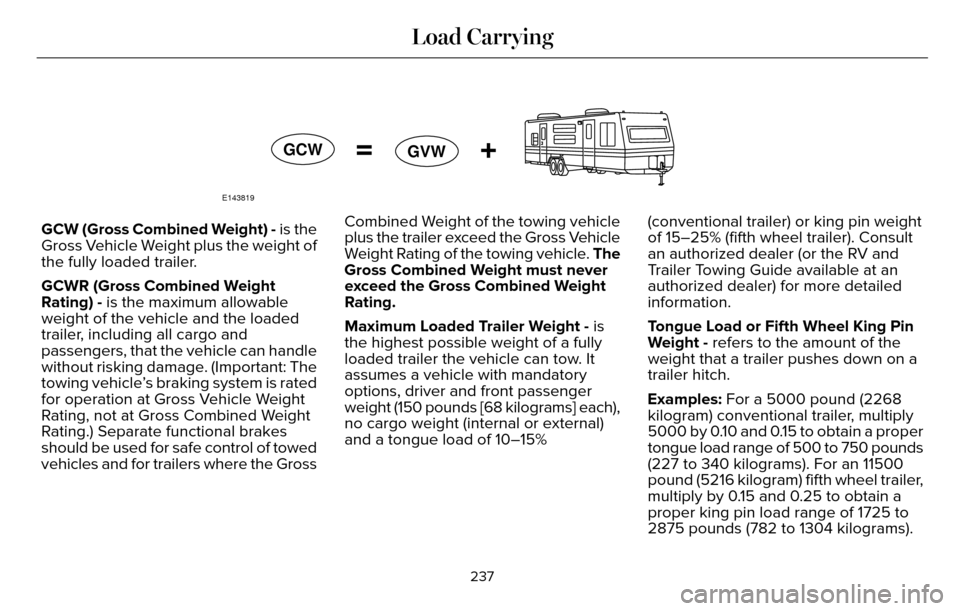
GCW (Gross Combined Weight) - is the
Gross Vehicle Weight plus the weight of
the fully loaded trailer.
GCWR (Gross Combined Weight
Rating) - is the maximum allowable
weight of the vehicle and the loaded
trailer, including all cargo and
passengers, that the vehicle can handle
without risking damage. (Important: The
towing vehicle’s braking system is rated
for operation at Gross Vehicle Weight
Rating, not at Gross Combined Weight
Rating.) Separate functional brakes
should be used for safe control of towed
vehicles and for trailers where the Gross Combined Weight of the towing vehicle
plus the trailer exceed the Gross Vehicle
Weight Rating of the towing vehicle. The
Gross Combined Weight must never
exceed the Gross Combined Weight
Rating.
Maximum Loaded Trailer Weight - is
the highest possible weight of a fully
loaded trailer the vehicle can tow. It
assumes a vehicle with mandatory
options, driver and front passenger
weight (150 pounds [68 kilograms] each),
no cargo weight (internal or external)
and a tongue load of 10–15%
(conventional trailer) or king pin weight
of 15–25% (fifth wheel trailer). Consult
an authorized dealer (or the RV and
Trailer Towing Guide available at an
authorized dealer) for more detailed
information.
Tongue Load or Fifth Wheel King Pin
Weight - refers to the amount of the
weight that a trailer pushes down on a
trailer hitch.
Examples: For a 5000 pound (2268
kilogram) conventional trailer, multiply
5000 by 0.10 and 0.15 to obtain a proper
tongue load range of 500 to 750 pounds
(227 to 340 kilograms). For an 11500
pound (5216 kilogram) fifth wheel trailer,
multiply by 0.15 and 0.25 to obtain a
proper king pin load range of 1725 to
2875 pounds (782 to 1304 kilograms).
237
Load Carrying
Page 241 of 544

WARNINGS
Do not exceed the GVWR or the
GAWR specified on the Safety
Compliance Certification Label.
Do not use replacement tires with
lower load carrying capacities than
the original tires because they may
lower the vehicle’s GVWR and GAWR
limitations. Replacement tires with a
higher limit than the original tires do not
increase the GVWR and GAWR
limitations.
Exceeding any vehicle weight
rating limitation could result in
serious damage to the vehicle and/or
personal injury.
Steps for determining the correct load
limit:
1. Locate the statement "The combined weight of occupants and cargo
should never exceed XXX kg or XXX
lb." on your vehicle’s placard. 2. Determine the combined weight of
the driver and passengers that will
be riding in your vehicle.
3. Subtract the combined weight of the driver and passengers from XXX kg
or XXX lb.
4. The resulting figure equals the available amount of cargo and
luggage load capacity. For example,
if the “XXX” amount equals 1,400 lb.
and there will be five 150 lb.
passengers in your vehicle, the
amount of available cargo and
luggage load capacity is 650 lb.
(1400-750 (5 x 150) = 650 lb.)
5. Determine the combined weight of luggage and cargo being loaded on
the vehicle. That weight may not
safely exceed the available cargo
and luggage load capacity calculated
in Step 4. 6. If your vehicle will be towing a trailer,
load from your trailer will be
transferred to your vehicle. Consult
this manual to determine how this
reduces the available cargo and
luggage load capacity of your
vehicle.
The following gives you a few examples
on how to calculate the available amount
of cargo and luggage load capacity:
*Suppose your vehicle has a 1400-pound
(635-kilogram) cargo and luggage
capacity. You decide to go golfing. Is
there enough load capacity to carry you,
four of your friends and all the golf bags?
You and four friends average 220
pounds (99 kilograms) each and the golf
bags weigh approximately 30 pounds
(13.5 kilograms) each. The calculation
would be: 1400 - (5 x 220) - (5 x 30) =
1400 - 1100 - 150 = 150 pounds. Yes, you
have enough load capacity in your
vehicle to transport four friends and your
golf bags. In metric units, the calculation
would be: 635 kilograms - (5 x 99
kilograms) - (5 x 13.5 kilograms) = 635 -
495 - 67.5 = 72.5 kilograms.
238
Load Carrying