Page 351 of 660
3514-5. Using the driving support systems
4
Driving
RX450h_U_OM0E013U
■Parking operation
When parking in a space which is in the reverse direction to the space
described in the procedure below, the steering directions will be reversed.
Shift the shift lever to R.
Turn the steering wheel so that
the estimated course lines are
within the parking space, and
back up slowly. Parking space
Estimated course lines
When the rear position of the
vehicle has entered the parking
space, turn the steering wheel so
that the vehicle width guide lines
are within the left and right divid-
ing lines of the parking space. Vehicle width guide line
1
2
1
2
3
3
Page 352 of 660
3524-5. Using the driving support systems
RX450h_U_OM0E013U
Once the vehicle width guide lines and the parking space lines are parallel,
straighten the steering wheel and back up slowly until the vehicle has com-
pletely entered the parking space.
Stop the vehicle in an approp riate place, and finish parking.
■Screen description
Vehicle width guide lines
These lines indicate a guide path when the vehicle is being backed straight
up. The displayed width is wider than the actual vehicle width.
Parking assist guide lines
These lines indicate the path of the sm allest turn possible behind the vehi-
cle.
These lines also indicate the approx imate position of the steering wheel
when parking.
Distance guide line
This line (red) indicates points approxim ately 1.5 ft. (0.5 m) behind the rear
bumper of your vehicle.
Vehicle center guide line
The line indicates the estimated vehicle center on the ground.
Parking assist guide line display mode
4
5
1
2
3
4
Page 354 of 660
3544-5. Using the driving support systems
RX450h_U_OM0E013U
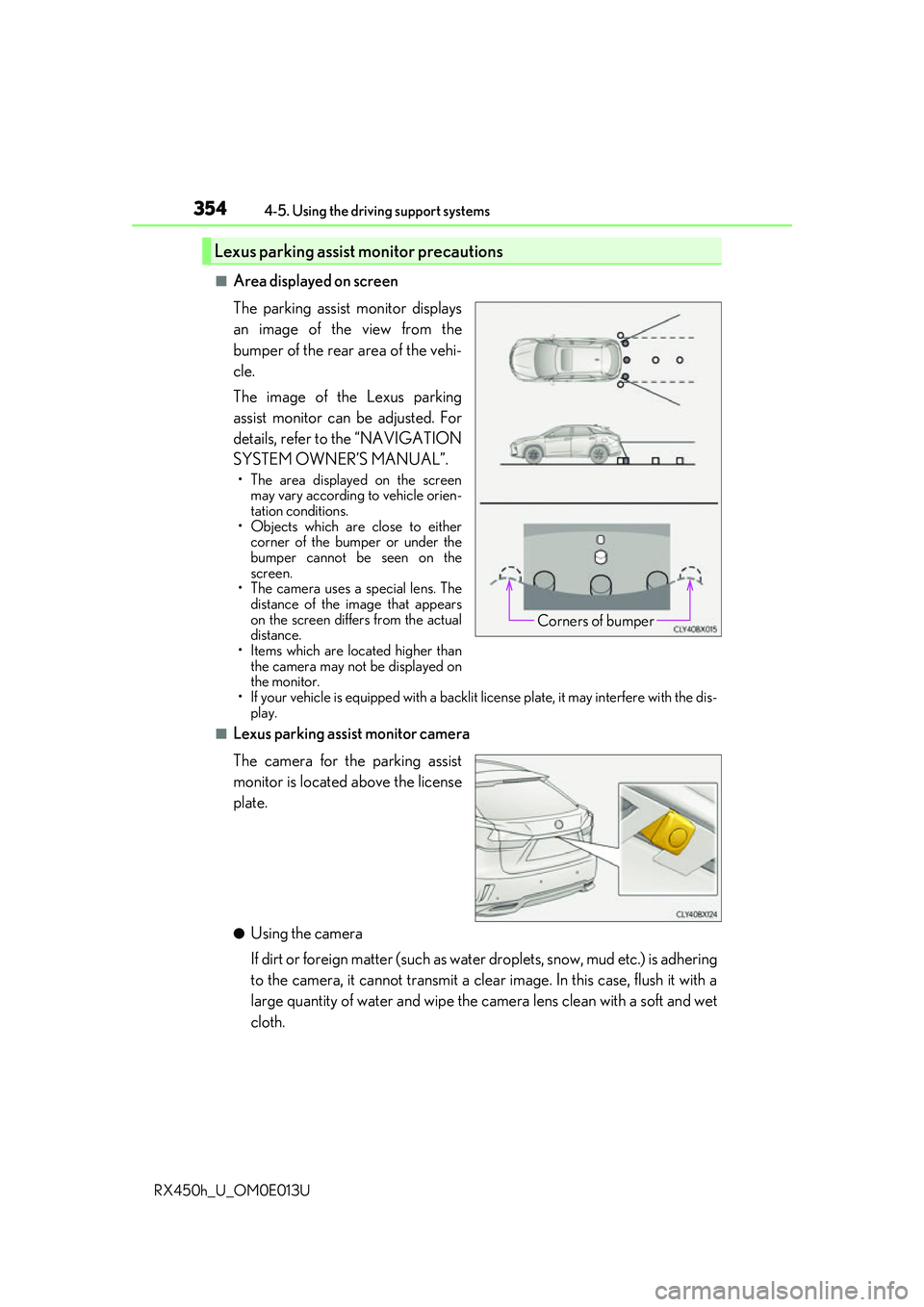
■Area displayed on screen
The parking assist monitor displays
an image of the view from the
bumper of the rear area of the vehi-
cle.
The image of the Lexus parking
assist monitor can be adjusted. For
details, refer to the “NAVIGATION
SYSTEM OWNER’S MANUAL”.
• The area displayed on the screen may vary according to vehicle orien-
tation conditions.
• Objects which are close to either corner of the bumper or under the
bumper cannot be seen on the
screen.
• The camera uses a special lens. The
distance of the image that appears
on the screen differs from the actual
distance.
• Items which are located higher than the camera may not be displayed on
the monitor.
• If your vehicle is equipped with a backlit license plate, it may interfere with the dis-
play.
■Lexus parking assist monitor camera
The camera for the parking assist
monitor is located above the license
plate.
●Using the camera
If dirt or foreign matter (such as wate r droplets, snow, mud etc.) is adhering
to the camera, it cannot transmit a clear image. In this case, flush it with a
large quantity of water and wipe the camera lens clean with a soft and wet
cloth.
Lexus parking assist monitor precautions
Corners of bumper
Page 357 of 660
3574-5. Using the driving support systems
4
Driving
RX450h_U_OM0E013U
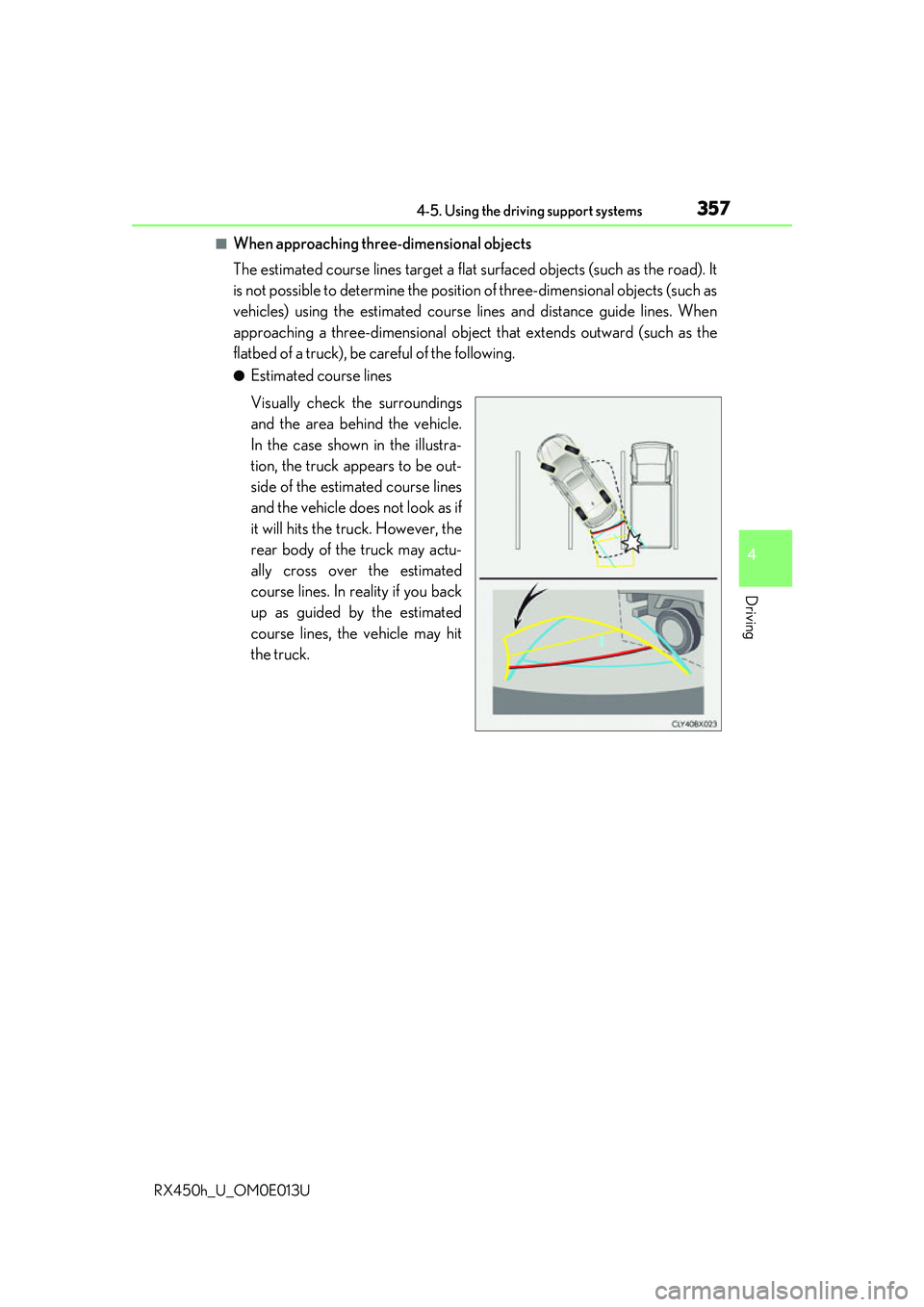
■When approaching three-dimensional objects
The estimated course lines target a flat surfaced objects (such as the road). It
is not possible to determine the position of three-dimensional objects (such as
vehicles) using the estimated course lines and distance guide lines. When
approaching a three-dimensional object that extends outward (such as the
flatbed of a truck), be careful of the following.
●Estimated course lines
Visually check the surroundings
and the area behind the vehicle.
In the case shown in the illustra-
tion, the truck appears to be out-
side of the estimated course lines
and the vehicle does not look as if
it will hits the truck. However, the
rear body of the truck may actu-
ally cross over the estimated
course lines. In reality if you back
up as guided by the estimated
course lines, the vehicle may hit
the truck.
Page 363 of 660
3634-5. Using the driving support systems
4
Driving
RX450h_U_OM0E013U
The Blind Spot Monitor is a system that has 2 functions:
●The BSM (Blind Spot Monitor) function
Assists the driver in making a decision when changing lanes
●The RCTA (Rear Cross Traffic Alert) function
Assists the driver when backing up
These functions use same sensors.
BSM (Blind Spot Monitor)
Summary of the Blind Spot Monitor
Page 364 of 660

3644-5. Using the driving support systems
RX450h_U_OM0E013U
Multi-information display
Turning the BSM function/RCTA function on/off. ( P. 365)
The RCTA function is available when the BSM function is on.
Outside rear view mirror indicators
BSM function:
When a vehicle is detected in a blind spot of the outside rear view mirrors or
approaching rapidly from behind into a blin d spot, the outside rear view mirror indi-
cator on the detected side will illuminate. If the turn signal lever is operated toward
the detected side, the outside rear view mirror indicator will flash.
RCTA function:
When a vehicle approaching from the right or left at the rear of the vehicle is
detected, both outsid e rear view mirror indicators will flash.
“BSM” indicator/“RCTA” indicator
When the BSM function/RCTA function is turned on, the indicator illuminates.
Monitor screen display (RCTA function only)
If a vehicle approaching from the right or left at the rear of the vehicle is detected, the
RCTA icon ( P. 372) for the detected side will be displayed on the monitor screen.
This illustration shows an example of a vehi cle approaching from the left at the rear of
the vehicle.
RCTA buzzer (RCTA function only)
If a vehicle approaching from the right or left at the rear of the vehicle is detected, a
buzzer will sound. The buzzer also sounds for approximately 1 second immediately
after the BSM function is operated to turn the system on.
1
2
3
4
5
Page 365 of 660

3654-5. Using the driving support systems
4
Driving
RX450h_U_OM0E013U
Press “” or “ ” of the meter control switches, select .
Press “ ” or “ ” of the meter control switches, select “BSM”.
Press “ ” or “ ” of the meter control switch es, select “BSM” or “RCTA”.
■Outside rear view mirror indicator visibility
In strong sunlight, the outside rear view mirror indicator may be difficult to see.
■Hearing the RCTA buzzer
The RCTA buzzer may be difficult to hear over loud noises, such as if the audio system
volume is high.
■When there is a malfunction in the Blind Spot Monitor
If a system malfunction is detected due to any of the following, a warning message will be
displayed: ( P. 543)
●A sensor is malfunctioning
●A sensor is dirty or covere d with snow or a sticker
●The outside temperature is extremely high or low
●Sensor voltage is abnormal
●A sensor is misaligned
■Certification for the Blind Spot Monitor
For vehicles sold in the U.S.A.
FCC ID : OAYSRR3A
This device complies with part 15 of the FC C Rules. Operation is subject to the following
two conditions:
(1) This device may not cause harmful interference, and
(2) this device must accept any interference received, including interference that may
cause undesired operation.
FCC Warning
Changes or modifications not expressly approved by the party responsible for compli-
ance could void the user's authority to operate the equipment.
For vehicles sold in Canada
Applicable law : Canada 310
This device complies with Industry Canada licence-exempt RSS standard(s). Operation
is subject to the following two conditions: (1) this device may not cause interference, and
(2) this device must accept any interference, including interference that may cause
undesired operation of the device.
Frequency bands : 24.05 - 24.25GHz
Output power : less than 20 milliwatts
■Customization
Some functions can be customized. (P. 376, 607)
Turning the BSM function/RCTA function on/off
1
2
3
Page 366 of 660

3664-5. Using the driving support systems
RX450h_U_OM0E013U
WARNING
■Handling the radar sensor
Blind Spot Monitor sensors ar e installed behind the left and right sides of the rear
bumper respectively. Observe the following to ensure the Blind Spot Monitor can
function correctly.
●Do not subject a sensor or its surrounding area on the rear bumper to a strong
impact.
If a sensor is moved even slightly off po sition, the system may malfunction and vehi-
cles may not be detected correctly.
In the following situations , have your vehicle inspected by your Lexus dealer.
• A sensor or its surrounding area is subject to a strong impact.
• If the surrounding area of a sensor is sc ratched or dented, or part of them has
become disconnected.
●Do not disassemble the sensor.
●Do not attach stickers to the sensor or surrounding area on the rear bumper.
●Do not modify the sensor or surrounding area on the rear bumper.
●Do not paint the rear bumper any colo r other than an official Lexus color.
●Keep the sensors and the surrounding areas
on the rear bumper clean at all times.
If a sensor or its surrounding area on the rear
bumper is dirty or covered with snow, the
Blind Spot Monitor may not operate and a
warning message (P. 543) will be dis-
played. In this situation, clear off the dirt or
snow and drive the vehicle with the operation
conditions of the BSM function ( P. 369)
satisfied for approximately 10 minutes. If the
warning message does not disappear, have
the vehicle inspected by your Lexus dealer.