Page 333 of 660
3334-5. Using the driving support systems
4
Driving
RX450h_U_OM0E013U
■When the sensor may not be correctly detecting the vehicle ahead
In the case of the following and depending on the conditions, operate the brake pedal
when deceleration of the system is insufficient or operate the accelerator pedal when
acceleration is required.
As the sensor may not be able to correctly detect these types of vehicles, the approach
warning ( P. 330) may not be activated.
●Vehicles that cut in suddenly
●Vehicles traveling at low speeds
●Vehicles that are not moving in the same lane
●Vehicles with small rear ends (traile rs with no load on board, etc.)
●Motorcycles traveling in the same lane
●When water or snow thrown up by the surrounding vehicles hinders the detecting of
the sensor
●When your vehicle is pointing upwards
(caused by a heavy load in the luggage com-
partment, etc.)
●Preceding vehicle has an extremely high
ground clearance
Page 339 of 660
3394-5. Using the driving support systems
4
Driving
RX450h_U_OM0E013U
Press “” or “ ” of the meter control
switches, select .
Press “ ” or “ ” of the meter control
switches, select “Parking Assist”.
When on, the indicator light comes on
to inform the driver that the system is
operational.
Intuitive parking assist
The distance from your vehicle to nearby obstacles when parallel parking or
maneuvering into a garage is measured by the sensors and communicated via
the displays and a buzzer. Always check the surrounding area when using this
system.
Types of sensors
Except F SPORT modelsF SPORT models
Front corner sensors
Front center sensors
Rear corner sensors
Rear center sensors
Turning the intuitive parking assist on/off
1
2
3
4
1
2
Page 340 of 660
3404-5. Using the driving support systems
RX450h_U_OM0E013U
When the sensors detect an obstacle, the following displays inform the driver of
the position and distance to the obstacle.
■Multi-information display
Front corner sensor operation
Front center sensor operation
Rear corner sensor operation
Rear center sensor operation
■Navigation system (8-inch display) screenIntuitive parking assist
When the vehicle is moving forward.
A graphic is automatically displayed
when an obstacle is detected. The
screen can be set so that the graphic
is not displayed. ( P. 344)
: Select to mute the buzzer
sounds.
Intuitive parking assist
Rear Cross Traffic Alert (if
equipped)
When the vehicle is moving back-
ward. A simplified image is displayed
on the upper part of the screen
when an obstacle is detected.
Display
1
2
3
4
1
2
3
Page 341 of 660
3414-5. Using the driving support systems
4
Driving
RX450h_U_OM0E013U
■Navigation system (12.3-inch display) screen
Lexus parking assist-sensor
Rear Cross Traffic Alert (if
equipped)
A graphic is automatically displayed
on the side display when an obstacle
is detected. The screen can be set so
that the graphic is not displayed.
( P. 344)
: Select to mute the buzzer
sounds. This function is available
when the vehicle is moving forward.
1
2
Page 342 of 660
3424-5. Using the driving support systems
RX450h_U_OM0E013U
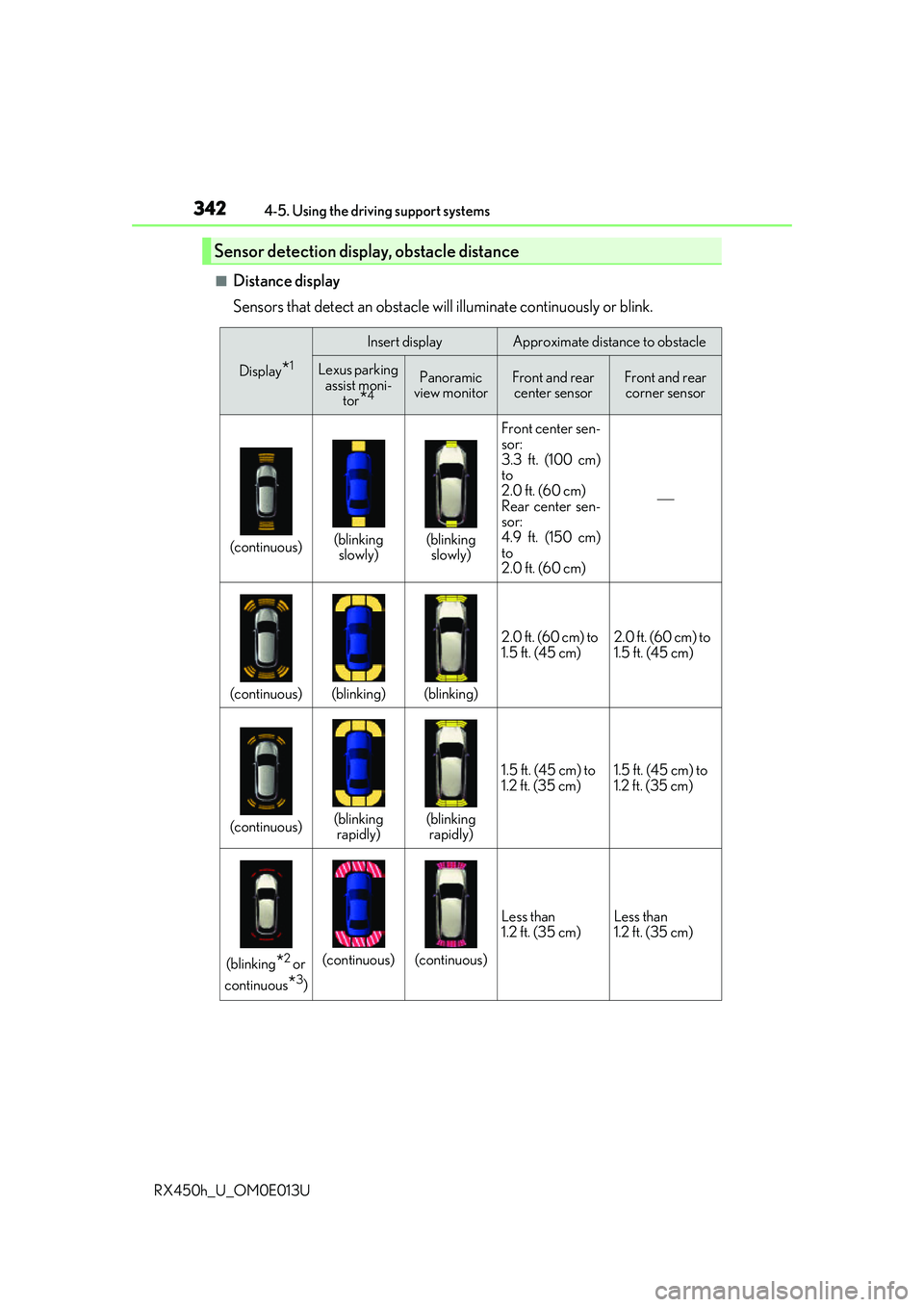
■Distance display
Sensors that detect an obstacle will illuminate continuously or blink.
Sensor detection display, obstacle distance
Display*1
Insert displayApproximate distance to obstacle
Lexus parking assist moni- tor
*4
Panoramic
view monitorFront and rear center sensorFront and rear corner sensor
(continuous)(blinking slowly)(blinking slowly) Front center sen-
sor:
3.3 ft. (100 cm)
to
2.0 ft. (60 cm)
Rear center sen-
sor:
4.9 ft. (150 cm)
to
2.0 ft. (60 cm)
(continuous)(blinking)(blinking)
2.0 ft. (60 cm) to
1.5 ft. (45 cm)
2.0 ft. (60 cm) to
1.5 ft. (45 cm)
(continuous)(blinking
rapidly)(blinking rapidly) 1.5 ft. (45 cm) to
1.2 ft. (35 cm)
1.5 ft. (45 cm) to
1.2 ft. (35 cm)
(blinking*2 or
continuous
*3)
(continuous)(continuous) Less than
1.2 ft. (35 cm)
Less than
1.2 ft. (35 cm)
Page 344 of 660

3444-5. Using the driving support systems
RX450h_U_OM0E013U
You can change the buzzer sounds volu me and the screen operating conditions
when the power switch is in ON mode.
Press the “MENU” button on the Remote Touch, and then select on the
screen.
Select “Vehicle”, and then select “LEXUS Park Assist” on the screen.
Select the desired item.
The buzzer sounds volume can
be adjusted.
On or off can be selected for intu-
itive parking assist display.
Both the front or rear center sen-
sors display and tone indication
can be set.
■The intuitive parking assist can be operated when
●Front corner sensors:
• The power switch is in ON mode.
• The shift lever is in other than P.
• The vehicle speed is less than about 6 mph (10 km/h).(At any speed when the shift lever is in R)
●Front center sensors:
• The power switch is in ON mode.
• The shift lever is in other than P or R.
• The vehicle speed is less than about 6 mph (10 km/h).
●Rear corner and rear center sensors:
• The power switch is in ON mode.
• The shift lever is in R.
■Intuitive parking assist display
●Vehicles with 8-inch display: When an ob stacle is detected while the Lexus parking
assist monitor or panoramic view monitor is in use, the warning indicator will appear in
the upper part of the screen even if the display setting has been set to off.
●Vehicles with 12.3-inch display: If the intu itive parking assist display is set to on,
detected objects will also be displayed on the panoramic view monitor. For details, refer
to “NAVIGATION SYSTEM OWNER’S MANUAL”.
Setting up intuitive parking assist
1
2
3
1
2
3
Page 347 of 660
3474-5. Using the driving support systems
4
Driving
RX450h_U_OM0E013U
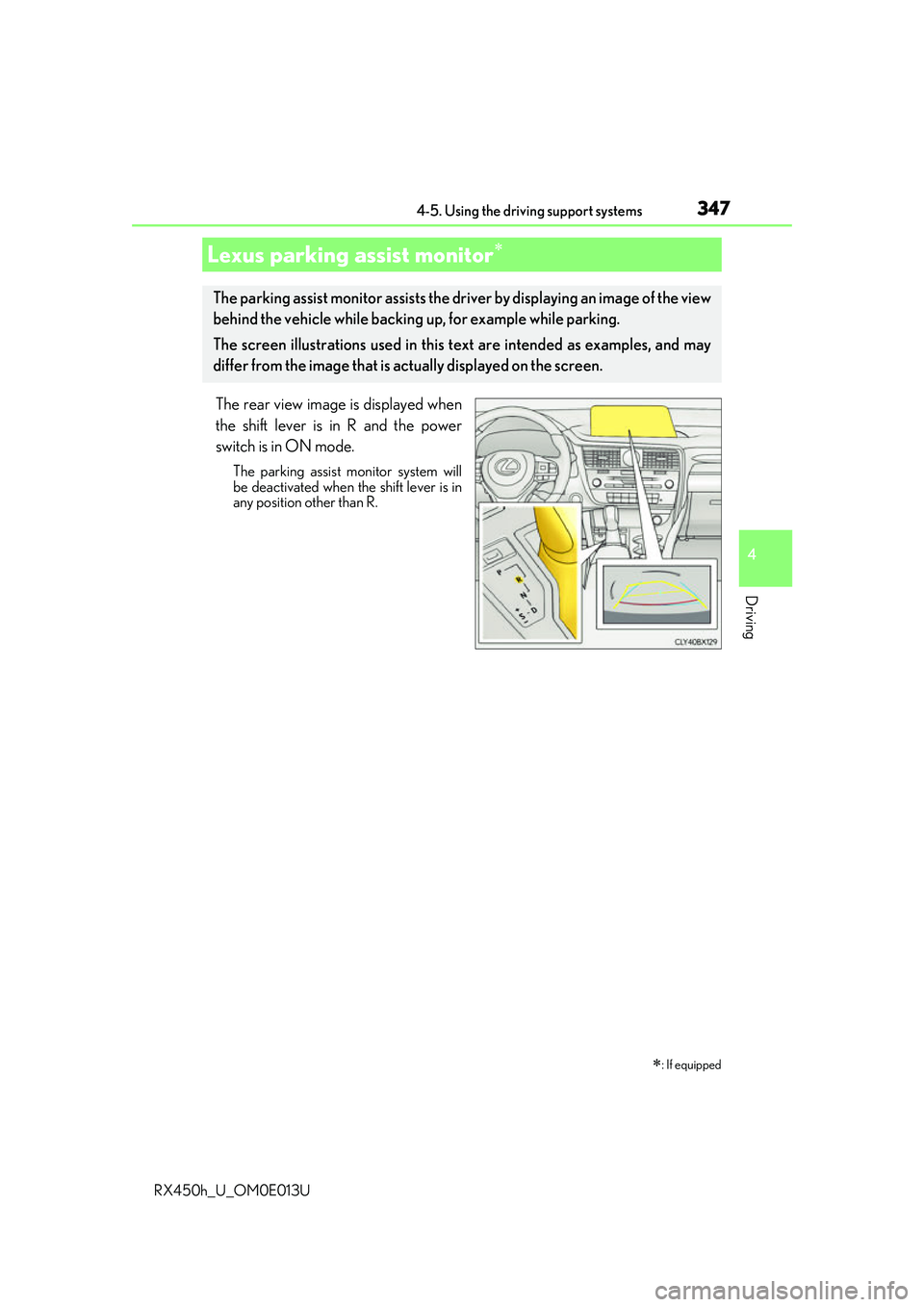
The rear view image is displayed when
the shift lever is in R and the power
switch is in ON mode.
The parking assist monitor system will
be deactivated when the shift lever is in
any position other than R.
Lexus parking assist monitor
: If equipped
The parking assist monitor assists the driv er by displaying an image of the view
behind the vehicle while backing up, for example while parking.
The screen illustrations used in this text are intended as examples, and may
differ from the image that is ac tually displayed on the screen.
Page 348 of 660
3484-5. Using the driving support systems
RX450h_U_OM0E013U
■Screen display
The parking assist monitor screen will be displayed if the shift position is
shifted to R while the power switch is in ON mode.
Intuitive parking assist
Rear Cross Traffic Alert (if
equipped)
A simplified image is displayed on
the upper part of the screen when an
obstacle is detected.
■Using the system
Use any of the following modes.
●Estimated course line display mode ( P. 350)
Estimated course lines are dis-
played which move in accor-
dance with the operation of the
steering wheel.
Using the Lexus parking assist monitor
1
2