Page 413 of 708
4135-1. Remote Touch screen
5
Interior features
LS460/LS460L_GE (OM50G06E)
■Full screen display
The following functions can be displayed full screen:
• Initial screen
•“Menu” screen ( P. 410)
•Map screen*1
•Audio screen*1,2
• Fuel consumption screen*2 ( P. 138)
• Air conditioning control screen*2 ( P. 418)
*1: For details, refer to “Navigation and Multimedia System Owner’s Manual” or
“Navigation System Owner’s Manual”.
*2: Except for Hong Kong and Macau
12.3-inch display
12.3-inch display operation
Page 415 of 708
4155-1. Remote Touch screen
5
Interior features
LS460/LS460L_GE (OM50G06E)
■ Selecting the operation screen
When selecting the main display, move the Remote Touch knob to the
left. When selecting the side display, move the Remote Touch knob to
the right.
■Main display
For details about the functions and operation of the main display, refer
to the respective section and “Navigation and Multimedia System
Owner’s Manual” or “Navigation System Owner’s Manual”.
■Side display
Basic screens
To change the screen displayed on th e side display, use the screen but-
tons on the right side of the display.
Navigation system*1
Audio*1
Phone*1
Vehicle information
( P. 142)
Air conditioning system
( P. 423)
Select to hide the side display.
If the item displayed on the
main display is full screen dis-
play compatible ( P. 413), it
will be displayed full screen.*2
Split-screen display operation
1
2
3
4
5
6
Page 416 of 708
4165-1. Remote Touch screen
LS460/LS460L_GE (OM50G06E)
Interruption screens
Each of the following screens is displayed automatically in accordance
with conditions.
• Lexus parking assist-sensor
•Phone*1
• Driving mode
• Lexus night view (if equipped) ( P. 395)
*1: For details, refer to “Navigation and Multimedia System Owner’s Manual” or
“Navigation System Owner’s Manual”.
*2: Except for Hong Kong and Macau
Page 425 of 708

4255-3. Using the air conditioning system and defogger
5
Interior features
LS460/LS460L_GE (OM50G06E)
Without rear air conditioning system
To adjust the fan speed, press or select on the operation
screen to increase the fan speed and or on the operation
screen to decrease the fan speed.
Press to turn the fan off.
To adjust the temperature setting, press or select on the
operation screen to increase the temperature and or on
the operation screen to decrease the temperature.
The air conditioning system switches between individual and simultaneous modes
each time “DUAL” is selected.
When “DUAL” is selected (the indicator will be on) or the passenger’s side tem-
perature control button is pressed, the temperature for the driver and passenger
seats can be adjusted separately.
When the climate control seats are set to “AUTO” mode, the system is operated
automatically according to the set temperature, outside temperature, etc.
To change the air outlets, press
or select an air outlet
switch.
Adjusting the settings manually
1
2
3
Page 426 of 708
4265-3. Using the air conditioning system and defogger
LS460/LS460L_GE (OM50G06E)
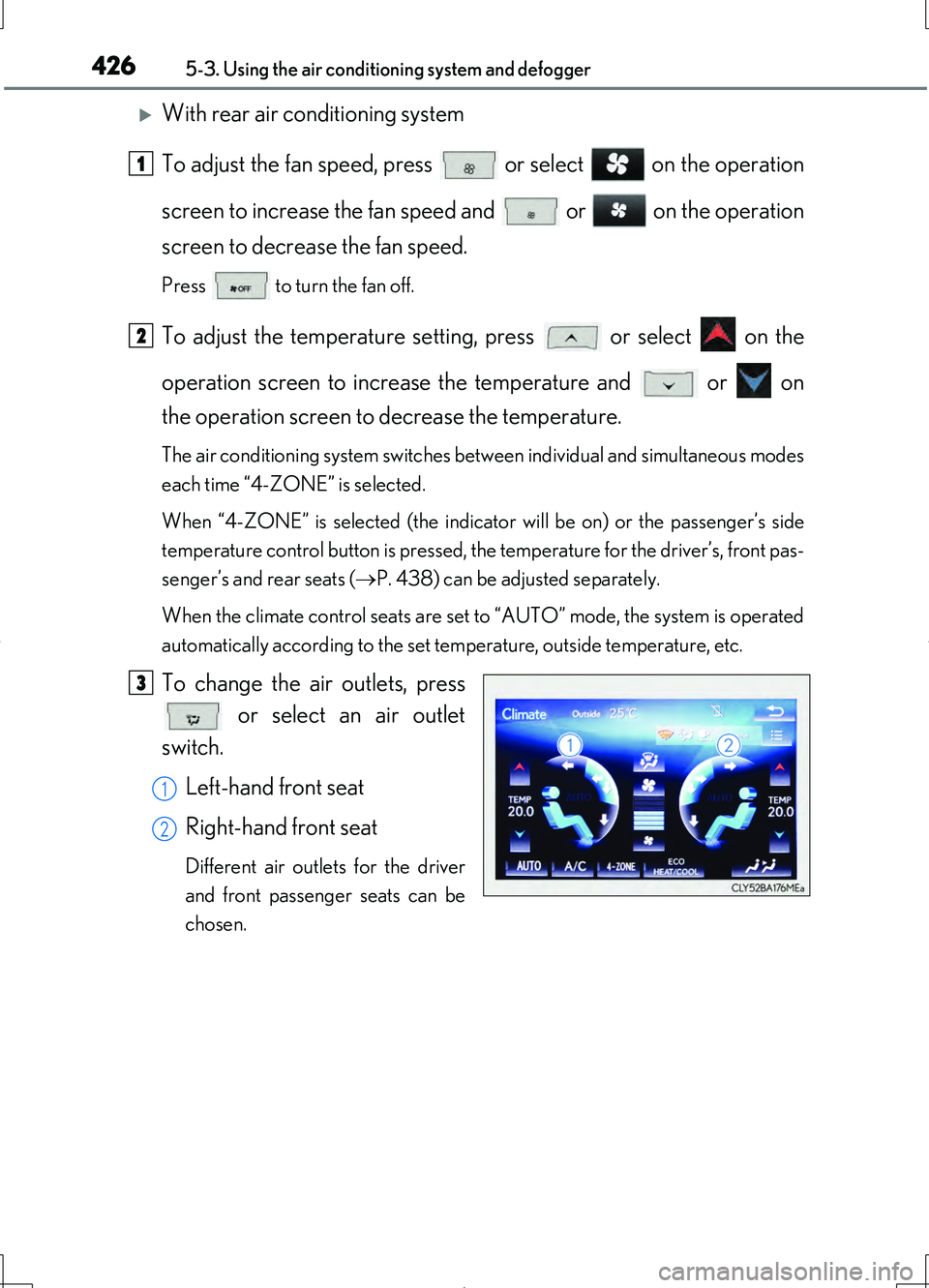
With rear air conditioning system
To adjust the fan speed, press or select on the operation
screen to increase the fan speed and or on the operation
screen to decrease the fan speed.
Press to turn the fan off.
To adjust the temperature setting, press or select on the
operation screen to increase the temperature and or on
the operation screen to decrease the temperature.
The air conditioning system switches between individual and simultaneous modes
each time “4-ZONE” is selected.
When “4-ZONE” is selected (the indicator will be on) or the passenger’s side
temperature control button is pressed, the temperature for the driver’s, front pas-
senger’s and rear seats ( P. 438) can be adjusted separately.
When the climate control seats are set to “AUTO” mode, the system is operated
automatically according to the set temperature, outside temperature, etc.
To change the air outlets, press or select an air outlet
switch.
Left-hand front seat
Right-hand front seat
Different air outlets for the driver
and front passenger seats can be
chosen.
1
2
3
1
2
Page 428 of 708
4285-3. Using the air conditioning system and defogger
LS460/LS460L_GE (OM50G06E)
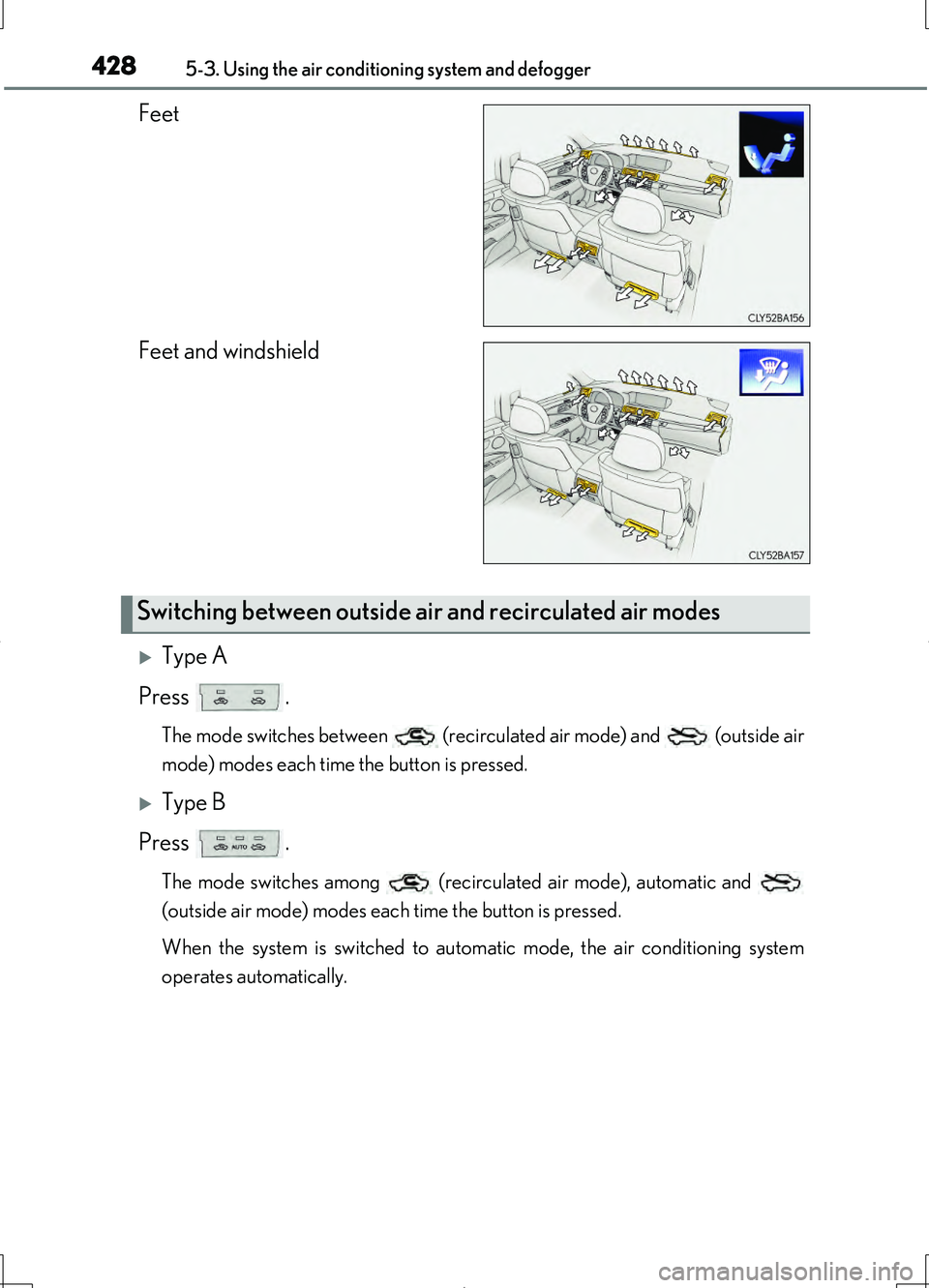
Feet
Feet and windshield
Type A
Press .
The mode switches between (recirculated air mode) and (outside air
mode) modes each time the button is pressed.
Type B
Press .
The mode switches among (recirculated air mode), automatic and
(outside air mode) modes each time the button is pressed.
When the system is switched to automatic mode, the air conditioning system
operates automatically.
Switching between outside air and recirculated air modes
Page 430 of 708
4305-3. Using the air conditioning system and defogger
LS460/LS460L_GE (OM50G06E)
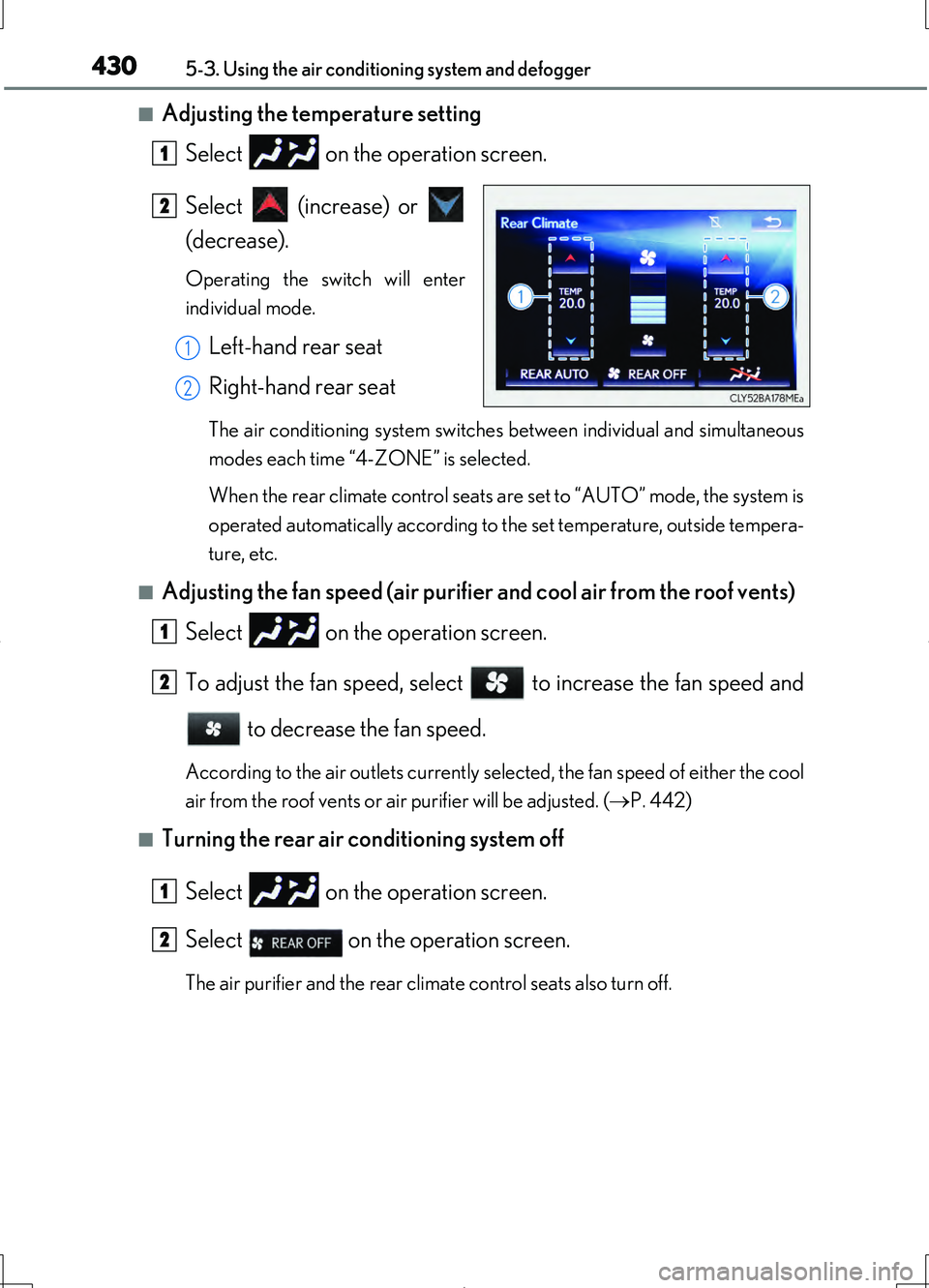
■Adjusting the temperature setting Select on the operation screen.
Select (increase) or
(decrease).
Operating the switch will enter
individual mode.
Left-hand rear seat
Right-hand rear seat
The air conditioning system switches between individual and simultaneous
modes each time “4-ZONE” is selected.
When the rear climate control seats are set to “AUTO” mode, the system is
operated automatically according to the set temperature, outside tempera-
ture, etc.
■Adjusting the fan speed (air purifier and cool air from the roof vents)
Select on the operation screen.
To adjust the fan speed, select to increase the fan speed and to decrease the fan speed.
According to the air outlets currently selected, the fan speed of either the cool
air from the roof vents or air purifier will be adjusted. ( P. 442)
■Turning the rear air conditioning system off
Select on the operation screen.
Select on the operation screen.
The air purifier and the rear climate control seats also turn off.
1
2
1
2
1
2
1
2
Page 436 of 708
4365-3. Using the air conditioning system and defogger
LS460/LS460L_GE (OM50G06E)
■Ventilation and air conditioning odors
●To let fresh air in, set the air conditioning system to the outside air mode.
●During use, various odors from inside and outside the vehicle may enter into and
accumulate in the air conditioning system. This may then cause odor to be emitted
from the vents.
●To reduce potential odors from occurring:
• It is recommended that the air conditioning system be set to outside air mode
prior to turning the vehicle off.
• The start timing of the blower may be delayed for a short period of time immedi-
ately after the air conditioning system is started in automatic mode.
■nanoe *1
The air conditioning system adopts nanoe technology. This helps to fill the cabin
with refreshing air by emitting slightly acidic nanoe ions coated with water parti-
cles through the front center vent on driver’s side*2.
●When the fan is turned on and “nanoe” on the option control screen is selected, the
nanoe is activated.
●When the fan is operated in the following conditions, system performance will be
maximized. If the following conditions are not met, the nanoe may not operate at
full capacity.
• The , or air outlets are being used.
• The front center vent on driver’s side is open.
●When nanoe is generated, a small amount of ozone is emitted and may be faintly
smelled in some situations. However, this is approximately the same as the amount
that already exists in nature, such as in forests, and it has no affect on the human
body.
●A slight noise may be heard during operation. This is not a malfunction.
*1:nanoe and the nanoe mark are trademarks of Panasonic Corporation.
*2: According to temperature and humidity conditions, fan speed and direction of
the air flow, the nanoe may not operate at full capacity.