Page 440 of 708
4405-3. Using the air conditioning system and defogger
LS460/LS460L_GE (OM50G06E)
■Changing the air outlets
Press .
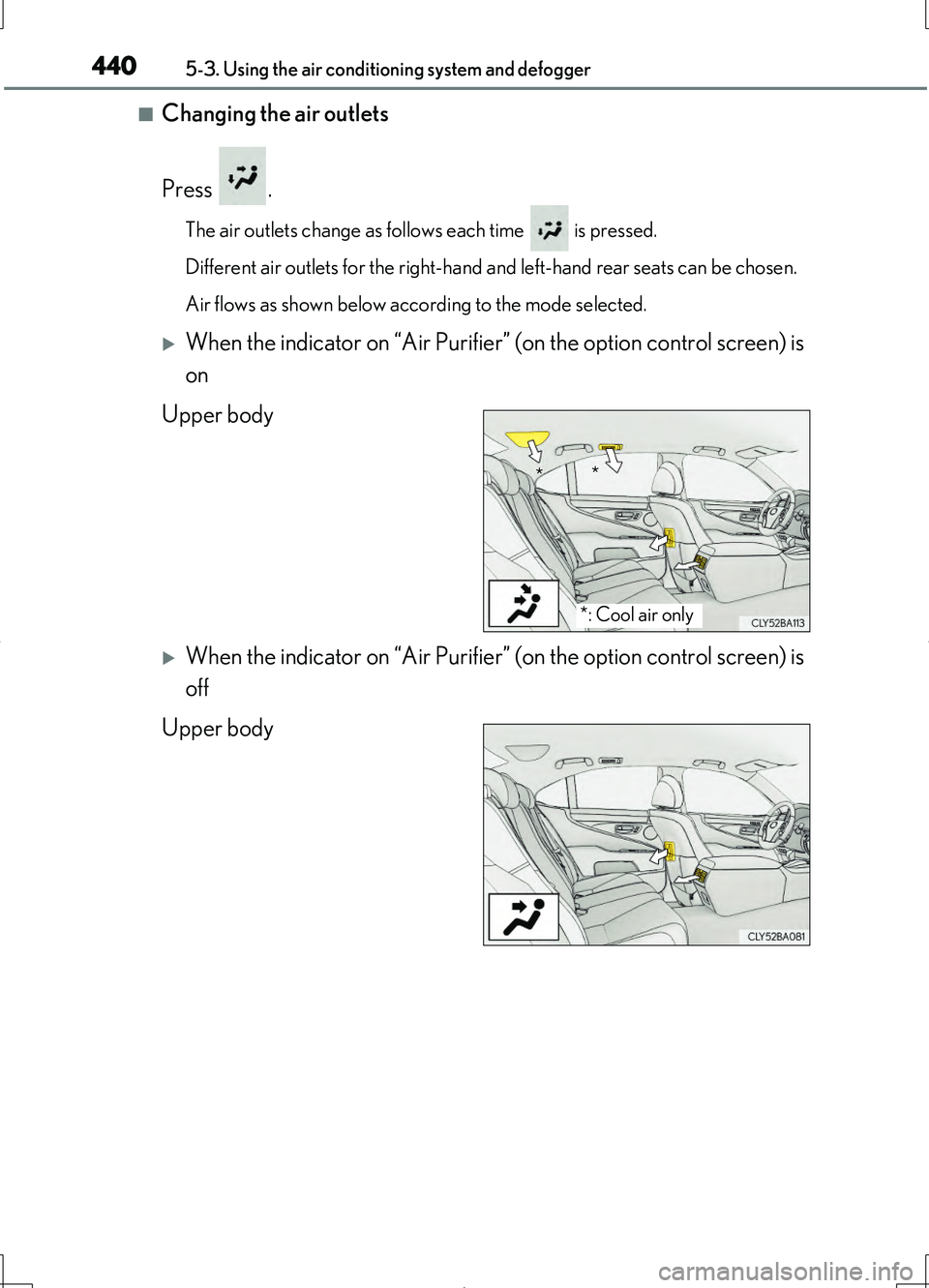
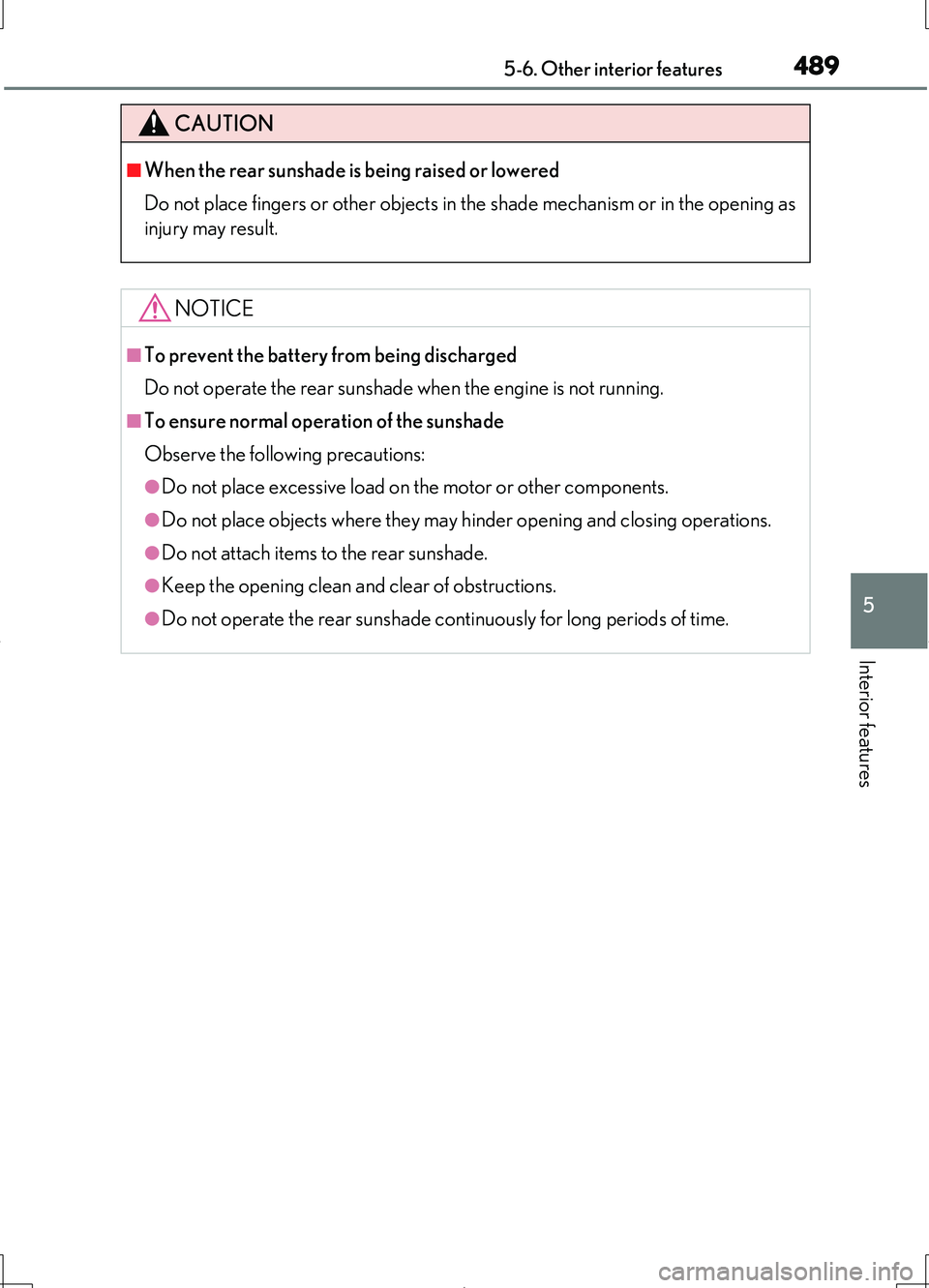
The air outlets change as follows each time is pressed.
Different air outlets for the right-hand and left-hand rear seats can be chosen.
Air flows as shown below according to the mode selected.
When the indicator on “Air Purifier” (on the option control screen) is
on
Upper body
When the indicator on “Air Purifier” (on the option control screen) is
off
Upper body
*: Cool air only
* *
Page 450 of 708
4505-4. Using the interior lights
LS460/LS460L_GE (OM50G06E)
■Illuminated entry system
The lights automatically turn on/off accordi ng to engine switch mode, the presence
of the electronic key, whether the doors are locked/unlocked, and whether the doors
are opened/closed.
■To prevent the battery from being discharged
If the following lights remain on when the engine switch is turned off, the lights will go
off automatically after 20 minutes:
●Interior lights
●Door courtesy lights
●Personal lights
●Inside door handle lights
●Seat belt buckle lights
●Footwell lights
●Engine switch light
■Customization
Settings (e.g. The time elapsed before lights turn off) can be changed.
(Customizable features P. 667)
NOTICE
■To prevent battery discharge
Do not leave the lights on longer than necessary when the engine is not running.
Page 469 of 708
4695-6. Other interior features
5
Interior features
LS460/LS460L_GE (OM50G06E)
The GPS clock’s time is automati-
cally adjusted by utilizing GPS time
information. (For details, refer to
“Navigation and Multimedia System
Owner’s Manual” or “Navigation
System Owner’s Manual”.)
Clock
Page 476 of 708

4765-6. Other interior features
LS460/LS460L_GE (OM50G06E)
Automatic operation
Operates automatically according
to the outside and cabin tempera-
ture when the engine switch is
turned to IGNITION ON mode.
Automatic operation can be turned
off using the switch.
The indicator light comes on when the
heater is operating.
Manual operation
Turns the heated steering wheel on/
off.
The indicator light comes on when the
heater is operating.
■Operating condition
The engine switch is in IGNITION ON mode.
■Timer function
Manual operation: Turns off after approximately 30 minutes.
Automatic operation: Operates for a maximum of 30 minutes. (Turns off according
to outside and cabin temperature.)
■If the indicator light does not come on
If the indicator light does not come on when the switch is pressed, a malfunction may
have occurred in the system. Have the vehicle inspected by your Lexus dealer.
■Customization
The automatic turning on/off of the heated steering wheel can be customized.
(Customizable features P. 667)
Heated steering wheel
: If equipped
The left and right grip portions of the steering wheel can be heated.
Page 489 of 708
4895-6. Other interior features
5
Interior features
LS460/LS460L_GE (OM50G06E)
CAUTION
■When the rear sunshade is being raised or lowered
Do not place fingers or other objects in the shade mechanism or in the opening as
injury may result.
NOTICE
■To prevent the battery from being discharged
Do not operate the rear sunshade when the engine is not running.
■To ensure normal operation of the sunshade
Observe the following precautions:
●Do not place excessive load on the motor or other components.
●Do not place objects where they may hinder opening and closing operations.
●Do not attach items to the rear sunshade.
●Keep the opening clean and clear of obstructions.
●Do not operate the rear sunshade continuously for long periods of time.
Page 492 of 708
4925-6. Other interior features
LS460/LS460L_GE (OM50G06E)
■Operating conditions
●The engine switch is in IGNITION ON mode.
●The rear windows are fully closed.
The rear door sunshades automatically retract when the rear windows are opened.
■Operating the rear door sunshades after turning the engine switch off
The rear door sunshades can be operated for approximately 60 seconds even after
the engine switch is switched to ACCESSORY mode or turned off.
■Jam protection function
If an object becomes caught between a rear door sunshade and the window frame,
the jam protection function will cause the sunshade to detach from its drive mecha-
nism and retract.
If the jam protection function operates when extending the rear door sunshades
Pressing the button will reconnect the sunshade.
Pressing the button again will allow the sunshades to be operated.
If the sunshade does not operate after the button is pressed, press the button again.
If the jam protection function operates when retracting the rear door sunshades
Press and hold the button to re-extend the rear door sunshades, and continue press-
ing for more than 5 seconds after the sunshades have fully extended and stopped.
■Button lock function
To prevent inadvertent operation, some buttons on the rear controller can be locked.
( P. 444)
■When reconnecting the battery
The rear door sunshades will always be retracted the first time the button is pressed.
Page 493 of 708
4935-6. Other interior features
5
Interior features
LS460/LS460L_GE (OM50G06E)
CAUTION
■When the rear door sunshades are being extended or retracted
Do not place fingers or other objects in the shade mechanism or in the opening as
injury may result.
■Jam protection function
Never use any part of your body to intentionally activate the jam protection func-
tion.
NOTICE
■To prevent the battery from being discharged
Do not operate the rear door sunshades when the engine is not running.
■To ensure normal operation of the sunshades
Observe the following precautions:
●Do not place excessive load on the motor or other components.
●Do not place objects where they may hinder opening and closing operations.
●Do not attach items to the rear door sunshades.
●Keep the opening clean and clear of obstructions.
●Do not operate the rear door sunshades continuously for long periods of time.
Page 501 of 708

5015-6. Other interior features
5
Interior features
LS460/LS460L_GE (OM50G06E)
Press and hold the vehicle’s programmed HomeLink button for 2
seconds and release it. Repeat this step once again. The garage door
may open.
If the garage door opens, the programming process is complete. If the door
does not open, press and release the button a third time. This third press and
release will complete the programming process by opening the garage door.
The ceiling mounted garage door opener motor should now recognize the
HomeLink signal and operate the garage door.
Repeat the steps above to program another rolling code system for
any of the remaining HomeLink buttons.
Place your transmitter 25 to 75 mm (1 to 3 in.) away from the surface of
the HomeLink.
Keep the HomeLink indicator light in view while programming.
Press and hold the selected HomeLink button.
Repeatedly press and release (cycle ) the device’s remote control but-
ton for two seconds each until step 4 is completed.
When the indicator light on the HomeLink compatible transceiver
starts to flash rapidly, release the buttons.
Test the operation of the HomeLink by pressing the newly pro-
grammed button. Check to see if the gate/device operates correctly.
Repeat the steps above to program another device for each of the
remaining HomeLink buttons.
To program other devices such as home security systems, home door
locks or lighting, contact your Lexus dealer for assistance.
Programming the HomeLink® (garage door type B) or entry gate
Programming other devices
3
4
1
2
3
4
5
6