2016 Lexus GS450h reset
[x] Cancel search: resetPage 106 of 544
106
GS450h_OM_OM30E99U_(U)
2. Instrument cluster
Press the “DISP” button to switch between on and off.
On and off will be switched between each time the button is pressed.
If the button is left alone without being operated for a short time, setting will be fin-
ished automatically.
■Head-up display
●The head-up display may seem dark and hard to see when viewed through sunglasses,
especially polarized sunglasses.
Adjust the brightness of the head-up display or remove your sunglasses.
●When the head-up display is turned off, it will remain off even if the power switch is
turned to ON mode after the power switch has been turned off.
●The startup image will be displayed on the head-up display after the power switch has
been turned to ON mode while the he ad-up display switch is set to on.
■When the 12-volt battery is disconnected
The customize settings of the head-up display will be reset.
■Head-up display automatic position adjustment
If the display position is recorded into me mory, the head-up display will be automatically
adjusted to the desired position. ( P. 1 4 3 )
WA R N I N G
■Before using the head-up display
Check that the position and brightness of the head-up display image does not interfere
with safe driving. Incorrec t adjustment of the image’s position or brightness may
obstruct the driver’s view and lead to an a ccident, resulting in death or serious injury.
NOTICE
■To prevent damage to components
●Do not touch the inside of the head-up disp lay projector or thrust sharp edges or the
like into the projector.
Doing so could cause mechanical malfunctions.
2
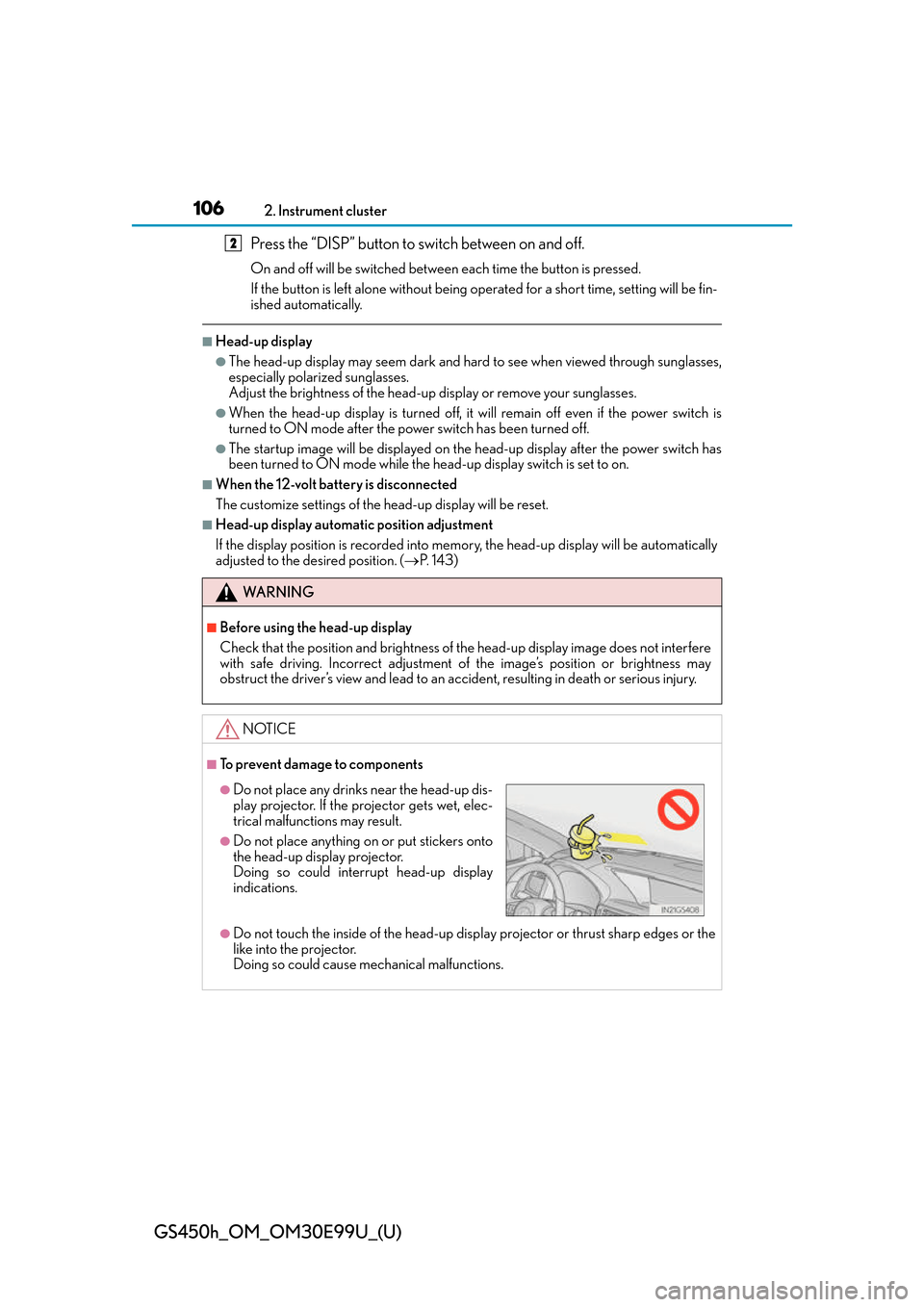
●Do not place any drinks near the head-up dis-
play projector. If the projector gets wet, elec-
trical malfunctions may result.
●Do not place anything on or put stickers onto
the head-up display projector.
Doing so could interrupt head-up display
indications.
Page 110 of 544
110
GS450h_OM_OM30E99U_(U)
2. Instrument cluster
Press the “MENU” button on the Remote Touch, then select on the “Menu”
screen, and then select “Fuel Consumption”.
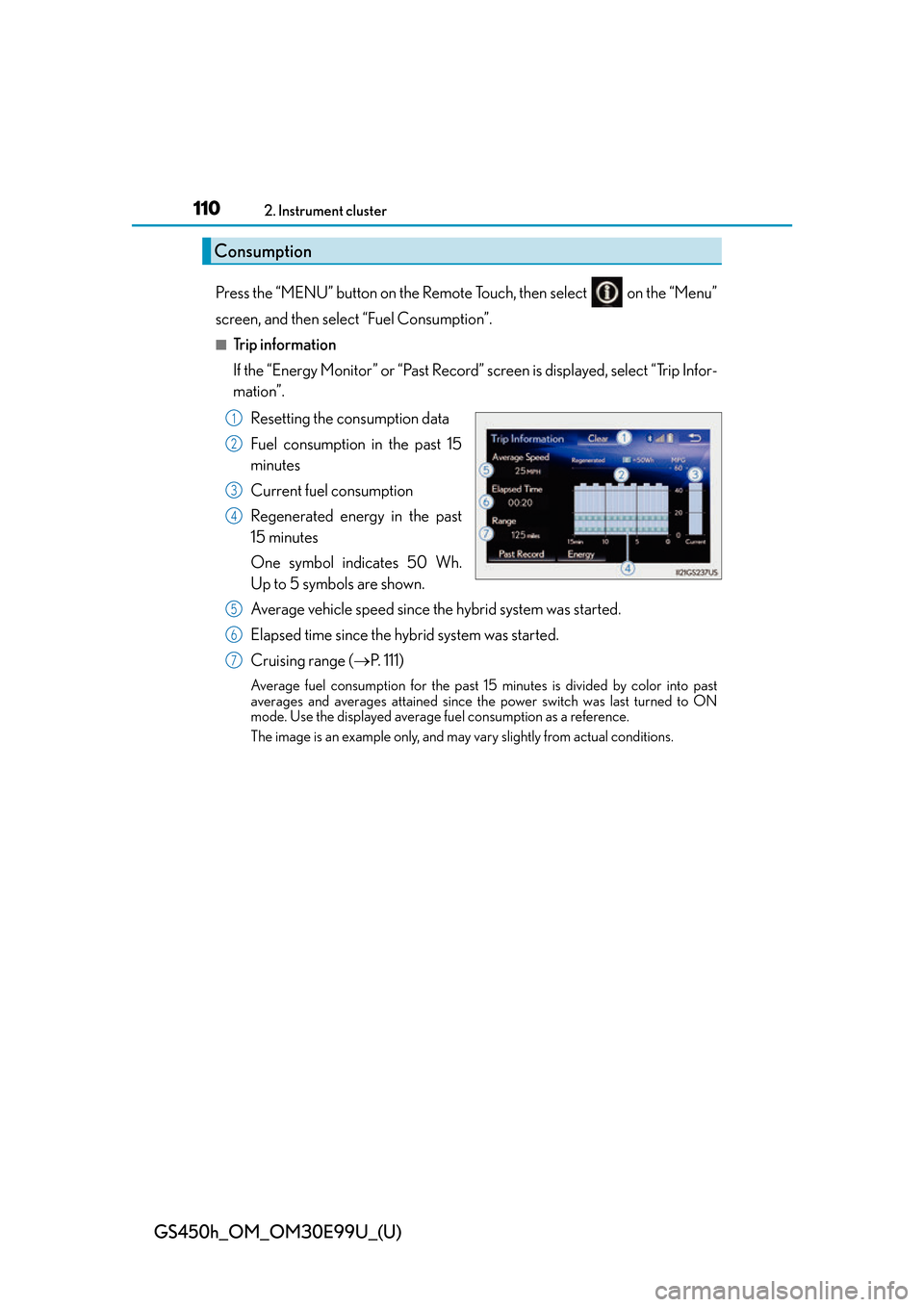
■Trip information
If the “Energy Monitor” or “Past Record” screen is displayed, select “Trip Infor-
mation”.Resetting the consumption data
Fuel consumption in the past 15
minutes
Current fuel consumption
Regenerated energy in the past
15 minutes
One symbol indicates 50 Wh.
Up to 5 symbols are shown.
Average vehicle speed since the hybrid system was started.
Elapsed time since the hybrid system was started.
Cruising range ( P. 111)
Average fuel consumption for the past 15 minutes is divided by color into past
averages and averages attained since th e power switch was last turned to ON
mode. Use the displayed average fuel consumption as a reference.
The image is an example only, and may vary slightly from actual conditions.
Consumption
1
2
3
4
5
6
7
Page 111 of 544
GS450h_OM_OM30E99U_(U)
1112. Instrument cluster
2
Instrument cluster
■Past record
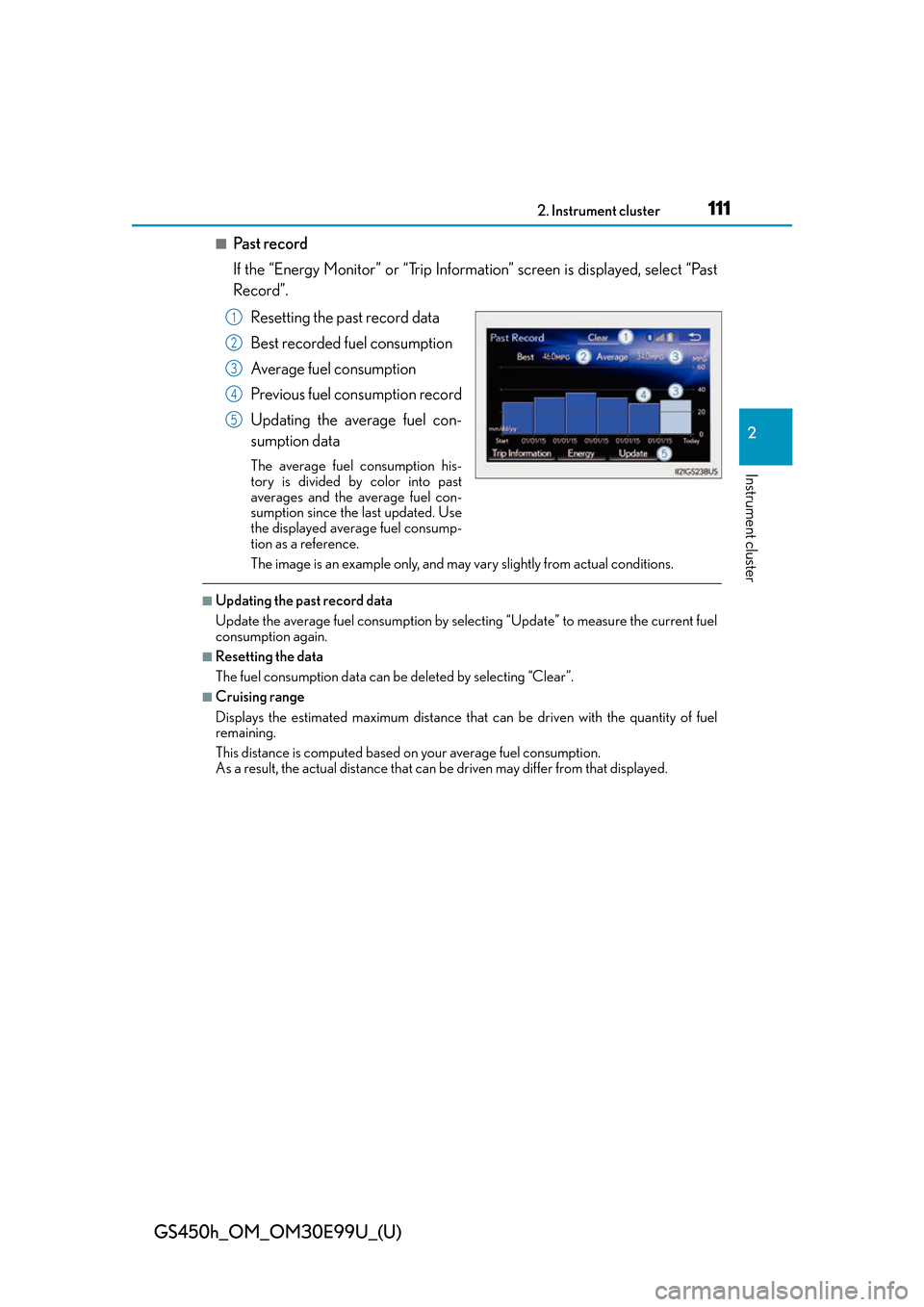
If the “Energy Monitor” or “Trip Information” screen is displayed, select “Past
Record”.
Resetting the past record data
Best recorded fuel consumption
Average fuel consumption
Previous fuel consumption record
Updating the average fuel con-
sumption data
The average fuel consumption his-
tory is divided by color into past
averages and the average fuel con-
sumption since the last updated. Use
the displayed average fuel consump-
tion as a reference.
The image is an example only, and may vary slightly from actual conditions.
■Updating the past record data
Update the average fuel consumption by selecting “Update” to measure the current fuel
consumption again.
■Resetting the data
The fuel consumption data can be deleted by selecting “Clear”.
■Cruising range
Displays the estimated maximum distance that can be driven with the quantity of fuel
remaining.
This distance is computed based on your average fuel consumption.
As a result, the actual distance that can be driven may differ from that displayed.
1
2
3
4
5
Page 144 of 544
![Lexus GS450h 2016 Owners Manual / LEXUS 2016 GS450H OWNERS MANUAL (OM30E99U) 144
GS450h_OM_OM30E99U_(U)
3-3. Adjusting the seats
Your preferred driving position (the position of the driver’s seat, steering wheel,
outside rear view mirrors and HUD [hea d-up display] [if equip](/manual-img/36/15331/w960_15331-143.png "Lexus GS450h 2016 Owners Manual / LEXUS 2016 GS450H OWNERS MANUAL (OM30E99U) 144
GS450h_OM_OM30E99U_(U)
3-3. Adjusting the seats
Your preferred driving position (the position of the driver’s seat, steering wheel,
outside rear view mirrors and HUD [hea d-up display] [if equip")
144
GS450h_OM_OM30E99U_(U)
3-3. Adjusting the seats
Your preferred driving position (the position of the driver’s seat, steering wheel,
outside rear view mirrors and HUD [hea d-up display] [if equipped]) can be
recorded and recalled by pressing a button.
Three different driving positions can be recorded into memory.
■Recording procedure
Check that the shift lever is in P.
Turn the power switch to ON mode.
Adjust the driver’s seat, steering wheel, outside rear view mirrors and HUD
(head-up display) (if equipped) to the desired positions.
While pressing the “SET” button,
or within 3 seconds after the
“SET” button is pressed, press
button “1”, “2” or “3” until the
buzzer sounds.
If the selected button has already
been preset, the previously recorded
position will be overwritten.
Vehicles with the driving position memory for the front passenger’s seat: To
record the position of the front passenger’s seat, adjust the front passenger’s
seat to the desired position and perform step using the buttons on the front
passenger’s side.
■Recall procedureCheck that the shift lever is in P.
Turn the power switch to ON mode.
Press one of the buttons for the
driving position you want to recall
until the buzzer sounds.
Driving position memory
1
2
3
4
4
1
2
3
Page 255 of 544
GS450h_OM_OM30E99U_(U)
2554-5. Using the driving support systems
4
Driving
■Automatic cruise control cancelation
Cruise control will stop maintaining the vehicle speed in any of the following situations.
●Actual vehicle speed falls more than approximately 10 mph (16 km/h) below the preset
vehicle speed.
At this time, the memorized set speed is not retained.
●Actual vehicle speed is below approximately 25 mph (40 km/h).
●VSC is activated.
●TRAC is activated for a period of time.
●When the VSC or TRAC system is turned off by pressing the VSC OFF switch.
■If the warning message for the cruise contro l is shown on the multi-information display
Press the “ON/OFF” button once to deactivate the system, and then press the button
again to reactivate the system.
If the cruise control speed cannot be set or if the cruise control cancels immediately after
being activated, there may be a malfunction in the cruise control system. Have the vehi-
cle inspected by your Lexus dealer.
WA R N I N G
■To avoid operating the cruise control by mistake
Switch the cruise control off using th e “ON/OFF” button when not in use.
■Situations unsuitable for cruise control
Do not use cruise control in any of the following situations.
Doing so may result in loss of control and could cause an accident resulting in death or
serious injury.
●In heavy traffic
●On roads with sharp bends
●On winding roads
●On slippery roads, such as thos e covered with rain, ice or snow
●On steep hills
Vehicle speed may exceed the set speed when driving down a steep hill.
●During emergency towing
Page 340 of 544
340
GS450h_OM_OM30E99U_(U)
6-2. Maintenance
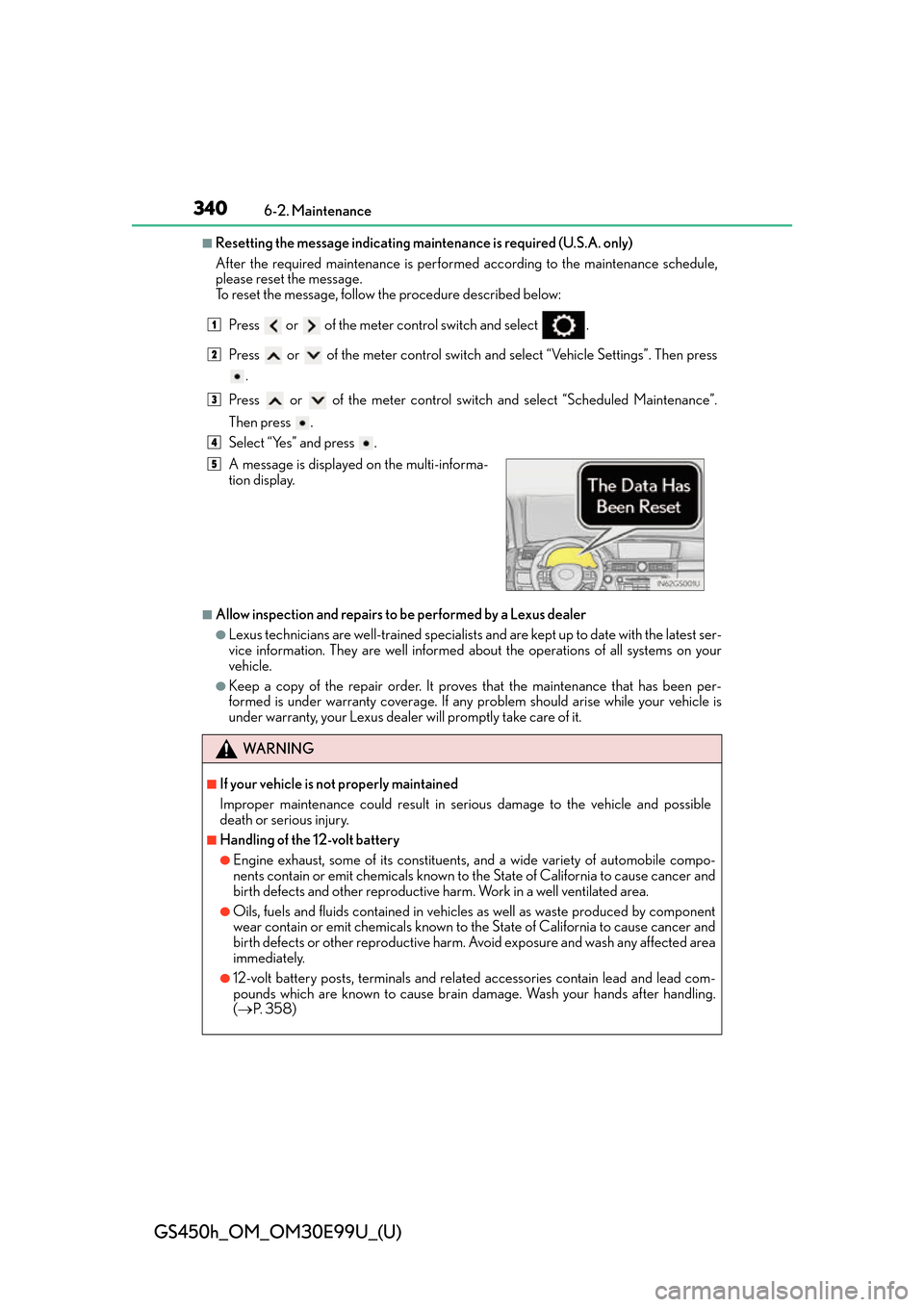
■Resetting the message indicating maintenance is required (U.S.A. only)
After the required maintenance is performed according to the maintenance schedule,
please reset the message.
To reset the message, follow the procedure described below:Press or of the meter co ntrol switch and select .
Press or of the meter control switch an d select “Vehicle Settings”. Then press
.
Press or of the meter control switch and select “Scheduled Maintenance”.
Then press .
Select “Yes” and press .
■Allow inspection and repairs to be performed by a Lexus dealer
●Lexus technicians are well-trained specialists an d are kept up to date with the latest ser-
vice information. They are well informed ab out the operations of all systems on your
vehicle.
●Keep a copy of the repair order. It proves that the maintenance that has been per-
formed is under warranty coverage. If any problem should arise while your vehicle is
under warranty, your Lexus dealer will promptly take care of it.
A message is displayed on the multi-informa-
tion display.
WA R N I N G
■If your vehicle is not properly maintained
Improper maintenance could result in se
rious damage to the vehicle and possible
death or serious injury.
■Handling of the 12-volt battery
●Engine exhaust, some of its constituents , and a wide variety of automobile compo-
nents contain or emit chemicals known to the State of California to cause cancer and
birth defects and other reproductive harm. Work in a well ventilated area.
●Oils, fuels and fluids contained in vehicles as well as waste produced by component
wear contain or emit chemicals known to the State of California to cause cancer and
birth defects or other reproductive harm. Avoid exposure and wash any affected area
immediately.
●12-volt battery posts, terminals and related accessories contain lead and lead com-
pounds which are known to cause brain damage. Wash your hands after handling.
( P. 3 5 8 )
1
2
3
4
5
Page 353 of 544
GS450h_OM_OM30E99U_(U)
3536-3. Do-it-yourself maintenance
6
Maintenance and care
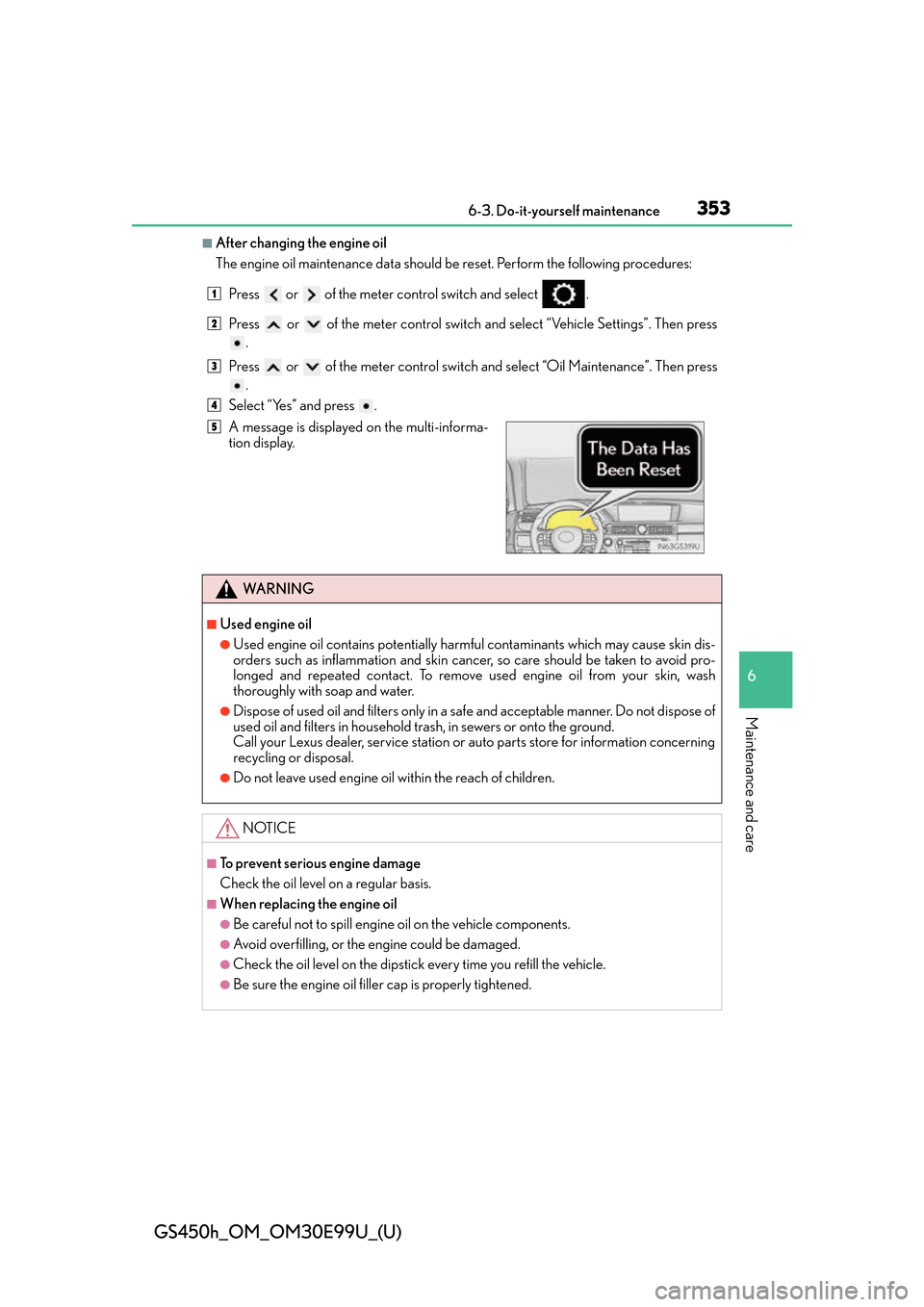
■After changing the engine oil
The engine oil maintenance data should be reset. Perform the following procedures:
Press or of the meter co ntrol switch and select .
Press or of the meter control switch an d select “Vehicle Settings”. Then press
.
Press or of the meter control switch and select “Oil Maintenance”. Then press
.
Select “Yes” and press .
A message is displayed on the multi-informa-
tion display.
WA R N I N G
■Used engine oil
●Used engine oil contains potentially harm ful contaminants which may cause skin dis-
orders such as inflammation and skin canc er, so care should be taken to avoid pro-
longed and repeated contact. To remove used engine oil from your skin, wash
thoroughly with soap and water.
●Dispose of used oil and filters only in a sa fe and acceptable manner. Do not dispose of
used oil and filters in household tras h, in sewers or onto the ground.
Call your Lexus dealer, service station or auto parts store for information concerning
recycling or disposal.
●Do not leave used engine oil within the reach of children.
NOTICE
■To prevent serious engine damage
Check the oil level on a regular basis.
■When replacing the engine oil
●Be careful not to spill engine oil on the vehicle components.
●Avoid overfilling, or the engine could be damaged.
●Check the oil level on the dipstick every time you refill the vehicle.
●Be sure the engine oil filler cap is properly tightened.
1
2
3
4
5
Page 426 of 544
4267-2. Steps to take in an emergency
GS450h_OM_OM30E99U_(U)
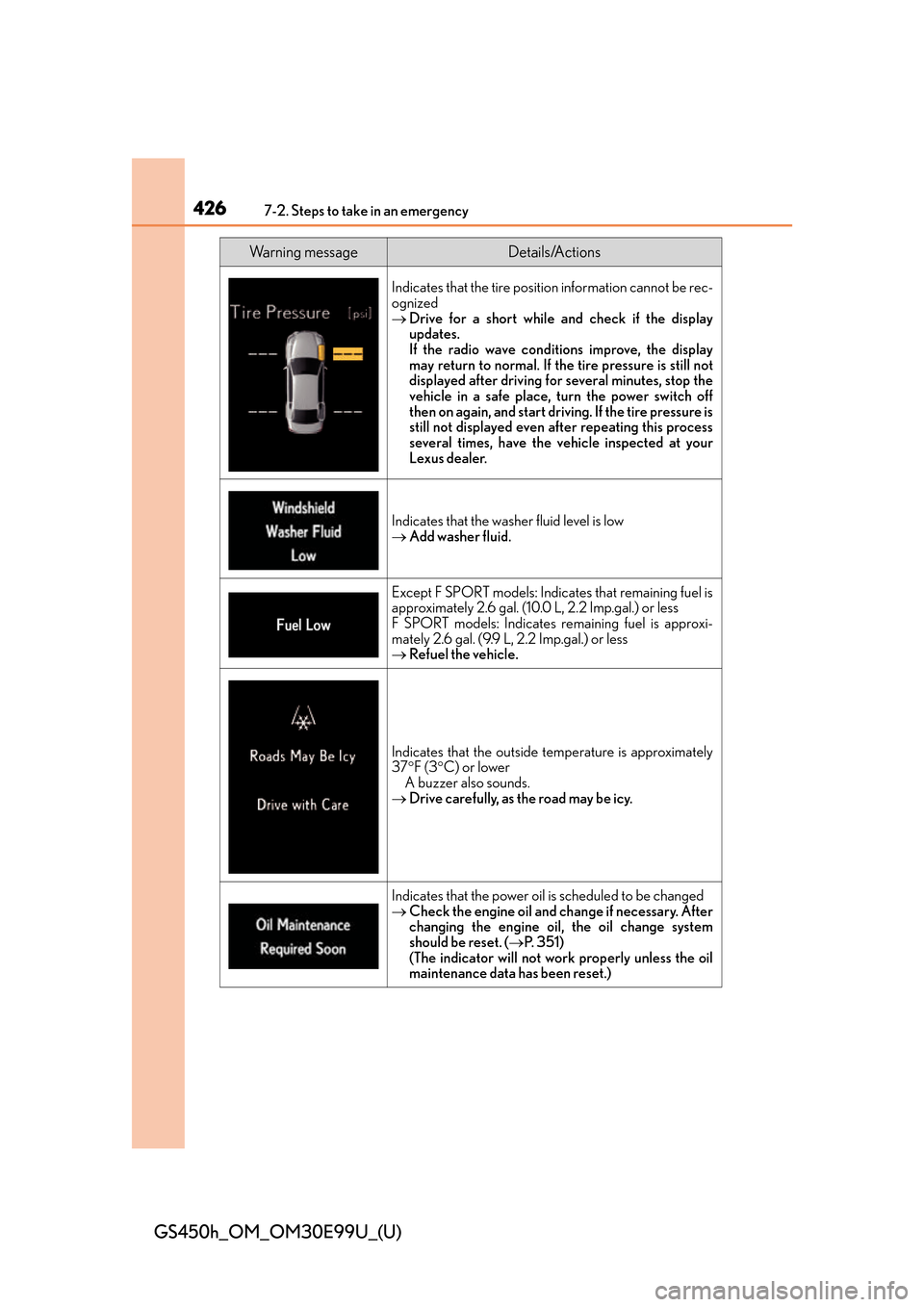
Indicates that the tire position information cannot be rec-
ognized
Drive for a short while an d check if the display
updates.
If the radio wave conditions improve, the display
may return to normal. If th e tire pressure is still not
displayed after driving for several minutes, stop the
vehicle in a safe place, turn the power switch off
then on again, and start driving. If the tire pressure is
still not displayed even after repeating this process
several times, have the vehicle inspected at your
Lexus dealer.
Indicates that the wash er fluid level is low
Add washer fluid.
Except F SPORT models: Indicates that remaining fuel is
approximately 2.6 gal. (10.0 L, 2.2 Imp.gal.) or less
F SPORT models: Indicates remaining fuel is approxi-
mately 2.6 gal. (9.9 L, 2.2 Imp.gal.) or less
Refuel the vehicle.
Indicates that the outside temperature is approximately
37F (3 C) or lower
A buzzer also sounds.
Drive carefully, as the road may be icy.
Indicates that the power oil is scheduled to be changed
Check the engine oil and ch ange if necessary. After
changing the engine oil, the oil change system
should be reset. ( P. 3 5 1 )
(The indicator will not work properly unless the oil
maintenance data has been reset.)
Wa r n i n g m e s s a g eDetails/Actions