2016 Lexus GS450h audio
[x] Cancel search: audioPage 6 of 544
TABLE OF CONTENTS6
GS450h_OM_OM30E99U_(U)
8-1. SpecificationsMaintenance data (fuel, oil level, etc.) .................. 466
Fuel information...........................478
Tire information............................ 481
8-2. Customization Customizable features ..............491
8-3. Initialization Items to initialize ......................... 504
Reporting safety defects for U.S. owners..................................... 506
Seat belt instructions for Canadian owners
(in French) .............................................. 507
SRS airbag instructions for Canadian owners
(in French) ..............................................509
Headlight aim instructions for Canadian owners
(in French) (vehicles with
single-beam headlights)..................... 517 What to do if...
(Troubleshooting) ............................... 520
Alphabetical index .................................524
8Vehicle specifications
9For owners
Index
For information regarding the equipment listed below, refer to the “NAVIGA-
TION AND MULTIMEDIA SYSTEM OWNER’S MANUAL”.
• Audio system
• Intuitive parking assist• Navigation system
• Lexus parking assist monitor
Page 17 of 544
17Pictorial index
GS450h_OM_OM30E99U_(U)
Multi-information display . . . . . . . . . . . . . . . . . . . . . . . . . . . . . . . . . . . . . . . . . . . . .P. 93
Display . . . . . . . . . . . . . . . . . . . . . . . . . . . . . . . . . . . . . . . . . . . . . . . . . . . . . . . . . . . . . . . . . . P. 93
Energy monitor . . . . . . . . . . . . . . . . . . . . . . . . . . . . . . . . . . . . . . . . . . . . . . . . . . . . . . . . . P. 1 0 7
When the warning messages are displayed . . . . . . . . . . . . . . . . . . . . . . . . . . . . P. 406
Parking brake switches . . . . . . . . . . . . . . . . . . . . . . . . . . . . . . . . . . . . . . . . . . . . . . .P. 193
Applying/releasing. . . . . . . . . . . . . . . . . . . . . . . . . . . . . . . . . . . . . . . . . . . . . . . . . . . . . . P . 193
Precautions against winter season . . . . . . . . . . . . . . . . . . . . . . . . . . . . . . . . . . . . . . P. 275
Warning buzzer/message . . . . . . . . . . . . . . . . . . . . . . . . . . . . . . . . . . . . . . . . .P. 400, 402
Turn signal lever. . . . . . . . . . . . . . . . . . . . . . . . . . . . . . . . . . . . . . . . . . . . . . . . . . . . . . .P . 192
Headlight switch . . . . . . . . . . . . . . . . . . . . . . . . . . . . . . . . . . . . . . . . . . . . . . . . . . . . . . . . . . P. 197
Headlights/parking lights/tail lights/daytime running lights . . . . . . . . . . . . . . P. 197
Windshield wiper and washer switch. . . . . . . . . . . . . . . . . . . . . . . . . . . . . . . . P. 204
Usage . . . . . . . . . . . . . . . . . . . . . . . . . . . . . . . . . . . . . . . . . . . . . . . . . . . . . . . . . . . . . . . . . P. 204
Adding washer fluid . . . . . . . . . . . . . . . . . . . . . . . . . . . . . . . . . . . . . . . . . . . . . . . . . . . . P. 3 57
Headlight cleaners
*1 . . . . . . . . . . . . . . . . . . . . . . . . . . . . . . . . . . . . . . . . . . . . . P. 205, 207
Warning messages . . . . . . . . . . . . . . . . . . . . . . . . . . . . . . . . . . . . . . . . . . . . . . . . . . . . . P. 42 6
Emergency flasher switch . . . . . . . . . . . . . . . . . . . . . . . . . . . . . . . . . . . . . . . . . . . P. 392
Trunk opener. . . . . . . . . . . . . . . . . . . . . . . . . . . . . . . . . . . . . . . . . . . . . . . . . . . . . . . . . .P. 1 2 6
Hood lock release lever . . . . . . . . . . . . . . . . . . . . . . . . . . . . . . . . . . . . . . . . . . . . . P. 347
Tilt and telescopic steering contro l switch . . . . . . . . . . . . . . . . . . . . . . . . . . . P. 151
Adjustment . . . . . . . . . . . . . . . . . . . . . . . . . . . . . . . . . . . . . . . . . . . . . . . . . . . . . . . . . . . . . . P. 151
Driving position memory . . . . . . . . . . . . . . . . . . . . . . . . . . . . . . . . . . . . . . . . . . . . . . . P. 143
Air conditioning system . . . . . . . . . . . . . . . . . . . . . . . . . . . . . . . . . . . . . . . . . . . . . P. 285
Usage . . . . . . . . . . . . . . . . . . . . . . . . . . . . . . . . . . . . . . . . . . . . . . . . . . . . . . . . . . . . . . . . . P. 285
Rear window defogger . . . . . . . . . . . . . . . . . . . . . . . . . . . . . . . . . . . . . . . . . . . . . . . . . P. 291
Audio system*2
Trunk opener main switch . . . . . . . . . . . . . . . . . . . . . . . . . . . . . . . . . . . . . . . . . . . P. 128
*1: If equipped
*2: Refer to “NAVIGATION AND MULTIMEDIA SYSTEM OWNER’S MANUAL”.
4
5
6
7
8
9
10
11
12
13
14
Page 20 of 544
20Pictorial index
GS450h_OM_OM30E99U_(U)
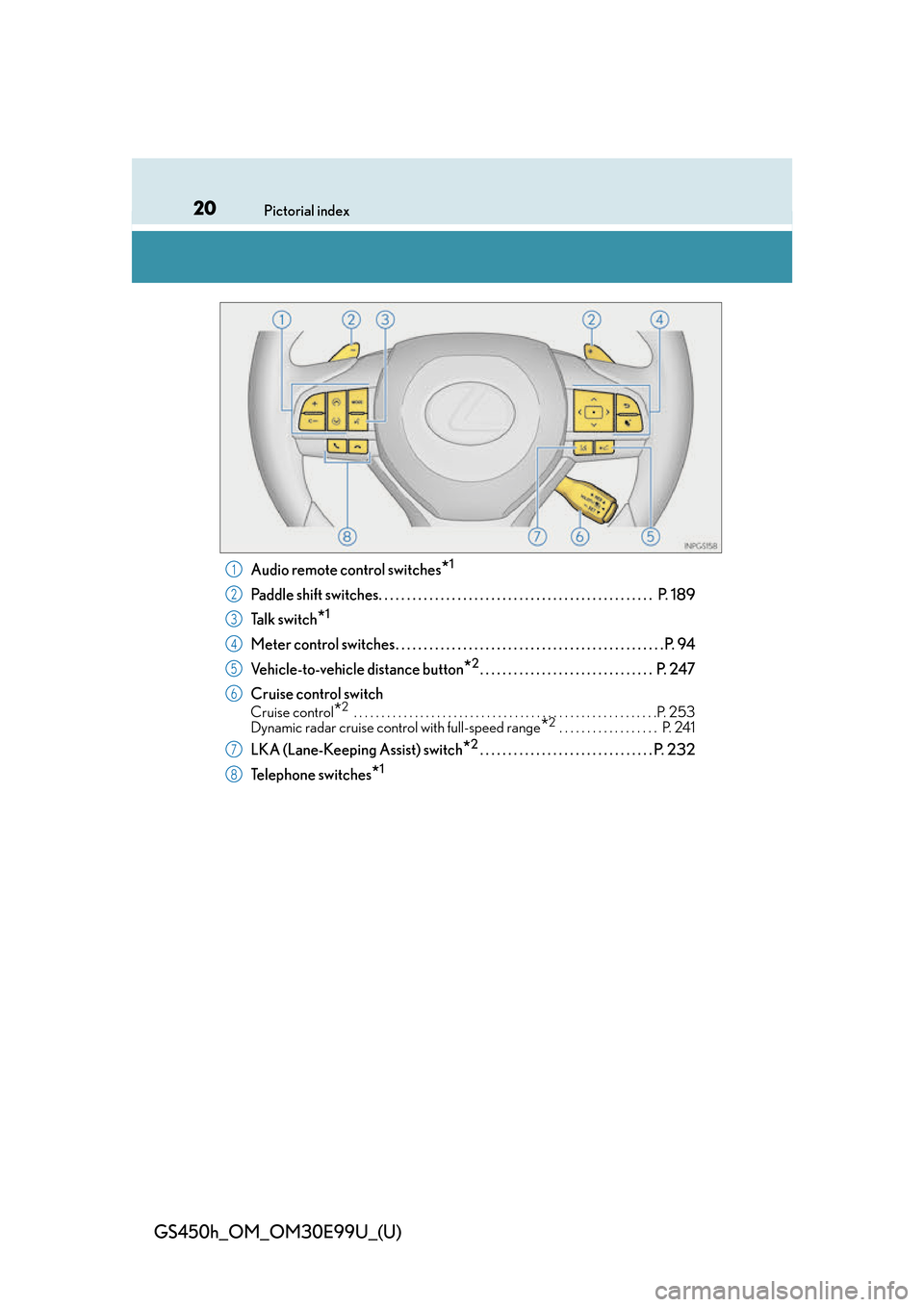
Audio remote control switches*1
Paddle shift switches. . . . . . . . . . . . . . . . . . . . . . . . . . . . . . . . . . . . . . . . . . . . . . . . . P. 189
Ta l k s w i t c h
*1
Meter control switches. . . . . . . . . . . . . . . . . . . . . . . . . . . . . . . . . . . . . . . . . . . . . . . . P. 94
Vehicle-to-vehicle distance button
*2. . . . . . . . . . . . . . . . . . . . . . . . . . . . . . . P. 247
Cruise control switch
Cruise control*2 . . . . . . . . . . . . . . . . . . . . . . . . . . . . . . . . . . . . . . . . . . . . . . . . . . . . . . .P. 253
Dynamic radar cruise control with full-speed range*2 . . . . . . . . . . . . . . . . . . P. 241
LKA (Lane-Keeping Assist) switch*2. . . . . . . . . . . . . . . . . . . . . . . . . . . . . . . P. 232
Telephone switches
*1
1
2
3
4
5
6
7
8
Page 93 of 544
93
GS450h_OM_OM30E99U_(U)2. Instrument cluster
2
Instrument cluster
Multi-information display
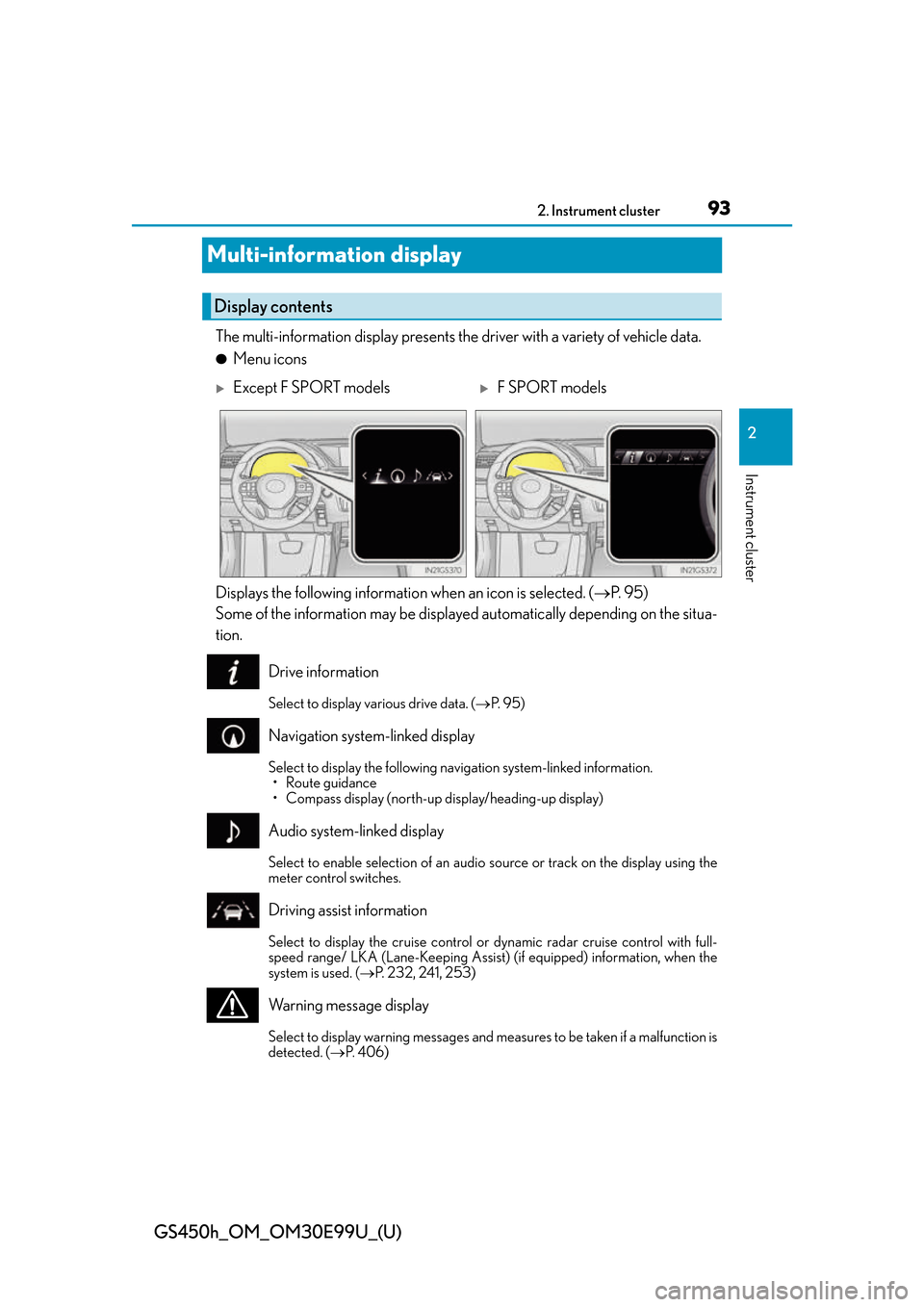
The multi-information display presents the driver with a variety of vehicle data.
●Menu icons
Displays the following informatio n when an icon is selected. (P. 9 5 )
Some of the information may be displayed automatically depending on the situa-
tion.
Drive information
Select to display various drive data. ( P. 9 5 )
Navigation system-linked display
Select to display the following navigation system-linked information.
• Route guidance
• Compass display (north-up display/heading-up display)
Audio system-linked display
Select to enable selection of an audio source or track on the display using the
meter control switches.
Driving assist information
Select to display the cruise control or dynamic radar cruise control with full-
speed range/ LKA (Lane-Keeping Assist) (if equipped) information, when the
system is used. ( P. 232, 241, 253)
Warning message display
Select to display warning messages and me asures to be taken if a malfunction is
detected. ( P. 4 0 6 )
Display contents
Except F SPORT modelsF SPORT models
Page 102 of 544
102
GS450h_OM_OM30E99U_(U)
2. Instrument cluster
●Vehicle speed
●Hybrid System Indicator( P. 1 0 4 )
●Tachometer
●Shift position and shift range
Displays the selected shift posi tion or selected shift range ( P. 1 8 7 )
●Audio display*
Displays audio information for approximately 3 seconds when the audio system is
operated
●Route guidance display (P. 1 0 5 )
When approaching an intersec tion while the navigation system is giving route guid-
ance, an arrow will automatically be displayed to indicate the direction of travel.
●Lexus Enform (if equipped)
Displays “LEXUS Enform” for approximat ely 3 seconds when LEXUS App Suite is
operated
●Lane departure warning display (LKA [Lane-Keeping Assist])
(if equipped) ( P. 4 0 7 )
●Approach warning display (dynamic radar cruise control with full-speed
range) (if equipped) ( P. 4 0 7 )
●Pre-collision warning message (PCS [Pre-Collision System])
(if equipped) ( P. 4 0 6 )
●Speed limit display (P. 1 0 5 )
*: The default setting is off
Head-up display contents
Page 105 of 544
GS450h_OM_OM30E99U_(U)
1052. Instrument cluster
2
Instrument cluster
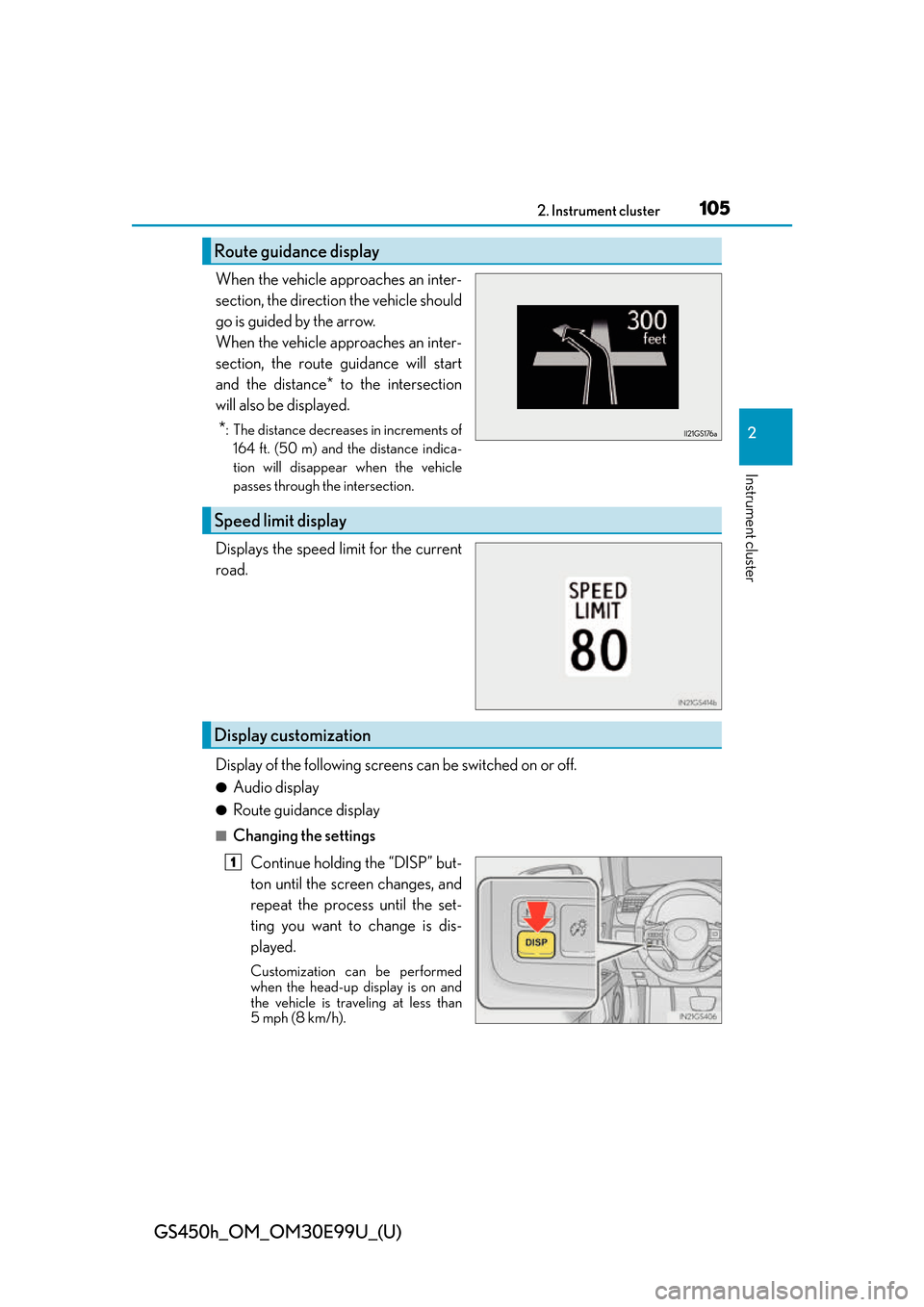
When the vehicle approaches an inter-
section, the direction the vehicle should
go is guided by the arrow.
When the vehicle approaches an inter-
section, the route guidance will start
and the distance* to the intersection
will also be displayed.
*: The distance decreases in increments of164 ft. (50 m) and the distance indica-
tion will disappear when the vehicle
passes through the intersection.
Displays the speed limit for the current
road.
Display of the following screen s can be switched on or off.
●Audio display
●Route guidance display
■Changing the settings
Continue holding the “DISP” but-
ton until the screen changes, and
repeat the process until the set-
ting you want to change is dis-
played.
Customization can be performed
when the head-up display is on and
the vehicle is traveling at less than
5 mph (8 km/h).
Route guidance display
Speed limit display
Display customization
1
Page 119 of 544
GS450h_OM_OM30E99U_(U)
1193-1. Key information
3
Operation of each component
NOTICE
■To prevent key damage
●Do not drop the keys, subject them to strong shocks or bend them.
●Do not expose the keys to high temperatures for long periods of time.
●Do not get the keys wet or wash them in an ultrasonic washer etc.
●Do not attach metallic or magnetic materials to the keys or place the keys close to
such materials.
●Do not disassemble the keys.
●Do not attach a sticker or anything else to the surface of the electronic key.
●Do not place the keys near objects that pr oduce magnetic fields, such as TVs, audio
systems and induction cookers.
●Do not place the keys near medical electrical equipment such as low-frequency ther-
apy equipment or microwave therapy equipm ent, and do not receive medical atten-
tion with the keys on your person.
■Carrying the electronic key on your person
Carry the electronic key 3.9 in. (10 cm) or mo re away from electric appliances that are
turned on. Radio waves emitted from electric appliances within 3. 9 in. (10 cm) of the
electronic key may interfere with the key, causing the key to not function properly.
■In case of a smart access system with push-button start malfunction or other key-
related problems
Take your vehicle with all the electronic keys provided with your vehicle to your Lexus
dealer.
■When an electronic key is lost
If the electronic key remains lost, the risk of vehicle theft increases significantly. Visit
your Lexus dealer immediately with all re maining electronic keys that was provided
with your vehicle.
Page 135 of 544

GS450h_OM_OM30E99U_(U)
1353-2. Opening, closing and locking the doors and trunk
3
Operation of each component
■Electronic Key Battery-Saving Function
When battery-saving mode is set, battery depletion is minimized by stopping the elec-
tronic key from receiving radio waves.
■Conditions affecting operation
The smart access system with push-button start uses weak radio waves. In the following
situations, the communication between th e electronic key and the vehicle may be
affected, preventing the smart access system with push-button start, wireless remote
control and immobilizer system from operating properly. (Ways of coping: P. 4 5 1 )
●When the electronic key battery is depleted
●Near a TV tower, electric powe r plant, gas station, radio station, large display, airport or
other facility that generates strong radio waves or electrical noise
●When the electronic key is in contact wi th, or is covered by the following metallic
objects
• Cards to which aluminum foil is attached
• Cigarette boxes that have aluminum foil inside
• Metallic wallets or bags
•Coins
•Hand warmers made of metal
• Media such as CDs and DVDs
●When other wireless keys (that emit radio waves) are being used nearby
●When carrying the electronic key together with the following devices that emit radio
waves
• When carrying a portable radio, cellular phone, cordless phone or other wireless
communication device
• Another vehicle’s electronic key or a wireless key that emits radio waves
• Personal computers or personal digital assistants (PDAs)
• Digital audio players
• Portable game systems
●If window tint with a metallic content or me tallic objects are attached to the rear win-
dow
●When the electronic key is placed near a battery charger or electronic devices
Press twice while pressing and holding
. Confirm that the electronic key indica-
tor flashes 4 times.
While the battery-saving mode is set, the smart
access system with push-button start cannot be
used. To cancel the function, press any of the
electronic key buttons.