2016 KIA PICANTO steering
[x] Cancel search: steeringPage 309 of 488

527
Driving your vehicle
Power brakes
Your vehicle has power-assisted brakes
that adjust automatically through normal
usage.
In the event that the power-assisted
brakes lose power because of a stalled
engine or some other reason, you can
still stop your vehicle by applying greater
force to the brake pedal than you nor-
mally would. The stopping distance, how-
ever, will be longer.
When the engine is not running, the
reserve brake power is partially depleted
each time the brake pedal is applied. Do
not pump the brake pedal when the
power assist has been interrupted.
Pump the brake pedal only when neces-
sary to maintain steering control on slip-
pery surfaces.In the event of brake failure
If service brakes fail to operate while the
vehicle is in motion, you can make an
emergency stop with the parking brake.
The stopping distance, however, will be
much greater than normal.
BRAKE SYSTEM (Continued)
When descending a long or steep
hill, shift to a lower gear and
avoid continuous application of
the brakes. Continuous brakeapplication will cause the brakes
to overheat and could result in a
temporary loss of braking per-
formance.
Wet brakes may impair the vehi- cle’s ability to safely slow down;
the vehicle may also pull to oneside when the brakes are applied.
Applying the brakes lightly will
indicate whether they have been
affected in this way. Always test
your brakes in this fashion after
driving through deep water. To
dry the brakes, apply them lightly
while maintaining a safe forward
speed until brake performancereturns to normal.
Always, confirm the position of the brake and accelerator pedal
before driving. If you don't checkthe position of the accelerator
and brake pedal before driving,
you may depress the accelerator
instead of the brake pedal. It maycause a serious accident.
WARNING - Brakes
Do not drive with your foot rest- ing on the brake pedal. This will create abnormal high brake tem-
peratures, excessive brake lining
and pad wear, and increasedstopping distances.
(Continued)
WARNING- Parking brake
Applying the parking brake while
the vehicle is moving at normal
speeds can cause a sudden loss of
control of the vehicle. If you mustuse the parking brake to stop the
vehicle, use great caution in apply-
ing the brake.
Page 314 of 488

Driving your vehicle
32
5
✽✽
NOTICE
When you jump start your vehicle
because of a drained battery, the engine
may not run as smoothly and the ABS
warning light may turn on at the same
time. This happens because of the low
battery voltage. It does not mean your
ABS is malfunctioning.
Do not pump your brakes!
Have the battery recharged before driving the vehicle.
Electronic Stability Control (ESC) (if equipped) The Electronic Stability Control (ESC)
system is designed to stabilize the vehicle
during cornering maneuvers. ESC checks
where you are steering and where the
vehicle is actually going.
ESC applies the brakes at individual
wheels and intervenes in the engine
management system to stabilize the
vehicle.
CAUTION
When you drive on a road having
poor traction, such as an icy road,
and operate your brakes continu-ously, the ABS will be active con-tinuously and the ABS warning light may illuminate. Pull your car
over to a safe place and stop theengine.
Restart the engine. If the ABS warning light is off, then your ABS
system is normal. Otherwise, youmay have a problem with the ABS.We recommend that you contactan authorized Kia dealer.
OTA050014
Page 315 of 488
533
Driving your vehicle
The Electronic Stability Control (ESC) system is an electronic system designed
to help the driver maintain vehicle control
under adverse conditions. It is not a
substitute for safe driving practices.
Factors including speed, road conditions
and driver steering input can all affect
whether ESC will be effective in
preventing a loss of control. It is still your
responsibility to drive and corner at
reasonable speeds and to leave a
sufficient margin of safety.
When you apply your brakes under con-
ditions which may lock the wheels, you
may hear a “tik-tik’’ sound from the
brakes, or feel a corresponding sensation
in the brake pedal. This is normal and it
means your ESC is active.✽✽NOTICE
A click sound may be heard in the
engine compartment when the vehicle
begins to move after the engine is start-
ed. These conditions are normal and
indicate that the Electronic Stability
Control System is functioning properly. WARNING
Never drive too fast for the road
conditions or too quickly when cor-
nering. Electronic Stability Control
(ESC) will not prevent accidents.
Excessive speed in turns, abrupt
maneuvers and hydroplaning onwet surfaces can still result in seri-
ous accidents. Only a safe and
attentive driver can prevent acci-
dents by avoiding maneuvers that
cause the vehicle to lose traction.
Even with ESC installed, always fol-
low all the normal precautions for
driving - including driving at safe
speeds for the conditions.
Page 318 of 488

Driving your vehicle
36
5
Hill-start assist control (HAC) (if equipped)
Hill start Assist Control is a comfort func-
tion. The main intend is to prevent the
vehicle from rolling backwards while driv-
ing off uphill on an inclined surface. HAC
holds the braking pressure builtup by
driver during stopping procedure for 2
seconds after releasing brake pedal.
During the pressure-hold period, the
driver has enough time to press the
accelerator pedal to drive off.
The braking pressure is reduced as soon
as the system detects the driver’s inten-
tion to drive off.✽✽
NOTICE
The HAC does not operate when the transaxle shift lever is in the P (Park)
or N (Neutral) position.
The HAC activates even though the
ESC is off but it does not activate
when the ESC has malfunctioned. Vehicle stability management (VSM) (if equipped)
This system provides further enhance-
ments to vehicle stability and steering
responses when a vehicle is driving on a
slippery road or a vehicle detected
changes in coefficient of friction between
right wheels and left wheels when brak-ing.
VSM operation
When the VSM is in operation, ESC indi-
cator light ( ) blinks.
When the vehicle stability management
is operating properly, you can feel a slight
pulsation in the vehicle. This is only the
effect of brake control and indicates noth-
ing unusual.
The VSM does not operate when:
Driving on bank road such as gradientor incline
Driving rearward
ESC OFF indicator light ( ) remains on the instrument cluster
EPS indicator light remains on the instrument cluster
WARNING
The HAC is usually activated only
for 2 seconds. The driver should be
careful from the rolling backwardcausing the accident with behind
objects or human, when the driver
may feel the unintended rolling
backward while driving off on hilldue to insufficient brake hold pres-
sure built-up by driver during stop-
ping procedure.
Page 319 of 488
537
Driving your vehicle
VSM operation off
If you press the ESC OFF button to turn off
the ESC, the VSM will also cancel and the
ESC OFF indicator light ( ) illuminates.
To turn on the VSM, press the button
again. The ESC OFF indicator light goesout.
Malfunction indicator
The VSM can be deactivated even if you
don’t cancel the VSM operation by press-
ing the ESC OFF button. It indicates thata malfunction has been detected some-
where in the Electric Power Steering sys-
tem or VSM system. If the ESC indicator
light ( ) or EPS warning light remains
on, we recommend that you contact an
authorized Kia dealer.
✽✽NOTICE
The VSM is designed to function above approximately 15 km/h (9 mph)
on curves.
The VSM is designed to function above approximately 30 km/h (18
mph) when a vehicle is braking on a
split-mu road. The split-mu road is
made of surfaces which have different
friction forces.
ESS : Emergency Stop Signal (if equipped) The Emergency Stop Signal system
alerts the driver behind by blinking the
stop light when the vehicle suddenly
stops or when the ABS activates in a
stop. (The system activates when the
vehicle speed is over 55km/h and the
vehicle deceleration is over 7m/s² or the
ABS activates when the vehicle emer-
gency braking.)
When the vehicle speed is under 40 km/h
and the ABS deactivates or the sudden
stop situation is over, the stop light blink-
ing will stop.
WARNING
The Vehicle Stability Management system is not a substitute for
safe driving practices but a sup-
plementary function only. It is theresponsibility of the driver to
always check the speed and the
distance to the vehicle ahead.
Always hold the steering wheel
firmly while driving.
Your vehicle is designed to acti- vate according to the driver’s
intention, even with installed
VSM. Always follow all the normal
precautions for driving at safe
speeds for the conditions –
including driving inclement
weather and on a slippery road.
Driving with varying tire or wheel sizes may cause the VSM system
to malfunction. When replacing
tires, make sure they are the
same size as your original tires.
CAUTION
The Emergency Stop Signal system
will not work if the hazard warningflasher is already on.
Page 327 of 488

545
Driving your vehicle
✽✽NOTICE
During normal cruise control opera- tion, when the SET switch is activated
or reactivated after applying the
brakes, the cruise control will ener-
gize after approximately 3 seconds.
This delay is normal.
To activate cruise control, depress the
brake pedal at least once after turning
the ignition switch to the ON position
or starting the engine. This is to check
if the brake switch which is important
part to cancel cruise control is in nor-
mal condition.
Cruise control switch
: Turns cruise control system on oroff. (ON CANCEL OFF)
: Changes mode between cruise con- trol system and speed limit control system.
RES+: Resumes or increases cruisecontrol speed.
SET-: Sets or decreases cruise control speed. To set cruise control speed:
1. Press the button on the steering
wheel, to turn the system on. The indicator light will illuminate
2. Accelerate to the desired speed, which must be more than approximately 30km/h (20 mph).
✽✽ NOTICE - Manual transaxle
For manual transaxle vehicles, you
should depress the brake pedal at least
once to set the cruise control after start-
ing the engine.
OTA055102OTA055039L
Page 329 of 488
547
Driving your vehicle
To temporarily accelerate with the
cruise control on:
If you want to speed up temporarily when
the cruise control is on, depress the
accelerator pedal. Increased speed will
not interfere with cruise control operationor change the set speed.
To return to the set speed, take your foot
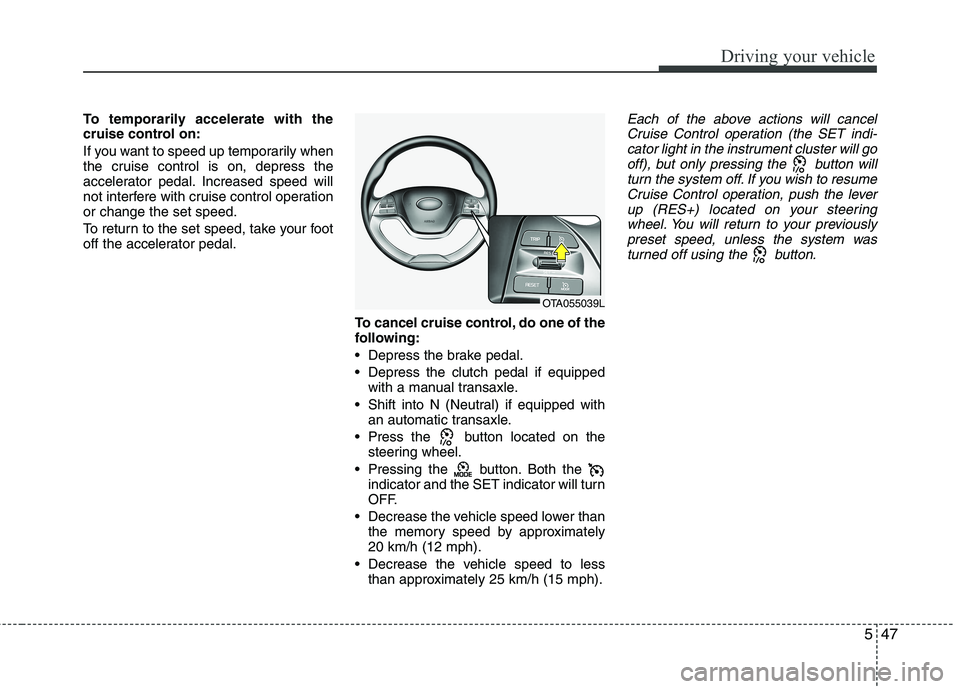
off the accelerator pedal.To cancel cruise control, do one of the
following:
Depress the brake pedal.
Depress the clutch pedal if equippedwith a manual transaxle.
Shift into N (Neutral) if equipped with an automatic transaxle.
Press the button located on the steering wheel.
Pressing the button. Both the indicator and the SET indicator will turn
OFF.
Decrease the vehicle speed lower than the memory speed by approximately20 km/h (12 mph).
Decrease the vehicle speed to less than approximately 25 km/h (15 mph).Each of the above actions will cancel
Cruise Control operation (the SET indi- cator light in the instrument cluster will gooff), but only pressing the button will
turn the system off. If you wish to resumeCruise Control operation, push the leverup (RES+) located on your steering
wheel. You will return to your previously preset speed, unless the system wasturned off using the button.
OTA055039L
Page 331 of 488
549
Driving your vehicle
You can set the speed limit when you do
not want to drive over a specific speed.
If you drive over the preset speed limit,
the warning system operates (set speed
limit will blink and chime will sound) until
the vehicle speed returns within thespeed limit.
✽✽NOTICE
While speed limit control is in opera-
tion, the cruise control system cannot be
activated.
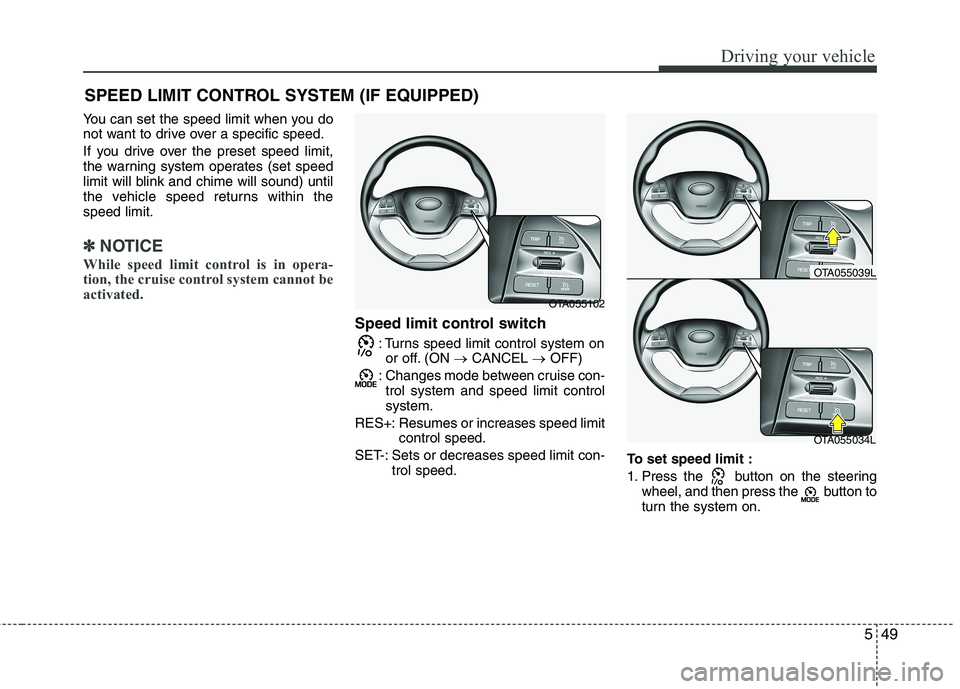
Speed limit control switch
: Turns speed limit control system onor off. (ON CANCEL OFF)
: Changes mode between cruise con- trol system and speed limit control system.
RES+: Resumes or increases speed limit control speed.
SET-: Sets or decreases speed limit con- trol speed. To set speed limit :
1. Press the button on the steering
wheel, and then press the button to
turn the system on.
SPEED LIMIT CONTROL SYSTEM (IF EQUIPPED)
OTA055102
OTA055034L
OTA055039L