Page 143 of 488
Features of your vehicle
68
4
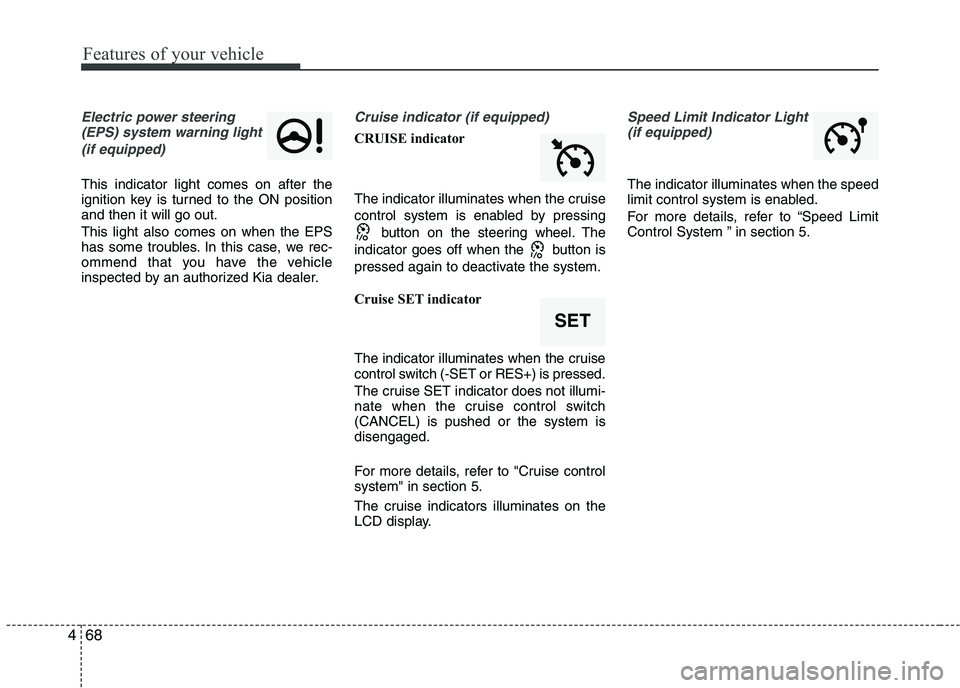
Electric power steering
(EPS) system warning light
(if equipped)
This indicator light comes on after the
ignition key is turned to the ON positionand then it will go out. This light also comes on when the EPS
has some troubles. In this case, we rec-
ommend that you have the vehicle
inspected by an authorized Kia dealer.
Cruise indicator (if equipped)
CRUISE indicator
The indicator illuminates when the cruise
control system is enabled by pressing button on the steering wheel. The
indicator goes off when the button is
pressed again to deactivate the system.
Cruise SET indicator
The indicator illuminates when the cruise
control switch (-SET or RES+) is pressed.
The cruise SET indicator does not illumi-
nate when the cruise control switch(CANCEL) is pushed or the system isdisengaged.
For more details, refer to "Cruise control system" in section 5.
The cruise indicators illuminates on the
LCD display.
Speed Limit Indicator Light (if equipped)
The indicator illuminates when the speed
limit control system is enabled.
For more details, refer to “Speed Limit
Control System ” in section 5.
SET
Page 144 of 488

469
Features of your vehicle
Auto stop indicator(if equipped)
This indicator will illuminate when the engine enters the Idle Stop mode of theISG (Idle Stop and Go) system.
When the automatic starting occurs, the auto stop indicator on the cluster will
blink for 5 seconds.
For more details, refer to the ISG (Idle Stop and Go) system in chapter 5.
✽✽ NOTICE
When the engine automatically starts by
the ISG system, some warning lights
(ABS, ESC, ESC OFF, EPS or Parking
brake warning light) may turn on for a
few seconds.
This happens because of the low battery
voltage. It does not mean the system is
malfunctioning.
Low tire pressure indicator / TPMS malfunction indica-tor (if equipped)
The low tire pressure telltale comes on
for 3 seconds after the ignition switch is
turned to the "ON" position.
The low tire pressure telltale illuminates
when one or more of your tires is signifi-
cantly underinflated.
The low tire pressure telltale will illumi-
nate after it blinks for approximately one
minute when there is a problem with the
Tire Pressure Monitoring System.
In this case, we recommend that you
have the vehicle inspected by an author-
ized Kia dealer as soon as possible.
If the warning light illuminates while driv-
ing, reduce vehicle speed immediately
and stop the vehicle. Avoid hard braking
and overcorrecting at the steering wheel.Inflate the tires to the proper pressure as
indicated on the vehicle’s tire informationplacard.
WARNING - Low tire pres-
sure
Significantly low tire pressure
makes the vehicle unstable and can
contribute to loss of vehicle controland increased braking distances.
Continued driving on low pressure
tires will cause the tires to overheatand fail.
WARNING - Safe stopping
The TPMS cannot alert you to severe and sudden tire damage
caused by external factors.
If you feel any vehicle instability, immediately take your foot off the
accelerator, apply the brakes
gradually and with light force,
and slowly move to a safe posi-
tion off the road.
Page 150 of 488
475
Features of your vehicle
Battery saver function
The purpose of this feature is to pre-vent the battery from being dis-
charged. The system automatically
turns off the parking lights when the
driver removes the ignition key (smart
key: turns off the engine) and opens
the driver-side door.
With this feature, the parking lights will be turned off automatically if the driver
parks on the side of road at night.
If necessary, to keep the lights on
when the ignition key is removed,
(smart key: turns off the engine) per-
form the following:
1) Open the driver-side door.
2) Turn the parking lights OFF and ON again using the light switch on the
steering column. Headlight escort function (if equipped) The headlights (and/or taillights) will
remain on for approximately 20 minutes
after the ignition key is removed when
the engine is turned off. However, if the
driver’s door is opened and closed, the
headlights are turned off after 30 sec-
onds.
The headlights can be turned off by
pressing the lock button on the transmit-
ter (or smart key) twice or turning off the
light switch from the headlight or Autolight position.
Headlight welcome function (if equipped)
When the headlight switch is in the ON or
AUTO position and all doors (and tail-
gate) are closed and locked, if you press
the door unlock button on the transmitter
(or smart key), the headlights will come
on for about 15 seconds.
If the headlight switch is in the AUTO
position, the function can only operate atnight.
At this time, if you press the door unlock
button again or door lock button on the
transmitter (or smart key), the headlights
will turn off immediately.
LIGHTING
CAUTION
If the driver gets out of the vehicle
through other doors (except dri-
ver's door), the battery saver func- tion does not operate and the head-light escort function does not turnoff automatically. Therefore, It caus-
es the battery to be discharged. Inthis case, make sure to turn off thelamp before getting out of the vehi-cle.
Page 192 of 488
4117
Features of your vehicle
With audio on
1. Press the [SETUP] or [Clock] buttonuntil the clock adjust mode displayed.
2. Set the clock by turning the knob(1) and press it.
Setup the clock (Type B)
Hour:
Turn the knob to the left (H), will advance
the time displayed by one hour.
Minute:
Turn the knob to the right (M), will
advance the time displayed by one
minute. Clothes hanger (if equipped)
To use the hanger, pull down the upper
portion of hanger.
OTA045522
■
Type B
WARNING
Do not adjust the clock while driv-
ing. You may lose your steering
control and cause an accident that
results in severe personal injury ordeath.
CAUTION
Do not hang heavy clothes, since those may damage the hook.
OUN026348
WARNING
Do not hang other objects except
clothes. In an accident it may cause
vehicle damage or personal injury.
Page 195 of 488
Features of your vehicle
120
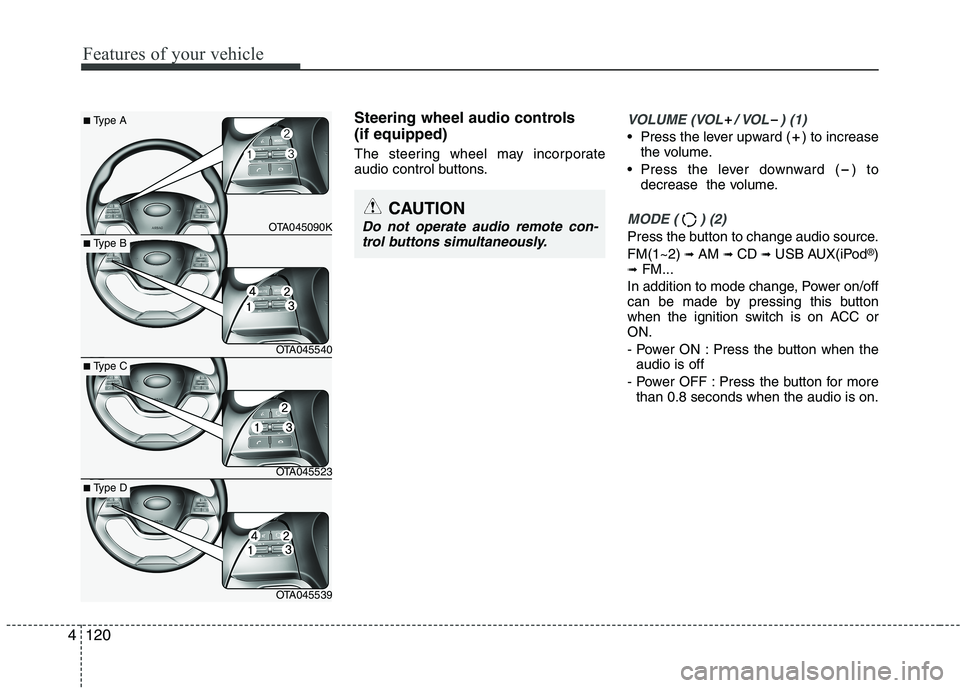
Steering wheel audio controls (if equipped)
The steering wheel may incorporate
audio control buttons.VOLUME (VOL / VOL ) (1)
• Press the lever upward ( ) to increasethe volume.
Press the lever downward ( ) to decrease the volume.
MODE ( ) (2)
Press the button to change audio source. FM(1~2) ➟ AM ➟ CD ➟ USB AUX(iPod ®
)
➟ FM...
In addition to mode change, Power on/off
can be made by pressing this button
when the ignition switch is on ACC orON.
- Power ON : Press the button when the audio is off
- Power OFF : Press the button for more than 0.8 seconds when the audio is on.
4
CAUTION
Do not operate audio remote con-
trol buttons simultaneously.
■ Type A
OTA045090K
■Type B
OTA045540
■Type C
OTA045523
■Type D
OTA045539
Page 264 of 488
189
Features of your vehicle
4
PHONE (IF EQUIPPED)
Before using the
Bluetooth®Wireless
Technology phone features
In order to use
Bluetooth®Wireless
Technology phone, you must first pair and connect the
Bluetooth®Wireless
Technology mobile phone.
If the mobile phone is not paired or connected, it is not possible to enter
Phone mode. Once a phone is pairedor connected, the guidance screen will
be displayed.
If Priority is set upon vehicle ignition (IGN/ACC ON), the
Bluetooth®
Wireless Technology phone will be
automatically connected. Even if you
are outside, the
Bluetooth®Wireless
Technology phone will be automatical-
ly connected once you are in the vicin-
ity of the vehicle. If you do not wantautomatic
Bluetooth®Wireless
Technology phone connection, set the
Bluetooth®Wireless Technology power
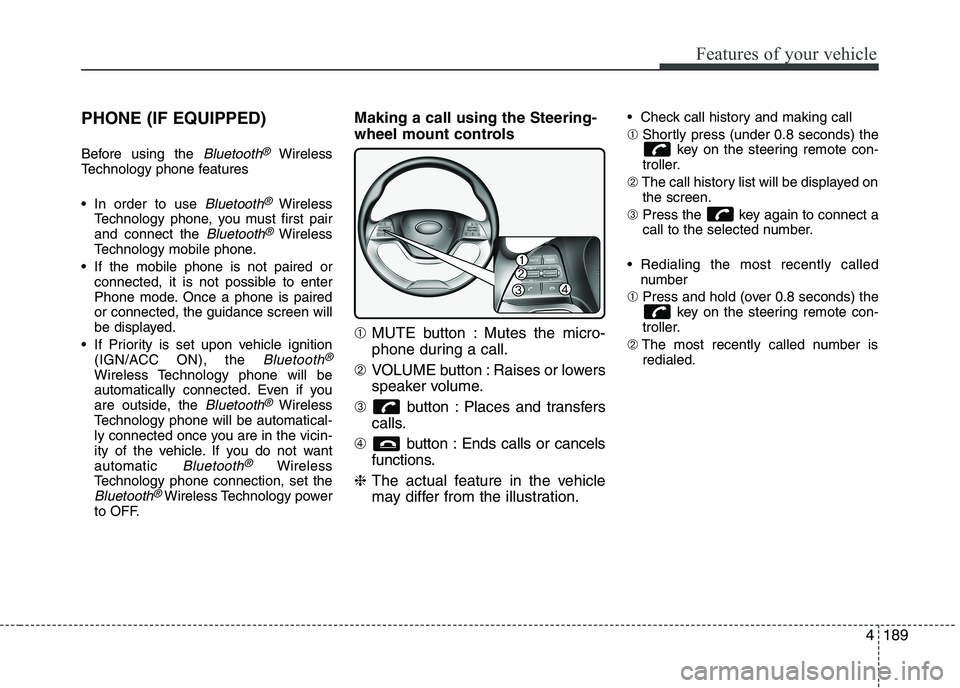
to OFF. Making a call using the Steering-
wheel mount controls ➀
MUTE button : Mutes the micro-
phone during a call.
➁ VOLUME button : Raises or lowers
speaker volume.
➂ button : Places and transfers
calls.
➃ button : Ends calls or cancels
functions.
❈ The actual feature in the vehicle
may differ from the illustration. Check call history and making call ➀
Shortly press (under 0.8 seconds) the
key on the steering remote con-
troller.
➁ The call history list will be displayed on
the screen.
➂ Press the key again to connect a
call to the selected number.
Redialing the most recently called number
➀ Press and hold (over 0.8 seconds) the
key on the steering remote con-
troller.
➁ The most recently called number is
redialed.
Page 265 of 488
Features of your vehicle
1904Making a call using the Steering-
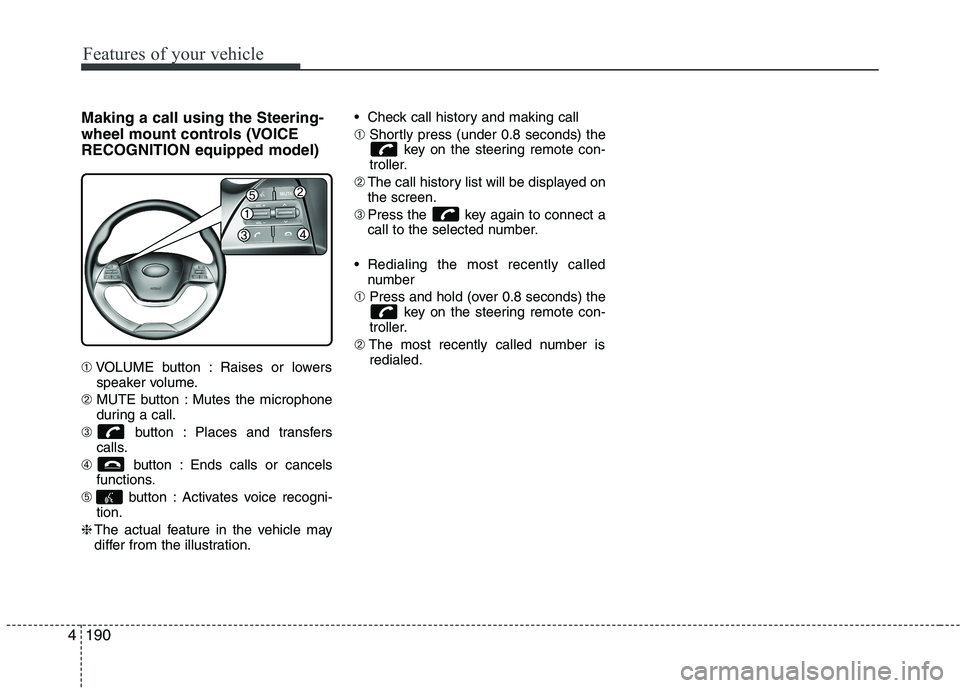
wheel mount controls (VOICERECOGNITION equipped model) ➀
VOLUME button : Raises or lowers
speaker volume.
➁ MUTE button : Mutes the microphone
during a call.
➂ button : Places and transfers
calls.
➃ button : Ends calls or cancels
functions.
➄ button : Activates voice recogni-
tion.
❈ The actual feature in the vehicle may
differ from the illustration. Check call history and making call ➀
Shortly press (under 0.8 seconds) the
key on the steering remote con-
troller.
➁ The call history list will be displayed on
the screen.
➂ Press the key again to connect a
call to the selected number.
Redialing the most recently called number
➀ Press and hold (over 0.8 seconds) the
key on the steering remote con-
troller.
➁ The most recently called number is
redialed.
Page 271 of 488
Features of your vehicle
1964
✽✽NOTICE - USING VOICE COM-
MAND
The voice recognition feature of this product supports recognition of the
commands listed within this user’s
manual.
While using voice recognition, operat-
ing the steering remote control or the
device will terminate voice recogni-
tion and allow you to manually oper-
ate desired functions.
Position the microphone above the head of the driver’s seat. For superior
performance, maintain good posture
when saying voice commands.
Voice recognition may not function properly due to outside noise. The fol-
lowing conditions can affect the per-
formance of Voice Recognition:
-When the windows and sunroof areopen
-When the heating/cooling system is on
-When passing a tunnel
-When driving on rugged and uneven roads
(Continued)(Continued)
After downloading Bluetooth®
Wireless Technology phone book, the
system requires some times to convert
the phone book into voice informa-
tion. During this time, voice recogni-
tion may not operate properly.
Upon inputting your phone book, spe-
cial symbols and numbers cannot be
recognized by voice. For example, “#
John Doe%&” will be recognized as
“John Doe”.
![KIA PICANTO 2016 Owners Manual 4117
Features of your vehicle
With audio on
1. Press the [SETUP] or [Clock] buttonuntil the clock adjust mode displayed.
2. Set the clock by turning the knob(1) and press it.
Setup the clock (Type B)](/manual-img/2/40383/w960_40383-191.png "KIA PICANTO 2016 Owners Manual 4117
Features of your vehicle
With audio on
1. Press the [SETUP] or [Clock] buttonuntil the clock adjust mode displayed.
2. Set the clock by turning the knob(1) and press it.
Setup the clock (Type B)")