Page 114 of 308
5-28 I Navigation
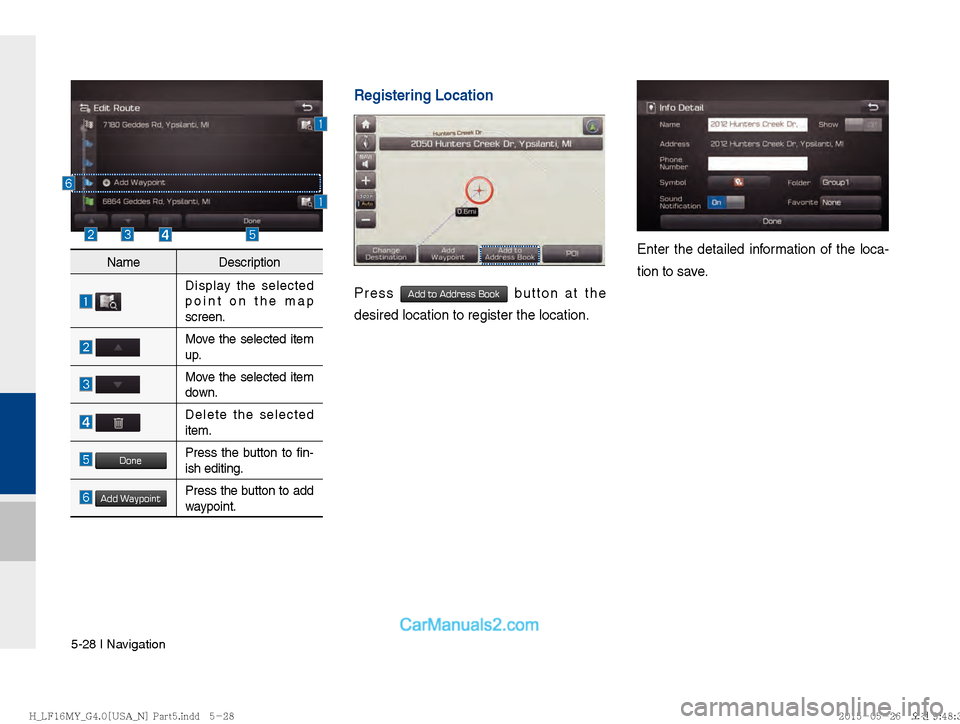
Registering Location
Press Add to Address Book button at the
desired location to register the location.
Enter the detailed information of the loca-
tion to save.Name Description
Display the selected
point on the map
screen.
Move the selected item
up.
Move the selected item
down.
Delete the selected
item.
DonePress the button to fin-
ish editing.
Add WaypointPress the button to add
waypoint.
)@-'��.:@(���<64"@/>�1BSU��JOEE������� )@-'��.:@(���<64"@/>�1BSU��JOEE������� �������������
Page 116 of 308
5-30 I Navigation
Split Screen during Route Guidance
Approaching the turning point, the detailed
road and travel information is automatically
displayed on the right side of the screen.
Touch the button to change display
view mode as below
Details additional info can be displayed
on Freeway
Additional info of Freeway exit or Rest
area can be displayed by pressing the but-
ton
Details
Detailed information for POIs around free-
way exit is listed by pressing POI symbols.
Name Description
!Ÿ
Turn Point : Display direction
and shape to turn shortly
!Ÿ
Distance to turn : Display dis-
tance to next turn point
Road name to maneuver
Detail Distance Bar : Display dis-
tance to next turn point.
Name
Description
Display the full map screen.
Junction View, Split screen.
(Active only when images are
available)
Display Turn-by-turn information
)@-'��.:@(���<64"@/>�1BSU��JOEE������� )@-'��.:@(���<64"@/>�1BSU��JOEE������� �������������
Page 118 of 308
5-32 I Navigation
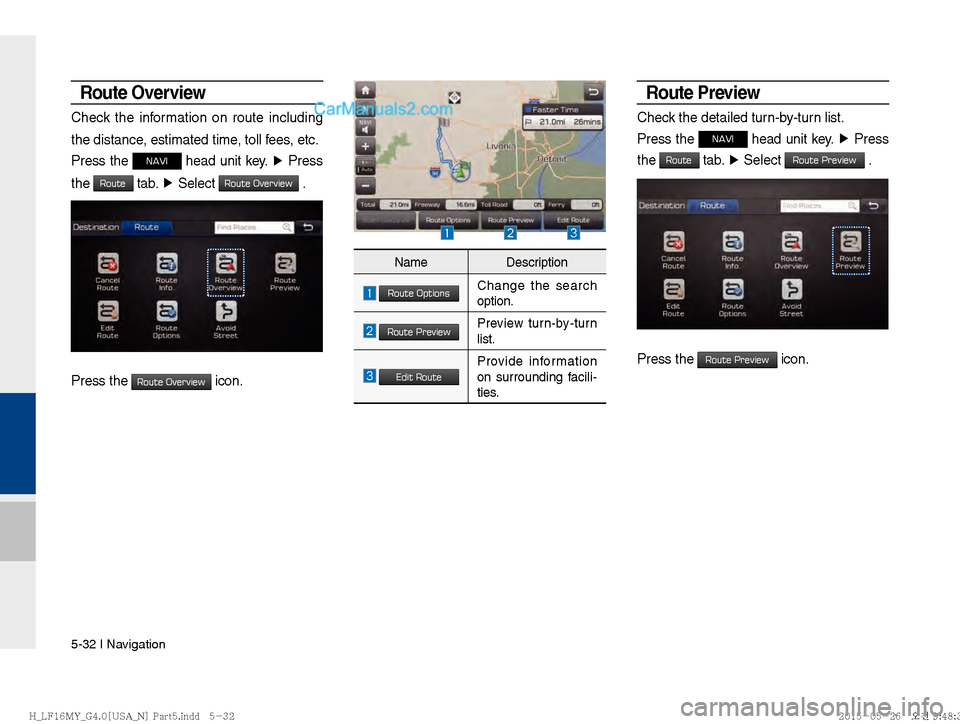
Route Overview
Check the information on route including
the distance, estimated time, toll fees, etc.
Press the
NAVI head unit key. ▶
Press
the
Route tab. ▶
Select Route Overview .
Press the Route Overview icon.
Route Preview
Check the detailed turn-by-turn list.
Press the
NAVI head unit key. ▶
Press
the
Route tab. ▶
Select Route Preview .
Press the Route Preview icon.
Name Description
Route OptionsChange the search
option.
Route PreviewPreview turn-by-turn
list.
Edit RouteProvide information
on surrounding facili-
ties.
)@-'��.:@(���<64"@/>�1BSU��JOEE������� )@-'��.:@(���<64"@/>�1BSU��JOEE������� �������������
Page 120 of 308
5-34 I Navigation
Add a waypoint through various searching
methods.
Route Options
Press the NAVI head unit key. ▶
Press
the
Route tab. ▶
Select Route Options .
Press the Route Options icon.
Choose between faster time or shorter
distance.
Route options such as ferry route, traffic infor-
mation, HOV, and avoiding highway can be
set by pressing Detailed Route Setting button.
Avoid Stre et
Search new route by avoiding the selected
street(s).
Press the
NAVI head unit key. ▶
Press
the
Route tab. ▶
Select Avoid Street .
Press the Avoid Street icon.
Press the Done button to plan new route
after selecting the street(s) that you want
to avoid.
)@-'��.:@(���<64"@/>�1BSU��JOEE������� )@-'��.:@(���<64"@/>�1BSU��JOEE������� �������������
Page 121 of 308
Navigation Settings I 5-35
05
Navigation Settings
General
Change general settings.
Press the GPS Information to display the
detail GPS satellites information
Display
Change the display environment settings.
Change the map colors and the route
guidance line colors.
Change the vehicle symbol.
Name Description
Change the unit of mile, km .
Press the
On, Off button to
change the previous destination
view setting when starting the
navigation.
Check the GPS information.
Press the Default Settings button
to initialize.
Name Description
ReceivingActive when current posi-
tion is being calculated
SpeedDisplay current speed of
the vehicle
LocationDisplay current position of
the vehicle
ElevationDisplay current elevation
of the vehicle
Time
Display time
DateDisplay date
)@-'��.:@(���<64"@/>�1BSU��JOEE������� )@-'��.:@(���<64"@/>�1BSU��JOEE������� �������������
Page 122 of 308

5-36 I Navigation
Guidance
Change the guidance setting.
Route
Change the route setting.
Press the On or Off button to change
the
Alternative Routes setting.
!Ÿ
Alternative on : Alternative routes will
be suggested(depending on the route
preference between “Faster time” and
“Shorter Distance”
NOTICE
Alternative routes can be shown only while
the vehicle is not moving.
!Ÿ
Alternative off : No alternative routes will
be suggested. Guidance will start right
after calculating with the route prefer-
ence (Faster time or Shorter distance)
Tr a f fi c
Change the traffic information setting.
Press the On or Off button to change the
settings.
!Ÿ
Show Traffic Information On/Off : Select
whether to display traffic information or
not
!Ÿ
Traffic Event Pop-up Freeway On/Off :
Select whether to display Pop-up mes-
sage for traffic information on freeway
!Ÿ
Traffic Event Pop-up Surface Road On/
Off : Select whether to display Pop-up
message for traffic information on sur-
face road.Name Description
Set the frequency of guidance
Route guidance is given less fre-
quently.
Guidance will be provided fre-
quently
Change whether to turn Curve
Alert on and off
Change whether to show speed
limit by pressing on and off
)@-'��.:@(���<64"@/>�1BSU��JOEE������� )@-'��.:@(���<64"@/>�1BSU��JOEE�������
�������������
Page 123 of 308

Troubleshooting I 5-37
05
Troubleshooting
The current position as shown on the navigation may differ from
the actual position under the following conditions.
The following occurrences are not malfunctions :
!Ÿ
When driving on Y-shaped roads
with narrow angles the current
position may be displayed in the
opposite direction
!Ÿ
Within city streets, the current posi-
tion may be displayed on the oppo-
site side or on an off-road position
!Ÿ
When changing the zoom level
from maximum to a different level,
the current position may become
displayed on a different road
!Ÿ
If the vehicle is loaded onto a ferry
or a car transport vehicle, the cur-
rent position may become stalled
on the last position prior to loading
!Ÿ
When driving on a spiral-shaped
road
!Ÿ
When driving in mountain regions
with sharp turns or sudden brakes
!Ÿ
When entering a road after passing
an underground parking structure,
building parking structure, or roads
with many rotations
!Ÿ
When driving in heavy traffic with
frequent starts and stops
!Ÿ
When driving under slippery condi-
tions, such as heavy sand, snow, etc.
!Ÿ
When driving on spiral-shaped roads
!Ÿ
When the tires have recently been
replaced (Especially upon use of
spare or studless tires).
!Ÿ
When using tires of improper size
!Ÿ
When the tire pressure for the 4 tires
are different
!Ÿ
When the replacement tire is worn or
used (Especially studless tires having
passed a second season).
!Ÿ
When driving near high-rise buildings
!Ÿ
When a roof carrier has been installed
!Ÿ
When a long distance route is calcu-
lated while driving on an expressway
In such cases, continued driving will
automatically enable the system
to conduct map matching or use
updated GPS information to provide
the current position (In such cases, up
to several minutes may be required)
Correct route guidance may not occur due to search conditions
or driving position.
The following occurrences are not malfunctions :
!Ÿ
Guidance to go straight may be
given while driving on a straight
road
!Ÿ
Guidance may not be given even
when having turned at an inter-
section
!Ÿ
There are certain intersections in
which guidance may not occur
!Ÿ
A route guidance signaling for
a u-turn may occur in some No
u-turn intersections
!Ÿ
Route guidance signaling
entrance into a No-entry zone
may occur (No-entry zone, road
under construction, etc.)
!Ÿ
Guidance may be given to a posi-
tion that is not the actual destina-
tion if roads to reach the actual
destination do not exist or are too
narrow
!Ÿ
Faulty voice guidance may be
given if the vehicle breaks away
from the designated route. (e.g. if
a turn is made at an intersection
while the navigation provided
guidance to go straight.)
These situations may occur after conducting route calculation.
The following occurrences are not malfunctions :
!Ÿ
Guidance may be given to a
position differing from the current
position when turning at an inter-
section
!Ÿ
When driving in high speeds,
route recalculation may take a
longer period of time
!Ÿ
Route guidance signaling for a
u-turn may occur in some No
u-turn intersections
!Ÿ
Route guidance signaling entrance
into No-entry zone may occur.
(No-entry zone, road under construc-
tion, etc.)
!Ÿ
Guidance may be given to a position
removed from the actual destination
if roads to reach the actual destina-
tion do not exist or are too narrow
!Ÿ
Faulty voice guidance may be given
if the vehicle breaks away from the
designated route (e.g. If a turn is
made at an intersection while the
navigation provided guidance to go
straight.)
)@-'��.:@(���<64"@/>�1BSU��JOEE������� )@-'��.:@(���<64"@/>�1BSU��JOEE������� �������������
Page 124 of 308

END USER LICENSE AGREEMENTEND USER LICENSE AGREEMENT
PLEASE READ THIS END USER LICENSE AGREEMENT (“EULA”) CAREFULLY BEFORE USING THE NAVIGATION SYSTEM.PLEASE READ THIS END USER LICENSE AGREEMENT (“EULA”) CAREFULLY BEFORE USING THE NAVIGATION SYSTEM.
This is a license agreement between you and Hyundai MnSoft, INC. including its affiliates (“COMPANY”) regarding a copy of the This is a license agreement between you and Hyundai MnSoft, INC. including its affiliates (“COMPANY”) regarding a copy of the
COMPANY navigable map database together with associated software, media and explanatory printed documentation published by COMPANY navigable map database together with associated software, media and explanatory printed documentation published by
COMPANY(jointly the “Product”). The Product is provided for your personal, internal use only and not for resale. It is protected by copyright COMPANY(jointly the “Product”). The Product is provided for your personal, internal use only and not for resale. It is protected by copyright
and is subject to the following terms which are agreed to by you, on the one hand, and COMPANY and its licensors (and their licensors and is subject to the following terms which are agreed to by you, on the one hand, and COMPANY and its licensors (and their licensors
and suppliers) (collectively, “Licensors”) on the other hand.and suppliers) (collectively, “Licensors”) on the other hand.
By using the Product, you accept and agree to all terms and conditions in this End User License Agreement (“EULA”). IF YOU DO NOT By using the Product, you accept and agree to all terms and conditions in this End User License Agreement (“EULA”). IF YOU DO N OT
AGREE TO THE TERMS OF THIS EULA, YOU MUST PROMPTLY EXIT THE PRODUCT OPERATION PROGRAM AND DO NOT USE AGREE TO THE TERMS OF THIS EULA, YOU MUST PROMPTLY EXIT THE PRODUCT OPERATION PROGRAM AND DO NOT USE
OR ACCESS TO THE PRODUCT. YOU AGREE THAT YOUR RIGHTS UNDER THIS EULA MAY BE TERMINATED AUTOMATICALLY OR ACCESS TO THE PRODUCT. YOU AGREE THAT YOUR RIGHTS UNDER THIS EULA MAY BE TERMINATED AUTOMATICALLY
WITHOUT NOTICE IF YOU FAIL TO COMPLY WITH ANY TERM(S) OF THIS EULA.WITHOUT NOTICE IF YOU FAIL TO COMPLY WITH ANY TERM(S) OF THIS EULA.
)@-'��.:@(���<64"@/>�1BSU��JOEE������� )@-'��.:@(���<64"@/>�1BSU��JOEE������� �������������